
9 min read
Best WordPress eLearning Plugins in 2026


WordPress powers a huge share of the web’s course and training content, and the eLearning plugin market reflects that, a genuinely broad field of options ranging from lightweight quiz add-ons to full learning-management platforms. This comparison covers the eight most established, full-featured LMS plugins specifically (rather than narrow single-purpose tools like standalone quiz plugins), evaluated across the core dimensions that matter for any serious course or training deployment: architecture, payment support, and overall feature completeness.
This article is the overview and entry point for a much deeper comparison series covering these same eight platforms across dozens of specific dimensions, particular features, particular audiences, and particular business models. If you already know your specific priority (payment processing, multi-instructor support, a specific audience like coaches or schools), jump directly to that dedicated comparison using the guide near the end of this article rather than reading this overview alone.
Table of Contents
- Quick comparison
- 1. Learnomy, the newest entrant with the most modern, complete architecture
- 2. LearnDash, the market’s most established, mature option
- 3. Tutor LMS, a well-regarded, actively developed alternative
- 4. Thinkific, the hosted alternative for those avoiding WordPress maintenance entirely
- 5. LifterLMS, flexible, add-on-driven extensibility
- 6. Sensei LMS, the simplest choice if you’re already running WooCommerce
- 7. WP Courseware, dependable, with a genuine student-reporting strength
- 8. MemberPress Courses, best when membership is the core business
- A framework for evaluating any WordPress eLearning plugin
- How to actually choose among eight legitimate options
- How we built this comparison series
- Find the comparison that matches what you’re actually deciding
- FAQ
- Where the WordPress eLearning market is heading
- Verdict
Quick comparison
| Platform | Architecture | Native Payments | AI-Assisted Content | Entry Price |
|---|---|---|---|---|
| Learnomy | Zero CPTs, API-first, 226+ REST routes | Yes, Stripe + PayPal native | Yes, course + quiz generation | Free |
| LearnDash | WordPress CPT-based | Via WooCommerce/add-ons | Limited native | $259/yr |
| Tutor LMS | WordPress CPT-based | Via WooCommerce/add-ons | Some AI features | $199/yr+ |
| LifterLMS | WordPress CPT-based | Via WooCommerce | No | $149 - $749/yr |
| Sensei LMS | WordPress CPT-based, WooCommerce-native | Via WooCommerce | No | Free / $179/yr |
| WP Courseware | WordPress CPT-based | Via WooCommerce | No | $129 - $199/yr |
| MemberPress Courses | WordPress CPT-based | Native | No | $199.50/yr+ |
| Thinkific | Hosted SaaS | Native (hosted) | Some AI features | $109/mo+ |
1. Learnomy, the newest entrant with the most modern, complete architecture
Among established WordPress eLearning plugins, Learnomy stands out for a genuinely unusual architectural choice: zero WordPress Custom Post Types, 41 dedicated database tables, and an API-first design with 226+ confirmed REST routes, details verified directly through code review and covered in depth elsewhere in this series. This isn’t just a technical curiosity; it translates into practical advantages covered throughout this comparison series: native Stripe and PayPal payments without a WooCommerce dependency, genuine AI-assisted course and quiz generation, honest analytics that surface real completion data rather than only flattering vanity metrics, native multi-instructor support with commission splitting, and a real LTI 1.3 implementation for institutional integration.
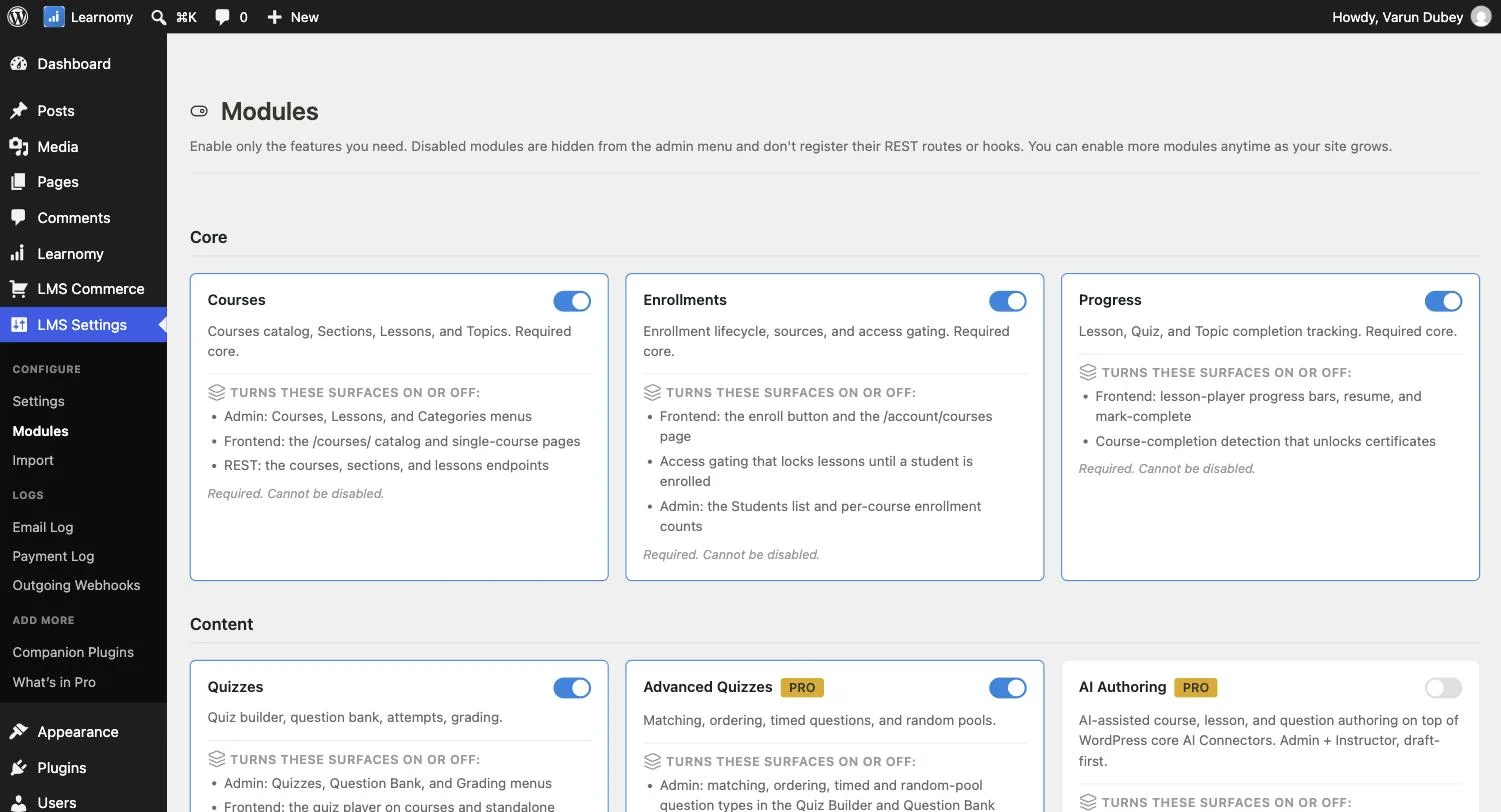
Every one of these capabilities ships in Learnomy’s free tier, a meaningfully more complete free starting point than most competitors in this comparison offer.
Go deeper: This comparison series covers each of these capabilities in dedicated depth, see the Stripe Payments, REST API, Reporting & Analytics, and Course Marketplace comparisons elsewhere on this site for full detail on each specific dimension.
2. LearnDash, the market’s most established, mature option
LearnDash’s long track record and extensive add-on ecosystem make it the safest, most broadly-supported choice for a buyer prioritizing proven maturity and the widest possible pool of existing solutions to specific needs, at a real cost once you factor in the add-ons (ProPanel, Dashboard) many real-world deployments end up needing.
3. Tutor LMS, a well-regarded, actively developed alternative
Tutor LMS’s frontend course builder and native gamification (the one platform in this comparison with genuinely built-in gamification, covered elsewhere in this series) make it a solid, actively developed alternative worth evaluating directly.
4. Thinkific, the hosted alternative for those avoiding WordPress maintenance entirely
For evaluators open to a non-self-hosted option, Thinkific removes WordPress hosting and maintenance from the equation entirely, at the cost of platform lock-in and less long-term cost efficiency at scale.
5. LifterLMS, flexible, add-on-driven extensibility
LifterLMS’s own add-on marketplace covers memberships, certificates, and advanced quiz functionality, giving it genuine flexibility for a buyer willing to assemble the specific combination of add-ons their business needs, at added cost and setup complexity beyond the core plugin.
6. Sensei LMS, the simplest choice if you’re already running WooCommerce
Sensei’s tight, native WooCommerce integration makes it the most natural extension for a business already running WooCommerce for other products or services, avoiding the need to bolt on a separate payment or e-commerce system.
7. WP Courseware, dependable, with a genuine student-reporting strength
WP Courseware’s straightforward course builder and particularly strong student-level reporting make it a solid, dependable choice for a buyer prioritizing detailed individual-student visibility over broader business-level analytics.
8. MemberPress Courses, best when membership is the core business
MemberPress Courses’ native bundling with MemberPress’s broader membership-and-billing engine makes it the most naturally integrated choice specifically for a business where recurring membership revenue, not one-time course sales, is the primary model.
A framework for evaluating any WordPress eLearning plugin
Beyond the specific dimensions covered in this series, a few evaluation principles apply regardless of which platform or which specific need you’re solving for. Verify claims directly rather than trusting marketing copy alone, a feature-list checkmark doesn’t tell you the actual depth or quality of that feature, whether it’s “AI-powered,” “gamification,” or “multi-instructor support”; wherever possible, test the actual capability against a real trial or demo rather than assuming. Calculate realistic total cost, not just entry price, as covered throughout this series, several platforms’ advertised entry pricing excludes functionality (native payments, deeper reporting, multi-instructor support) that pushes real-world cost meaningfully higher once you’ve added what you actually need. Match the platform to your actual business model, not a generic “best LMS” ranking, a platform that’s ideal for a solo course creator may be a poor fit for a multi-teacher school, and vice versa, which is exactly why this series breaks the comparison down by specific audience and use case rather than offering one universal ranking. Weight architecture and data portability appropriately for your planning horizon, a platform choice you’ll live with for years deserves more scrutiny of its underlying architecture and migration flexibility than a short-term experiment would.
How to actually choose among eight legitimate options
With this many capable platforms, the right choice comes down to matching your specific priorities against the detailed comparisons in this series rather than a single universal answer. If payment friction and setup speed matter most, prioritize native payment processing (Learnomy, MemberPress Courses, Thinkific). If you need the deepest possible add-on ecosystem for highly specific requirements, LearnDash’s maturity is hard to beat. If institutional LTI compliance is a hard requirement, Learnomy is currently the only option with genuine native support. Work through the specific-need comparisons elsewhere in this series for the dimension that matters most to your actual use case.
How we built this comparison series
This overview and every dedicated comparison in this series draws on the same foundation: Learnomy’s capabilities described here reflect its current documented feature set (rather than relying on marketing copy), and the other seven platforms are compared on their publicly stated pricing, features, and limitations. Where a competitor claim couldn’t be confirmed from public documentation, that’s flagged rather than presented as confirmed fact throughout the series. This overview doesn’t repeat every detail already covered elsewhere, instead, use the guide below to find the specific comparison most relevant to your actual decision.
Find the comparison that matches what you’re actually deciding
By specific feature: Multi-Instructor Support · Course Marketplace Building · Frontend Course Builder · Quiz Builder · Certificates · Built-in Payments · Assignments · Stripe Payments · PayPal Payments · Recurring Subscriptions · Membership Features · WooCommerce Integration · AI Features · Drip Content · Course Prerequisites · Student Progress Tracking · Reporting & Analytics · Community Features · Gamification · REST API / Developer Features · Zoom / Live Classes
By who you are: Course Creators · Coaches · Teachers · Schools & Education Websites · Universities & Higher Education · Corporate & Employee Training · Training Companies · Membership Sites · Online Academies · Creators · Small Businesses · Nonprofits
By architecture: Self-Hosted LMS Platforms compares the seven genuinely self-hosted options in this series against each other in more depth than this overview covers.
FAQ
Is a newer platform like Learnomy a safe choice compared to more established options? Evaluate based on verified current capability (covered directly throughout this comparison series) and active development, rather than tenure alone, a newer, more modern architecture can offer genuine advantages over an older codebase carrying more legacy constraints, provided the plugin is actively maintained.
Do I need to pick just one, or can these coexist? Running multiple full LMS plugins simultaneously on one site is technically possible but generally not advisable, since it multiplies maintenance overhead and creates a fragmented, confusing experience for students, choose one platform and use its own extensibility for specific additional needs.
What’s the single most important factor in choosing among these eight? There isn’t a universal answer, it depends entirely on your specific use case (covered throughout this comparison series’ audience- and feature-specific articles), though native payment processing and genuine architecture quality are reasonable starting filters for most evaluators.
How often should I revisit this comparison, given how quickly software changes? Pricing and specific feature availability shift over time across this market, treat this series as a snapshot reflecting verified capabilities and pricing at the time of writing, and reconfirm directly with each vendor before a final purchase decision, particularly for any feature that’s central to your specific requirement.
Is it worth trying more than one platform before committing? Yes, where practical, most of these platforms offer either a free tier or a trial period sufficient to test your actual core workflow (building a sample course, testing checkout, checking the admin experience) before committing budget and migration effort to a specific choice.
Does the “best” platform change based on company size or budget? Yes, substantially, a platform’s ranking in this overview reflects an overall, general-purpose evaluation; the audience-specific comparisons linked above weight the same eight platforms differently based on what actually matters for that specific context, which is why a single universal ranking is less useful than matching to your specific situation.
Where the WordPress eLearning market is heading
A few trends are worth watching across this comparison series as you plan a longer-term platform commitment. AI-assisted content creation is moving from a novelty to a genuine expectation, though verified quality still varies significantly by platform and subject matter, treat any “AI-powered” claim with the same verification standard applied throughout this series rather than assuming uniform quality. API-first architecture is a genuine differentiator as course businesses increasingly need custom integrations, mobile apps, or automation beyond what a plugin’s own admin screens provide, Learnomy’s zero-CPT, API-first design reflects this shift more than any competitor compared here. Honest, actionable analytics, surfacing real completion rates rather than only flattering vanity metrics, is an emerging expectation as course businesses mature past pure customer acquisition toward genuinely improving outcomes. Platforms that adapt to these shifts fastest are likely to pull further ahead of those still built primarily around the WordPress CPT-and-page-builder patterns that defined the previous generation of course plugins.
Verdict
Among all eight established WordPress eLearning plugins compared throughout this series, Learnomy’s combination of a modern, API-first architecture, native payments, AI-assisted content tools, and a genuinely complete free tier makes it the strongest overall starting point for most new deployments in 2026. LearnDash remains the safest choice for buyers prioritizing ecosystem maturity above all else. The remaining six platforms each serve genuine, more specialized use cases worth matching against the detailed comparisons throughout this series.
The newest entrant, the most modern architecture
Zero Custom Post Types, 41 dedicated database tables, and 226+ confirmed REST routes, verified through code review, ship in Learnomy, on a site you own.
Related reading