
10 min read
Best LMS with AI Features in 2026

Every course platform is adding an AI button right now, and most of them are vague about what it actually does, whose API key it uses, and whether AI-generated content can reach a student without a human reviewing it first. We compared eight LMS platforms specifically on AI depth, not whether an “AI” badge appears somewhere in the marketing copy, but the actual mechanics: whose account gets billed, whether content publishes automatically, and what real safety controls exist.
Table of Contents
- Quick comparison
- 1. Learnomy, the only platform here with a fully transparent AI architecture
- 2. LearnDash, an AI course outline tool, documented briefly
- 3. MemberPress Courses, a 2026 AI course generator addition
- 4. Tutor LMS, “AI Studio” bundled in paid tiers
- 5. LifterLMS, Sensei, WP Courseware, and Thinkific, no dedicated AI feature found
- Why “whose AI account gets billed” is the first question to ask
- Why “draft-first” is the safety feature that actually matters
- What a careless AI implementation looks like, by comparison
- Three real ways this actually gets used
- Why AI in a course tool carries higher stakes than AI in a chatbot
- FAQ
- Red flags when evaluating any “AI-powered” claim
- Pricing reality across all eight platforms
- Verdict
Quick comparison
| Platform | AI Course/Content Generation | Uses Your Own AI Provider | Draft-First Safety | Usage Limits | Entry Price |
|---|---|---|---|---|---|
| Learnomy | Yes, outlines, quiz questions | Yes, own provider account | Yes, enforced | Yes, per-instructor caps | Free (requires connected AI provider) |
| LearnDash | AI course outline tool | Own integration | Not clearly documented | Not clearly documented | $259/yr |
| MemberPress Courses | AI course generator (2026 addition) | Own integration | Not clearly documented | Not clearly documented | $199.50/yr+ |
| Tutor LMS | “AI Studio” in paid tiers | Own integration | Not clearly documented | Not clearly documented | $199 - $399/yr |
| LifterLMS | No dedicated AI feature found | N/A | N/A | N/A | $149 - $749/yr |
| Sensei LMS | No dedicated AI feature found | N/A | N/A | N/A | Free / $179/yr |
| WP Courseware | No dedicated AI feature found | N/A | N/A | N/A | $129 - $199/yr |
| Thinkific | No dedicated AI feature found in comparison research | N/A | N/A | N/A | $54 - $219/mo |
1. Learnomy, the only platform here with a fully transparent AI architecture
Most AI features across this market are opaque about two things that actually matter: whose AI account is being billed, and whether generated content can reach a student without human review. Learnomy addresses both directly in its own settings.
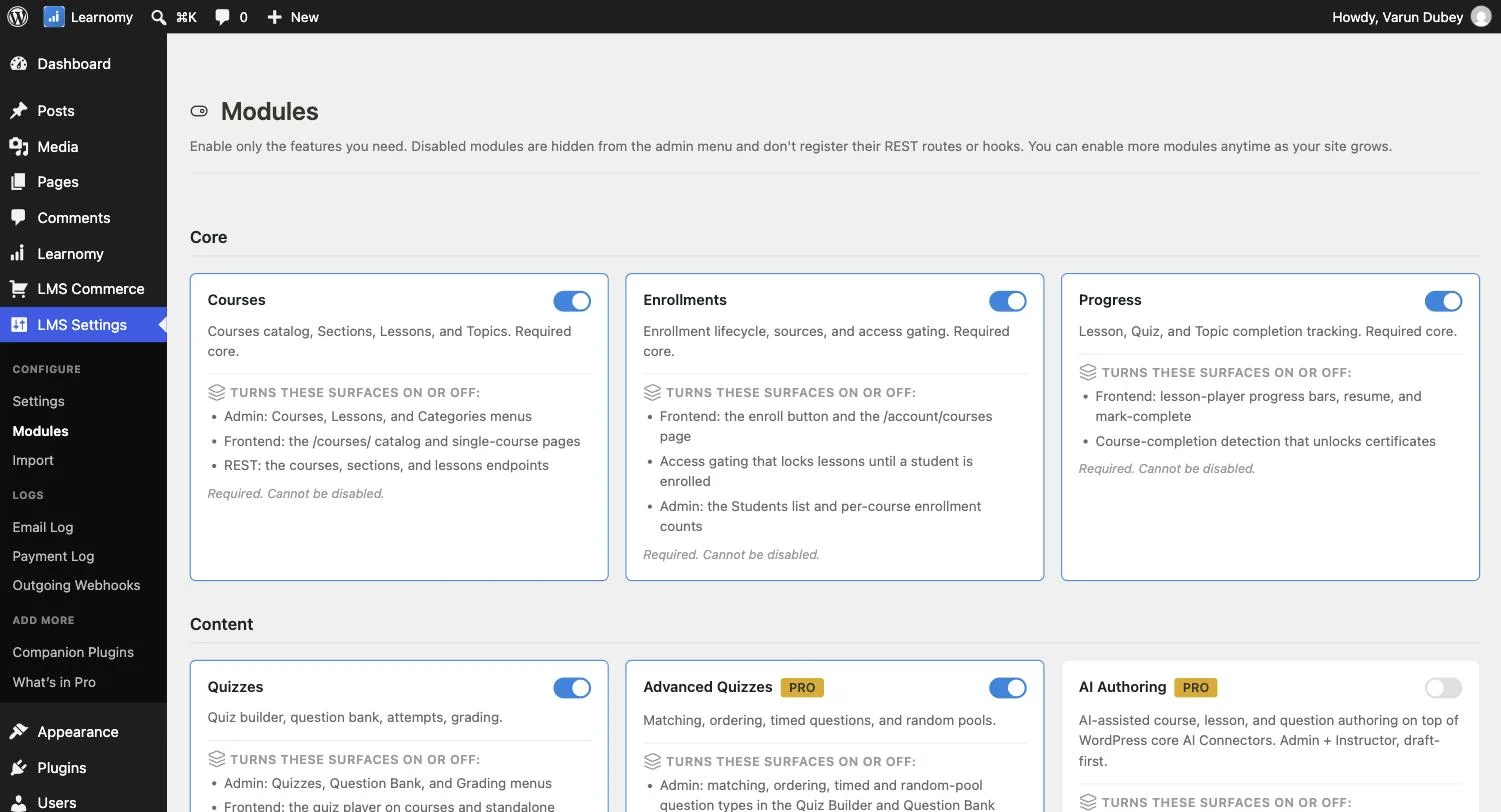
Learnomy connects to your own AI provider account rather than billing usage through Learnomy itself, so you control which provider you use and what it costs.
The safety model is built around review before publishing: AI-generated content requires human review before it goes live, so nothing is auto-published by default. Usage limits let you cap how much each instructor can generate per month, keeping AI costs predictable as more instructors use the feature. AI assistance is available in both the standard admin editor and the frontend course-creation flow, so a non-technical instructor gets the same help without needing wp-admin access.
Go deeper: The AI That Drafts Your Course, Not Replaces You covers the full settings screen, the draft-first policy, and usage limits with real screenshots.
2. LearnDash, an AI course outline tool, documented briefly
LearnDash’s own pricing and feature documentation lists an AI course outline tool among its capabilities. Available public documentation doesn’t go into the same depth Learnomy’s own settings screen provides regarding which AI provider is used, whether generated content requires review before publishing, or what usage limits apply, worth confirming these specifics directly with LearnDash if AI safety controls are a deciding factor for you.
3. MemberPress Courses, a 2026 AI course generator addition
MemberPress added an AI course generator as part of its broader 2026 feature updates, alongside its “ReadyLaunch” site builder. As a recent addition, detailed documentation on its safety model (draft-first enforcement, usage caps, provider transparency) wasn’t found in the research for this comparison, worth investigating directly with MemberPress if these specifics matter to your evaluation.
4. Tutor LMS, “AI Studio” bundled in paid tiers
Tutor LMS includes an “AI Studio” feature as part of its paid tiers ($199 - $399/yr). As with LearnDash and MemberPress, detailed public documentation on the underlying safety architecture wasn’t available in the research for this comparison.
5. LifterLMS, Sensei, WP Courseware, and Thinkific, no dedicated AI feature found
Our research didn’t surface a documented, dedicated AI content-generation feature for any of these four platforms as of September 2026. This doesn’t necessarily mean no AI capability exists in any form, but no clear, marketed AI authoring feature comparable to the others in this list was found in current documentation.
Why “whose AI account gets billed” is the first question to ask
It’s worth being direct about why this specific question matters more than most AI feature comparisons acknowledge. A platform that routes AI generation through its own proprietary backend, rather than your own connected provider account, means you have less visibility into and control over the actual cost per generation, the specific model being used, and how your data is handled by that AI provider. Learnomy’s architecture, using WordPress’s own core Connector system, means you’re connecting directly to Anthropic, Google, or OpenAI yourself, with the same account you might already use for other AI-powered plugins, rather than trusting an intermediary relationship you can’t fully see into.
Why “draft-first” is the safety feature that actually matters
The second question worth asking any AI feature claim: can generated content reach a real student without a human reviewing it first? An AI model can produce a reasonable-sounding quiz question about a topic it has no way of knowing your specific course actually covered the way the question assumes, or draft a course outline that sounds structurally sound but skips a prerequisite your actual curriculum depends on. A platform that publishes AI content automatically is optimizing for speed at exactly the point where speed causes the most damage, the moment unreviewed content reaches a paying student. Learnomy’s draft-first policy, requiring human review before anything goes live, is the strongest documented commitment to this principle among the platforms compared here.
What a careless AI implementation looks like, by comparison
It’s worth naming the specific failure modes a careless AI feature can fall into, since “AI-powered” as a phrase covers a wide range of actual implementation quality across this market. A careless version stores its own separate API key in its own settings screen, meaning you’re managing a second AI credential specifically for one plugin with no visibility into how it’s used or rate-limited. A careless version defaults to on, so a site upgrading the plugin discovers AI-generated content has already started appearing without anyone actively deciding to enable it. A careless version publishes what it generates directly, because “one click and it’s done” demos better than “one click and now review a draft.” A careless version has no usage cap at all, leaving the site owner to discover a cost problem only when the AI provider’s invoice arrives.
Learnomy’s documented settings avoid every one of these patterns directly and explicitly, which is precisely why it stands out in this comparison, not because AI generation itself is a rare capability (several competitors now offer some version of it), but because the safety architecture around it is unusually transparent and complete.
Three real ways this actually gets used
The solo creator staring at a blank course outline. For someone building their first course alone, the hardest part is rarely the subject matter, it’s structuring it. An AI-assisted outline turns a blank page into a first draft to react to and edit into shape using real expertise, rather than generating content from nothing.
The instructor who’s slow at writing quiz questions. Writing a genuinely good multiple-choice question takes real effort per question. AI-assisted question suggestion produces a batch to react to instead of stare down one at a time, the instructor still decides which ones are good enough to keep, editing and selecting rather than generating from scratch.
The academy managing instructors with different writing speeds. In a multi-instructor marketplace, some instructors are naturally fast writers and some are subject experts who dread the writing part. Enabling AI features selectively for instructors, with a shared monthly cap, lets an academy owner offer real support without an unlimited, untracked AI bill.
Why AI in a course tool carries higher stakes than AI in a chatbot
A generic AI feature that gives a slightly wrong answer in a chat widget produces an annoyed user who tries again. An AI feature that generates a slightly wrong quiz question, and that question ships to students without review, teaches something false, under the authority of a credential-bearing course. That’s the actual reason a draft-first rule matters more here than in most other AI feature categories, and it’s why evaluating an AI authoring tool by “does it write well” is the wrong question. The right question is “what happens to what it writes before a student ever sees it,” which is a question about workflow and defaults, not model quality.
FAQ
Does using AI features cost extra beyond the platform’s own subscription price? On Learnomy, yes indirectly, you’re billed by your connected AI provider (Anthropic, Google, or OpenAI) based on actual usage, not by Learnomy itself, and the platform’s own usage caps are specifically designed to help you control that cost. On the other platforms with AI features, confirm directly whether AI usage is included in the subscription price or billed separately.
Can I control which employees or instructors are allowed to use AI generation? Learnomy’s settings explicitly separate “Administrators (always)” from a separate “Instructors” checkbox, letting a site owner decide whether to extend AI access to instructors at all, with a per-instructor monthly cap when enabled.
Is AI-generated content flagged as AI-written to students? Nothing in Learnomy’s documented settings mentions a visible AI disclosure on published content, once a human has reviewed, edited, and published a draft, it’s treated as their content, consistent with the draft-first review requirement being the actual safety mechanism rather than a disclosure label.
Which AI model does each platform actually use? Learnomy explicitly lets you choose (or use your connected provider’s default), with in-app guidance recommending a cheaper model for routine authoring tasks. The other platforms with AI features generally don’t document this level of model transparency in their public materials.
Red flags when evaluating any “AI-powered” claim
Ask directly whether AI-generated content publishes automatically or requires review. If a vendor can’t answer this clearly and immediately, treat that as a warning sign rather than an oversight, it likely means the question hasn’t been prioritized in the product’s design.
Ask whose AI account is actually billed for each generation. A platform that routes generation through its own backend rather than a provider account you control gives you less visibility into cost and data handling than one using your own connected provider.
Ask what happens if an instructor generates far more content than expected in a single month. A platform with no usage cap has no answer to this question beyond “we’ll see the bill later”, worth knowing before you enable AI access for an instructor roster you don’t personally supervise closely.
Pricing reality across all eight platforms
Learnomy‘s AI authoring features are included, with the actual AI generation costs billed separately by whichever provider (Anthropic, Google, OpenAI) you connect. LearnDash‘s AI course outline tool is part of its $259 - $599/yr tiers. MemberPress Courses‘s AI course generator is a 2026 addition to its $199.50 - $499.50/yr tier structure. Tutor LMS‘s “AI Studio” is bundled specifically into its $199 - $399/yr paid tiers, unavailable in the free version. The remaining four platforms compared, LifterLMS, Sensei, WP Courseware, and Thinkific, didn’t have a documented dedicated AI feature at any price point as of this research.
Verdict
For a genuinely transparent, safety-conscious AI implementation, using your own connected AI provider account, enforcing a hard draft-first rule with no auto-publish path, and real configurable usage caps, Learnomy is the clear leader in this comparison, and the only platform whose own documentation answers every one of the questions this article poses. LearnDash, MemberPress, and Tutor LMS all offer some form of AI generation, but public documentation doesn’t provide the same level of detail on their underlying safety architecture, which is worth investigating directly with each vendor before trusting an AI feature with real course content.
AI you control, not a black box
Your own AI provider account, human review before anything publishes, and per-instructor usage limits all ship in Learnomy, on a site you own.
Related reading