
16 min read
Best LMS with Certificates in 2026


A course certificate is either a real credential a student is proud to share, or a flat PDF image that proves nothing to anyone who looks at it closely. The difference comes down to whether the platform behind it can actually verify the certificate is real, a public verification page, a cryptographic signature, a QR code that resolves to something concrete, or whether it’s just a design template with a name merged into it. We compared eight LMS platforms specifically on certificate depth: verification, design flexibility, and whether the credential is something a student would actually put on LinkedIn.
This matters more the longer you think about what a certificate is actually for. It’s the final artifact a student walks away with, the thing they can point to, months or years later, as proof they invested the time and actually finished what they started. If that artifact is trivially fakeable by anyone with basic design skills, it’s worth exactly as much as the paper it’s printed on: nothing, to anyone who thinks to question it. The platforms in this comparison split cleanly into two groups on this exact question, and the gap between them is bigger than most course creators realize when they’re comparing certificate features as a minor checkbox rather than a real credibility decision.
Table of Contents
- Quick comparison
- 1. Learnomy, the only platform here with real cryptographic verification
- 1b. How the verification actually works, technically
- 2. LearnDash, solid certificate builder, no native verification
- 3. Tutor LMS, decent templates, gated behind paid tiers
- 4. LifterLMS, automatic generation, no verification depth
- 5. Sensei LMS, certificates as a Pro-only add-on
- 6. WP Courseware, MemberPress Courses, and Thinkific, basic, unverified templates
- How we actually tested this
- Pricing reality across all eight platforms
- Why verification is the actual differentiator, not design quality
- The growth-loop angle most course creators miss
- Red flags when evaluating any “certificate” claim
- Three real scenarios where this decision matters most
- The connection to multi-course programs
- What a certificate reveals about the rest of the platform
- FAQ
- A concrete example of why this actually matters
- Self-hosted verification versus depending on a third party
- Verdict
Quick comparison
| Platform | Signed / Verifiable | Public Verify Page | Design Flexibility | Entry Price |
|---|---|---|---|---|
| Learnomy | Yes, Ed25519 cryptographic signing | Yes, public /verify/ URL + QR code |
Canva-like designer | Free |
| LearnDash | Basic certificate builder | No native public verification | Template-based | $259/yr |
| Tutor LMS | Basic, paid-tier gated | No | Template-based | $199/yr paid tiers |
| LifterLMS | Automatic certificate generation | No | Template-based | $149 - $749/yr |
| Sensei LMS | Certificate builder (Pro) | No | Basic | $179/yr Pro |
| WP Courseware | Basic | No | Limited | $129 - $199/yr |
| MemberPress Courses | Included, basic | No | Basic | $199.50/yr+ |
| Thinkific | From Start tier up | No | Template-based | $109/mo+ |
1. Learnomy, the only platform here with real cryptographic verification
Most “certificate” features across this market are the same underlying idea: a template, merged with a student’s name and course title, rendered as a downloadable PDF or image. Learnomy does that too, but it adds something none of the other seven platforms compared here offer natively: Ed25519 cryptographic signing on every issued certificate, plus a genuine public verification page.
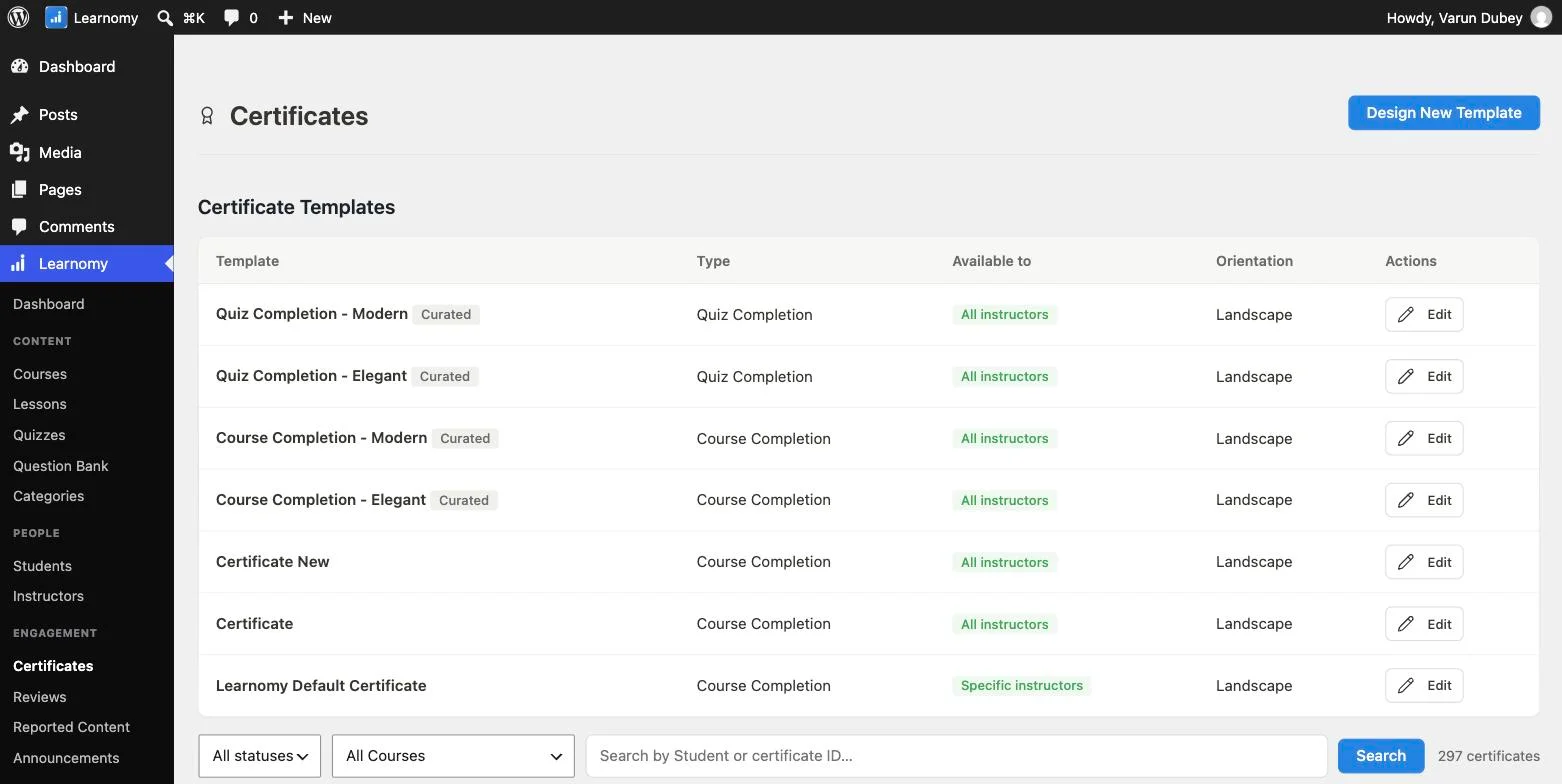
Here’s what that actually means in practice. Every certificate carries a unique verification hash and a QR code linking to a dedicated /verify/ URL on your own domain, anyone, with or without an account, can scan the code or visit the link and confirm the certificate is real, tied to an actual completed course, not a Photoshopped image someone made to look official. That single design decision changes what the certificate is worth to a student. A flat image proves nothing the moment anyone questions it. A signed, publicly verifiable credential can be checked by exactly the people who matter most, an employer, a hiring manager, a professional network, without ever contacting you directly.

The design side is handled through a Canva-like certificate designer, giving you real visual control without needing design software, and the free tier includes this complete system, signed certificates, the public verify page, and one-click sharing, with no upgrade required. Higher tiers (Certificates Pro) add Open Badges 3.0 support and Credly integration, for organizations that need certificates recognized by external credentialing networks specifically.
Go deeper: The Certificate That Sells Your Next Course For You covers the designer, the verify page, and the growth-loop mechanics of a shareable credential in full, with real screenshots.
1b. How the verification actually works, technically
It’s worth understanding the mechanism behind Learnomy’s verification claim, because “cryptographic signing” is a phrase that gets thrown around loosely in marketing without much substance behind it. Ed25519 is a real, widely-trusted public-key signature algorithm, the same broad category of cryptography used to secure software updates and authenticate secure connections across the internet. When a certificate is issued, it’s signed with a private key only the server holds; the public verification page checks that signature against the certificate’s claimed details (student name, course, completion date) and confirms whether they genuinely match what was actually signed at issuance time.
Practically, this means a certificate can’t be altered after the fact, change the name or the course title on a copy of the certificate image, and the signature no longer matches, which the verify page would immediately reveal to anyone who checked. That’s a meaningfully stronger guarantee than “we store a record in our database and hope nobody edits the downloaded file,” which is closer to what a non-cryptographic verification system (if one existed at all among the other seven platforms) would typically offer.
2. LearnDash, solid certificate builder, no native verification
LearnDash’s certificate functionality is mature and well-integrated with its completion and quiz logic, you can trigger a certificate on course completion or a passing quiz score, with reasonable template customization. What it doesn’t offer natively is any public verification mechanism; a LearnDash certificate is a downloadable file, and confirming its authenticity to a third party requires manual effort on your part rather than a link the recipient can share directly.
3. Tutor LMS, decent templates, gated behind paid tiers
Tutor LMS’s certificate functionality is tied directly to its paid tiers ($199 - $399/yr), the free version’s certificate options are noticeably more basic. Where it does offer customization, it’s template-based rather than a genuinely flexible design tool, and there’s no public verification mechanism at any tier. For a course business already committed to Tutor LMS for its other strengths (particularly its native multi-instructor marketplace features covered elsewhere in this series), the certificate functionality is adequate but not a reason to choose the platform on its own.
4. LifterLMS, automatic generation, no verification depth
LifterLMS’s certificates generate automatically on course completion, which is a genuinely convenient default, no manual trigger configuration required for the basic case. Design customization is reasonable within its template system. Like every other platform in this comparison besides Learnomy, there’s no public verification page or cryptographic signature, meaning the credential’s authenticity rests entirely on trust in your brand rather than something a skeptical third party could independently confirm.
5. Sensei LMS, certificates as a Pro-only add-on
Sensei’s certificate builder isn’t available in the free core plugin at all, it requires the $179/yr Pro tier, bundled alongside content dripping and deeper WooCommerce integration. Once unlocked, it’s functional but basic, consistent with Sensei’s overall positioning as a lightweight, WooCommerce-integrated tool rather than a platform built around credential depth. If certificates matter enough to justify paying for Sensei Pro specifically, it’s worth comparing that $179/yr cost against Learnomy’s free-tier equivalent, which includes meaningfully more (verification, QR codes) at no cost.
6. WP Courseware, MemberPress Courses, and Thinkific, basic, unverified templates
These three treat certificates as a standard, expected feature rather than a differentiator, present, functional, template-based, without any verification mechanism. WP Courseware and MemberPress Courses include basic certificate generation as part of their base pricing without a specific upgrade path for deeper functionality. Thinkific specifically gates certificates behind its Start tier ($109/mo) and above, meaning its $54/mo Basic plan excludes them entirely, worth factoring in if you were planning to start on the cheapest Thinkific tier and certificates matter to your course. None of the three should be your choice if certificate credibility and shareability are a genuine business priority.
How we actually tested this
Every claim about Learnomy’s certificate system traces to direct testing on a real, working install, generating an actual certificate, confirming the verify page and QR code function as described, and reviewing the actual settings screens for the designer and Certificates Pro extension. Claims about the other seven platforms are sourced from each vendor’s own current documentation and independent review coverage as of September 2026, cross-checked against the same competitor fact-sheet used across this comparison series. Where a platform’s marketing language was vague about whether “verification” meant something technically real or just a design claim, we noted that ambiguity rather than assuming the stronger interpretation.
Pricing reality across all eight platforms
Learnomy‘s complete signed-certificate system, designer, verification page, QR codes, ships free, with Certificates Pro (Open Badges 3.0, Credly integration, employer-facing verification enhancements) as a paid extension for organizations with that specific institutional need. LearnDash includes certificate functionality across its $259 - $599/yr tiers as a standard, non-differentiating feature. Tutor LMS gates its fuller certificate customization behind its $199 - $399/yr paid tiers, with the free version more limited. LifterLMS includes automatic certificate generation across its $149 - $749/yr range without a specific certificate-focused upgrade tier.
Sensei requires its $179/yr Pro tier for certificate functionality at all, the free core doesn’t include it. WP Courseware ($129 - $199/yr) and MemberPress Courses (from $199.50/yr) both include basic certificates as a standard feature without a dedicated upgrade path for deeper functionality. Thinkific gates certificates behind its Start tier ($109/mo) and above, meaning the $54/mo Basic plan excludes them entirely, a real cost consideration if certificates matter to your course but you were budgeting for the cheapest tier.
Why verification is the actual differentiator, not design quality
It’s worth being direct about why this comparison weights verification so heavily over template aesthetics. A beautifully designed certificate that can be trivially recreated in Photoshop by anyone with the template proves nothing about whether the person holding it actually completed anything. A plainer-looking certificate with a working QR code that resolves to a real, server-verified record is worth more as an actual credential, even if it’s visually less polished.
This distinction matters most for exactly the courses where a certificate carries real weight: professional certifications, compliance training, anything an employer or client might actually check. For a casual enrichment course, a template-based certificate with no verification is perfectly fine, nobody’s going to challenge whether you really learned watercolor painting. The moment a credential needs to survive scrutiny, verification stops being a nice-to-have and becomes the entire point.
The growth-loop angle most course creators miss
There’s a business reason to care about this beyond credential integrity: a genuinely shareable, verifiable certificate is a marketing channel a template-only certificate can’t match. A student who shares a signed certificate on LinkedIn isn’t just showing off, they’re putting a real, checkable credential in front of their entire professional network, each of whom can click through to a live verification page that puts your course’s name and branding directly in front of a warm, interested audience. A flat PDF shared the same way carries none of that same trust signal, because there’s nothing for a skeptical viewer to actually verify.
Red flags when evaluating any “certificate” claim
Ask whether “verification” means a public, checkable link, or just a claim that certificates “look official.” Many platforms use language like “professional certificates” or “official-looking templates” that describes visual design, not actual verifiability. Test this directly: generate a real certificate, and see if there’s an actual working URL a third party could visit to confirm it independently of you.
Ask what happens to a certificate’s validity if a student’s completion record is later disputed or corrected. A signed, database-backed certificate (like Learnomy’s) can reflect an updated record if something changes; a static, one-time-generated PDF has no mechanism to reflect a correction after the fact, which matters if you ever need to revoke or correct a credential.
Ask whether the certificate design tool requires learning a new interface, or if it’s genuinely accessible without design skills. A “customizable” certificate that actually requires editing CSS or a complex template language isn’t meaningfully more accessible than no customization at all for a non-technical course creator.
Three real scenarios where this decision matters most
The professional certification provider whose credential needs to survive scrutiny. For a business built around issuing credentials that matter to employers or licensing bodies, verification isn’t optional, it’s the entire product’s credibility. Learnomy is the only platform in this comparison built for this specific requirement out of the box.
The corporate training department needing an audit trail. Compliance and mandatory training programs often need to prove, potentially years later, that a specific person completed specific training by a specific date. A signed, database-backed certificate system with a permanent verification record serves this need far better than a static file that could be lost, altered, or simply never proven to have existed in its original form.
The hobbyist instructor who just wants students to feel proud. For a creative or personal-enrichment course, verification matters less than the emotional and shareability value of a nice-looking certificate. Any platform on this list handles this use case adequately, the differentiator here is design flexibility and ease of sharing, not cryptographic rigor.
The connection to multi-course programs
If your catalog includes sequential, multi-course learning paths, covered elsewhere in this series, certificate depth matters even more, because a path-level certificate representing an entire program is a bigger, more meaningful credential than any single course’s certificate. A student who completes a four-course “Cybersecurity Analyst Track” and receives one verifiable, signed certificate representing that whole journey has something genuinely more marketable than four separate, disconnected course certificates a hiring manager would have to piece together to understand.
Learnomy’s Learning Paths feature specifically supports path-level certificates on top of individual course certificates, using the same signed-verification infrastructure, meaning the credibility benefits described throughout this article extend to the program level, not just individual courses. None of the other seven platforms compared here combine multi-course learning paths with any certificate system, verified or not, making this a genuinely distinctive combination for a course business building toward career-track programs rather than a loose catalog of unrelated courses.
What a certificate reveals about the rest of the platform
There’s a broader signal worth reading into this comparison beyond certificates specifically. A team that builds real cryptographic verification into its certificate system, rather than shipping a template-and-merge-field feature and calling it done, is a team optimizing for genuine credential integrity over the appearance of having “a certificate feature” to list on a marketing page. That same engineering discipline tends to show up elsewhere in a platform, in how seriously it takes payment reconciliation, in how carefully it handles edge cases in its migration tooling, in whether its quiz engine actually prevents cheating or just displays a countdown timer.
That’s not a guarantee, but it’s a reasonable heuristic: a platform willing to invest in the harder, less visible engineering (a real signature scheme, a real public verification endpoint) for a feature most users will never technically audit is more likely to have applied the same care to the features you’ll depend on daily. It’s worth treating certificate depth as a signal about the platform’s overall engineering philosophy, not just an isolated feature to check off a list.
FAQ
Does a verified certificate require a paid tier on any of these platforms? Learnomy’s signed certificates and public verification page are included in its free tier, no upgrade required for the core verification mechanism. None of the other seven platforms compared offer a comparable verification feature at any tier, paid or free.
Can I customize the certificate design without hiring a designer? Learnomy’s Canva-like designer is built specifically for this. LearnDash, LifterLMS, and the others offer template customization of varying depth, generally requiring more comfort with the platform’s specific design tools than a genuinely drag-and-drop Canva-style interface.
What is Open Badges 3.0 and do I need it? Open Badges is an established, portable digital credential standard; support for it (available in Learnomy’s Certificates Pro tier) matters specifically if you need your certificates recognized by external credentialing platforms and networks beyond your own site. Most course creators without that specific institutional requirement don’t need it.
Does a QR code on a certificate work if the student prints it physically? Yes, a QR code linking to a public verify URL works identically whether the certificate is viewed digitally or printed and scanned from paper, which matters for professional certifications where a physical printed credential is still commonly expected.
What happens if I switch platforms later, do my old certificates stop working? This is worth confirming directly with any vendor, but logically, a verification page depends on the original platform’s server remaining live and the verification record persisting in its database. If you migrate away from a platform entirely and shut it down, previously issued certificates from that platform would likely stop verifying, regardless of which platform issued them, a reason to keep this in mind if you’re deep into a migration decision covered elsewhere in this series.
Can students share their certificate directly to LinkedIn, or do they need to download and re-upload it manually? Learnomy specifically includes one-click sharing built into its certificate flow, reducing the friction between “I finished a course” and “my network sees I finished a course.” Check directly whether any competitor you’re evaluating offers a similarly frictionless sharing path, since a certificate that requires several manual steps to share gets shared far less often in practice.
Does a signed certificate cost more to generate than a simple template-based one? No, cryptographic signing is a computational operation that happens instantly at issuance time, with no meaningful cost difference from generating an unsigned PDF. The “cost” of verified certificates, where one exists at all across this comparison, shows up in which pricing tier includes the feature, not in any per-certificate processing expense.
Is certificate verification only useful for professional certifications? No, even a hobbyist course benefits from a shareable credential a student is proud to post, since the sharing itself functions as free marketing regardless of whether anyone formally verifies it. Verification matters most for credibility in professional contexts, but shareability benefits every kind of course.
A concrete example of why this actually matters
Consider a specific, realistic scenario: a hiring manager receives a resume listing “Certified in Cloud Security Fundamentals” with a certificate attached as a PDF. On six of the eight platforms compared here, that PDF is the entire proof available, the hiring manager either trusts it at face value or has to email the course provider directly and wait for a manual confirmation, which most hiring managers simply won’t bother doing given how many resumes they’re reviewing. The credential’s practical value, in that moment, depends entirely on the hiring manager’s willingness to take it on faith.
On Learnomy, that same certificate carries a QR code the hiring manager can scan in under ten seconds, landing on a public page that either confirms the credential is genuine and shows exactly when it was earned, or reveals it’s not a real record at all. That’s not a hypothetical convenience, it’s the actual moment where a credential either does its job or doesn’t, and it’s the specific moment this entire comparison is built around evaluating correctly.
Self-hosted verification versus depending on a third party
One more distinction worth understanding: Learnomy’s verification page lives on your own domain, under your own control, rather than depending on a separate third-party verification service that could change its terms, pricing, or availability independent of your own business. That matters for the same reason self-hosting matters throughout the rest of this series, a verification mechanism that depends on an external service you don’t control is a dependency that could disappear or change unexpectedly, taking your issued certificates’ verifiability down with it. A verification page hosted on your own infrastructure, tied to your own domain, doesn’t carry that same risk.
Verdict
For a genuinely verifiable, shareable, professionally credible certificate, the kind of credential worth defending if anyone ever questions it, Learnomy is the clear leader in this comparison, and the only platform offering real cryptographic signing and public verification in its free tier. LearnDash offers the most mature certificate-triggering logic among the rest, without the verification layer. Every other platform compared treats certificates as a standard, unverified template feature, fine for casual use, a real gap the moment credibility matters.
A certificate worth defending
Ed25519 cryptographic signing, a public verification page with QR codes, a Canva-like designer, and Open Badges 3.0 support all ship in Learnomy, on a site you own.
Related reading