
15 min read
Best LMS with Built-in Payments in 2026


Most WordPress course plugins expect you to bolt on WooCommerce, Easy Digital Downloads, or a separate payment gateway plugin just to charge for a course, an extra layer of software to install, configure, secure, and keep updated, on top of the LMS itself. A genuinely built-in payment system means Stripe and PayPal checkout working the moment you activate the plugin, no separate store plugin required. We compared eight platforms specifically on how native their payment processing actually is, and the difference between “built-in” and “requires WooCommerce” turned out to matter more than most buyers realize until they’re mid-setup.
This is a decision most course creators only think carefully about after they’ve already committed to a platform, discovering mid-setup that “sell courses” actually means “sell courses, once you’ve also installed and configured a separate e-commerce plugin, learned its own settings, and kept it updated alongside everything else.” That discovery, made after the fact, is exactly what this comparison is meant to prevent, knowing upfront which platforms genuinely process payments themselves versus which ones route the transaction through a dependency you’ll be responsible for maintaining indefinitely.
Table of Contents
- The compounding maintenance cost most buyers don’t calculate upfront
- How we actually tested this
- Quick comparison
- 1. Learnomy, native checkout with no store plugin required
- 2. LearnDash, flexible integrations, not truly native
- 3. LifterLMS, genuinely native for direct sales
- 4. Sensei LMS, native to WooCommerce’s own ecosystem
- 5. Tutor LMS, monetization through WooCommerce integration
- 6. WP Courseware, a basic native cart, real limits
- 7. MemberPress Courses, native, but with a transaction fee catch
- 8. Thinkific, native payments, zero transaction fees, but not WordPress
- What “eight pricing models” actually solves that a single checkout can’t
- Red flags when evaluating any “built-in payments” claim
- Why “no WooCommerce required” actually matters
- Three real situations this decision affects
- Pricing reality across all eight platforms
- The two pricing models nobody else on this list offers
- FAQ
- What to actually test before trusting any payment claim
- Verdict
The compounding maintenance cost most buyers don’t calculate upfront
It’s worth walking through what a WooCommerce dependency actually costs over a platform’s lifetime, not just at setup. Every WooCommerce update needs testing against your specific course site’s theme and other plugins before you apply it, a real, recurring task that doesn’t exist if payments are handled natively by your LMS. WooCommerce’s own extensive settings surface (shipping zones, tax classes, inventory management) mostly goes unused by a course-only business, but it’s still there, still a source of potential misconfiguration, and still something a new team member or a hired developer has to understand before touching your site’s commerce setup.
None of this makes WooCommerce a bad product, it’s an excellent, widely-trusted e-commerce platform for businesses that actually need its full feature set. The point is narrower: if your actual requirement is “let a student pay for a course,” adopting WooCommerce specifically to satisfy that requirement is adopting far more complexity than the task requires, and every one of the platforms in this comparison that requires it for basic monetization is asking you to accept that tradeoff whether you need WooCommerce’s other capabilities or not.
How we actually tested this
Learnomy’s native payment claims were verified directly against a real, working install, confirming Stripe and PayPal checkout function without any WooCommerce plugin active, reviewing the actual pricing-model selection interface, and checking the transactions and coupon screens directly. Claims about the other seven platforms are sourced from each vendor’s own current documentation and independent review coverage as of September 2026, cross-referenced against the shared competitor fact-sheet used throughout this comparison series. Where a vendor’s own marketing language was ambiguous about whether WooCommerce was optional or effectively required, we noted that ambiguity explicitly rather than assuming the more favorable interpretation.
Quick comparison
| Platform | Native Payments | WooCommerce Required? | Pricing Models | Entry Price |
|---|---|---|---|---|
| Learnomy | Stripe + PayPal, fully native | No, optional | 8 built-in models | Free |
| LearnDash | Via integrations (free, well-supported) | Recommended for flexibility | Basic natively, more via WooCommerce | $259/yr |
| Sensei LMS | Native via WooCommerce (its own ecosystem) | Yes, by design | Basic | Free / $179/yr |
| LifterLMS | Native Stripe/PayPal | No for basic; yes for full marketplace | One-time + recurring | $149 - $749/yr |
| Tutor LMS | Via WooCommerce integration | Effectively yes | Basic | $199/yr+ |
| WP Courseware | Basic native cart (since v4.3) | For anything beyond basic sales | Very basic | $129 - $199/yr |
| MemberPress Courses | Native, built-in | No | Subscription-focused | $199.50/yr+ |
| Thinkific | Native, 0% transaction fees | N/A (not WordPress) | Multiple | $54 - $219/mo |
1. Learnomy, native checkout with no store plugin required
Learnomy takes payments directly, Stripe and PayPal both work out of the box, with no WooCommerce, no Easy Digital Downloads, no separate cart plugin standing between a student clicking “buy” and actually completing a purchase. That’s a meaningfully different architecture from most of the WordPress plugins in this comparison, where “payments” often really means “integrates with a payment plugin you still have to install and configure separately.”
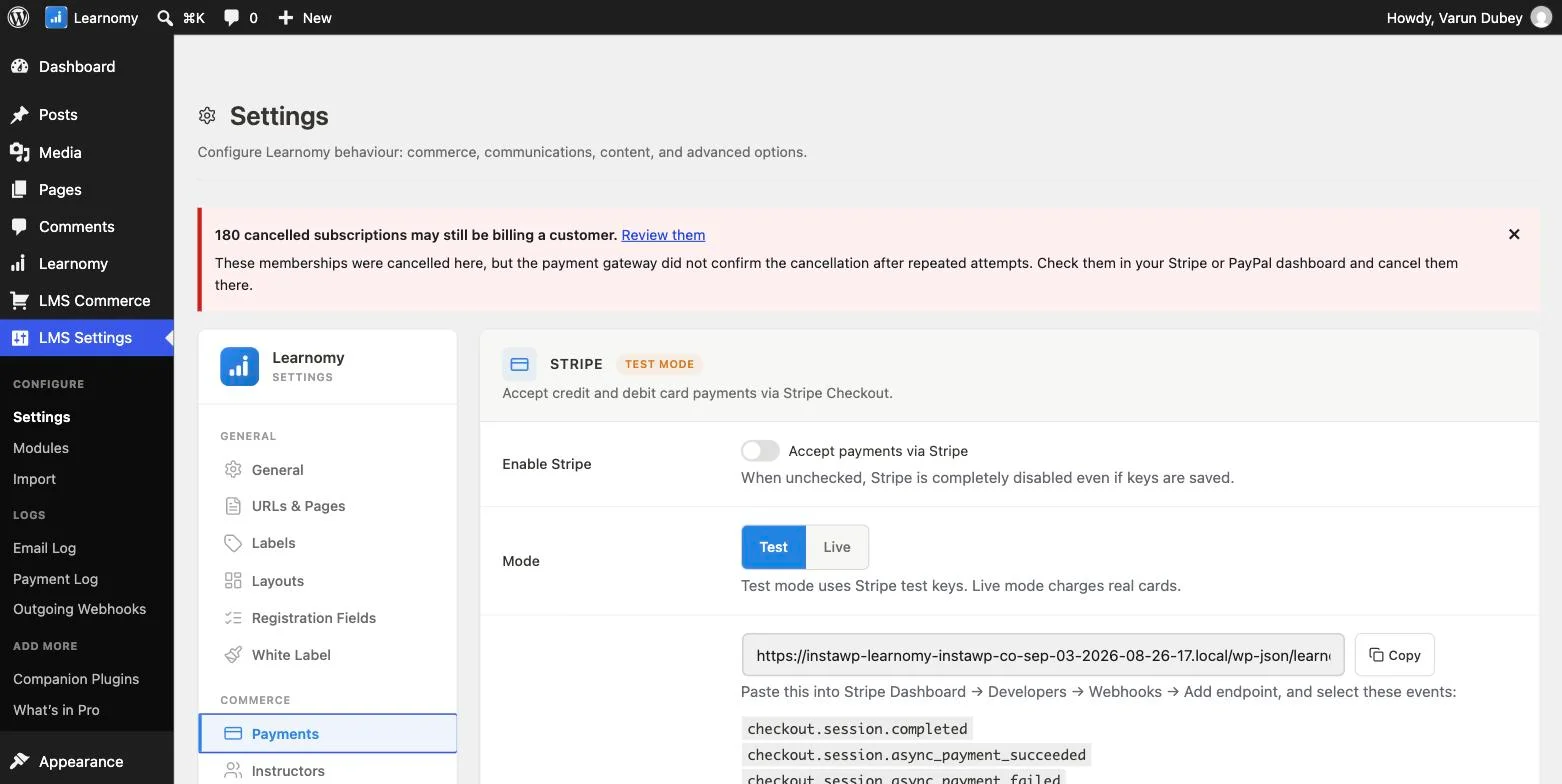
Beyond just accepting a card, Learnomy ships eight distinct pricing models you can choose per course: free, one-time payment, fixed-term access, recurring subscription, members-only, one-time-or-membership, closed (sold elsewhere, access granted via webhook), and invite-only. That range matters because a real course business rarely fits one pricing shape, a flagship course might sell as a one-time purchase while a content library works better as a subscription, and Learnomy lets you make that decision per course rather than committing your whole catalog to one model.

The commerce side goes beyond checkout too: a Transactions ledger, a Coupons system with usage limits and expiry windows, and gift codes are all part of the same native system, not separate add-ons. And for a course you’re selling entirely outside Learnomy, through Gumroad, a custom cart, or another platform, a signed webhook endpoint grants and revokes access automatically based on external sales, without needing WooCommerce as a bridge.
Go deeper: Stop Paying for a Store You Don’t Need covers the native checkout in full. One Course, One-Time Sale, Or a Recurring Business walks through all eight pricing models with real screenshots.
2. LearnDash, flexible integrations, not truly native
LearnDash doesn’t process payments itself; it integrates with WooCommerce, Stripe, and PayPal, all free and well-supported. That’s a reasonable, flexible approach, but it does mean an additional plugin (WooCommerce, most commonly) is genuinely part of your stack if you want the full range of payment flexibility, rather than payments being handled by LearnDash alone.
3. LifterLMS, genuinely native for direct sales
LifterLMS offers real native Stripe and PayPal support for both one-time and recurring payments, a legitimate built-in option, not a WooCommerce dependency, for straightforward course sales. Where it needs WooCommerce is specifically for full marketplace-style commission distribution across multiple instructors, covered elsewhere in this series, for a single-instructor site selling courses directly, LifterLMS’s native payment support is a real strength.
4. Sensei LMS, native to WooCommerce’s own ecosystem
Sensei’s payment handling is arguably the most “native” of any platform here in one specific sense: it’s built by Automattic, the same team behind WooCommerce, and designed around that integration as its core commerce layer. That’s genuinely seamless if you’re already running WooCommerce for other reasons, but it also means WooCommerce is a hard dependency by design, not an optional add-on, which is the opposite tradeoff from Learnomy’s WooCommerce-optional approach.
5. Tutor LMS, monetization through WooCommerce integration
Tutor LMS’s free version includes WooCommerce-based monetization as its documented path to selling courses, meaning, like Sensei, WooCommerce is effectively part of the required stack rather than an optional layer. Its multi-instructor commission and withdrawal features (a genuine strength covered elsewhere in this series) are built around this WooCommerce-integrated foundation.
6. WP Courseware, a basic native cart, real limits
WP Courseware added a built-in Stripe/PayPal cart in version 4.3, supporting recurring payments for straightforward sales. Reviews consistently describe it as too simplistic for anything beyond basic one-off or simple recurring sales, real tax handling or more complex subscription logic still pushes a WP Courseware site toward WooCommerce.
7. MemberPress Courses, native, but with a transaction fee catch
MemberPress Courses includes native payment processing as part of its core membership-and-billing engine, genuinely built-in, no WooCommerce required. The catch: its Launch tier carries a 5% transaction fee on top of the $199.50/yr subscription cost, a real cost most other platforms in this comparison don’t charge at their entry tier. That fee is removed starting at the Growth tier ($349.50/yr).
8. Thinkific, native payments, zero transaction fees, but not WordPress
Thinkific’s payment processing is fully native with 0% transaction fees across every paid plan, a genuine strength, and arguably the cleanest “no fees beyond the payment processor’s own cut” story in this entire comparison. It’s not a WordPress plugin at all, though, so the WooCommerce-dependency question doesn’t apply the same way; you’re trading self-hosting flexibility for a fully managed, recurring-fee SaaS platform instead.
What “eight pricing models” actually solves that a single checkout can’t
It’s worth explaining why pricing-model variety matters as much as the payment mechanism itself. A platform that only supports one-time purchases forces every course into the same commercial shape, regardless of whether that shape actually fits the content. A flagship, comprehensive course with lasting reference value genuinely suits a one-time purchase, a student buys it once and owns it. A rapidly-updated, ongoing content library suits a subscription far better, since the value is in continued access to fresh material, not a single static purchase.
Learnomy’s eight models, free, one-time, fixed-term, recurring, members-only, one-time-or-membership, closed/externally-sold, and invite-only, cover essentially every commercial shape a real course business is likely to need, chosen independently per course rather than committing your entire catalog to one model. LifterLMS’s native one-time-and-recurring support covers the two most common shapes without the same full range. The rest of the platforms compared here generally need WooCommerce Subscriptions or an equivalent add-on to reach recurring billing at all, adding both cost and complexity for a business model that Learnomy and LifterLMS handle natively.
Red flags when evaluating any “built-in payments” claim
Ask directly whether “supports Stripe” means native processing or a required WooCommerce integration. Many platforms describe Stripe or PayPal “support” in their marketing copy without clarifying that the actual transaction is processed through WooCommerce as an intermediary, a materially different claim than truly native checkout.
Ask what happens to your payment setup if you ever deactivate WooCommerce, on any platform where it’s involved. If course sales stop working the moment WooCommerce is deactivated, that plugin isn’t optional infrastructure, it’s a hard dependency, regardless of how the feature is marketed.
Ask about the total transaction cost, not just the plugin’s own price. A platform’s own subscription cost is only part of the real expense; platform-level transaction fees (like MemberPress’s Launch-tier 5%) and any required companion plugin’s own costs need to be added to get an honest total cost of ownership.
Why “no WooCommerce required” actually matters
It’s worth being specific about the real cost of an unnecessary WooCommerce dependency, beyond the abstract preference for fewer plugins. Every additional plugin in your stack is something that needs its own updates, can conflict with your theme or other plugins, and adds its own security surface area to maintain. WooCommerce specifically is a large, powerful plugin, genuinely useful when you need its full e-commerce feature set (physical products, complex shipping, extensive third-party integrations) but real overhead when all you actually need is “let a student pay for a course.”
For a course-only business, running WooCommerce purely to process course payments is roughly equivalent to buying an entire warehouse management system because you needed a filing cabinet. It works, but you’re maintaining far more than you need, and every WooCommerce update becomes something you have to test against your course site even though you’re not using 90% of what WooCommerce actually does.
Three real situations this decision affects
The solo instructor who doesn’t want to become a WooCommerce administrator. Every additional plugin in a stack is something to learn, secure, and maintain. A single-instructor course business that just needs to charge for access to a course library has no real need for WooCommerce’s full e-commerce feature set, and Learnomy or LifterLMS’s native processing avoids that overhead entirely.
The site owner already running WooCommerce for other products. If you’re already selling physical merchandise or other digital products through WooCommerce, Sensei’s tight native integration into that same ecosystem is a genuine strength rather than a limitation, you’re not adding a new dependency, you’re extending one you already maintain.
The business selling through multiple channels simultaneously. A course creator selling the same course through their own site and through Gumroad or a separate storefront needs the incoming-webhook capability covered above to keep both channels correctly granting and revoking access. Learnomy’s native webhook endpoint solves this directly; most of the other platforms compared would need custom development to achieve the same result.
Pricing reality across all eight platforms
Learnomy‘s complete native payment system, Stripe, PayPal, all eight pricing models, coupons, transactions ledger, is included in the free tier. LifterLMS‘s native Stripe/PayPal support spans its $149 - $749/yr range without a specific payments upgrade tier. LearnDash‘s free WooCommerce/Stripe/PayPal integrations are included across its $259 - $599/yr tiers, with WooCommerce itself free but representing a separate plugin to install and maintain. Sensei and Tutor LMS both build their monetization around WooCommerce at every tier, free through Pro.
WP Courseware‘s basic native cart is included across its $129 - $199/yr range, with WooCommerce needed for anything beyond simple sales. MemberPress Courses includes native payments from its $199.50/yr Launch tier, with the 5% transaction fee specifically removed starting at the $349.50/yr Growth tier, worth the upgrade if your sales volume makes that fee meaningful. Thinkific‘s 0%-transaction-fee native payments apply across all its paid tiers, $54 - $219/month, with only the standard payment processor fees (Stripe/PayPal’s own cut) applying on top.
The two pricing models nobody else on this list offers
Two of Learnomy’s eight pricing models deserve specific attention because they solve real, common problems the other seven platforms don’t address at all. “Closed” (sold elsewhere, access granted externally) exists for exactly the scenario where you’re selling a course through a completely separate system, a corporate training program bundled into a larger enterprise contract, a course sold as part of a bootcamp package through a different checkout entirely, where you still want the actual learning experience to live on your Learnomy site, but you don’t want Learnomy’s own checkout involved in the transaction at all. Combined with the incoming-webhook endpoint covered above, this lets an external sale of any kind grant real course access automatically.
“Invite only” exists for the opposite scenario: courses where you, not a payment, decide who gets in, an exclusive cohort, a courses reserved for existing customers of another product, a beta group testing new content before a public launch. Neither of these is a common feature elsewhere in this market, because most course platforms assume every course is either free or sold through the platform’s own checkout, with no accommodation for the real, common cases where neither assumption holds. For a course business with any kind of unconventional sales arrangement, bundled into another product, gated by manual approval, sold through a completely separate system, these two models are the difference between the platform accommodating your actual business and forcing your business to bend around the platform’s assumptions.
FAQ
Does “no WooCommerce required” mean I can’t use WooCommerce if I want to? No, on Learnomy specifically, WooCommerce integration is available as an option for sites that want it for other reasons (selling physical merchandise alongside courses, for instance), it’s just not a requirement for basic course sales the way it effectively is on Sensei or Tutor LMS.
Which of these charges the lowest overall transaction cost? Thinkific’s 0% platform transaction fee (leaving only the payment processor’s own standard rate) and Learnomy’s similarly fee-free native processing are the two strongest options here. MemberPress’s 5% Launch-tier fee is the clearest additional cost to watch for among the platforms compared.
Can I offer both one-time and subscription pricing on the same platform? Learnomy’s eight pricing models explicitly support this per course. LifterLMS supports both natively as well. The others generally support this too, though often requiring WooCommerce Subscriptions or a similar add-on for the recurring side specifically.
Is native payment processing more secure than routing through WooCommerce? Not inherently, both approaches, done correctly, rely on the same underlying payment processors (Stripe, PayPal) handling the actual sensitive card data, meaning neither your LMS plugin nor WooCommerce ever directly touches raw card numbers. The security difference is more about reduced plugin surface area and fewer integration points that could be misconfigured, not the payment security itself.
Do coupons and gift codes work the same way across all eight platforms? Learnomy includes native coupon codes (with usage limits and expiry windows) and gift codes as part of its core commerce system. LearnDash and WooCommerce-dependent platforms typically rely on WooCommerce’s own coupon system, which is genuinely capable but tied to that dependency. LifterLMS includes native coupon support as well. Confirm directly whether gift codes specifically, as opposed to percentage-off discount coupons, are supported on any platform where that’s a specific requirement, since it’s a less universally offered feature.
Is a subscription business (recurring revenue) harder to set up than one-time sales on any of these? Learnomy and LifterLMS both support recurring billing natively, meaning subscription setup is a configuration choice rather than requiring a separate plugin. On platforms requiring WooCommerce for monetization, recurring billing specifically often requires the separate WooCommerce Subscriptions extension, an additional cost and setup step beyond the base WooCommerce integration.
What if I need to sell a course through a completely separate storefront, like Gumroad? Learnomy’s incoming webhook endpoint is built specifically for this, an external sale on any platform can grant Learnomy course access automatically via a signed request, with a matching revoke action for refunds. This is a genuinely distinctive capability among the platforms compared here.
What to actually test before trusting any payment claim
Don’t take a features page’s word for “native payments”, this is one of the easiest things to verify directly on a free trial or a test install. Deactivate WooCommerce (or any other e-commerce plugin) entirely, then attempt to complete a full test purchase of a course, from clicking “buy” through to actually receiving access. If the checkout flow breaks, throws an error, or simply doesn’t render without WooCommerce active, you’ve found the platform’s real answer to whether payments are genuinely native, regardless of how the marketing copy phrased it. This is a five-minute test that reveals more than any comparison article, including this one, and it’s worth doing yourself before committing a real course business to any specific platform’s payment claims.
Verdict
For genuinely native payment processing with no WooCommerce dependency and the most pricing-model flexibility, Learnomy and LifterLMS are the two strongest options in this comparison, Learnomy for its broader eight-model range and external-sale webhook support, LifterLMS for solid native Stripe/PayPal handling on direct course sales. Thinkific offers the cleanest zero-transaction-fee story if you’re open to a hosted, non-WordPress platform. Sensei and Tutor LMS both effectively require WooCommerce as part of their monetization stack, which is a real cost if you don’t need WooCommerce for anything else.
Checkout with no store plugin required
Native Stripe and PayPal checkout, eight distinct pricing models per course, and no WooCommerce or cart plugin standing between a click and a purchase all ship in Learnomy, on a site you own.
Related reading