
19 min read
Best WordPress Plugins for Course Creators in 2026


A fresh WordPress install is an empty room, and a course creator standing in it faces a specific version of a familiar problem: which plugins actually belong on this site, and which ones will quietly become maintenance debt? Most “best plugins” lists answer the wrong question, they compare eight LMS plugins against each other, when the LMS is only one seat at the table. This post is about the whole table: the complete stack a course creator needs on a new WordPress site, one plugin per job, from the LMS itself through SEO, lead capture, email, video, gamification, discussion, security, caching, and backups.
To be clear about scope up front: if you’re comparing LMS platforms head-to-head, that comparison lives in our best LMS for course creators guide, this post is the rest of the stack. The lens here is shaped by a solo creator’s three real constraints: every additional plugin is another update cycle and another potential conflict, every SaaS subscription the stack replaces is money kept, and every hour spent wiring tools together is an hour not spent on course content. The ten picks below are filtered through those constraints, not through a generic popularity contest, and each one earns its slot by doing a job the others don’t.
Table of Contents
- Quick comparison
- 1. Learnomy, the LMS core the rest of the stack builds on
- 2. Rank Math, SEO that brings students to your courses
- 3. Fluent Forms, lead capture without the bloat
- 4. FluentCRM, email marketing inside your own dashboard
- 5. Presto Player, course video under your control
- 6. WB Gamification, points, badges and streaks for your learners
- 7. bbPress, a lightweight home for course Q&A
- 8. Wordfence, security for a site that takes payments
- 9. A caching plugin, because slow course pages lose sales
- 10. UpdraftPlus, backups before you need them
- The stack-bloat trap
- A realistic build order
- What actually matters most when assembling a course stack
- How we chose these ten plugins
- Questions worth asking before you install anything
- Common mistakes course creators make with their plugin stack
- What we’d tell a friend building this stack today
- FAQ
- Verdict
Quick comparison
| Plugin | Job in the stack | Replaces (SaaS you’d otherwise pay for) | Entry Price |
|---|---|---|---|
| Learnomy | LMS core: courses, quizzes, certificates, selling | Teachable / Thinkific ($59 - $109/mo) | Free |
| Rank Math | SEO and Course structured data | Standalone SEO audit tools | Free / paid |
| Fluent Forms | Lead capture and surveys | Typeform-style form SaaS | Free / paid |
| FluentCRM | Email marketing and automation | Mailchimp / ConvertKit-style ESP | Paid |
| Presto Player | Course video hosting and controls | Wistia-style video hosting | Free / paid |
| WB Gamification | Points, badges, streaks for learners | Standalone engagement tools | Free |
| bbPress | Course Q&A and discussion | Circle-style community SaaS | Free |
| Wordfence | Security: firewall and malware scanning | External security monitoring | Free / paid |
| WP Rocket (or free alternative) | Caching and page speed | Nothing directly, protects everything else | Free / paid tiers |
| UpdraftPlus (or similar) | Scheduled off-site backups | Host-level backup upsells | Free / paid tiers |
1. Learnomy, the LMS core the rest of the stack builds on
Everything else on this list is scaffolding around one decision: which plugin actually delivers and sells the courses. Learnomy takes that slot here because of how much it absorbs natively that would otherwise mean two or three more plugins. Its drag-and-drop curriculum builder needs no separate page-builder plugin, lessons can be video, audio, PDF or reading content, and the assessment side is genuinely deep for a free-entry product: six quiz types, question banks, partial credit, anti-cheat tab-switch tracking, an essay-grading inbox, and a real gradebook rather than a bare pass/fail flag.
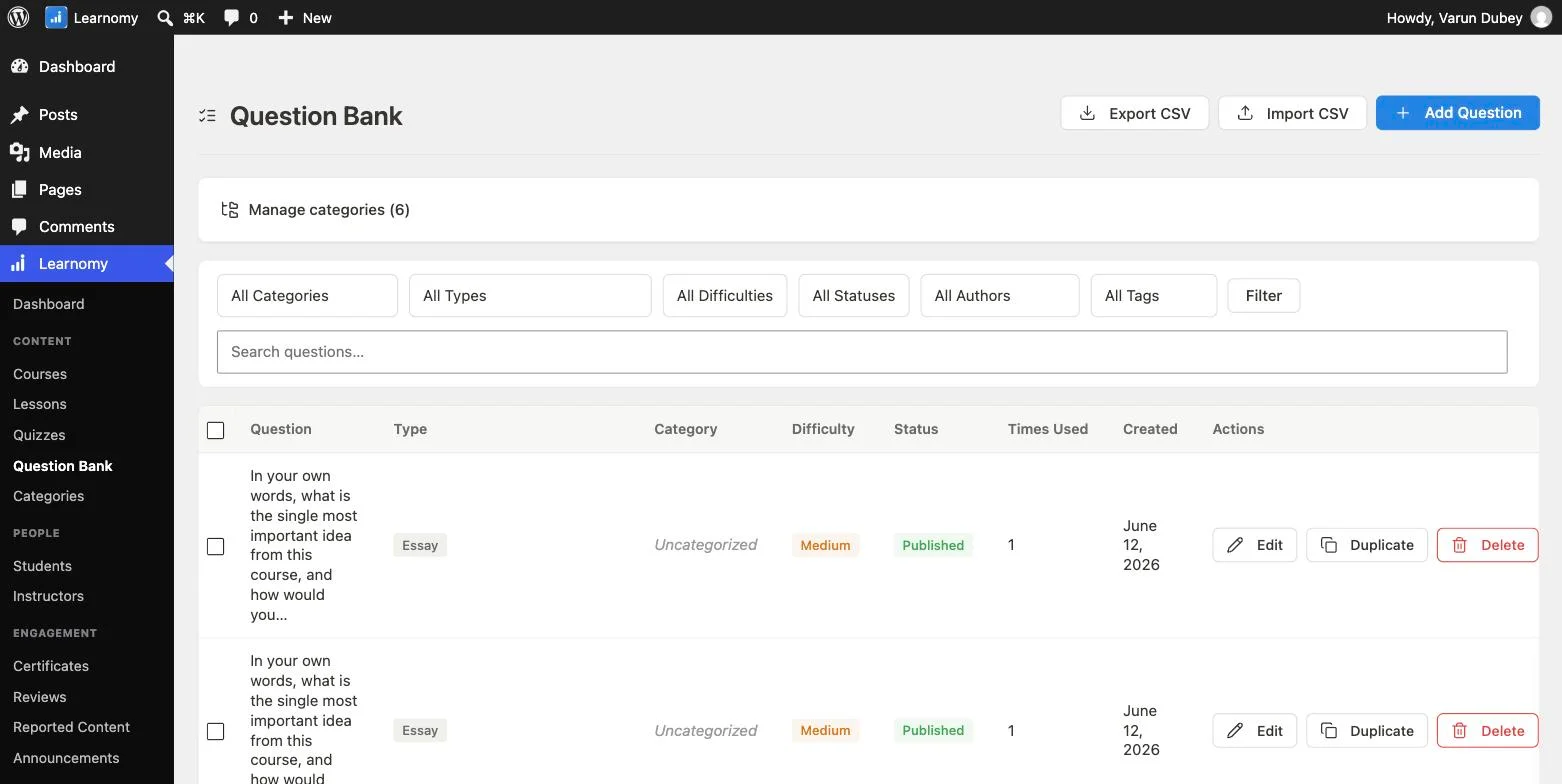
The part that most directly shortens this list is selling. Learnomy ships native Stripe and PayPal checkout with no WooCommerce requirement, no platform fees (what students pay is yours), plus coupons, course reviews, announcements, and email templates built in. Memberships with trials and an automatic pricing page are native too, which means this stack needs no membership plugin and no e-commerce plugin, two categories that would otherwise each add their own entry, their own settings screens, and their own renewal invoices. If a WooCommerce store already exists on the site, a WooCommerce adapter is available, but a fresh course site doesn’t need it.

Certificates deserve a specific mention because they’re where many stacks quietly grow another plugin: Learnomy’s are cryptographically signed, QR-verifiable on a public verify page, LinkedIn-shareable, and built in a visual designer, so completion credentials that students actually trust and share come standard rather than as an add-on purchase. If credentials are central to your course’s value, the dedicated comparison of LMS platforms with certificates goes deeper on exactly this.
Honest limitation: Learnomy is the backbone, not the whole body. It handles courses, assessment, credentials, and selling, but you still want the rest of this list for SEO, email marketing, video protection, security, and backups, no LMS should be doing those jobs anyway. Its free tier is genuinely usable for launching, confirm current feature scope directly, since free-tier limits can change. And if you’re migrating from LearnDash, Tutor LMS, or LifterLMS, a migration wizard covers exactly those three, which removes the biggest practical barrier to starting with it on an existing course site rather than only a fresh one.
2. Rank Math, SEO that brings students to your courses
A course nobody finds sells to nobody, and for a creator without an existing audience, organic search is usually the cheapest sustainable acquisition channel. Rank Math handles the on-page fundamentals, titles, meta descriptions, sitemaps, canonical URLs, and its schema support matters specifically here: course pages marked up with structured data are eligible for richer treatment in Google results, which is meaningful visibility a course creator gets without paying for it. Learnomy emits Course structured data for Google natively, and Rank Math handles the rest of the site’s markup so the blog posts feeding your funnel are properly optimized too.
The free tier covers everything most course sites need for years, which is why it takes this slot over equally respectable alternatives like Yoast SEO (also free with a paid tier, and a perfectly reasonable substitution if you already know it). The honest tradeoff with Rank Math is that its interface surfaces a lot of options and scores, which can pull a new creator into fiddling with SEO settings when writing one more genuinely useful article would move rankings further. Install it, configure it once with the setup wizard, and get back to content.
3. Fluent Forms, lead capture without the bloat
Between “stranger reads your blog post” and “student buys your course” sits an email address, and forms are how you get it. Fluent Forms takes this slot because it’s fast, its free tier genuinely covers lead capture (opt-in forms, contact forms, basic surveys), and it’s built by the same team as FluentCRM below, so form submissions flow into email automations without a third-party connector service in the middle, which is exactly the kind of glue subscription this stack is designed to avoid.
Use it for the pre-sale funnel: a lead magnet opt-in on blog posts, a “which course is right for me” quiz-style survey, a contact form for pre-sale questions. WPForms is a fine alternative if you prefer it, the category matters more than the specific pick. The limitation worth knowing: conversational form layouts and some advanced integrations sit in the paid tier, so check the free tier’s current scope against your specific funnel before assuming everything you sketched is included.
4. FluentCRM, email marketing inside your own dashboard
Email is where course businesses are actually won, launches, abandoned-cart nudges, student onboarding sequences, and the periodic “new course is live” announcement to everyone who bought the last one. FluentCRM is a self-hosted CRM and email automation plugin, which means your subscriber list lives in your own database rather than a SaaS ESP that charges by subscriber count. For a creator whose list grows from 200 to 5,000 over two years, that pricing difference compounds into real money: Mailchimp-style per-subscriber pricing scales with your success, while a self-hosted CRM’s annual license doesn’t.
The pairing with Fluent Forms is the practical win: a lead magnet form feeds a tag, the tag triggers a welcome sequence, the sequence links your sales page, all configured in one WordPress admin without Zapier in the middle. Two honest caveats. First, FluentCRM is paid, there’s no meaningful free tier, so it’s the one entry on this list that belongs in the “buy when revenue justifies it” column rather than day one. Second, self-hosted email still needs a sending service (Amazon SES or similar) configured for deliverability, which is an hour of one-time setup a hosted ESP would have hidden from you. Budget that hour; it’s worth it.
5. Presto Player, course video under your control
Course video has two problems the default WordPress embed doesn’t solve: YouTube embeds decorate your paid lessons with suggested videos (sometimes your competitors’), and a bare player gives you no control over the learning experience. Presto Player wraps video from YouTube, Vimeo, or self-hosted/Bunny-style sources in a player built for courses: chapter markers, playback speed, resume-where-you-left-off, and a clean branded frame without another platform’s logo and recommendations bleeding into your product.
For a course creator the outcome is concrete: lessons feel like part of your school rather than embedded YouTube clips, and students who leave mid-lesson come back to where they stopped instead of scrubbing through a 40-minute video hunting for their place. The free tier covers the core player; features like some integrations and deeper video protection sit in the paid tier. It also pairs naturally with the LMS layer, protecting your course videos from casual sharing is part of protecting the thing people paid for.
6. WB Gamification, points, badges and streaks for your learners
Completion rates are the quiet crisis of online courses, students buy with enthusiasm and stall at lesson three, and a stalled student doesn’t buy the next course or send a referral. Gamification is the lightest-weight lever against that: points for progress, badges for milestones, streaks for showing up on consecutive days. WB Gamification is free and covers exactly that learner-motivation layer, giving students a visible reason to come back tomorrow that the course content alone doesn’t always provide.
The honest framing: gamification amplifies a good course, it doesn’t rescue a bad one. If students are dropping off because a lesson is confusing, a badge won’t fix that, your LMS’s gradebook and progress data will tell you where the real problem is. But for the common case, a decent course losing students to ordinary life friction, streaks and badges are a genuinely effective nudge, and at free, the cost of testing that on your own students is zero. GamiPress (free with paid add-ons) is the established alternative if you need a broader points-economy toolkit; our roundup of gamification plugins for WordPress compares the category properly.
7. bbPress, a lightweight home for course Q&A
Every course generates questions, and where those questions land shapes your workload. Left in email, every question is answered once, privately, forever. In a forum, a question answered once helps every future student who searches it, which is the difference between support that scales and support that eats your calendar. bbPress is the lightweight, free, long-standing WordPress forum plugin: a forum per course, a thread per question, and a searchable archive that compounds in value as the course ages.
It’s worth saying that bbPress shows its age in styling, expect to spend a little time making it match your theme, and it’s a standalone tool rather than something course-aware. Worth knowing before you commit either way: Learnomy’s platform grows into discussion boards and a full learning community around your courses, from the same team, so if community is central to your model rather than a support channel, that path keeps discussion in the same ecosystem as the courses themselves. For a creator who wants a simple, free, no-lock-in Q&A space today, bbPress remains the honest default.
8. Wordfence, security for a site that takes payments
The moment your site takes payments and stores student accounts, security stops being optional hygiene and becomes part of the product. A compromised course site means student trust, payment credibility, and search rankings all take a hit at once, and rebuilding trust costs far more than preventing the breach. Wordfence’s free tier provides the essentials: a web application firewall, malware scanning, login protection with two-factor authentication, and brute-force blocking.
The paid tier’s main practical difference is real-time firewall rule updates versus a 30-day delay on the free tier, worth paying for once revenue is real, reasonable to defer on day one. The honest caveat: security plugins can be noisy, and Wordfence’s default email alerts will happily fill an inbox. Spend ten minutes tuning notifications to “things requiring action” during setup, and let the firewall do its quiet work.
9. A caching plugin, because slow course pages lose sales
Nine plugins into this stack, page speed is no longer theoretical: an LMS, a CRM, forms, a video player, gamification, and a firewall all add weight, and a sales page that takes five seconds to load loses buyers who would have converted at two. A caching plugin serves pre-built pages to visitors instead of rebuilding each one per request, which is the single highest-impact speed intervention available to a non-developer. WP Rocket is the well-regarded paid option, configured well in minutes with sensible defaults; free alternatives like LiteSpeed Cache (if your host runs LiteSpeed) or W3 Total Cache cover the fundamentals at zero cost with a little more configuration effort.
One course-site-specific warning that justifies this entry’s slot on its own: caching must exclude logged-in students. A cached course page served to the wrong learner, showing someone else’s progress or name, is a genuinely bad bug, and most caching plugins handle logged-in users correctly by default, but verify it after setup by loading a lesson as a test student. Cache the public site aggressively, the sales pages and blog that anonymous visitors hit, and leave the logged-in learning experience dynamic.
10. UpdraftPlus, backups before you need them
A course site concentrates months of work into one database: course content, student accounts, enrollment records, quiz attempts, order history. A botched update, a hosting failure, or a hack can erase that in a morning, and “my host keeps backups” is a sentence that has preceded many unpleasant discoveries about retention windows and restore fees. UpdraftPlus schedules automatic backups to off-site storage you control, Google Drive, Dropbox, S3, and restores from the same screen, so recovery is a click rather than a support-ticket negotiation.
The free tier handles scheduled backups and restores; incremental backups and some destinations sit in paid tiers. Alternatives like WPvivid are fine, the non-negotiable is the practice, not the brand: automatic, off-site, and tested. Run one restore drill on a staging copy before launch, a backup you’ve never restored is a hope, not a plan.
The stack-bloat trap
Every plugin on a WordPress site is more than a feature, it’s an update cycle, a settings screen to learn, a renewal invoice, a support relationship, and a potential conflict surface with every other plugin on the list. Ten plugins that each update monthly means a hundred-plus updates a year, and any one of them can interact badly with any other. This is the real argument for weighting how much your LMS handles natively: every category the core absorbs is a category that never enters your maintenance rotation. It’s exactly why this list has no membership plugin, no e-commerce plugin, and no separate certificate plugin, Learnomy’s native checkout, memberships, and signed certificates removed three categories that a stack built around a thinner LMS would need to fill, each with its own price and its own conflict surface.
The trap has a predictable shape: a creator solves each need as it appears, one plugin at a time, and eighteen months later runs thirty-plus plugins, several overlapping, two abandoned by their developers, and no longer remembers which one added which database table. The defense is a simple rule: one plugin per job, and before any install, ask whether something already on the site does this. The stack above is deliberately ten entries covering ten distinct jobs, and several picks (Fluent Forms plus FluentCRM from one team, an LMS with selling built in) are chosen specifically because they collapse what would otherwise be more moving parts. If you’ve seen how the alternative plays out, our look at the LearnDash add-on stack once you’ve outgrown it is a case study in exactly this dynamic.
A realistic build order
Week one: foundation and content. Install Learnomy, Wordfence, and UpdraftPlus on day one, security and backups are cheapest before there’s anything to lose. Then spend the rest of the week where the value actually lives: building the first course’s curriculum, lessons, and quizzes. Add Presto Player as soon as the first video lesson exists so you never publish bare embeds you’ll have to rework. Resist installing anything else this week; an empty CRM automating email to nobody helps nothing.
Week two: selling and speed. Configure Stripe and PayPal checkout, set pricing, create a coupon for launch, and run a real test transaction end to end, buy your own course with a real card and confirm enrollment, receipt, and course access all fire correctly. Add the caching plugin now and verify logged-in students bypass the cache. Set up certificates so completion has a payoff from the first cohort onward.
Weeks three and four: the marketing stack. Now Rank Math, Fluent Forms, and, once there’s a lead magnet worth automating, FluentCRM. This ordering is deliberate: marketing tooling installed before there’s a sellable product produces configuration work, not customers. bbPress and WB Gamification slot in here too, or honestly, after your first students arrive, community and gamification layers work better with real people in them, and adding them in month two costs you nothing.
What actually matters most when assembling a course stack
Three tests separate a durable stack from an accumulating pile. First, does each plugin do a job nothing else on the site does, overlap is where conflicts and confusion breed. Second, what’s the realistic annual total, not the sticker prices: this stack runs on free tiers for everything except FluentCRM and optionally WP Rocket and Wordfence Premium, so a creator can launch near zero and add paid tiers as revenue justifies them, which is the correct direction for that money to flow. Third, who maintains each plugin, an actively developed tool with a real support channel is a dependency; an abandoned one is a countdown. Every entry above passes all three, and any substitution you make should too.
How we chose these ten plugins
The selection principle was one plugin per category, chosen for fit with a course creator’s specific workflow rather than general popularity. Learnomy’s capabilities described here, including course building, checkout, and certificates, reflect its current documented feature set. The remaining picks are compared on their publicly stated pricing, free-tier scope, and limitations. Where a category has a genuinely strong alternative (Yoast for SEO, WPForms for forms, GamiPress for gamification, WPvivid for backups), it’s named rather than hidden, because the category earning its slot matters more than brand loyalty to any single pick. Pricing reflects researched figures at the time of writing; reconfirm on each plugin’s own site before purchasing, since tiers and prices change.
Questions worth asking before you install anything
Before each install, get direct answers to: Does something already on my site do this job? What exactly does the free tier include today, not in an old review, on the plugin’s current pricing page? When was it last updated, and does the developer answer support threads? What happens to my data if I remove it later, forms, subscribers, and forum posts should be exportable, not hostages? And does it have known conflicts with my LMS or caching layer, a five-minute search for “[plugin] conflict [LMS name]” before installing is cheaper than a debugging afternoon after.
Common mistakes course creators make with their plugin stack
Installing the whole stack on day one. Ten plugins configured in one sitting means ten half-configured tools and no course. The build order above exists because sequencing is the difference between a stack that serves the course and a stack that delays it.
Duplicating jobs. Two SEO plugins fight over meta tags, two caching plugins corrupt each other’s output, and an e-commerce plugin alongside an LMS with native checkout doubles the surface area for payment bugs. One job, one plugin, no exceptions without a written reason.
Skipping the test transaction. A surprising number of launch-day emergencies are checkout misconfigurations that a single real test purchase would have caught a week earlier. Buy your own course before anyone else can.
Treating backups as installed rather than verified. The plugin being active is not the same as restores working. One restore drill before launch turns a catastrophic failure mode into an inconvenient morning.
What we’d tell a friend building this stack today
Start with the LMS decision, because it determines how long the rest of the list needs to be, an LMS with native payments, memberships, and certificates keeps you near ten plugins, while a thinner core pushes you toward fifteen. Then install security and backups before anything else, build the course before touching marketing tools, and add exactly one plugin per job as each job becomes real. Spend money in this order: nothing until the course exists, then a caching layer and FluentCRM once there’s traffic and a list worth automating, then premium security once there’s revenue worth protecting. And if your interest is more in which course-building tools to compare within categories than in the full-site stack, our guide to the best WordPress plugins for creating online courses approaches the same territory from that angle.
FAQ
Do I really need all ten of these plugins to launch? No, launch needs the LMS, security, backups, and caching, four plugins. The rest join as their jobs become real: forms and SEO when you start publishing marketing content, the CRM when there’s a list, gamification and forums when there are students. The list is a complete destination, not a day-one checklist.
Won’t ten plugins slow my site down? Plugin count matters less than plugin quality, one badly built plugin outweighs eight good ones, and the caching entry exists specifically to keep the public site fast. Run a speed test before and after each install and you’ll know exactly what each one costs.
Why is there no membership or e-commerce plugin on this list? Because the LMS pick covers both: Learnomy’s native Stripe/PayPal checkout and built-in memberships with trials mean those categories are already filled. A stack built around an LMS without native selling would need both, which is two more plugins, two more costs, and two more conflict surfaces.
Can I substitute plugins I already know? Yes, and you should. Yoast for Rank Math, WPForms for Fluent Forms, GamiPress for WB Gamification, WPvivid for UpdraftPlus, every category here has respectable alternatives, and a tool you already know is often worth more than a marginally better one you don’t. Keep the category structure; swap the brands freely.
How much does this full stack cost per year? At launch, close to zero: Learnomy, WB Gamification, bbPress, and the free tiers of everything else cover a real launch. A mature version, FluentCRM, WP Rocket, Wordfence Premium, Presto Player Pro, typically lands in the few-hundred-dollars-a-year range, still well under a single year of a mid-tier hosted course platform’s subscription.
What about a page builder like Elementor? Deliberately omitted. Learnomy’s curriculum builder needs no separate page-builder plugin, and the block editor handles sales pages adequately for most creators. One you already love coexists fine, but it’s a preference, not a requirement.
Should the community layer be bbPress or something bigger? Start with the question of role: if discussion is a support channel for courses, bbPress is free and sufficient. If community is a core part of what students are buying, look at the LMS ecosystem’s own community path, Learnomy grows into a full learning community from the same team, which keeps discussion and courses in one ecosystem instead of two.
Verdict
For a course creator building on fresh WordPress, the strongest version of this stack starts with Learnomy, because its native selling, memberships, and certificates keep the total plugin count, cost, and conflict surface meaningfully smaller than any thin-core alternative, then adds Rank Math, Fluent Forms, FluentCRM, Presto Player, WB Gamification, bbPress, Wordfence, caching, and UpdraftPlus, one per job, in the build order above. The safest alternative path is the same category structure with the tools you already know substituted in, the structure matters more than the brands. Fluent Forms plus FluentCRM and Presto Player are the picks most worth evaluating hands-on before committing, since they touch your funnel and your product directly. Build it in order, test the checkout, drill the restore, and the stack will carry the business instead of becoming a second job beside it.
The LMS core the rest of the stack builds on
A drag-and-drop curriculum builder, six quiz types with question banks, and native payments with an optional WooCommerce adapter all ship in Learnomy, on a site you own.
Related reading