
17 min read
Best LMS for Selling Online Courses in 2026


This comparison is for the reader who judges an LMS the way they’d judge a storefront. You already know you can teach; the open question is whether the platform can take money well, a checkout that doesn’t leak buyers, real coupon and pricing controls, subscriptions that bill reliably, order management and refunds that don’t require a support ticket, and a clear answer to who keeps what percentage of every sale. Lesson players and quiz builders are table stakes here; the cash register is the product being reviewed.
Seen through that lens, the market splits into two camps with one awkward middle. Most WordPress LMS plugins outsource selling to WooCommerce, which genuinely works, Woo is a serious commerce engine, but it means running and updating a second system whose checkout was designed for shipping physical goods, not enrolling students. Hosted platforms handle selling smoothly but charge a monthly fee that scales with time rather than success, and their checkout owns your customer records. The constraints that matter for a course seller are therefore checkout friction (every extra step costs completed purchases), fee structure (processor fees are unavoidable, platform fees are a choice), and ownership (whether your buyers are your customers or the platform’s). Every entry below is weighed against those three.
Table of Contents
- Quick comparison
- 1. Learnomy, a storefront built into the LMS
- 2. LearnDash + WooCommerce, the two-system standard
- 3. LifterLMS, serious commerce options on a WooCommerce core
- 4. Tutor LMS, marketplace selling with a borrowed cart
- 5. MemberPress Courses, billing first, courses second
- 6. Thinkific, a hosted storefront with a monthly meter
- 7. Teachable, polished checkout, platform economics
- 8. Podia, the simplest storefront of the hosted three
- Where the money actually leaks
- What actually matters in a course storefront
- How we evaluated these eight platforms
- Three sellers, three different right answers
- Questions worth asking before you commit
- Common mistakes course sellers make
- Red flags on pricing pages and fee schedules
- What we’d tell a friend asking this exact question
- FAQ
- Verdict
Quick comparison
| Platform | Checkout | Subscriptions/memberships | Platform fee on sales | Entry Price |
|---|---|---|---|---|
| Learnomy | Native Stripe + PayPal | Memberships with trials, automatic pricing page | None | Free |
| LearnDash + WooCommerce | Woo cart + gateway extension | Via Woo subscription extensions | None | $259/yr + extensions |
| LifterLMS | Via WooCommerce | Memberships and recurring plans via add-ons | None | $149 - $749/yr |
| Tutor LMS | Via WooCommerce/add-ons | Subscriptions in paid tiers | None | $199/yr+ |
| MemberPress Courses | Native | Core strength: subscriptions and access rules | None | $199.50/yr+ |
| Thinkific | Native (hosted) | Memberships and communities on higher tiers | Monthly fee model; confirm per-tier terms | $109/mo+ |
| Teachable | Native (hosted) | Subscriptions supported | Transaction fees on lower tiers | $59/mo+ |
| Podia | Native (hosted) | Memberships built in | Monthly fee; advertises no per-sale cut on paid plans | $39/mo+ |
1. Learnomy, a storefront built into the LMS
Learnomy’s commerce argument is structural: the checkout is part of the LMS itself. Native Stripe and PayPal processing means a buyer goes from course page to payment to enrolled without detouring through a cart plugin, and there are no platform fees on sales, what students pay is yours, minus only the payment processor’s cut that every option on this list pays. For a seller, that collapses the usual WordPress equation, LMS plus WooCommerce plus gateway extension plus subscriptions extension, into one system with one settings screen.
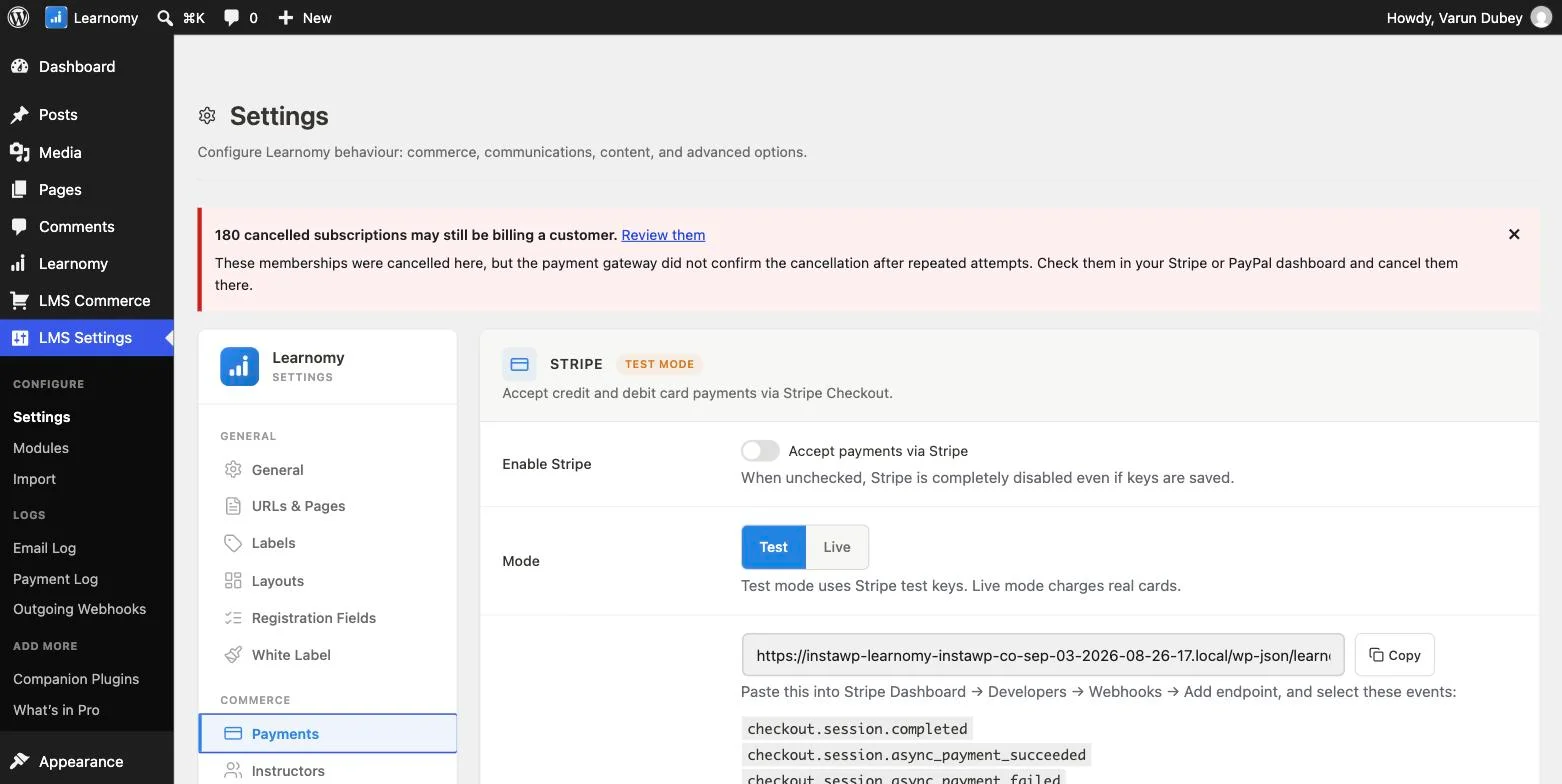
The selling toolkit around the checkout is unusually complete for a plugin’s core: coupons for promotions, memberships with free trials for recurring revenue, and an automatic pricing page so your offer is presentable without designing one. Course reviews and announcements handle the social-proof and post-purchase communication pieces, and email templates cover the transactional messages a store sends constantly. If a WooCommerce store already exists, physical products, other digital goods, a WooCommerce adapter lets courses join that store instead of fighting it, so the native checkout is a default rather than a mandate.
Two things widen the picture beyond a single storefront. Instructor revenue sharing supports Udemy-style splits with instructor applications and dashboards, so the same checkout can power a multi-teacher catalog, with automated instructor payouts and deeper revenue analytics available at the platform’s upper capability tier. And team purchasing lets a company buy seats and manage its own roster, which turns B2B deals, usually a custom-invoice headache, into an ordinary transaction.
The honest limits: WooCommerce’s extension universe is deeper for exotic commerce needs, multi-currency display, region-specific gateways beyond Stripe and PayPal, complex tax edge cases, so audit your requirements against what ships natively. The free tier is genuinely usable for launching and selling, confirm current feature scope directly, since free-tier limits can change. Pick Learnomy if you want the shortest possible path from course page to completed payment, with nothing between you and your revenue.
2. LearnDash + WooCommerce, the two-system standard
LearnDash paired with WooCommerce is the most common serious selling setup in WordPress LMS, and it earns that position: LearnDash handles course delivery with real depth, and WooCommerce brings the most battle-tested commerce engine in WordPress, every gateway, every tax plugin, every conceivable extension. If your selling needs are unusual, this pairing is the one most likely to have an existing answer, and our comparison of LMS platforms with WooCommerce integration goes deeper on this pattern.
The cost is the second system itself. You maintain two products from two vendors, keep the bridge between them working through both release cycles, and accept a checkout flow designed around carts and shipping for a product that has neither. Subscriptions add a Woo subscriptions extension to the bill on top of the $259/yr core. Nothing here is broken, plenty of six-figure course businesses run exactly this stack, but as a storefront it’s the most moving parts on this list. Pick it when you need WooCommerce’s extension depth specifically, not as a default.
3. LifterLMS, serious commerce options on a WooCommerce core
LifterLMS thinks harder about selling than most WordPress LMS plugins: access plans support one-time purchases, payment plans, and recurring pricing per course, and its membership add-on ties courses into bundles and tiered access cleanly. For a seller whose catalog has real pricing structure, a flagship course, a payment-plan option, an all-access tier, LifterLMS models that structure natively rather than forcing workarounds.
Payment processing still runs through WooCommerce, and assembling the full commerce toolkit pushes you toward the add-on bundles that explain the $149 - $749/yr spread, so the storefront strength arrives with the familiar WordPress add-on economics. Pick LifterLMS if pricing-model flexibility, plans, trials, bundles, is your defining requirement and you’re comfortable with Woo underneath.
4. Tutor LMS, marketplace selling with a borrowed cart
Tutor LMS’s commerce identity is the marketplace: instructor commissions, withdrawals, and multi-teacher storefronts are handled with unusual seriousness for a WordPress plugin, making it a natural pick when the plan is many instructors selling under one roof. The frontend course builder also means instructors can manage their own listings without touching wp-admin, which matters operationally once sellers multiply.
The cash register itself is mostly borrowed, though: real checkout typically routes through WooCommerce or paid add-ons, and subscription selling sits in the $199 - $399/yr Pro tiers, so the storefront is an assembly rather than a unit. Pick Tutor LMS when marketplace mechanics are the point; if you’re a single seller, its commerce stack is more machinery than the job requires.
5. MemberPress Courses, billing first, courses second
MemberPress is what happens when the billing engine is the founder’s obsession: native payment processing, subscription management, prorations, expirations, and access rules are the core product, with courses layered on top. For a seller whose model is recurring, an all-access library, a paid community with courses inside, this inversion is exactly right, and its retention tooling around failed payments and renewals is genuinely strong. Our membership-site LMS comparison treats this model in full.
The trade is course depth: assessment and curriculum tooling are serviceable rather than deep, and if you sell courses individually rather than through memberships, you’re paying $199.50/yr+ for an engine you’re not running. Pick MemberPress when subscriptions are the business and courses are the content.
6. Thinkific, a hosted storefront with a monthly meter
Thinkific’s selling experience is what hosted money buys: a clean native checkout, order management, coupons, and after-sale flows that work out of the box with no plugin stack to assemble or maintain. For a seller who wants to think about offers and marketing rather than infrastructure, that is a real, honest advantage, the store simply works on day one.
The meter is the catch. At $109/mo and up, the fee runs whether you sell or not, over $1,300 a year before your first enrollment, and it compounds against a self-hosted stack’s annual pricing the longer you operate. Your checkout, and therefore your customer records, live inside Thinkific’s platform, which is fine until the day you want to leave with your buyer relationships intact. Pick Thinkific if predictable revenue already covers the fee and infrastructure-free operation is worth the rent.
7. Teachable, polished checkout, platform economics
Teachable built its reputation on the buying experience, a fast, conversion-minded checkout with one-click order bumps and a payment flow that removes friction better than most WordPress carts manage. Its $59/mo entry price is gentler than Thinkific’s, and for a seller obsessed with conversion rate on cold traffic, the checkout polish is a legitimate draw.
Read the fee schedule before committing: Teachable has historically charged transaction fees on its lower tiers on top of processor fees, so the advertised price and the effective cost per sale diverge until you climb the plan ladder. Combined with the standard hosted trade, their platform, their checkout, their records of your buyers, the economics deserve a spreadsheet, not a glance. Pick Teachable if checkout conversion is your battle and you’ve priced the tier where the fees stop.
8. Podia, the simplest storefront of the hosted three
Podia is the minimalist answer: courses, digital downloads, and memberships sold through one tidy hosted storefront at $39/mo+, with the platform advertising no per-sale cut on its paid plans, confirm current terms directly. For a creator selling a small catalog who wants the entire commerce apparatus to be someone else’s problem at the lowest hosted price point, it’s a genuinely pleasant product.
Simplicity is also the ceiling: teaching tools are lighter than everything else here, assessment and progress features are thin, and a growing business tends to outgrow Podia’s surface area rather than its pricing. Pick Podia for a lean digital-product storefront; plan an eventual graduation if serious course delivery is the trajectory.
Where the money actually leaks
Every course sale loses money in up to four places, and platforms differ mainly in how many drains they open. The first is the payment processor, roughly three percent plus a small fixed fee per transaction, and it’s universal: Stripe and PayPal charge it whether they’re wired into Learnomy, WooCommerce, or Thinkific. Treat it as the cost of cards existing and compare everything else. The second is the platform fee, the percentage or monthly rent some platforms add on top. Self-hosted WordPress options charge nothing per sale; hosted platforms charge monthly rent, and some add transaction fees on lower tiers, a seller doing $2,000/mo loses a very different amount to a $109 monthly fee than a seller doing $200/mo, which is why the same platform can be cheap for one business and expensive for another.
The third drain is the add-on subscription stack, the WordPress-specific leak. A “free” or $259/yr LMS that needs a subscriptions extension, a gateway extension, and a reporting add-on to function as a store has quietly become a several-hundred-dollar-a-year platform; total the renewals before comparing against a hosted fee. The fourth is the quietest: checkout abandonment. Every extra step between “buy” and “paid”, bouncing from a course page into a cart plugin, creating an account before paying, a redirect to an external processor page, costs some fraction of ready buyers, and on paid traffic that leak is real money that never appears on any invoice. This is the argument for native checkout generally, whether Learnomy’s on WordPress or a hosted platform’s: fewer systems between intent and payment. Our built-in payments comparison ranks platforms on this axis alone.
What actually matters in a course storefront
Strip away feature lists and a course storefront has five jobs: take payment with minimal friction, support the pricing models your business actually uses (one-time, payment plans, subscriptions, team seats), let you run promotions without a developer, show you orders and revenue clearly enough to make decisions, and handle the unhappy paths, refunds, failed renewals, chargebacks, without a support ticket to a vendor. Judge every platform here against those five jobs and your own eighteen-month plan. A platform that aces the first sale but fumbles recurring billing is fine for a launch and wrong for a subscription business; the reverse is equally true.
One under-weighted job deserves its own sentence: promotions. Course revenue is lumpy, launches, seasonal sales, partner discounts, and a storefront where creating a limited-time coupon or a bundle price requires a developer turns every promotion into a project. The platforms that treat coupons, trials, and pricing changes as ordinary settings-screen work, rather than extension territory, are the ones whose owners actually run promotions, which compounds into real revenue differences over a year.
How we evaluated these eight platforms
Learnomy’s commerce claims described here, including its checkout, coupon, and membership configuration, reflect its current documented feature set. The remaining seven platforms are compared on their published pricing, fee schedules, and commerce capabilities; where a fee or feature boundary couldn’t be confirmed from public documentation, we’ve flagged it as worth verifying rather than asserting it. Pricing and fee structures change frequently in this market, especially on hosted platforms, so reconfirm every number on the vendor’s own pricing page before deciding.
Three sellers, three different right answers
The first-time seller with one course and no revenue yet should minimize fixed costs until the offer is proven. A hosted monthly fee is backwards at this stage, rent before revenue, while Learnomy’s free tier with native checkout means the only cost of a slow month is the slow month itself.
The established seller moving from one-time sales to recurring revenue needs subscription plumbing that survives failed cards and plan changes. MemberPress’s billing engine and Learnomy’s memberships with trials both fit; our recurring-subscriptions comparison weighs that decision on its own terms.
The store owner adding courses to an existing WooCommerce business shouldn’t rip out a working checkout. LearnDash, LifterLMS, or Learnomy through its WooCommerce adapter all respect the store’s center of gravity, and the deciding factors become course depth and stack cost rather than checkout architecture.
Questions worth asking before you commit
Get specific answers before money moves: What is the effective cost of a $100 sale on this platform at my expected volume, processor fees plus platform fees plus the monthly or annual cost amortized? How many clicks and page loads sit between a course page and a completed payment, count them on a real test purchase? Can I issue a partial refund, pause a subscription, and change a price without support intervention? If I leave in two years, what do I keep, content, student records, buyer emails, active subscriptions? And do coupons, trials, and payment plans exist on the tier I’m actually buying, or the tier above it?
Common mistakes course sellers make
Comparing sticker prices instead of cost-per-sale. A $39/mo platform with transaction fees can cost more at volume than a $109/mo platform without them, and a free plugin needing three paid extensions can cost more than either. Model your actual expected monthly revenue through each fee structure before deciding.
Never test-buying their own course. Sellers configure checkouts they’ve never completed as customers. Run a real card through the real flow on a phone, count the steps, read the receipt email, then try refunding yourself. Ten minutes of this reveals more than any comparison article, including this one.
Treating the buyer list as an afterthought. On hosted platforms the checkout owns the customer record; confirm what buyer data you can export and email independently. Your list of people who’ve paid you is the most valuable asset the store produces, more than any single course.
Launching subscriptions without dunning. Recurring revenue means failed cards, involuntary churn quietly eats subscription businesses. Confirm how your platform retries failed payments and notifies the customer before you build a business on renewals.
Red flags on pricing pages and fee schedules
A few patterns deserve suspicion no matter whose pricing page they appear on. An entry price with an asterisk is the classic: the fee schedule that makes the low tier viable, transaction percentages, feature gates on subscriptions or coupons, usually lives in a comparison table three scrolls down, so read the table, not the headline number. “Unlimited” framing is another, unlimited courses or students matters less than whether the commerce features you’ll actually bill through, recurring plans, trials, team purchases, sit on the tier being advertised or two tiers up.
On the WordPress side, the equivalent red flag is the demo built on a stack the pricing doesn’t mention: a checkout screenshot that quietly assumes WooCommerce plus a subscriptions extension plus a gateway add-on, none of which appear in the advertised price. And on any platform, a sales team that answers “what does a $100 sale cost me on your entry tier, all-in” with anything other than a number is telling you something useful about the relationship ahead. None of these patterns make a platform dishonest, they make it a platform with a marketing department, and the defense is the same everywhere: model your own expected revenue through the published fee schedule before believing any headline price.
What we’d tell a friend asking this exact question
Decide the ownership question first, everything else follows. If you want your storefront, your buyer records, and every dollar after processor fees to be yours, sell from your own WordPress site: Learnomy if you want the checkout built into the LMS with nothing to assemble, LearnDash or LifterLMS with WooCommerce if you need Woo’s extension depth and accept maintaining two systems, MemberPress if the business is subscriptions at its core. If you’d genuinely trade a monthly fee for never thinking about infrastructure, pick the hosted tier where the transaction fees stop and treat the rent as a staffing cost. The only wrong answer is not doing the arithmetic, five minutes with your expected monthly revenue and each fee structure usually makes the decision for you.
FAQ
Do WordPress LMS plugins take a percentage of my sales? No. Self-hosted platforms like Learnomy, LearnDash, LifterLMS, Tutor LMS, and MemberPress charge no platform fee on sales, you pay only the payment processor’s standard cut. The costs to watch instead are license renewals and any paid extensions the selling setup requires.
Is WooCommerce checkout actually bad for selling courses? Not bad, misfit. It’s excellent commerce software designed around carts, shipping, and multi-item orders, which adds steps a single-course purchase doesn’t need. It’s the right choice when a real store already exists or when you need its extension ecosystem; it’s overhead when courses are the only product.
Can I sell subscriptions without extra plugins? Depends on the platform: Learnomy includes memberships with trials natively, and MemberPress is built around subscriptions, while LearnDash and Tutor LMS typically need WooCommerce subscription extensions or paid tiers. Confirm recurring billing exists on the exact tier you’re buying, it’s one of the most commonly upsold capabilities.
Which is cheaper long-term, self-hosted or hosted? At meaningful volume, self-hosted almost always wins on pure cost, annual licenses against compounding monthly fees, but the comparison should include your hosting, maintenance time, and add-on renewals. Hosted platforms are buying you operations staff, effectively; whether that’s worth $700 - $1,500+ a year depends on your revenue and your tolerance for infrastructure.
How do refunds work on these platforms? On self-hosted setups you refund through your own processor (Stripe or PayPal dashboards, or the platform’s order screen) and control the policy entirely; hosted platforms process refunds inside their checkout systems under their mechanics. Either way, publish a clear refund policy, a generous, clearly stated one measurably reduces purchase hesitation on higher-priced courses.
Do I need a separate funnel or upsell tool? Start without one. Coupons, a clear pricing page, and an order-bump-style offer cover most early revenue optimization, capabilities Learnomy and the hosted platforms include in some form. Dedicated funnel machinery earns its complexity once traffic volume makes single-digit conversion improvements worth real money.
What about taxes on course sales? Card processors don’t handle tax obligations for you, and rules for digital products vary sharply by country and state, notably EU VAT. WooCommerce has mature tax tooling and extensions, hosted platforms handle portions of it depending on tier, and in every case a business selling across borders should confirm the specifics with an accountant rather than a pricing page.
Verdict
For selling courses from a site you own, Learnomy is the strongest storefront in this comparison, because the checkout, coupons, memberships, and pricing page are part of the LMS itself, with no platform fee and no second system to maintain. LearnDash or LifterLMS with WooCommerce is the safest conventional alternative when a store already exists or Woo’s extension depth is genuinely required, and MemberPress is the right engine when the business is subscriptions first. Among hosted options, Thinkific and Podia are both honest products whose monthly economics simply need to be modeled against your real revenue. Whichever way you lean, complete one test purchase of your own course before launch, the storefront you experience as a buyer is the one that decides your conversion rate.
A storefront built into the LMS
Native Stripe and PayPal checkout with no platform fees on sales, and eight distinct pricing models per course, ship in Learnomy, on a site you own.
Related reading