
7 min read
Best LMS for Teachers in 2026


A teacher building an online course faces a different set of priorities than a course entrepreneur or a coach: usually less concern about payment processing and marketing funnels, more concern about assessment depth, ease of grading, and whether the platform actually helps students learn rather than just deliver video content. We compared eight WordPress LMS platforms specifically through a teaching lens: quiz and assessment quality, ease of content creation, and genuine student progress visibility.
This comparison assumes a teacher building supplementary or standalone digital content, a flipped-classroom resource, a self-paced skills module, or an independently sold course drawing on classroom expertise, rather than a full institutional deployment managing an entire school’s curriculum, which is covered separately elsewhere in this series for schools and universities specifically. If you’re evaluating on behalf of an institution rather than as an individual teacher, that companion comparison will be more directly relevant to your actual requirements.
Table of Contents
- Quick comparison
- 1. Learnomy, genuine assessment depth, with an honest AI-generation caveat
- 2. LearnDash, the deepest quiz engine in this comparison
- 3. LifterLMS and Thinkific, solid, dependable assessment tools
- 4. Tutor LMS, Sensei, WP Courseware, and MemberPress Courses, functional, more basic
- Why assessment quality matters more for teaching than for a generic course sale
- Grading workflow: where the real time savings (or cost) show up
- Using an LMS for blended or flipped-classroom teaching
- FAQ
- Verdict
Quick comparison
| Platform | Quiz Question Types | Auto-Grading Depth | Student Progress Visibility | Entry Price |
|---|---|---|---|---|
| Learnomy | Multiple types incl. short-answer, matching | Yes, with manual review for open-ended | Yes, per-student, per-lesson | Free |
| LearnDash | Strong quiz engine (from H5P heritage) | Yes | Yes, via ProPanel | $259/yr |
| Tutor LMS | Reasonable quiz builder | Yes | Basic | $199/yr+ |
| LifterLMS | Solid quiz support | Yes | Yes | $149 - $749/yr |
| Sensei LMS | Basic quiz types | Yes | Basic | Free / $179/yr |
| WP Courseware | Straightforward quizzes | Yes | Detailed student reporting | $129 - $199/yr |
| MemberPress Courses | Basic quiz support | Yes | Basic | $199.50/yr+ |
| Thinkific | Quizzes and basic assessments | Yes | Yes | $109/mo+ |
1. Learnomy, genuine assessment depth, with an honest AI-generation caveat
Learnomy’s quiz system supports multiple question types including short-answer and matching questions beyond the basic multiple-choice most platforms default to, with automatic grading handling objective question types and a manual review workflow for open-ended responses that genuinely require a human eye. Its AI-assisted quiz generation can draft assessment questions directly from lesson content, giving a teacher a real starting point rather than building every quiz from a blank form, worth verifying the actual output quality against your specific subject matter before relying on it heavily, since AI-generated question quality varies by topic complexity.
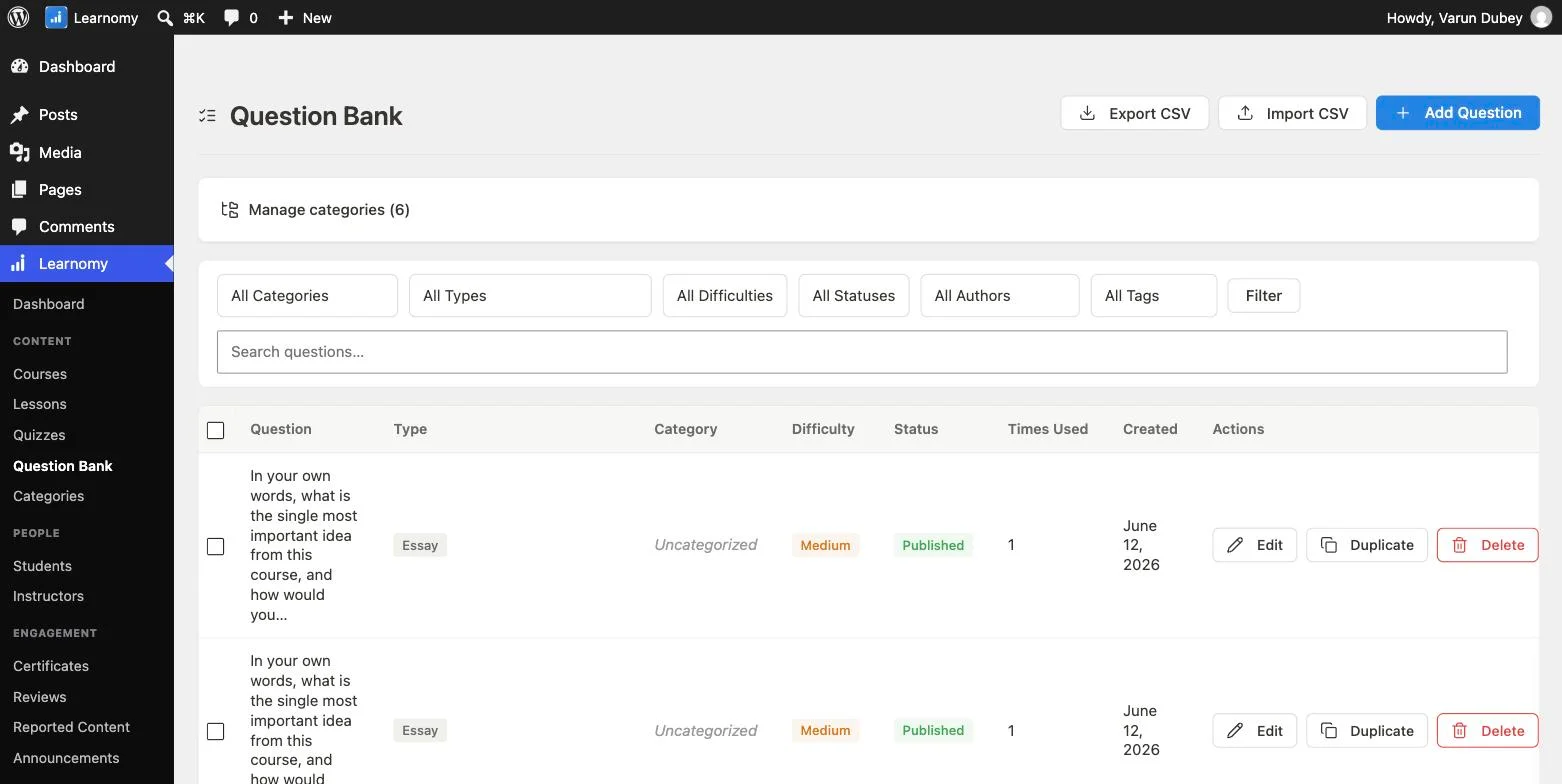
Per-student, per-lesson progress tracking gives a teacher genuine visibility into where each specific student is struggling, not just an aggregate class completion percentage, the same honest analytics philosophy (surfacing real, sometimes uncomfortable numbers rather than only flattering aggregates) covered in depth elsewhere in this series applies directly to classroom-style visibility here.
Go deeper: Know Exactly Who’s Learning and Who’s Stuck covers the per-student progress and analytics system in full.
2. LearnDash, the deepest quiz engine in this comparison
LearnDash’s quiz functionality, with roots tracing back to H5P-style interactive content, is widely regarded as the most feature-rich quiz engine among WordPress LMS options, supporting a broad range of question types and interactive content formats. For a teacher whose course leans heavily on varied, sophisticated assessment types, this depth is a genuine, real advantage worth the $259/yr entry cost.
3. LifterLMS and Thinkific, solid, dependable assessment tools
Both platforms offer reasonable, dependable quiz functionality adequate for most teaching use cases, without the specific depth LearnDash offers but without major gaps either.
4. Tutor LMS, Sensei, WP Courseware, and MemberPress Courses, functional, more basic
These four platforms handle standard quiz types competently but don’t stand out with particular assessment depth or a distinguishing teaching-specific feature, making them reasonable but not exceptional choices specifically for assessment-heavy teaching use cases.
Why assessment quality matters more for teaching than for a generic course sale
A course sold primarily on its content and production value can succeed with light or no assessment, students self-report their own learning. A genuine teaching context, whether K-12 supplementary material, higher-ed adjacent content, or professional certification prep, usually requires verifying that learning actually happened, which is where quiz depth, auto-grading accuracy, and honest per-student progress visibility become core requirements rather than nice-to-haves.
Grading workflow: where the real time savings (or cost) show up
The actual day-to-day workload difference between platforms shows up in the grading workflow specifically, not just whether a quiz feature exists. A teacher grading dozens or hundreds of open-ended responses weekly needs a review queue that surfaces ungraded submissions clearly, lets you grade in bulk or in a distraction-free single view, and notifies students promptly once grades post, small workflow details that don’t show up in a feature-list comparison but add up to real hours saved or lost weekly. Confirm this specific workflow directly with a trial account before committing, since a platform can have “manual grading support” as a checkbox while the actual experience of doing that grading is clunky or slow.
Auto-graded objective questions remove this workload entirely for factual or procedural content, which is why a teacher whose subject matter allows more objective assessment (math, coding, factual recall) benefits more from deep multiple-choice and matching question support, while a teacher in a more discussion- or writing-heavy subject should weight the manual-grading workflow quality more heavily than raw auto-grading depth.
Using an LMS for blended or flipped-classroom teaching
Many teachers use these platforms not to replace classroom teaching but to supplement it, assigning video lessons and quizzes as homework, then using class time for discussion and application (the flipped-classroom model), or simply providing a structured resource library alongside in-person instruction. For this use case, the platform’s progress tracking becomes a genuine classroom management tool: knowing which students completed the assigned pre-work before class starts lets a teacher adjust that day’s lesson plan in real time, something a generic document or video-hosting solution can’t offer.
FAQ
Can I import existing quiz content from another format (Word docs, Google Forms)? This varies by platform and is worth confirming directly, most platforms support manual quiz building through their own interface, with import capability for external formats being a secondary, sometimes limited feature rather than a guaranteed one.
Does auto-grading work reliably for anything beyond multiple choice? Auto-grading is reliable for objective question types (multiple choice, true/false, matching) across all eight platforms; open-ended or essay-style responses genuinely require human review regardless of platform, since no current AI grading approach is reliable enough to fully replace teacher judgment for nuanced written responses.
Is AI-generated quiz content trustworthy enough to use without review? No, treat AI-generated questions (available on Learnomy and select competitor tiers) as a genuinely useful first draft to review and edit, not a final product to publish unreviewed, since AI-generated assessment quality varies meaningfully by subject complexity and specificity.
Can I prevent students from seeing quiz answers before completing an attempt, or retaking a quiz unlimited times? Attempt limits and answer-reveal timing are configurable on Learnomy and most platforms compared here, confirm the specific granularity you need (per-quiz attempt limits, delayed answer reveal until a due date) directly, since default settings vary by platform.
Does student data stay private and compliant with education privacy requirements (like FERPA in the US)? This depends on your own hosting and configuration choices more than the LMS plugin itself for self-hosted options, a self-hosted WordPress platform gives you direct control over where student data lives, which some institutional privacy policies specifically require, whereas a hosted SaaS platform means trusting that vendor’s own compliance posture.
Is it worth using a full LMS plugin versus just a simple quiz plugin for occasional assessments? If you only need occasional standalone quizzes without course structure, progress tracking, or certificates, a lighter dedicated quiz plugin may genuinely be simpler, the platforms compared here earn their complexity when you need structured courses with sequential lessons and tracked completion, not just an isolated quiz.
Verdict
For teachers wanting varied question types, an honest AI-assisted starting point for quiz creation, and genuine per-student progress visibility, Learnomy is the strongest all-around choice in this comparison. For assessment-heavy courses needing the deepest possible quiz engine specifically, LearnDash’s H5P-heritage quiz functionality remains the clearest specialist choice. LifterLMS and Thinkific both offer solid, dependable assessment tools without major gaps.
Genuine assessment depth, not just multiple choice
Short-answer and matching question types, a human grading inbox for open-ended responses, and AI-assisted quiz drafting all ship in Learnomy, on a site you own.
Related reading