
14 min read
The LearnDash Addon Stack: What It Doesn’t Do, What to Add, and When You’ve Outgrown It

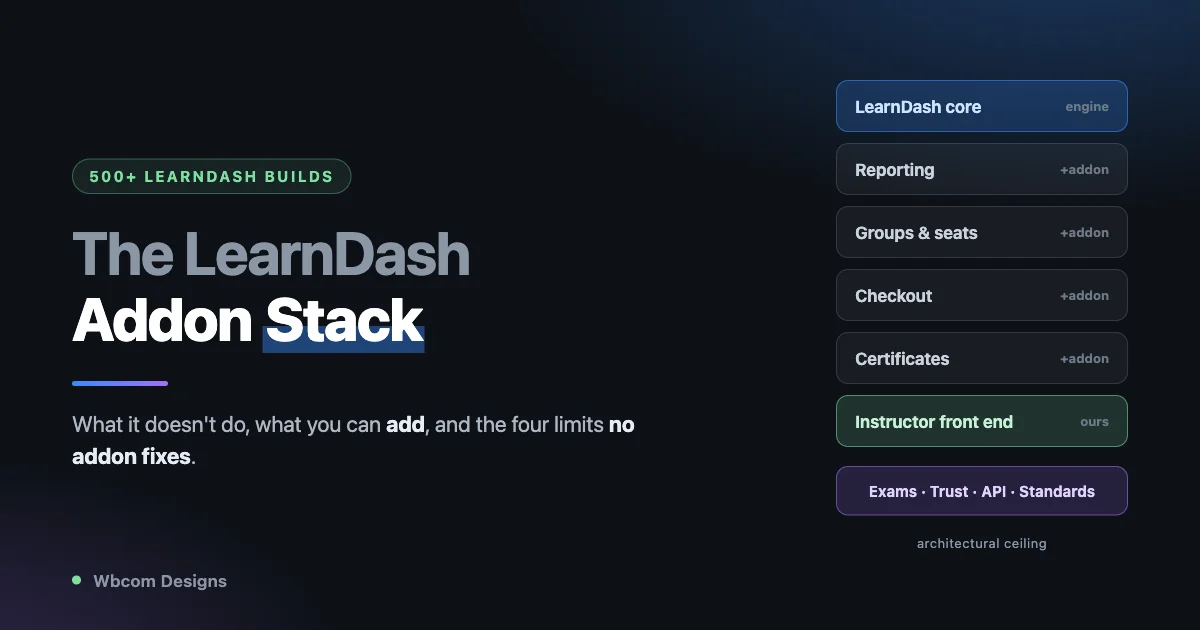
We have built more than 500 sites on LearnDash. We also build and sell a LearnDash plugin. So when we say LearnDash has gaps, we are not saying it from the outside, and we are not saying it to sell you a replacement. We are saying it because we have filled those gaps by hand, on client after client, for years.
This post is the honest version of that experience. What LearnDash gives you out of the box, what it makes you go and buy, which of those gaps we solved with our own plugin, and the point where we stopped patching and built a different LMS instead.
If you run a LearnDash site and never buy anything from us, the first half is still the most useful inventory of the LearnDash addon stack you will find, because it is written by people who have paid for all of it.
Start with what people actually search for
Before any opinion, look at what LearnDash site owners type into Google every month:
- `wp fusion learndash`
- `learndash propanel`
- `woocommerce learndash`
- `uncanny learndash toolkit`
- `learndash course grid plugin download`
- `divi learndash kit`
- `learndash notifications`
- `learndash certificates`
- `learndash recurring payments`
- `learndash edd`
- `learndash reporting`
Read that list again. Not one of those is somebody asking how to use LearnDash. Every single one is somebody trying to buy a part.
That is the tell. People do not search for the components of a product that ships whole. They search for components when they are assembling something themselves. LearnDash is not a course platform you configure. It is a course engine you build a platform around, and the building is on you.
Two more searches finish the picture. Look up `learndash mobile app` and the top result is BuddyBoss. Look up `learndash alternatives` and the top result is Mighty Networks. LearnDash’s own users are being handed to competitors on the two questions that matter most, because LearnDash does not answer either one.
What people expect, and what actually ships
Every LearnDash project we have taken on starts with roughly the same brief. The client wants:
- Instructors who can run their own courses without being given wp-admin access
- Reporting that answers “who is stuck, who finished, who paid”
- Certificates that look like the brand and can be trusted
- A way to sell to companies, not just individuals
- Something learners can use on a phone
- Payment that handles subscriptions and refunds without drama
LearnDash ships a genuinely good course engine, a solid quiz builder, and a reliable progress model. That is not nothing. It is the reason it has the install base it has.
But of the six things on that list, stock LearnDash gives you none of them completely. Instructors go into wp-admin or they do not teach. Reporting means buying ProPanel. Certificates are a PDF with no verification story. Selling to a company means finding a groups-and-seats addon. Mobile means a third-party app product. Subscriptions mean an ecommerce integration and a payments addon on top of it.
So you buy. And then you buy again.
The addon stack tax
Here is what a real LearnDash build looks like by the time it goes live. This is not a worst case, this is a Tuesday:
- LearnDash core
- ProPanel, because the client wants to know who is failing
- A groups or seat-licensing addon, because a company wants twenty logins
- WooCommerce plus the LearnDash integration, because they want a real checkout
- A subscriptions addon, because they want recurring
- A course grid or a page-builder kit, because the default course listing is plain
- A certificate addon, because the built-in one will not match the brand
- A notifications addon, because LearnDash will not email a learner who went quiet
- A CRM bridge such as WP Fusion, because marketing wants tags
- A front-end instructor solution, because the client will not hand out admin accounts
Ten moving parts. Ten licences with ten renewal dates. Ten changelogs. Ten things that can break when LearnDash ships a major version, and ten vendors who each think the other one broke it.
The licence cost is the part clients notice. It is not the part that hurts. What hurts is that nobody owns the seams. When the certificate addon and the page-builder kit disagree about page size, that is your problem. When the groups addon and the subscriptions addon both think they control enrollment expiry, that is your problem. We have spent more hours on seams between LearnDash addons than on LearnDash itself.
What we fixed with LearnDash Dashboard
A large share of that stack is one gap wearing ten hats: LearnDash has no front end for the people running the courses.
That is the gap we built LearnDash Dashboard for, and it is the one we still actively ship. Version 7.7.6 is current as of the end of July 2026. What it replaces from the list above:
A real front-end instructor experience. Twenty-eight dashboard tabs, a dedicated `ld_instructor` role, and front-end creation and editing of courses, lessons, topics, quizzes, questions and certificates. Instructors never see wp-admin. Group leaders get their own scoped view, including users who hold both roles at once.
Reporting without ProPanel. A unified reports layer covering quiz results, essay submissions, assignment status and course progress, plus charts for course completion, top courses, instructor earnings and time spent. Exports go out as CSV or a native Excel workbook, and they export the data rather than whatever columns happen to be visible on screen.
Instructor monetization. Commission logs, withdrawal requests, and a commission report. If your instructors get paid a share, LearnDash has no opinion on that at all. This does.
Messaging. Private conversations between dashboard users, with threads, unread counts and read state, over a proper REST surface.
Enrollment and seat codes. Generate, export, deactivate and redeem codes, with Uncanny Groups seat support. This is the cheap version of B2B selling.
Certificates that survive contact with reality. A certificate builder, redesigned templates, and full Chinese, Japanese and Korean glyph rendering in both the preview and the downloaded PDF. That last one sounds niche until you sell a course in Asia and every name comes out as empty boxes.
Zoom, properly. Schedule meetings against a course, notify enrolled students, pull recordings back in. This is a real API integration, not a link field. Remember this one, it matters later.
That is six or seven line items off the stack, under one licence, from one vendor who answers the phone. For a very large number of LearnDash sites, that is the whole answer, and we would rather sell you that than talk you into a migration you do not need.
The ceiling we kept hitting
Here is the part that took us a few hundred sites to accept.
An addon can only fix what the host platform’s architecture allows. LearnDash Dashboard can put a beautiful front end on LearnDash’s reporting. It cannot change what LearnDash records. It can present quizzes nicely. It cannot rewrite the quiz engine underneath.
What LearnDash records, and what it does not
Reporting is the clearest example, and it is worth being precise about why.
LearnDash records completion. A learner started a lesson, finished a lesson, passed a quiz with a score. That model is fine for the question “did they finish.”
It is not built for the question every serious training business actually asks, which is “why did they not finish.” That question needs time on task, attempt-by-attempt score history, per-question failure rates across the whole cohort, and drop-off by lesson. Some of that can be reconstructed, some of it was never written down in the first place. If you have ever wondered why students never come back to lesson one, the uncomfortable answer is usually that your LMS never recorded enough to tell you.
We can build a reporting front end that shows everything LearnDash knows. We did. What we cannot do is show you data the platform never recorded. When a client asks which single quiz question is failing eighty percent of their cohort, and whether that is the question or the lesson before it, the answer has to come from an engine that was designed to capture it.
The gaps we could not close, no matter how much we built:
The quiz engine. LearnDash quizzes work, and they show their age. If a learner’s connection drops halfway through a timed exam, you find out how much you cared about autosave. There is no section-based exam structure, no per-category score breakdown, no proctoring signal of any kind. For a training provider running certification exams, this is disqualifying, and no addon can fix it because the exam model itself is the limit.
Certificate trust. A LearnDash certificate is a PDF. Anyone can edit a PDF. If your certificate is worth anything to an employer, someone will eventually ask how they verify it, and the honest answer is that they cannot.
Anything headless or mobile. LearnDash’s API was not built to run an app against. This is exactly why `learndash mobile app` sends people to a competitor. You cannot addon your way to an API surface that was never designed to be one.
Selling outside WordPress. Sell a seat in a marketplace, a sales call, or a corporate procurement system, and you need to grant access from outside and revoke it on refund. There is no clean seam for that.
Standards. SCORM, xAPI, LTI. If a corporate or academic buyer asks and the answer is no, the deal is over.
At some point we were quoting clients for a stack of ten plugins and still saying no to five questions in the brief. That is when we stopped.
So we built Learnomy
Learnomy is what a WordPress LMS looks like when the person building it has already run 500 LearnDash projects and knows exactly which invoices hurt.
The design rule was simple: everything in that ten-plugin stack that should never have been a separate purchase is core. The current release is Learnomy 1.8.0, which added a weighted gradebook and a settings audit.
What it does that the stack could not:
A modern exam engine. Five exam layouts including sectioned SAT and GRE style papers with candidate-chosen section order. Timed exams with autosave, a question map, flag-for-review, and resume-to-the-exact-question after a dropped connection, verified at 150 questions. Per-category score breakdowns across every layout. Proctoring with tab-switch tracking, configurable auto-submit and reviewer-visible IP. Question banks you can reuse.
Certificates you can verify. Ed25519-signed, with a public verification URL and a QR code on the certificate itself. An employer scans it and gets a yes or a no. Open Badges 3.0 and Credly are available in Pro.
A real API, and a real app. The `learnomy/v1` namespace has 199 registered REST routes, with JWT and API-key auth, cursor pagination and batch operations. On top of that sits a documented mobile contract, an `/app/config` bootstrap handshake, WordPress Application Passwords for auth, Expo push notifications, and an actual Expo application. This is the answer to the search that currently sends people to BuddyBoss.
Selling outside WordPress. A `closed` pricing model that grants access by email, CSV, or an HMAC-signed webhook, and revokes it automatically on refund.
Standards. SCORM and xAPI ship in Pro, on a provisioning foundation that is in free.
Agent-controllable. Fifty-four registered abilities through the WordPress Abilities API, each with its own permission callback. If you want an AI assistant to enroll a student or pull a report, that is a supported path rather than a scraping exercise.
Money that behaves. One-time, recurring, fixed-term and members-only pricing. Stripe, PayPal and WooCommerce as gateways. Coupons, partial refunds, a configurable failed-payment grace period, and PDF receipts. Not one of those is a separate purchase.
What Learnomy does not do
We are going to be specific here, because a comparison post that lists only wins is an advertisement, and you have read enough of those.
Learnomy does not have affiliate integration. There is no AffiliateWP or SliceWP support.
Learnomy does not do protected or DRM video. It plays video through oEmbed and Plyr. If you need signed URLs or genuine content protection, we are not your answer today.
Learnomy does not run email marketing sequences. Transactional email only. If you want a re-engagement drip, you are still bringing a CRM.
Learnomy has no SAML or OIDC single sign-on.
Learnomy has no recertification automation. Enrollments can expire; nothing walks the learner through renewing.
Gamification is a separate plugin, not core. Drip content, the weighted gradebook, and B2B seat licensing through Spaces are all Pro rather than free.
And the one we think is most worth saying out loud: LearnDash Dashboard has better live-session support than Learnomy does. The Dashboard’s Zoom module talks to the Zoom API and creates the meeting for you. Learnomy schedules a live session properly, with a start time, a duration, a learner countdown and a join window, but it does not create the room. You paste in a link. If Zoom automation is central to how you teach, our LearnDash plugin is genuinely the stronger product right now, and we would rather tell you that than have you find out in week two.
A real build, and where each decision lands
Abstract comparisons are easy to agree with and hard to use. Here is a brief we get several times a year, and how it actually resolves.
A professional body wants to move its certification programme online. Two thousand members. Courses are free to members and paid for non-members. Companies buy blocks of twenty to fifty seats and want a manager who can see their own staff’s progress but nobody else’s. The final assessment is a timed, invigilated exam, and passing it produces a certificate that employers will check. Members expect to study on a phone during a commute.
On a LearnDash stack, the first two thirds of that brief is a good afternoon’s work. Courses, lessons, member pricing through a membership plugin, a groups addon for the corporate seats, our Dashboard for the manager view and the reporting. All fine.
The last third is where it stops. The timed invigilated exam is the wall: there is no proctoring signal, and if a candidate’s wifi drops at question forty of sixty, you are having a very bad phone call. The employer-verifiable certificate is the second wall, because a PDF proves nothing. The phone requirement is the third, and it is the one that sends people to search for a LearnDash mobile app and find a competitor selling one.
Three walls, none of them fixable with a plugin. That is the shape of the projects Learnomy exists for. Notice how much of the brief LearnDash handled perfectly well before we got there, though. That is the honest split.
How to actually decide
Stay on LearnDash, and add LearnDash Dashboard, if: your instructors need a front end, you want reporting without ProPanel, you pay instructors a revenue share, you need enrollment codes, or Zoom is central. This is most LearnDash sites. It is the cheaper, lower-risk answer, and it is the one we recommend more often than the other one.
Look at Learnomy if: you run real certification exams, your certificates need to be verifiable by a third party, you need a mobile app that keeps working when the connection drops, you sell through channels outside WordPress, or a buyer has asked you about SCORM. These are architectural needs. No addon fixes them, including ours.
Do not migrate because a feature list is longer. Migrate when something on your roadmap is impossible where you are.
If you do move, the path is built. Learnomy’s import wizard reads LearnDash directly and maps courses, sections, lessons, sub-lessons, quizzes, questions and categories, plus enrollments and student progress, so your learners keep their history. Seven question types come across intact. LifterLMS and Tutor LMS have the same treatment, and we have written up how to migrate LearnDash, Tutor LMS or LifterLMS to Learnomy step by step.
Questions we get asked
Is LearnDash still worth buying in 2026? Yes, for the job it does. It is a mature, stable course engine with a large ecosystem and it is not going anywhere. Buy it knowing you are buying an engine, and budget for the parts you will bolt on.
Do I need ProPanel if I have LearnDash Dashboard? No. The Dashboard’s reporting layer covers quiz, essay, assignment and course-progress reporting, plus completion, top-course, earnings and time-spent charts, with CSV and Excel export. That is the overlap, and it is most of ProPanel’s job.
Can I run LearnDash and Learnomy on the same site? You can, and during a migration you will. It is not a long-term arrangement. Two LMS plugins mean two enrollment models and two progress tables, so treat it as a transition window, not a setup.
Will I lose student progress if I move? No. The import maps enrollments and progress alongside the content, so learners keep their history and their place. Test it on a staging copy first regardless. We would say that about any migration, including ours.
What if I only need one thing LearnDash cannot do? Then look hard at whether you actually need it, and whether a service can sit alongside instead. Replacing a working LMS for a single feature is rarely the cheapest path. Migrate when the list has three things on it, not one.
We are an agency. What do you recommend to clients? The same thing we do internally. Start on LearnDash. Add the Dashboard when instructors need a front end. Have the Learnomy conversation when the brief contains exams, verifiable credentials, an app, or standards, because those are the four that will not resolve any other way.
The short version
LearnDash is a good course engine with an addon-shaped hole where the platform should be. For most sites, filling that hole with one well-built plugin is the right call, and that is why we still ship and support LearnDash Dashboard.
But there is a ceiling, and it is architectural. Exams, verifiable credentials, a real API, mobile, and standards are not addon problems. Five hundred sites in, we got tired of quoting a ten-plugin stack and still saying no. Learnomy is what we built instead.
Either way, you should stop paying the seam tax without noticing it. Count your LearnDash addons this week. If the number surprises you, that is the post doing its job.
Related reading