
16 min read
Wbcom Designs Updates #3: Course Revenue, Multisite, Polls


This is the third post in our updates series, and it covers what Wbcom Designs shipped from October 22 to 28, 2026. Every release below is live, so you can install it from Dashboard > Updates on your WordPress site. Where a product has a free and a Pro version, install both updates together. Each section links to the full release notes, and we kept this post to what you can now do rather than a list of every fix.
The short version, grouped by what you can now do:
- Sell courses: Learnomy can give course access from another store or membership plugin, and it now pays each course’s author a fair share of a plan’s revenue.
- Run a community: BuddyNext runs on a multisite network, Jetonomy gets a sidebar you control, and WB Polls adds private group polls and hidden voters.
- Run directories, events and job boards: Listora lets owners delete their own listings, Eventonomy gets narrow-sidebar widgets, and WP Career Board gets Trash and Restore.
- Sell services and products: WP Sell Services can import reviews, and several WooCommerce add-ons got compatibility updates.
- Protect your media: MediaShield now protects playlists and the standard YouTube and Vimeo embed blocks.
Key takeaways
- Sold elsewhere? Learnomy can now give course access from another store, with an Access Log to check every grant.
- Run a network of sites? BuddyNext now runs one community across a multisite network.
- Run polls? WB Polls 5.0.2 is a privacy and security release, so update it first.
- BuddyNext moderation roles need WPMediaVerse 2.6.2 or newer.
- Update free and Pro together, and try it on staging first.
Releases at a glance
One card per release, grouped by what you can do. Each button opens the full release notes.
Sell courses
Run a community
Directories, events and jobs
Services, stores and media
What can I now do if I sell courses with Learnomy?
Two Learnomy releases landed this week, and together they answer a question we hear often: “I already sell through WooCommerce or a membership plugin, so do I have to rebuild my checkout to use your LMS?” Now you do not.
Learnomy 2.1.4 and Learnomy Pro 2.1.4: access that follows your store
Learnomy 2.1.4 adds Access Grants. An order in another store, a membership plugin or an automation can give someone access to courses and membership plans without recording a sale inside Learnomy. The incoming webhook accepts grant and revoke instructions, and a new Access Log under LMS Settings lists every grant with its store and order number. From there you can remove a grant, try a refused one again, or grant it anyway.
The rules behind it are worth knowing, because they are the part owners usually get wrong in a home-built setup:
- A refund or revoke removes only the access that sale gave. If a student also holds the course through a plan, they keep it.
- A membership billed by a store stays off Learnomy’s own billing clock. The member sees which store bills them, and you can still end access.
- A late renewal no longer revives a membership that already ended.
- Each grant sends one “Your access is ready” email, with a set-password button when the person is new.
Learnomy Pro 2.1.4 adds a store and membership bridges module, off until you turn it on. It connects WooCommerce, Easy Digital Downloads, Restrict Content Pro, Paid Memberships Pro and MemberPress. You pick what each product or level unlocks: courses, membership plans, learning paths, seats in a Space or places in a cohort. Access follows the store. A paid order grants, a refund takes back, a cancelled subscription keeps access to the end of the paid period, and a renewal after a refund gives it back.
The same release also moved Learnomy’s admin onto one set of buttons, filters, tabs and row menus, so screens behave alike. Lessons can now take a video file straight from the Media Library, and a lesson keeps its bold, italic and spacing from the editor to the player. We also fixed a long list of access and enrolment edge cases, including finished courses staying finished and progress surviving a return visit.
Release notes: Learnomy and Learnomy Pro.
Learnomy 2.1.5: instructor earnings you can explain in a sentence
If several people teach on your site, this one is for you. A plan’s monthly revenue is now shared equally across its published courses and paid to each course’s author at their own rate. Before, the split followed lessons completed, which was hard to explain to an instructor who asked why their cheque looked small.
Some details owners will care about:
- Each plan payment is shared once. A renewal that completes after the monthly run is paid by the next run.
- Refunding a plan payment that was already shared takes the instructors’ part back as a negative earning, which clears against their next plan earnings.
- A partly refunded payment is shared for what is left of it.
- A membership plan can only take published courses.
- For a preview before anything is paid,
wp learnomy membership split YYYY-MMruns with--dry-runand changes nothing.
Two presentation changes also shipped. Astra, Kadence, Twenty Twenty-Five, GeneratePress, Blocksy, Neve and Ollie now lend their brand colour and text to Learnomy, so a course page looks like your site without a stylesheet. And the “Powered by Learnomy” credit is gone from the front end.
If you are weighing a move from another LMS, our guide to migrating from LearnDash to Learnomy shows how these access features fit into a real migration.
What can I now do if I run a community?
BuddyNext 1.2.7: multisite, addons and moderators that stay in their lane
BuddyNext now runs on a WordPress multisite network. One community lives on the network’s main site, BuddyNext is network activated, and nothing of it loads on a subsite. If you run a network and wanted one shared community, this removes the workarounds.
The rest of the release is about how a community grows around the core:
- An addon framework lets a partner addon list its modules and have BuddyNext wire each one behind a guard. A “Building an Addon” guide and a public API table come with it. Profile panels and the Portfolio tab now live in BuddyNext itself, so any addon can add a panel to a member’s profile.
- A space can be linked to a course or another partner object. A Linked to tab appears in space settings, and Remove keeps every member.
- Space owners choose which tab a space opens on, and site owners can change a space’s owner from the Spaces list.
- Every optional email now ends with a “Stop emails like this” link. Welcome, verification and billing emails do not, because members need those.
- Moderation roles hold up inside spaces. A community Admin who is only a plain member of a space can still post when the rule is “Moderators and up”, and a stricter “Moderate spaces” rule no longer locks community moderators out.
Required: BuddyNext 1.2.7 moderation roles need WPMediaVerse 2.6.2 or newer. Update both in the same maintenance window.
Release notes: BuddyNext, BuddyNext Pro and MediaVerse.
Jetonomy 2.0.4 to 2.0.6: a sidebar you control, and blocking that works
Jetonomy, our forum and Q&A plugin, had releases for the sidebar, safety and reliability.
- A Community Sidebar widget area appears under Appearance > Widgets. Add your own widgets or blocks to the sidebar on every community page.
- Staff can add a member to a space through the REST API, with the same rules as the Add member control.
- Blocking a member now stops them replying to you or voting on your posts. Moderators are exempt.
- Moderation tabs stay in place after you resolve a flag, and the Pending queue can be filtered by Pending or Spam.
- Space RSS feeds are valid XML again when a topic excerpt is shortened, so Mailchimp and other feed readers import them.
- Members whose username is an email address, or contains a space, can be found for messages and profile cards. Join dates now show in your site’s timezone.
Version 2.0.6 also moves plugin updates and licence checks to a dedicated update server, with an automatic fallback to the old address if it cannot be reached. Nothing to configure. Release notes: Jetonomy and Jetonomy Pro.
WB Polls 5.0.2: a privacy and security release
WB Polls 5.0.2 is recommended for every site that runs polls. It adds private group polls, lets you hide who voted, shows exact poll times, and exports CSV vote logs. It is a good moment to check whether any poll on your site shows voter names that members would not expect to be public. Release notes: WB Polls.
WB Member Blog 4.5.0, Anonymous Activity 1.6.3 and BuddyX 5.1.9
- WB Member Blog 4.5.0 adds series, co-authors, and a second review when a published post is edited. Members can write a multi-part series together, and your editors see edits before they go live. Release notes.
- Anonymous Activity 1.6.3 keeps anonymous forum posts anonymous. Anonymous topics and replies no longer appear on the author’s profile or count toward their public totals, and sharing an anonymous activity no longer names its author. Release notes.
- BuddyX 5.1.9 brings dark mode to bbPress, IdeaPush and the WooCommerce checkout, so those pages match the rest of a dark site. Release notes.
What can I now do with directories, events and job boards?
Listora 2.1.0: owners manage their own listings
Listora 2.1.0 is about the person who owns a listing and the person who moderates it. Owners can delete a listing from the More menu in My Dashboard. It goes to the trash, where an administrator can restore it. The listing author, administrators and review moderators can reply to a review from the Reviews tab. Most of the 36 fixes are layout work for phones, and a long-standing gap is closed: every search filter now reaches every listing.
Listora Pro adds credit emails and invoice numbers. Release notes: Listora and Listora Pro.
Eventonomy 1.9.1: widgets for narrow sidebars and the right currency
Eventonomy adds four sidebar widgets built for narrow areas: Upcoming events, Next event, Mini calendar and Event search. The [eventonomy_upcoming] shortcode now takes a title, category, image, layout and count. Prices show the currency they were sold in, and dates follow the visitor’s language. Checkout names any missing billing fields and no longer dead-ends when the room fills up during payment.
Eventonomy Pro runs background imports and handles refunds safely. Free and Pro release in lockstep, so update both. Release notes: Eventonomy and Eventonomy Pro.
WP Career Board 1.8.2: Trash and Restore, and emails in the reader’s language
WP Career Board now has Trash and Restore, so a deleted job or company is recoverable. Emails go out in the reader’s language, and a MariaDB issue with jobs that never expire is fixed. The Pro version adds Mapbox maps and verifies Stripe and PayPal webhooks. Release notes: WP Career Board and WP Career Board Pro.
What can I now do if I sell services or products?
WP Sell Services 1.9.1: reviews for new vendors, and tidier money
A marketplace with no reviews is a hard sell, so admins can now add a review or import a CSV for a vendor’s service. Imported reviews carry an “Imported review” label, count in ratings and send no email (this needs Pro). Buyers can also add optional Communication, Quality and Value ratings, which show on the review card and in the REST API, while the overall rating stays as it was.
- Vendors can set their own time zone, and the dates they see follow it.
- A Tax tips setting under Commission and Tax controls whether tips are taxed. They are untaxed unless you switch it on.
- Payment, proposal, milestone and extension emails always send.
- Banned users are blocked everywhere, and VAT now applies to milestones.
WP Sell Services Pro fixes a case where a PayPal payout could go out twice. Release notes: WP Sell Services and WP Sell Services Pro.
Woo Sell Services, Price Quote, BuddyWoo and two compatibility updates
- Woo Sell Services 5.8.8 shows custom order statuses under Active and adds payment instructions. Release notes.
- Price Quote 2.3.6 adds a response-time promise your customers can see. In Pro, a quote can turn into an order. Release notes.
- BuddyWoo 1.5.5 is part of this week’s WooCommerce round. Release notes.
- Open Graph for WooCommerce 2.1.1 and Custom My Account 1.7.2 are compatibility updates tested on PHP 8.1 to 8.5 and WordPress 7.1. Open Graph notes and My Account notes.
What can I now protect with MediaShield?
MediaShield 1.4.0 closes three gaps that owners kept finding on real pages. A playlist now plays through the same protected player as a single video, so its videos are watermarked, tracked and counted, and moving to another item swaps the player without a reload. Videos added with the standard YouTube or Vimeo embed block are protected too. Before, only the plain link was stored in the post, so they were not detected. You can set a brand colour for the player with a live preview, and a video’s featured image becomes its poster. Release notes: MediaShield. For the bigger picture on keeping paid video from leaking, see our guide to stopping paid videos and course files from being shared.
Which of these releases should I look at first?
If the list feels long, read it through the lens of one question: what would hurt most if it went wrong on your site tomorrow? Here is how we would order it for different owners.
You sell courses or memberships
Start with Learnomy 2.1.4. If any of your sales happen outside Learnomy, the Access Log is the new place to check that every buyer got their course, and the refund rules mean a returned order will not strip access that came from somewhere else. If you pay several instructors, read the 2.1.5 notes next and run the dry-run command for last month before the next real payout, so nobody is surprised by the new equal-share rule.
You run a members-only community
Start with the BuddyNext 1.2.7 moderation changes and the Jetonomy blocking fix. Both are about trust between members. Then check your polls, because hidden voters and private group polls change what members can see about each other. If you run a multisite network, BuddyNext’s multisite support is the headline, and it deserves a test on staging before you touch the live network.
You run a directory, an event site or a job board
Open Listora’s My Dashboard and look at the new More menu, then try the review reply as a moderator. For events, drop the new Mini calendar or Upcoming events widget into a sidebar and see how it fits on a phone. For jobs, try Trash and Restore on a test listing so your team knows the safety net exists.
You run a marketplace or a store
Import a handful of reviews for your newest vendor in WP Sell Services and see how the Imported review label reads to a buyer. Then check the Tax tips setting against your accounting rules. It is a small switch, but it touches money.
You sell protected video
Open a page that uses a playlist or the standard YouTube or Vimeo embed block and confirm the watermark appears. If you used those embeds before, they were not being detected, so this is worth a look on every page that carries one.
Not sure which update to do first?
Every product has its own release-notes page, newest version first. Bookmark the hub and plan your update window around it.
What are we working on next?
These are in progress and not released yet. We have not put dates on them, and the lists can change before anything ships.
- Themes and add-ons: Reign 8.0.9 and the Reign WCFM and Sensei add-ons.
- Communities: Jetonomy 2.0.7, and a large BuddyPress add-on round covering Reactions, Hashtags, Check-ins, Profile Pro, Birthdays, Sticky Post, Quote, Job Manager, Business Profile, Lock, Stats, Giphy, To-do List and more.
- Jobs, polls and quotes: WP Career Board 1.8.3, WB Polls 5.0.3 and Price Quote 2.3.7.
- Stores: Woo Sell Services 5.8.9, and WooCommerce add-ons for AJAX Filter, Document Preview, Audio Preview and Infinite Loader.
- Everything else: WB Ad Manager Pro 3.2.0, SnipShare 1.1.0 and Wbcom Essential 4.7.1.
How do I update safely?
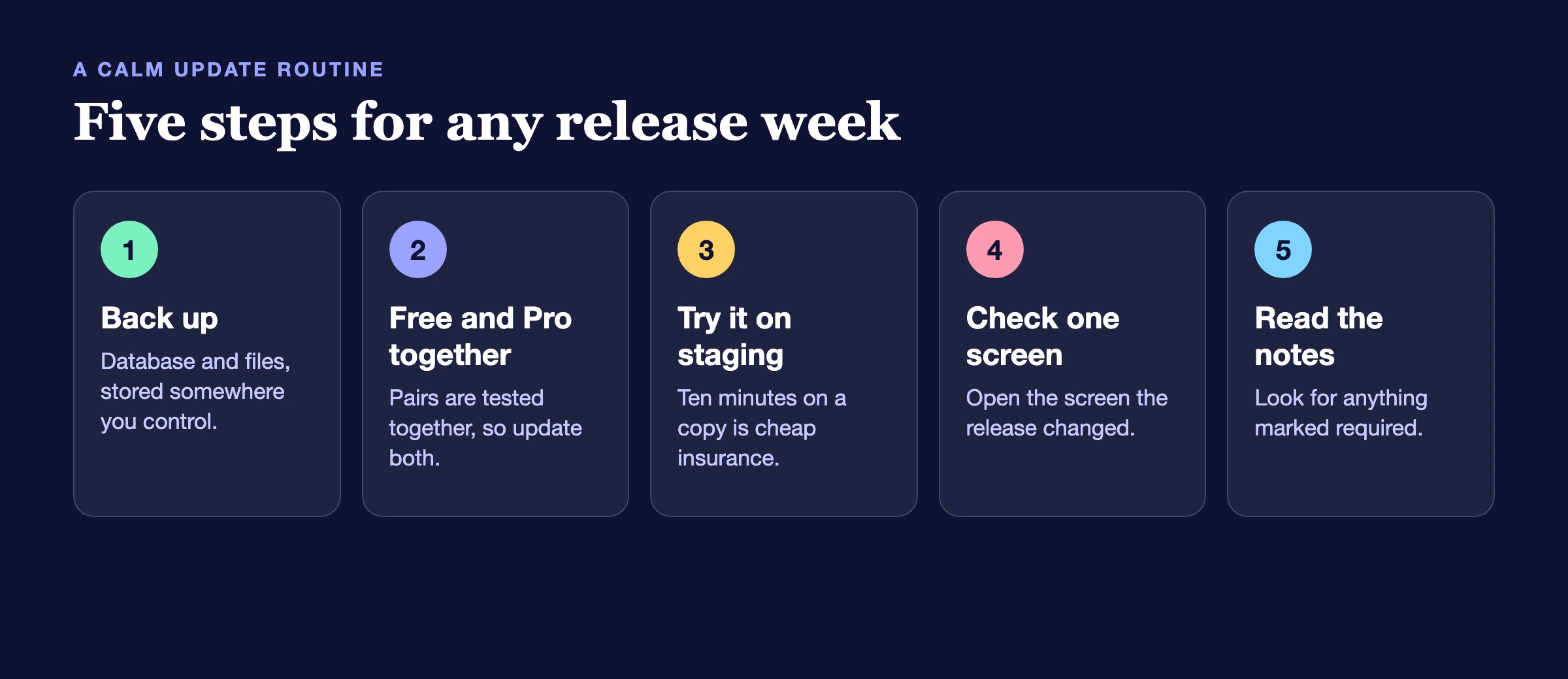
A short routine keeps a week like this uneventful:
- Back up first. A database and files backup takes minutes and saves hours.
- Update free and Pro together. Where a product has both, the two are tested as a pair. Learnomy, BuddyNext and Eventonomy all say so in their release notes.
- Update on staging if you can. If your site earns money, a ten-minute test on a copy is cheap insurance.
- Check the one screen the release changed. For example, after Learnomy 2.1.4 open LMS Settings and look at the Access Log. After BuddyNext 1.2.7, open a space and check its tabs.
- Read the notes for anything marked required. This week, BuddyNext moderation roles need WPMediaVerse 2.6.2 or newer.
Vendor price changes and licence worries are a separate question, and our licence-risk checklist covers that calmly.
Frequently asked questions
Where do I find the full list of changes for each plugin?
Every product has its own page on our release notes hub, with each version listed newest first. This post groups them by what you can do, and the notes are the complete record.
Do I need to update every plugin on the list?
No. Update what you use. If you run a plugin that is not on the list, nothing here affects it. Releases marked as security or privacy releases, such as WB Polls 5.0.2, are the ones we would not leave waiting.
Will updating break my site?
We test each release on current WordPress and PHP, but your site is your site: your theme, your other plugins and your content all matter. That is why the routine above starts with a backup and a staging test.
Why are some plugins listed as in progress with no dates?
Because a date we cannot keep is worse than no date. In-progress means work is happening, not that a release is promised for a day.
My Pro licence does not show the update. What should I do?
Check that the licence is active on the License tab of the product, then look in Dashboard > Updates again. If it still does not appear, contact support through your account and mention the plugin and its version.
Can I get updates like this by email?
The release notes hub is the source of truth, and we publish this roundup every week. Bookmark the hub and check it when you plan your maintenance window.
Does a lockstep release mean I must update both plugins on the same day?
Ideally, yes, within the same maintenance window. A free plugin and its Pro version are built and tested as a pair, and a mismatch can show up as a missing setting or an admin notice. Updating one and leaving the other for a week is rarely harmful, but it is not what we test.
What does “tested up to WordPress 7.1” mean for me?
It means we ran the plugin on that version and found no breakage in the areas we check. It does not replace your own test. If WordPress 7.1 is new to your site, update on staging first.
Want these updates handled for you?
A maintenance plan covers backups, staging tests and the update itself, so a release week stays uneventful.
Where to go from here
Pick the section that matches how you earn from your site, update on a staging copy, and read the notes for that one product. If a release solves something you have been working around, tell us. Most of what shipped this week started as a customer asking for it.
Related reading