
17 min read
Wbcom Designs Updates #5: 11 Releases Before Black Friday

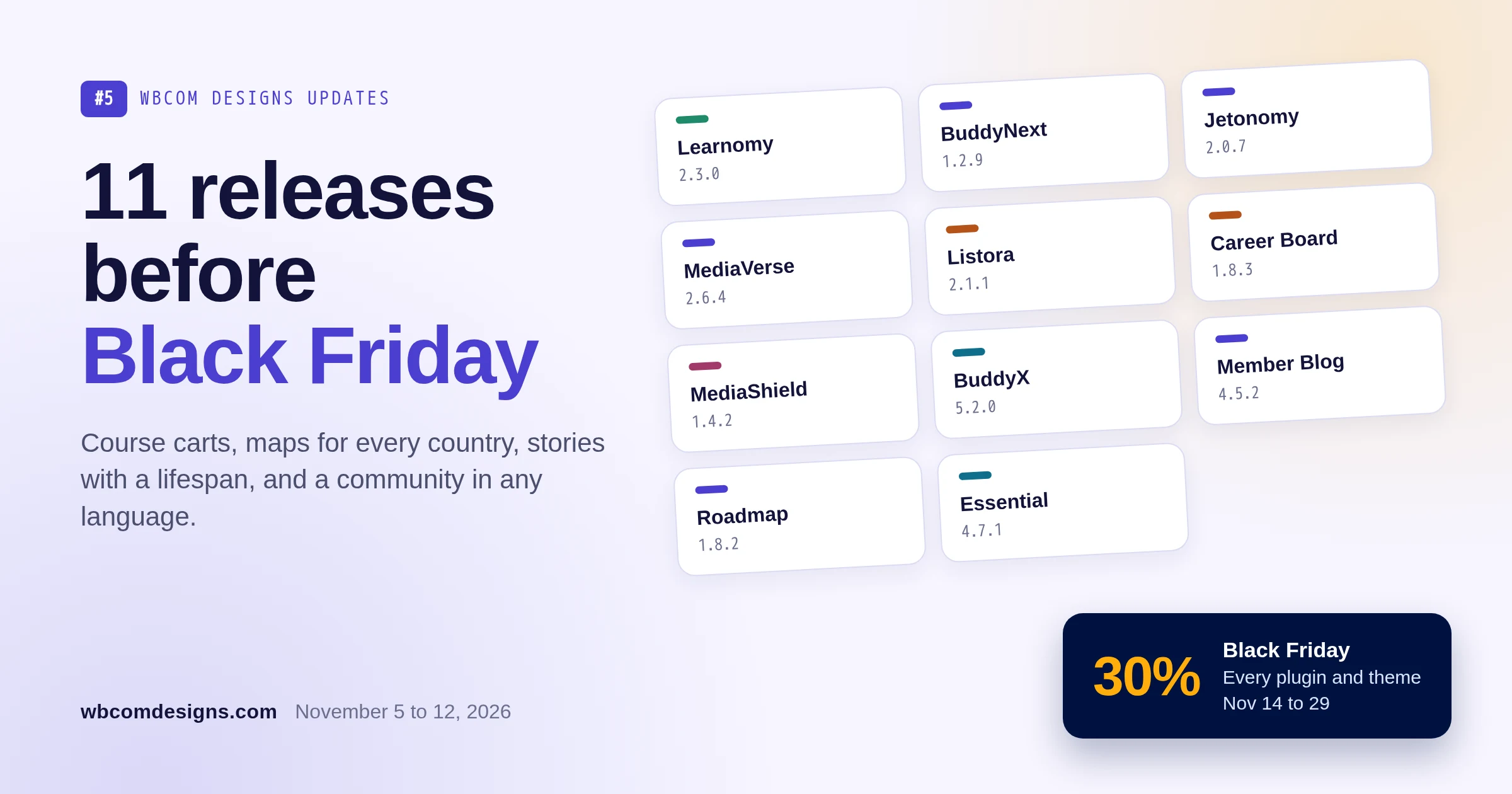
This is the fifth post in our Wbcom Designs updates series, and it covers what Wbcom Designs shipped from November 5 to 12, 2026. It is a big week: eleven releases across courses, communities, directories, video and themes, and every one of them is live now. Where a product has a free and a Pro version, update the free plugin first and then Pro. Each section links to the full release notes, and we kept this post to what you can now do rather than a list of every fix.
The timing matters too. Our Black Friday sale starts on November 14, so anything you buy during the sale is the version described here, not last month’s.
The short version, grouped by what you can now do:
- Sell courses: Learnomy 2.3.0 adds a multi-course cart that works with any payment gateway, a guest checkout that logs the buyer in, and certificates that expire and renew. Pro adds full-screen SCORM, cohort duplicate and roster export, and learning paths with optional courses.
- Run a community: BuddyNext 1.2.9 works end to end in Korean, Arabic and other non-Latin languages, and Pro keeps one invoice trail for every membership. Jetonomy 2.0.7 explains access rules in plain words and supports Divi. WPMediaVerse stories get a length, reactions and a Seen by list.
- Build a directory or job board: Listora 2.1.1 puts every map provider in one list, adds Plus Codes, and Pro adds Kakao, Naver and AMap. WP Career Board 1.8.3 shows every date in your site’s timezone.
- Protect your video: MediaShield 1.4.2 is a security release that protects self-hosted videos picked from the Media Library.
- Design the site: BuddyX 5.2.0 drives the brand from one Theme Color in light and dark mode, and Wbcom Essential 4.7.1 fixes member and group blocks on BuddyBoss.
Key takeaways
- MediaShield 1.4.2 is a security release for every site that sells video, so update it first.
- Every paired release this week is a lockstep release: update the free plugin first, then Pro, to the same version.
- Learnomy’s new cart is off by default. Switch it on under Settings > Payments > Cart when you are ready.
- Product Roadmap 1.8.2 is in your account now. WordPress.org still serves 1.8.1, so download the free plugin from your account if your dashboard does not offer it yet.
- Black Friday runs November 14 to 29: 30% off every plugin and theme with code WBBLACKFRIDAY26.
Wbcom Designs updates at a glance
One card per release, grouped by what you can do. Each button opens the full release notes.
Sell courses
Run a community
Directories and jobs
Video and design
What can I now do if I sell courses with Learnomy?
Learnomy 2.3.0 is the release course sellers have been asking for since the first version: buyers can now put several courses in a cart and pay once. If you run a sale, that is the difference between a buyer taking one course and a buyer taking three.
Learnomy 2.3.0: one cart, one payment, any gateway
Switch the cart on under Settings > Payments > Cart. A buyer adds several courses, applies one coupon, and pays once with whichever payment gateway you already use. Behind the scenes each course in the cart is still its own sale, so earnings, receipts and refunds keep working per course. An instructor still sees their own course sale, and a refund on one course does not touch the others.
Guest checkout got smoother at the same time. A buyer who pays without an account is logged in straight after paying, gets one branded receipt with a Set your password button, and lands on the course. There is no “now check your email and create an account” step between paying and learning.
Two more additions worth trying this week:
- Certificates that expire and renew. Set an expiry on a certificate, and holders are reminded 30 days and 7 days before it ends. Finishing the course again renews it. This suits compliance training, safety courses and anything that needs a yearly refresh.
- A Learning status filter. Signed-in members can filter the catalog by in progress, completed or not started, so a returning student finds their place without scrolling.
Good to know: the cart stays off after the update, so your course pages look exactly as before until you switch it on.
Learnomy Pro 2.3.0: SCORM, cohorts and learning paths
- SCORM lessons open full screen over the page or in a new tab, and keep the size they were made at. Packages built for a fixed screen no longer get squeezed into the lesson column.
- Cohorts can be duplicated as a draft, and their roster exported as CSV. Running the same cohort every month is now a copy, not a rebuild.
- Learning paths can require a minimum number of optional courses on top of every required one, for example “all four core courses, plus any two electives”.
- Assignment files are private to the student and the staff who grade them.
Release notes: Learnomy and Learnomy Pro. Update Learnomy first, then Learnomy Pro, to the same version.
What can I now do if I run a community?
BuddyNext 1.2.9: a community in any language
If your members write in Korean, Arabic, Japanese or a language with accented letters, this release is for you. Spaces with non-Latin names now open, can be deleted by typing their name, and their categories filter the spaces directory. Hashtags in those languages open and can be followed, and the streak strip shows a whole, translated weekday letter in every language.
Moderation is tighter too. A removed post is now closed to its author and to every reaction, comment and share, so a removed post really is gone from the conversation. Community moderators can moderate media, and report queues offer Remove content on media reports.
Owners setting up a new community get a shorter path:
- The setup wizard sets the site title from the community name, makes the feed the home page by default and adds a Community menu.
- Integration Settings is now one table, with a row per integration and a column per surface, so you see what is on where at a glance.
- Main Navigation lists every rail item and marks items from other plugins as Add-on.
BuddyNext Pro 1.2.9 gives every membership one invoice trail. Each invoice names its subscription and says whether it was a new purchase, a renewal or a plan change. Renewals keep the member’s currency, kept price and coupon, and a PayPal renewal sent twice records one invoice, not two. Release notes: BuddyNext and BuddyNext Pro.
Jetonomy 2.0.7: access rules members understand
Paid forums live or die on one question from members: why can I not see this? Jetonomy 2.0.7 answers it on the page. The space header tells a member which course or plan gives them access, and the membership gate has one sentence for every paid plan and a button for each way in.
- You can change an access rule’s grant in place from the rules list or the REST API, instead of deleting and recreating it.
- Divi Theme Builder global headers and footers, with their styles, now show on community pages.
- Members suspended or blocked in BuddyNext are read-only or blocked in the forum too.
- All 10 translations were redone with consistent wording.
Jetonomy Pro 2.0.7 links each extension on the Extensions page to where it is set up, and names the next step when you switch one on. Analytics draws activity as a daily or weekly column chart, the Conversations screen has search, filters and pages, and Tutor LMS, LifterLMS, LearnDash and Sensei course pages link to their course discussion space. Release notes: Jetonomy and Jetonomy Pro.
WPMediaVerse 2.6.4: stories with a lifespan
The free plugin’s setup wizard now offers demo content, and demo members get photos, so a new media community does not open on an empty wall. When the server rejects an upload for its size, the message now says how large an upload may be.
WPMediaVerse Pro 2.6.4 is about stories. Owners set how long stories last, from 6 hours to 7 days, and members can react to a story. A Who can post stories setting under Display > Stories picks the roles that may post, and the Seen by list now shows every viewer, 50 at a time. An upload made only for a story is deleted when the story ends, so stories stop filling your media library. Release notes: WPMediaVerse and WPMediaVerse Pro.
WB Member Blog 4.5.2 and Product Roadmap 1.8.2
- WB Member Blog 4.5.2 is a dark mode, phone and screen reader release. The chosen category in the post form is readable in dark mode, the dashboard search field no longer makes iOS zoom the page, and Pro’s filters have labels for screen readers. Release notes.
- Product Roadmap 1.8.2 makes your public roadmap look like part of your site. Boards, cards and timelines follow your theme’s font and corner radius, including Reign’s, and every dialog works from the keyboard and with screen readers. Pro keeps a member’s votes and suggestions private to editors and administrators, and Approve & Convert on guest suggestions emails the guest once. Release notes.
Product Roadmap on WordPress.org: the free plugin updates from WordPress.org, which still serves 1.8.1. Until 1.8.2 appears there, download Product Roadmap 1.8.2 from your account, upload it under Plugins > Add New, then update Product Roadmap Pro.
What can I now do with a directory or job board?
WB Listora 2.1.1: maps for every country
Maps now use one list of providers. Settings > Maps and the Setup Wizard show every provider installed on the site, so switching providers is a choice from a list rather than a setting buried in another tab. A fresh install and the Setup Wizard now start on a working map, so your first look at a new directory is a map with pins, not an empty box.
Listings also understand Plus Codes, the free digital addresses Google created for places without a street address. A listing’s Location card shows its Plus Code, and a full Plus Code typed into search lists nearby listings. That helps in places where street addresses are unreliable, such as rural areas and new developments.
WB Listora Pro 2.1.1 adds Kakao Maps, Naver Maps and AMap, the maps people in South Korea and mainland China actually use, and its money screens are clearer. Dates now show in the site timezone everywhere, and listings at latitude or longitude 0 appear in nearby search and on maps. Release notes: WB Listora and WB Listora Pro.
WP Career Board 1.8.3: times that match your site
Every date and time is now saved in UTC and shown in your site’s timezone from Settings > General, the same on admin screens, member pages, emails and job pages. A job deadline closes at the end of its day in your timezone, and existing deadlines are converted on update. If an employer in Sydney set a deadline of Friday, it now ends on Friday night in Sydney, not halfway through Friday.
- The setup wizard’s sample data creates no user accounts, and it can create a Jobs menu with Find Jobs, Companies and Post a Job.
- Category, location and type names with an ampersand or a quote read correctly on filters, job cards, company pages and the REST API.
- The Users screen no longer stops with a fatal error when another plugin saved a role without a name.
WP Career Board Pro 1.8.3 sends job alert digests at 08:00 in your site’s timezone instead of 08:00 UTC, and the licence status refreshes after you activate or deactivate a key. Pro requires WP Career Board 1.8.3. Release notes: WP Career Board and WP Career Board Pro.
What can I now protect with MediaShield?
MediaShield 1.4.2 is a security release, and it is the one we would not leave waiting. Until now, a self-hosted video you picked from the Media Library was not protected the same way as a video uploaded through MediaShield. From 1.4.2 it is. Existing Media Library videos move to the protected folder in the background after the update, and playback keeps working throughout.
- A Keep the watermark at the edges setting keeps the watermark in the corners, off the centre of the video. It is off by default.
- A Revoke session button on each Viewers row ends that member’s active watch sessions after you confirm, which helps when one account is being shared.
- The Viewers list and each viewer’s watch history are paged, so a site with thousands of viewers can reach every one.
MediaShield Pro 1.4.2 can add new Bunny uploads to MediaShield automatically with an opt-in switch on the connected Bunny card, and imports with no platform title are named Untitled video. Release notes: MediaShield and MediaShield Pro. For the bigger picture, see our guide to stopping paid videos and course files from being shared.
What changed in the theme and page builder?
BuddyX 5.2.0: one colour, both modes
BuddyX 5.2.0 is a presentation release. One Theme Color now drives the brand in light and dark mode, with live previews in the Customizer, so you no longer tune two palettes that drift apart. The theme draws its own SVG icons, which makes Font Awesome optional, and the free theme drops its jQuery requirement. Both mean less code loading on every page.
- LearnDash course cards and the single course page show the category, lesson count, price and rating, with Start or Continue buttons and a progress bar.
- LearnDash, Tutor LMS 4, Sensei, LifterLMS, LearnPress, WPForms, The Events Calendar and Elementor follow the theme colours and dark mode.
- Directory cards are more compact, profile fields are grouped, and BuddyPress and WooCommerce styles load only where they are used.
BuddyX Pro 5.2.0 adds goal-based setup paths and a plugin support matrix on Getting Started, and a share-icon rail beside the post body on desktop. Release notes: BuddyX and BuddyX Pro.
Wbcom Essential 4.7.1: blocks that work on BuddyBoss
Members, groups and activity blocks now show their content on BuddyBoss sites, where they used to say No members found. Member and group grids and carousels fit sidebars and other narrow spaces, carousel arrows no longer cover the card, and carousel blocks placed in widget areas load their slider styles. The plugin no longer calls the Wbcom template server, and its documentation was rewritten to match the current 35 blocks and 43 widgets, with FAQ and Troubleshooting sections. Release notes.
Which of these releases should I look at first?
Eleven releases is a lot for one week. Ask one question: what would hurt most if it went wrong on your site tomorrow? Here is how we would order it.
You sell protected video
Update MediaShield and MediaShield Pro first. Then open one video you picked from the Media Library while logged out and confirm it no longer plays. If accounts are being shared, try the Revoke session button on one viewer.
You sell courses
Update Learnomy and Learnomy Pro, then switch the cart on and buy two courses with a test gateway. Check that the buyer lands on the course after paying and that each course shows as its own sale. If you offer a Black Friday deal on your own courses, the cart is the feature to have on before your traffic arrives.
You run a paid community
Update BuddyNext and BuddyNext Pro, then look at a member’s invoices to see the new one-trail view. If you use Jetonomy, open a locked space as a logged-out visitor and read the new gate sentence the way a buyer would.
You run a directory or job board
Update WB Listora, then type a Plus Code into your directory search. For WP Career Board, check one job’s deadline after the update, since existing deadlines are converted to your site’s timezone.
How does Black Friday fit with this week?
Black Friday, November 14 to 29
30% off every plugin and theme
Every plugin and theme in this post is in the sale. Use code WBBLACKFRIDAY26 at checkout.
We shipped this week on purpose before the sale. If you have been waiting to add courses to your community, a directory to your membership site or protected video to your courses, the products you buy during the sale are the ones described above. A few combinations owners ask us about most:
- Community plus courses: BuddyNext and Learnomy, so members learn and talk in one place.
- Courses plus protected video: Learnomy and MediaShield, so paid lessons are not shared outside the course.
- Community plus forums: BuddyNext and Jetonomy, with forum access that follows the member’s plan.
- Directory plus jobs: WB Listora and WP Career Board for a local business hub with its own job board.
Every product has a free version, so you can try it on a staging site before you buy the Pro licence at the sale price.
What are we working on next?
These are in progress and not released yet. We have not put dates on them, and the list can change before anything ships.
- Themes: Reign 8.1.0 is in beta, together with matching updates for the Reign add-ons for Dokan, WC Vendors, WCFM, Tutor LMS, Sensei, LifterLMS, LearnDash, GeoDirectory and WP Job Manager. The focus is dark mode and theme colours on marketplace, course and directory pages.
- Events: Eventonomy 1.9.2, with one seat per person, ticket labels, host and venue improvements and an early-bird pricing fix.
- Jobs and marketplaces: WP Career Board 1.8.4, with steadier resume and job forms and refreshed translations, and WP Sell Services 1.9.3, with localised numbers and times and PayPal currency fixes.
- BuddyPress add-ons: BuddyPress Activity Social Share 3.6.0 with better share previews, the BuddyPress reCAPTCHA suite 2.2.4 with dark mode on every form, and BP Business Profile 2.2.3.
How do I update safely?
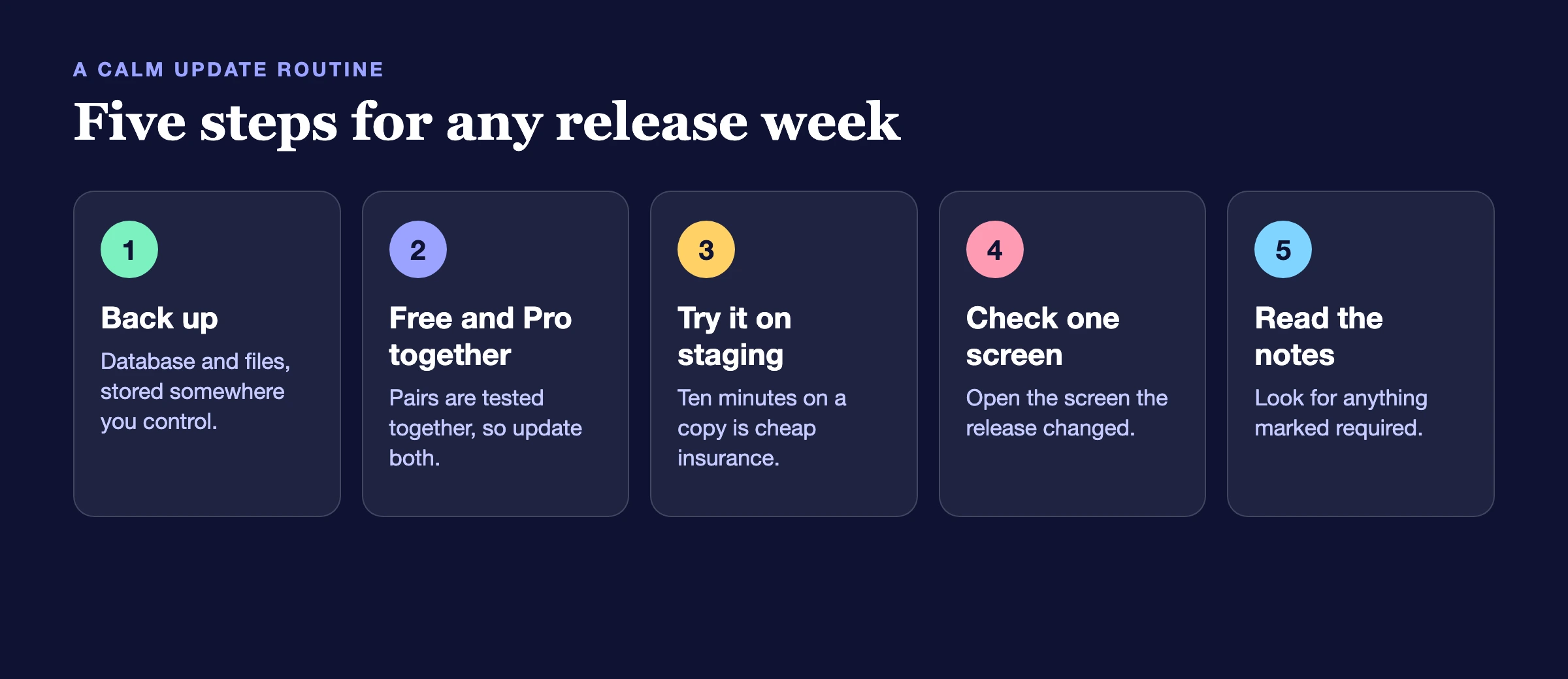
A short routine keeps a week like this uneventful:
- Back up first. A database and files backup takes minutes and saves hours.
- Update the free plugin first, then Pro. Every paired release this week is a lockstep release, so both should end on the same version.
- Update on staging if you can. If your site earns money, a ten-minute test on a copy is cheap insurance, and more so in a sale week.
- Check the one screen the release changed. After MediaShield 1.4.2, open a Media Library video while logged out. After WP Career Board 1.8.3, check one job deadline.
- Read the notes for anything marked required. This week, WP Career Board Pro needs WP Career Board 1.8.3, and Product Roadmap’s free plugin comes from your account until WordPress.org catches up.
Frequently asked questions
Where do I find the full list of changes for each plugin?
Every product has its own page on our release notes hub, with each version listed newest first. This post groups them by what you can do, and the notes are the complete record.
Do I need to update every plugin on the list?
No. Update what you use. If you run a plugin that is not on the list, nothing here affects it. Security releases, such as MediaShield 1.4.2, are the ones we would not leave waiting.
Why update the free plugin before Pro?
Pro builds on the free plugin. When Pro is newer than the free plugin, Pro pauses itself or shows a notice until the free plugin catches up. Updating the free plugin first means Pro starts on the right base.
Does the Black Friday code work on these new versions?
Yes. Code WBBLACKFRIDAY26 takes 30% off every plugin and theme from November 14 to 29, and every download in your account is the latest version, including the releases in this post.
Will updating break my site?
We test each release on current WordPress and PHP, but your site is your site: your theme, your other plugins and your content all matter. That is why the routine above starts with a backup and a staging test.
My Pro licence does not show the update. What should I do?
Check that the licence is active on the License tab of the product, then look in Dashboard > Updates again. If it still does not appear, download the zip from your account, or contact support and mention the plugin and its version.
Want these updates handled for you?
A maintenance plan covers backups, staging tests and the update itself, so a release week stays uneventful.
Where to go from here
Pick the section that matches how you earn from your site, update on a staging copy, and read the notes for that one product. Last week’s roundup, Wbcom Designs Updates #4, covers the releases just before these. If you have been waiting for the right moment to add a product, the Black Friday sale runs until November 29. And if a release solves something you have been working around, tell us. Most of what shipped this week started as a customer asking for it.
Related reading