
12 min read
11 Best WordPress Event Calendar Plugins for Your Website


The WordPress event calendar plugins let you create different kinds of events for your website and customize the events accordingly. You will be able to set the time and location of the events. The colors and appearance of your events can be changed to make them look attractive. The plugin is quite easy to use and contains various add-ons. You can also add images or background colors to your events.
This article lists 11 event calendar plugins you can use to publish events, take RSVPs or sell tickets on a WordPress site, with current install counts, versions and prices checked on 6 November 2026.
Last updated: 6 November 2026
Quick answer: The best WordPress event calendar plugin depends on what you need. The Events Calendar (600,000+ installs) is the standard for a plain public calendar, Modern Events Calendar suits bookings and ticketing, Eventonomy covers events, RSVPs and registrations in one plugin, and Amelia fits appointment-led businesses. Most have a free version.
Events still drive marketing results. Bizzabo reports that 78% of organizers consider in-person conferences, summits and conventions their most impactful marketing channel, which makes a reliable calendar and registration flow on your own site worth getting right.
Event calendar plugins compared
| Plugin | Best for | Active installs (WordPress.org) | Pricing |
|---|---|---|---|
| Eventonomy | Events, RSVPs and registrations | Distributed from eventonomy.org | Free; Pro from $99/year |
| Modern Events Calendar | Bookings, ticketing, 60+ layouts | Lite is not on WordPress.org; Webnus lists 200K+ customers | Lite free; Pro from $99/year (1 site) |
| Events Manager | One-time and recurring events with bookings | 60,000+ (version 7.4.13) | Free core; Pro paid |
| The Events Calendar | Public event calendars | 600,000+ (version 6.18.3.1) | Free core; Pro paid |
| Amelia | Appointments and event bookings | 90,000+ (version 2.4.14) | Free version; paid plans annual or lifetime |
| Simple Calendar | Showing Google Calendar events | 50,000+ (version 4.3.2) | Free; paid add-ons |
| My Calendar | Accessible event management | 20,000+ (version 3.8.13) | Free; My Tickets for ticketing |
| Sugar Calendar | Simple event scheduling | 10,000+ (version 3.17.0) | Free Lite; Pro paid |
| Calendarize It | Customisable layouts | Sold on CodeCanyon (13,000 sales) | $25 regular license on CodeCanyon |
| EventsOn | Styled calendars | Not confirmed, check before you buy | Check vendor |
| WP Event Manager | Event listings and submissions | 20,000+ (version 3.4.2) | Free core; paid add-ons |
Install counts, versions and update dates come from the WordPress.org plugin pages, retrieved on 6 November 2026. Prices are from vendor pages and change often, so confirm them at checkout.
11 Best Event Calendar Plugins for WordPress
1. Eventonomy

Eventonomy is a WordPress event management plugin that helps website owners create events, publish calendars, manage RSVPs, and handle registrations directly from their websites. It is an alternative to The Events Calendar for businesses, community organizations, event organizers, and membership websites that want to manage events without relying on an external platform.
Eventonomy supports one-time and recurring events, multiple calendar views, guest registration, and attendee management. Its free version includes unlimited events and core RSVP functionality, making it useful for community meetups, workshops, classes, and other gatherings. Paid plans add ticket sales, payment processing, QR code check-in, and advanced reporting tools.
Key features
- Event calendars: Grid, list, month, and upcoming event views to display events in different formats.
- Recurring events: Schedule recurring events and manage event series.
- RSVPs and registration: Accept registrations, collect attendee information, and manage guest counts.
- Waitlists and capacity limits: Manage attendance when an event reaches its registration limit.
- Frontend event submission: Allow users to submit events through the website.
- Venue and organizer management: Save event locations and organizer details for reuse.
- Ticketing and payments: Sell tickets through supported payment integrations with Eventonomy Pro.
- QR code check-in: Manage event entry and attendee check-ins using supported tools.
- Calendar integration: Provide ICS feeds and add-to-calendar options to help visitors save events.
- Attendee reports: Export registration data and access reporting features available with the selected plan.
Pricing: Eventonomy offers a free version with unlimited events and core RSVP features. Paid plans are available with annual and lifetime licensing options.
- Free: $0, with unlimited events and core event management features.
- Personal: $99/year for one website, or $249 for a lifetime license.
- Professional: $199/year for five websites, or $499 for a lifetime license.
- Agency: $249/year for unlimited websites, or $629 for a lifetime license.
Best for: Businesses, community websites, membership platforms, and event organizers that need event calendars, RSVPs, recurring events, and attendee management within WordPress. The paid plans are suitable for organizers who also need ticketing, payment processing, check-in, and reporting tools.
2. Modern Events Calendar
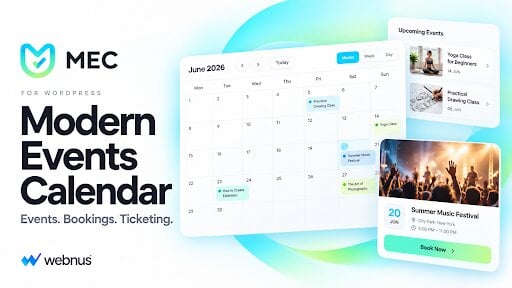
Modern Events Calendar (MEC) is a WordPress event calendar plugin that handles events, ticket sales and bookings from one dashboard, with no coding. Webnus lists more than 200,000 customers. It’s the most complete plugin on this list for sites that need more than a calendar, such as a yoga studio taking class bookings, a school publishing its term schedule, or a venue selling reserved seats.
Most calendar plugins offer a handful of views. MEC includes 60+ display layouts, among them monthly, weekly, daily, yearly, agenda, timetable, list, grid, masonry, carousel, slider and map. That lets the calendar fit your theme instead of clashing with it. The free version already supports single, multi-day and recurring events, and you can exclude specific dates from a recurring series.
Key features
- Booking and ticketing: multiple ticket types, RSVP events, waiting lists, partial payments and ticket prices that change by date. Payments run through PayPal, Stripe, Square or WooCommerce.
- Check-in: QR-code tickets and a check-in app for Android and iOS.
- Virtual and hybrid events: Zoom and Webex integration for online sessions.
- Appointments: time-slot booking for classes, consultations and services.
- Smart forms: booking forms with conditional logic and custom event fields.
- Imports and sync: Google Calendar sync, Facebook events import, and built-in importers for The Events Calendar, Events Manager, Eventbrite, Meetup and more.
- Page builders: works with Gutenberg, Elementor, Divi and WPBakery. Supports WPML and RTL for multilingual sites.
- Community and promotion: front-end event submission, speaker and sponsor profiles, a social auto-poster and email notifications.
Pricing: The free Lite version is downloaded from the Webnus site rather than WordPress.org, and covers single, multi-day and recurring events, monthly, weekly and daily views, and community event submission. MEC Pro costs $99/year for one site, $199 for 5 sites, $299 for 10 sites, $799 for 100 sites and $999 for unlimited sites, each with one year of updates and premium support, per the Webnus pricing page.
Best for: businesses, schools, churches, venues and community sites that want a calendar and a booking system in one plugin instead of three.
If you’re comparing it with The Events Calendar, Amelia or EventON, Webnus publishes a feature-by-feature comparison of WordPress event plugins that covers 57 features and lists each plugin’s starting price.
3. Events Manager
Events Manager is a long-running events and bookings plugin with 60,000+ active installs on WordPress.org (version 7.4.13, updated 5 November 2026 and tested up to WordPress 7.1.4). It handles one-time and recurring events, and its WordPress.org title describes it as covering calendar, bookings, tickets and appointments.
You can add events anywhere on your site, and widgets show locations and other event details. The Pro version adds more advanced features, including custom booking forms. Rated 4.2 out of 5 from 551 reviews, it is a solid pick if bookings matter more than visual polish.
4. The Events Calendar
The Events Calendar is one of the most versatile events calendar plugins available for you. It has 600,000+ active installs on WordPress.org (version 6.18.3.1, updated 5 November 2026) and a 4.2 out of 5 rating from 2,463 reviews. It has a lot of options to create and customize events. You will be able to add information related to your events like time date and event location.
The settings option is quite simple and you will be able to customize the options as per your requirement. This plugin also comes with Google Map integration using which you can directly have a look at the location of your event. You can even allow ticket booking on your website. Ticketing and advanced views come from paid add-ons such as Event Tickets and Events Calendar Pro, so check current pricing on the vendor site before you buy.
5. Amelia
Amelia is a WordPress plugin that mainly manages bookings and appointments. It has 90,000+ active installs and a 4.6 out of 5 rating from 793 reviews on WordPress.org (version 2.4.14). It is extremely user-friendly and you will be able to organize everything via the booking calendar. The free version contains various simple features and events. You can create a single-day event, multi-day event, or even recurring event using this plugin.
You can create notifications about your events. Amelia also supports the WordPress editor using which you can edit the different contents of your website. You will also get 2 content blocks along with this plugin. Another very useful feature of this plugin is that you will also be able to insert shortcodes in your website.
Paid plans (Starter, Standard, Pro and Elite) are sold annually or as lifetime licenses on the Amelia pricing page, with the annual Pro plan listed at $149 for 5 domains at the time of checking.
6. Simple Calendar
Simple Calendar is a very simple yet useful WordPress plugin that allows you to display events on your website. It has 50,000+ active installs (version 4.3.2, updated 4 November 2026). You can display the events directly from the Google Calendar also. Simple Calendar makes it possible for you to retrieve your events. You can even adjust the date and time of your events.
You will have to enter your Google API key to access the plugin. The settings option is quite simple and everything can be customised easily. Various add-ons are also available that add functionality. The plugin has a step-by-step video tutorial that will help you out. It is read-only by design, so it suits sites that already manage events in Google Calendar rather than ones that need registrations.
7. My Calendar
My Calendar is a very popular event manager plugin that sells tickets through the My Tickets WordPress plugin. You can set recurring events and also assign these events to various categories. There can be multiple start and end times for a particular event. You will also be able to attach your company’s logo.
One of the very important features of this plugin is that it allows your events to have audio descriptions. My Calendar also supports assisted learning devices that help you to set the location and details of your events like contact information and website address. It also contains a built-in style editor.
My Calendar has 20,000+ active installs and a 4.7 out of 5 rating from 159 reviews (version 3.8.13, updated 5 November 2026). Its accessibility focus makes it a good fit for public bodies, schools and non-profits.
8. Sugar Calendar
Sugar Calendar is a very simple yet useful event management plugin. It allows you to add simple events to your website. You will also be able to add a description of your event along with the time and location. You will also be able to add a recurring event.
Sugar Calendar consists of free Google Maps integration using which you will be able to trace the location of your events. The pro version has various additional functionality as well but the free version is also quite useful. You can also specify the start and end time of your event along with the event location.
Sugar Calendar Lite has 10,000+ active installs and a 4.5 out of 5 rating from 24 reviews (version 3.17.0, updated 4 November 2026), so its public track record is shorter than the bigger names here.
9. Calendarize It
Calendarize It is one of the most widely used event management plugins which is packed with features. It allows you to add custom fields to your event. There are over 15 premade event layouts to choose from. You will also get 39 templates even which will allow you to build the perfect webpage. The drag-and-drop interface allows you to add events without any hindrance.
Calendarize It comes with WP Bakery Page Builder and Gutenberg integration. You will also be allowed to publish your events on social media platforms. 11 premium platforms are also available along with this plugin. Calendarize It also comes with WooCommerce integration.
Calendarize It is sold on CodeCanyon rather than WordPress.org. The listing shows a $25 regular license, about 13,000 sales and a 4.28 out of 5 rating from 777 reviews, with the last update on 10 January 2024. Check the current release and WordPress compatibility before you buy.
10. EventsOn
EventsOn One is one of the most popular event management plugins. It is one such plugin that can allow you to add beautiful and realistic events to your web page. EventsOn supports repeated events and multi-day events as well. You will be able to categorize the plugins as per your requirements.
There are various shortcode generators available using which you will be allowed to add shortcodes to different parts of your webpage. There are a lot of interesting features. The calendars created using this plugin look extremely gorgeous. You will be able to search for a particular event using the search bar option.
Check before you buy: we could not confirm a current public listing, version or price for EventsOn, so verify it with the vendor and test it on a staging site first.
Get EventsOn
11. WP Event Manager
WP Event Manager is an event management plugin for creating event listings, adding an events calendar, running recurring events, managing registrations and selling tickets with QR codes. Its WordPress.org page also mentions an Organizer App for check-ins. It has 20,000+ active installs on WordPress.org and a 4.0 out of 5 rating from 250 reviews (version 3.4.2, updated 30 October 2026, tested up to WordPress 7.1.4).
The core plugin is free, and the vendor sells more than 37 premium add-on plugins for functions such as tickets, registrations and calendars. It suits directories, job-board-style event listings and sites where outside organizers post their own events.
Frequently asked questions
What is the best WordPress event calendar plugin?
It depends on the job. The Events Calendar is the most installed at 600,000+, Modern Events Calendar suits bookings and ticketing, and Eventonomy covers events, RSVPs and registrations. Pick by the features you need, not by popularity alone.
What is the best free event calendar plugin for WordPress?
The Events Calendar, Events Manager, My Calendar, Sugar Calendar Lite and Eventonomy all have free versions. Compare which features stay free, since ticketing and payments are usually paid.
Are there free WordPress event calendar plugins?
Yes, several have free versions for creating and displaying events. Advanced features such as ticket sales, payment processing and extra integrations usually need a paid plan.
Which WordPress event calendar plugin supports ticket sales?
The Events Calendar (through Event Tickets), Modern Events Calendar, My Calendar (with My Tickets), Eventonomy Pro and WP Event Manager (with a WooCommerce add-on) all offer ticketing. Check each plan to confirm the payment features you need.
Can I sync a WordPress event calendar with Google Calendar?
Yes. Simple Calendar displays events from Google Calendar, and Modern Events Calendar syncs with Google Calendar. Other plugins offer ICS feeds or add-to-calendar links instead.
Can WordPress event calendar plugins manage recurring events?
Yes, most of the plugins here support recurring events, so you can schedule weekly classes or monthly meetings without creating each date by hand.
Can I accept event registrations and RSVPs on WordPress?
Yes. Eventonomy, Events Manager, Modern Events Calendar and Amelia let visitors register or RSVP, and some include attendee management, registration limits and waitlists.
How do I choose the right WordPress event calendar plugin?
List what you need first: recurring events, registrations, tickets, calendar layouts and integrations. Then test your shortlist on a staging site and compare total cost over a year.
Summary
For a simple public calendar, start with The Events Calendar. For bookings and ticket sales, compare Modern Events Calendar and Eventonomy. For appointment-led businesses, look at Amelia. Whichever you choose, test it on a staging site with your real theme before you go live.
Related reading: best calendar plugins for WordPress, WordPress event management plugins and booking plugins to schedule appointments.
Related reading