Self-hosted · One-time licence

Show clients the work. Keep the mess.

Project management on your own WordPress. No per-user fee, no per-project fee. Pay once.

Try the switch. The whole page changes lens, the way a project does.

  • Internal Brightpath internal cost review
  • Budget $48,000
  • Team only Staffing for the accessibility audit
yoursite.com/projects/patient-portal-redesign/board
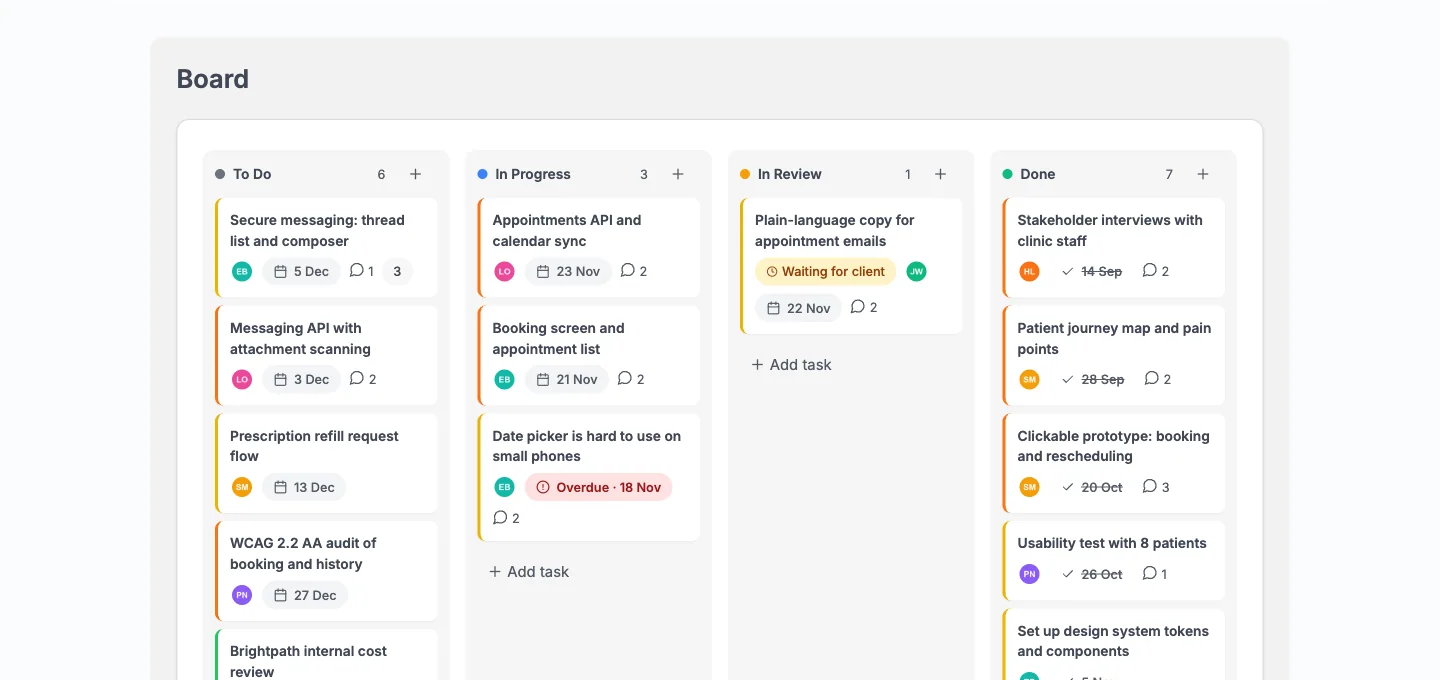
The team's board for the Patient Portal Redesign project with an Internal task, a Waiting for client badge and an Overdue badge
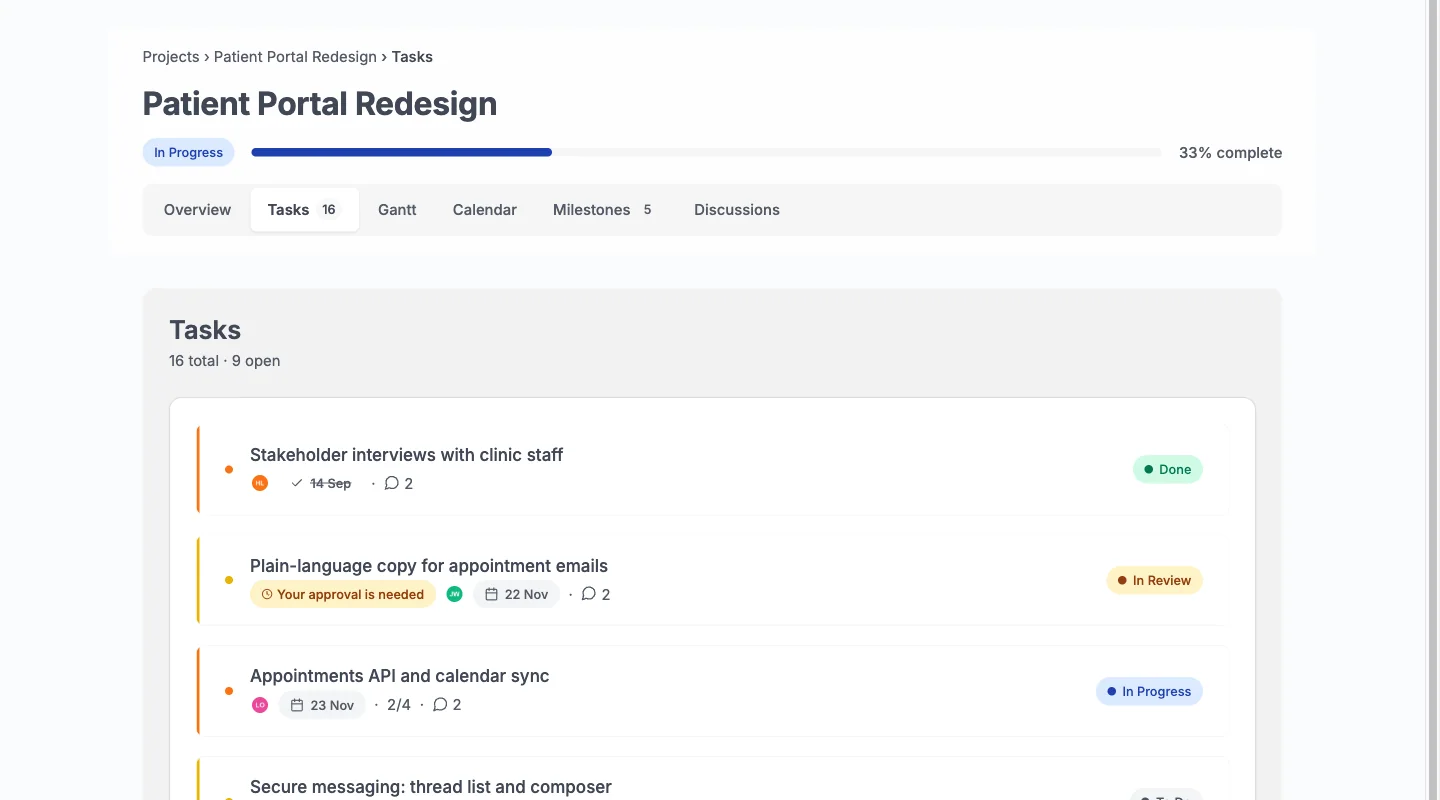
yoursite.com/projects/patient-portal-redesign/tasks
The same project as the client sees it: shared tasks only and a Your approval is needed badge on one task

Pay once. Then stop counting.

Per user
$0
Teammates and clients are users of the site you already host.
Per project
$0
The scale test ran 2,007 projects and 100,023 tasks.
Per feature
$0
Fifteen features, all in every licence. No add-on store.
Licence
Once
A one-time lifetime licence, priced per site. Yearly is also available.
Your data
Yours
Stored in your own database. The only outbound call is the licence check.

A self-hosted alternative to Trello, Asana, ClickUp and Teamwork.

If you are leaving a hosted project tool, or you run client work on WordPress already, this is what changes. Kanbanomy also imports your Trello and Asana boards.

How hosted project management tools typically compare with Kanbanomy
What mattersHosted project tools, typicallyKanbanomy
Where your project data livesOn the vendor’s serversIn your own WordPress database
What it costs as the team growsPer user, per monthOne licence per site, no seat meter
Adding a clientOften another paid seat or a guest allowanceA Client role, as many as you need
Keeping internal work privateDepends on the planInternal tasks and team-only threads, built in
Time tracking and GanttOften a higher plan or an add-onIncluded in every licence
If you stop payingAccess endsEverything keeps working, forever

Every feature, in every licence.

Laid out the way you will work: plan it, do it, share it, connect it. The licence differs only by how many sites you run.

Plan4

  • BoardDrag work through columns, with the keyboard if you prefer.
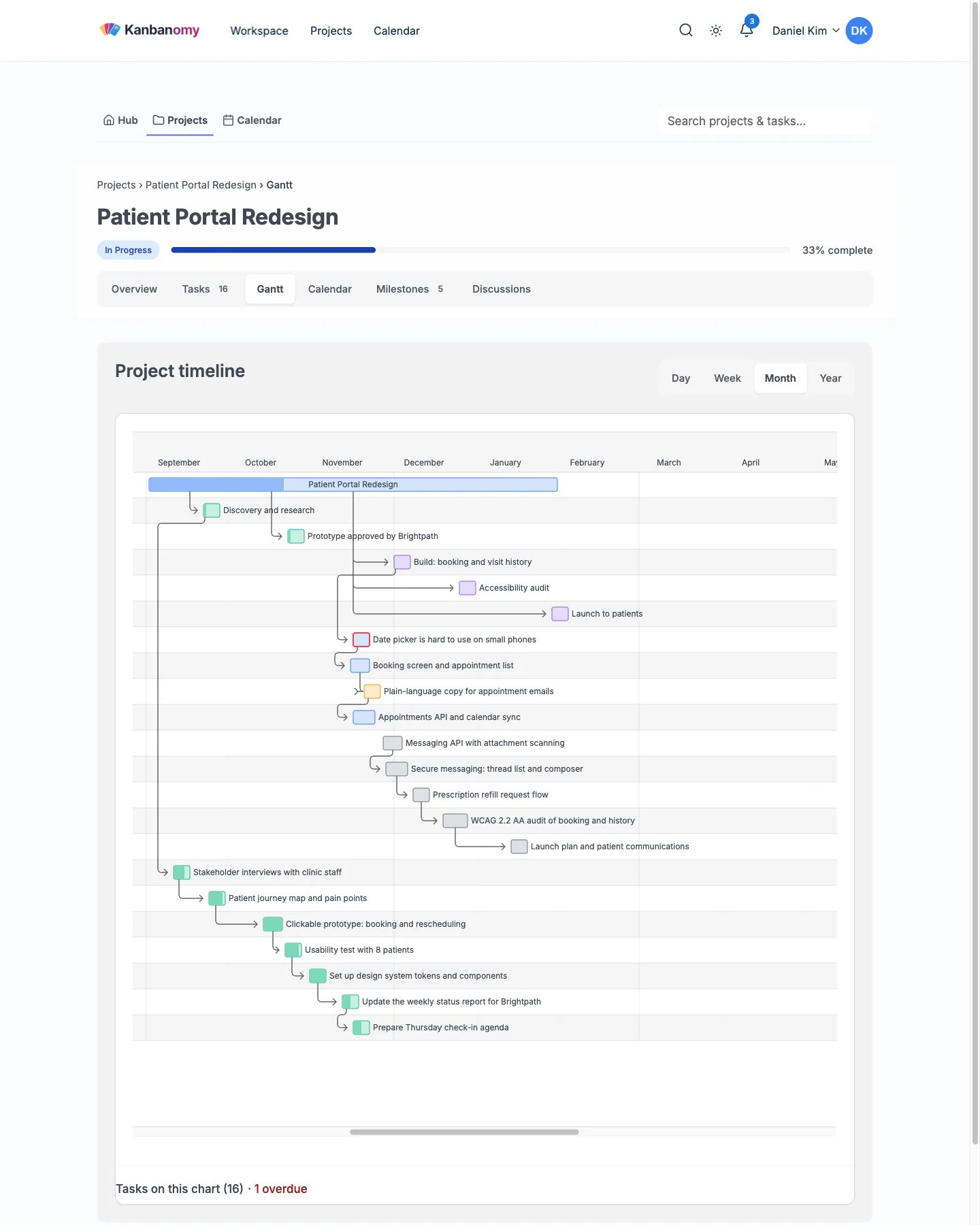
  • Gantt timelineDependencies draw as arrows. Overdue work is marked.
  • CalendarDeadlines by month, with a feed for any calendar app.
  • TemplatesStart a new client project from a saved one.

Do4

  • TasksSubtasks, checklists, labels, custom fields, recurring schedules.
  • Time trackingBillable against estimated, per project and per person.
  • AutomationsWhen a task reaches In Review, assign QA. Rules pause if they loop.
  • ReportsEstimated, logged, over or under, overdue. Export to CSV.

Share4

  • Client portalA Client role with no wp-admin and no view of internal work.
  • ApprovalsAsk a client to approve a task. They approve or ask for changes.
  • DiscussionsEach thread is team only or shared with clients.
  • Intake formsProposals land in an approval queue, guests off by default.

Connect4

  • Slack and webhooksPost updates to Slack. Send signed webhooks to other tools.
  • BuddyPress groupsLink a project to a private group. Its members join.
  • ImportTrello, Asana or CSV. Preview first, undo for 7 days.
  • AI assistantOff by default. Sees only what the asker can see.

On Monday, start with what is late.

The Hub opens on your projects, your open tasks and what is overdue, with upcoming milestones and recent activity beside them.

yoursite.com/hub
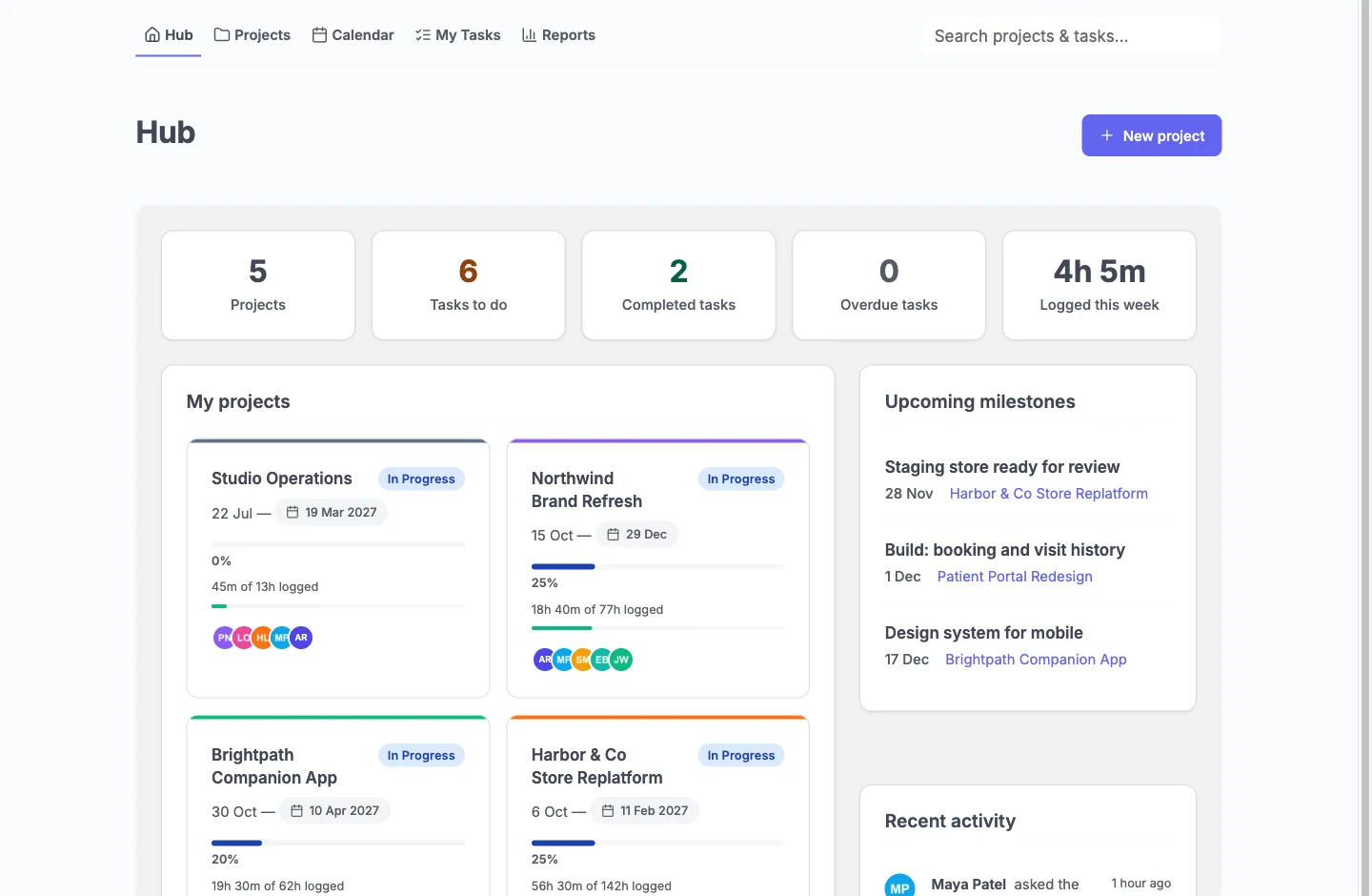
The team Hub: five projects with progress and logged hours, upcoming milestones and recent activity

Clients get a lighter Hub. Their projects with status, progress and the next milestone, plus a Waiting for your approval list. No task stats, activity or team avatars.
On Wednesday, move it once.

Drag a card to In Review and the list, the Gantt timeline and the calendar all show the new status.

yoursite.com/projects/patient-portal-redesign/gantt
The project timeline with task bars and dependency arrows from September to April
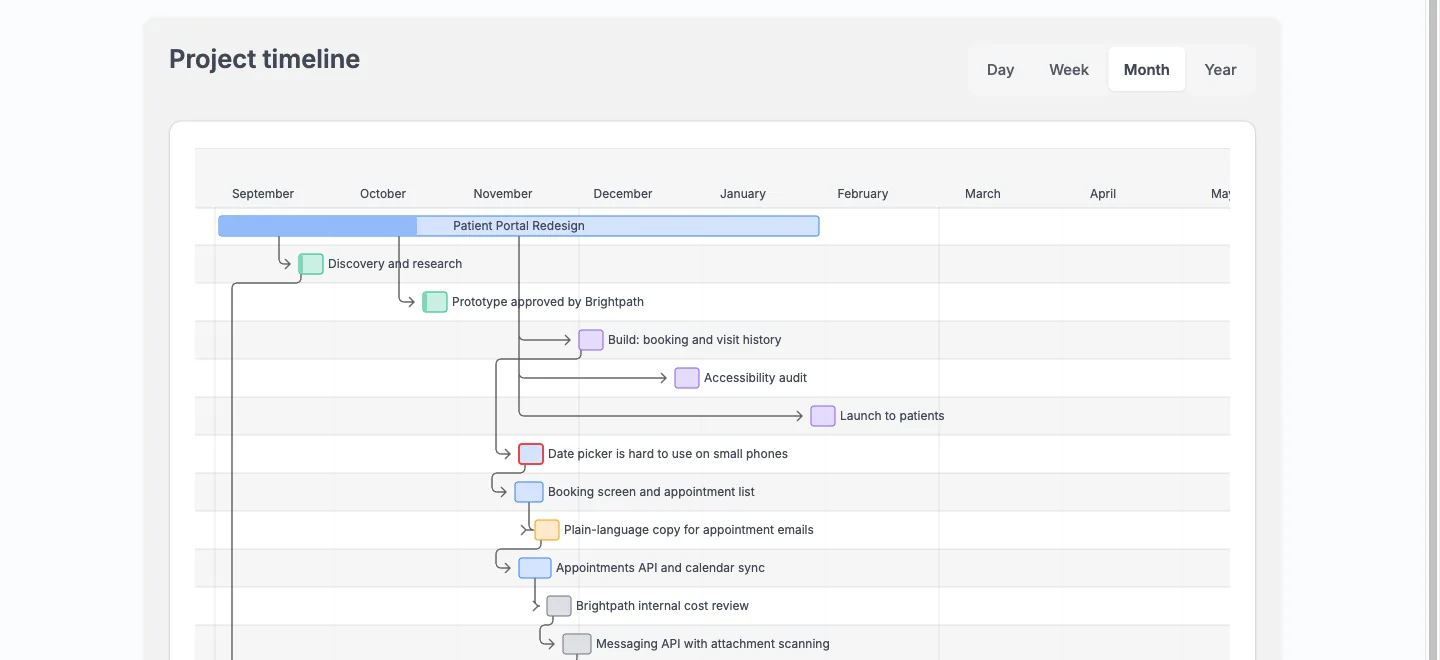
yoursite.com/projects/patient-portal-redesign/gantt
The client's Gantt timeline of the shared tasks

Clients see the timeline. The Board stays with your team.

On Thursday, get the sign-off.

It shows as Waiting for client on your board and Your approval is needed on theirs. They approve or ask for changes in one click.

yoursite.com/projects/patient-portal-redesign/discussions
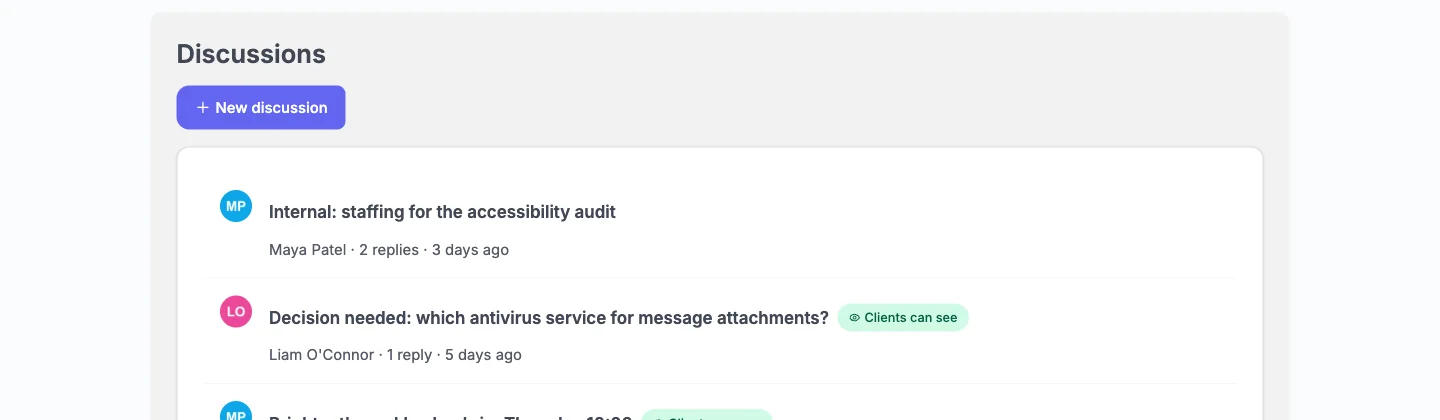
The team's discussions tab with an internal staffing thread, a decision thread and a weekly check-in
yoursite.com/projects/patient-portal-redesign/tasks
The client's task list with a Your approval is needed badge on Plain-language copy for appointment emails

They see Your approval is needed. The internal staffing thread never appears in their Discussions.

On Friday, see the hours behind the invoice.

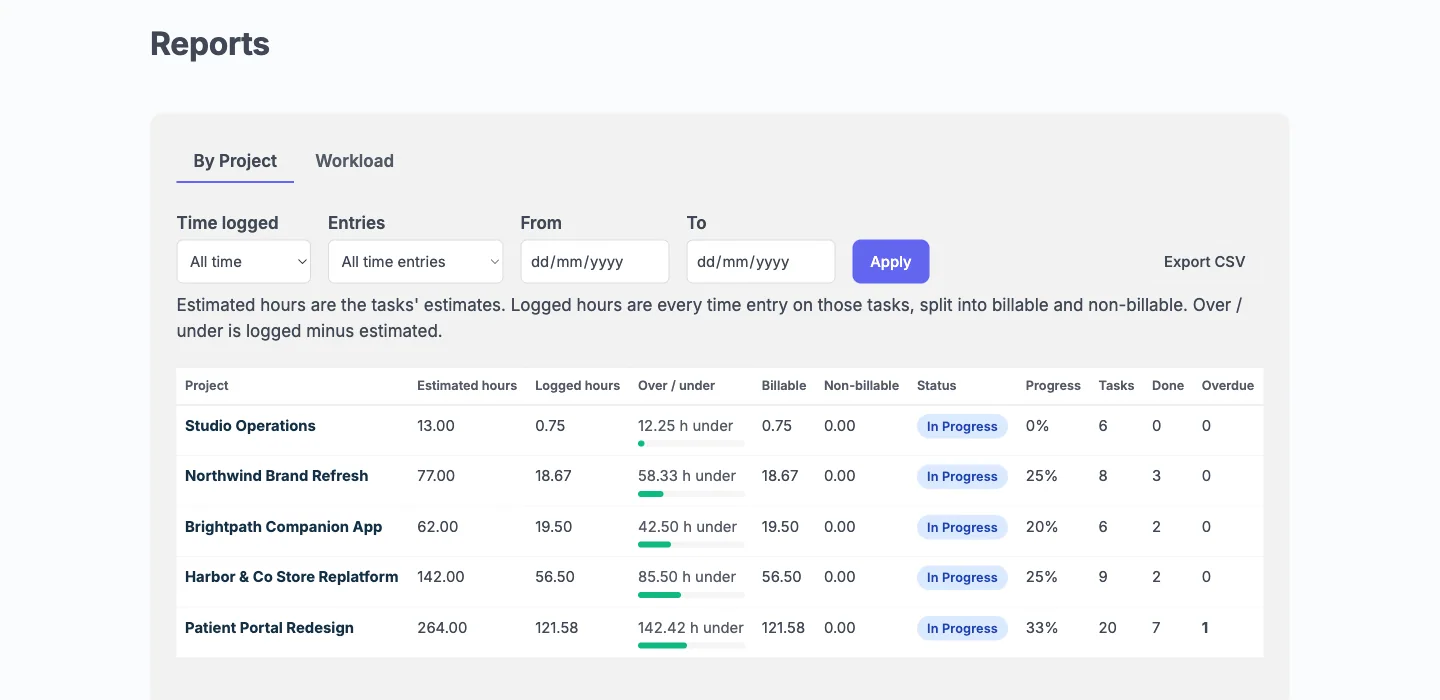
Log time on any task and split billable from non-billable. See logged against estimated for every project and every person.

yoursite.com/hub/?view=reports
The Reports table with estimated and logged hours, over or under, billable hours, progress and overdue counts for five projects

Logged time stays with your team. The budget shows to a client only when you switch it on for that project.

Next month, bring your boards.

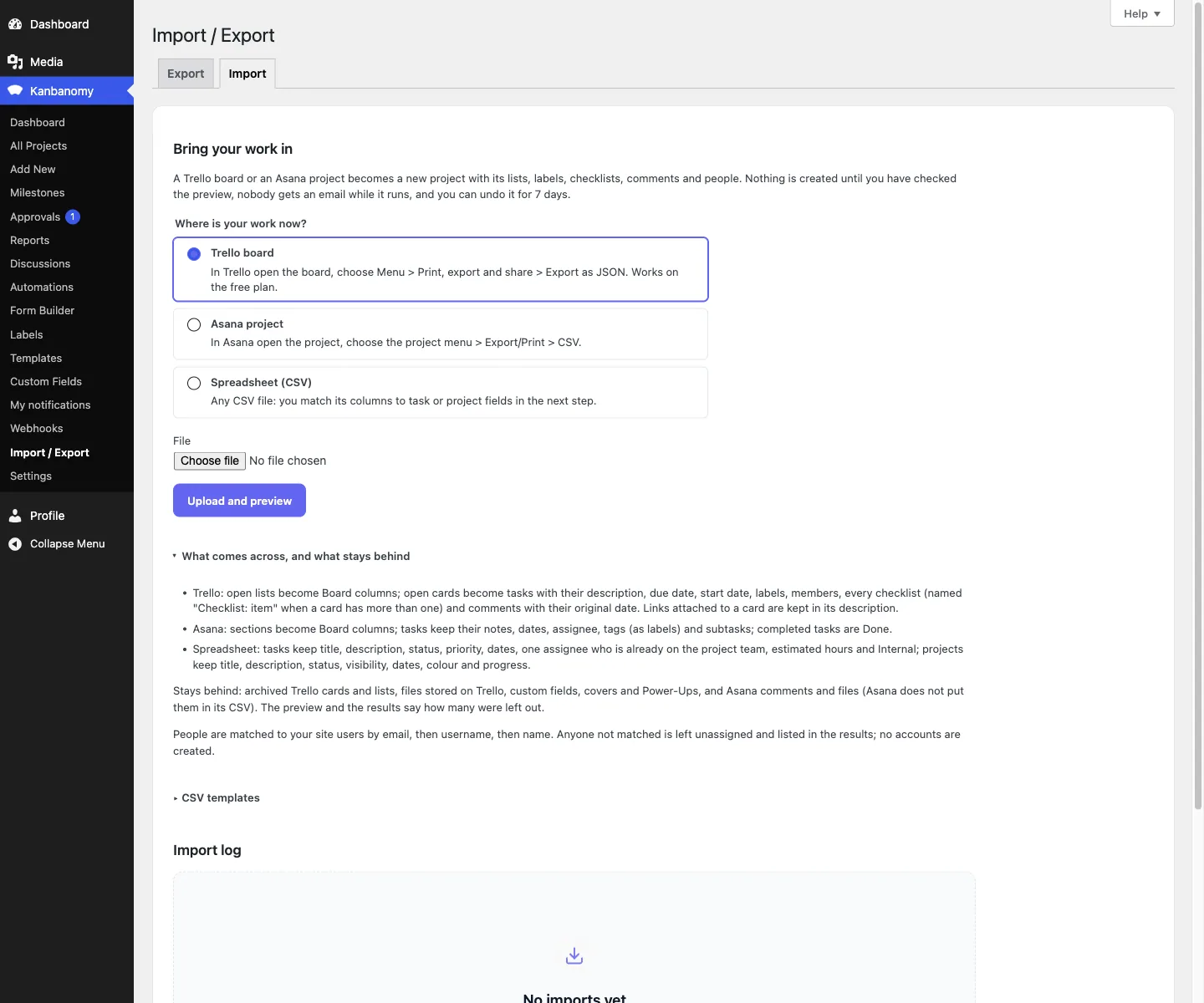
Upload a Trello export or an Asana CSV and check the preview first. Nobody is emailed while it runs, and you can undo it for 7 days.

yoursite.com/wp-admin/admin.php?page=kanbanomy-import-export
The import screen with Trello board, Asana project and Spreadsheet choices and a list of what comes across and what stays behind

Import is yours alone. Clients never see wp-admin.

What a client can see in the client portal.

Read this before you put a client in. It is what the plugin enforces, not a promise.

What the team and a client can see or do in a shared project
In a shared projectYour teamA client
Shared tasks and milestones Yes Yes
Gantt and calendar Yes Yes
Comments on a task Yes Yes, and edit their own
Approve a task or ask for changes Asks Answers
Discussions shared with clients Starts and replies Replies
Budget Yes Only if you show it

Try it before you ask.

Take the guided tour

A live client-services studio with real projects. Pick a role card, sign in as a team member or as a client, and follow the tour.

Try the demo

Launch your own copy

Spin up a sandbox of the same site on InstaWP and change anything you like: move tasks, add a client, import a board.

Launch a sandbox

What Kanbanomy will not do.

We would rather you read this here than find it after buying. The full list is in the evaluation guide.

  • Invoicing, a deal pipeline or ticketing. It manages projects.
  • A native mobile app. The interface works in a phone browser.
  • Client requests for timeline changes. Clients comment and approve.
  • Backups. Import is for moving in, so keep a real database backup.
  • Bundled translations. It is translation-ready with a .pot file.
  • Email delivery. That is your site’s, so budget for an SMTP plugin.

One licence per site. Nobody counts seats.

Every feature is in every licence. Pay yearly, or pay once with a lifetime licence.

  • No per-user fee and no per-project fee
  • Self-hosted: your data stays in your database
  • Every feature included, no add-on store
  • Works forever after the licence lapses

Personal

$69 / year

or $199 lifetime

One site, everything included. Where most studios start.

  • Every feature, no add-ons
  • Unlimited users, clients and projects
  • One site
  • Updates and support while the licence is active
Most popular

Developer

$99 / year

or $299 lifetime

Five sites you own or run for clients.

  • Everything in Personal
  • Up to five sites
  • One licence for your own site and client sites

Agency

$399 / year

For studios running client work across many sites.

  • Everything in Developer
  • Unlimited sites

30-day money-back guarantee on every paid plan · Refund policy

Questions

Before you install

  1. Is there a per-user or per-project fee?

    No. Kanbanomy runs on your own WordPress site, so your team and your clients are users of a site you already host. Add as many people, clients and projects as you like. The licence is priced per site, and a one-time lifetime licence is available.

  2. Is Kanbanomy a Trello alternative for WordPress?

    Yes, if you want boards inside your own WordPress site. It has Trello-style boards plus a Gantt timeline, a calendar, time tracking and a client portal, and it imports a Trello board with its lists, cards, labels, checklists and comments. It also imports Asana projects, so it works as an Asana alternative too.

  3. Is there a WordPress client portal plugin with boards and approvals?

    Kanbanomy is one. Clients get a Client role with no wp-admin, follow the tasks, milestones and Gantt you share, comment, and approve work when you ask. Internal tasks, team-only discussions and logged time never reach them.

  4. Is it self-hosted project management software?

    Yes. It runs on your own WordPress and stores everything in your own database, so there is no separate server to run and no per-seat fee. The only outbound request is the licence check.

  5. What does one licence cover?

    Personal covers one site, Developer covers up to five and Agency covers unlimited sites. Every feature is in every licence, so the tiers differ only by how many sites you run.

  6. Should I pick yearly or lifetime?

    Both include every feature. Yearly renews each year to keep updates and support. Lifetime is paid once. Either way the plugin and all its features keep working if the licence lapses.

  7. What happens if I stop paying?

    Nothing breaks. Every feature works without a licence key, and a lapsed licence keeps working forever. You stop receiving updates and support. Deleting the plugin also keeps your data unless you opt in to destroying it.

  8. Can I try it before I buy?

    Yes. Open the guided demo, a client-services studio with real projects, and sign in as a team member or as a client, or launch your own sandbox copy on InstaWP. Every purchase also has a 30-day money-back guarantee, and the plugin includes sample data you can load on a staging site and remove in one click. The refund terms are on the refund policy page.

  9. What does support cover?

    Installation, configuration and defects, for as long as your licence is active. Documentation is maintained alongside the code.

  10. What do I need to run it?

    WordPress 7.0 or newer and PHP 8.1 to 8.5. There is no build step: install and activate. It creates 25 database tables, so confirm your backup covers the whole database. Scheduled work uses Action Scheduler when present, and WP-Cron otherwise.

  11. Can clients see my internal tasks or the budget?

    No. Clients get a Client role with no wp-admin. Tasks marked Internal, team-only comments and discussions, activity and the team list stay with your team. The budget stays hidden unless you switch it on for a project.

  12. Can I move my Trello or Asana boards in?

    Yes. Trello (JSON) and Asana (CSV) import with a preview first, and you can undo an import for 7 days. Anything else, including Jira and Monday, comes in through a spreadsheet. No import brings milestones or time entries, and Trello files and archived cards stay behind.

  13. Does it replace Trello or Asana?

    For project work with clients, yes: boards, Gantt, a calendar, time tracking, approvals and a client portal. It is not invoicing, a deal pipeline or a helpdesk, and it has no native mobile app. The interface works in a phone browser.

  14. Does it send my project data to an AI service?

    Only if you turn the assistant on. It is off by default, uses the AI provider you set up in WordPress, sends only what the person asking can already see, and never sends budgets. Clients never get the assistant.

  15. Will it slow my site down?

    It was tested with 10,000 users, 2,007 projects and 100,023 tasks. Lists page on the server, so a 5,000-task project costs about the same as a 45-task one. Its scripts and styles load only on pages that use it.

  16. Does it work with my theme?

    It inherits your theme colours and ships dark mode and right-to-left support. It was checked on BuddyX, BuddyX Pro, Reign and Twenty Twenty-Five.

  17. How does it handle personal data?

    It connects to the privacy tools already in WordPress, so data export and erasure requests run through Tools, Export Personal Data and Erase Personal Data.

  18. Can developers extend it?

    Yes. There is a REST API, a module system and a documented hook surface. The developer guide is in the docs.

  19. Is it translated?

    It is fully translation-ready and ships a .pot template, but no bundled translations. You or a translator supply the .po file.

Run the work. Share the result.

Self-hosted project management with no per-user fee, no per-project fee and a one-time licence. Try the demo first, then pick the licence that fits your sites.