
13 min read
AI Lead Generation: A Step-by-Step System for Service Businesses

AI lead generation is the use of AI to find prospects, answer their first questions, score how well they fit, follow up on time, and route the good ones to a person. It is not a machine that closes deals for you, and it is not a way to skip the conversation. The tools handle the repetitive, time-sensitive parts. You still decide who you want as a client and you still pick up the phone.
Most guides on this topic hand you a ranked list of software. That gets the order backwards. Tools only help once you know which stage of the process is leaking leads. This post lays out a five-stage system, names real tools at each stage, and tells you what to leave to people.
It is written for service businesses: agencies, consultancies, clinics, accountants, legal and home-services firms. If you sell a handful of high-value engagements rather than thousands of low-priced orders, the advice below fits you.
In this post
- Why this is worth setting up now
- The five-stage system at a glance
- Stage 1: Attract
- Stage 2: Capture
- Stage 3: Qualify
- Stage 4: Nurture
- Stage 5: Hand off
- A worked example (illustrative)
- Pick your stack
- What to automate and what to keep human
- Four numbers to track
- Mistakes that waste the setup
- Frequently asked questions
Why This Is Worth Setting Up Now
Salesforce’s State of Sales report for 2026, a survey of 4,050 sales professionals run in August and September 2025, found that 87% of sales organizations already use some form of AI, and 54% of sellers have used AI agents. Your competitors are not waiting.
The same report has a number that matters more for a small team: 48% of sellers say they lack the bandwidth to do adequate cold outreach. That is the real problem AI solves for a service business. Not novelty. Capacity.
Speed is the other half. A well-known Harvard Business Review study from 2011, The Short Life of Online Sales Leads, audited 2,241 U.S. companies by sending each a web-generated test lead. Per Venture Harbour’s summary of the findings, 37% replied within an hour, 23% never replied at all, and the average reply among those that did answer within 30 days took 42 hours. Firms that contacted the lead within an hour were nearly seven times as likely to qualify it as firms that waited an hour longer.
That study is fifteen years old and the channels have changed. The direction has not. Whoever answers first usually gets the conversation, and an AI that replies in seconds at 11pm does what no part-time inbox owner can.
The Five-Stage System at a Glance
Every lead passes through the same five stages whether you plan for them or not. Naming them lets you find the weak one. We use the same logic in our five-step audit for service businesses: fix the earliest stage that is failing before you touch the later ones.
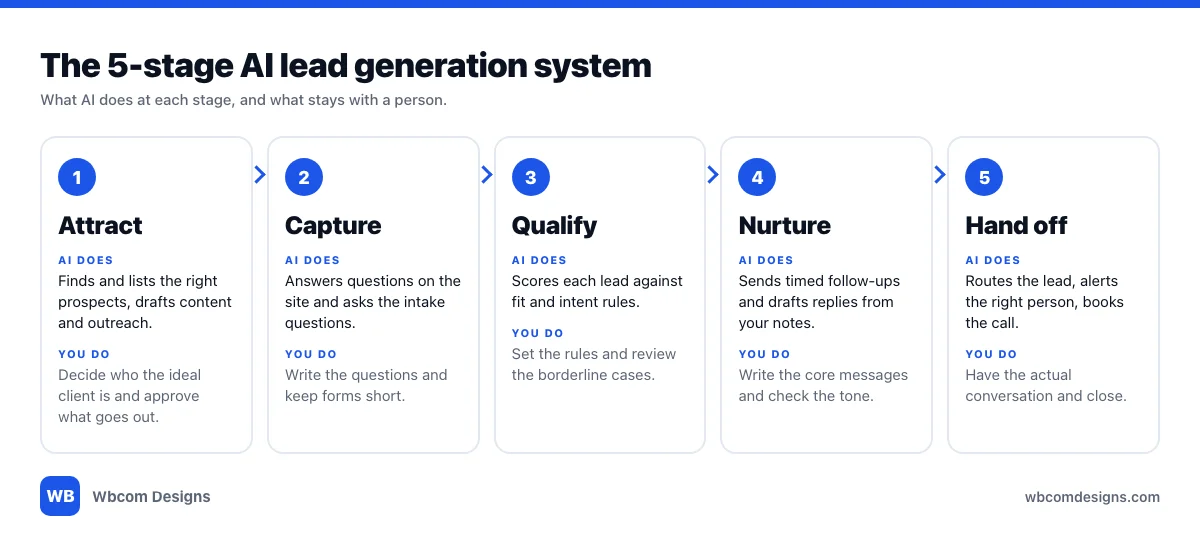
One rule applies across the board. AI does the repeatable work and a person owns the decision. The moment you reverse that, quality drops and clients notice.
Stage 1: Attract
What AI does here. It finds people who match your ideal client and helps you reach them. On the outbound side that means building prospect lists, researching accounts and drafting first-touch messages. On the inbound side it means helping you write and structure content around the questions your clients actually ask.
Example tools. Apollo is a B2B prospecting platform. Apollo says its database holds more than 240 million contacts and 30 million accounts, and that its AI agents can research accounts, build lists, write outreach and book meetings. Treat the database size as a vendor claim and check the fit for your own market before you pay. For inbound, Google Search Console is free and shows you the exact queries that already bring people to your site.
Setup checklist.
- Write one paragraph describing your best three clients: industry, size, the problem they came with, what they spent.
- Turn that paragraph into filters: location, job title, company size.
- Pull a small list first, fifty names at most, and read every one before sending anything.
- Have a person approve each message template. AI drafts, you edit.
A warning about cold email. Volume is the temptation, and it is the fastest way to damage your sending domain. Apollo itself lists domain warming, inbox rotation and reputation monitoring among its deliverability tools, which tells you the problem is real. If you are not ready to manage that, put your effort into inbound instead.
Stage 2: Capture
What AI does here. It answers the visitor’s first questions on your site, asks the intake questions you would ask on a call, and passes along structured answers instead of a vague “contact me” message.
Example tools. Tidio’s Lyro is an AI agent that answers from the content you give it, and Tidio lists lead qualification among its Smart Actions. On the form side, Fluent Forms is a WordPress form builder with multi-step forms, conditional logic and CRM integrations. The multi-step format matters. A five-field form that appears one question at a time tends to get finished more often than a wall of fields.
Setup checklist.
- List the four or five facts you need before a call is worth having: what they need, rough budget, timeline, who decides.
- Turn those into form questions, with conditional logic so people only see what applies to them.
- Feed any chat agent your real service pages and pricing policy, and nothing else. It should say “I don’t know, here is how to reach us” instead of inventing an answer.
- Test it as a stranger on a phone before it goes live.
Stage 3: Qualify
What AI does here. It turns the answers and behaviour of each lead into a score, so the people you call first are the ones most likely to become clients. This is the stage most small businesses skip, and it is why their best leads sit behind the worst ones in the inbox.
There are two kinds of scoring, and the difference is worth knowing before you buy anything.
Rules-based scoring. You assign points. A named budget adds points, a free email address subtracts them, a visit to your pricing page adds more. Groundhogg offers this inside WordPress through activity-tracking rules, available on its Plus plan and up. HubSpot’s manual lead scoring works the same way and is available with Marketing Hub or Sales Hub Professional or Enterprise.
AI-built scoring. The tool studies which past contacts became customers and builds the score itself. In HubSpot this requires a Marketing Hub Enterprise subscription, and it needs at least 50 contacts, with 25 that converted and 25 that did not. If you close a dozen clients a year, you do not have the history for that. Start with rules.
A third option sits between the two and costs very little. Send the form answers to a general-purpose AI model through an automation step, ask it to score the lead against your written criteria, and have it return a score and a two-line summary. That is a prompt and a rubric, not a product. It works well when the rubric is specific and badly when it says “rate how good this lead is.”
Setup checklist.
- Write the rubric first, in plain words, before you open any tool.
- Keep it to five or six signals. More than that and nobody can explain why a lead scored 62.
- Set one threshold that means “call today” and one that means “nurture only.”
- Read twenty scored leads by hand. If your gut disagrees with the score, fix the rubric.
Stage 4: Nurture
What AI does here. It sends the right follow-up at the right time, drafts replies from your notes, and keeps leads that are not ready warm without someone remembering to check on them. Most deals in a service business are lost to silence, not to a competitor.
Example tools. FluentCRM is a WordPress plugin for email marketing, contact management and automation. Its automations can start from WordPress events such as a form submission, it stores contact data in your own WordPress database, and it connects to Zapier and Make. You still need an SMTP service such as Amazon SES, Mailgun or SendGrid to send the mail. Groundhogg is the other WordPress-native option and describes itself as a CRM for WordPress, with pipelines and booking built in. We compared both in our guide to the best WordPress CRM plugins and wrote up the Groundhogg review separately.
Setup checklist.
- Write the core sequence yourself: a confirmation, a useful follow-up a day later, a case-style email on day four, a soft check-in a week out.
- Use AI to adapt each message to the lead’s stated problem, not to write the sequence from nothing.
- Stop the sequence the moment a lead replies or books. Nothing looks worse than an automated email arriving after a real conversation started.
- Leave a plain-text, human-sounding sender name and a real reply-to address.
Stage 5: Hand Off
What AI does here. It routes a qualified lead to the right person, sends that person an alert with the score and summary, and offers the lead a way to book time. The AI’s job ends when a human takes over.
This is where the speed research bites. A hot lead that waits three days for a human reply is a lead that the first two stages paid for and the business then lost. Set a rule that a lead above your “call today” threshold triggers an immediate alert by email or chat, with the full context attached, so the person calling is never asking questions the form already answered.
Setup checklist.
- Name one owner for every hot lead, and a backup for when that person is out.
- Put the score, the summary and the original answers in the alert. Nobody should open the CRM to understand why they are calling.
- Offer a booking link in the first automated reply for leads above the threshold.
- Measure the gap between submission and first human contact. It is the number most worth shrinking.
A Worked Example (Illustrative)
The following is a made-up example to show how the stages connect. It is not a client case study and the figures are not results.
Picture a six-person accounting practice that takes on small-business clients. Its website is WordPress. Today, enquiries arrive through a contact form and land in a shared inbox.
- Capture. The contact form is replaced with a three-step form: what the business does, what help is needed, and when they want to start. Conditional logic skips the payroll questions for people who only need tax filing.
- Qualify. On submission, an automation sends the answers to an AI model with a written rubric. The rubric awards points for being in the practice’s service area, wanting ongoing work rather than a one-off filing, a start date within a month, and being the owner or finance lead. It returns a score from 0 to 10 and a two-line summary.
- Nurture. Every lead is tagged in the CRM and receives a confirmation within a minute. Leads below the threshold enter a four-email sequence. Leads above it skip the sequence.
- Hand off. Leads above the threshold trigger an alert to the partner on rotation, with the summary and answers, and the confirmation email carries a booking link. If nobody has contacted the lead within a few working hours, a second alert goes to the backup.
Notice what stayed human. The partners wrote the rubric, wrote the emails and take every call. The system only decides who gets called first and makes sure nobody waits in silence.
Pick Your Stack
Buy the smallest setup that covers your lead volume. A heavy CRM with no leads to fill it is just a subscription.
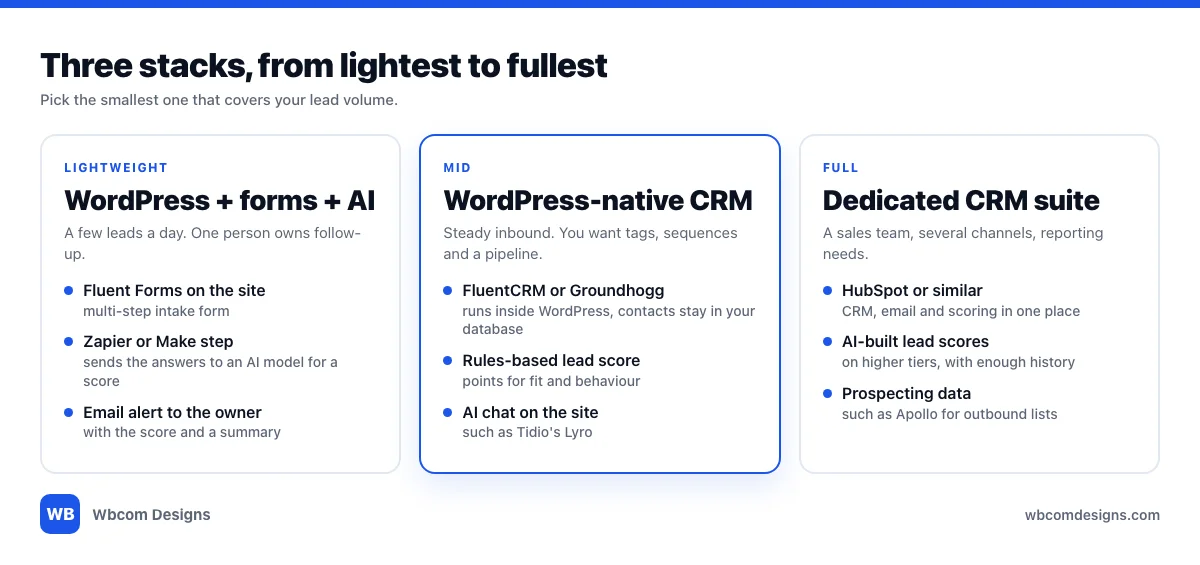
Lightweight: WordPress, a form plugin and an AI step. Right for a few leads a day with one person owning follow-up. A form plugin captures the lead, a Zapier or Make step calls an AI model to score it, and an email alert goes to the owner. Cheap to run, and easy to move away from.
Mid: a WordPress-native CRM. Right when inbound is steady and you want tags, sequences and a pipeline. FluentCRM or Groundhogg keeps contacts in your own site, which suits businesses that care about owning their data. Add a rules-based score and, if you want it, an AI chat agent on the site.
Full: a dedicated CRM suite. Right for a sales team, several lead channels and real reporting needs. HubSpot is the common example. Expect the AI features to sit on higher tiers and to need history to learn from.
If your site runs on WordPress, start in the first column and move right only when something breaks. Wiring the forms, the CRM and the automation together is the part that usually needs a developer. Picking the tools is the easy bit.
What to Automate and What to Keep Human
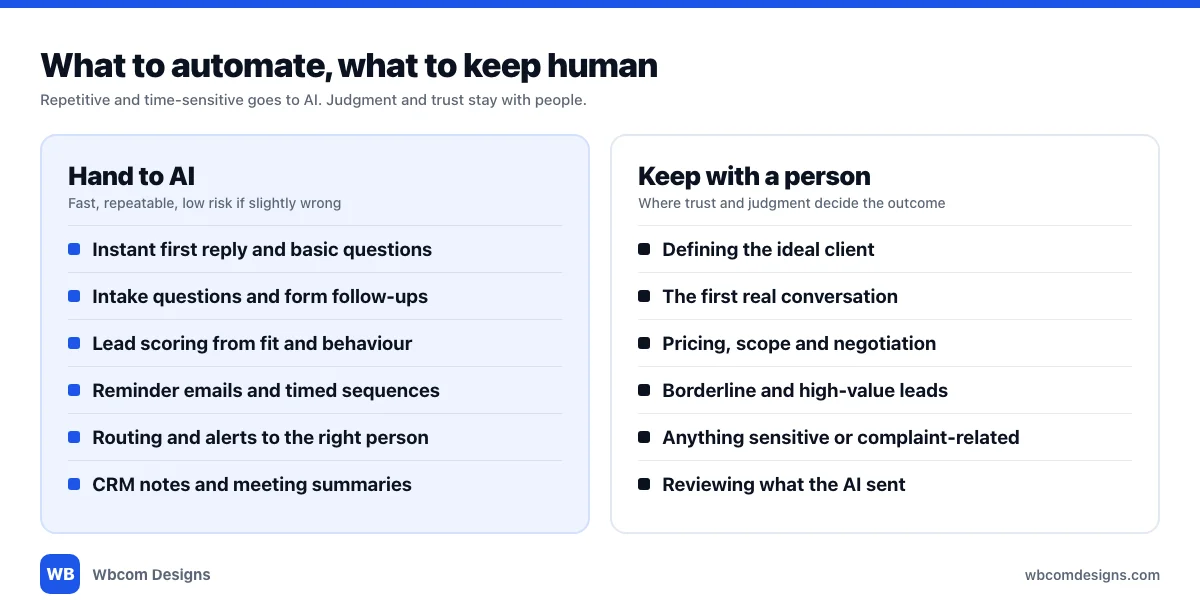
A simple test sorts most tasks. If it is repetitive, time-sensitive and low-risk when slightly wrong, automate it. If trust, judgment or money is on the line, keep a person in it.
Pricing is the clearest example. An AI can tell a visitor where your pricing page is. It should not quote a price, agree a scope or negotiate. The same goes for anything sensitive: a complaint, a legal question, a lead who sounds distressed. Route those to a human immediately and say so.
Be honest with people, too. If a chat agent is answering, say it is an assistant and give a way to reach a person. Clients forgive automation. They do not forgive being fooled by it.
Four Numbers to Track
You do not need a dashboard full of charts. These four tell you whether the system works.
| Metric | What it tells you | Fix it at |
|---|---|---|
| Time to first human contact | How long a hot lead waits after submitting | Hand off |
| Form completion rate | Whether your intake asks too much | Capture |
| Qualified-to-booked rate | Whether the score points at real prospects | Qualify |
| Lead-to-client rate by source | Which channels bring people who actually buy | Attract |
Look at the first one every week. It is the cheapest to improve and the one most businesses have never measured.
Mistakes That Waste the Setup
Buying the tool before writing the rubric. The scoring criteria are the system. The software only applies them.
Letting the chat agent improvise. Give it your approved content and a clear instruction to hand off when it is unsure.
Nurturing people who already replied. Wire a stop rule into every sequence on day one.
Chasing volume on cold outreach. A smaller, well-researched list that gets read beats a large one that lands in spam.
Trusting a score nobody has read. Twenty leads, once a month, takes ten minutes and catches most drift.
Frequently Asked Questions
What is AI lead generation?
It is the use of AI at each step of finding and winning clients: building prospect lists, answering visitors, scoring leads, sending follow-ups and routing the best leads to a person. It supports your sales process. It does not replace the conversation that closes the work.
Do I need a CRM to start?
No. A form, an automation step and an email alert is enough for a few leads a day. Add a CRM when you start losing track of who needs a reply, or when you want sequences and a pipeline view.
What is lead qualification and why does it matter?
Lead qualification is deciding which enquiries deserve your time first, based on fit and intent. Without it, leads get answered in the order they arrive, and a strong prospect waits behind a poor one.
Is AI lead scoring accurate enough to trust?
Trust it to sort, not to decide. A clear written rubric gives consistent results. A vague one does not. Review a sample by hand regularly, and keep a person in the loop for borderline and high-value leads.
Can I do this on WordPress?
Yes. A form plugin such as Fluent Forms, a WordPress-native CRM such as FluentCRM or Groundhogg, and an automation tool such as Zapier or Make cover capture, scoring, nurture and alerts without leaving your own site’s stack.
How fast should I reply to a new lead?
As fast as you can sustain. The Harvard Business Review study found far better qualification odds for firms that responded within an hour. An instant automated acknowledgement plus a human reply the same day is a realistic standard for a small team.
Will clients mind talking to an AI?
Not if you are upfront and the AI is useful. Say it is an assistant, answer from approved content, and make a real person easy to reach. Problems start when an AI pretends to be a person or blocks access to one.
Where should I start if I have no system today?
With Hand off. Measure how long a new enquiry waits for a human reply, and cut that first. It costs almost nothing, and it makes every later stage more valuable.
Build the system in the order leads travel through it, and stop at the first stage that is leaking. Most service businesses find the biggest gain is not a smarter tool but a faster, more reliable reply.
Want help wiring forms, a WordPress CRM and an automation flow into your site? Wbcom Designs builds and supports WordPress sites for businesses that need the plumbing done properly.
Interesting Reads:
Related reading