13 min read
Best Sales Automation Software in 2026: 10 Tools for Automated Sales

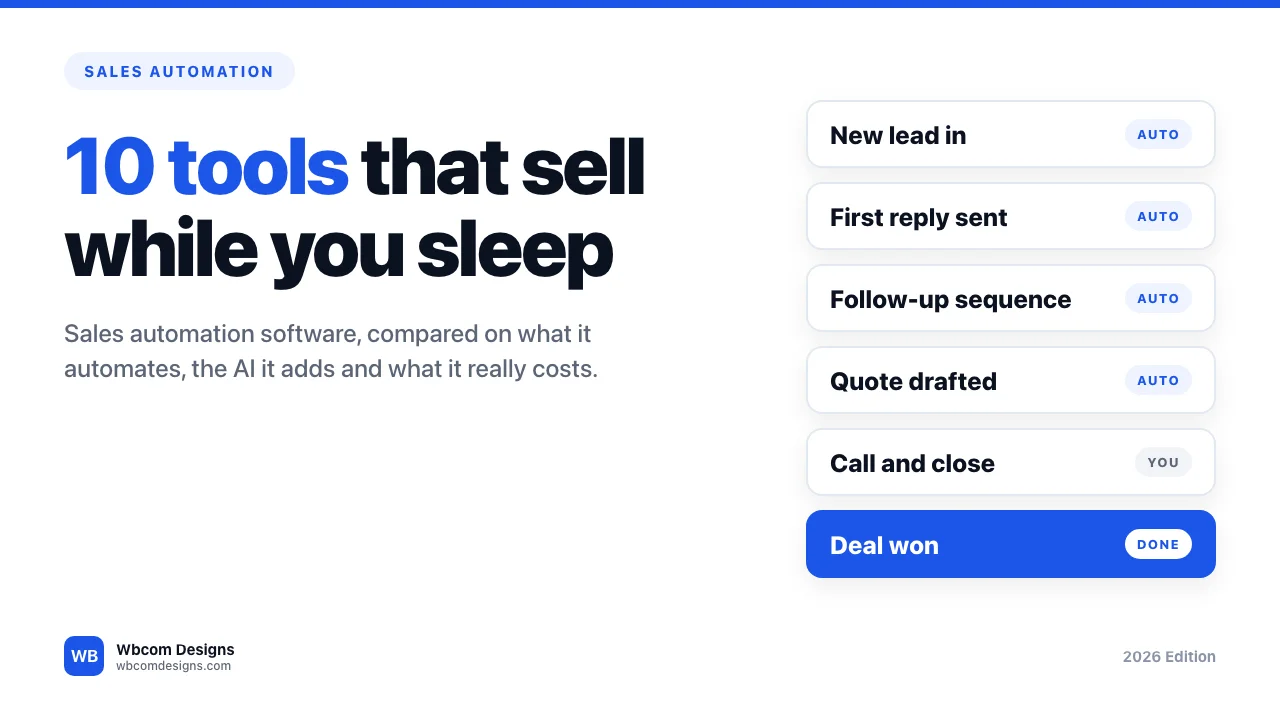
The best sales automation software is the one that automates the step where you lose the most deals. For most teams, HubSpot Sales Hub is the safest all-in-one pick, Pipedrive suits small teams that live in a pipeline, and Zoho CRM gives you the most for the least money. If your site runs on WordPress, Groundhogg and FluentCRM keep your contacts in your own database. The other six tools below cover prospecting, AI outreach, phone selling and proposals.
“Automated sales” sounds like a machine that closes deals. It is not. It is software that handles the repetitive parts of selling so a person can spend their time on the conversations that decide whether you win.
This guide ranks ten tools by how many kinds of business they suit, and gives each one the same five checks: who it is for, what it automates, where it falls short, what it costs and a one-line verdict. Every price comes from the vendor’s own pricing page, verified in November 2026. We did not run hands-on tests, and where a vendor’s page contradicts itself, we say so instead of picking a number.
In this post
- Sales automation software at a glance
- How we picked these tools
- Why sales automation is worth the setup
- 1. HubSpot Sales Hub
- 2. Pipedrive
- 3. Zoho CRM
- 4. Close
- 5. Salesforce Sales Cloud
- 6. Apollo
- 7. AiSDR
- 8. PandaDoc
- 9. Groundhogg
- 10. FluentCRM
- Which tool fits your business
- What to automate and what to keep human
- What automation really costs
- Mistakes that waste the setup
- Frequently asked questions
Sales Automation Software at a Glance
Prices are in US dollars, per user per month unless noted, and were checked on each vendor’s pricing page in November 2026.
| Tool | Best for | What it automates | AI features | Starting price | Free plan |
|---|---|---|---|---|---|
| HubSpot Sales Hub | All-in-one teams | Workflows, sequences, lead scoring | Agents, paid in credits | $7 or $20 per seat (page unclear) | Yes, 2 users |
| Pipedrive | Small pipeline teams | Pipeline actions from Growth up | Meeting intelligence | $14 (Lite, annual) | 14-day trial |
| Zoho CRM | Tight budgets | Workflows, assignment, cadences | AI agents, Zia | $14 (Standard, annual) | Yes, 3 users |
| Close | Phone and SMS selling | Workflows, dialers, bulk email | Chloe on every plan | $9 to $19 (Solo) | 14-day trial |
| Salesforce | Large, custom teams | Sales flows, lead routing | Agentforce from Core | $25 (Starter Suite) | Not listed |
| Apollo | Finding prospects | Email sequencing | On Professional | See vendor site | Yes |
| AiSDR | AI-run outreach | Email and LinkedIn outreach | Writes and sends | $1.50 per prospect | Pay as you go |
| PandaDoc | Quotes and signatures | Documents, approvals | AI Assistant | $19 (Starter, annual) | Yes, 5 docs a month |
| Groundhogg | WordPress sites | Automated flows, scoring | None listed | $20 a month per site | Not listed |
| FluentCRM | WordPress, free start | Email automations, segments | None listed | Free plugin | Yes |
How We Picked These Tools
We started from what ranks for sales automation searches, then added tools that cover jobs the big CRMs skip. Each had to pass four checks.
It automates something specific. A tool that only stores contacts is a database, not automation. We looked for workflows, sequences, routing, scoring or document handling.
The pricing is public, or we say it is not. Where a page hides the numbers, you will see “see vendor site” instead of a guess.
The AI part is real. We counted AI only when the vendor’s own page names a feature and the plan that includes it.
There is a fit for small teams. Several enterprise-only products are missing on purpose, because most readers of a WordPress agency’s blog are not buying for 500 reps.
The ranking is based on public documentation and pricing pages, not hands-on testing. Treat it as a shortlist to trial, not a verdict.
Why Sales Automation Is Worth the Setup
Selling is a small part of a salesperson’s week. Salesforce’s State of Sales report for 2026, a survey of 4,050 sales professionals run in August and September 2025, found that the average seller spends 40% of their time actually selling. The rest goes to research, data entry and admin.
The same report shows where sellers expect relief. Those using or planning AI agents expect to cut prospect research time by 34% and email drafting time by 36%. These are expectations from a vendor-run survey, not measured results, so read them as direction rather than promise.
The practical point is simple. Every hour a tool takes off research and follow-up is an hour back for calls. If you are still deciding how automation fits a wider system, our AI lead generation system for service businesses shows the full path from first enquiry to handoff.
1. HubSpot Sales Hub
- Best for: teams that want sales, marketing and service in one place.
- What it automates: workflows, email sequences, lead scoring and quote-based workflows on the top tier. Starter allows up to 50 workflows with restricted triggers, Professional up to 300 and Enterprise up to 1,000.
- AI: Agent Builder plus named Prospecting, Data and Customer agents. They run on HubSpot Credits at $0.010 each, which reset monthly and do not roll over.
- Limits: the free plan has no sequences, workflows or lead scoring. Professional carries a one-time $1,500 onboarding fee and Enterprise $3,500.
- Pricing: Free for up to 2 users. Starter shows $7 and $20 per seat on the same page without saying which is which. Professional is $90 per seat a month on an annual commitment or $100 monthly. Enterprise is $150.
Verdict: The default choice when you do not want to stitch tools together, as long as you budget for onboarding and credits.
2. Pipedrive
- Best for: small teams that think in deal stages.
- What it automates: actions that fire as deals move through the pipeline. Pipedrive’s support documentation says automations arrive with Growth and higher, with 50 active automations per company on Growth, 150 on Premium and 250 on Ultimate.
- AI: the Lite plan copy mentions meeting intelligence for admin work. Check the current plan page for the rest.
- Limits: Lite has no automations at all, so the cheapest tier is a plain pipeline. The caps are per company, not per user.
- Pricing: Lite $14, Growth $39, Premium $59 and Ultimate $79 per seat a month, billed annually, with a 14-day trial. Pipedrive’s pricing page blocked our fetch, so these figures come from Pipedrive’s own listing in search results. Confirm them before you buy.
Verdict: A clean fit for a team of three to fifteen that wants the pipeline front and centre, as long as you start on Growth.
3. Zoho CRM
- Best for: teams that need many users on a small budget.
- What it automates: workflow automation on the free tier, then assignment rules and cadences for multichannel follow-up. Professional adds Blueprint process automation, and Enterprise adds journey orchestration and territory management.
- AI: AI agents on Standard and the Zia assistant on Enterprise.
- Limits: the pricing page shows two feature grids that disagree about what Standard includes, so confirm cadences and AI agents before you pay. Local taxes are added to the listed prices.
- Pricing: Free for up to 3 users. Standard $14, Professional $23, Enterprise $40 and Ultimate $52 per user a month, all billed annually. No monthly rate appears on the page we checked.
Verdict: The cheapest way to get real workflow automation across a whole team.
4. Close
- Best for: reps who sell by phone, SMS and email all day.
- What it automates: workflows on Growth and Scale only, plus a power dialer, bulk email and, on Scale, a predictive dialer and live call coaching.
- AI: its Chloe assistant is on every plan, with AI credits that grow by tier. Chloe inside workflows needs Growth or Scale.
- Limits: Solo is capped at one user and 10,000 leads, and neither Solo nor Essentials includes workflows. Calling is billed by usage, with most outbound calls around $0.02 a minute. The page never mentions sequences.
- Pricing: Solo $19 listed and $9 under the current discount banner, Essentials $49 and $35, Growth $109 and $99, Scale $149 and $139. The page does not say which billing period the lower figures assume. The trial runs 14 days with no card.
Verdict: Pick it if the phone is your main channel. Skip it if you only need email follow-up.
5. Salesforce Sales Cloud
- Best for: larger teams with custom processes and a budget for admin time.
- What it automates: Starter Suite includes built-in sales flows and lead routing. Pro Suite adds more customisation and automation plus quoting and forecasting.
- AI: Starter syncs emails, events and contacts with AI. Core and above add Agentforce skills, and Agentforce for Sales is a separate $125 per user add-on.
- Limits: costs climb fast once you leave Starter. Salesforce also states that its pricing page is for information only and subject to change.
- Pricing: Starter Suite $25 per user a month, monthly or annual. Pro Suite $100, Core $195, Advanced $395 and Max $550, all annual.
Verdict: Strong when your process is complicated enough to need it. Overkill for a five-person team.
6. Apollo
- Best for: building prospect lists and starting outbound.
- What it automates: email sequencing from the Basic plan up. The Professional plan adds AI features, call recording and deeper CRM integrations.
- Limits: the free plan connects Gmail only for email campaigns. Credits are pooled across the team, expire each billing cycle and do not roll over. Extra credits are an add-on.
- Pricing: Free, Basic, Professional and Custom plans exist, but the pricing page printed no dollar amounts when we checked. See the vendor site.
Verdict: The place to find the people. You will still need a CRM behind it to track what happens next.
7. AiSDR
- Best for: teams that want an AI to run first-touch outreach.
- What it automates: research, writing and sending across email and LinkedIn, including connection requests, direct messages, InMail and voice notes. InMail needs a Sales Navigator account. It syncs both ways with HubSpot.
- Limits: you pay for every person prospected, so cost scales with volume. Team plan pricing is unpublished and aimed at 1,000 or more contacts a month. The page gives two minimum campaign costs, $7.50 and $3, in different places.
- Pricing: $1.50 per person prospected, charged daily with no monthly fee. A warmed-up mailbox is $33, a managed campaign $149 and a fully managed service $2,500 a month.
Verdict: Worth a small paid test if you have a clear audience. Watch the daily charge in the first week.
8. PandaDoc
- Best for: teams whose deals stall at the proposal.
- What it automates: document creation, approvals and e-signature. Business adds unlimited templates, approval workflows, pricing tables, payments, CRM integrations and custom quotes. CPQ is an optional extra on Enterprise.
- AI: an AI Assistant from Starter up, with document data extraction on Business and above.
- Limits: it is not a CRM. Workflow automation tools, bulk send and web forms are optional extras that use credits. The page is also inconsistent about whether the free plan includes the editor.
- Pricing: Free allows 5 documents a month. Starter is $19 and Business $49 per seat a month, billed annually. Enterprise is custom.
Verdict: A fast fix when quotes take days. Pair it with a CRM.
9. Groundhogg
- Best for: WordPress businesses that want CRM and automation inside their own site.
- What it automates: automated flows on every plan. Lead scoring and a sales pipeline start on Plus. SMS automation, cart abandonment and conditional logic start on Pro.
- Limits: licences are per site, there is no monthly billing and the page lists no free version or AI features. A 14-day refund applies.
- Pricing: Basic $20 for 1 site, Plus $40 for up to 3, Pro $50 for up to 5 and Agency $100 for up to 25. Billed annually, shown per month.
Verdict: Good when data ownership matters to you. We cover it in more depth in our Groundhogg review.
10. FluentCRM
- Best for: WordPress sites that want email automation without a monthly bill.
- What it automates: email campaigns, automations that run on WordPress events and segmentation by lists and tags. On WordPress.org it shows 80,000+ active installations and a 4.8 rating.
- Limits: the plugin page does not mention a deal pipeline or quoting, so check that before you rely on it for sales tracking. Integrations with WooCommerce, EDD, LMS and membership tools are labelled Pro.
- Pricing: the core plugin is free with unlimited contacts and campaigns. Pro pricing did not load on the page we checked, so see the vendor site.
Verdict: The lowest-cost start on this list. For a wider comparison of WordPress options, read our best WordPress CRM plugins roundup.
Which Tool Fits Your Business
Start from your situation, not from the feature list.
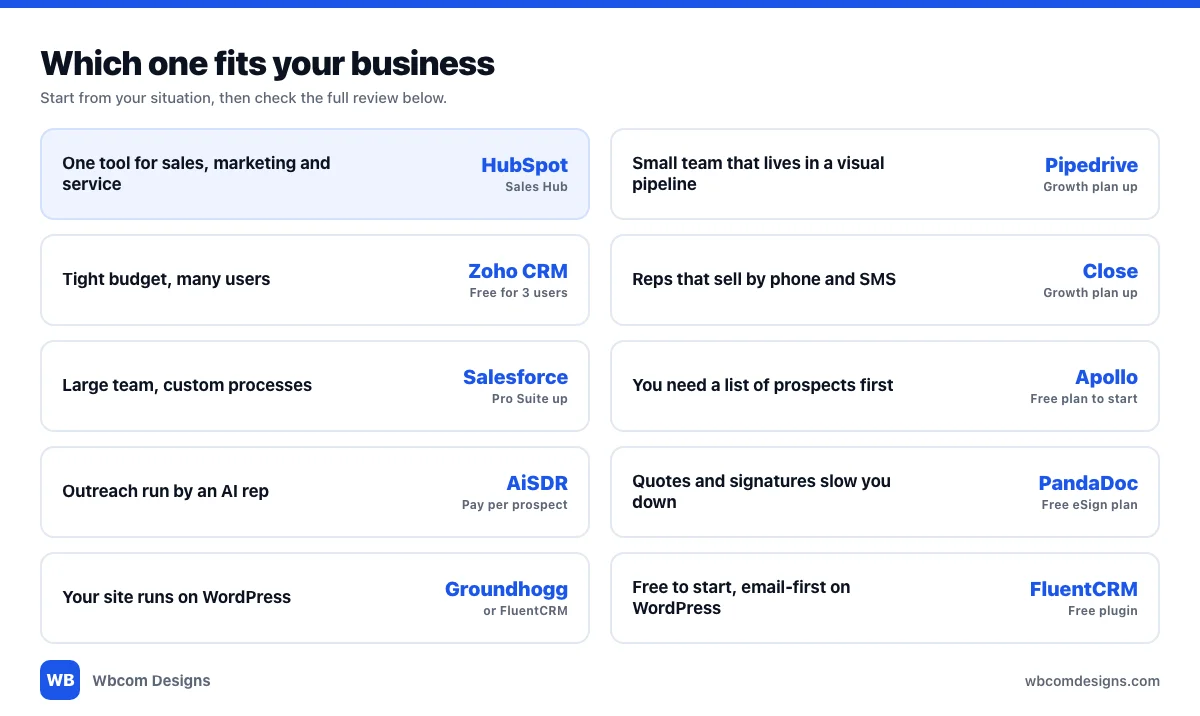
Solo operators should begin with a free tier: Zoho CRM, HubSpot’s free plan or FluentCRM. Small teams get the most from Pipedrive Growth or Zoho Standard. Anyone selling by phone should look at Close first. If you sell through WooCommerce, our guide to the best WooCommerce CRM plugins covers store-side options. If what you need is pipeline visibility rather than automation, our list of sales tracking software tools is the better starting point.
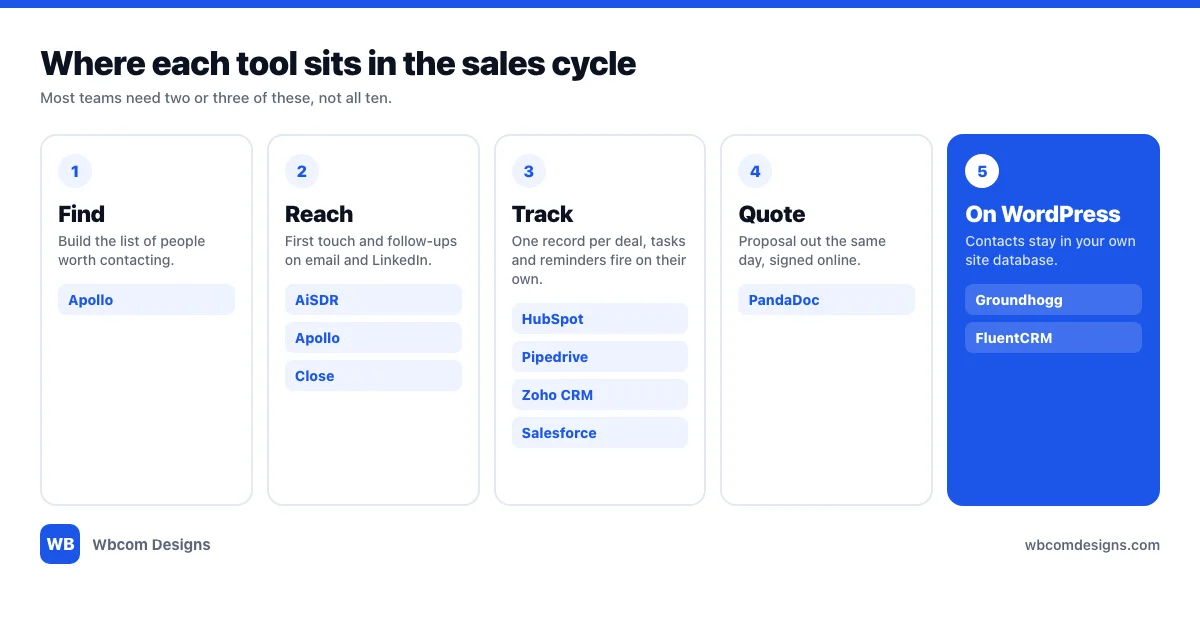
Most teams end up with two or three tools, not ten. This map shows where each one sits.
What to Automate and What to Keep Human
Automate anything repetitive, time-sensitive and low risk if slightly wrong: first replies, reminders, task creation, lead routing, meeting notes and document generation.
Keep people on the parts where trust decides the outcome. The first real conversation. Pricing and scope. Negotiation. Any lead worth a large share of your year.
A useful test: if a wrong message from the tool would cost you a client, a person should read it first.
What Automation Really Costs
Sticker prices mislead because the cheapest plan often has no automation. Pipedrive Lite and the Close Solo and Essentials plans have none. This chart shows the first plan on each tool that does.
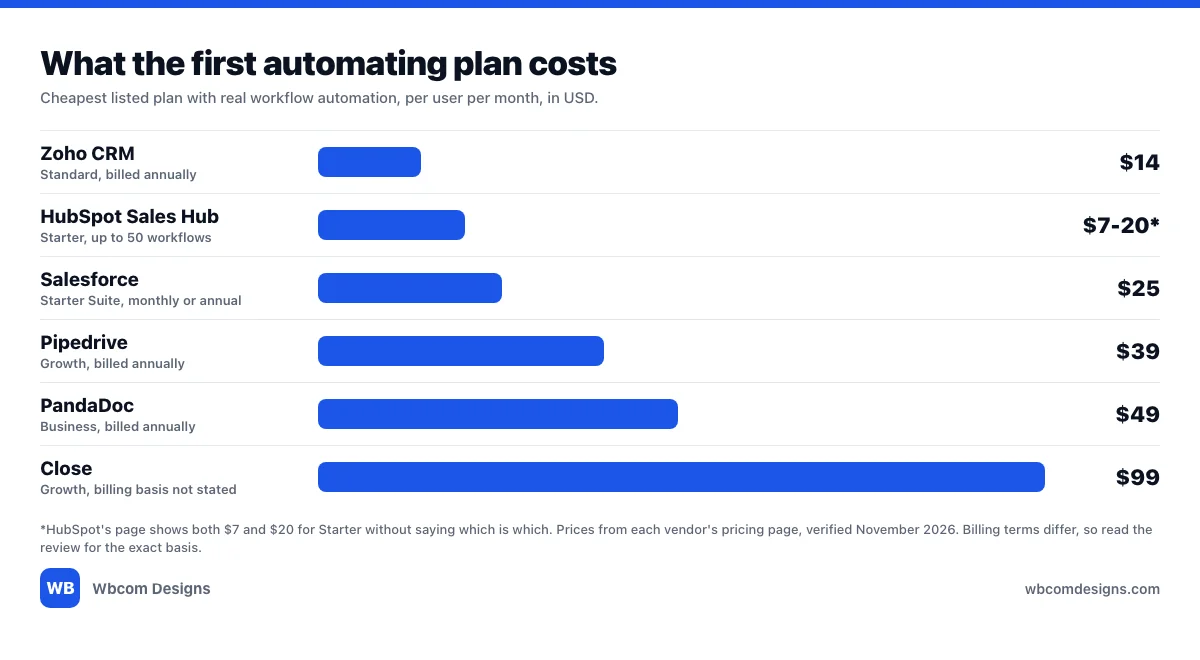
Then add the extras. HubSpot charges onboarding fees and credits, AiSDR charges per prospect, Close bills calls by usage and Apollo sells extra credits. A tool that looks cheap per seat can cost more than a pricier flat plan once you count them.
Mistakes That Waste the Setup
Automating a broken process. If your follow-up is chaotic by hand, software only makes it chaotic faster. Write the steps down first.
Buying the biggest plan. Start on the cheapest tier that includes automation. Move up when you hit a real limit.
Ignoring data quality. Duplicates and stale contacts make automation fire at the wrong people. Clean the list before you switch anything on.
Sending too much, too soon. Volume tools make it easy to email thousands of strangers. Reputation damage is slow to repair.
Letting the AI talk unsupervised. Read the first fifty messages an AI outreach tool sends before you raise the volume.
Frequently Asked Questions
What is sales automation software?
It is software that handles repeatable selling tasks for you: logging activity, sending follow-ups, routing leads, scoring them and generating quotes. People still run the conversations.
What is the difference between a CRM and sales automation?
A CRM stores contacts and deals. Automation acts on that data, for example by sending an email when a deal reaches a stage. Most modern CRMs include both, and the plan you buy decides how much automation you get.
Which sales automation tool is best for a small business?
Zoho CRM and Pipedrive Growth are the usual starting points for small teams, and HubSpot’s free plan works if you only need a basic CRM. Pick the one whose cheapest automating plan fits your budget.
How much does sales automation software cost?
From free to about $100 per user a month for the first plan with real workflows, based on the vendor pages checked in November 2026. Extras such as onboarding, credits and usage fees can add to that.
Can I automate sales on a WordPress site?
Yes. Groundhogg and FluentCRM run inside WordPress, so your contacts stay in your own database. Pair them with a form plugin and an automation tool for capture and handoff.
Will an AI SDR replace my sales reps?
No. Tools like AiSDR handle research and first-touch outreach. A person still has to run the conversations, set the price and close.
Does automated outreach get flagged as spam?
It can. Send to people with a reason to hear from you, keep volume modest at first, include a working unsubscribe link and honour it quickly.
Start with the smallest setup that removes your biggest bottleneck, run it for a month and then decide what to add. Most sales teams gain more from one well-built follow-up flow than from a stack of tools nobody maintains.
Want help connecting your site, forms and CRM so leads flow into the right tool? Wbcom Designs builds and supports WordPress sites for businesses that need the plumbing done properly.
Interesting Reads:
Related reading