
27 min read
Best WordPress CRM Plugins for 2026 (Tested & Compared)

Best WordPress CRM Plugins for 2026 (13 Compared, Pricing Included)
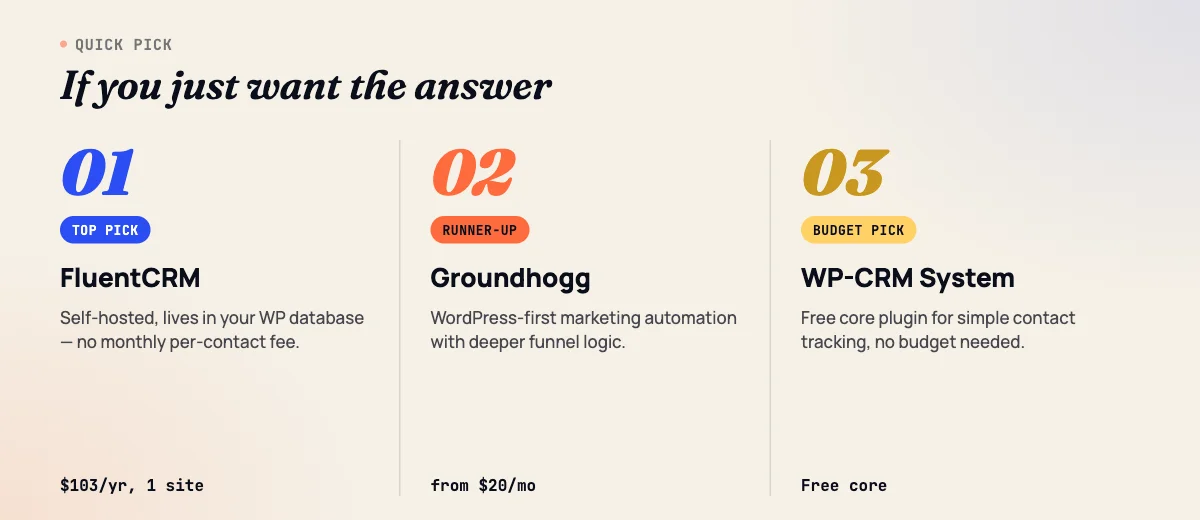
TL;DR: For most WordPress sites managing leads and contacts outside of WooCommerce orders, FluentCRM is the best default, it runs entirely inside your WordPress database, charges one flat annual fee regardless of contact count, and covers email automation, tagging, and forms without a monthly per-contact bill. If you’re already committed to a SaaS CRM or email platform and just need WordPress to talk to it reliably, WP Fusion is the better pick, it syncs form submissions, membership status, and course progress into whatever CRM you already pay for, instead of asking you to migrate contacts into a new system.
This post covers CRM plugins and integrations for managing leads and contacts, not order history. If you’re specifically trying to turn WooCommerce purchase data into customer segments and win-back campaigns, that’s a different set of tools; see our best WooCommerce CRM plugins comparison. If you haven’t settled on WordPress vs. a standalone SaaS CRM at all, start with our broader best CRM tools roundup.
What counts as a “WordPress CRM” in this list?
A WordPress CRM plugin either stores your contact database directly in WordPress’s own MySQL tables, or it’s a connector that keeps a SaaS CRM in sync with what happens on your WordPress site. Both approaches are legitimate, they just trade off differently on cost, data ownership, and how much infrastructure you’re responsible for.
We split the 13 tools below into two groups: WordPress-native plugins (FluentCRM, Groundhogg, Jetpack CRM, WP-CRM System, WP ERP, FunnelKit Automations) where the contact database lives in your WordPress install, and SaaS CRMs with WordPress integration (HubSpot, Zoho CRM, Pipedrive, Brevo, Freshsales, GreenRope, plus WP Fusion as the connector layer) where the CRM is a separate hosted product that WordPress feeds data into.
Quick comparison: 13 WordPress CRM tools at a glance
Pricing below is current as of September 2026, billed annually unless noted. “WP-native” means the contact database lives in your WordPress install; “SaaS-synced” means it’s a separate hosted CRM that WordPress pushes data to.
| Tool | Best for | Starting price | Type |
|---|---|---|---|
| FluentCRM | Flat-fee email automation + CRM for any WP site | Free core; $103/yr Pro (1 site) | WP-native |
| Groundhogg | GDPR-conscious agencies wanting funnels + CRM | Free core; $20/mo Basic | WP-native |
| Jetpack CRM | Freelancers/agencies needing invoicing + client records | Free core; $11/mo Freelancer | WP-native |
| WP-CRM System | Simple, lightweight client/contact tracking | Free core; $99/yr Plus | WP-native |
| WP ERP | Agencies running HR + CRM + accounting in one place | Free core; $29/mo Growth (adds CRM) | WP-native |
| FunnelKit Automations | Automation-first CRM with visual flow builder | $99.50/yr (1 site) | WP-native |
| WP Fusion | Syncing WordPress data into a SaaS CRM you already use | Free Lite; $297/yr Personal | Connector |
| HubSpot (free WP plugin) | Startups wanting forms + live chat + free CRM in one install | Free (1,000 contacts) | SaaS-synced |
| Zoho CRM | Teams already inside the Zoho ecosystem | Free (3 users); $14/user/mo Standard | SaaS-synced |
| Pipedrive | Sales teams who want a visual pipeline over lead gen | $14/user/mo Essential | SaaS-synced |
| Brevo | Combining email marketing and a lightweight sales CRM | Free; $27.92/mo Sales Essentials | SaaS-synced |
| Freshsales (Freshworks CRM) | Sales teams wanting AI lead scoring on a budget | Free (limited); $9/user/mo Growth | SaaS-synced |
| GreenRope | All-in-one suites replacing 5+ separate marketing tools | From ~$99/mo + setup fee | SaaS-synced |
WordPress-native CRM plugins
These six store your contact data directly in your WordPress database. You own the data outright, there’s no per-contact SaaS bill, and everything lives in the same admin you already log into, but you’re also responsible for backups, hosting performance as your list grows, and staying current on plugin updates.
1. FluentCRM
Verdict: The best all-around WordPress-native CRM for lead and contact management, unlimited contacts on a flat annual license, with automation depth that used to require a $50+/month SaaS plan.
Best for: Agencies, membership sites, course creators, and service businesses who want email automation and contact segmentation without a recurring per-contact bill.
Key features:
- Unlimited contacts on every paid tier, no per-contact pricing tiers to outgrow
- Visual automation builder with sequences, tagging, and conditional branching
- Built-in form builder and 45+ integrations (WooCommerce, LearnDash, LifterLMS, Easy Digital Downloads, WPForms, Gravity Forms)
- 360-degree contact view showing email activity, purchases, and form submissions in one profile
- Sends through your own SMTP provider (Mailgun, SendGrid, Amazon SES), so deliverability cost scales with volume, not contact count
Pricing: A free version is available on WordPress.org with core CRM and automation features. Paid tiers (discounted from list price at the time of writing): Solo $103/year (1 site), Small Business $199/year (5 sites), Agency $399/year (50 sites). All paid tiers include unlimited contacts, unlimited campaign sends, and one year of updates and support.
Pros: No per-contact fees at any scale; genuinely deep automation for the price; native WooCommerce and LMS integrations without a separate connector plugin.
Cons: Email deliverability depends on your own SMTP setup, which is one more thing to configure and monitor; advanced sales-pipeline features (deal stages, forecasting) are thinner than a dedicated sales CRM like Pipedrive.
Who should skip it: Teams that need a visual sales pipeline with deal forecasting, or that need phone/SMS built in without a separate add-on stack.
2. Groundhogg
Verdict: A CRM and marketing automation plugin built specifically around GDPR compliance and consent tracking, with per-site rather than per-contact pricing.
Best for: EU-facing businesses, nonprofits, and agencies that need documented consent trails alongside standard CRM and email automation.
Key features:
- Unlimited contacts, users, funnels, and email sends on every plan
- “Superlinks” for one-click list segmentation from an email link
- Funnel builder with conditional logic, tagging, and lead scoring add-ons
- SMS, e-commerce, and membership-plugin integrations (Pro tier and above)
- White-label branding on the Agency tier for client-facing installs
Pricing: A free core plugin is available on WordPress.org. Paid: Basic $20/month (1 site), Plus $40/month (3 sites), Pro $50/month (5 sites), Agency $100/month (25 sites, white-label). All plans include a 14-day money-back guarantee and onboarding support.
Pros: Consent and compliance tooling is more built-in than most competitors; per-site (not per-contact) pricing rewards large lists; strong nonprofit and nonprofit-adjacent use case fit.
Cons: SMS and e-commerce integrations are locked behind the Pro tier, not Plus; the interface has more of a learning curve than FluentCRM for a first-time WordPress CRM user.
Who should skip it: Teams that don’t need consent/compliance tracking and just want the simplest possible email automation, FluentCRM’s free tier covers that with less setup.
3. Jetpack CRM
Verdict: A contact-and-invoicing CRM built for freelancers and small agencies who need client records, quotes, and payment tracking more than they need marketing automation.
Best for: Freelancers, consultancies, and small agencies managing client relationships, invoices, and proposals from inside WordPress.
Key features:
- Contact and company records with a full interaction timeline
- Invoicing, quotes, and transaction tracking (Invoicing Pro extension)
- Stripe and PayPal payment connections
- Gravity Forms sync for lead capture
- 30+ extensions covering forms, analytics, and email marketing add-ons
Pricing: A free core CRM plugin is available on WordPress.org. Paid: Freelancer $11/month billed yearly (1 site, 4 extensions), Entrepreneur $17/month billed yearly (1 site, 30+ extensions), Reseller $5.40/site/month billed yearly (10 sites, white-label rebranding). 14-day money-back guarantee.
Pros: Invoicing and quoting are genuinely built for freelance/agency billing workflows, not bolted on; owned by Automattic (the company behind WordPress.com and Jetpack), so long-term maintenance risk is low.
Cons: Marketing automation (sequences, tagging-driven campaigns) is noticeably thinner than FluentCRM or Groundhogg, it’s built around client management first, lead nurturing second.
Who should skip it: Anyone whose primary need is email nurture sequences and list segmentation rather than invoicing and client records.
4. WP-CRM System
Verdict: The lightest-weight option on this list, a genuinely free core plugin for basic contact and client tracking, with optional paid extensions for anyone who outgrows it.
Best for: Freelancers and small business owners who want simple client/contact records without automation complexity, and don’t want to pay anything until they need to.
Key features:
- Contact and client database with activity notes and task assignment
- Optional extensions for Zapier, WooCommerce, and Mailchimp sync
- No automation builder in the core plugin, this is a records-and-notes tool, not a marketing automation platform
- Team/staff assignment for support or account-management workflows
Pricing: The core plugin is free with no extensions required to use it. Paid extension bundles: Plus $99/year (3 premium extensions, 1 site), Enhanced $199/year (all current and future extensions, 1 site), Professional $249/year (all extensions, unlimited sites).
Pros: Truly usable for free with zero extensions; simplest learning curve of any tool on this list; extension pricing is transparent with no per-contact scaling.
Cons: No native email automation or sequence builder, you’ll need a separate email tool (or the Mailchimp extension) if nurture campaigns matter to you.
Who should skip it: Anyone whose primary goal is automated email nurturing rather than contact record-keeping, FluentCRM or Groundhogg will do more out of the box.
5. WP ERP
Verdict: Less a CRM and more a full back-office suite, HR, accounting, and CRM in one free core plugin, aimed at agencies running internal operations, not just lead capture.
Best for: Agencies and small businesses that want CRM, HR, and basic accounting in a single admin instead of three separate subscriptions.
Key features:
- Deals pipeline and workflow automation (CRM module, Growth tier and above)
- WooCommerce, Mailchimp, HubSpot, and Gravity Forms sync
- HR module (leave, payroll basics) and accounting module bundled in
- Free core plugin with no user limit on the base modules
Pricing: Core HR, CRM, and accounting modules are permanently free with no user limits. Paid, billed monthly: Starter $15/month (HR only, no CRM features), Growth $29/month (adds CRM: workflow automation, deals pipeline, WooCommerce and Mailchimp/HubSpot sync), Scale $55/month (adds accounting extras, mobile app, live chat support), Enterprise custom pricing. Annual billing runs 30 - 40% cheaper (Growth $304/year vs. $348 paid monthly).
Pros: Genuinely useful if you’re consolidating internal tools, not just marketing to leads; free tier has no artificial user cap.
Cons: The CRM module specifically is not the product’s main focus, you’re buying an ERP that happens to include a deals pipeline, not a purpose-built lead-management CRM. The Starter tier confusingly excludes CRM entirely.
Who should skip it: Anyone who only wants CRM and doesn’t need HR/accounting bundled in, you’ll pay for a lot of functionality you won’t touch.
6. FunnelKit Automations
Verdict: An automation-first CRM built around a visual flow builder, originally released as Autonami before FunnelKit’s rebrand, strongest when paired with FunnelKit’s funnel builder, but usable standalone for lead automation on any WordPress site.
Best for: Sites that want visual, drag-and-drop automation flows (not just linear email sequences) for lead nurturing.
Key features:
- Visual automation builder with 30+ prebuilt automation templates
- Contact profiles with a 360-degree activity view and audience segmentation
- Email and SMS follow-ups with conditional branching and smart delays
- Form-plugin connections and webhook support
- 60+ app integrations plus Zapier support (bundled Professional plan)
Pricing: Automations Starter is $99.50/year for one site (standalone, discounted from $149). The Automations + Funnels Professional bundle is $199.50/year for three sites and adds the funnel builder, A/B testing, and unlimited broadcast sends alongside the CRM. 14-day money-back guarantee.
Pros: The visual flow builder is genuinely more flexible than a linear “if this, email that” sequence tool; strong if you’re also running WooCommerce (though our WooCommerce CRM comparison covers that angle specifically).
Cons: Full CRM depth (contact profiles, segmentation) is really unlocked at the Professional bundle price, not the entry Starter tier, read the feature list per tier carefully before buying the cheaper plan.
Who should skip it: Non-ecommerce lead-gen sites that don’t need a funnel builder at all, FluentCRM or Groundhogg get you automation without paying for funnel-building features you won’t use.
WP Fusion: the connector, not a CRM itself
7. WP Fusion
Verdict: WP Fusion isn’t a CRM, it’s the plumbing that keeps a SaaS CRM or email platform in sync with what happens on your WordPress site, which is exactly what you need if migrating your contact list into a WordPress-native tool isn’t realistic.
Best for: Sites already running a SaaS CRM or ESP (ActiveCampaign, HubSpot, Salesforce, Drip, ConvertKit, and dozens more) that need two-way sync with WordPress logins, membership status, course completions, and form submissions.
Key features:
- Two-way sync between WordPress user data and your external CRM/ESP
- Tag-based content restriction, gate pages, courses, or downloads by CRM tag
- Deep LMS and membership plugin integrations (LearnDash, MemberPress, Restrict Content Pro)
- Connects to 100+ external platforms rather than replacing your existing CRM
Pricing: A free Lite version covers core user sync. Paid: Personal $297/year (1 site), Plus $427/year (1 site, adds six pro add-ons), Professional $647/year (unlimited sites). 30-day money-back guarantee; lifetime licenses are also available. Note: we sourced these figures from third-party review aggregators and WP Fusion’s own site after its pricing page returned an access error during research, verify current numbers on wpfusion.com before quoting a client.
Pros: Avoids a painful contact migration if you’re already locked into a SaaS CRM; the tag-based content restriction is genuinely useful for course and membership sites layered on top of any CRM.
Cons: You’re still paying your external CRM’s subscription on top of WP Fusion’s license, this adds a cost layer rather than replacing one; per-site pricing gets expensive fast for agencies managing many client sites without the Professional tier.
Who should skip it: Anyone starting from scratch with no existing CRM, there’s no reason to pay for a connector when a WordPress-native CRM like FluentCRM does the job without a second subscription.
SaaS CRMs with strong WordPress integration
These six keep your contact database in a separate hosted platform, with WordPress feeding it data through an official plugin, form connector, or (for deeper syncing) WP Fusion. They cost more as your team and contact count grow, but you get dedicated sales-pipeline tooling, phone/SMS, and mobile apps that WordPress-native plugins generally don’t match.
8. HubSpot (free WordPress plugin)
Verdict: The fastest way to get forms, live chat, and a real CRM onto a WordPress site with zero setup cost, but the free tier’s contact ceiling is tighter in 2026 than HubSpot’s reputation suggests.
Best for: Startups and small teams that want a recognizable, well-documented CRM with forms and live chat bundled into one official plugin, and don’t yet need heavy automation.
Key features:
- Official plugin (“HubSpot All-In-One Marketing,” formerly Leadin) with forms, popups, live chat, and CRM sync built in
- Form submissions sync automatically into HubSpot contact records with full interaction history
- Free-tier email marketing (2,000 sends/month) and basic reporting
- Massive third-party ecosystem if you outgrow the free tier and move into paid Marketing/Sales Hub tiers
Pricing: Free, but capped: accounts created after September 2024 are limited to 1,000 contacts, 2 users, 1 deal pipeline, and 2,000 marketing emails/month. This is a meaningfully tighter limit than the “1,000,000 free contacts” figure still repeated in older articles, we cross-checked this against several 2026 sources but recommend confirming current limits directly on hubspot.com/pricing before committing a client to this plan. Paid Marketing Hub and Sales Hub tiers scale per-seat from there.
Pros: Zero-cost entry with a genuinely usable CRM, forms, and live chat in one plugin; brand recognition makes it an easy internal sell; huge documentation and support ecosystem.
Cons: The free contact cap is easy to hit faster than expected on an active lead-gen site; once you’re paying, HubSpot’s per-seat and per-tier pricing climbs quickly compared to WordPress-native flat-fee tools.
Who should skip it: Sites already collecting more than 1,000 contacts that don’t want to pay HubSpot’s paid-tier pricing, FluentCRM’s unlimited-contact flat fee will be cheaper at that volume.
9. Zoho CRM
Verdict: A deep, inexpensive per-seat CRM that makes sense mainly for teams already using other Zoho products, WordPress integration happens through third-party form connectors, not an official Zoho plugin.
Best for: Small sales teams already inside the Zoho ecosystem (Zoho Books, Zoho Desk, Zoho Campaigns) who want lead capture from WordPress forms flowing into the same CRM.
Key features:
- Lead, contact, account, and deal management with pipeline stages
- Zia AI for lead scoring and sales forecasting (paid tiers)
- Workflow automation and custom modules (Professional tier and above)
- Native mobile apps and extensive Zoho-suite integrations
Pricing: Free edition for up to 3 users, roughly 5,000 records across modules, basic leads/contacts/deals and standard reports, no workflow automation or advanced analytics. Paid, per user/month billed annually: Standard $14, Professional $23, Enterprise $40, Ultimate $52.
Pros: Genuinely capable CRM at a low per-seat price once you’re past the free tier; strong fit if your business already runs on other Zoho tools.
Cons: No official native WordPress plugin, you’re relying on third-party form connectors (WPForms + Zoho integration, Bit Integrations, miniOrange) which adds a maintenance dependency outside Zoho’s own support; the free tier’s hard 3-user cap forces an all-or-nothing upgrade the moment you hire a fourth person.
Who should skip it: Anyone not already using other Zoho products, the ecosystem lock-in benefit disappears, and you’re left managing a third-party WordPress connector for a CRM with no official plugin.
10. Pipedrive
Verdict: A visual, pipeline-first sales CRM that’s excellent for tracking deals through stages, but it treats WordPress as a lead source to feed in, not a platform it integrates with natively.
Best for: Sales-driven service businesses and agencies that want a highly visual deal pipeline more than marketing automation.
Key features:
- Visual, drag-and-drop deal pipeline with customizable stages
- Email sync (2-way on Advanced tier and above) and meeting scheduler
- Workflow automation and sales forecasting (Advanced tier and above)
- Revenue management and custom field visibility controls (Professional tier)
Pricing: Per user/month, billed annually: Essential $14, Advanced $29, Professional $59, Power $69, Enterprise $99. Monthly billing runs higher per tier.
Pros: The pipeline UI is genuinely best-in-class for visualizing deal stages; strong for teams whose core workflow is “move a lead through stages until it closes,” rather than automated nurture sequences.
Cons: No official WordPress plugin at all, connecting WordPress forms to Pipedrive means a third-party connector plugin or WP Fusion, and WooCommerce-specific sync requires a separate paid plugin on top of your Pipedrive subscription.
Who should skip it: Content-driven lead-gen sites whose main need is email nurturing rather than a sales pipeline, Pipedrive is built for reps working deals, not automated drip campaigns.
11. Brevo
Verdict: Best thought of as an email marketing platform with a CRM bolted on, rather than a CRM-first tool, but its official WordPress plugin and unlimited free-tier contacts make it a reasonable entry point for small teams.
Best for: Small businesses that want email marketing and a lightweight sales CRM (deal pipeline, chatbot scenarios) from one vendor without stitching two subscriptions together.
Key features:
- Official WordPress plugin (plugin slug “mailin”) for embedded forms, on-site tracking, and live chat
- Unlimited contacts on the free plan (email volume, not contact count, is the billing metric)
- Sales Essentials CRM tier adds deal pipelines, chatbot scenarios, and calendar/mailbox connections
- SMS and WhatsApp campaign add-ons
Pricing: Free plan includes unlimited contacts with roughly 300 emails/day (~9,000/month). Email-focused paid tiers scale by send volume rather than contact count, starting in the single digits per month for low volume. The CRM-specific tiers, restructured in mid-2026, are Sales Essentials at $27.92/month and Sales Advanced at $58.50/month per user. We could not independently confirm Brevo’s higher email-volume tier pricing (figures above roughly $400+/month circulating in some secondary sources), check brevo.com/pricing directly for anything beyond the Free and Sales tiers.
Pros: The official native plugin is a real point in its favor over Zoho/Pipedrive/Freshsales’ third-party-only situation; billing by email volume instead of contact count suits large, mostly-inactive lists.
Cons: The CRM half of the product is newer and thinner than dedicated sales CRMs like Pipedrive; email-volume billing can work against you if you send frequently to a modest list.
Who should skip it: Teams whose primary need is pipeline management with deal forecasting, Brevo’s CRM tier is functional but not as deep as Pipedrive or Zoho’s paid tiers.
12. Freshsales (Freshworks CRM)
Verdict: A budget-friendly, AI-assisted sales CRM from Freshworks, solid for sales teams, but its WordPress connection depends on third-party plugins and its free tier’s lack of API access blocks most of them.
Best for: Small sales teams wanting built-in AI lead scoring and deal insights without Salesforce-level pricing.
Key features:
- Kanban-style deal pipeline with contact lifecycle stages
- Freddy AI for lead/deal scoring and forecasting insights (add-on pricing)
- Built-in chat, email, and phone from one contact record
- Custom sales activities and sales sequences (Pro tier and above)
Pricing: A limited free plan exists (exact limits not independently confirmed in this research, verify current details on freshworks.com before quoting). Paid, per user/month billed annually: Growth $9, Pro $39, Enterprise $59. Freddy AI Agent add-on is $49 per 100 sessions.
Pros: The Growth tier’s $9/user/month entry price undercuts Pipedrive and Zoho’s paid tiers noticeably; AI-assisted scoring is included rather than a separate expensive add-on suite.
Cons: WordPress integration is entirely third-party (form-to-CRM plugins), and Freshworks’ own free tier has no API access, so several of those connector plugins won’t function until you’re on a paid tier.
Who should skip it: Anyone planning to stay on Freshworks’ free plan and connect it to WordPress, confirm API access before building a workflow around it.
13. GreenRope
Verdict: An all-in-one CRM, email, event, and social suite aimed at replacing several separate tools at once, WordPress integration here is genuinely the weakest of the 13, limited to basic forms and Zapier rather than a dedicated plugin.
Best for: Small businesses currently juggling five or more separate marketing tools who want one platform (and one bill) instead, and don’t need deep WordPress-specific sync.
Key features:
- CRM, email marketing, event management, and social media scheduling in one suite
- Unlimited users and unlimited emails included at every contact tier
- Marketing automation workflows tied to CRM records
- Native form/API integration; WordPress-specific sync mostly happens via Zapier
Pricing: Starts around $99/month, priced by number of contacts stored rather than users. A one-time setup fee applies, $399 standard or $499 for a “premium” account with added onboarding/consulting time. We could not verify GreenRope’s exact contact-tier pricing brackets beyond the starting price during this research, request current tier pricing directly before quoting a client.
Pros: Genuinely consolidates multiple tools (email, CRM, events, social) into one subscription and one login; unlimited users/emails removes a common SaaS cost lever.
Cons: No dedicated WordPress plugin, this is the loosest WordPress integration on this list, essentially generic web forms plus Zapier; the setup fee is an unusual up-front cost compared to every other tool here.
Who should skip it: Anyone who specifically needs deep, native WordPress integration (form field mapping, membership/LMS sync, tag-based content restriction), GreenRope’s WordPress connection is the shallowest of the tools we evaluated.
WordPress-native CRM vs. SaaS CRM synced to WordPress: which fits your site?

A CRM only solves half the lead-management problem, capturing and organizing contacts. The other half is what you do with them afterward: nurture sequences, drip campaigns, and lifecycle emails. If that broader automation layer is still an open question for your site, our posts on why WordPress businesses need marketing automation and the best marketing automation plugins for WooCommerce stores cover that side of the stack in more depth than we will here.
Pick a WordPress-native plugin (FluentCRM, Groundhogg, Jetpack CRM, WP-CRM System, WP ERP, FunnelKit) if: your contact count is large or growing fast and per-contact SaaS pricing would get expensive; you want your lead data to live in the same database as your content, with no separate vendor to lose access to; your team is comfortable maintaining a WordPress plugin (updates, backups) as part of routine site maintenance; and you don’t need phone-based sales tooling or a large in-house sales team working deals across many channels.
Pick a SaaS CRM synced to WordPress (HubSpot, Zoho, Pipedrive, Brevo, Freshsales, GreenRope, via WP Fusion or a native/third-party plugin) if: you already have a sales team using a dedicated CRM for reasons beyond your website (phone, in-person, other channels) and WordPress is just one lead source among several; you want mobile apps, a dedicated support team, and SLA-backed uptime that a self-hosted plugin can’t offer; your compliance or IT policy requires data to sit with a specific vendor rather than your own hosting; or you’re not confident in your team’s ability to keep a WordPress plugin updated and want that responsibility to sit with a SaaS vendor instead.
The middle path: if you’re already paying for a SaaS CRM and don’t want to migrate contacts, WP Fusion lets you keep that CRM as the system of record while still getting WordPress-specific behavior, tag-based content restriction, membership sync, course completion tracking, without ripping anything out.
We’ve set this decision framework up for client stores directly: the calculation almost always comes down to contact volume math (flat WordPress-native fee vs. per-contact/per-seat SaaS pricing at your actual list size) plus how much of your sales process happens outside the website. If you want a second opinion on your specific numbers, that’s exactly what our CRM implementation service is for, we’ll run the comparison against your real contact count and existing stack before you commit to a migration either way.
Frequently asked questions
What’s the difference between a WordPress CRM plugin and a SaaS CRM connected to WordPress?
A WordPress CRM plugin (like FluentCRM or Groundhogg) stores contact records in your own WordPress database, you own the data outright and pay a flat license fee regardless of contact count. A SaaS CRM (like HubSpot or Zoho) stores contacts on the vendor’s servers, and WordPress just feeds it data through a plugin or form connector; you’re renting access and typically paying per contact or per user.
Is FluentCRM good enough to replace HubSpot for a small business?
For lead capture, email automation, and contact segmentation, yes, FluentCRM covers the same core workflows HubSpot’s free and early paid tiers handle. Where it falls short is dedicated sales-pipeline tooling with phone integration and enterprise-grade reporting, which HubSpot’s paid tiers do better once you need a larger sales team working deals across multiple channels.
Can I use a WordPress CRM plugin without WooCommerce installed?
Yes. Every WordPress-native plugin in this list (FluentCRM, Groundhogg, Jetpack CRM, WP-CRM System, WP ERP, FunnelKit Automations) works as a standalone CRM with no WooCommerce dependency, WooCommerce integration is optional and only activates if the plugin is installed.
Do WordPress CRM plugins work with Gravity Forms, WPForms, or Contact Form 7?
Most do, either natively or through a free add-on. FluentCRM, Groundhogg, and Jetpack CRM all support the major form builders directly. For SaaS CRMs without an official plugin (Zoho, Pipedrive, Freshsales), form-to-CRM syncing typically requires a third-party connector plugin or a native Zapier integration.
What happens to my contact data if I deactivate a WordPress CRM plugin?
For WordPress-native plugins, your contact data stays in your WordPress database’s custom tables even when the plugin is deactivated, it’s not deleted until you explicitly uninstall and choose to remove data, or delete the tables directly. Always export a CSV backup before deactivating any CRM plugin, since some (not all) offer a “delete data on uninstall” option that’s easy to trigger by accident.
Is a free WordPress CRM plugin like WP-CRM System enough for an agency, or should I pay?
The free tier is enough if you only need contact records and notes with no automated email sequences. The moment you need automated nurture campaigns, tagging-based segmentation, or WooCommerce/Mailchimp sync, you’ll need either WP-CRM System’s paid extensions or a plugin built around automation from the start, like FluentCRM or Groundhogg.
How do I migrate from HubSpot or Zoho CRM to a self-hosted WordPress CRM?
Export your contacts as a CSV from your current CRM, including tags/lists and custom field data, then import that CSV into your new WordPress-native plugin, FluentCRM, Groundhogg, and Jetpack CRM all support CSV import with field mapping. The harder part is usually recreating automation sequences and integrations (forms, LMS, WooCommerce) rather than the contact data itself; budget time for rebuilding those rather than assuming a straight lift-and-shift.
Which WordPress CRM plugin is the most GDPR-friendly?
Groundhogg is built specifically around consent tracking and GDPR documentation as a core feature, not an add-on. FluentCRM and Jetpack CRM both support GDPR-compliant opt-in forms and data export/erasure requests, but Groundhogg’s consent-trail tooling is the most purpose-built of the three.
Pricing and feature details in this post were verified against vendor pricing pages and current documentation as of September 2026. CRM pricing and feature tiers change frequently, if you’re reading this more than a few months after publication, confirm current numbers directly with the vendor before making a purchasing decision. Wbcom Designs implements CRM and marketing automation setups like these for client WordPress sites; if you want help choosing between a WordPress-native and SaaS-synced approach for your specific contact volume, our CRM implementation service covers exactly this decision.
Related reading