
17 min read
Agent-Ready WooCommerce: How AI Agents Find, Read and Buy From Your Store

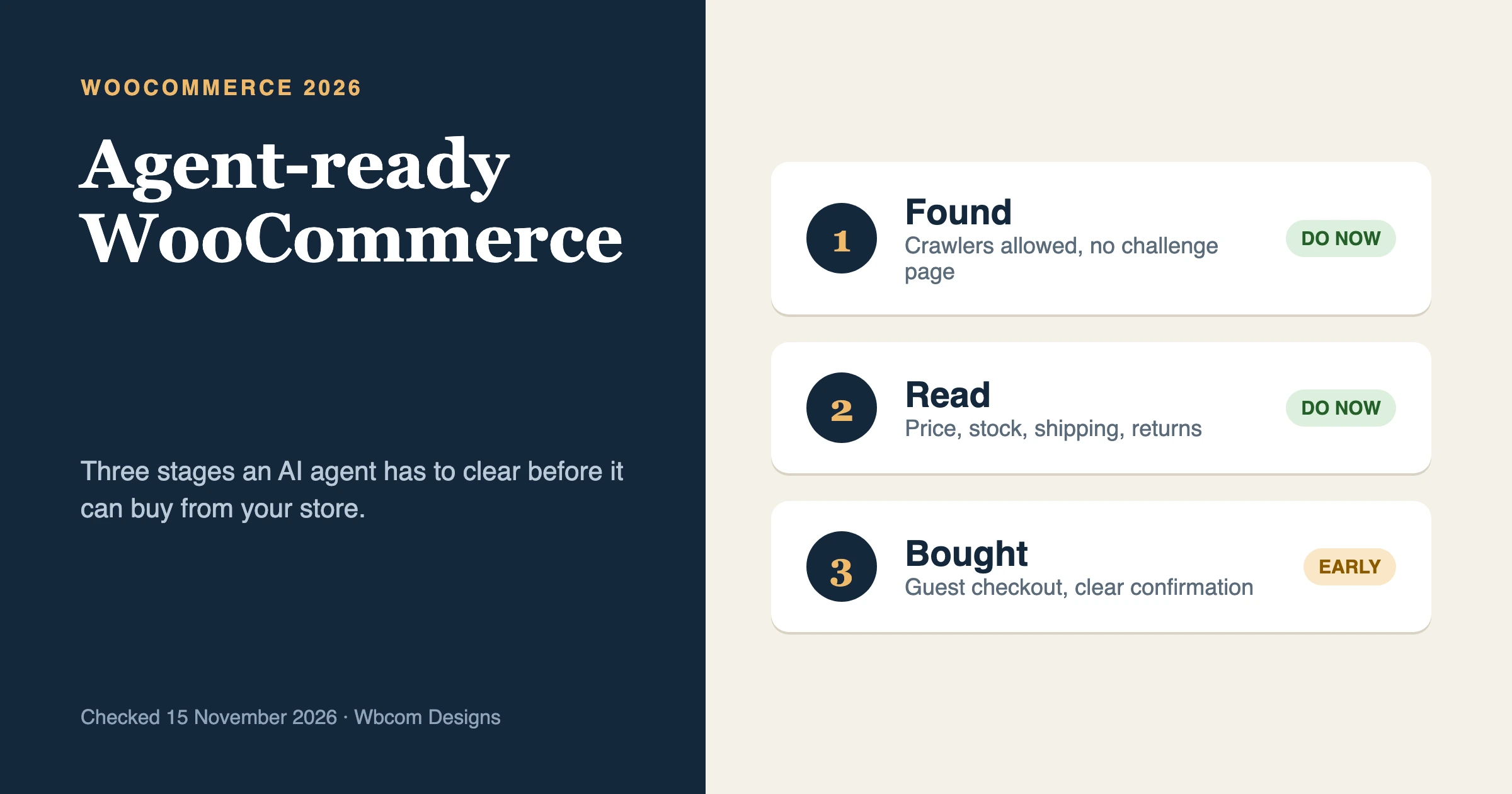
An agent-ready WooCommerce store is one that an AI agent can find, read and buy from without a human fixing things halfway. That comes down to three stages: the agent can reach your pages, it can read clean product facts (price, stock, shipping, returns), and it can finish checkout with a normal guest order and a clear confirmation. Most of that is ordinary store hygiene. The agent-specific parts are still early, and this guide says plainly which ones.
Checked on 15 November 2026. Several things in this space changed in the last three weeks, so each claim below carries its source and date.
What does “agent-ready” mean for a WooCommerce store?
It means software acting for a shopper can complete the same journey a person would: land on a product, understand it, add it to a cart and pay. Search engines only need to read. An agent also needs to act, so it fails on the things that already annoy human shoppers, such as a stock status that is wrong, a shipping cost that appears only at the last step, or a checkout form that throws an error.
Two kinds of software visit your store, and they need different treatment.
- Crawlers fetch pages ahead of time so an AI product can quote or recommend you later.
- Agents arrive during a live task, for one buyer, and may try to purchase.
Search Engine Journal’s AI Bot Management piece (13 November 2026, by Chris Green) splits bots into five groups: traditional search crawlers, AI training crawlers, retrieval bots, user-initiated fetches and autonomous agents. It argues that lumping them together as “AI bots” leads to bad blocking decisions. We agree, and the rest of this guide follows that split.
What changed this month?
Five items matter for a store owner. Each is dated and linked so you can check it yourself.
| Date | What happened | What it means for a store |
|---|---|---|
| 21 Oct 2026 | WooCommerce’s developer blog explained that WooCommerce 11.3 changes its MCP setup: core product and order abilities are on by default and need the WordPress MCP Adapter plugin; the old WooCommerce MCP endpoint is removed | Store management by AI tools now goes through one WordPress-level door, with application passwords |
| 28 Oct 2026 | The WordPress AI team published WordPress for the Agentic Web, a plan with four workstreams (MCP Adapter, Abilities, OAuth, end-to-end experience), targeting WordPress 7.3 for core inclusion | Direction, not a shipped feature. No agent-facing standard for shoppers yet |
| 12 Nov 2026 | Elementor released Agent Ready: a readiness score, files and Markdown versions agents can read, and bot rules | Useful for discovery. Elementor itself says commerce is not available yet |
| 13 Nov 2026 | TechCrunch reported that ChatGPT’s new Wallet lets agents shop and check out for a limited number of US Pro subscribers | The first mainstream consumer wallet built for agent purchases, in a small test |
| 13 Nov 2026 | Search Engine Journal published its bot management argument (above) | Treat each bot type as its own decision |
Two details from the TechCrunch report are worth holding onto. Users approve each purchase with a biometric check, and the wallet charges through a payment token, so neither the agent nor the merchant sees the card number. And the article notes that some retailers block agents outright, naming Amazon as the largest.
Stage 1: How do AI agents find your store?
An agent finds you the way a person does: through search results, product feeds, links and, increasingly, an AI product’s own index. Your job at this stage is to be reachable and to say plainly what you sell.
Run through this checklist.
- Your public pages load without a login, a cookie wall or a challenge page. Open a product page in a private window on a phone connection. If you see a “checking your browser” screen, so can an agent.
- Your sitemap is current and lists products. WordPress core and most SEO plugins produce one. Confirm it contains your product URLs.
- Search crawlers are allowed in robots.txt. OpenAI’s bots page says allowing OAI-SearchBot is recommended for visibility in ChatGPT search, and that changes can take about 24 hours to apply.
- Your product titles and descriptions say what the product is. “Blue Widget” helps nobody. “Blue ceramic planter, 20 cm, drainage hole, ships in 2 days” helps a person and a model.
- A feed exists if you want one. OpenAI’s commerce developer docs describe a product feed specification for keeping price and availability current in ChatGPT. WooCommerce’s own developer blog said in October 2025 that it was experimenting with that feed spec. We could not confirm a finished WooCommerce feature from either page, so check your extensions before assuming you have one.
- Google Merchant Center is connected. WooCommerce’s agentic commerce page lists syncing your catalog through Google for WooCommerce as the route to Google’s AI surfaces.
Do you need llms.txt?
It is cheap and harmless, and Elementor’s new feature generates llms.txt and related files. We have not seen a major AI product state that it relies on the file to choose what to show, so treat it as a small extra and not the main event. Your product pages matter more.
Stage 2: Can an agent read your products?
Reading means pulling accurate facts from a page. A model can read a well-written page, but structured data removes guesswork, and it is the part you control.
WooCommerce already prints Product structured data (JSON-LD) on single product pages through its WC_Structured_Data class, and you can adjust it with the woocommerce_structured_data_product filter. That much is in WooCommerce’s own API reference. Third-party guides add two caveats we have seen in practice: the markup does not carry a brand by default, and an SEO plugin can print a second Product block next to WooCommerce’s, which leaves two competing versions on the page.
Here is a small example that adds a brand to the markup WooCommerce already produces. It is a starting point for your own staging site, so test it there first.
add_filter( 'woocommerce_structured_data_product', function ( $markup, $product ) {
    $markup['brand'] = array(
        '@type' => 'Brand',
        'name'  => 'Your Brand Name',
    );
    return $markup;
}, 10, 2 );
Then check the facts an agent will compare. These are the same facts a careful shopper looks for.
| Fact | Where it should live | Common problem |
|---|---|---|
| Price and currency | Product page and structured data | Sale price in the page, regular price in the markup |
| Stock status | Product page, updated on every order | Variants show “in stock” when a size has sold out |
| Shipping cost and time | A visible line on the product page, not only at checkout | Shipping appears at the last step only |
| Returns policy | A linked page and a short summary near the buy button | Policy buried in the footer |
| Variants (size, colour) | Real variation attributes, one clear name each | Variants typed into the title |
| Identifiers (SKU, GTIN) | Product data fields | Empty fields |
Stripe’s lessons post, 10 things we learned building for the first generation of agentic commerce (12 March 2026), puts the stock point well: an agent needs to confirm an item is in stock right now, not fifteen minutes ago. If your stock syncs from a warehouse system on a schedule, ask how stale it gets.
Write one more thing for humans and models alike: a short FAQ on the product or category page. WooCommerce’s own agentic page recommends clear product descriptions, FAQs and buying guides for both shoppers and AI agents.
Stage 3: Can an agent complete checkout?
This is the stage that is still early, and we want to be direct about it. Three separate things are called “agent checkout” right now.
- A wallet inside an AI product. ChatGPT Wallet, from the 13 November report, is an example. It holds a card for the user and pays on their behalf. It is limited to a small group of US Pro subscribers, and TechCrunch lists no formal merchant requirements.
- A protocol between agent and store. Stripe’s Agentic Commerce Protocol and Google’s Universal Commerce Protocol are the names to know. WooCommerce’s agentic page lists both as “coming soon”, as well as agentic checkout in Stripe for WooCommerce.
- An agent that drives your normal checkout page in a cloud browser, the way a person would. This works today in some products, and it is why your checkout page itself matters.
For most store owners, item 3 is the only one you can prepare for this week. OpenAI’s commerce docs tell merchants to check that site security settings do not block the ChatGPT cloud browser. They do not say how to verify that, so we describe a test in the checklist below.
What an agent needs from your checkout page
- Guest checkout turned on. In WooCommerce, this is the setting that lets customers place orders without creating an account (under Accounts and Privacy). Stripe’s post notes that most agentic commerce still behaves like guest checkout, because the customer’s identity is not revealed until the moment they buy. A forced account creation step is the most likely place an agent gives up.
- Few required fields. Each extra field (a phone number, a company name, a “how did you hear about us” dropdown) is a place to fail. Stripe’s post also warns that extra form-fills can cost you the sale.
- Errors in plain text. “Invalid postcode” next to the field, as readable text, helps an agent recover. A red border alone does not.
- A real confirmation. The order-received page should show the order number, items, total and delivery estimate in text. The confirmation email should carry the same facts. An agent reports back to a human, and what it reports is what it could read.
- No surprise steps after payment. Upsell pages and mandatory sign-ups after the order confuse a person and break an automated flow.
- Payment methods that work in a normal browser session. Redirects to a bank page that needs a one-time code from the buyer’s phone will still need the buyer. That is fine, and it is the same safeguard people rely on.
A test you can run in ten minutes
We suggest this as a practical check, not an official certification. Open your store in a private window. Add a product to the cart, check out as a guest with test payment details on a staging copy, and note every field and every click. Then look at your firewall or CDN events log for the same window. If it logged a challenge, a block or a rate limit on a cart or checkout request, an agent would have hit it too.
Which bots should you allow and which should you block?
Allow the ones that bring you buyers or act for them. Block the ones that only take. That is a business choice, and the table below lays out what each type does so you can make it deliberately.
| Type | Example | What it does | Robots.txt applies? | Our default for a store |
|---|---|---|---|---|
| Search crawler | Googlebot | Indexes pages for search | Yes | Allow |
| AI search crawler | OAI-SearchBot | Surfaces pages in ChatGPT search | Yes, per OpenAI | Allow if you want to appear in AI answers |
| Training crawler | GPTBot | Collects content that may train models | Yes, per OpenAI | Your call. Block if you do not want your catalog used for training |
| User-initiated fetch | ChatGPT-User | Fetches a page because a user asked | OpenAI says robots.txt rules may not apply | Allow, and judge at the firewall |
| Autonomous agent | A shopping agent in a cloud browser | Acts for one buyer, may check out | Not a reliable control | Allow on product and checkout paths, watch the logs |
Two facts change how you set this up.
First, robots.txt is a request and not a lock. The SEJ article makes this point, and Elementor’s announcement is equally plain: its bot controls are stated preferences, and the post says there are no technical blocks that enforce them. Real enforcement happens in your CDN, your firewall or your host’s bot protection.
Second, that enforcement layer can contradict the file. A site can allow OAI-SearchBot in robots.txt while a firewall rule challenges it. Cloudflare’s documentation for its free Bot Fight Mode says you cannot bypass it with WAF custom rules, so a store that wants more control needs to turn it off or move to a plan that supports exceptions. Check what your own host or CDN does, because the settings differ.
Some sites choose to shut the door. SEJ reported that United Airlines updated its terms on 11 November 2026 to require written permission for automated agents, while leaving search indexing open. That fits an airline, where bookings carry rules and liability. A shop selling planters has a different calculation, and blocking an agent that is comparing products can remove you from the answer entirely, which SEJ also notes.
What should an agent be able to do on your store, and what should it never do?
There are two different conversations here, and mixing them up is how stores get into trouble. One is about shoppers’ agents buying from you. The other is about your own AI tools managing your store, which is what WooCommerce’s MCP work covers.
Shopper-side: public actions only
A shopper’s agent should only do what an anonymous visitor can do: browse, read, add to cart, check out as a guest. It should never see other customers’ orders, admin screens or your cost prices. If your store is set up normally, those are already protected by WordPress and WooCommerce login and capability checks. Nothing here needs a new switch, but it is worth confirming that your REST endpoints do not leak data to logged-out requests.
Owner-side: permissions you grant on purpose
The WooCommerce MCP documentation describes what connected AI clients can do through the MCP Adapter, limited by WordPress and WooCommerce permissions. Products can be queried, created, updated and deleted. Orders can be queried, and an agent can read order notes, update status and add notes. The same page labels MCP a developer preview and warns that details may change.
Authentication has changed in 11.3 as well. Per the 21 October post, the old endpoint and its REST API key header are gone, and clients now connect to /wp-json/mcp/mcp-adapter-default-server with a WordPress application password. The post recommends a user with only the capabilities the client needs.
Here is how we would set the permissions, as an owner-level view.
| Action | Shopper’s agent | Your own AI tool (MCP) |
|---|---|---|
| Browse and read products | Yes | Yes |
| Add to cart and check out as guest | Yes | Not needed |
| Read your orders | Never | Only on a dedicated, low-privilege user |
| Change product prices or stock | Never | Yes, on a dedicated user, ideally with a review step |
| Delete products | Never | Only with a person approving each one |
| Refund or cancel orders | Never | Not through an unattended agent |
| See customer personal data | Never | Avoid. The docs warn that order and customer operations may expose personal data |
A rule we hold ourselves to: an unattended agent never gets a permission that you would not give a new temporary employee on day one. If you connect an AI tool to your store, give it its own user and revoke the application password when you stop using it.
What is still early or unproven?
We would be doing you a disservice if we pretended this was settled.
- Wallet checkout is a limited test. The TechCrunch report describes a limited number of US Pro subscribers with US-issued cards, and says spending limits and pre-approvals are future plans. It does not name participating merchants.
- Store-side protocols are not shipped for WooCommerce. WooCommerce’s own page lists Stripe’s protocol, Google’s protocol and agentic checkout in Stripe for WooCommerce as coming soon.
- WooCommerce MCP is a developer preview. It is aimed at store management, and the 11.3 post warns that the replacement abilities are not fully listed yet.
- Core WordPress support is a plan. The 28 October post sets workstreams for the 7.2 and 7.3 cycles, and names no concrete ability list or OAuth flow.
- Agent conversion data is thin. The WordPress AI post cites Adobe data on AI referral traffic converting better, and TechCrunch reports that DoorDash and Uber have seen low numbers of orders placed by agents. Both can be true. We would not plan a business case on either.
- Elementor’s commerce support is listed as coming soon. Its Agent Ready release covers discovery, reading and forms.
The practical conclusion: do the checks that also help human shoppers and search, and wait on protocol work until your payment provider ships it for WooCommerce.
Common mistakes people report
These are recurring problems from documentation, support threads and vendor write-ups, checked on 15 November 2026. We paraphrase them and link where a public source exists.
- Pointing an MCP client at the old endpoint. The 21 October post says requests to the removed
/wp-json/woocommerce/mcproute now return HTTP 410 and that the REST API key method no longer works. Clients configured before 11.3 need the adapter plugin, an application password and the new URL. - Expecting one tool per WooCommerce ability. The MCP docs say the default server exposes three adapter tools (discover, get info, execute). A client that lists only those three is not broken.
- Duplicate Product markup. WooCommerce and an SEO plugin can both print Product JSON-LD, and guides on the topic report that SEO plugins do not remove another plugin’s output. The fix is to turn off one source, then check the page source for a single Product block.
- A free bot-protection setting that challenges everything automated. Cloudflare’s Bot Fight Mode documentation says it cannot be skipped by WAF rules. Stores that rely on it can end up challenging legitimate crawlers and agents without knowing.
- Robots.txt that says one thing while the firewall does another. The SEJ article on bot management makes this a central point: the enforcement layer can contradict the file without the SEO team knowing.
- Treating all AI bots as one group. Blocking a training crawler and blocking a search crawler have different consequences. OpenAI’s bots page lists separate user agents for each purpose.
What we would do this week
Start with the work that helps people and agents alike.
- Turn on guest checkout and strip optional fields from checkout.
- Check that stock status is accurate for variants, and that shipping and returns are stated on the product page.
- View the page source of one product and confirm there is exactly one Product JSON-LD block with price, availability and a brand.
- Open your CDN or firewall events and look for challenges on product, cart and checkout paths.
- Decide, in writing, which bot types you allow, and set robots.txt and the firewall to match.
- If you connect an AI tool to your store, give it a dedicated low-privilege user and a short review step for anything that changes prices, stock or orders.
If you want help, our team builds and maintains WooCommerce stores, and our WooCommerce development service covers checkout, structured data and custom behaviour. It is one option among many, and it has real limits: it costs money, and most of the checklist above is a short afternoon of work you can do yourself or ask your current developer to do. Where we help most is the part that keeps changing, which is the firewall, the structured data and the permission setup after each plugin update. That overlaps with what a care plan should already include, which we describe in what a WordPress care plan should include. For the wider build-versus-buy question on a new store, see our custom ecommerce development guide, and for how agencies earn their fee in an AI-heavy market, read what clients still pay an agency for.
FAQ
Can ChatGPT buy from my WooCommerce store today?
Not through any WooCommerce feature we can confirm. TechCrunch reports ChatGPT Wallet is limited to a small group of US Pro subscribers (13 November 2026), and WooCommerce lists agentic checkout as coming soon. Some agents can still drive a normal checkout page in a browser, which is why guest checkout and a clean form matter.
Should I block AI crawlers on my WooCommerce store?
Block what you do not want and allow what brings buyers. Search crawlers and AI search crawlers usually bring traffic. Training crawlers are a separate decision, and OpenAI documents that blocking GPTBot signals you do not want content used for training. Robots.txt is a request, so enforce your choice in the firewall too.
What is the WooCommerce MCP adapter?
It is a WordPress plugin that turns WordPress Abilities into the Model Context Protocol format so AI clients can discover and run them. Since WooCommerce 11.3, it is required for MCP connections, and WooCommerce’s product and order abilities are on by default. The documentation calls it a developer preview.
Does WooCommerce add structured data on its own?
Yes, WooCommerce prints Product JSON-LD on single product pages through its WC_Structured_Data class. It may be incomplete for your needs, for example without a brand, and an SEO plugin can add a second block. View the page source and confirm there is one clean block.
Is guest checkout safe to leave on?
Yes. Guest checkout is standard on many stores, and payment details stay with your payment provider. The usual protection is fraud screening and rate limits on your checkout, not forcing an account.
How do I know if my firewall blocks AI agents?
Check the events or logs in your CDN or host for challenges and blocks on cart and checkout requests, then run a guest checkout in a private window. OpenAI’s commerce docs tell merchants to make sure the ChatGPT cloud browser is not blocked, and do not describe a test.
Do I need llms.txt?
No. It is a small extra. Elementor’s new feature generates it, and we have not seen a major AI product say it depends on the file. Accurate product pages and one clean structured data block matter more.
Related reading