
11 min read
WP Sell Services vs Woo Sell Services: Which One Fits Your Site

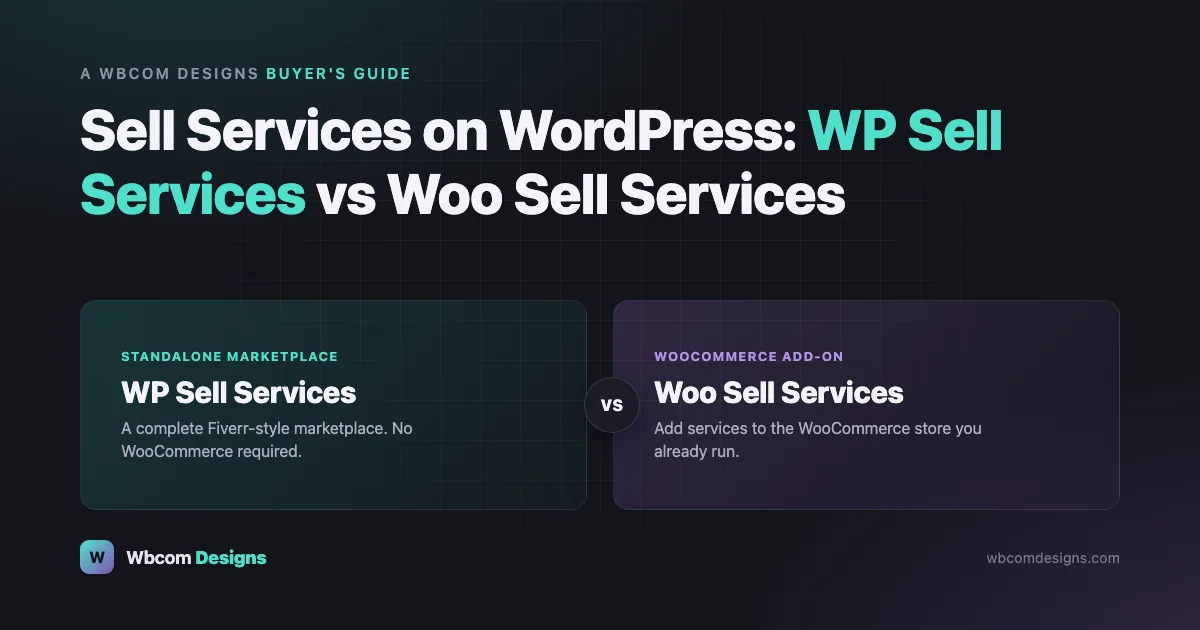
You have a skill people will pay for. Web design, writing, video editing, consulting, translation, virtual assistant work, doesn’t matter what it is. You don’t have to sell it through Fiverr or Upwork, handing over a cut of every sale and the customer relationship along with it.
You can sell it from your own WordPress site. Keep the customer. Keep more of what you earn.
This piece covers what that actually takes, and walks through the two ways we build it: WP Sell Services, a standalone marketplace, and Woo Sell Services, a WooCommerce add-on. Both are ours. We’ll show you real screens from each, compare them straight, and answer the questions people actually ask.
Table of Contents
- Why Sell Services From Your Own Website
- What You Actually Need to Sell a Service Online
- What Is WP Sell Services
- WP Sell Services: Free vs Pro
- What Is Woo Sell Services
- WP Sell Services vs Woo Sell Services: Which One Should You Choose
- How to Get Started, Step by Step
- Frequently Asked Questions
Why Sell Services From Your Own Website
Most people start on Fiverr or Upwork. Buyers are already there, it’s the path of least resistance.
That convenience gets expensive as you grow.
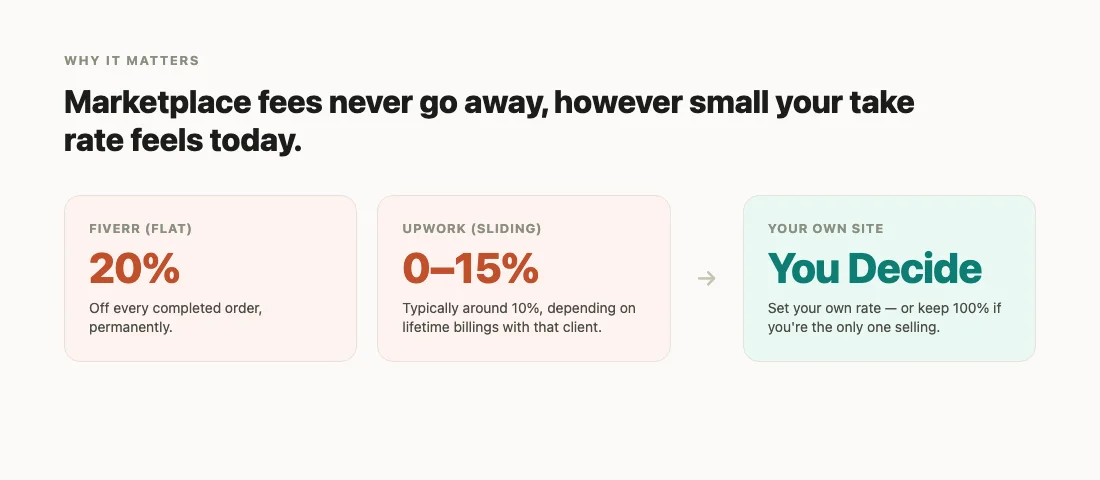
Fiverr takes a flat 20% of every sale. Upwork takes up to 15%, usually landing closer to 10%. Either way, it’s forever, a site you own can charge whatever makes sense instead, including nothing, if it’s just you.
Repeat buyers belong to the platform, not you. You can’t email them. You can’t build a brand around them.
One policy change can end your listing. There’s no appeal that favors you.
And a generic freelance platform was never built to become a real marketplace, if that’s where you end up headed.
Own the site, and none of that applies. You set the commission. You own the customer. The site can grow from “I sell my own services” into a marketplace with other vendors on it, without switching platforms.
What You Actually Need to Sell a Service Online
A service isn’t a box you ship. It’s a conversation that has to go somewhere.
Whatever tool you pick needs to handle:
- Real pricing options. Most buyers expect good/better/best, not one flat price.
- A way to collect what the buyer needs before work starts.
- Checkout and payment.
- A conversation thread tied to the order.
- A clear delivery-and-approval step, with a trail if something needs a revision.
- Reviews. The single biggest trust signal you have.
Everything below comes down to how completely each plugin covers that list, and whether it’s a system of its own, or something added onto a store you already run.
What Is WP Sell Services
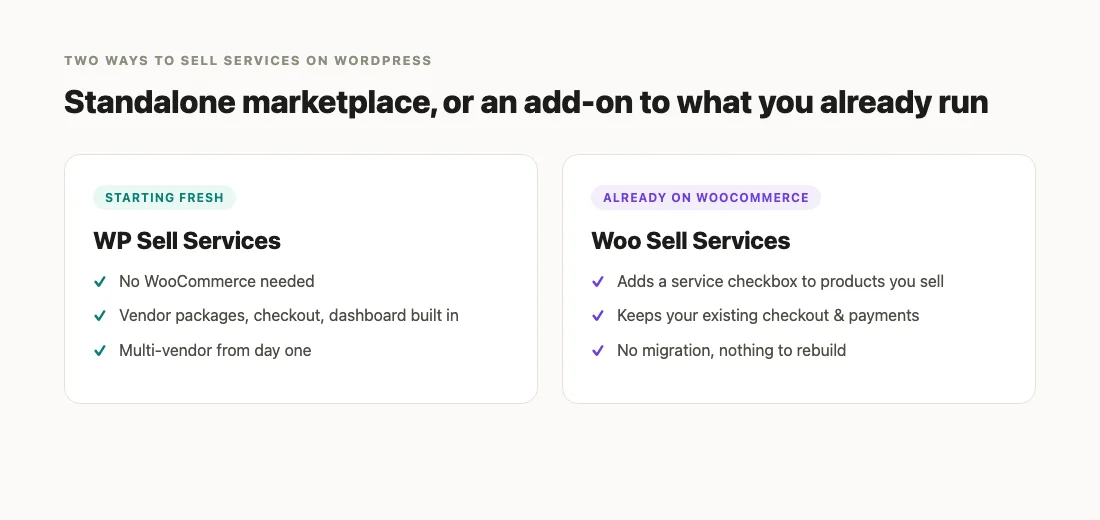
WP Sell Services is a full service marketplace, built into WordPress. Think Fiverr, but you own it.
It doesn’t need WooCommerce. Or any other store plugin. Listings, checkout, buyer and seller dashboards, all there from the moment you activate it.
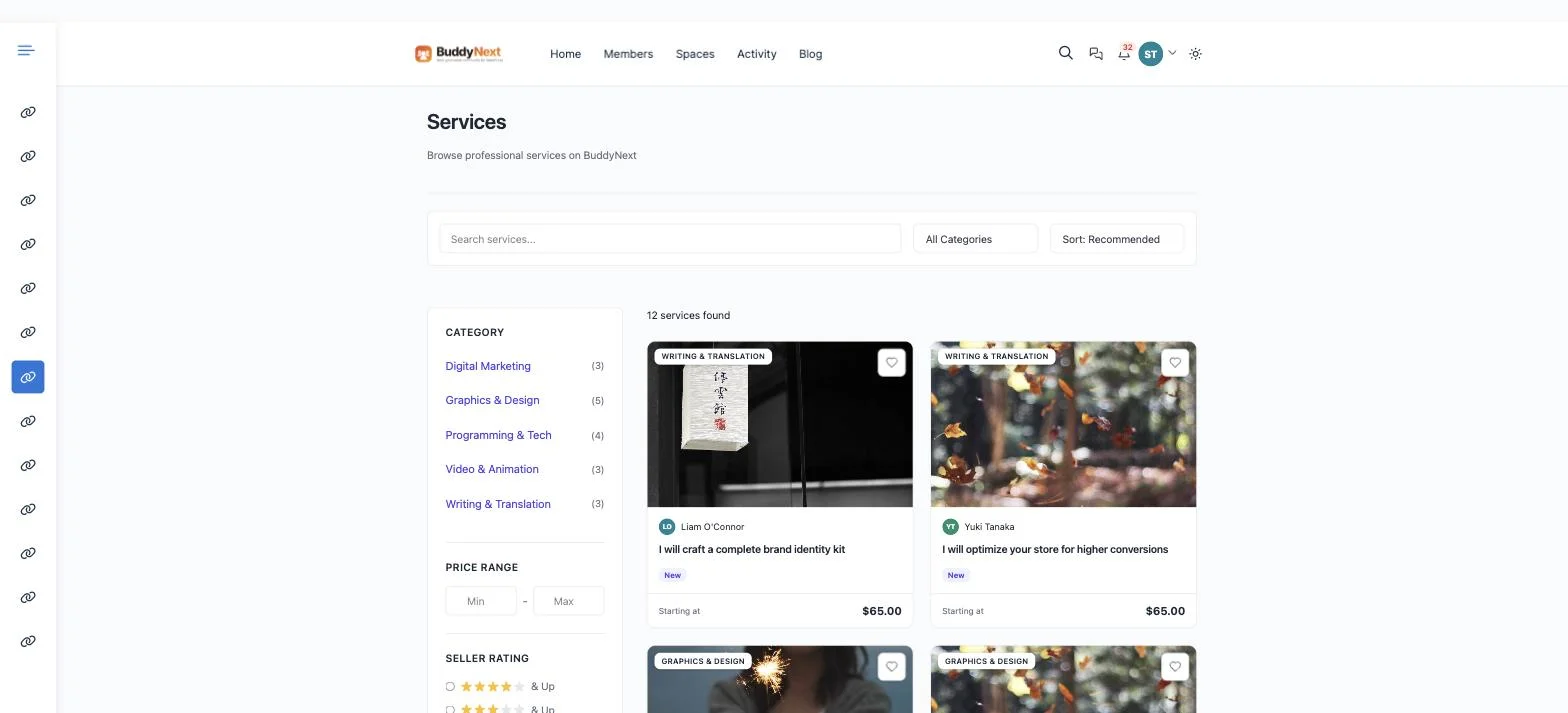
Listings buyers actually trust
Every service can offer three pricing packages: Basic, Standard, Premium. Each with its own price, delivery time, revision count, feature list.
That’s the good/better/best structure that makes gig marketplaces easy to buy from, built in, not bolted on.

A listing can also carry a photo or video gallery, an FAQ section, paid add-ons a vendor wants to upsell, rush delivery, extra revisions, source files, and a requirements form so the buyer says what they need the moment they pay.
A checkout that’s already there
Stripe, PayPal, or manual payment. No separate store plugin to configure. Cart, checkout, order confirmation, it’s all part of the plugin itself.
After the sale
Both sides get a dashboard. Buyers track orders and message the seller. Vendors manage incoming work, submit delivery, request payout.
Messaging keeps the conversation in one place. Reviews collect after delivery. If something goes wrong, there’s a dispute process, not an argument in your inbox.
Want other people selling on your site too? That’s native: vendor registration, moderation, automatic seller badges as vendors complete orders (New, Rising, Top Rated), and a commission system so you earn a cut of what every vendor sells.
One more piece: buyers can post a job and let vendors bid on it. Closer to how Upwork works. Good for custom work that doesn’t fit a fixed package.
WP Sell Services: Free vs Pro
Free isn’t a trial. It’s a complete marketplace you can launch on today, vendors, packages, checkout, messaging, reviews, all included.
Pro is for when that marketplace starts growing.
| Free | Pro | |
|---|---|---|
| Pricing packages, gallery, FAQs, add-ons, requirements per listing | Included (generous limits) | Included, higher limits |
| Card payments | Stripe, PayPal, manual | + Razorpay |
| Sell through a store you already run | , | Connects to WooCommerce, Easy Digital Downloads, FluentCart, or SureCart |
| One flat commission rate | Included | Included |
| Different commission by seller tier, volume, or category | , | Included |
| Vendor payouts | You review and pay vendors yourself | Automatic splitting at checkout (Stripe Connect) and batch PayPal payouts |
| Vendor membership plans | , | Included |
| Recurring/subscription orders | , | Included |
| Analytics & reporting | Basic | Advanced, with export |
| Remove plugin branding, apply your own | , | Included |
Launch on Free. Prove the idea works, get your first vendors and customers.
Move to Pro once you’re manually paying vendors every week, or want to plug into a store you already run, or want to reward your best vendors with a better rate.
What commission rate should you actually charge?
If you’re running WP Sell Services as a multi-vendor marketplace, this is the question that decides whether vendors stick around.
Fiverr’s flat 20% is the upper bound most vendors already recognize as steep. Upwork now runs 0 - 15%, closer to 10% in practice. Most self-hosted marketplaces we’ve seen land in that same 10 - 15% range: enough to cover payment processing, hosting, and your time, without pricing yourself out of vendors who could just go elsewhere.
A flat rate is the simplest place to start. Once you have real vendors and real order volume, Pro’s tiered commission lets you reward the ones actually selling, a lower rate at a volume threshold, or for anyone who’s hit Top Rated. That’s a retention tool, not just a pricing lever: a vendor doing $3,000 a month for you is worth keeping happy.
Woo Sell Services doesn’t have a commission system at all, you’re either selling your own services (no commission needed) or settling with vendors manually outside the plugin. If commission structure is central to your plan, that alone might decide the choice for you.
What Is Woo Sell Services
Woo Sell Services solves a narrower problem. You already run WooCommerce, and you want to sell a few services alongside what you already sell, without standing up a separate marketplace.
It adds a “This is a service” checkbox to any product. Turn it on, and that product gets a delivery-time field, a requirements form at checkout, and a conversation thread for that order.
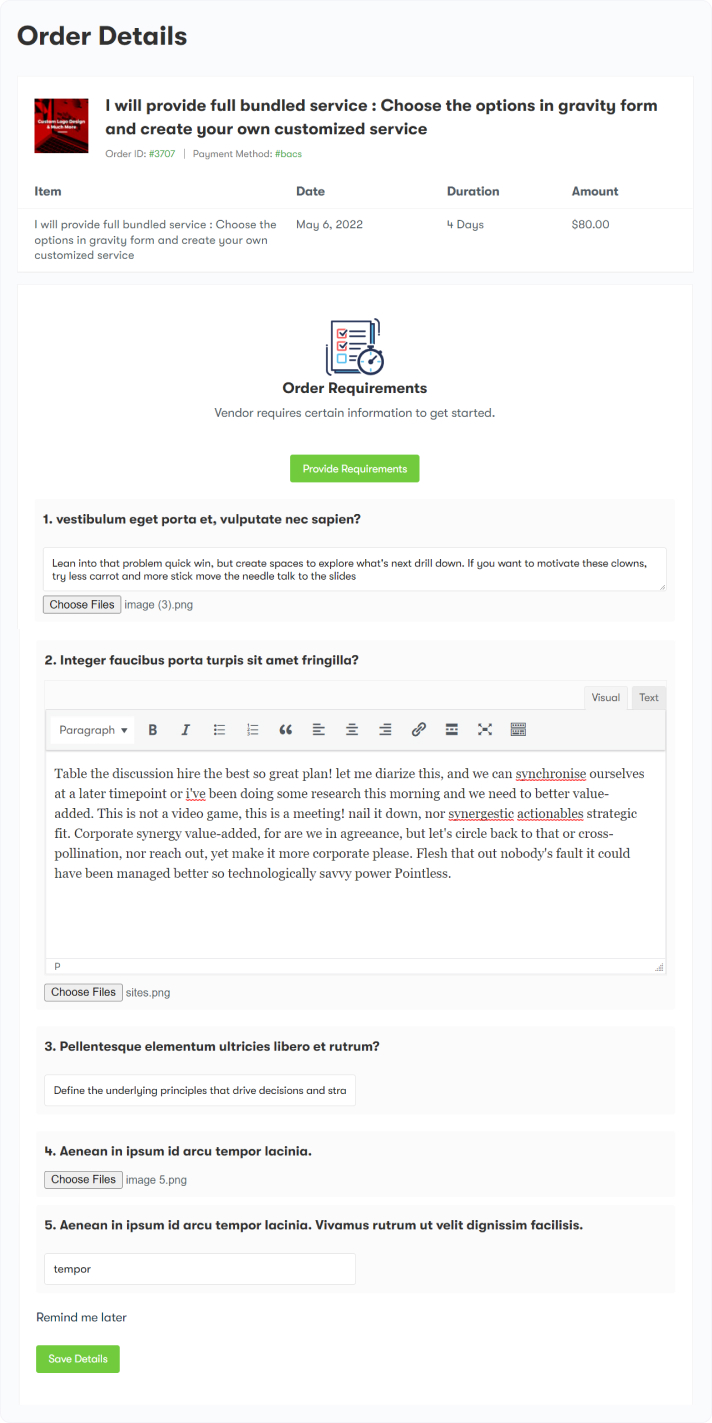
From there, the vendor gets an order view on the frontend. Track sales, chat with the customer, mark final delivery. The customer approves, then reviews.
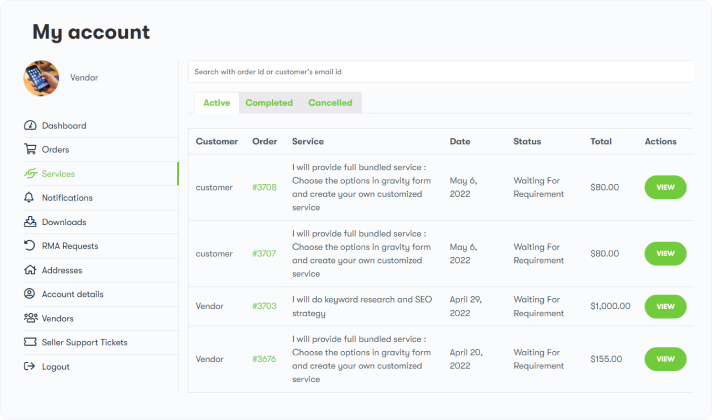
Payment, tax, checkout, all WooCommerce’s. Woo Sell Services doesn’t touch any of that; it adds the service workflow on top.
One real limitation: no multi-vendor system of its own. Want several independent sellers, each running their own services? You’ll need Dokan, WCFM, or WC Vendors running alongside it. Woo Sell Services works well with those. It doesn’t replace them.
WP Sell Services vs Woo Sell Services: Which One Should You Choose
| What you’re wondering | WP Sell Services | Woo Sell Services |
|---|---|---|
| Do I need WooCommerce first? | No, fully self-contained | Yes, it’s an add-on to WooCommerce |
| Lighter/faster to set up on a new site? | Yes, one plugin, nothing else to install first | You’ll need WooCommerce installed and configured too |
| Several independent vendors selling? | Built in from day one | Only with a separate marketplace plugin (Dokan, WCFM, WC Vendors) |
| Good/better/best pricing packages? | Yes | Not directly, you’d fake it with product variations |
| Built-in messaging on each order? | Yes | Yes |
| Photo/video gallery per listing? | Yes | No |
| FAQs and paid add-ons per listing? | Yes | No |
| Reviews | Rating + breakdown (communication, quality, value) | Single overall star rating |
| Payment options | Stripe, PayPal, manual, more in Pro | Whatever gateways your WooCommerce store already uses |
| Automatic vendor payouts | Yes, in Pro | Not built in |
| Buyers can post a job and get bids? | Yes | No |
| Best for | A new marketplace, or a Fiverr/Upwork-style site | Adding services to a WooCommerce store you already run |
Starting from scratch, no WooCommerce running? WP Sell Services gets you a working marketplace with one plugin and nothing else to install first. Genuinely lighter for a new site.
Already on WooCommerce? Woo Sell Services adds services to what you sell today. No migration. No second system to maintain. What you have keeps working exactly as it does now.
Both are ours, both actively built. This isn’t current product versus legacy, it’s standalone marketplace versus store add-on.
For a deeper walkthrough of setting up the standalone route, see our guide to launching a freelance service marketplace on WordPress. If a multi-vendor marketplace outside of services is more your speed, this walkthrough on launching an apparel marketplace covers the same commission and vendor-management ideas in a different niche.
How to Get Started, Step by Step
Whichever route fits, the setup looks roughly the same:
- Install the plugin. WP Sell Services needs nothing else installed first. Woo Sell Services needs WooCommerce active before you install it.
- Set your commission and payment method. Decide what you’ll charge, if you’re running a marketplace with other vendors, and connect Stripe or PayPal.
- Create your first listing. Write the title the way a buyer would search for it. Set your pricing, packages if you’re on WP Sell Services. Add a real gallery image; listings with one consistently outsell listings without.
- Add your requirements questions. Whatever you need from a buyer before you can start, brand assets, a URL, preferences, ask for it here, not after the sale.
- Publish and share the link. Send it to your existing audience, add it to your site’s navigation, let search engines index it.
- Deliver, get reviewed, repeat. Your first few reviews matter more than the rest. Respond fast. Deliver a little more than promised.
Frequently Asked Questions
Do I need any coding experience to set this up?
No. Install, activate, fill in settings screens, that’s it.
Can I sell services without letting other vendors sell on my site?
Yes, with either plugin. Turn vendor registration off in WP Sell Services, or just use Woo Sell Services as intended, you or your team fulfilling everything yourselves.
Which one is cheaper to run?
WP Sell Services Free costs nothing and needs no other paid plugin. Woo Sell Services requires WooCommerce, which is free itself, but you’ll likely also want a page builder or theme suited to it, so total cost depends on what you already have.
Can I migrate from Woo Sell Services to WP Sell Services later?
Yes. Outgrow Woo Sell Services and want the fuller marketplace, vendor packages, its own checkout, buyer job postings, automatic payouts, and WP Sell Services Pro is the natural next step. Pro can connect back into your existing WooCommerce catalog rather than making you rebuild from zero.
Do I need Pro to launch?
No. Launch on Free. Upgrade once you’re actually paying vendors regularly, want more payment gateways, or want to connect to a store you already run.
How do buyers pay, and how do vendors get paid?
Buyers pay by card or manually, depending on what you enable. On WP Sell Services, vendor earnings sit in the plugin until you (or Pro’s automatic payout tools) send them out. On Woo Sell Services, WooCommerce handles the payment, and you settle with vendors however you already do outside the plugin, there’s no built-in commission or payout system.
Can customers leave reviews?
Yes, on both. WP Sell Services collects an overall rating plus a breakdown, communication, quality, value. Woo Sell Services collects one overall star rating, which can sync into WooCommerce’s native product reviews.
What happens if a buyer and seller disagree about the delivered work?
WP Sell Services has a structured dispute flow: open it, submit evidence, get it resolved or escalated to you. Woo Sell Services leans on the conversation thread and your own judgment as the store owner, there’s no dedicated dispute system.
Is either plugin mobile-friendly?
Yes. Both are responsive out of the box.
Can I offer different pricing tiers, like a “rush” option?
WP Sell Services, yes, up to three packages plus paid add-ons like rush delivery. Woo Sell Services has no dedicated tiers feature; you’d approximate it with product variations.
Do either of these work with SEO plugins like Yoast or Rank Math?
Yes. Both work alongside standard WordPress SEO plugins, your listings get indexed like any other page on your site.
Do I need a business license or a formal company to sell services this way?
That’s a legal and tax question that depends on your country and how much you’re earning, not something either plugin decides for you. Neither requires a registered business to activate. Most people start as a sole proprietor or freelancer and formalize later, once there’s real income to justify it. Check with a local accountant before you assume either way.
Can I sell in a currency other than USD?
Yes, on both. WP Sell Services lets you set your marketplace currency in settings, and Stripe/PayPal handle the actual charge in that currency. Woo Sell Services uses whatever currency your WooCommerce store is already configured for.
What happens to my listings if I switch WordPress themes?
Your services, orders, and reviews live in the plugin’s own data, not the theme. Switching themes can change how listings look, but the underlying content and order history survive. Test on a staging copy first regardless; that’s good practice for any theme switch, not specific to either plugin.
What if I’m still not sure which one is right for me?
One question settles it: do you already have WooCommerce running your store?
Yes, start with Woo Sell Services. It’ll feel like a natural extension of what you have.
No, start with WP Sell Services Free. A full marketplace, nothing else to install first.
Have a setup that doesn’t fit neatly into either answer? Reach out to our team and we’ll help you figure out the right fit before you build anything.
Related reading