Eventonomy Pro adds paid ticketing through Stripe, PayPal, or WooCommerce, hour-grid calendars,
door check-in, reports, and reminders to the free plugin. Your gateway fees are
the only fees. From $99 per year.
Eleven capabilities on top of a complete free plugin.
Free runs the whole RSVP workflow. Pro adds the money, the reports, and the
growth tools - here are the ones that matter most, on the actual screens.
Ticketing · checkout
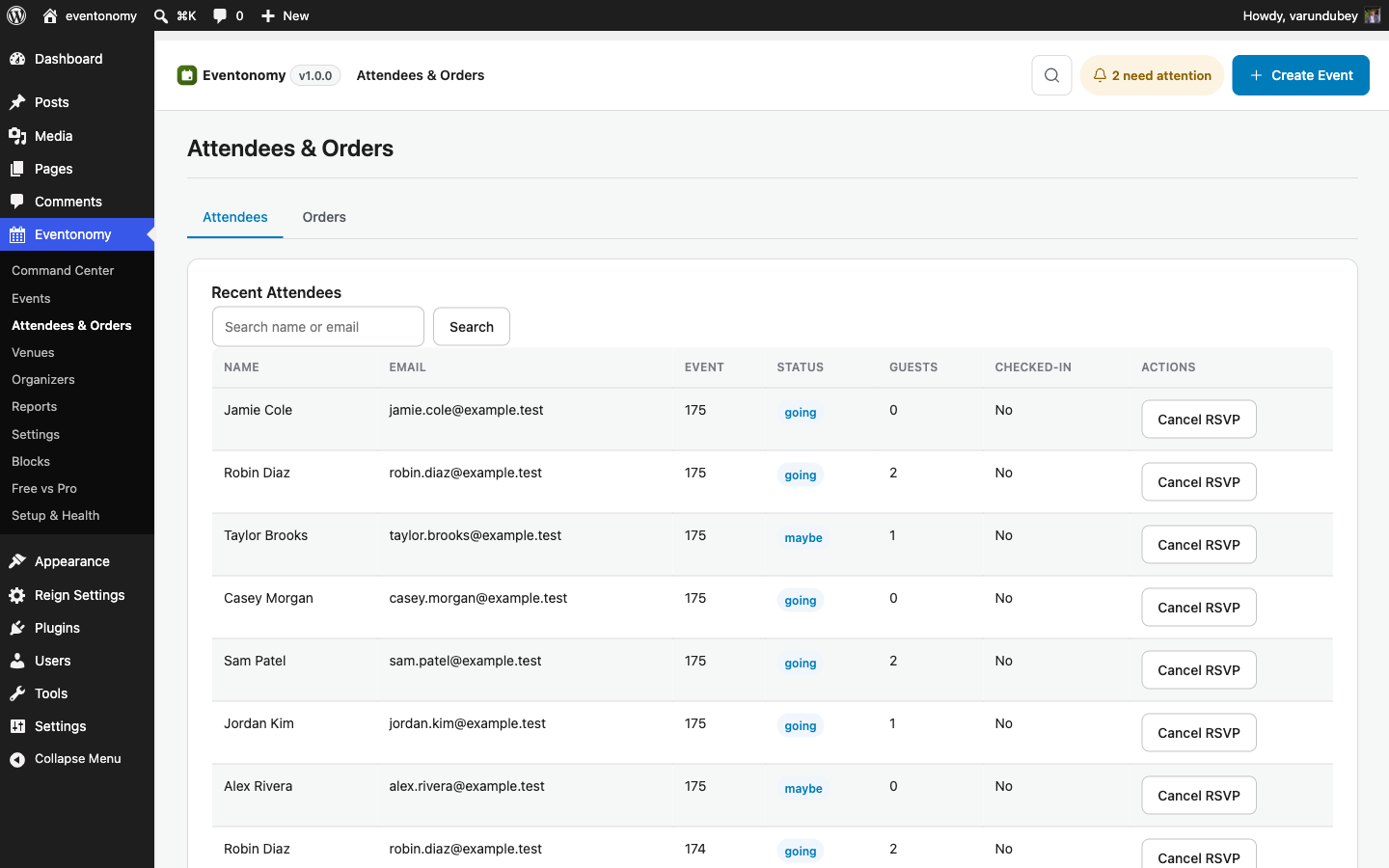
Sell tickets, keep every dollar.
Check out through Stripe, PayPal, or WooCommerce. Tax rates,
booking fees, and coupon codes are computed at checkout. Every order lands in
your own admin.
Stripe or PayPal, or hand checkout to WooCommerce
Tax, booking fees, and coupons built in
Order statuses: pending, paid, cancelled, refunded, and failed
yoursite.com/wp-admin · Attendees & Orders
Reports
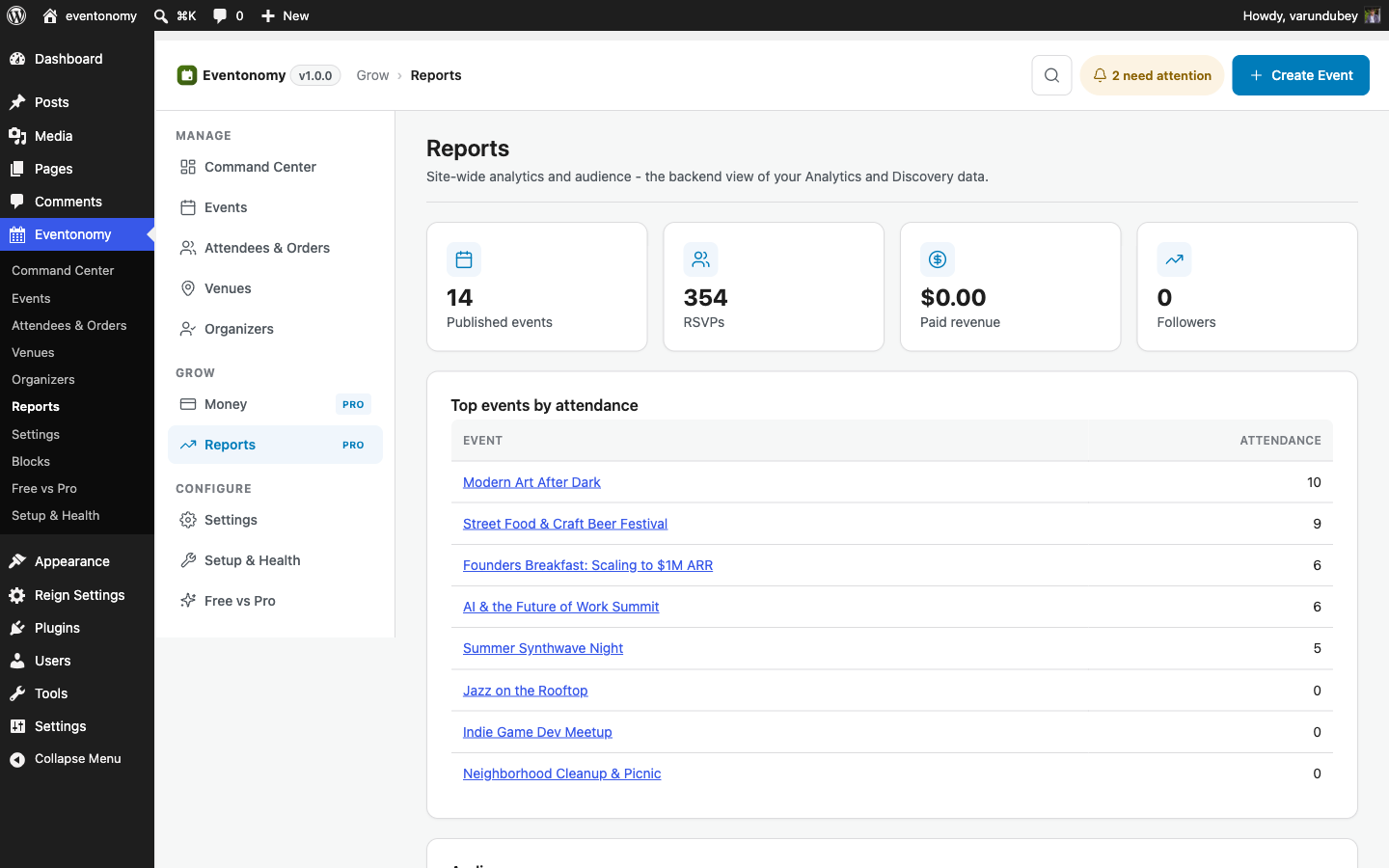
Know what sold, who came, and what worked.
Backend reports cover revenue, attendance, and RSVP funnels, per event and
overall. Organizers get their own analytics on the frontend, scoped to their
events only.
Revenue and attendance summaries in wp-admin
Per-event breakdowns and RSVP funnels
Organizer analytics on the member dashboard
yoursite.com/wp-admin · Reports
Week + Day grids
Hour grids for spaces that live by the hour.
Pro adds Week and Day views to the four free calendar views. Time-blocked hour
grids fit studios, venues, and coworking spaces where three events share one
afternoon.
Week and Day views join Grid, List, Month, and Upcoming
Events plotted on an hour grid, not a flat list
Advanced recurrence too - series like the last Friday of each month
yoursite.com/events/week/
Thu 16Fri 17Sat 18
9 amFarmers market
12 pmLunch & learn
6 pmMakers meetup
8 pmOpen studio night
QR check-in
Scan the QR ticket, the attendee is in.
Every ticket carries a self-contained QR code - on the confirmation screen, in the
email, and in My Tickets. On event day, staff scan it from any phone, no app and no
hardware, and the attendee is checked in. Typed-token entry is there as a fallback.
Self-contained QR ticket, no external scanning service
Scan from any phone or laptop camera, or type the token
Already-checked-in and invalid tickets are flagged clearly
QR check-in · Makers meetup
Point the camera at the ticket QR code
✓
Riya SharmaGeneral · scanned in at 6:42 pm
128 of 210 attendees checked in
Discovery · follow
Members find the next event on their own.
A discovery feed surfaces events by city and category, with a clustered map
view of geocoded venues. Members follow the organizers and venues they like, and save
events to come back to later.
Discovery feed with city and category filters
Map view with marker clustering and event popups
Follow organizers and venues, save events for later
PortlandMusicWorkshops
Vinyl swap SundayRiverside Hall · Aug 2
Following ✓
Intro to letterpressInk Studio · Aug 9
Follow
Makers meetup - AugustHall B · Aug 20
Saved
SMS + reminders
Reminders that keep attendance from leaking.
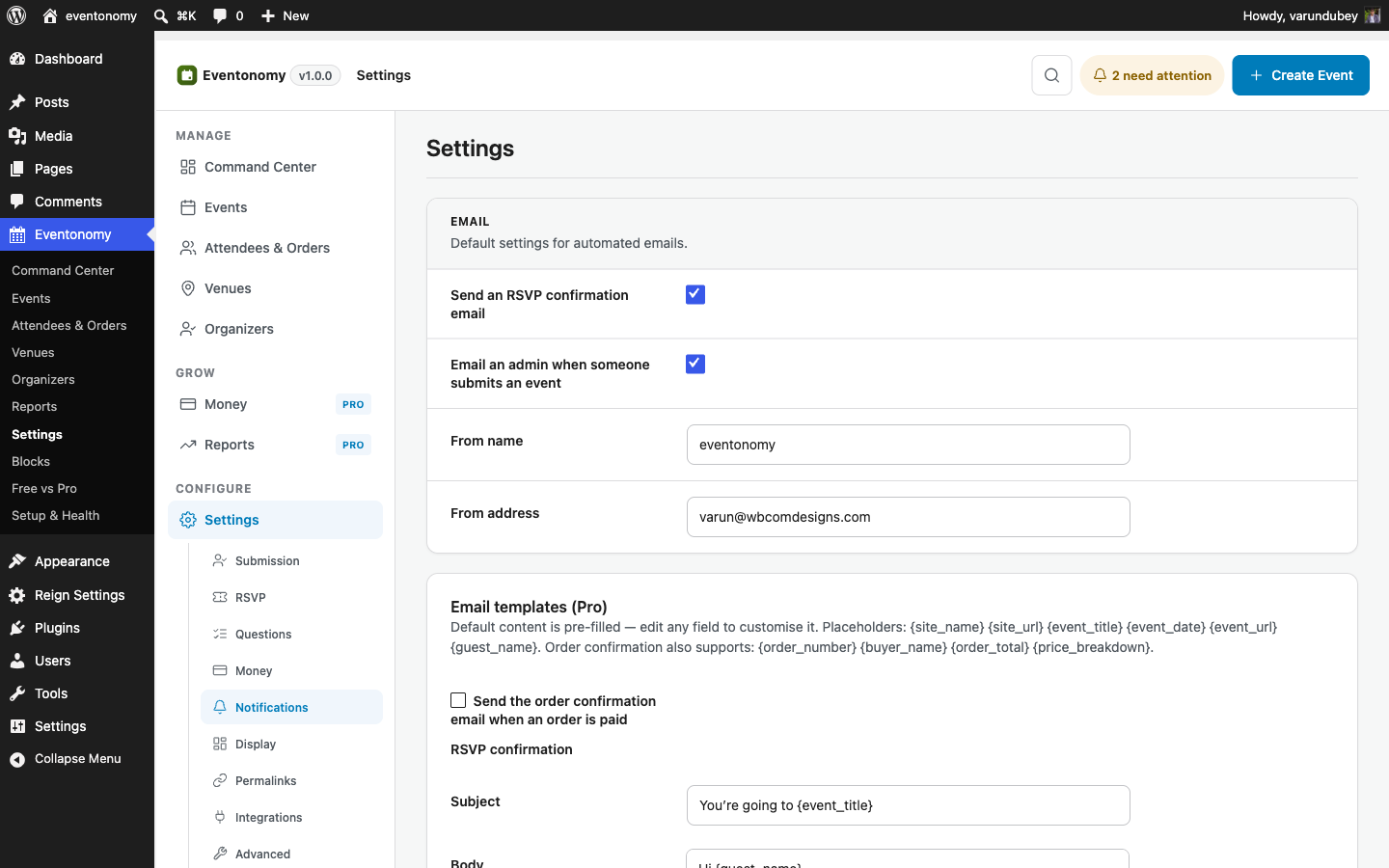
Schedule email reminders ahead of each event, and add SMS through Twilio for
the messages that must land. Custom email templates keep every message in your
brand.
Scheduled email reminders before event day
SMS notifications through your Twilio account
Custom email templates, plus GA4 and Meta conversion tracking
yoursite.com/wp-admin · Notifications
Refunds · reliability
One refund path that never leaves an order stranded.
Refund from the orders screen, the REST API, or a gateway webhook - a Stripe
dashboard refund lands the same way. Every route runs one idempotent path, so a
double click or a replayed webhook can never refund twice.
Refund from admin, REST, or a gateway webhook - one code path
Each refund releases stock, voids the ticket, and frees the coupon
A reconcile cron settles stale-pending orders when a webhook is missed
Order #10432 · refund
Refund $138.00 to StripeRefund
Payment refunded through Stripe
Two tickets voided, they can no longer check in
Stock released back to the pool
Coupon MEETUP10 released for reuse
Coupons · early bird · tax
Coupons, early-bird tiers, and tax that always add up.
Set early-bird windows, tiered ticket prices, percentage or fixed coupons, and
tax or service-fee rules. Pro composes them in the right order - the discount
first, then the fee and tax on the discounted amount - so the total is never off.
Early-bird windows and tiered pricing per ticket type
Percentage or fixed coupons, with usage limits
Tax and service fees applied after the discount, not before
2 × General admission
Subtotal$120.00
Early bird -20%-$24.00
Coupon MEETUP10-$9.60
Service fee$4.32
Tax 8%$7.26
Total$97.98
Earnings · payouts
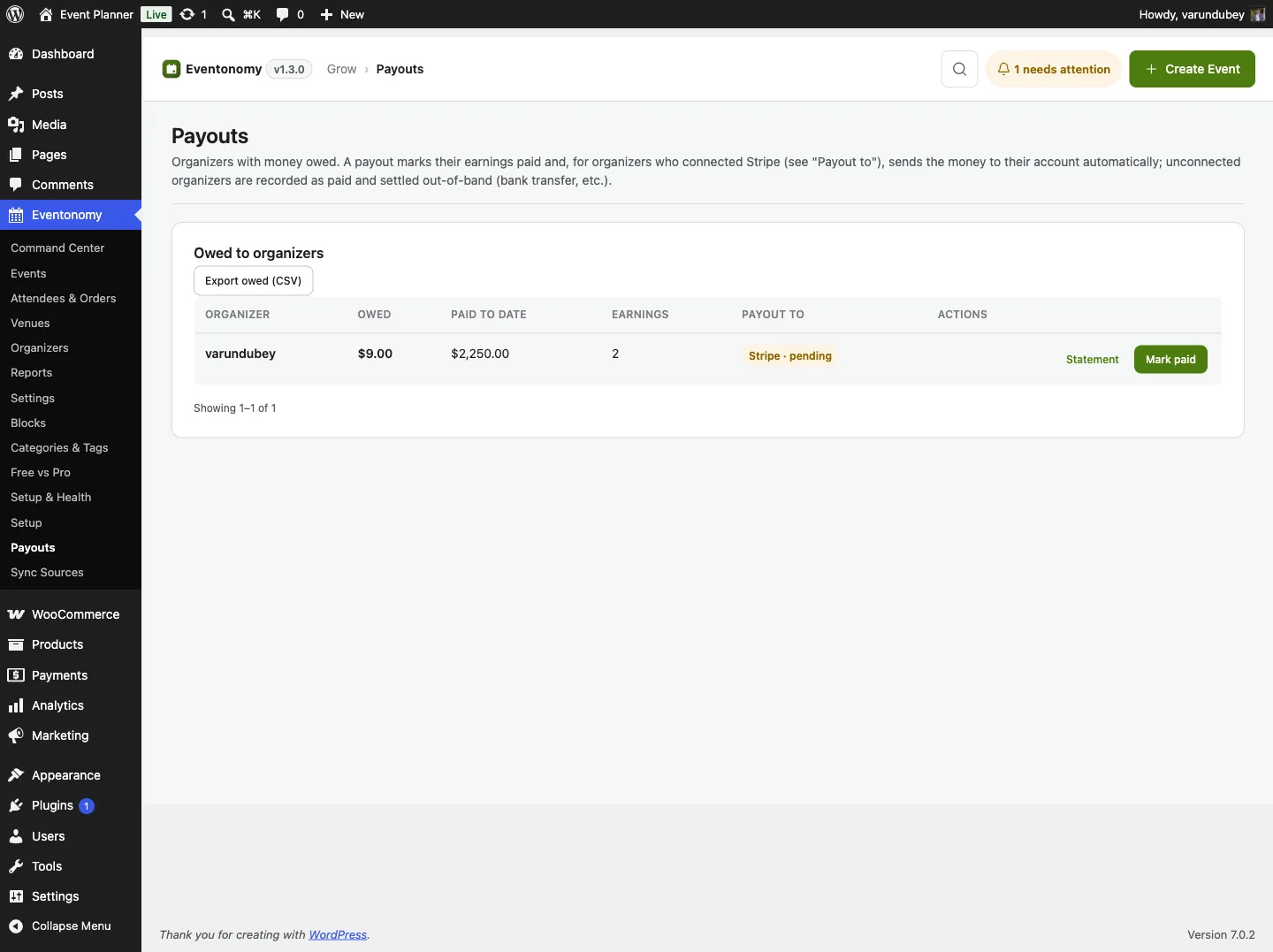
Run a multi-organizer platform and pay everyone on time.
Every paid order books the platform fee and the organizer's net to a ledger. The
Payouts screen lists each organizer with an outstanding balance, and organizers can request
a payout themselves. You approve, settle, and record it in one place. A refund after a payout nets against the next one,
so the books always balance.
Platform fee as a percentage of each order or a flat amount
Organizers see earned, paid, and outstanding on their own dashboard
Stripe Connect pays a connected organizer straight from the screen
Export owed as CSV to pay through your own bank, or send statements
yoursite.com/wp-admin · Payouts
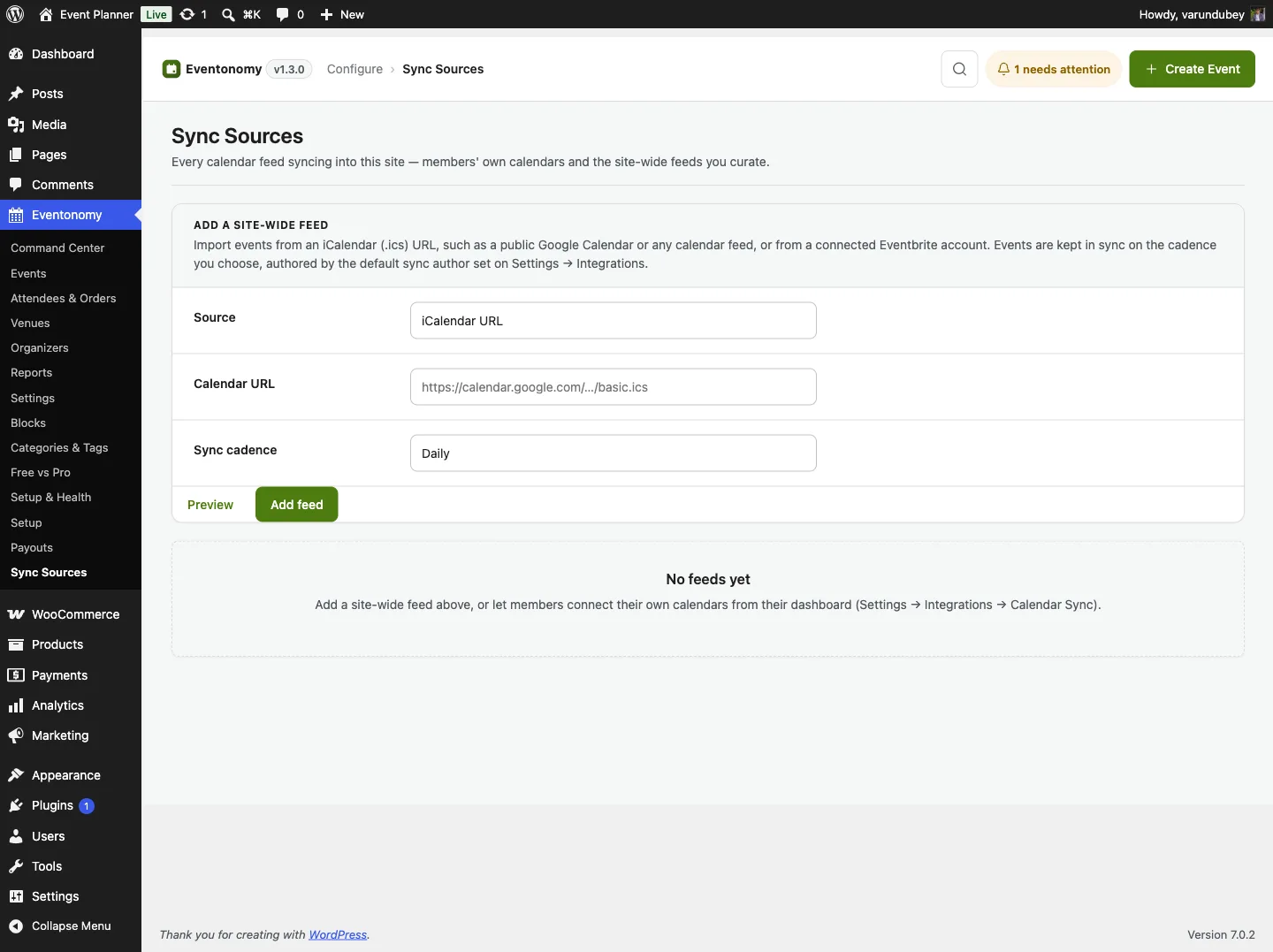
Calendar Sync · imports
Pull events in instead of retyping them.
Point Eventonomy at any iCalendar feed and it imports on a schedule, with duplicate
detection so the same event never lands twice. Organizers can connect their own
feeds from their dashboard, and Eventbrite events come across directly.
Any ICS feed, imported on a recurring schedule
Eventbrite import site-wide or per organizer
Members connect their own calendars, no admin needed
Sync Sources lists every feed with its owner, cadence, and last run
yoursite.com/wp-admin · Sync Sources
Free vs Pro
The same comparison the plugin shows in its admin.
Six shared foundations, ten Pro capabilities. Here is every row, the same matrix
the plugin shows on its own admin screen.
Capability
Free
Pro
Unlimited events and RSVPs (going, maybe, waitlist)
✓
✓
Month, list, grid, and upcoming views
✓
✓
Recurring events
✓
✓
Custom RSVP questions
✓
✓
Calendar feed (ICS) and add to calendar
✓
✓
Shared venue and organizer catalog
✓
✓
Paid tickets and checkout (Stripe, PayPal, WooCommerce)
Ticket platforms take a cut. Pro takes a flat license.
Sell 1,000 tickets or 100,000 - the license price is the same. Your payment
gateway's fees are the only per-ticket cost, and attendee data stays in your
database.
Yes. Pro extends the free plugin rather than replacing it, so install both and activate your license key. All your existing events, RSVPs, and settings stay exactly where they are.
What does the license cover?
An active license gives you Pro updates and support for the sites on your tier. Annual licenses include a year of updates and support and renew at 30% off. Lifetime licenses are a one-time payment and never expire. You can deactivate a site to move the license.
Can organizers ask to be paid?
Yes. On a multi-organizer site, an organizer requests a payout from their Earnings tab and you approve and pay it from the Payouts screen. A request never moves money by itself, so nothing leaves your account until you act.
What happens if my license expires?
Your site keeps working. Free features are unaffected, and Pro features continue to work too. Updates and support stop until you renew.
Is there a money-back guarantee?
Yes. Every plan is covered by a 30-day money-back guarantee through wbcomdesigns.com. If Pro is not the right fit, ask for a refund within 30 days of purchase.
No per-ticket fees, ever.
Start free with the whole RSVP workflow today. Add Pro the day tickets,
reports, or reminders matter.
WBComDesigns is amazing. The WP plugins and themes are of top notch quality with lots of features and updated very frequently. Supports are very responsive and helpful. I use Reign with TutorLMS, and the experience is surprisingly smooth.…
Hoang Phan·VN·
The job well done!
The job well done, well in time - Thanks so much Anmbiya and team!
Happy Client·ZA·
WBCOM Designs is Amazing!
WBCOM Designs has constantly updated and supported their plugins and themes. Recently the new BuddyNext project is Amazing! - and the new line of addons like Mediaverse, Jetonomy, Mediashield, and Listora.. are likewise Amazing! - and very…
Edward S.·US·
High quality WordPress plugins and themes
We’ve hosted a number of Wbcom Designs clients on Levamo, and our experience with their products has been very positive. Their plugins and themes are well built, their support has been reliable, and they seem to be very innovative and…
Michael Eisenwasser·US·
I have worked with Wbcom Designs on…
I have worked with Wbcom Designs on several custom development requests for my WordPress platform, and my experience has been excellent.
christian nicolas·BJ·
Love this company
Love this company. Loved the REIGN product. They were there the entire time helping me set things up; and when things went wrong? They were quick to take action and help find a solution.
Fable Fortitude·CA·
Seriously, one of the best "software tech experiences" I've ever had!
After 16 years of buying WordPress themes and plugins, I know exactly what bad support looks like and Wbcom Designs is the polar opposite. My setup was a nightmare: multiple tools, deep integrations, custom configurations that required…
Duston McGroarty·US·
I was using an excellent plugin created…
I was using an excellent plugin created by Wbcom Designs and had both an error and discovered a slight bug in one aspect of the plugin. After creating a support ticket - I got a super-quick response and discovered the error was on my part…
Edward Bonthrone·US·
Excellent Theme, Powerful Plugins and Outstanding Support
I am using the REIGN theme and several plugins from Wbcom Designs on my website. The theme is beautifully designed, and the plugins are user-friendly. Everything works smoothly, and the features are perfect for building professional…