
24 min read
13 Best WordPress Appointment Booking Plugins Compared

Managing appointments manually can quickly become difficult as your business grows. Missed bookings, scheduling conflicts, delayed responses, and back-and-forth emails can negatively affect both customer experience and productivity.
That is why many businesses use WordPress appointment booking plugins to automate scheduling, accept online bookings, manage calendars, send reminders, and even process payments directly from their websites.
Whether you run a salon, clinic, coaching business, agency, fitness studio, consultancy, or online service platform, the right booking plugin can save time and simplify appointment management.
In this guide, I tested and compared the best WordPress appointment booking plugins based on ease of use, booking flexibility, payment integrations, calendar management, automation features, customization, and overall business value to help you choose the right plugin for your website.

Last updated: 6 November 2026
Quick answer
The best WordPress appointment booking plugin for most sites is Amelia, with 90,000+ active installs and a 4.6 out of 5 rating on WordPress.org. Bookly suits service businesses with many staff, Booknetic suits clinics and salons that want a staff panel, and Easy Appointments is the best free option. BookingPress was closed on WordPress.org on 1 February 2025.
Best WordPress Appointment Booking Plugins Compared
| Plugin | Best For | Online Payments | Calendar Sync | Starting Price |
|---|---|---|---|---|
| Amelia | Appointments and events, most sites | Yes (Square free, others paid) | Google and Outlook (paid) | Free Lite, paid plans from the vendor |
| Bookly | Service-based businesses | Yes | Google Calendar | Free (Pro from $39/year) |
| Booknetic | Multi-staff service businesses, clinics, salons, consultants, agencies | Yes | Google and Outlook Calendar | Limited free version from booknetic.com, paid from $45/year |
| Bookster | Modern booking systems | Yes | Limited | Free (Pro available) |
| MotoPress Appointment Booking | Multi-service businesses | Yes (Pro; Lite is pay on site) | Google Calendar (Pro) | Free Lite, Pro paid |
| Booked | Beginner-friendly appointment booking | Limited | No | Paid |
| Team Booking | Google Calendar scheduling | Limited | Google Calendar | Paid |
| Easy Appointments | Free appointment scheduling | Limited | Google Calendar (Pro) | Free (Pro available) |
| Online Booking & Scheduling Calendar | Classes and group events | Yes | Limited | Check vendor |
| WP Simple Booking Calendar | Simple availability calendars | No | iCal sync (premium) | Free (Premium available) |
| HBook | Hotels and hospitality bookings | Yes | Third-party sync | Paid |
| Appointment Booking Calendar | Simple appointment calendars | PayPal (free), more in Pro | Google Calendar import (Platinum) | Free (Pro available) |
| WP Quick Booking Manager Pro | Property and room bookings | Limited | No | Paid |
Install counts, versions and ratings come from the WordPress.org plugin pages checked on 6 November 2026. Booknetic, Booked, Team Booking, HBook and some others are sold outside the directory, so no WordPress.org figures apply.
What Should You Look for in a WordPress Appointment Booking Plugin?
Choosing the right WordPress appointment booking plugin is important because it affects customer experience, scheduling efficiency, and business automation.
Here are a few important things to consider before choosing a booking plugin:
1. Customization Options: A good booking plugin should let you customize booking forms, schedules, layouts, and branding to match your website and business needs.
2. Ease of Use: The booking process should be simple for both customers and administrators. Complicated systems can lead to missed appointments and poor user experience.
3. Mobile-Friendly Design: Many users book appointments from mobile devices, so your booking plugin should work smoothly across smartphones and tablets.
4. Online Payment Support: Plugins with PayPal, Stripe, WooCommerce, or other payment integrations make appointment scheduling easier and more professional.
5. Calendar and Notification Features: Look for features like Google Calendar sync, automated reminders, and email or SMS notifications to reduce scheduling conflicts and missed bookings.
6. Integration Compatibility: The plugin should work well with tools like WooCommerce, Elementor, Zoom, CRM platforms, and membership plugins.
How I Tested These Appointment Booking Plugins
To make this comparison genuinely useful, I tested each WordPress appointment booking plugin using real-world scheduling and booking scenarios instead of simply comparing feature lists.
I evaluated how well each plugin handled appointment scheduling, calendar management, online payments, automated reminders, staff management, and overall booking experience.
Here are the main factors I considered while reviewing these appointment booking plugins:
- Ease of setup and usability
- Booking and scheduling flexibility
- Online payment integrations
- Calendar synchronization
- Email and SMS notifications
- Mobile responsiveness
- Customization options
- WooCommerce compatibility
- Automation features
- Overall value for businesses
I also considered how suitable each plugin is for different businesses such as salons, clinics, agencies, coaches, consultants, fitness studios, and service-based websites.
Best WordPress Appointment Booking Plugins
There are loads of appointment booking plugins available in the market. All you need to do is select the perfect one for your website. For that, I’ll help you out. Today, in the article, I’m going to share with you the best WordPress Appointment Booking Plugins for your website.
1. Amelia: Best Overall Appointment Booking Plugin
Amelia is the most widely installed appointment booking plugin in this list. WordPress.org shows 90,000+ active installations, version 2.4.14 (updated 27 October 2026), a 4.6 out of 5 rating from 793 reviews and testing up to WordPress 7.1.4. It handles both one-to-one appointments and events from one calendar.
The free Lite version covers core booking, a back-end calendar view, customer and service management, email and SMS confirmations and Square payments. The paid plans add PayPal, Stripe, WooCommerce, Mollie and Razorpay payments, Google Calendar and Outlook Calendar sync, scheduled reminders, WhatsApp messages, unlimited employees and multiple event ticket types.
On pricing, the vendor page lists a Pro plan at $149 a year for 5 domains (shown crossed out from $199), an Elite plan at $259 a year, lifetime plans and a 15-day money-back guarantee. The Starter and Standard prices were not readable on the page we checked, so confirm them before you buy.
Key Features:
- Appointments and events in one calendar
- Free Lite version with Square payments
- Google and Outlook Calendar sync (paid)
- PayPal, Stripe, WooCommerce, Mollie and Razorpay (paid)
- Email, SMS and WhatsApp notifications
- Customer and employee panels
- Multiple event ticket types (paid)
Pros: Largest user base here, active updates, a usable free version, and appointments plus events in one tool.
Cons: Calendar sync, most payment gateways and unlimited staff sit behind the paid plans.
Best For: Salons, clinics, consultants, studios and agencies that want a well-supported plugin with a free way to test it first.
2. Bookly: Best for Service Businesses

Bookly is one of the most popular WordPress appointment booking plugins for businesses that want a professional and automated scheduling system. It offers flexible appointment management, staff scheduling, customer booking tools, and payment integrations in a modern interface.
What I like most about Bookly is how easy it is to manage appointments for multiple staff members and services. Customers can book appointments directly from your website, while administrators can manage schedules, holidays, working hours, and bookings from a mobile-friendly dashboard.
The plugin also integrates with WooCommerce and supports customizable email notifications, making it useful for service-based businesses that want a streamlined booking experience.
WordPress.org lists Bookly at version 28.7 (updated 26 October 2026), 60,000+ active installations, a 4.4 out of 5 rating from 586 reviews and testing up to WordPress 7.1.4. The free plugin is the base. Bookly Pro is a paid add-on, and the vendor site lists it at $39 a year for one site or $99 lifetime, with 40+ optional add-ons and SMS or WhatsApp through paid Bookly Cloud services.
Key Features:
- Unlimited staff members and services
- Flexible appointment scheduling
- Mobile-friendly booking system
- WooCommerce integration
- Custom email notifications
- Google Calendar integration
- Customizable booking forms
- Responsive admin dashboard
Pros: Easy to use, highly customizable, mobile-friendly, and suitable for multiple business types
Cons: Many advanced features require paid add-ons or the Pro version
Best For: Salons, clinics, consultants, agencies, fitness businesses, and service-based websites that need professional appointment scheduling.
3. Booknetic: Best for Multi-Staff Service Businesses
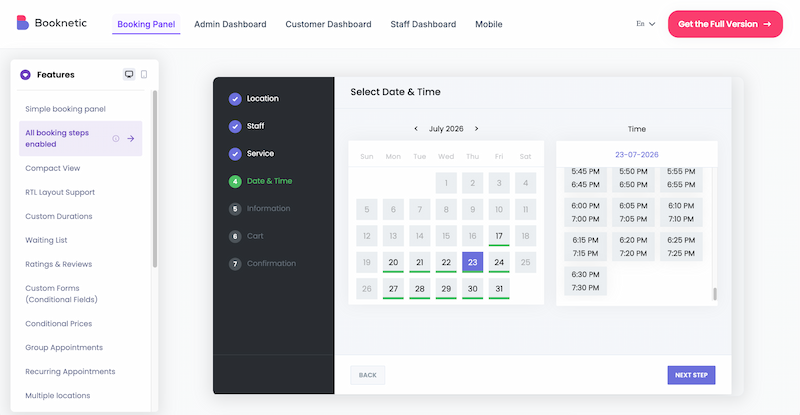
Booknetic is a powerful WordPress appointment booking plugin built for service-based businesses that need more than a simple booking form. It works well for salons, clinics, consultants, fitness studios, agencies, law firms, tutoring centers, and other businesses that manage staff schedules, services, locations, payments, and customer notifications from one place.
What makes Booknetic stand out is its dedicated booking dashboard. Instead of forcing staff to manage appointments inside the full WordPress admin area, Booknetic provides a clean booking panel for appointments, customers, staff schedules, payments, and reports. This makes it easier for non-technical staff to manage daily bookings without dealing with WordPress menus or plugin settings.
Booknetic supports multiple staff members, multiple locations, recurring appointments, group bookings, custom booking forms, deposits, online payments, automated notifications, and calendar sync. Businesses can also extend the plugin with 50+ add-ons through Boostore, including Google Calendar, Outlook Calendar, Zoom, Google Meet, WhatsApp notifications, SMS notifications, WooCommerce payments, gift cards, loyalty points, and more.
Booknetic is not in the WordPress.org directory, so the install count and rating there do not apply. The vendor offers a limited free version for testing and lists annual plans at $45 (Basic), $99 (Standard), $149 (Premium) and $299 (Elite), plus lifetime plans from $99. Prices exclude VAT and change during sales, so confirm on the Booknetic pricing page.
Key Features:
- Step-by-step appointment booking wizard
- Multiple staff, services, and locations
- Recurring appointments and group bookings
- Custom booking forms and conditional fields
- Online payments through Stripe, PayPal, Square, WooCommerce, and other gateways
- Google Calendar and Outlook Calendar sync
- Automated email, SMS, WhatsApp, and Telegram notifications
- Zoom and Google Meet integration
- Dedicated staff and admin booking dashboard
- 50+ add-ons available through Boostore
- Mobile app for staff and admins
- REST API support
Pros: Feature-rich booking system, clean staff dashboard, strong automation options, multi-location support, and flexible add-on ecosystem.
Cons: Some advanced features require add-ons, and setup may take more time for very simple one-service businesses.
Best For: Salons, clinics, consultants, agencies, fitness studios, law firms, tutoring centers, and service businesses that need a complete WordPress appointment booking system.
4. Bookster: Best Modern Booking Plugin

Bookster is a modern WordPress appointment booking plugin designed to simplify scheduling and service management for businesses of all sizes. It allows customers to book appointments directly from your website without complicated setup or manual coordination.
What I like most about Bookster is its clean interface and smooth booking experience. The plugin includes customizable booking forms, flexible scheduling options, automated notifications, and staff management tools that make appointment handling much easier.
It also integrates with WooCommerce, PayPal, and Stripe, allowing businesses to accept secure online payments while managing services and customer appointments from one dashboard.
WordPress.org shows Bookster at version 3.3.0 (released 2 September 2026), 100+ active installations, a 5 out of 5 rating from 7 reviews and testing up to WordPress 7.1.4. The plugin is actively developed, but the install base is small, so there is far less community support than for Amelia or Bookly. Pro prices were not shown on the listing, so check the vendor price plans.
Key Features:
- Customizable booking forms
- Staff and service management
- Flexible appointment scheduling
- PayPal and Stripe integration
- Automated email notifications
- User-friendly admin dashboard
- WooCommerce compatibility
- Multiple service support
Pros: Modern interface, easy setup, flexible scheduling options, and strong payment integrations
Cons: Smaller ecosystem compared to older booking plugins
Best For: Consultants, salons, fitness trainers, agencies, coaches, and service-based businesses looking for a modern booking solution.
5. MotoPress Appointment Booking: Best for Multi-Service Businesses

MotoPress Appointment Booking is a flexible WordPress booking plugin designed for businesses that manage multiple services, employees, and appointment schedules. It offers a step-by-step booking system that makes scheduling easy for both administrators and customers.
What I like most about MotoPress Appointment Booking is its balance between flexibility and usability. You can create unlimited services, assign employees, define custom schedules, and manage bookings from a centralized dashboard. The plugin also supports Google Calendar synchronization and online payments through Stripe, PayPal, and bank transfer options.
It works especially well for businesses that offer multiple appointment types or staff-based scheduling systems.
Know what is free before you start. The Lite version on WordPress.org (version 2.4.9, updated 3 November 2026, 2,000+ active installations, 4.5 out of 5 from 21 reviews) takes bookings with pay-on-site only. The Google Calendar sync for employees and the Stripe, PayPal and bank transfer payments come with the paid Pro version. WordPress.org lists it as tested up to WordPress 6.9.11, so check compatibility on a staging site if you run a newer release.
Key Features:
- Unlimited services and employees
- Step-by-step booking wizard
- Google Calendar synchronization
- Group and multiple bookings
- Stripe and PayPal integration
- Automated email notifications
- Centralized booking dashboard
- Flexible scheduling management
Pros: Flexible scheduling system, strong staff management tools, and useful payment integrations
Cons: Advanced customization can require additional setup time
Best For: Salons, clinics, coaching businesses, agencies, wellness centers, and multi-service businesses that need advanced appointment scheduling.
6. Booked: Best Beginner-Friendly Appointment Booking Plugin
Booked is a simple and flexible WordPress appointment booking plugin that helps businesses create appointment calendars and manage bookings directly from their websites. It offers an easy setup process along with useful customization options for different scheduling needs.
What I like most about Booked is how beginner-friendly the interface feels. You can create multiple booking calendars, allow guest bookings, customize appointment fields, and manage availability without dealing with complicated settings.
The plugin also includes responsive booking forms, calendar color customization, appointment buffering, and quick date blocking features that make appointment management more organized.
Check before you buy: Booked is not in the WordPress.org plugin directory, and we could not confirm its current version, price or update date from an official page on 6 November 2026. Check the vendor listing for the latest release and support terms before you rely on it for a live business.
Key Features:
- Multiple appointment calendars
- Guest booking support
- Custom appointment fields
- Responsive booking interface
- Calendar color customization
- Appointment buffering
- Date blocking options
- Shortcodes and widgets support
Pros: Easy to use, beginner-friendly, flexible calendar system, and responsive design
Cons: Some advanced features require additional add-ons
Best For: Small businesses, freelancers, consultants, and WordPress users looking for a simple and easy-to-manage appointment booking system.
7. Team Booking: Best Google Calendar Booking Plugin
Team Booking is a WordPress appointment booking plugin built around Google Calendar integration. It allows businesses to manage appointments, availability, and bookings directly through Google Calendar while syncing schedules with their WordPress website.
What I like most about Team Booking is how smoothly it connects WordPress with Google Calendar. Calendar events can automatically become available booking slots, making appointment management much easier for businesses already using Google’s scheduling system.
The plugin also includes customizable reservation forms, automated email notifications, and responsive booking layouts that work well across devices.
Check before you buy: Team Booking is not in the WordPress.org directory, and we could not confirm its current version, price or update date from an official page on 6 November 2026. Check the vendor listing before buying.
Key Features:
- Google Calendar integration
- Automatic booking slot generation
- Reservation form builder
- Responsive booking system
- Email notification system
- Flexible scheduling management
- Multiple booking calendars
- Mobile-friendly design
Pros: Excellent Google Calendar integration, responsive design, and easy appointment management
Cons: Best suited for businesses already using Google Calendar workflows
Best For: Consultants, agencies, teams, coaches, and businesses that rely heavily on Google Calendar for scheduling and appointment management.
8. Easy Appointments: Best Free Appointment Booking Plugin

Easy Appointments is a flexible WordPress booking plugin that allows businesses to manage appointments, services, workers, and locations from a centralized scheduling system. It is a popular free option for websites that need customizable appointment management without high costs.
What I like most about Easy Appointments is its flexibility for managing multiple services and appointment types. You can create recurring appointments, define custom schedules, manage multiple locations, and send automated reminders to both customers and employees.
The plugin also includes customizable booking forms, calendar management tools, and multiple time slot options, making it useful for different business types.
WordPress.org lists Easy Appointments at version 4.0.4 (updated 21 October 2026), 10,000+ active installations, a 4.3 out of 5 rating from 132 reviews and testing up to WordPress 7.1.4. The core plugin is free. A paid Pro extension adds two-way Google Calendar sync, and some reviews report sync problems, so test that feature before you depend on it.
Key Features:
- Multiple services and locations
- Recurring and one-time appointments
- Custom booking fields
- Automated reminders
- Multiple time slots
- Calendar management tools
- Bulk connection builder
- Customizable admin dashboard
Pros: Flexible scheduling system, free to use, customizable booking options, and supports multiple business locations
Cons: The interface feels less modern compared to newer booking plugins
Best For: Clinics, salons, agencies, consultants, and businesses looking for a flexible, free appointment booking plugin for WordPress.
9. Online Booking & Scheduling Calendar: Best for Classes and Events

Online Booking & Scheduling Calendar is a flexible WordPress booking plugin designed for businesses that manage appointments, classes, group events, and online services. It allows customers to schedule bookings directly from your website while managing payments and notifications from one dashboard.
What I like most about this plugin is its support for both one-on-one appointments and group bookings. Businesses can create custom booking forms, manage staff access, offer Zoom-based online services, and accept secure payments through gateways like PayPal and Stripe.
The plugin also includes automated reminders and customizable scheduling tools, making it useful for businesses that handle recurring events or classes.
Check before you buy: we could not match this plugin to a current WordPress.org listing or an official pricing page on 6 November 2026. Confirm the vendor, current version and price before you install it. If you mainly need classes and events, Amelia (number 1 above) is a verified alternative.
Key Features:
- One-on-one and group bookings
- Event and class registration
- Zoom integration
- PayPal and Stripe support
- Customizable booking forms
- Email and SMS notifications
- Unlimited bookings and services
- Staff role management
Pros: Flexible booking system, supports events and classes, strong payment integrations, and easy scheduling management
Cons: Advanced customization options may require additional configuration
Best For: Educational platforms, fitness studios, coaches, event organizers, consultants, and businesses offering classes or group bookings.
10. WP Simple Booking Calendar: Best Lightweight Booking Calendar

WP Simple Booking Calendar is a lightweight WordPress booking plugin designed for businesses and property owners who need a simple availability calendar without complex booking management features.
What I like most about WP Simple Booking Calendar is its simplicity. You can quickly create booking calendars, display availability on posts or pages, and manage multiple booking forms without complicated setup processes.
The plugin supports Gutenberg blocks, widgets, and shortcodes, making it easy to add calendars anywhere on your website. It also includes responsive layouts and language translation support for better usability.
WordPress.org shows version 2.0.16 (updated 29 June 2026), 10,000+ active installations, a 4.8 out of 5 rating from 227 ratings and testing up to WordPress 7.0.8. The premium version adds iCal sync with sites such as Airbnb and Booking.com, unlimited calendars and CSV export. The price is on the vendor site, not on the WordPress.org page.
Key Features:
- Simple availability booking calendars
- Multiple booking calendars
- Gutenberg block support
- Shortcodes and widgets
- Responsive calendar layouts
- Language translation support
- Real-time booking management
- Easy calendar customization
Pros: Lightweight, beginner-friendly, easy setup, and ideal for simple booking needs
Cons: Limited advanced appointment scheduling and automation features
Best For: Property rentals, small businesses, vacation rentals, and WordPress websites that need a simple booking availability calendar.
11. HBook: Best Hotel and Hospitality Booking Plugin

HBook is a WordPress appointment and reservation plugin designed specifically for hotels, vacation rentals, bed and breakfasts, apartments, and hospitality businesses. It helps property owners manage bookings, availability, and online reservations directly from their websites.
What I like most about HBook is how well it handles hospitality-focused booking workflows. The plugin allows businesses to manage occupancy rates, seasonal pricing, booking availability, and reservation calendars from a centralized dashboard.
It also supports third-party synchronization, multilingual functionality, and booking exports, making it useful for businesses that manage multiple properties or accommodation services.
Check before you buy: HBook is a premium plugin from the Maestrel team and is not in the WordPress.org directory. We could not confirm its current version or price from an official page on 6 November 2026, so check the vendor listing and the date of the last update first.
Key Features:
- Online reservation management
- Occupancy and seasonal pricing controls
- Booking calendar management
- Third-party calendar synchronization
- CSV booking export support
- Multilingual functionality
- Flexible availability settings
- Hospitality-focused booking system
Pros: Excellent for hotels and rentals, flexible reservation management, and strong accommodation booking features
Cons: Primarily designed for hospitality businesses rather than general appointment scheduling
Best For: Hotels, vacation rentals, apartments, campsites, bed and breakfasts, and hospitality businesses using WordPress.
12. Appointment Booking Calendar: Best Multi-Calendar Booking Plugin

Appointment Booking Calendar is a flexible WordPress scheduling plugin that helps businesses manage appointments across multiple calendars and booking systems. Its Platinum version can import items from Google Calendar.
What I like most about Appointment Booking Calendar is its ability to manage multiple booking calendars and time slots from a simple interface. Customers can book available appointment slots directly from the frontend, while administrators can manage schedules, users, and availability settings without coding knowledge.
The plugin also includes customizable booking options, multi-page calendars, and captcha protection for secure booking management.
WordPress.org lists version 1.4.07 (updated 26 October 2026), 1,000+ active installations, a 4.2 out of 5 rating from 92 reviews and testing up to WordPress 7.0.8. The free version takes bookings through PayPal. The paid version adds bookings without PayPal, a visual form builder, email reminders and coupon codes.
Key Features:
- Google Calendar import (Platinum version)
- Customer self-booking system
- Multi-page calendar support
- Multiple time slot management
- User assignment options
- Frontend booking forms
- Captcha protection
- Easy setup and configuration
Pros: Flexible calendar system, beginner-friendly setup, and supports multiple scheduling platforms
Cons: The interface may feel outdated compared to newer booking plugins
Best For: Businesses, consultants, agencies, clinics, and WordPress websites that manage appointments across multiple calendars and scheduling systems.
13. WP Quick Booking Manager Pro: Best for Property and Room Bookings

WP Quick Booking Manager Pro is a WordPress booking plugin designed for property rentals, hotels, room bookings, and accommodation-based businesses. It allows customers to make reservations directly from your website while helping administrators manage bookings and availability more efficiently.
What I like most about WP Quick Booking Manager Pro is its flexibility for handling room and property reservations. The plugin can automatically generate booking calendars, room galleries, and shortcodes, making setup much easier for businesses managing multiple properties or booking types.
It also supports multiple currencies, dynamic room management, and responsive booking layouts that improve the overall booking experience.
Check before you buy: we could not confirm this plugin’s current version, price or update date from an official page on 6 November 2026. Check the vendor listing before you buy, and test the booking flow on a staging site first.
Key Features:
- Property and room booking management
- Automatic booking calendar generation
- Multiple currency support
- Dynamic room management
- Responsive booking interface
- Booking shortcode support
- Modern admin dashboard
- Flexible booking controls
Pros: Good for property rentals, flexible booking setup, and supports multiple room management
Cons: More focused on accommodation bookings than general appointment scheduling
Best For: Hotels, vacation rentals, guest houses, apartments, and WordPress websites that manage room or property bookings.
What happened to BookingPress?
Earlier versions of this guide ranked BookingPress first. We removed it from the ranking because its WordPress.org page now reads: “This plugin has been closed as of February 1, 2025 and is not available for download. Reason: Guideline Violation.” A closed plugin cannot be installed from the WordPress.org directory or updated through it.
The vendor still sells BookingPress. Its own site offers a free plan download, a Standard plan at $89 a year (regular price $99) and lifetime plans from $229, and it does not mention the WordPress.org closure. If you already run it, check how you receive updates and security fixes. If you are choosing a plugin today, pick one that is listed on WordPress.org, such as Amelia, Bookly or Easy Appointments.
For a shorter list, see our guide to the top WordPress booking plugins. If you are also comparing hosted tools, read online scheduling software for better appointment management.
How to Choose the Right WordPress Appointment Booking Plugin
Need a complete booking solution with a free way to test it?
Choose Amelia. It covers appointments and events, has the largest install base in this list and a free Lite version.
Running a service-based business?
Bookly is a proven option for salons, clinics, agencies, consultants, and businesses that need flexible appointment scheduling.
Want a modern booking experience?
Bookster provides a clean interface, customizable booking forms, and easy payment integrations for modern websites.
Managing multiple services and employees?
MotoPress Appointment Booking works well for businesses that need flexible schedules, staff assignments, and centralized booking management.
Need the easiest setup?
Booked is beginner-friendly and makes it easy to create appointment calendars without complicated configuration.
Using Google Calendar heavily?
Team Booking is the best option for businesses that want deep Google Calendar integration and automated booking slots.
Looking for a free appointment booking plugin?
Easy Appointments is a strong free solution with support for multiple locations, services, and recurring bookings. Two-way Google Calendar sync needs the paid Pro extension.
Offering classes, events, or group sessions?
Online Booking & Scheduling Calendar works well for event registrations, group bookings, and Zoom-based appointments.
Need a simple availability calendar?
WP Simple Booking Calendar is ideal for property rentals and websites that only need lightweight booking availability management.
Running a hotel or hospitality business?
HBook is specifically designed for hotels, vacation rentals, apartments, and hospitality-based booking systems.

Final Thoughts
The best WordPress appointment booking plugin depends on the type of business you run and the level of scheduling automation you need.
Some plugins focus on simple appointment scheduling, while others provide advanced features like online payments, calendar synchronization, automated reminders, staff management, and multi-service booking systems. Therefore, choosing the right plugin depends on your workflow, customer experience goals, and business requirements.
For example, service businesses may need flexible scheduling and payment integrations, while hotels and property rentals may require availability calendars and reservation management tools. Similarly, businesses offering classes, consultations, or events may benefit from plugins with group booking and Zoom integration features.
In short, the right appointment booking plugin can help automate scheduling, reduce manual work, improve customer experience, and make managing appointments much more efficient for your WordPress website.
Frequently asked questions
What is a WordPress appointment booking plugin?
A WordPress appointment booking plugin lets customers schedule appointments, classes, consultations or services directly from your website. It manages availability, sends confirmations and can take payments.
Is BookingPress still available?
BookingPress was closed on WordPress.org on 1 February 2025 for a guideline violation, so you cannot download it from the directory. The vendor still sells it from its own site. For a plugin listed on WordPress.org, pick Amelia, Bookly or Easy Appointments.
Which is the best free appointment booking plugin for WordPress?
Easy Appointments is fully free at its core and has 10,000+ active installs on WordPress.org. Amelia Lite and Bookly also have free versions, but calendar sync and several payment gateways need a paid plan.
Which appointment booking plugin has the most installs?
Among the plugins here that are listed on WordPress.org, Amelia leads with 90,000+ active installs, followed by Bookly with 60,000+ and Easy Appointments and WP Simple Booking Calendar with 10,000+ each.
Can booking plugins accept online payments?
Yes. Most support PayPal, Stripe or WooCommerce, but gateways are often a paid feature. Amelia Lite supports Square for free, while MotoPress Lite takes pay-on-site bookings only.
Do appointment booking plugins support Google Calendar?
Many do, but often only in the paid version. Amelia, Booknetic, Bookly, MotoPress and Team Booking offer Google Calendar sync, and Easy Appointments needs its Pro extension for two-way sync.
Are WordPress booking plugins mobile-friendly?
Most modern appointment booking plugins are responsive and work on smartphones and tablets. Test the booking form on a real phone before launch.
Which booking plugin is best for hotels and rentals?
HBook and WP Quick Booking Manager Pro are built for hotels, vacation rentals and property bookings. WP Simple Booking Calendar is a lighter choice if you only need an availability calendar.
Can I use booking plugins for classes and group events?
Yes. Amelia handles events and group bookings, and Booknetic, Bookly and MotoPress support group bookings. Check that your plan includes the group or event feature.
Do booking plugins work with WooCommerce?
Many integrate with WooCommerce for payments and service management, usually through a paid add-on or plan. Check the plugin page before you buy.
Which appointment booking plugin is best for beginners?
Amelia and Easy Appointments are the easiest to try because they have free versions. Booked is also described as beginner-friendly, but confirm its current version first.
Interesting Reads:
Top WordPress Migration Service To Move Your Website
Online Scheduling Software for Better Appointment Management
Related reading