
12 min read
What is the Best WordPress Community Plugin?


Building an online community requires the right tools, and choosing the best WordPress community plugin is the first step. Whether you want to create a private membership site, a discussion forum, or a full-fledged social network, the right plugin can make or break your project.
With so many options available, it’s easy to feel overwhelmed. Some plugins focus on social networking features, while others enhance user engagement through forums, messaging, and gamification. This guide breaks down the top plugins, their features, and how to choose the best one for your community.

2026 WordPress Community Plugin Comparison
Six Plugins, One Question: How Many Do You Actually Need?
One more thing has changed since this guide first went up: there’s now a plugin built specifically to answer the question this whole list is really about - not “which community plugin,” but “how many plugins am I about to install to get a community that actually works.” We cover it first below, then walk through the rest of the field the same way we always have.
What Makes a Great WordPress Community Plugin?
Not all community plugins offer the same functionality. Some are designed for social networks, while others focus on forums or memberships. The best WordPress community plugin should provide:
-
User profiles and member directories
-
Private messaging and group discussions
-
Content sharing and activity feeds
-
Customization options for branding
-
Scalability to grow with your community
A plugin should also integrate seamlessly with other WordPress tools, ensuring flexibility for monetization, analytics, and design.
Why WordPress is the Best Platform for Online Communities
WordPress offers unmatched flexibility, making it the ideal platform for building online communities. Unlike social media platforms, you have complete control over your members, content, and monetization.
WordPress also allows for deep customization. You can choose themes, install plugins, and add custom features to match your community’s goals. With the right plugin, you can turn your website into a fully functional social network or membership site without needing to code.
How to Choose the Best WordPress Community Plugin
Before installing a plugin, consider your community’s needs. Are you building a private network for professionals? A fan community? A customer support forum? Each goal requires different features.
Also, consider factors like ease of use, mobile responsiveness, and integration with other plugins. A plugin should enhance user experience, not complicate it.
One Plugin or Five? The Question 2026 Actually Forces You to Answer
Here’s what building a WordPress community usually looks like in practice. You install a core community plugin for profiles and activity feeds. Then a separate plugin for private messaging, because the core one’s messaging is thin. Then a gamification plugin for points and badges, because engagement drops without a reason to come back. Then, if you’re running courses or a marketplace on the side, another two or three plugins to bridge those in. Each one has its own settings screen, its own update schedule, and its own way of doing things - and every WordPress developer who has run a site past 5,000 members has watched two of those plugins quietly break each other after an update.
That’s not a knock on any single plugin in this list. It’s the default shape of building on WordPress: composable, flexible, and also the reason “plugin conflict” is one of the most common support tickets in this space. The tradeoff has always been flexibility versus complexity, and for years accepting that complexity was the price of staying self-hosted instead of moving to a hosted platform like Circle or Mighty Networks.
BuddyNext is the first plugin in this category built around a different bet: that most of what a community site needs - the feed, the profiles, the messaging, the points and badges, the moderation - belongs in one codebase instead of five, wired together by one team instead of stitched together by the site owner. Whether that bet is right for your project is exactly what the rest of this guide will help you decide.
The Field at a Glance
| Plugin | Free tier | Paid from | Architecture | Native gamification | Course & job integration |
|---|---|---|---|---|---|
| BuddyNext | Yes, full core | $149/year (optional) | Single plugin | Yes - points, badges, leaderboard built in | Connects to a companion course and job system out of the box |
| BuddyPress | Yes, full core | Free (add-ons vary) | Core plus separate add-ons | Via third-party add-ons | Via third-party add-ons |
| BuddyBoss Platform | No | ~$399/year | Single vendor, LearnDash/LifterLMS integration | Available as a paid add-on | Deep LMS integration; no native job board |
| PeepSo | Yes, full core | From $149/year | Core plus paid bundles | Not native | Not native |
| UserPro | No | One-time license | Single plugin, profile-focused | Basic badge system | Not built in |
| Youzify | No | From $49 one-time | Add-on layer, requires BuddyPress | Not native | Not built in |
Read the table for what it is: a starting point, not the whole decision. BuddyBoss earns its price with the deepest LMS integration of the group if LearnDash or LifterLMS is the point of your site. PeepSo still has the best native real-time chat. What follows covers each plugin’s actual strengths, starting with the newest entry in the category.
The Top WordPress Community Plugins
1. BuddyNext - The All-in-One Pick for 2026
BuddyNext is the newest plugin on this list, and it starts from a different premise than the other five: instead of being a community core that you extend, it’s built to be the whole stack. Activity feeds, spaces, member profiles, direct messaging, notifications, onboarding, and moderation all ship in one free, self-hosted plugin - no per-seat fees, nothing phoning home to a third-party server.
Key Features:
- Activity feed with For You, Following, Spaces, and Network views, plus text, link, and poll posts with per-post privacy
- Points, badges, levels, streaks, and a leaderboard built natively into the member profile - not a bolted-on add-on
- Real direct messaging with media sharing, built on the same engine that powers the plugin’s own notification system
- Connects to a companion course platform (Learnomy), so course completions and certificates show up as feed activity and notifications without a second dashboard to manage
- Connects to a companion job board the same way - new listings and open-to-work profiles surface in the community feed and search
- REST-first with a documented hook layer, and ships as a Progressive Web App so the same community works on the web and installs like an app
Why It’s Great: The gamification and messaging aren’t separate purchases or separate settings screens - they’re part of the same plugin, built by the same team, tested against each other before release. That’s the difference between a community site with five moving parts and one with effectively one. The free core covers everything above; a paid tier starting at $149/year adds the monetization layer - membership plans, on-site checkout, and content protection - for sites that want to charge for access.
Best For: New community builds in 2026 that want gamification and messaging working on day one without assembling them from separate plugins, and site owners who’d rather not pay per-seat fees to run their own community.
Related: Best Self-Hosted WordPress Community & Course Plugins (2026)
2. BuddyPress - The Social Networking Powerhouse

BuddyPress remains a fan favorite, and for good reason. It’s free, open-source, and incredibly flexible. Think of it as your starter kit for building social networks on WordPress.
Key Features:
-
Custom user profiles and avatars
-
Activity streams and group features
-
Private messaging and notifications
-
Extensible with dozens of third-party add-ons
Why It’s Great: BuddyPress has stayed relevant thanks to its massive community and plugin ecosystem. It integrates effortlessly with forums like bbPress, gamification tools, and membership systems.
Best For: Anyone who wants full control over their community structure and isn’t afraid to tinker with settings or code.
3. BuddyBoss Platform - The Premium Powerhouse
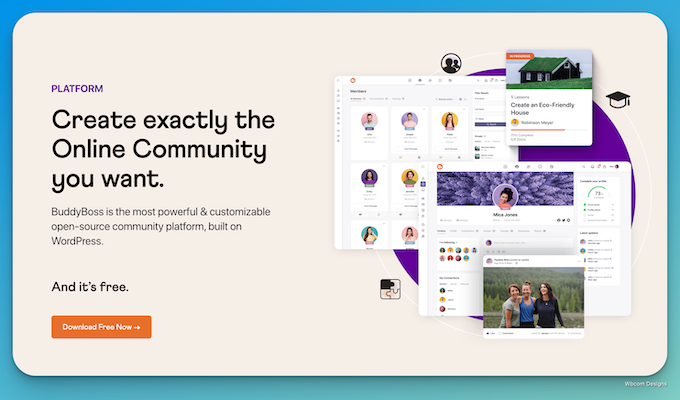
If you love BuddyPress but want a more polished, plug-and-play experience, the BuddyBoss Platform delivers. It builds on BuddyPress’s foundation but adds powerful extras that make launching a full-fledged online community fast and easy.
Key Features:
-
Beautiful front-end design out of the box
-
Built-in support for e-learning (LearnDash, LifterLMS)
-
Mobile app integration
-
Zoom, GamiPress, and WooCommerce compatibility
Why It’s Great: It’s become the go-to for creators, coaches, and brands building social learning communities or premium member hubs. You get the BuddyPress features, but modernized and refined.
Best For: Creators who want a premium WordPress community plugin with social networking, course support, and monetization tools in one.
Also Read: 17 Best WP Community Plugins in 2025
4. PeepSo - The Social Network Alternative
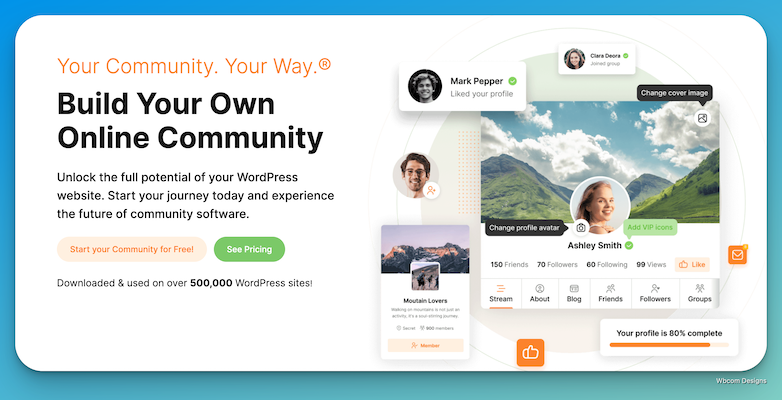
PeepSo brings the feel of a social media platform, right inside WordPress. It’s lightweight but powerful, with a clean interface that mimics Facebook-style communities.
Key Features:
-
Customizable user profiles
-
Activity streams, friend connections, and reactions
-
Front-end posting and media sharing
-
Real-time notifications and chat add-ons
Why It’s Great: PeepSo has grown fast thanks to its modular design. You can start small and scale up by adding features like groups, videos, polls, or even paid memberships.
Best For: Site owners who want a social network vibe and great UX without sacrificing speed or performance.
5. UserPro - Profile Management Made Simple

If your priority is beautiful, functional user profiles with minimal fuss, UserPro fits the bill. It focuses on front-end registration, member directories, and profile customization.
Key Features:
-
Drag-and-drop profile builder
-
Front-end login and registration forms
-
Badge system and member lists
-
Built-in content restriction and social connect
Why It’s Great: UserPro makes onboarding clean and smooth. You can design stunning profile layouts without touching code, and the user directory adds a professional feel to any community.
Best For: Business networks, talent directories, or private communities with a focus on user identity and clean design.
6. Youzify - The Customization King

Youzify (formerly Youzer) is one of the most visually rich WordPress community plugins out there. It’s packed with features and customization options, perfect for anyone who loves detail.
Key Features:
-
Stylish, animated user profiles
-
User wall, followers, and mentions
-
Multiple tabs, widgets, and profile layouts
-
Gamification, reviews, and social links
Why It’s Great: Youzify turns basic profiles into social hubs. It’s all about visual engagement and giving users more ways to express themselves within the community.
Best For: Communities that value design, interactivity, and strong personal branding, like influencers, creators, or fan clubs.
How BuddyX Enhances WordPress Communities
When building a community with BuddyPress or PeepSo, the right theme makes all the difference. BuddyX is designed specifically for community-driven websites, providing seamless integration with leading community plugins.
With BuddyX, you get:
-
A modern, responsive design
-
Built-in support for BuddyPress and PeepSo
-
Customization options for branding
-
Optimized performance for speed and engagement
A strong plugin needs a strong theme, and BuddyX ensures your community looks and functions flawlessly.
Features to Look for in a WordPress Community Plugin
Choosing the right plugin depends on your needs, but some features should be non-negotiable. Look for:
-
User registration and profile management
-
Group and forum discussions
-
Private messaging and notifications
-
Mobile-friendly design
-
Compatibility with other WordPress tools
A good plugin should also receive regular updates and have strong developer support to ensure long-term stability.
How to Set Up a Community Plugin on WordPress
Installing a community plugin is simple. First, navigate to the WordPress dashboard, go to Plugins > Add New, and search for your chosen plugin. Click Install Now and then Activate.
Once activated, follow the setup wizard or customize the settings to match your community’s needs. Many plugins offer add-ons for extra features like monetization, analytics, and gamification.

FAQ
Is BuddyPress still a good choice in 2026?
Yes - it remains actively maintained (the core plugin shipped an update as recently as July 2026) and its add-on ecosystem is still the largest of any WordPress community plugin. The tradeoff is that you’re assembling a stack yourself: gamification, advanced messaging, and course integrations each come from separate add-ons rather than one plugin.
What makes BuddyNext different from BuddyPress?
Scope. BuddyPress gives you a lean, extensible core and expects add-ons to fill in the rest. BuddyNext ships the feed, profiles, messaging, gamification, and moderation together in one plugin, with a companion course platform and job board that connect in without a separate integration project.
Do I need a page builder or theme to use these plugins?
Most community plugins render their own templates, but a theme built for community sites - like BuddyX - makes the front end look finished instead of default WordPress. Check theme compatibility before committing to a plugin if design matters as much as functionality to you.
Which of these plugins is actually free to run at scale?
BuddyPress, PeepSo, and BuddyNext all ship full-featured free cores with no member cap. BuddyBoss, UserPro, and Youzify require a paid license from the start. “Free” only stays free in practice if you’re not forced into paid add-ons to get gamification or messaging working - worth checking against the table above before you commit.
Final Thoughts
The best WordPress community plugin depends on your community’s goals, but the calculus has shifted in 2026. If you’re starting a new build and want gamification, messaging, and course or job-board integration working without assembling them from five separate plugins, BuddyNext is the one to try first, it’s free, self-hosted, and built as a single connected platform instead of a core-plus-add-ons stack. If you’ve already invested years into a BuddyPress or BuddyBoss setup with add-ons that work, the switching cost usually isn’t worth it, keep building on what you have. Choosing a plugin with strong support, seamless integration, and scalability ensures long-term success either way.
Building a thriving community takes more than just installing a plugin, it requires thoughtful customization, consistent engagement, and a user-friendly experience. With the right tools and strategy, your WordPress-powered community can become an active, valuable space where members connect and interact meaningfully.
Interesting Reads:
10 Best WordPress Themes for WooCommerce
What Are the Benefits of an Online Community for Businesses?
How to Increase Engagement in an Online Community?
Best Self-Hosted WordPress Community & Course Plugins (2026)
Related reading