
15 min read
Migrate LearnDash, Tutor LMS or LifterLMS to Learnomy

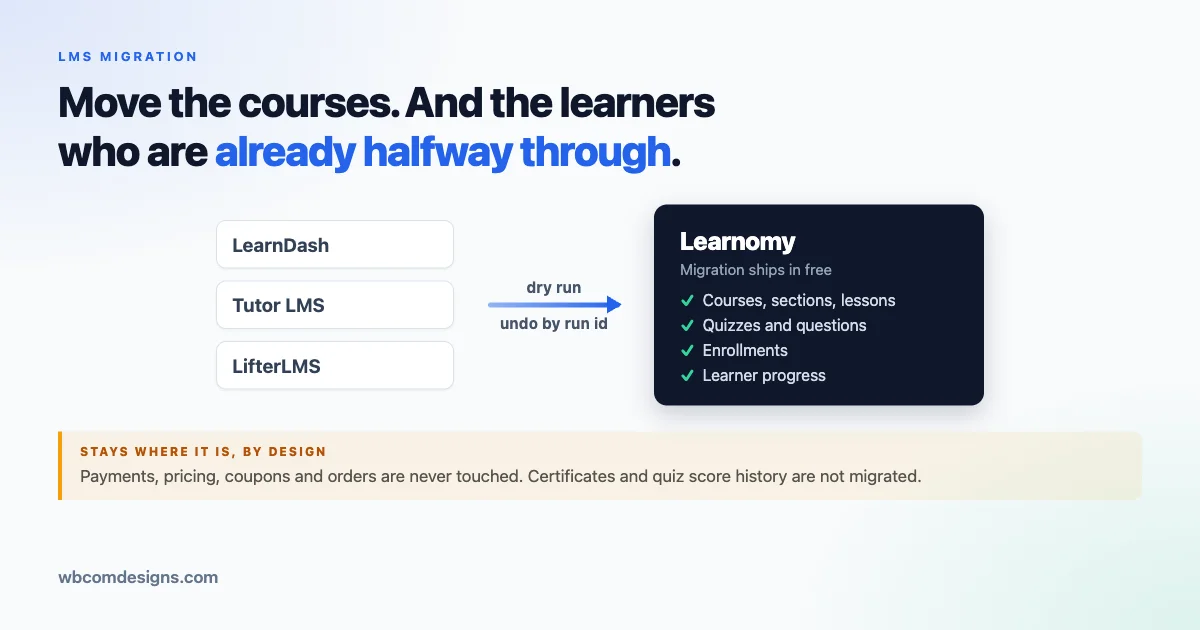
Most LMS migrations do not stall because of the course content. Videos, PDFs, and lesson text copy over in some form on almost any platform, and even a rough copy job gets a course looking presentable again within a day.
What actually stops a migration is the part nobody wants to touch: the learners who are already enrolled, already partway through a course, and already expect their progress to still be there on Monday morning.
An academy running LearnDash, Tutor LMS, or LifterLMS for a year or more does not have an empty course catalog. It has enrollments tied to specific users, completion records tied to specific lessons, and a support inbox that will fill up fast if any of that resets to zero.
That is the real migration problem, and it is why so many “we should switch platforms” conversations end in “let’s revisit this next quarter” instead of a plan.
This article is for two readers at once. If you are deciding whether to move an academy off LearnDash, Tutor LMS, or LifterLMS, the first several sections cover what actually happens to your courses, your learners, and your money during a move to Learnomy. If you are the developer or agency who would run that migration, skip ahead to the section marked for you.
Why we built a migration path into Learnomy itself
Learnomy is a standalone WordPress LMS, and we wrote about the reasoning behind building it in our launch post. Part of that reasoning was ownership: an academy that owns its LMS plugin, its data, and its hosting is not subject to a platform’s pricing changes or feature removals.
We go into that argument in more detail in our piece on owning a standalone WordPress LMS instead of renting a hosted platform.
None of that matters if moving to Learnomy means starting over. An academy with a working course library and an active learner base is not going to rebuild everything by hand, and asking them to accept a wave of “why did my progress reset” tickets is not a fair trade for platform ownership.
So migration shipped as part of Learnomy free from the start, not as a paid add-on bolted on afterward. If you are moving off LearnDash, Tutor LMS, or LifterLMS, the tooling to do it is already in the plugin you would be installing anyway.
The plugin page is at wbcomdesigns.com/downloads/learnomy, and the product site is at learnomy.app.
The three supported sources
Learnomy’s migration system supports three source LMS plugins: LearnDash, Tutor LMS, and LifterLMS. Each is a reasonable product that a lot of academies chose for good reasons, and this migration is not an argument that any of them did something wrong.
It is an argument about fit: some academies want a plugin they fully own on infrastructure they control. If that describes your situation, the path below is what moving looks like in practice.
Each source has its own data model, so the migration maps entities individually rather than doing a generic “copy everything” pass. The table below shows exactly what migrates from each source.
| Source | Entities migrated | Taxonomies migrated |
|---|---|---|
| LearnDash | Category, course, section, lesson, sub-lesson (LearnDash topics), quiz, question, enrollment, progress | course_category, course_tag, lesson_tag, quiz_tag, question_category |
| Tutor LMS | Category, course, section, lesson, quiz, question, enrollment, progress | course_category, course_tag |
| LifterLMS | Category, course, section, lesson, quiz, question, enrollment, progress | course_category, course_tag |
Notice that enrollment and progress appear on every row. That is deliberate, and it is the part most worth pointing out to a decision maker: the migration carries who is enrolled in what, and how far each learner got.
LearnDash has an extra layer that Tutor LMS and LifterLMS do not, sub-lessons under LearnDash’s topic structure, and those map into Learnomy as their own entity rather than getting flattened into the parent lesson.
What moves and what does not
We would rather state the limits of this tool plainly, before you commit to anything, than have you discover them after a run. Some categories of data are excluded on purpose, and the dry-run output says so directly rather than leaving you to find out later.
Here is the full picture, item by item.
| Item | Migrates? | Notes |
|---|---|---|
| Courses | Yes | Title, structure, and associated metadata carry over from all three sources. |
| Sections | Yes | Course structure is preserved in order. |
| Lessons | Yes | Migrated from all three sources. |
| LearnDash topics (sub-lessons) | Yes | LearnDash only. Migrated as sub_lesson entities under their parent lesson. |
| Quizzes | Yes | Structure and association to the parent course or lesson migrates. |
| Questions | Yes | Question types map to Learnomy’s supported types, with fallbacks where there is no direct equivalent. |
| Enrollments | Yes | Existing learner-to-course relationships are preserved. |
| Progress | Yes | Completion state per learner migrates, so a learner who was partway through a course lands partway through it in Learnomy. |
| Certificates | No | No source provides a reliable per-course certificate flow to migrate from. You enable certificates per course with a Learnomy template after the import. |
| Quiz attempt scores | No | Not reconstructed. A learner who passed is marked complete, but per-question score history does not carry over. |
| Payments and orders | No | Never touched. Imported courses arrive free. Pricing, coupons, and order history stay in the existing system. |
Two of those rows are worth restating, because they are stated in the plugin’s own code header as hard guarantees rather than implementation notes: the migration never writes anything back to the source LMS, and it never touches money.
Your LearnDash, Tutor LMS, or LifterLMS installation is read from, not modified. No pricing, subscription, coupon, or order data is read, written, or migrated in either direction.
That last point deserves its own sentence, because it is easy to misread as a limitation when it is really a boundary. This tool moves course structure and learning history. It does not move commerce.
If your courses are sold through WooCommerce, Easy Digital Downloads, or a membership plugin layered on top of your current LMS, that setup stays where it is, and you reconnect pricing on the Learnomy side separately. We come back to that below.
How the safety model works
An academy considering this move is right to ask what happens if something goes wrong partway through. The honest answer is that the migration is built around four mechanisms so that question has a good answer, rather than around a promise that nothing can go wrong.
Dry run first, always
Before anything is written to the database, a preview pass runs against the source data and prints per-entity counts, warnings, and the same not-migrated notes covered above. Nothing is created during a preview.
This is where you find out, before committing, how many courses, lessons, quizzes, and enrollments the tool sees, and whether any question types will need a fallback mapping.
Idempotent re-runs
Every migration run keeps an id-map recording the relationship between a source item (source plugin, entity type, source id) and the new Learnomy id it became. That map lives in Learnomy’s existing lrn_audit_log table, so adopting migration did not require a new database table.
Because the importer checks this map and resolves existing records before creating new ones, running a migration a second time updates what is already there instead of duplicating it. The same map lets a lesson correctly find its parent course during import, and it is also what powers undo.
Undo by run
Every migration is tied to a run id. Undo removes exactly what that specific run created, addressed by that id, so a bad run does not require a database restore to reverse.
That matters in practice: you can run a migration, look at the result, and cleanly back out if something about the mapping needs adjusting, then run again with corrected settings.
Async for larger libraries
Rather than running inline in a single request, an async mode queues the work on Action Scheduler, WordPress’s standard background job system, processed in batches and resumable if interrupted. In this mode the migration returns a run id immediately, and you check progress by polling status rather than waiting on an open browser tab or a request that might time out.
Put together, this is the sequence we would tell any academy to follow, whether they run it themselves or hand it to a developer:
- Run a dry-run preview and read the counts and warnings carefully.
- Run the actual migration on a staging copy of the site first, not on production.
- Check enrollments and progress for a sample of real learners, not just that courses appear.
- If something looks wrong, undo the run, adjust the mapping, and run again.
- Once staging looks correct, repeat the same run against production.
That is a deliberately unglamorous process. We are not going to tell you this is a one-click migration or that it runs with zero downtime, because neither claim would be true of any migration moving real learner data between two different database schemas.
What we can say is that every step in that sequence is reversible except the last one, and the last one is only run once the preceding steps gave you confidence.
For developers and agencies: running the migration with WP-CLI and REST
This section is for the person who will actually execute the migration, not the person deciding whether to approve it. If you are the decision maker from the earlier sections, this is a reasonable place to stop reading, or to forward to whoever handles your site’s technical work.
The migration is reachable through three entry points that all call the same underlying service: a click-through import wizard in the Learnomy admin, a WP-CLI command set for scripting, and a REST API for building it into a deployment tool or a staged rollout.
Because all three sit on one shared service rather than three separate implementations, they cannot drift out of sync. A run started from the wizard produces the same run id, the same id-map entries, and the same undo behaviour as one started from wp learnomy migrate or from a REST call.
WP-CLI commands
The command family is wp learnomy migrate, with five subcommands:
| Subcommand | Purpose |
|---|---|
wp learnomy migrate preview | Runs a dry-run pass and prints entity counts, warnings, and not-migrated notes without writing anything. |
wp learnomy migrate run | Executes the migration. Accepts the flags below. |
wp learnomy migrate undo | Reverses a specific run, addressed by run id. |
wp learnomy migrate status | Checks the status of a run, useful when running async. |
wp learnomy migrate runs | Lists past migration runs. |
The run subcommand takes four flags worth knowing before your first execution:
--entities=<csv>limits the run to specific entity types, useful when you want to migrate courses and structure first, verify, then bring across enrollment and progress in a second pass.--map=<file>points to a JSON file describing a selection and mapping spec, which is where you override question-type fallback behaviour for a specific run without touching site-wide settings.--dry-runruns the preview logic through the same command, so you can script your preview and your real run with the same tooling.--asyncqueues the run on Action Scheduler instead of running inline, which matters for anything beyond a small course library.
After a run completes, the command prints the run id along with the exact undo command for that run. A small detail, but a useful one for an agency workflow: you do not have to go hunting for a run id in a log later, it is handed to you at the moment you need it.
REST API
Everything above is also reachable over REST, under the namespace learnomy/v1 and the base route admin/migration. Every route requires the manage_options capability, the same capability WordPress uses to gate site administration generally.
| Method and route | Purpose |
|---|---|
GET learnomy/v1/admin/migration/sources | Lists available migration sources and whether each is detected on the site. |
POST learnomy/v1/admin/migration/preview | Runs a dry-run preview and returns the same counts and warnings as the CLI preview. |
POST learnomy/v1/admin/migration/run | Starts a migration run, inline or async depending on the request. |
GET learnomy/v1/admin/migration/runs | Lists past runs. |
GET learnomy/v1/admin/migration/runs/<id> | Returns status and detail for a specific run. |
POST learnomy/v1/admin/migration/runs/<id>/undo | Undoes a specific run by id. |
This surface is what makes the migration usable inside a larger deployment pipeline. An agency managing several academy launches at once can preview from a staging server, start the real run from a deployment script once staging is verified, and poll the run status endpoint instead of babysitting a browser tab.
Question-type fallback mapping
Not every question type in LearnDash, Tutor LMS, or LifterLMS has a direct equivalent in Learnomy. Where that gap exists, the migration applies a default fallback, shown below.
Every one of these is overridable, either per run through the --map flag or the import wizard, or site-wide through the learnomy_migration_question_type_fallbacks filter for a developer who wants to change the default for every migration a site runs.
| Source question type | Learnomy target | Why |
|---|---|---|
| image_matching | matching | Closest structural equivalent. The matching interaction carries over even though the image-specific presentation does not. |
| image_answering | short_answer | No image-based answer type exists in Learnomy, so the response is treated as free text. |
| h5p | skip | H5P content is an external interactive format with no equivalent question type to map into. |
| assessment_answer | skip | No direct equivalent in Learnomy’s question model. |
| scale | skip | Scale and rating questions have no matching Learnomy question type. |
| picture_choice | mc_single | Treated as a single-choice multiple choice question, dropping the image-specific rendering. |
| picture_reorder | ordering | The reordering interaction maps cleanly even without the image element. |
| upload | essay | File-upload responses are treated as an essay-style manually graded response. |
| code | essay | Code-response questions are treated as an essay-style manually graded response. |
A skip outcome means the question itself is not migrated, and this shows up in the dry-run warnings so you know the count ahead of the real run rather than discovering it afterward.
If a course leans heavily on H5P or scale-type questions, review that in the preview output before deciding whether to rebuild those specific questions manually after import.
Extending to another source
The three supported sources are not hardcoded in a way that closes the door on others. Sources register themselves on the learnomy_migration_sources filter, so a fourth LMS source can be added as a self-contained module class without modifying the core importer logic.
If your agency works with a course library on a platform not covered here, that filter is the extension point to build against rather than a fork of the plugin.
What to do after the import
A completed run gets your courses, structure, enrollments, and progress into Learnomy. It does not finish the job on its own, and there are a few things every academy should plan for immediately after.
Certificates
Since certificates are not migrated, this is the first gap to close. Learnomy handles certificates per course through templates, so after import you go through your migrated courses and enable a certificate template on each one that needs it. This is manual work proportional to the size of your catalog, and worth budgeting time for rather than treating as an afterthought.
Pricing and commerce
Every migrated course arrives free, because payments and orders are never part of what migrates. If your courses were paid on the source LMS, you need a plan for reconnecting pricing on the Learnomy side, whether through WooCommerce, a membership layer, or however your commerce stack is set up.
This is also the moment to decide whether customers who already purchased access on the old platform need re-enrolling or grandfathering in. Enrollment records themselves did carry over, even though the pricing that originally granted them did not.
Learner-facing progress and gradebook
Once progress and enrollment land in Learnomy, learners should see a gradebook reflecting where they left off. We covered that in our post on the 1.8.0 gradebook update, which is worth a read if you want to know what a migrated learner actually lands in once their courses and completion state have come across.
Keeping learners engaged after the move
A migration is a natural point to look at retention more broadly, since re-engaging a learner base right after a platform change is a good moment to reinforce the habits that keep completion rates up.
We wrote about the forgetting curve and how course design can work with it rather than against it in this piece on course retention. Relevant reading whether or not you are migrating, and especially relevant right after you have moved a learner base and want to make sure the move itself does not become a reason to disengage.
Community features alongside the LMS
If your academy also runs a community layer, Learnomy is built to run alongside our other community products rather than in isolation. We cover how it fits together with BuddyNext and Jetonomy in this post on running all three together, useful context if your migration plan includes more than the course catalog.
Deciding whether now is the right time
Not every academy should migrate today, and it is fair to say so plainly. If your current setup is working, your support volume is low, and the reasons pulling you toward a change are speculative rather than concrete, there is no urgency. The migration tooling described here will still be in Learnomy free whenever the decision is actually made.
What we would push back on is the assumption that a migration has to mean starting from zero, because that assumption is often the real reason a switch keeps getting deferred.
If the honest blocker on your end is that you cannot lose your enrolled learners and their progress, that specific concern has a specific answer: enrollment and progress are both migrated entities, not excluded ones, across all three supported sources. What is excluded, certificates, quiz score history, and anything related to money, is small and known in advance rather than a surprise you find out about after committing.
A realistic checklist before you start
If you do decide to move forward, here is a short list to work through before touching production:
For a closer look at exactly what that wizard screen looks like, the four-step Source, Content, Review, and Import flow, and how the dry-run preview and undo actually work under the hood, see our full walkthrough of the import wizard.
- Confirm which of LearnDash, Tutor LMS, or LifterLMS you are migrating from, and that Learnomy is installed on a staging copy of the site.
- Run
wp learnomy migrate preview, or the equivalent wizard or REST preview, and read every warning, not just the entity counts. - Decide, based on the question-type fallback table, whether any courses need manual review for questions that will be skipped.
- Run the migration on staging, verify enrollment and progress for a sample of real learners, and confirm course structure looks right.
- Plan certificate templates and pricing reconnection as separate follow-up tasks, not as part of the migration run itself.
- Once staging is verified, repeat the same run against production, and keep the run id in case you need to undo.
None of this is exotic, and that is intentional. A migration that touches real learner data should feel like following a checklist, not like taking a leap. The dry run tells you what is coming before it happens, the run itself is reversible by id, and the parts that will not carry over are documented instead of discovered.
Where this leaves the decision
Moving an academy off LearnDash, Tutor LMS, or LifterLMS is a real project regardless of which tools are involved, because it touches learners, revenue, and whatever workflows your team has built around your current LMS.
What this migration path changes is not the size of that project, but how much of it is guesswork. Course structure, enrollments, and progress have a defined path into Learnomy. Certificates, quiz scores, and money have a defined boundary where the migration stops and manual work picks up.
If you are the decision maker, that should be enough to evaluate the move on its real merits rather than on the fear of losing what you already built. If you are the developer running it, the dry run, the id-map, and the undo command are the three things to lean on, in that order, every time.
Related reading