
15 min read
BuddyNext, Jetonomy, and Learnomy: Why Three Products All Have “Spaces,” and How to Run Them Together

If you run more than one Wbcom product on the same site, you’ve probably noticed all three of our community-facing plugins, BuddyNext, Jetonomy, and Learnomy, talk about “Spaces.” Naturally, that raises a fair question: are these the same feature under three names? Do they conflict if you activate more than one? And if you’re building a site that needs a social feed, a support forum, and a course catalog, which one should actually own the word “Spaces”?
We tested all three together on a clean install to answer this properly, rather than guess. Here’s what each one actually does, what happens when you combine them, and the one setting screen where you can genuinely cause yourself trouble.
The short version
- BuddyNext Spaces are community groups, the closest thing to a Facebook Group or a Discord server. Free, core feature.
- Jetonomy Spaces are discussion boards, forums, Q&A, and idea boards organized by category. Free, core feature.
- Learnomy Spaces are something else entirely, branded mini-academies for resellers and partner organizations to run on top of your course catalog. It’s a Learnomy Pro feature, not part of the free plugin, and it’s a commerce/distribution feature, not a general-purpose grouping tool.
- Run any two, or all three, together and there is no URL conflict by default, we verified this directly. Each plugin owns its own address space.
- There is exactly one way to break that: manually typing in a custom base URL that happens to match another plugin’s default. We’ll show you exactly where that setting lives so you never do it by accident.
BuddyNext Spaces: your community’s neighborhoods
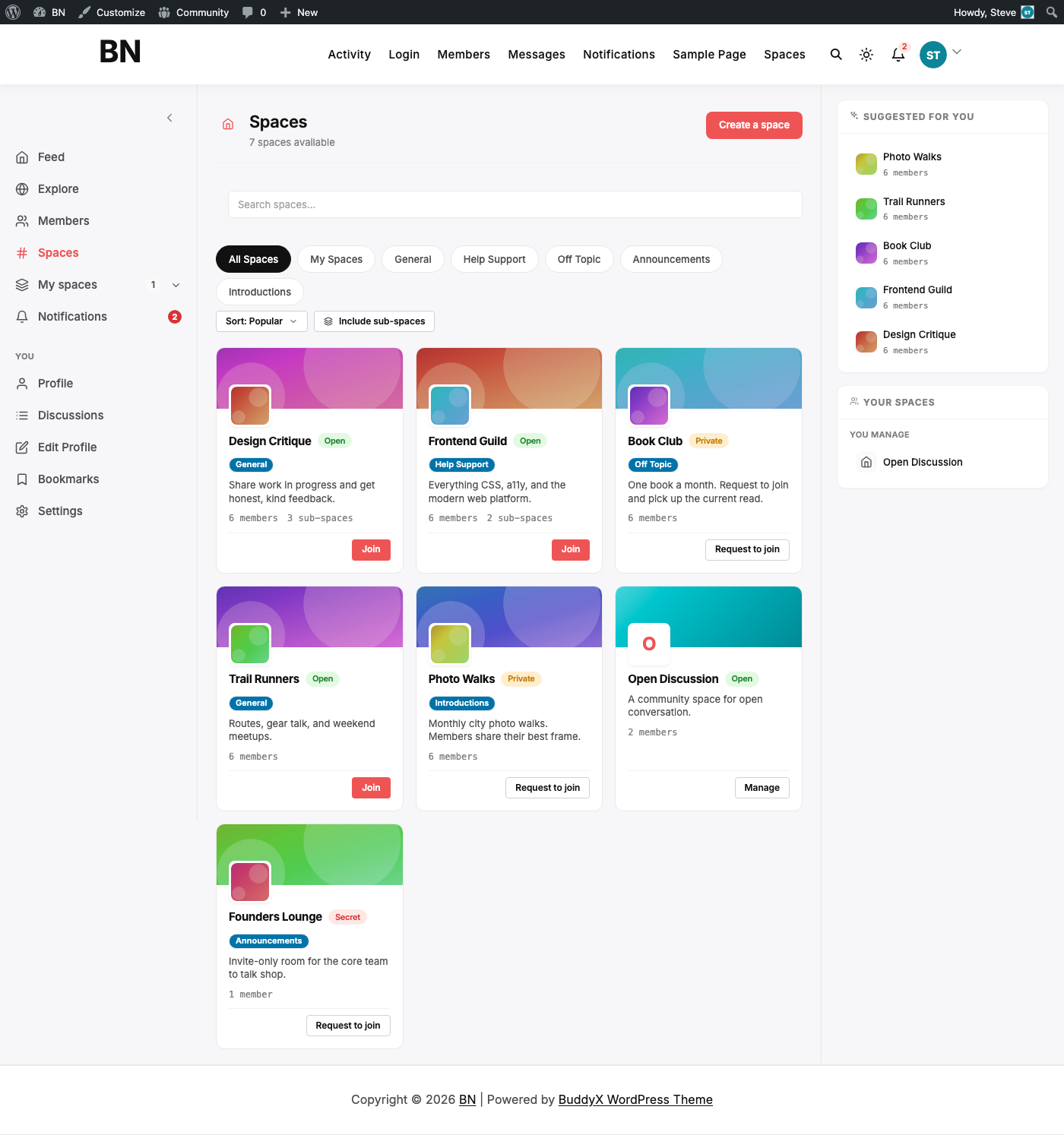
BuddyNext’s Spaces are general-purpose community groups. Think of them as the org chart for your social community, some open to anyone, some invite-only, some fully secret. On our test site, the admin directory looked like this:

Notice the mix: Open spaces anyone can join (Frontend Guild, Trail Runners), Private ones that require a join request (Book Club, Photo Walks), and a Secret one only its members even know exists (Founders Lounge). BuddyNext also supports sub-spaces, Frontend Guild has “UI Patterns,” “Accessibility Lab,” and “CSS Architecture” nested underneath it, so a large community topic can be broken into smaller rooms without losing the parent/child relationship.
On the front end, members browse this directory, filter by category, and request or join with one click:
Use BuddyNext Spaces when you’re building a social network, a membership community, or any site where “groups of people who post to each other” is the core interaction, hobby communities, alumni networks, fan communities, internal company social intranets.
Jetonomy Spaces: your structured discussion boards
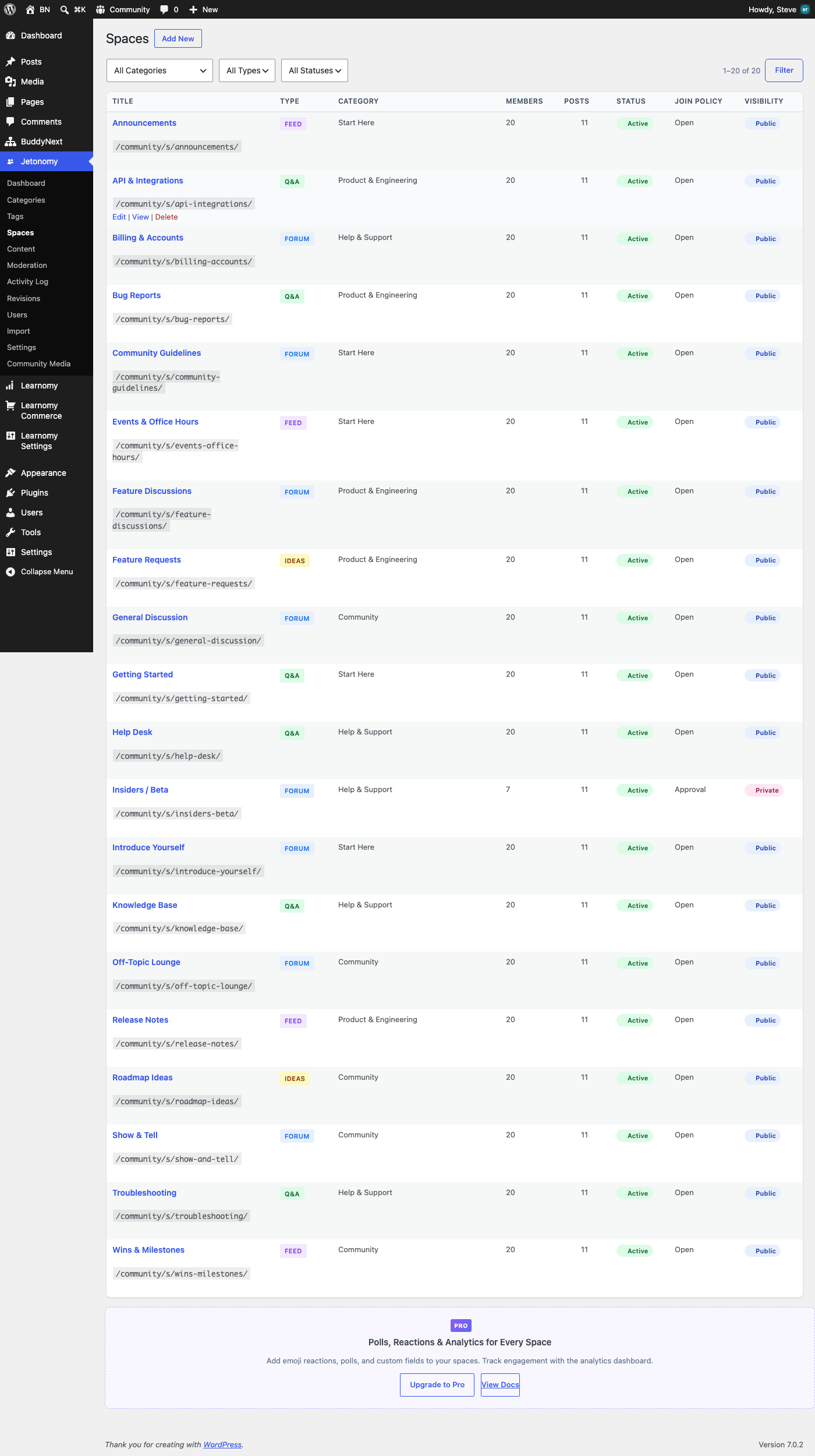
Jetonomy’s Spaces look similar at a glance, a directory of named rooms, but they’re built for a different job: structured, threaded discussion. Each Space has a type (Forum, Q&A, Ideas, or Feed) and belongs to a category, and the whole thing is organized more like a help center or a product community than a social feed:
On the front end, that structure becomes a proper community hub, sectioned by purpose (Help & Support, Product & Engineering, Start Here), with a leaderboard, trending posts, and popular tags in the sidebar:
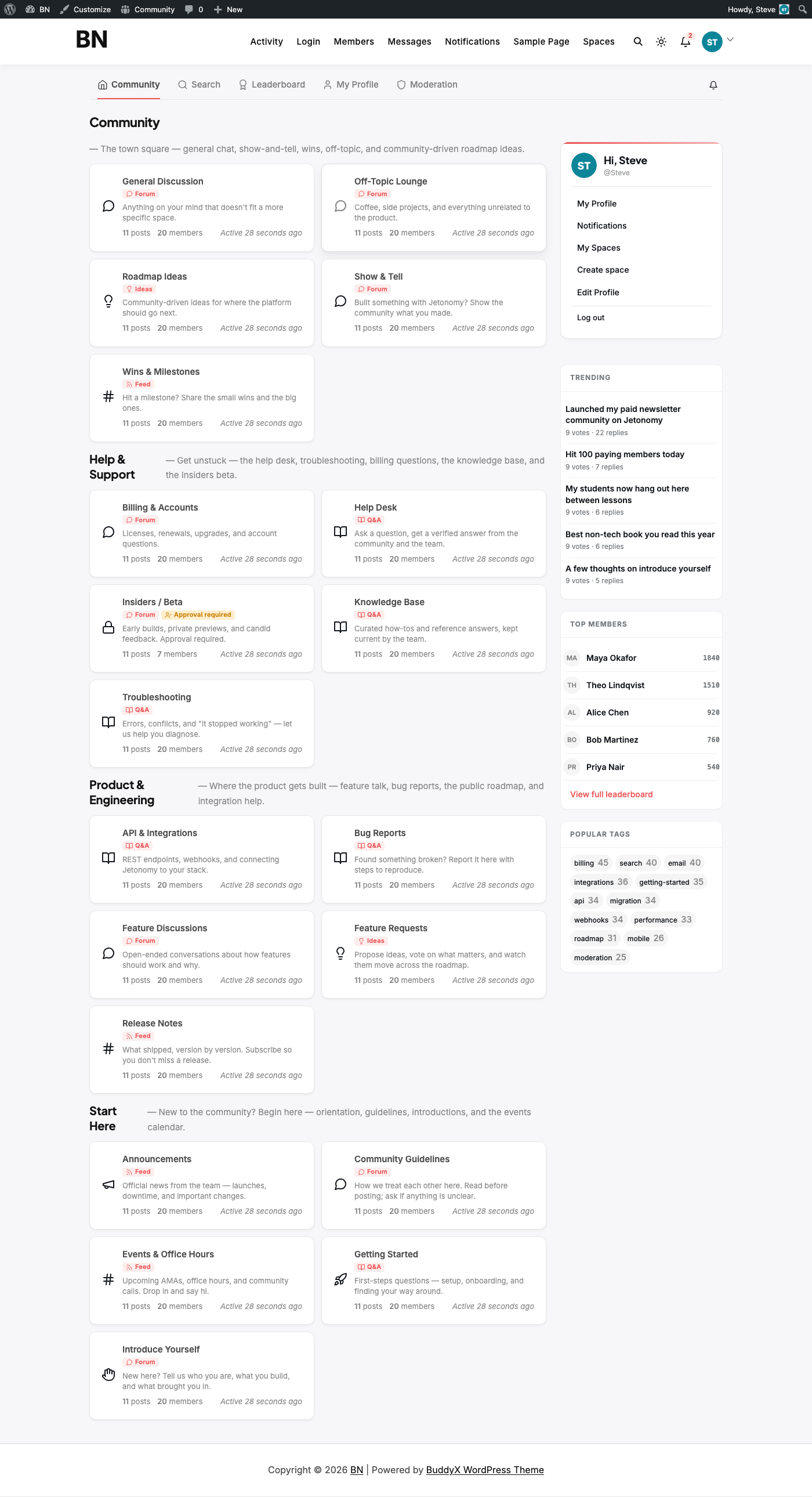
The Q&A type spaces support accepted answers. Ideas spaces have a status board for feature requests. Forum spaces are open-ended threaded discussion. That’s meaningfully different from BuddyNext’s model, where every Space is the same kind of container regardless of purpose.
Use Jetonomy Spaces when you’re building a support community, a product feedback/roadmap hub, a knowledge base with community Q&A, or any site where the goal is organized problem-solving and discussion rather than general socializing.
Learnomy Spaces: not what you’d expect, and not in the free plugin
This is the one that trips people up, so we’ll be direct about it: free Learnomy does not have a Spaces feature. If you check the Modules screen on a fresh Learnomy install, there’s no Spaces toggle anywhere, just the expected LMS building blocks (Courses, Enrollments, Progress, Quizzes, Certificates, and so on):
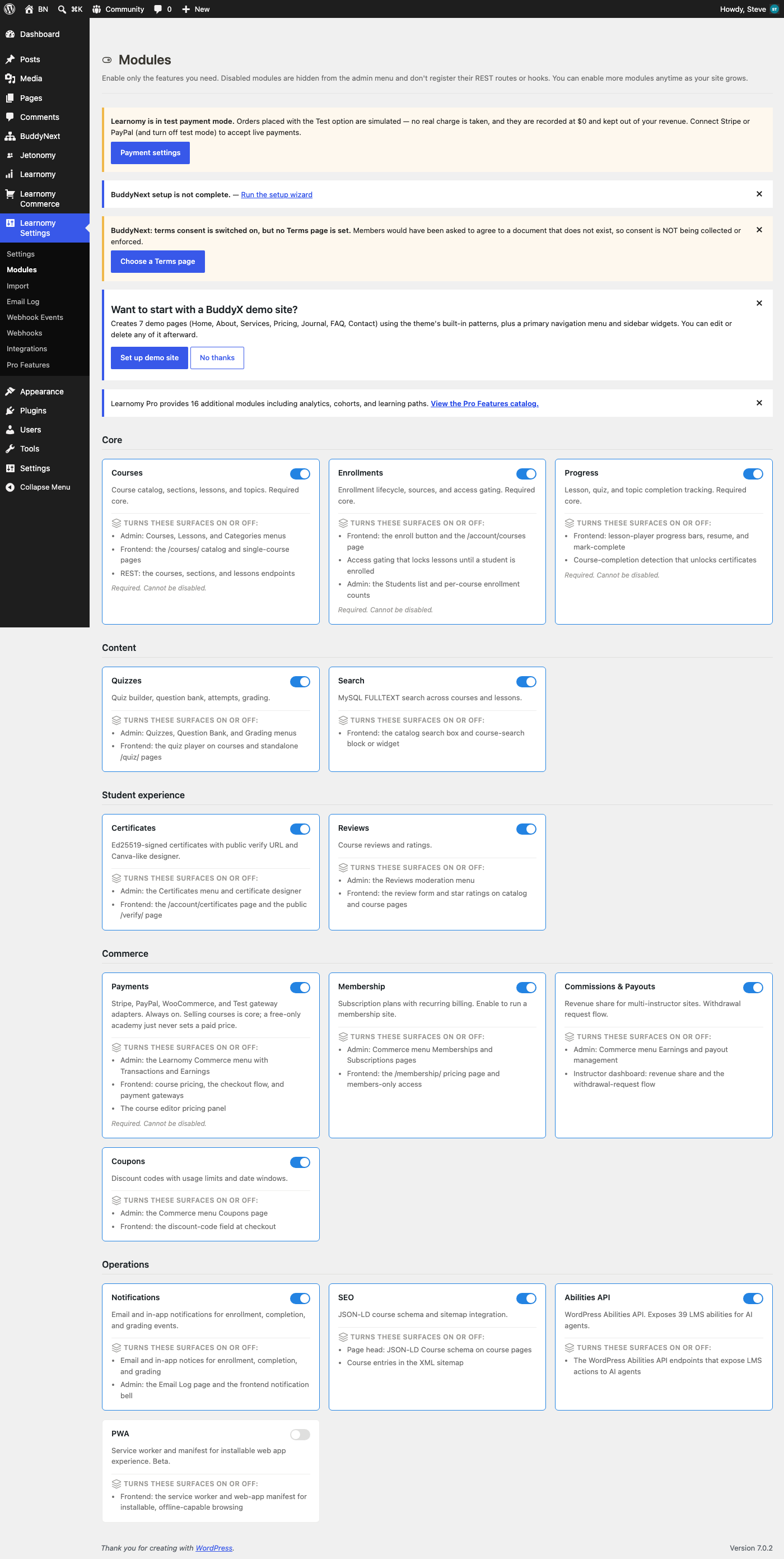
Spaces only shows up once you open the Pro Features catalog, tagged both PRO and COMMUNITY:
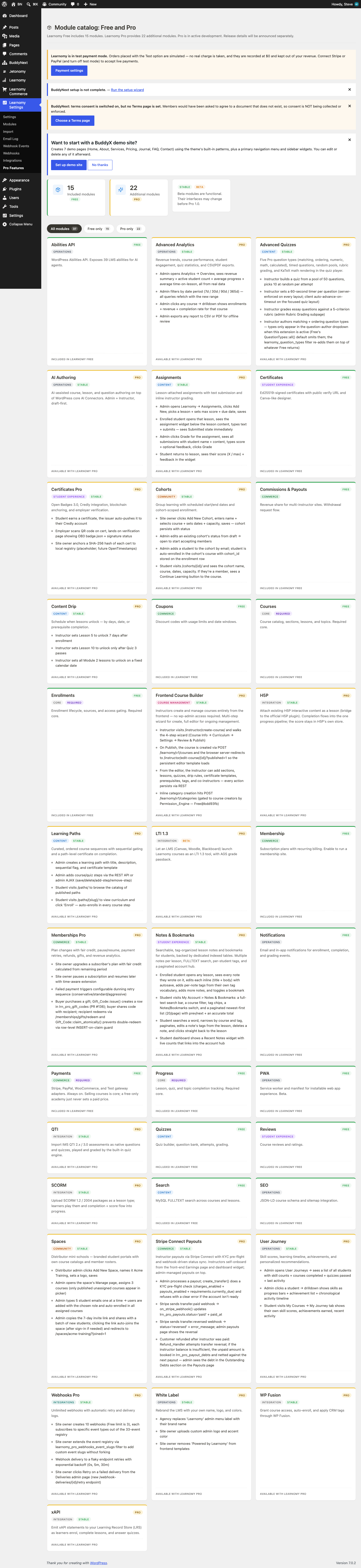
And its description is worth reading closely: “Distributor mini-catalogs, branded student portals with own course category and member roster.” That’s not a study group or a cohort, it’s a reseller/white-label mechanism. A Learnomy Space lets a partner organization run what looks like its own branded mini-academy on top of your existing course catalog, with its own member roster and its own slice of your courses, without you having to stand up a second site for them.
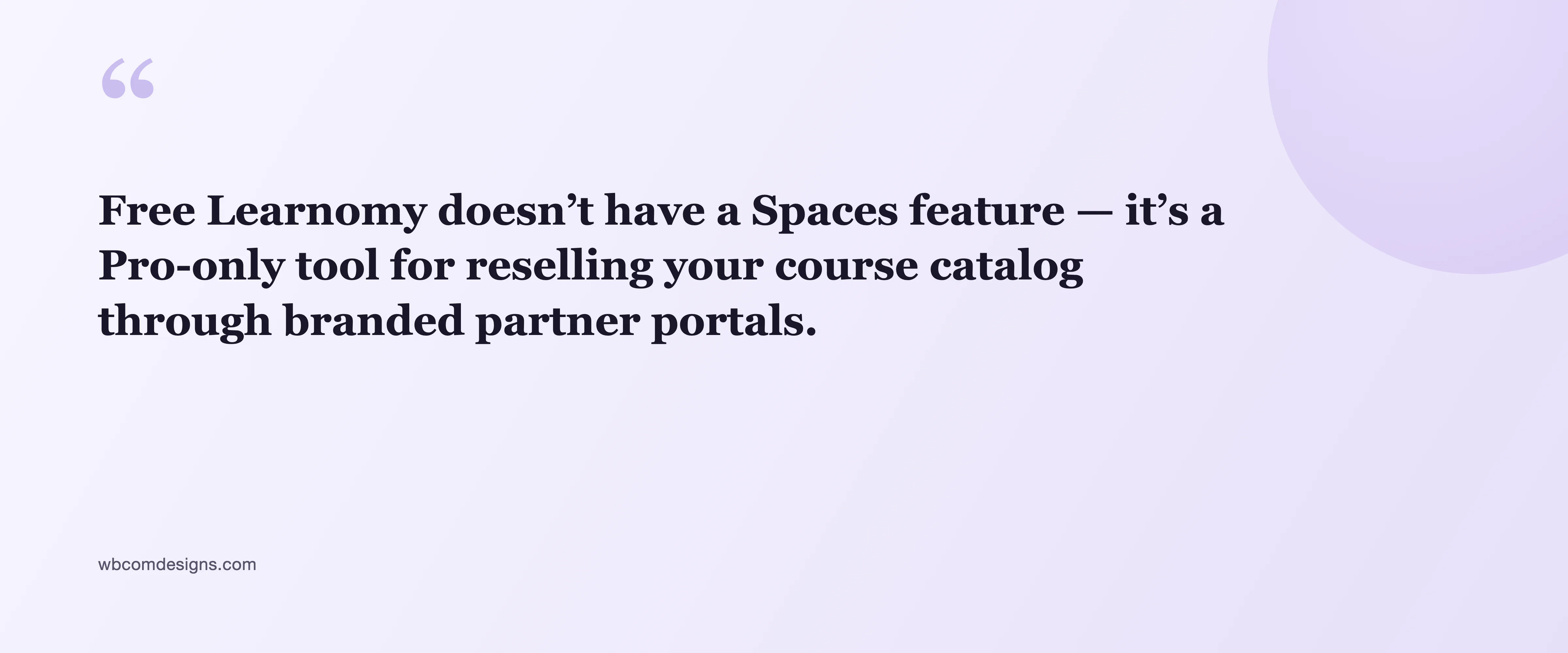
We confirmed this live: hitting the free plugin’s own /my-spaces/ URL doesn’t 404 (the route exists), but it renders a clean upsell instead of a real feature:
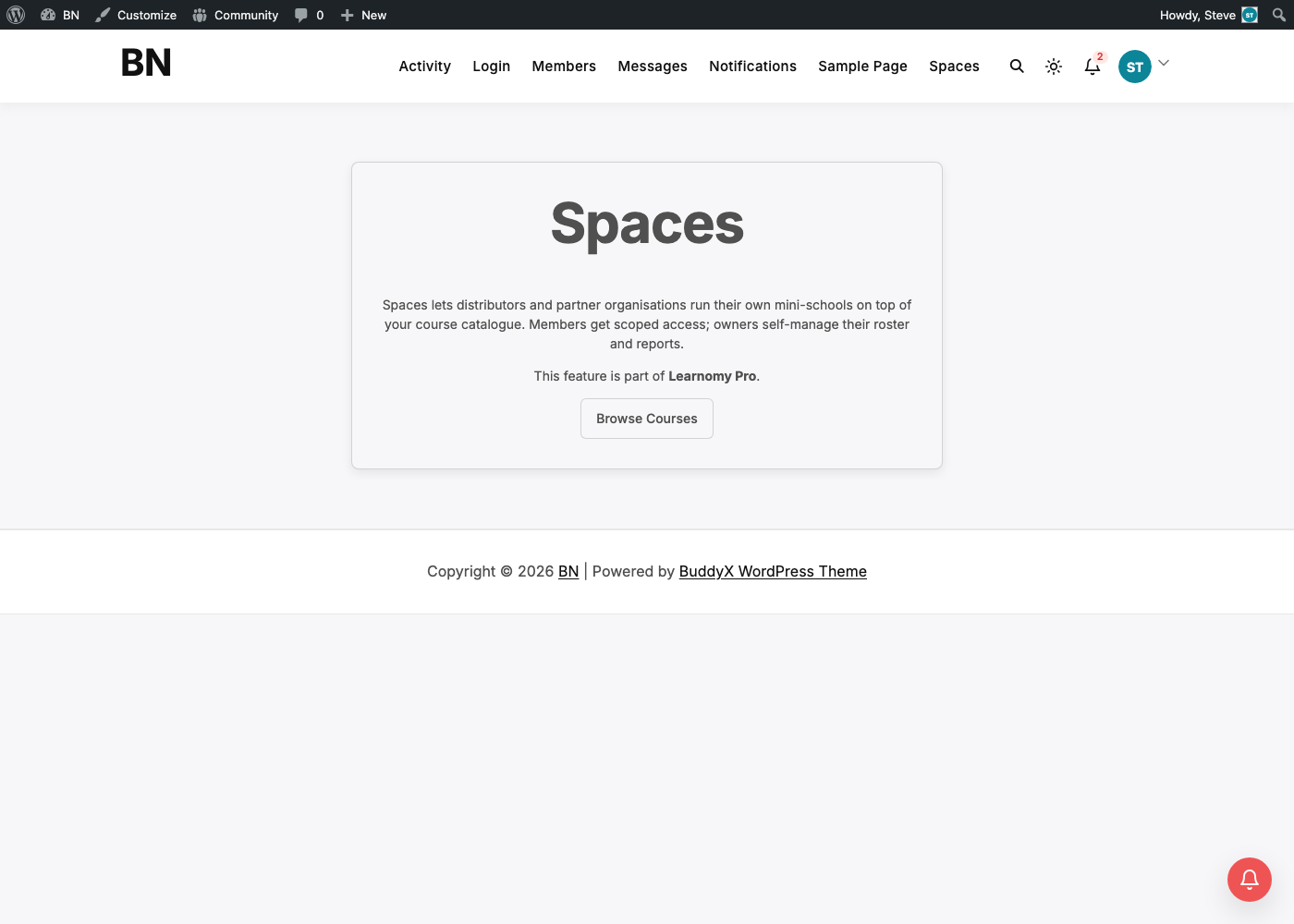
Free Learnomy’s actual organizing unit is the course catalog:
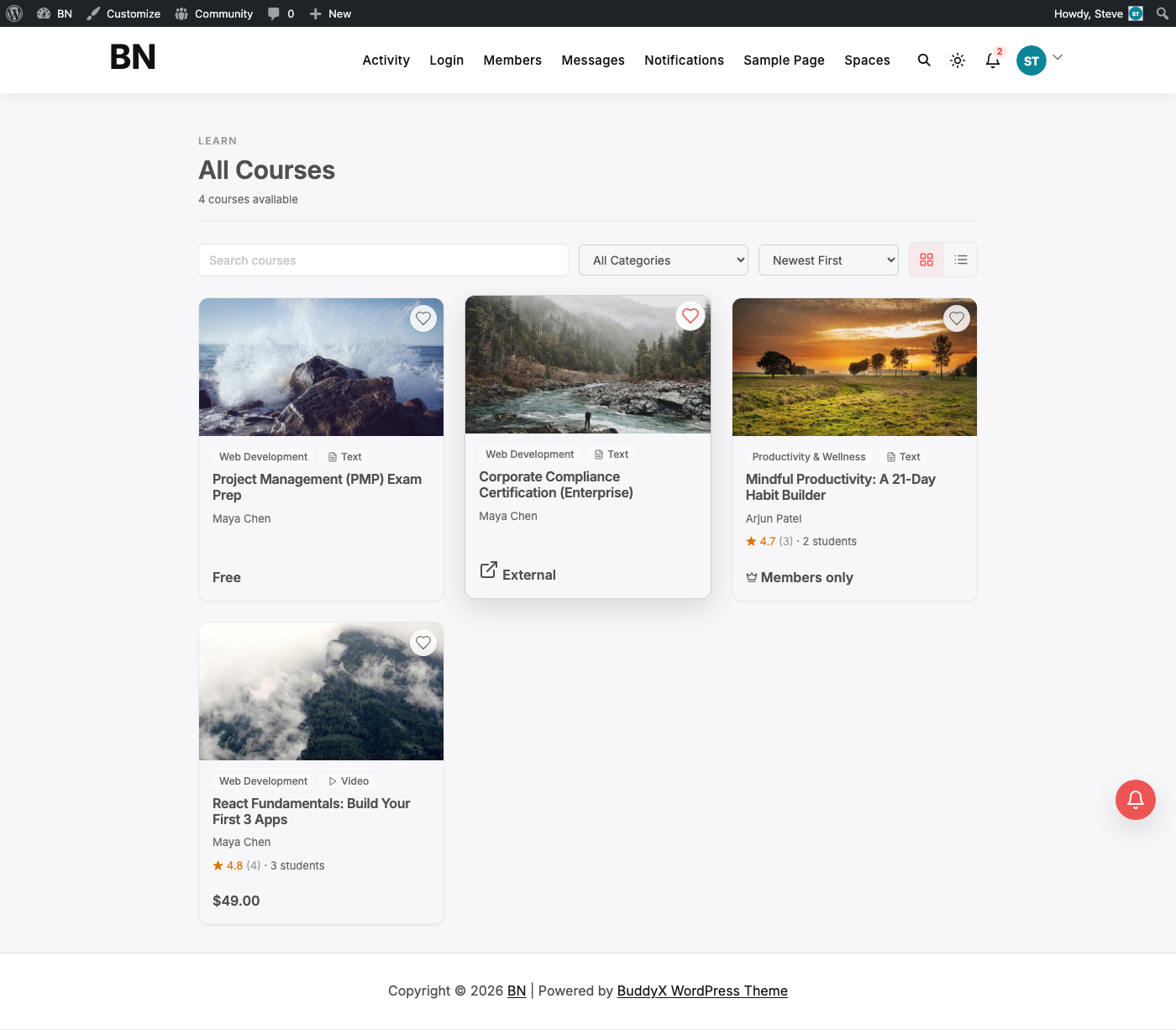
Use Learnomy Spaces (Pro) when you’re running a multi-vendor or franchise-style academy, reselling your catalog through partner organizations who each need their own branded portal and their own member list. It is not a substitute for BuddyNext or Jetonomy’s grouping features, and it isn’t trying to be.
So what happens when you run two or three of these together?
We activated BuddyNext, BuddyNext Pro, Jetonomy, and Learnomy simultaneously on one WordPress install and tested every default route:
| Route | Owner | Result |
|---|---|---|
/spaces/ | BuddyNext | 200, community groups directory |
/community/ | Jetonomy | 200, discussion hub |
/my-spaces/ | Learnomy | 200, Pro upsell (feature-gated, route still resolves) |
/courses/ | Learnomy | 200, course catalog |
Nothing collided. Each plugin owns a completely separate URL prefix out of the box, BuddyNext lives under /spaces/, Jetonomy lives under /community/, and Learnomy’s routes sit at the site root but don’t overlap with either. You can run all three, on the same theme, with the same members logging into all of them, and every link resolves to the right place.
That matches what we’d expect from three products that are explicitly designed to be used together (BuddyNext and Jetonomy cross-link to each other automatically once both are active, and Learnomy Spaces exists specifically to sit on top of a course catalog). The engineering is sound. The confusion, where it exists, is about naming, not routing.
The one thing that actually can break: custom base URLs
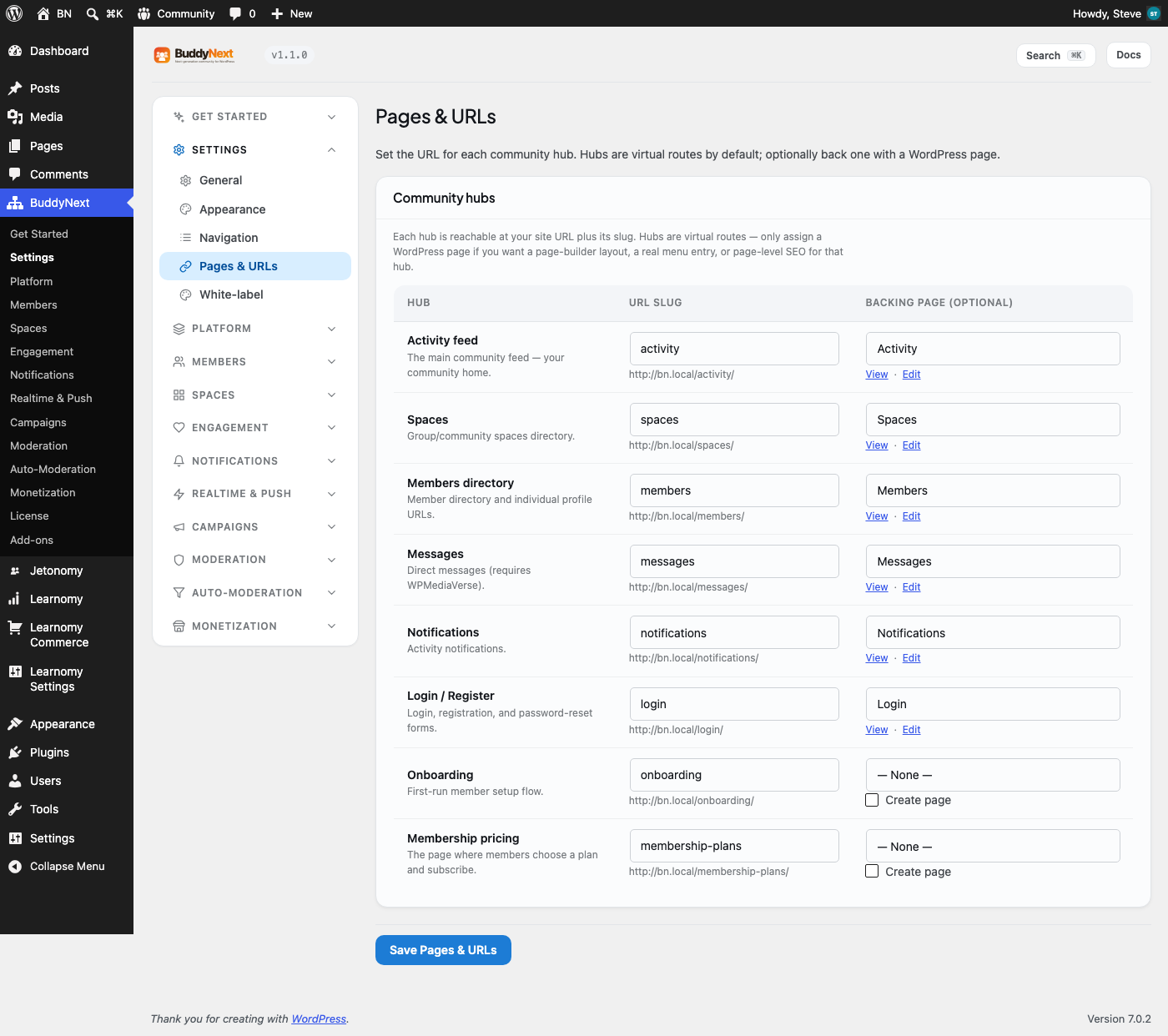
Both BuddyNext and Jetonomy let you customize the URL prefix their features live under. That’s a good feature, but it’s also the only real way to create a genuine conflict, because neither plugin currently checks what URL the other one is using.
Here’s BuddyNext’s version of that setting, under BuddyNext → Settings → Pages & URLs:
And here’s Jetonomy’s equivalent, under Jetonomy → Settings → General, labeled Community Base URL:
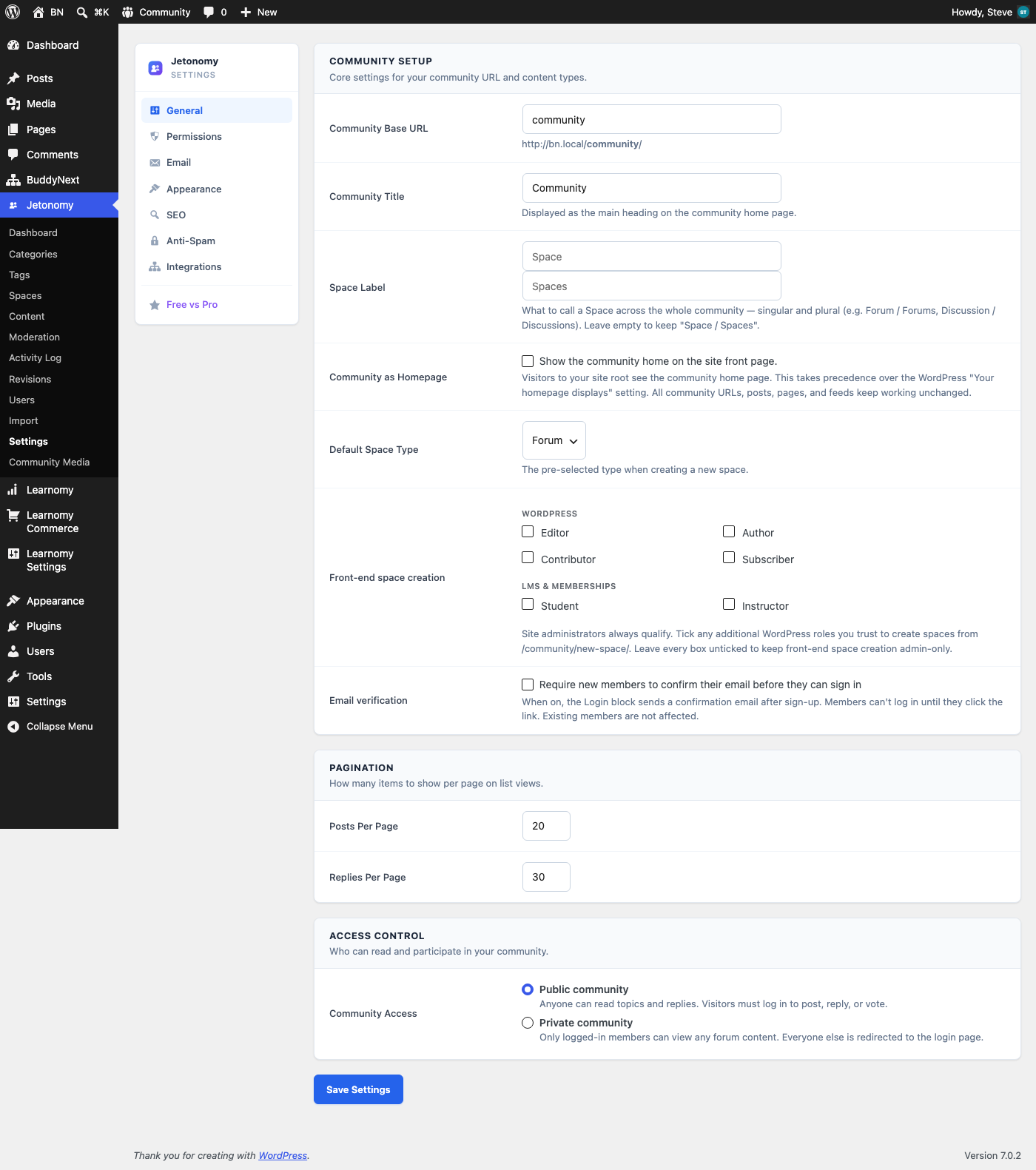
Both of those are free-text fields. If you ever set Jetonomy’s Community Base URL to spaces, matching BuddyNext’s default, or set BuddyNext’s Spaces slug to community, matching Jetonomy’s default, the two plugins will register conflicting rewrite rules on the same URL prefix. WordPress resolves that kind of collision by whichever rule loaded last; the other plugin’s pages will start silently returning the wrong content or a 404, with no warning to you or your members.
The rule of thumb: if you’re running both plugins, leave their base URLs at the defaults (/spaces/ for BuddyNext, /community/ for Jetonomy), or if you do customize one, make sure it doesn’t match the other’s current or default value. Don’t set them to the same word.
Fixing the naming confusion (without touching a URL)
The genuinely confusing part isn’t routing, it’s that BuddyNext and Jetonomy both put a menu item called “Spaces” in your wp-admin sidebar, for two different kinds of content. If you’re running both, your team will eventually ask “wait, which Spaces menu do I use?” Fortunately, both plugins let you rename what members see, without touching any URLs.
Jetonomy has a dedicated Space Label field right on the same General settings screen shown above, you can rename “Space/Spaces” to “Forum/Forums” or “Discussion/Discussions” site-wide, in one place, and every screen in Jetonomy will use your label instead. See the Space Label fields in the Jetonomy General settings screenshot above.
BuddyNext takes a slightly different approach: instead of one global relabel, its Navigation editor (BuddyNext → Settings → Navigation) lets you rename any individual nav item’s label, including “Spaces”:
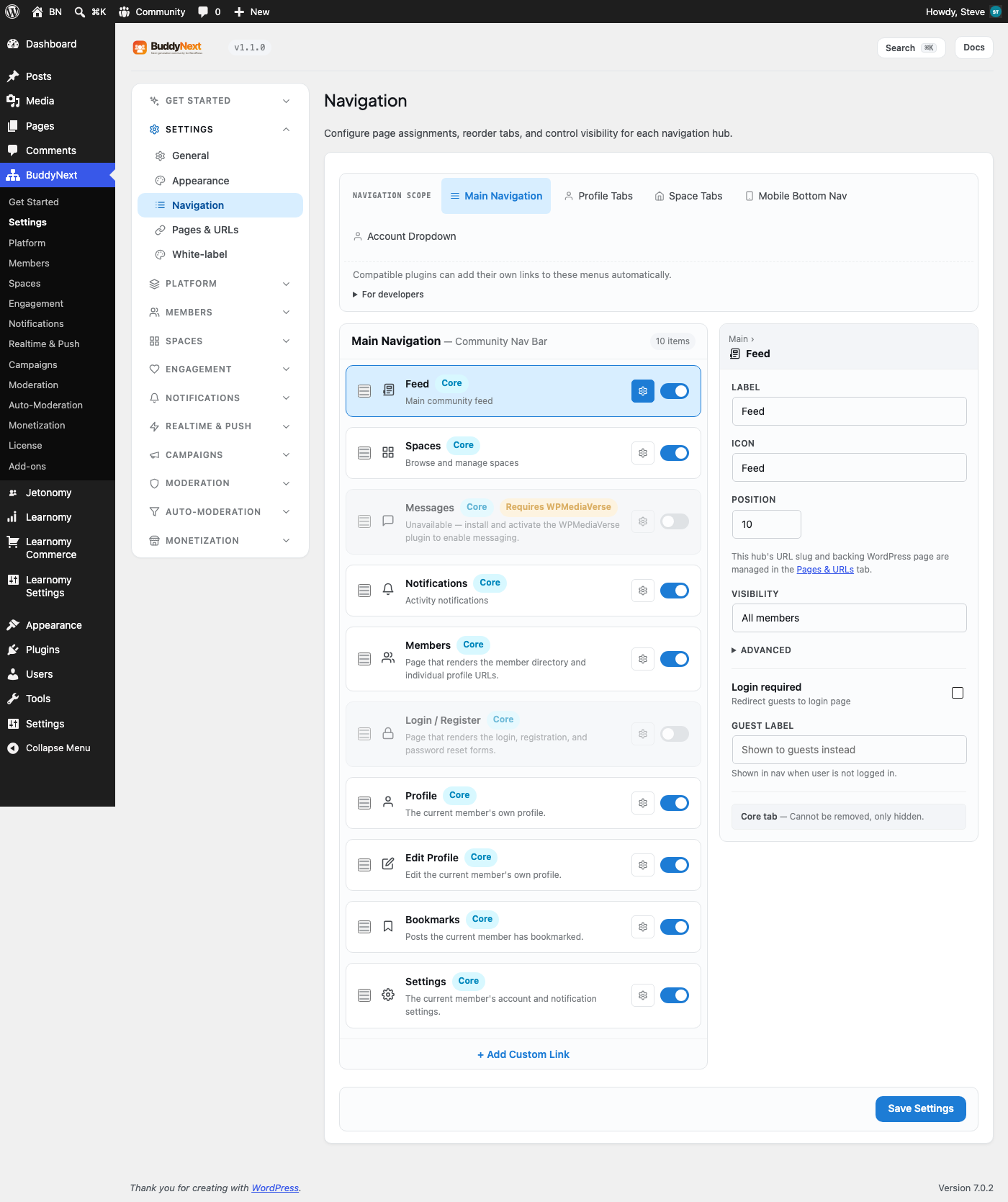
Our recommendation if you’re running BuddyNext and Jetonomy together: pick one product to keep the word “Spaces,” and rename the other. For example, keep BuddyNext’s Spaces as-is (it’s the more general-purpose, member-facing term) and use Jetonomy’s Space Label field to rename its Spaces to “Discussions” or “Forums”, which also happens to describe Jetonomy’s actual content more accurately than the generic word “Spaces” ever did.
A concrete example: one company, three audiences
It’s easier to see how these fit together with a real scenario. Say you’re running a SaaS product and want three things: a place for customers to socialize and show off what they’ve built, a place to get support and vote on features, and a course catalog to onboard new users, plus, eventually, a way for consulting partners to run their own branded training portals.
Here’s how that maps:
- BuddyNext becomes your customer community, a “Success Stories” space where customers post what they’ve shipped, a “General” space for casual chat, and maybe a members-only “Beta Testers” space for your most engaged users. This is the social layer: profiles, follows, reactions.
- Jetonomy becomes your support and feedback hub, a “Help Desk” Q&A space, a “Bug Reports” space, a “Feature Requests” Ideas board, and a “Release Notes” feed. This is the structured layer: every thread has a clear purpose and a resolution state.
- Learnomy becomes your onboarding academy, courses on getting started, advanced workflows, and certification. If you later bring on consulting partners, Learnomy Pro’s Spaces let each partner run a branded mini-academy reselling a scoped slice of your course catalog under their own name, without you standing up separate infrastructure per partner.
A customer can be a BuddyNext community member, ask a question in a Jetonomy Q&A space, and be enrolled in a Learnomy course, all with the same WordPress login. Each of those experiences lives at its own predictable URL. The only place you, the site owner, need to make an active decision is vocabulary, deciding what your team calls each thing so support tickets and onboarding docs don’t collide on the word “Spaces.”
This is also where community health matters more than feature checklists, a beautifully-labeled set of Spaces still needs enough active members to feel alive. If you’re earlier in that journey, Liquidity: The Community Problem That Isn’t About How Many Members You Have is worth reading alongside this one.
Why the routing doesn’t collide, technically
If you want the mechanical detail: WordPress resolves incoming URLs against an ordered list of rewrite rules, most specific first. Each plugin registers its own rules through WordPress’s standard rewrite-rule API, scoped to its own prefix.
BuddyNext’s rules all start with ^spaces/. Jetonomy’s all start with ^{base}/, where {base} defaults to community. Learnomy’s course and space-adjacent routes live at their own top-level slugs like ^courses/ and ^my-spaces/. Because none of those prefixes overlap by default, WordPress never has to choose between two plugins’ rules for the same incoming request, each URL only ever matches one plugin’s pattern in the first place.
That’s also exactly why a manually-customized base URL is the one thing that can break it. Changing Jetonomy’s base from community to spaces doesn’t just rename Jetonomy’s own routes, it makes every one of Jetonomy’s rewrite patterns start with ^spaces/ too, the same prefix BuddyNext already owns.
At that point you have two plugins with genuinely overlapping patterns, and WordPress’s rewrite engine has to pick one. It picks whichever rule was registered later in the request lifecycle, which in practice depends on plugin load order, something you don’t control from the settings screen, and something that can quietly change after a plugin update. That’s the entire mechanism behind the warning earlier in this article, and it’s also why the fix is so simple: don’t create the overlap in the first place.
A decision checklist before you activate all three
If you’re about to set this up rather than retrofit an existing site, working through these questions in order will save you a settings-screen rework later:
- Decide your primary audience action first. Are people mostly here to socialize, to get help, or to learn? That answer tells you which plugin’s Spaces should keep the default label and which should be renamed, before anyone has a chance to get used to the wrong one.
- Check every base-URL setting before you announce launch, not after. Open BuddyNext’s Pages & URLs tab and Jetonomy’s Community Base URL field side by side and confirm they’re different words. Do this once, before members start bookmarking links, since changing a base URL later breaks every link anyone already saved or shared.
- Flush permalinks after every activation, not just the last one. If you’re installing all three at once, activate them one at a time and flush permalinks (Settings → Permalinks → Save) after each, rather than activating all three back to back and flushing once at the end.
- Write your one-paragraph internal explanation before support tickets force you to. A single internal doc, “BuddyNext Spaces are for X, Jetonomy Spaces are for Y, Learnomy is for courses”, saves your team from re-explaining the same distinction over and over as new hires and new members ask.
- Only enable Learnomy Spaces (Pro) once you actually have a partner to onboard. It’s a specific, commerce-oriented feature for multi-vendor reselling, there’s no benefit to turning it on speculatively.
Quick reference
| BuddyNext | Jetonomy | Learnomy | |
|---|---|---|---|
| Spaces feature | Free, core | Free, core | Pro only |
| What it actually is | Community groups | Discussion boards (Forum/Q&A/Ideas/Feed) | Branded distributor mini-academies |
| Default base URL | /spaces/ | /community/ | /my-spaces/ (Pro-gated) |
| Where to rename the label | Settings → Navigation (per item) | Settings → General → Space Label (global) | N/A in free |
| Where the URL is configured | Settings → Pages & URLs | Settings → General → Community Base URL | N/A in free |
| Best for | Social/membership communities | Support & product communities | Multi-vendor course reselling |
How we verified this
We didn’t want to answer “do these conflict?” from memory, so we built a real test environment: a fresh WordPress install with BuddyX as the theme, BuddyNext and BuddyNext Pro, Jetonomy, and Learnomy all active at once, seeded with realistic demo data (spaces, categories, courses, and members) rather than an empty install. From there we:
- Read each plugin’s actual routing code to find every URL prefix it registers, rather than guessing from the admin menu.
- Hit every base route directly (
/spaces/,/community/,/my-spaces/,/courses/) and confirmed the HTTP response and rendered content, logged in and as a guest. - Walked every relevant settings screen, Pages & URLs, Navigation, and General settings, to find where base URLs and labels are actually configured, since that’s where a real conflict would have to originate.
That’s also how we found the Learnomy Spaces detail: the admin Modules screen for the free plugin simply doesn’t list it, and the Pro Features catalog confirms it’s gated, so the honest answer is “it’s a Pro feature with a different purpose,” not “here’s how the free version’s Spaces compares.”
Common setup mistakes we see
Beyond the base-URL collision covered above, a few smaller things trip people up when they first combine these plugins. None of them are bugs, they’re just easy to miss on a first pass:
- Forgetting to flush permalinks after activating a second or third plugin. Each of these registers its own rewrite rules on activation, but WordPress caches the compiled rule set. If a new route 404s right after activating a plugin, visit Settings → Permalinks and click Save once.
- Assuming a shared login means shared membership. A member being logged into WordPress doesn’t automatically make them a member of a BuddyNext Space, a participant in a Jetonomy Space, or enrolled in a Learnomy course, each is still its own join/enroll action.
- Expecting content to cross-post between systems. A post in a BuddyNext Space does not automatically appear in a Jetonomy Space, and a Learnomy course announcement does not automatically appear in either. That’s a manual post or automation, not a built-in sync.
- Renaming a label and forgetting your saved views or bookmarks still use the old word. Relabeling “Spaces” to “Discussions” in Jetonomy’s settings changes what members see going forward, but any documentation or help-desk macros your team already wrote with the word “Spaces” in them won’t update themselves.
Frequently asked questions
Do I need to disable two of the three “Spaces” features to avoid problems? No. Leave all three active. The routing is already separate; there’s nothing to switch off for compatibility’s sake.
If I already renamed one plugin’s base URL, how do I check whether it collides with another? Compare the value in BuddyNext’s Settings → Pages & URLs → Spaces slug against Jetonomy’s Settings → General → Community Base URL. As long as those two text fields don’t contain the same word, you’re fine.
Will Learnomy ever get a free Spaces/group feature, separate from the Pro distributor feature? Not as far as this article can promise, that’s a product roadmap decision. What we can say is that today, “Spaces” in Learnomy specifically means the Pro distributor-portal feature, and free Learnomy’s organizing unit is the course catalog.
Can members of a BuddyNext Space also be discussing that same topic in a Jetonomy Space? Yes, and that’s by design, the two systems don’t share categories, so a BuddyNext community group and a Jetonomy discussion board on a similar topic are two independent things that happen to sit side by side.
Does activating all three slow down my site? Each plugin only loads its own assets on its own routes. Running all three does mean three plugins’ worth of database tables and background tasks exist on the install, so on very high-traffic sites it’s worth normal performance hygiene, object caching, a decent host, and keeping unused modules switched off if you’re not using them.
Which one should be the main item in my site’s navigation menu? Whichever one is the primary reason someone visits your site. A course-first business should lead with Learnomy’s course catalog; a community-first business should lead with BuddyNext. All three ship their own navigation integration, so this is a menu-ordering decision, not a technical constraint.
Bottom line
You can run BuddyNext, Jetonomy, and Learnomy on the same site today, for the exact reason we built them to complement each other, a social layer, a structured discussion layer, and a learning/commerce layer. None of them will silently break each other at default settings. The only thing to actively avoid is manually setting a custom base URL that copies another plugin’s prefix, and the only thing worth a few minutes of setup is renaming one of the “Spaces” labels so your team and your members aren’t left guessing which menu does what.
If you’re still deciding which of the three should anchor your community, it helps to start from the actual job each one is hired to do, see Jobs to Be Done: What Is Your Community Actually Hired to Do? for that framing before you pick.
Related reading