
32 min read
14 Best CRM Tools for Businesses in 2026

14 Best CRM Tools for Businesses in 2026
By the Wbcom Designs team. Last updated September 2026. We build and maintain WordPress and WooCommerce sites for clients and regularly wire them into the CRMs on this list, so alongside pricing and features we’ve called out exactly how well each one talks to a WordPress/WooCommerce stack, something none of the other CRM roundups cover.
TL;DR: the two-minute answer
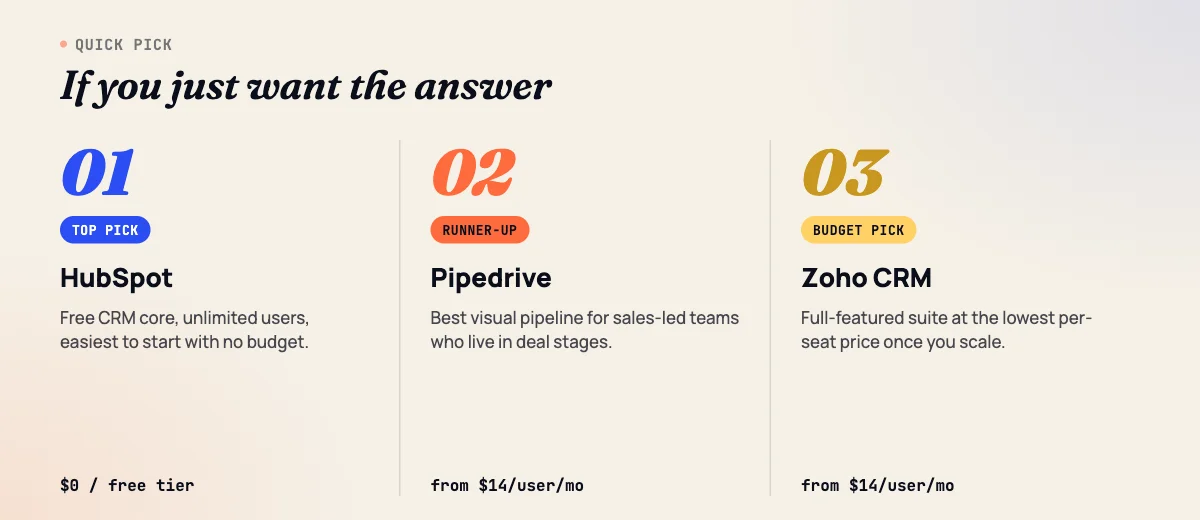
Best overall: HubSpot CRM. Its free tier is genuinely usable on its own, the paid tiers scale into marketing and service tools without a platform switch, and it has the largest talent pool for hiring or training. It doesn’t ship an official WooCommerce connector, so a store owner still needs a certified plugin or middleware to sync orders.
Runner-up: Pipedrive. Cheaper to start ($14/user/month vs. HubSpot’s $20), faster to onboard a small sales team into, and its visual pipeline is still the category benchmark. Skip it if you need marketing automation or a free tier, Pipedrive has neither.
Best native WordPress/WooCommerce integration: ActiveCampaign, Freshsales, and Insightly, the only three on this list with a first-party WooCommerce connector built by the CRM vendor itself, not a third party.
Running WordPress or WooCommerce?
This guide covers CRM platforms broadly, for any business. If you’re specifically choosing a CRM for a WordPress site, our dedicated best WordPress CRM plugins guide covers WordPress-native options this list doesn’t get into. Running a WooCommerce store instead? Our best WooCommerce CRM plugins guide covers order- and purchase-behavior-specific tools built for that exact job.
How we picked these 14 CRMs
We started from the tools that already dominate this search, Zapier’s list of 11, Salesflare’s list of 8, and Pipedrive’s list of 15, then kept every tool that showed up on at least two of those three lists, added Insightly and monday.com CRM for their WooCommerce/marketplace-app integration angle, and verified every price and integration claim directly against vendor pricing pages and vendor-published integration docs in September 2026. We dropped niche picks like Ontraport, Nimble, Attio, and Salesmate to keep the list to CRMs a WordPress/WooCommerce business owner is actually likely to shortlist.
What none of the existing roundups do is tell you whether a CRM talks to WordPress or WooCommerce out of the box. We checked that for all 14, rating each one Native/Official, Certified third-party, or Zapier-only based on whether the CRM vendor itself built and maintains the connector.
Comparison table: pricing and WordPress/WooCommerce integration at a glance
| CRM | Best for | Starting price | WordPress/WooCommerce integration |
|---|---|---|---|
| HubSpot CRM | Teams that want CRM + marketing + service in one platform | Free; paid from $20/seat/mo | Certified third-party (no official WooCommerce plugin) |
| Salesforce Sales Cloud | Growing or enterprise sales orgs needing deep customization | $25/user/mo (Starter Suite) | Native but limited (free Web-to-Lead is one-way); full sync needs paid WP Fusion |
| Pipedrive | Small sales teams who want a simple visual pipeline | $14/user/mo (Lite) | Certified third-party (W2P plugin, WordPress.org) |
| Zoho CRM | Budget-conscious teams already using other Zoho apps | Free (3 users); paid from $14/user/mo | Certified third-party (mature, free options on WordPress.org) |
| Copper | Google Workspace-native teams | $23/seat/mo (Basic) | Zapier-only, no dedicated WooCommerce plugin |
| Microsoft Dynamics 365 Sales | Enterprises standardized on the Microsoft 365 stack | $65/user/mo (Professional) | Certified third-party (multiple mature options) |
| Freshsales (Freshworks CRM) | Support-heavy businesses already on Freshdesk/Freshchat | $9/user/mo (Growth) | Native/Official (Freshworks-built WooCommerce Connector) |
| ActiveCampaign | WooCommerce stores that want marketing automation + a CRM | $15/mo (Starter, 1,000 contacts); CRM is a paid add-on | Native/Official (free vendor-built WooCommerce plugin) |
| Keap | Solo service businesses wanting CRM + invoicing + automation bundled | $249-299/mo flat | Certified third-party (mature ecosystem since Infusionsoft) |
| Nutshell | Small teams who want a CRM that’s genuinely easy to onboard | $13/user/mo (Foundation) | Vendor-managed (native forms; WooCommerce sync via a Zapier connection Nutshell sets up and pays for) |
| Insightly | Project-and-sales hybrid teams (post-sale delivery work) | $29/user/mo (Plus) | Native/Official (built into Insightly AppConnect) |
| monday.com CRM | Teams already running projects on monday.com | $12/seat/mo (Basic) | Certified third-party (marketplace app) |
| Close | Outbound-heavy sales teams (calling/SMS built in) | $19/user/mo (Solo) | Zapier/iPaaS-only, no dedicated plugin |
| Salesflare | Small B2B teams who want the CRM to fill itself in automatically | $29/user/mo (Growth) | Certified third-party (WP Fusion is the de facto standard) |
The 14 CRMs, in detail
1. HubSpot CRM
Verdict: The best all-around starting point for a team that doesn’t want to outgrow its CRM in a year, because the free tier is a real product and the paid tiers open into marketing, service, and CMS tools without switching platforms.
Best for: Businesses that expect to eventually need marketing automation, live chat, or a help desk alongside the CRM, and would rather buy one connected stack than stitch several tools together.
Key features:
- Unlimited contacts on the free CRM, with deal pipelines, task queues, and email tracking included
- Up to 15 sales pipelines and 50 workflows on the entry-level Starter plan
- Meeting scheduling links, canned snippets, and a shared inbox built in from the Starter tier up
- Deep two-way sync with HubSpot’s own Marketing and Service Hubs if you add them later
Pricing: Free CRM (2 users, 1,000 contacts). Starter Customer Platform from $20/seat/month (frequently discounted to $15-20 for new accounts). Professional runs roughly $90-100/seat/month plus a mandatory $1,500 one-time onboarding fee. Enterprise is $150/seat/month plus $3,500 onboarding.
Pros: Genuinely useful free tier; consistent UI across every hub; the largest hiring pool of any CRM on this list, so onboarding new reps or freelance admins is easier. Cons: Professional and Enterprise pricing escalates fast once you add seats and hubs; the mandatory onboarding fees on paid tiers are non-negotiable in most regions; per-contact pricing on Marketing Hub can get expensive if your list grows past a few thousand.
Who should skip it: Teams that only need a sales pipeline and never plan to buy Marketing or Service Hub, you’ll pay for a platform breadth you’re not using. Pipedrive or Zoho Standard is cheaper for that use case.
WordPress/WooCommerce integration: HubSpot’s own WordPress plugin handles forms, live chat, and analytics tracking on any WordPress site, but there is no official HubSpot-built WooCommerce connector. Certified partner plugins (MakeWebBetter’s HubSpot for WooCommerce, CRM Perks) fill that gap and are what most agencies, including ours, actually install for order and customer sync.
2. Salesforce Sales Cloud
Verdict: The most customizable CRM in this list, and the one most likely to be overkill for a small team, it earns its complexity once you need custom objects, territory management, or an AppExchange add-on ecosystem.
Best for: Mid-market and enterprise sales organizations with a dedicated ops or admin person to configure and maintain it.
Key features:
- Assistive AI (Agentforce) built into lead scoring and email nurture flows
- Built-in sales flows and lead routing on Starter Suite, quoting and forecasting on Pro Suite
- AppExchange marketplace with thousands of add-ons and industry-specific packages
- Granular role- and territory-based permission structures for large sales orgs
Pricing: Starter Suite from $25/user/month. Pro Suite from $100/user/month, billed annually with a contract requirement. Enterprise-tier Sales Cloud pricing sits well above both and is quote-based.
Pros: Unmatched customization ceiling; the deepest third-party app ecosystem of any CRM here; scales to organizations with thousands of reps without hitting a platform wall. Cons: Steep learning curve even for admins; Pro Suite requires an annual contract; the jump from Starter to Pro Suite ($25 to $100/user) is the biggest single-tier price gap on this list.
Who should skip it: Teams under 10 people with a straightforward, single-stage-owner sales process. The configuration overhead isn’t worth it until you have complexity to manage.
WordPress/WooCommerce integration: Salesforce’s free Web-to-Lead feature lets you embed a form on WordPress that creates Leads in Salesforce, but it’s one-way and has no error tracking or order sync. For real two-way WordPress/WooCommerce sync, the standard approach is WP Fusion, a paid third-party plugin; Salesforce itself doesn’t publish a WooCommerce-specific plugin.
3. Pipedrive
Verdict: Still the cleanest visual pipeline in the category and the fastest CRM on this list to get a small sales team actually using on day one.
Best for: Small to mid-size sales-only teams who want deal-stage visibility without marketing automation bolted on.
Key features:
- Drag-and-drop visual pipeline with customizable stages
- Email sync with open/click tracking from the Growth plan up
- Revenue forecasting and custom fields on Premium and above
- AI-assisted deal summaries and next-step suggestions
Pricing (annual billing): Lite $14/user/month, Growth $39/user/month, Premium $59/user/month, Ultimate $79/user/month. Monthly billing runs 30-40% higher. Note: Pipedrive renamed its plans in 2025 (Essential→Lite, Advanced→Growth, Professional/Power merged into Premium, Enterprise→Ultimate); some third-party comparison sites still reference the old names.
Pros: Lowest learning curve of any paid CRM here; pipeline visualization is still best-in-class; Power/Premium tier adds project management without leaving the app. Cons: No free tier; no native marketing automation, so you’ll need a separate tool or Pipedrive’s paid Campaigns add-on; automation and reporting are locked behind the Growth tier and above.
Who should skip it: Teams that want marketing automation and sales in one login, look at HubSpot, ActiveCampaign, or Zoho instead.
WordPress/WooCommerce integration: W2P: WooCommerce to Pipedrive Integration, listed on WordPress.org, is a dedicated third-party plugin built specifically for this pairing, not built by Pipedrive itself, but purpose-built and reviewed for WordPress.org’s security standards, which puts it a level above generic Zapier-only integrations.
4. Zoho CRM
Verdict: The best value-for-features CRM on this list if you’re comfortable with a slightly dated interface, especially for businesses already inside the Zoho ecosystem (Books, Desk, Campaigns).
Best for: Budget-conscious small and mid-size businesses that want enterprise-tier features (territory management, CPQ, custom functions) without enterprise-tier pricing.
Key features:
- Workflow and assignment rules, AI agents (Zia), and sales forecasting from Standard up
- CPQ, email intelligence, and inventory management on Professional
- Territory management, journey orchestration, and customer portals on Enterprise
- Free edition for up to 3 users with contact management and basic automation
Pricing (annual billing, USD): Free (3 users). Standard $14/user/month, Professional $23/user/month, Enterprise $40/user/month, Ultimate $52/user/month. Monthly billing adds 25-52% depending on tier.
Pros: Best feature-per-dollar ratio in this list at the Standard and Professional tiers; deep native integration with the rest of the Zoho One suite; genuinely usable free tier for a 2-3 person team. Cons: Interface feels dated next to HubSpot or Pipedrive; support quality is inconsistent below Enterprise; some features are split confusingly across Zoho CRM, Zoho Bigin, and Zoho CRM Plus, which takes research to untangle.
Who should skip it: Teams that value UI polish and fast onboarding over raw feature count, Pipedrive or HubSpot will feel more modern.
WordPress/WooCommerce integration: No first-party plugin from Zoho, but the third-party ecosystem is unusually mature for a non-native integration: “Integration for WooCommerce and Zoho CRM, Books, Invoice, Inventory, Bigin” is free on WordPress.org with no artificial submission caps, which is more generous than most CRMs’ free-tier third-party plugins.
5. Copper
Verdict: The CRM to pick if your team already lives in Gmail and Google Workspace and wants the CRM to feel like an extension of that, not a separate app to context-switch into.
Best for: Google Workspace shops (agencies, consultancies) that want minimal setup friction.
Key features:
- Native Gmail and Google Workspace integration with automatic contact and email capture
- Task automation and pipeline management from the Basic tier
- Contact enrichment pulling in company and social data automatically
- Chrome extension for logging activity without leaving your inbox
Pricing (annual billing): Basic $23/seat/month, Professional $59/seat/month, Business $99/seat/month. Monthly billing is roughly 25% higher across all tiers.
Pros: The tightest Google Workspace integration of any CRM on this list; minimal training needed for a Gmail-native team; contact enrichment saves real manual data entry. Cons: Limited value outside the Google ecosystem; reporting and customization lag behind Zoho or HubSpot at similar price points; no dedicated WooCommerce path at all.
Who should skip it: Any team on Microsoft 365 rather than Google Workspace, you lose most of Copper’s differentiator and pay a premium for features other CRMs include at a lower tier.
WordPress/WooCommerce integration: The weakest of any CRM on this list. There’s no dedicated WooCommerce plugin, official or third-party; Zapier is effectively the only path, with Bit Integrations available for form-builder connections. If WooCommerce order sync is a requirement, Copper should not be on your shortlist.
6. Microsoft Dynamics 365 Sales
Verdict: The default choice if your organization is already standardized on Microsoft 365 and Azure, less because it’s the best CRM UX and more because it’s the least friction to procure, secure, and support internally.
Best for: Enterprises with an existing Microsoft licensing agreement and an IT team that already manages Azure AD/Entra ID.
Key features:
- Native integration with Outlook, Teams, and SharePoint
- Copilot AI assistance for deal summaries and next-best-action suggestions
- Power Platform (Power Automate, Power BI) extensibility without leaving the Microsoft stack
- Enterprise-grade compliance and data residency options
Pricing (annual billing): Professional $65/user/month, Enterprise $105/user/month, Premium $150/user/month. These are Microsoft’s list prices as of January 2026; actual cost varies with enterprise agreements and volume licensing.
Pros: Unmatched if your stack is already Microsoft-centric; Power Platform extensibility is genuinely powerful for internal tooling; enterprise compliance credentials are strong. Cons: Overkill and overpriced for anyone not already on Microsoft 365; UI is less intuitive than Salesforce or HubSpot for net-new users; per-seat cost climbs fast past Professional.
Who should skip it: Any business not already committed to the Microsoft ecosystem, the integration advantages disappear and you’re left paying enterprise pricing for a CRM with a steeper learning curve than the alternatives.
WordPress/WooCommerce integration: No official Microsoft-built plugin, but a genuinely mature third-party market exists given enterprise IT demand: “Integrate Dynamics 365 CRM” on WordPress.org, plus CRM Perks’ and Woo365’s dedicated WooCommerce connectors for product, inventory, and order sync with Dynamics 365 Business Central.
7. Freshsales (Freshworks CRM)
Verdict: The best-value CRM here for a business that already runs (or plans to run) Freshdesk or Freshchat, and one of only three CRMs on this list with a true vendor-built WooCommerce connector.
Best for: Support-and-sales hybrid teams, especially WooCommerce stores that also run a Freshworks help desk.
Key features:
- Built-in phone, email, and chat within the CRM record, not bolted on
- AI-based deal scoring (Freddy AI) from the Pro tier up
- Visual sales pipeline with customizable stages
- Native two-way integration with Freshdesk and Freshchat
Pricing (annual billing): Growth $9/user/month, Pro $39/user/month, Enterprise $59/user/month. Monthly billing runs 15-20% higher. Note: Freshworks removed its free 3-user plan in a July 2026 pricing redesign; a 21-day trial is now the only no-cost entry point.
Pros: Cheapest usable paid entry tier of any comparable mid-market CRM here at $9/user/month; genuinely native phone/chat inside deal records; strong AI features even at the Pro tier. Cons: The Growth-to-Pro price jump (333%) is one of the steepest tier gaps in this list; losing the free plan in 2026 makes it a harder recommendation for very early-stage teams than it used to be.
Who should skip it: Teams that need a genuinely free long-term plan, HubSpot or Zoho are better fits now that Freshsales’ free tier is gone.
WordPress/WooCommerce integration: Freshworks publishes its own official WooCommerce Connector app in the Freshworks Marketplace, built and maintained by Freshworks itself, plus a separate WCC Freshsales extension on the WooCommerce.com marketplace. This is a genuine first-party integration, not a certified-partner workaround.
8. ActiveCampaign
Verdict: The strongest WooCommerce story on this entire list, a free, official, vendor-built WooCommerce plugin, wrapped around a marketing-automation-first platform where the CRM itself is an add-on, not the core product.
Best for: WooCommerce stores that want marketing automation (abandoned cart flows, win-back sequences, segmentation) with a lightweight CRM layer on top, rather than a sales-first CRM with marketing bolted on.
Key features:
- Deep Data sync: full order history, abandoned carts, and opt-in status flow into ActiveCampaign automatically via the official plugin
- Visual automation builder with hundreds of pre-built recipes
- CRM/Deals add-on (Pipelines, $68/month) for basic pipeline and account tracking
- Sales Engagement add-on ($111/month) layering in win-probability scoring and 1:1 automated outreach
Pricing (annual billing, 1,000 contacts): Starter $15/month, Plus $49/month, Professional $79/month, Enterprise $145/month. Pricing scales with contact-list size up to 50,000 contacts, past which it’s custom. The CRM/Deals feature itself is not included by default, it’s a paid add-on available from the Plus plan up.
Pros: Best WordPress/WooCommerce integration of any CRM-adjacent tool in this list, full stop; marketing automation depth well beyond what Pipedrive, Copper, or Close offer; pricing scales predictably with list size rather than seat count, which favors small teams with big contact lists. Cons: The actual CRM/pipeline functionality is a paid add-on, not a first-class citizen of the product, so pure sales teams may find it thinner than Pipedrive or Close; pricing is contact-based, which can get expensive fast for a list-heavy WooCommerce store even with a small sales team.
Who should skip it: Sales-only teams with no marketing automation need, you’d be paying for (and navigating around) a marketing platform to get a secondary CRM feature.
WordPress/WooCommerce integration: “ActiveCampaign for WooCommerce” is a free, official plugin published and maintained by ActiveCampaign on WordPress.org, requiring only WooCommerce 3.0+ and an API key to connect. We’ve set this exact plugin up on multiple WooCommerce client stores and it remains the cleanest CRM-to-store connection of any tool in this roundup, no middleware, no per-Zap cost, and order data appears in ActiveCampaign within seconds of checkout.
9. Keap
Verdict: An all-in-one CRM, email, and invoicing bundle built for solo service businesses and small teams who’d rather pay one flat monthly fee than assemble a stack of separate tools.
Best for: Coaches, consultants, and small service businesses that want CRM, appointment scheduling, invoicing, and basic marketing automation under one login.
Key features:
- Contact management with lead scoring and custom fields
- Landing pages, email broadcasts, and text messaging built in
- Invoicing and payment processing without a separate tool
- Pipeline management with task automation across sales and delivery
Pricing: As of 2026, Keap has moved to a single published plan at $299/month (month-to-month) or an effective $249/month billed annually, including 2 users. Additional users are $39/month each. Legacy Pro/Max/Ultimate tiers still exist for grandfathered accounts but are no longer sold to new customers.
Pros: Genuinely all-in-one, you can run CRM, invoicing, and email from one tool without third-party billing software; long track record (dating to Infusionsoft) means a mature partner and plugin ecosystem; strong for service businesses that bill by invoice rather than through a store. Cons: The move to a single $299/month plan removed the lower-cost entry points that used to make Keap accessible to very small businesses; required implementation packages add to the real first-month cost; overkill if you just need a sales pipeline.
Who should skip it: Anyone who only needs contact and deal tracking, Nutshell or Pipedrive costs a fraction of Keap’s flat fee for that narrower job.
WordPress/WooCommerce integration: No plugin built by Keap itself, but the third-party ecosystem is unusually mature because it dates back to the Infusionsoft era: WP Swings’ “Keap Integration for WooCommerce,” the independent InfusedWoo plugin, and WP Fusion all offer two-way order, contact, and tag sync.
10. Nutshell
Verdict: The CRM most likely to get a resistant sales team to actually adopt it, because the onboarding curve is close to zero and Nutshell itself manages the messiest part of most CRM integrations, the Zapier connection, on your behalf.
Best for: Small sales teams who’ve tried a more complex CRM before and abandoned it because reps wouldn’t use it.
Key features:
- Nutshell Forms, a native embeddable form builder included on every plan
- AI-assisted “outcomes” (deal summaries, next-step suggestions) starting at 10/month on Foundation
- Activity reports, sales quotas, and lead assignment rules from Growth up
- Unlimited contacts and storage even on the entry-level plan
Pricing: Foundation $13/user/month, Growth $25/user/month, Pro $42/user/month, Business $59/user/month, Enterprise $79/user/month. Add-ons for marketing ($49/month), SMS engagement ($16/user/month), and quotes/invoices ($79/month) are separate.
Pros: Lowest genuine learning curve of any CRM in this list; unlimited contacts even on the cheapest plan, unlike Pipedrive or Copper’s capped tiers; Nutshell covers the Zapier setup and connection cost for WooCommerce rather than leaving you to build and pay for it yourself. Cons: Advanced reporting and multiple pipelines are locked behind the Pro tier and above; the AI “outcomes” credit system is a usage cap most competitors don’t impose; smaller third-party ecosystem than Zoho or HubSpot.
Who should skip it: Teams that need deep customization or a large third-party app marketplace, Nutshell trades flexibility for simplicity, and that trade won’t suit a complex sales org.
WordPress/WooCommerce integration: Nutshell Forms embed natively on any WordPress page and sync submissions straight into Nutshell as leads. WooCommerce order sync runs through a Zapier connection, but unusually, Nutshell itself covers the setup and the Zapier cost as part of every subscription tier, a middle ground between “official plugin” and “figure out Zapier yourself.”
11. Insightly
Verdict: The strongest choice for a business where the sale is only half the job, onboarding, delivery, or project work happens after the deal closes, and Insightly is one of the few CRMs built to track both in one record.
Best for: Agencies, consultancies, and product businesses with a post-sale delivery or onboarding process worth tracking alongside the deal.
Key features:
- Native project management tied directly to won deals, not a separate module
- Lead assignment and routing with workflow automation from Professional up
- AI Copilot (75 queries/month on Professional) for research and drafting
- Insightly AppConnect, a built-in iPaaS for connecting outside apps without a separate integration tool
Pricing: Plus $29/user/month, Professional $49/user/month, Enterprise $99/user/month. Separate marketing automation and support/ticketing products are priced independently, from $99/account/month and $29/user/month respectively.
Pros: Project management built into the core product, not an add-on, which is rare among sales-first CRMs; AppConnect removes the need for a separate Zapier subscription for most integrations; solid mid-market feature set at Professional. Cons: Less pipeline-visualization polish than Pipedrive; the AI Copilot query cap (75/month on Professional) is easy to exhaust; smaller ecosystem and community than Zoho, HubSpot, or Salesforce.
Who should skip it: Pure transactional sales teams with no post-sale delivery phase to track, you won’t use Insightly’s core differentiator and will pay a premium versus Pipedrive for the same pipeline functionality.
WordPress/WooCommerce integration: Insightly AppConnect includes a built-in WooCommerce connector maintained by Insightly itself, capable of creating and syncing products, orders, and contacts bidirectionally. A MakeWebBetter-built plugin is also listed on the WooCommerce.com marketplace as an alternative setup path. This puts Insightly in the small group (with ActiveCampaign and Freshsales) that has genuine first-party WooCommerce support.
12. monday.com CRM
Verdict: Makes the most sense as a CRM if your team already runs projects on monday.com’s work OS and wants sales data in the same visual boards, rather than as a first choice for a team starting from zero.
Best for: Teams already using monday.com for project management who want sales pipeline tracking without adopting a second platform.
Key features:
- Fully customizable boards for contacts, deals, and activity, shared with the same interface as monday.com’s project boards
- AI agents for outreach drafting and lead sourcing on paid tiers
- Custom automations (up to 25,000/month on Pro) connecting CRM boards to other monday.com workflows
- Mass email and sequencing from the Pro tier up
Pricing (annual billing): Basic $12/seat/month, Standard $17/seat/month, Pro $28/seat/month, Ultimate (formerly Enterprise) custom-quoted.
Pros: If you’re already paying for monday.com, adding CRM boards is cheaper than buying a dedicated CRM outright; genuinely flexible board/column structure for unusual sales processes; unifies sales and delivery visibility for teams that already track projects there. Cons: Not purpose-built as a CRM the way Pipedrive or Close are, so sales-specific features (forecasting, territory rules) are thinner; active contact/deal record caps on lower tiers (1,000 on Basic) are restrictive for a growing pipeline.
Who should skip it: Sales teams that aren’t already on monday.com for project work, a purpose-built CRM will out-feature it for the same or lower price.
WordPress/WooCommerce integration: A WooCommerce Integration app is listed on the monday.com Marketplace, built by a marketplace partner rather than monday.com’s own sales-CRM team. It’s functional for capturing new orders as board items, but it’s a lighter, less deeply native connection than ActiveCampaign’s or Freshsales’ vendor-built plugins.
13. Close
Verdict: Built specifically for outbound-heavy sales teams that live on the phone and in SMS, calling, texting, and email are native to every deal record, not add-ons.
Best for: SDR/inside-sales teams doing high-volume outbound calling and texting, especially remote teams that need a built-in dialer rather than a separate phone tool.
Key features:
- Built-in calling, email, and SMS from every plan, including the entry tier
- Power dialer and, on higher tiers, a predictive dialer for high-volume outbound
- Chloe, an AI assistant with usage-based credits for call summaries and follow-up drafting
- Automated workflows triggering outreach sequences based on lead behavior (Growth tier and up)
Pricing: Solo $19/user/month (single user, 10k lead cap), Essentials $35-49/user/month, Growth $99-109/user/month, Scale $139-149/user/month. Close runs frequent promotional discounts off these list prices, so check current pricing before budgeting.
Pros: Best built-in calling/SMS experience of any CRM in this list, no separate dialer subscription needed; fast, keyboard-driven UI built for reps doing high call volume; predictable per-user pricing with no hidden contact caps at the Essentials tier and above. Cons: Essentials tier explicitly excludes workflow automation, which is a meaningful gap versus Pipedrive Growth at a similar price; no marketing automation at all; per-minute calling and SMS costs are billed separately on top of the subscription.
Who should skip it: Teams that don’t do high-volume outbound calling, you’d be paying for Close’s core differentiator without using it, and Pipedrive or Nutshell will serve a relationship-based or inbound sales motion better.
WordPress/WooCommerce integration: The weakest integration story alongside Copper. There is no dedicated WooCommerce plugin for Close, official or third-party, in either the WordPress.org repository or the WooCommerce.com marketplace as of this writing. Connecting WooCommerce to Close requires an automation platform like Zapier, Make, or SyncSpider.
14. Salesflare
Verdict: The CRM built around the idea that reps shouldn’t have to manually enter data at all, it auto-fills contact and company details from email signatures, social profiles, and calendar activity.
Best for: Small B2B teams (agencies, consultancies, startups) who’ve resisted CRMs in the past because manual data entry killed adoption.
Key features:
- Automatic contact, company, and deal data entry from email and calendar activity
- Email and link open-tracking built into every plan
- LinkedIn and email sidebar for logging activity without leaving your inbox
- Custom dashboards and multi-email workflows from the Pro tier up
Pricing (annual billing): Growth $29/user/month, Pro $49/user/month, Enterprise $99/user/month (5-user minimum). Monthly billing runs roughly 25-35% higher across all tiers.
Pros: The least manual data entry of any CRM in this list by a wide margin; genuinely fast to set up for a small team; strong email/LinkedIn integration for relationship-based B2B sales. Cons: Automation and reporting depth thin out compared to HubSpot or Zoho at the same price; Enterprise tier’s 5-seat minimum rules it out for very small teams; smaller company and less brand recognition than the rest of this list, which can matter for hiring reps already familiar with a tool.
Who should skip it: Larger sales orgs needing deep customization or territory management, Salesflare optimizes for small-team simplicity, not enterprise scale.
WordPress/WooCommerce integration: No first-party plugin from Salesflare, but WP Fusion has built dedicated, actively maintained connectors for WooCommerce core, WooCommerce Subscriptions, Smart Coupons, and Deposits with Salesflare specifically, making WP Fusion the de facto standard path rather than a generic workaround. Zapier and Pabbly Connect are also available for simpler order-to-contact syncs.
Which CRM is actually right for your business?
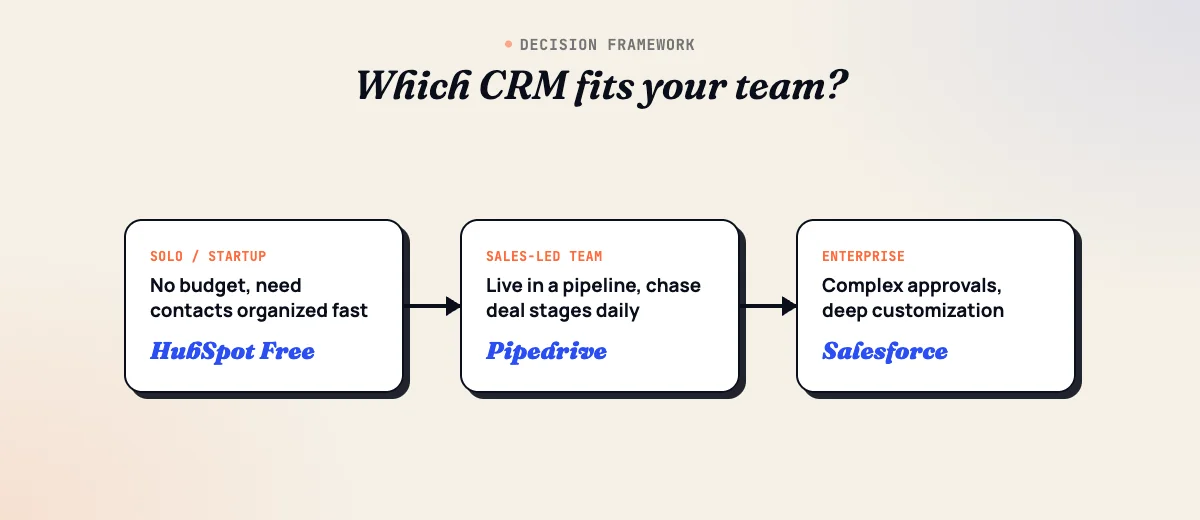
The right CRM depends more on your sales motion and existing stack than on any single “best” feature list. Here’s how we’d narrow it down by scenario.
If you’re a solo founder or a team of 1-3
Start with Close (if you’re doing outbound calling), Salesflare (if you’d rather the CRM fill itself in), or Nutshell Foundation (if you just want the cheapest usable pipeline). All three keep total monthly cost under $60 for a team this size, and none require an admin to configure before your first rep can use it.
If you run a WooCommerce store and the CRM’s main job is order/customer data
Prioritize ActiveCampaign, Freshsales, or Insightly, the three with a first-party, vendor-built WooCommerce connector. If your real need is closer to purchase-behavior segmentation than full sales-pipeline management, it’s worth reading our best WooCommerce CRM plugins guide before committing to an external SaaS CRM at all; a WooCommerce-native plugin can be the simpler and cheaper answer.
If you need marketing automation and sales in one tool
HubSpot, ActiveCampaign, and Zoho are built for this; Pipedrive, Close, Copper, and Salesflare deliberately are not and expect you to pair them with a dedicated marketing platform. If marketing automation is the primary need and the CRM is secondary, compare options directly in our marketing automation software guide.
If you’re already committed to a bigger platform
On Google Workspace, Copper’s native Gmail integration is hard to beat. On Microsoft 365, Dynamics 365 Sales removes procurement and security friction your IT team would otherwise have to solve separately. On Zoho One, Zoho CRM is the obvious default. On monday.com, adding CRM boards is cheaper than a separate platform if your sales process is simple enough for it.
If you’re leading a sales team past 20-30 reps
Salesforce and Zoho Ultimate are the two in this list built for that scale of territory management, custom objects, and reporting complexity. HubSpot Enterprise is a credible third option if you also need Marketing or Service Hub at that scale.
If you’re not sure a generic SaaS CRM is even the right layer
Some businesses don’t need a separate CRM login at all, they need lead capture and follow-up built directly into WordPress, without exporting data to a third-party platform. If that sounds closer to your situation, our best WordPress CRM plugins guide covers CRM plugins that live natively inside wp-admin.
Frequently asked questions
What’s the best free CRM in 2026?
HubSpot’s free CRM is the most usable free tier in this list: unlimited contacts on the core CRM, up to two paid seats before you need a plan, and enough pipeline, task, and email-tracking functionality to run a small sales process. Zoho CRM’s free edition is the runner-up, capped at three users, which fits a very small team but not a growing one.
What’s the best CRM for a small business on a tight budget?
Pipedrive’s Lite plan ($14/user/month) and Zoho CRM’s Standard plan ($14/user/month) are the cheapest paid tiers that still include real pipeline management, reporting, and automation. Nutshell’s Foundation plan ($13/user/month) is priced similarly and includes unlimited contacts and email/calendar sync, which some of the $14 plans restrict.
Which CRM integrates natively with WordPress and WooCommerce, not just through Zapier?
Three of the 14 tools here ship a first-party WordPress/WooCommerce connector built by the CRM vendor itself: ActiveCampaign (a free official WooCommerce plugin on WordPress.org), Freshworks/Freshsales (an official WooCommerce Connector app in the Freshworks Marketplace), and Insightly (a built-in WooCommerce connector inside Insightly AppConnect). Everything else on this list relies on a certified third-party plugin, a paid middleware tool like WP Fusion, or Zapier.
Does WooCommerce have a built-in CRM, or do I need a separate tool?
WooCommerce has customer and order records, but no pipeline, lead scoring, or sales-automation layer on top of them, so it isn’t a CRM by itself. Stores that only need to act on purchase history (win-backs, repeat-purchase segments, RFM data) are usually better served by a WooCommerce-native CRM plugin than a full external SaaS CRM; our companion guide covers those options in the best WooCommerce CRM plugins roundup.
What’s the difference between a CRM and a marketing automation platform?
A CRM is built around the sales side: contacts, deals, pipeline stages, and a sales rep’s task list. A marketing automation platform is built around campaigns: email sequences, lead scoring, and audience segmentation, usually with a much bigger contact-list ceiling. HubSpot, ActiveCampaign, and Zoho blur the line by selling both in one product; Salesforce, Pipedrive, and Close stay deliberately sales-only and expect you to pair them with a dedicated marketing automation tool like the ones in our best marketing automation plugins guide.
How much should a small sales team expect to pay for a CRM per month?
For a team of 3-5 reps, realistic mid-tier pricing (the plan level that unlocks automation and real reporting, not the entry tier) runs from roughly $75/month total up to $400-600/month for HubSpot Professional or Salesforce Pro Suite at the same headcount. Entry-level tiers like Pipedrive Lite, Zoho Standard, or Nutshell Foundation keep a small team closer to $50-70/month total.
Can I switch CRMs later without losing my data?
Yes, every CRM on this list supports CSV export of contacts and deals, and most (Pipedrive, Zoho, HubSpot, Salesforce) also expose a REST API for a scripted migration. The real cost of switching isn’t the data export, it’s rebuilding automations, email templates, and custom fields, which is why it’s worth spending an extra week evaluating a CRM before committing rather than treating the decision as reversible.
Is Salesforce overkill for a small business?
For a team under 10 people with a simple sales process, yes, in most cases. Salesforce’s real value shows up once you need custom objects, multi-team territory rules, or AppExchange add-ons that smaller CRMs don’t offer, and its Pro Suite pricing and setup complexity are built for that scale. A small team is usually better served by Pipedrive, Zoho, or HubSpot’s lower tiers and can migrate to Salesforce later if it outgrows them.
Where wbcomdesigns fits in
We’re a WordPress and WooCommerce development agency, not a CRM vendor, which is the only reason we can be neutral about which of these 14 tools actually has a native integration versus a Zapier workaround dressed up as one. We’ve implemented most of the connectors named in this guide, the ActiveCampaign WooCommerce plugin, WP Fusion setups for Salesforce and Salesflare, and custom REST-API syncs where no plugin existed, directly on client stores. If you’ve picked a CRM from this list and want it properly wired into your WordPress or WooCommerce site (not just a Zapier connection that breaks when a field changes), that’s exactly the kind of project our CRM implementation team handles.
Related reading