
27 min read
Best WooCommerce CRM Plugins in 2026

Best WooCommerce CRM Plugins in 2026
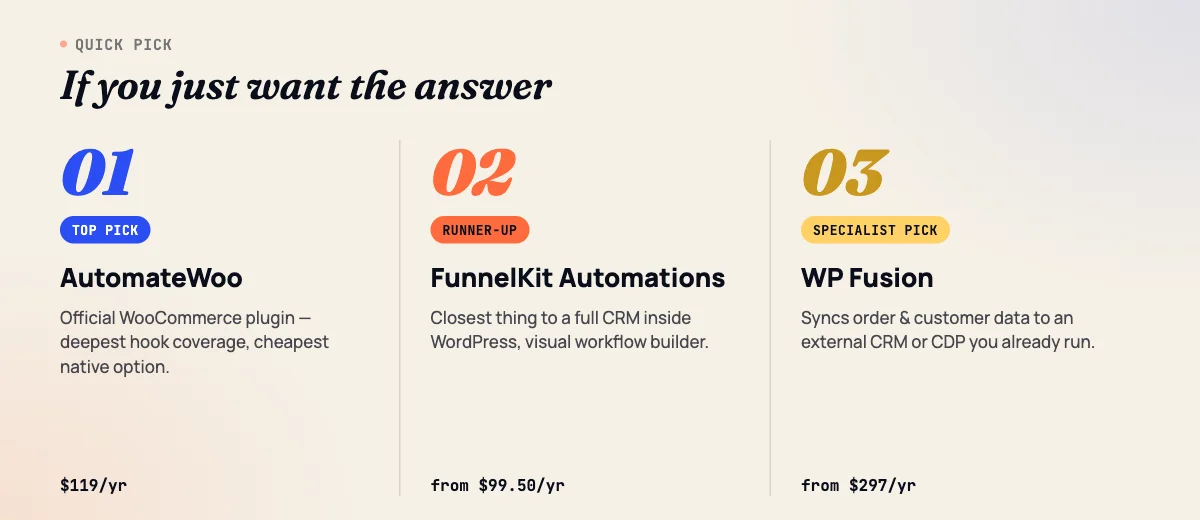
TL;DR: If you only add one tool, add AutomateWoo: it’s WooCommerce’s own plugin, it’s $119/year with no per-contact fees, and it covers abandoned carts, win-back campaigns, and VIP customer tracking out of the box. If you want a fuller CRM feel with visual workflows and built-in broadcasts, FunnelKit Automations is the strongest runner-up. Stores that outgrow either one usually move customer data into an external platform like Klaviyo, Omnisend, or Metrilo rather than replacing them outright.
What Makes a Tool a “WooCommerce CRM” (Not Just a CRM With a Plugin)
A WooCommerce CRM organizes customer records around orders, not conversations. It knows what someone bought, how many times they’ve bought, how much they’ve spent, whether they abandoned a cart in the last 48 hours, and whether they’re at risk of never coming back. That’s a different job from a lead/contact CRM, which tracks inquiries and deal stages for people who haven’t necessarily bought anything yet.
Every tool on this list reads WooCommerce order and cart data directly, either as a self-hosted plugin running on your own WordPress install or as a SaaS platform with a native WooCommerce connector. None of them are generic contact databases with a WooCommerce label slapped on the marketing page. If you’re looking for a general-purpose WordPress CRM for leads, quotes, and sales pipelines instead, see our guide to the best WordPress CRM plugins instead, since that’s a different buying decision with different criteria.
The 13 Best WooCommerce CRM Plugins at a Glance
The table below ranks the tools by how directly they work with WooCommerce order data, from native WordPress plugins to SaaS platforms with dedicated WooCommerce connectors. Pricing shown is the lowest published tier that gets you real WooCommerce functionality, not a stripped-down free plan.
| Tool | Best for | Starting price | Self-hosted or SaaS | Native WooCommerce integration |
|---|---|---|---|---|
| AutomateWoo | Most stores: cart recovery, win-back, VIP tracking | $119/year | Self-hosted | Yes (official) |
| FunnelKit Automations | A full CRM/automation builder inside WordPress | $99.50/year | Self-hosted | Yes |
| CartCue | Lightweight cart recovery plus CRM sync | Free / $59 Pro | Self-hosted | Yes |
| WP Fusion | Pushing order data into an external CRM you already run | $297/year | Self-hosted bridge | Yes |
| Klaviyo for WooCommerce | Deep event-level email and SMS automation at scale | Free tier / from $20/mo | SaaS | Yes (official) |
| Omnisend | Omnichannel email, SMS, and push for growing stores | Free tier / from $16/mo | SaaS | Yes (official) |
| Metrilo | Dedicated ecommerce CRM and retention analytics | From $199/mo ($165/mo annual) | SaaS | Yes |
| GetResponse (Ecommerce plan) | CRM plus automation plus landing pages in one suite | From $119/mo | SaaS | Yes |
| Jetpack CRM | Modular, pay-for-what-you-use approach | Free core / $129/year bundle | Self-hosted | Yes |
| Groundhogg | Self-hosted CRM where you own the data outright | Free core / $20/mo (Basic) | Self-hosted | Yes (Pro or add-on) |
| Drip | Ecommerce-only SaaS alternative to Klaviyo | From $39/mo | SaaS | Yes |
| Putler | Customer analytics, RFM segments, and CLV reporting | From $20/mo | SaaS | Yes (connector plugin) |
| WooCommerce Customer Relationship Manager | Budget, one-time-purchase basic CRM | ~$46 one-time | Self-hosted | Yes |
1. AutomateWoo: The Default Choice for Most Stores
Verdict: AutomateWoo is WooCommerce’s own marketing automation plugin, and it’s the safest first purchase for any store that hasn’t automated cart recovery or win-back emails yet.
Best for: Stores that want native, no-monthly-fee automation for carts, follow-ups, and VIP customers without leaving WordPress.
Key features:
- Abandoned cart and abandoned wishlist recovery sequences
- Win-back campaigns for customers who haven’t purchased in X days
- Post-purchase review request automation
- VIP customer status based on total spend or order count
- Native WooCommerce Subscriptions triggers (renewal, cancellation, payment failure)
- SMS notifications and a visual workflow builder
Pricing: $119/year for a single site (official pricing, no per-contact fees).
Pros: Built and maintained by WooCommerce/Automattic, so it tracks core WooCommerce updates closely; flat annual price regardless of list size; no data leaves your server unless you connect an SMS provider.
Cons: No visual funnel builder or broadcast-style newsletter tool; email deliverability depends entirely on your own SMTP setup, which can be a weak point on shared hosting.
Who should skip it: Stores that need SMS and push notifications as a primary channel, or that want a drag-and-drop visual automation canvas, will outgrow AutomateWoo’s simpler rule-based interface quickly.
2. FunnelKit Automations: The Closest Thing to a Full CRM Inside WordPress
Verdict: FunnelKit Automations (formerly sold as Autonami) is the strongest choice when you want contact profiles, a visual automation builder, and broadcast email in one self-hosted plugin.
Best for: Stores that want CRM-style contact records with full purchase history, not just triggered emails.
Key features:
- Visual, drag-and-drop automation builder with conditional branching
- Contact profiles showing full order history, tags, and lifecycle stage per customer
- Built-in abandoned cart recovery, win-back flows, and post-purchase sequences
- Email broadcasts and segmentation by purchase behavior, not just list membership
- No cap on contacts regardless of plan tier
Pricing: Standalone Automations starts at $99.50/year for one site; the Professional bundle with the full CRM, broadcasts, and segmentation runs $249.50/year for three sites.
Pros: Genuinely feels like a CRM rather than an automation add-on; no per-contact pricing at any tier; works whether or not you also use FunnelKit’s checkout/funnel builder.
Cons: The Professional tier is needed to unlock full segmentation and broadcasts, so the entry price understates what most stores will actually pay; email sending still depends on your own SMTP or a connected transactional email service.
Who should skip it: If you already run a separate CRM or ESP and just need cart recovery, AutomateWoo or CartCue do that specific job for less money and less setup.
3. CartCue: The Lightweight Specialist for Cart Recovery and CRM Sync
Verdict: CartCue is a narrowly focused, WooCommerce-native automation plugin built specifically around cart abandonment, win-back, and syncing customer events to whatever CRM or ESP you already use.
Best for: Stores that want a single, cheap tool for cart recovery and win-back, plus a bridge to an external CRM, without paying for a full automation suite.
Key features:
- Detects abandoned carts as soon as a shopper enters an email at checkout, before they even leave the page
- Win-back campaigns with unique, per-customer coupon codes and batch-sending throttling
- CRM and ESP sync to FluentCRM, Mailchimp, MailPoet, ActiveCampaign, and Klaviyo (Pro)
- Outgoing webhooks for Zapier, n8n, and Make
- Native support for WooCommerce Subscriptions, Memberships, points systems, and HPOS
Pricing: Free version available; CartCue Pro is roughly $59 for a single-site license, sold as a one-time plugin purchase rather than a recurring SaaS fee.
Pros: Very low cost for the CRM-sync feature specifically; trigger-based logic (trigger, timing, conditions, action) is simple to configure without a learning curve; genuinely native to WooCommerce order and cart events.
Cons: It’s a newer, smaller plugin with a limited install base and review history compared to AutomateWoo or FunnelKit, so you’re taking on more long-term-support risk; it’s a sync layer, not a full CRM interface on its own.
Who should skip it: Stores that want a self-contained CRM with its own contact database and reporting dashboard should look at FunnelKit Automations or Jetpack CRM instead; CartCue assumes you already have (or will connect) somewhere else for that.
4. WP Fusion: The Bridge to Your External CRM
Verdict: WP Fusion doesn’t host customer data itself; it syncs WooCommerce order and customer data into whatever CRM or ESP you already run, which makes it the right pick when the CRM decision is already made and WooCommerce needs to feed it.
Best for: Stores or agencies that already use ActiveCampaign, HubSpot, Salesforce, Drip, or another external CRM and need clean, tag-based order data flowing into it automatically.
Key features:
- Two-way sync between WooCommerce customer/order data and 150+ external CRMs and ESPs
- Tag-based segmentation driven by purchase history, product category, and order status
- Content restriction based on purchase or membership tags synced from your CRM
- Abandoned cart tracking that pushes events to your CRM rather than sending emails itself
- Works alongside WooCommerce Subscriptions and Memberships
Pricing: Personal plan $297/year (150+ integrations, one site); Plus $427/year (adds 6 pro add-ons); Professional $647/year (unlimited sites). A lifetime license option also exists.
Pros: Genuinely CRM-agnostic, so it doesn’t lock you into a single downstream platform; tag-based logic is powerful once configured; strong fit for agencies managing several client CRMs.
Cons: It’s the most expensive plugin on this list relative to what it does on its own, since you’re also paying for the destination CRM separately; the value only shows up once you’ve already committed to an external platform.
Who should skip it: If you haven’t picked an external CRM yet, don’t start with WP Fusion; pick the CRM first, or use a self-contained option like FunnelKit Automations or Jetpack CRM that doesn’t require a second subscription.
5. Klaviyo for WooCommerce: Deep Event Tracking at SaaS Scale
Verdict: Klaviyo is the deepest event-level tracking platform on this list, built for stores that want to trigger campaigns off granular behavior like specific product views, not just cart abandonment.
Best for: Growing to established stores that need sophisticated email and SMS flows and can justify per-profile pricing.
Key features:
- Official WooCommerce integration syncing orders, products, and customer profiles in near real time
- Granular event tracking (viewed product, started checkout, placed order, refunded)
- Predictive analytics: predicted CLV, churn risk, and next-order date per customer
- Pre-built flows for abandoned cart, browse abandonment, post-purchase, and win-back
- Combined email and SMS in a single platform and single automation canvas
Pricing: Free up to roughly 250 to 500 profiles; paid plans start around $20/month for 500 contacts and scale with active profile count, with no annual discount on self-serve plans as of 2026.
Pros: Best-in-class predictive CLV and segmentation; strong deliverability infrastructure since sending happens on Klaviyo’s servers, not your hosting; scales cleanly to large catalogs and high order volume.
Cons: Cost climbs fast as your list grows, since pricing is billed on active profiles rather than a flat fee; a 50,000-contact list can run $700+/month for email alone.
Who should skip it: Stores under a few thousand customers rarely need Klaviyo’s predictive features yet, and will get more value per dollar from AutomateWoo or Omnisend at that size.
6. Omnisend: The Budget-Friendly Omnichannel Option
Verdict: Omnisend covers email, SMS, and push notifications in one platform at a lower entry price than Klaviyo, which makes it the more approachable SaaS option for small and mid-size WooCommerce stores.
Best for: Stores that want multichannel automation (not just email) without Klaviyo’s pricing curve.
Key features:
- Official WooCommerce plugin with order, product, and customer sync
- Pre-built automation library for cart recovery, welcome series, and win-back, organized by ecommerce use case
- Email, SMS, and web push in one workflow builder
- Customer segmentation by purchase history, total spend, and product category
- Free plan supports up to 250 reachable contacts and 500 email sends a month
Pricing: Free plan available; Standard from $16/month (email-focused, billed by contact count); Pro from $59/month (unlimited sends, SMS credits during the current pricing structure).
Pros: Lower entry cost than most SaaS competitors for genuine omnichannel automation; ecommerce-specific templates reduce setup time; solid middle ground between AutomateWoo’s simplicity and Klaviyo’s depth.
Cons: SMS credit bundling is changing in late 2026 (Legacy Pro migrating to a separate SMS Credits subscription), so check current terms before budgeting SMS into the Pro plan; predictive analytics are less advanced than Klaviyo’s.
Who should skip it: Stores that don’t plan to use SMS or push at all may not need Omnisend’s core differentiator and could save money with an email-only tool like AutomateWoo.
7. Metrilo: The Dedicated Ecommerce CRM and Retention Platform
Verdict: Metrilo is built specifically as an ecommerce CRM, not an email tool with a CRM feature bolted on, combining customer profiles, retention analytics, and email/loyalty tools in one dashboard.
Best for: Established stores that want a genuine customer relationship view (every order, every email, every interaction per customer) alongside retention-focused analytics.
Key features:
- Individual customer timelines showing every order, email open, and campaign interaction
- Cohort and retention analysis to see how repeat-purchase rate changes over time
- Built-in email marketing and loyalty/rewards tools tied to purchase behavior
- Order, catalog, and promotion management alongside the CRM view
- Data sync and alerting across multiple sales channels, not just WooCommerce
Pricing: Essential from $199/month ($165/month billed annually); Pro from $379/month ($315/month annually); Premium from $599/month ($499/month annually).
Pros: Genuinely CRM-first rather than campaign-first; strong retention and cohort reporting most email tools don’t offer; useful for teams (support plus marketing) who need a shared customer view.
Cons: Priced well above every other tool on this list, putting it out of reach for small stores; the value case depends on having enough order volume for cohort analysis to be meaningful.
Who should skip it: Stores under roughly $50k/month in revenue will likely find Metrilo’s price hard to justify against AutomateWoo plus Putler covering similar ground for a fraction of the cost.
8. GetResponse (Ecommerce Marketing Plan): The All-in-One Suite Option
Verdict: GetResponse’s Ecommerce Marketing plan bundles CRM-style contact management with abandoned cart recovery, product recommendations, and web push in a platform that also does webinars and landing pages, which suits stores that want one vendor for everything.
Best for: Stores that want marketing automation, CRM contact records, and content/landing-page tools under a single subscription.
Key features:
- Native WooCommerce integration syncing contacts, products, and order data
- Abandoned cart recovery, promo codes, and product recommendation blocks
- Web push notifications tied to browsing and purchase behavior
- Marketing automation workflows with conditional logic based on purchase history
- Landing pages, webinars, and forms bundled into the same account
Pricing: Free plan for 500 contacts; Email Marketing from $19/month; Marketing Automation from $59/month; Ecommerce Marketing (the tier with full WooCommerce features) from $119/month, scaling with contact count.
Pros: One subscription replaces several separate tools if you also need landing pages or webinars; automation builder is mature and not WooCommerce-exclusive, so it works across other channels too.
Cons: The WooCommerce-specific features live in the top-priced tier, so casual users comparing the $19 entry price will be surprised by the real cost; less ecommerce-specific depth than Klaviyo or Metrilo.
Who should skip it: If WooCommerce automation is your only need and you don’t want webinars or landing pages, you’re paying for unused capability; AutomateWoo or Omnisend will be cheaper for the same core job.
9. Jetpack CRM: The Modular, Pay-for-What-You-Use Plugin
Verdict: Jetpack CRM’s core is free and handles contacts, quotes, and invoices, and you add paid extensions (including WooCommerce sync) only for the specific features you need, which keeps costs predictable.
Best for: Stores or freelancers who want to own their CRM data on WordPress and don’t want to pay for features they won’t use.
Key features:
- Free core plugin covering contacts, invoicing, quotes, and transactions
- WooCommerce extension syncing orders, customers, and subscription data automatically
- Modular add-ons (email marketing, automation, forms) purchased individually or in a bundle
- Import tool for pulling existing WooCommerce customers into CRM records
- Client-facing portal for quotes and invoices tied to their order history
Pricing: Core plugin free; Freelancer bundle $129/year (four key extensions including Invoicing Pro and payment connects); Entrepreneur bundle $199/year (all 30+ extensions plus priority support).
Pros: Genuinely modular, so small stores aren’t forced into an all-or-nothing purchase; strong invoicing and quoting features that pure marketing-automation plugins don’t have; data stays on your own server.
Cons: The automation and email-marketing side is less mature than AutomateWoo’s or FunnelKit’s for pure WooCommerce triggers; getting the exact feature set you want can mean buying several individual extensions rather than one clean price.
Who should skip it: Stores whose main need is abandoned-cart and win-back automation, not invoicing or quoting, will get a more focused tool for less setup from AutomateWoo or CartCue.
10. Groundhogg: The Self-Hosted CRM Where You Own the Data Outright
Verdict: Groundhogg is a self-hosted WordPress CRM and marketing automation plugin priced per site rather than per contact, which makes it attractive once your list is large enough that SaaS per-contact pricing gets expensive.
Best for: Stores or agencies with large contact lists that want CRM and automation features without list-size-based billing.
Key features:
- WooCommerce integration triggering automation on order placement, status changes, and cart activity
- Dynamic replacement codes for cart contents and order details inside emails
- Automatic, personalized discount code generation tied to workflow steps
- Full contact/CRM records with tagging, notes, and activity timelines
- No contact-count-based pricing at any tier
Pricing: Free core WordPress.org plugin; paid plans start at $20/month (Basic, 1 site), $40/month (Plus, 3 sites), $50/month (Pro, 5 sites, includes WooCommerce integration), and $100/month (Agency, 25 sites). The WooCommerce integration can also be purchased as a standalone add-on on lower tiers.
Pros: Flat pricing regardless of contact count is a real advantage at scale; full data ownership on your own hosting; agency-friendly multi-site licensing.
Cons: Deliverability is your responsibility (via your own SMTP/transactional email provider), unlike SaaS platforms that manage sending infrastructure for you; the WooCommerce integration requires the Pro tier or a separate add-on purchase, not included in Basic.
Who should skip it: Stores without in-house email deliverability know-how, or without a small list where SaaS pricing is still cheap, may find Groundhogg’s setup overhead not worth it yet.
11. Drip: The Ecommerce-Only SaaS Alternative to Klaviyo
Verdict: Drip positions itself purely as ecommerce marketing automation, without the broader CRM/sales features some competitors bolt on, which keeps its workflow builder focused on lifecycle campaigns and revenue attribution.
Best for: Stores that want a Klaviyo-style workflow builder and segmentation but prefer Drip’s pricing curve or interface.
Key features:
- WooCommerce integration for order, customer, and product sync
- Visual workflow builder with lifecycle and event-based triggers
- Dynamic segments based on purchase behavior and engagement
- Onsite forms and popups tied directly into the same contact records
- Revenue attribution reporting per campaign and per workflow
Pricing: No free plan; 14-day free trial; paid plans start at $39/month for up to 2,500 subscribers, with pricing scaling in tiers (roughly $89/month once you pass 2,500 contacts).
Pros: Interface is generally considered simpler to learn than Klaviyo’s for the same category of workflows; strong for stores whose growth strategy leans on popups and onsite list-building alongside automation.
Cons: No SMS channel built in the way Klaviyo and Omnisend offer; no free tier means there’s no low-cost entry point for very small stores.
Who should skip it: Stores that need SMS as a core channel, or that want to test with a genuinely free plan first, are better served by Omnisend or Klaviyo’s free tier.
12. Putler: The Analytics Layer for CLV and RFM Segmentation
Verdict: Putler isn’t a campaign-sending tool; it’s a customer and revenue analytics platform that computes RFM (recency, frequency, monetary) segments and customer lifetime value from your WooCommerce order data, which most CRM plugins only approximate.
Best for: Stores that already have an email/automation tool but lack real segmentation and CLV reporting to feed it.
Key features:
- WooCommerce connector plugin refreshing dashboard data roughly every 15 minutes
- Automatic RFM customer segmentation (champions, at-risk, lost, and more)
- Customer lifetime value calculated and trended per customer and per segment
- Multichannel support if you sell across WooCommerce plus other platforms simultaneously
- Inbound API for pushing Putler-computed segments into other marketing tools
Pricing: Plans are priced on your store’s monthly revenue rather than contact count, starting around $20/month for stores under $10k/month in revenue, scaling up as revenue grows (into the hundreds per month for larger stores); a $1 first-month trial is typically offered.
Pros: Best dedicated CLV/RFM reporting on this list without paying Metrilo-level prices; revenue-based pricing can be cheaper than contact-based pricing for stores with fewer, higher-value customers; works alongside whatever email tool you already use.
Cons: It doesn’t send emails or SMS itself, so you still need AutomateWoo, Omnisend, or similar to act on the segments it produces; revenue-based pricing means costs rise with sales growth even if your contact list doesn’t grow.
Who should skip it: Stores that just want simple abandoned-cart automation, with no interest in deep analytics, don’t need Putler’s segmentation depth and should start with AutomateWoo instead.
13. WooCommerce Customer Relationship Manager: The Budget, One-Time-Purchase Option
Verdict: This is a long-running CodeCanyon plugin built specifically for WooCommerce customer management: profiles, status tracking, bulk email, and call logging, sold as a one-time purchase rather than a subscription.
Best for: Budget-conscious stores that want basic customer-relationship features (not full marketing automation) without any recurring fee.
Key features:
- Customer profile pages consolidating order history and contact details
- Customer status tracking (lead, active customer, inactive) for manual follow-up
- Bulk email tool for filtered customer segments
- Call logging: record call purpose, related order/product, and duration against a customer
- CSV export of filtered customer lists
Pricing: Around $46 for a regular license as a one-time purchase (Envato/CodeCanyon marketplace pricing can vary by promotion; confirm the current listed price before buying).
Pros: No recurring fee at all, which is unusual among tools that track customer status and enable bulk email; call-logging is a genuinely uncommon feature among WooCommerce-native tools, useful for stores that do phone-based sales follow-up.
Cons: No visual automation builder or triggered workflows, so it’s manual-first rather than automation-first; support and update cadence on marketplace plugins like this are typically less predictable than a dedicated SaaS vendor’s, so check recent changelog activity before buying.
Who should skip it: Stores that want automated abandoned-cart or win-back sequences (not just manual bulk email and call logs) need AutomateWoo or CartCue instead; this tool is built for manual account management, not automation.
Which WooCommerce CRM Fits Your Store? A Decision Framework
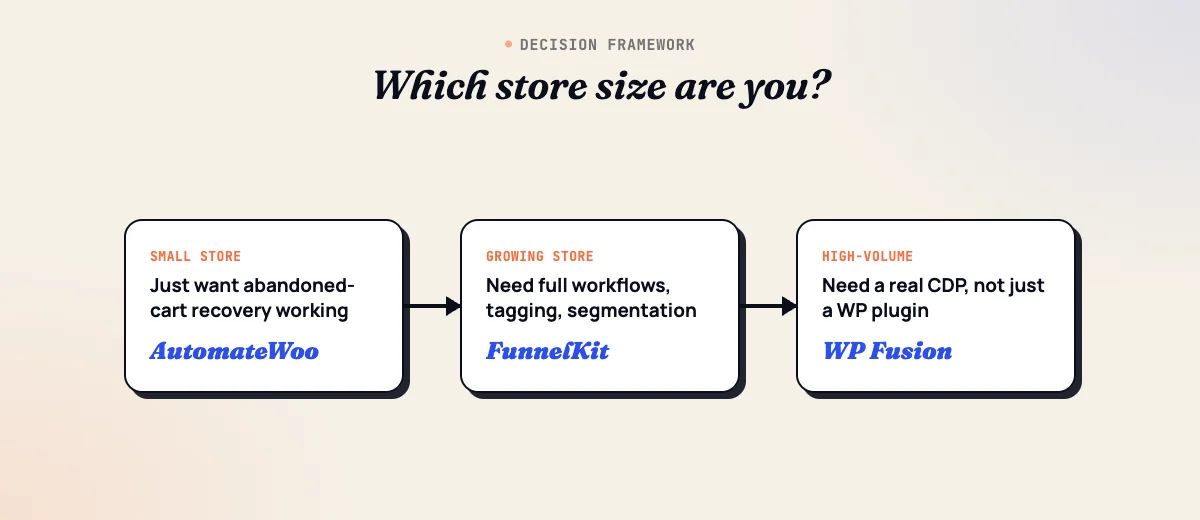
Match the tool to your order volume and team structure first, not the feature list. Here’s how the tools in this guide split by store stage:
- New or small store (under roughly 500 orders/month), no dedicated marketing person: Start with AutomateWoo or CartCue. Both are flat-fee, self-hosted, and solve the highest-ROI problem (recovering abandoned carts) without adding a monthly SaaS bill you’ll forget to cancel.
- Growing store that wants a real CRM feel inside WordPress: FunnelKit Automations, Jetpack CRM, or Groundhogg. These give you contact profiles, tagging, and a visual workflow builder while keeping billing flat instead of contact-based.
- Store scaling email/SMS as a primary revenue channel: Omnisend first (cheaper entry point), Klaviyo once you need predictive CLV and more advanced segmentation. Budget for costs to climb as your list grows, since both are priced on contacts or profiles.
- High-volume or high-AOV store that needs real retention analytics: Metrilo if you want CRM and analytics in one dashboard and can absorb the price; Putler if you already have an ESP and just need RFM segmentation and CLV numbers to feed it.
- Store or agency already committed to an external CRM (HubSpot, Salesforce, ActiveCampaign): WP Fusion is the right connector, syncing WooCommerce order data in without forcing you onto a second platform.
- Agency managing multiple client stores: Groundhogg or Jetpack CRM scale better than per-contact SaaS pricing once you’re running the same tool across many small sites.
If you’re not sure which bucket you’re in, the honest default for most stores reading this guide is AutomateWoo. It’s cheap enough to try without a real budgeting decision, and it covers the automation that produces the fastest measurable revenue: recovered carts.
Frequently Asked Questions About WooCommerce CRM Plugins
What’s the difference between a WooCommerce CRM and a general WordPress CRM?
A WooCommerce CRM organizes customer records around orders, carts, and purchase history: what someone bought, how much they’ve spent, whether their cart is abandoned, and when they’re likely to buy again. A general WordPress CRM organizes records around inquiries, deals, and sales-pipeline stages, and often has no concept of an order at all. If you sell through WooCommerce, you want tools built around order events, not a contact database with a WooCommerce plugin bolted on.
Do I need a separate CRM if I already use AutomateWoo?
Not necessarily. AutomateWoo covers abandoned cart recovery, win-back campaigns, review requests, and VIP customer tracking, which is what most small and mid-size stores actually need. Add a dedicated CRM or analytics platform like Metrilo or Putler only when you need deeper segmentation, RFM analysis, or a shared customer view across a support and sales team, not just automated emails.
Is a self-hosted WooCommerce CRM plugin better than a SaaS platform like Klaviyo or Omnisend?
Neither is universally better; they solve different problems. Self-hosted plugins (AutomateWoo, FunnelKit Automations, Jetpack CRM, Groundhogg) charge a flat annual fee regardless of list size and keep customer data on your own server. SaaS platforms (Klaviyo, Omnisend, Drip, GetResponse) charge based on contacts but include deliverability infrastructure and multichannel sending that’s hard to replicate from a plugin. Stores under a few thousand contacts often save money self-hosted; stores sending serious email/SMS volume usually get better deliverability from SaaS.
How much should a small WooCommerce store budget for CRM and marketing automation tools?
A small store can cover abandoned cart recovery and basic segmentation for $60 to $120 a year using a self-hosted plugin like AutomateWoo or CartCue. Once you need email/SMS sending at real scale, budget $20 to $60 a month for an entry-level SaaS plan and expect that number to climb as your contact list grows, since most SaaS pricing scales with profiles.
Can I track customer lifetime value (CLV) without a dedicated CRM?
WooCommerce’s built-in Analytics screen gives a basic lifetime-value figure per customer, but it doesn’t segment customers by CLV tier or trigger automation based on it. To act on CLV, such as flagging your top spenders for a VIP campaign, you need a tool that computes it continuously, like Metrilo, Putler, or AutomateWoo’s VIP customer feature.
Does GDPR or other consent law affect WooCommerce CRM email and SMS automation?
Yes. Any tool that emails or texts customers based on order or cart activity still needs a lawful basis to contact them, typically consent at checkout or a documented legitimate-interest basis for transactional-adjacent messages like cart recovery. Most tools in this guide include consent-tracking and unsubscribe handling, but you’re responsible for configuring checkout consent correctly and for SMS-specific rules like TCPA opt-in in the US.
Will adding a CRM plugin slow down my WooCommerce store?
Self-hosted plugins that process order events on your server (AutomateWoo, FunnelKit Automations, Groundhogg, CartCue) add some database and cron load, noticeable mainly on high-order-volume stores with underpowered hosting. SaaS-connected tools (Klaviyo, Omnisend, Metrilo, Putler, Drip) do the heavy processing on their own servers and only send lightweight API calls from your site, so they typically have less impact on page load.
Which WooCommerce CRM plugin works best for subscription-based stores?
AutomateWoo has native triggers for WooCommerce Subscriptions events (renewal, cancellation, payment failure), making it a strong default for subscription dunning and win-back emails. FunnelKit Automations and Groundhogg also support subscription-based triggers if you’re already using their broader automation builder for other campaigns.
Final Thoughts
Start with the smallest tool that solves your actual problem. For most WooCommerce stores that means AutomateWoo or CartCue for cart recovery, with a move to Omnisend, Klaviyo, or Metrilo only once list size and order volume justify the added cost. If your need is general lead and contact management rather than order-driven marketing, see our guide to the best WordPress CRM plugins. For a broader look at CRM platforms beyond the WordPress ecosystem entirely, see our roundup of best CRM tools. And if you want the bigger picture on automating marketing around a WooCommerce store, our guides to marketing automation software and the best marketing automation plugins cover the broader landscape beyond CRM specifically. If you’d rather not configure any of this yourself, our team can set up and connect the right tool for your store; see our CRM implementation service for what that looks like.
Related reading