
16 min read
Leaving Discord, Skool or Circle: Move a Paid Community to a Platform You Own

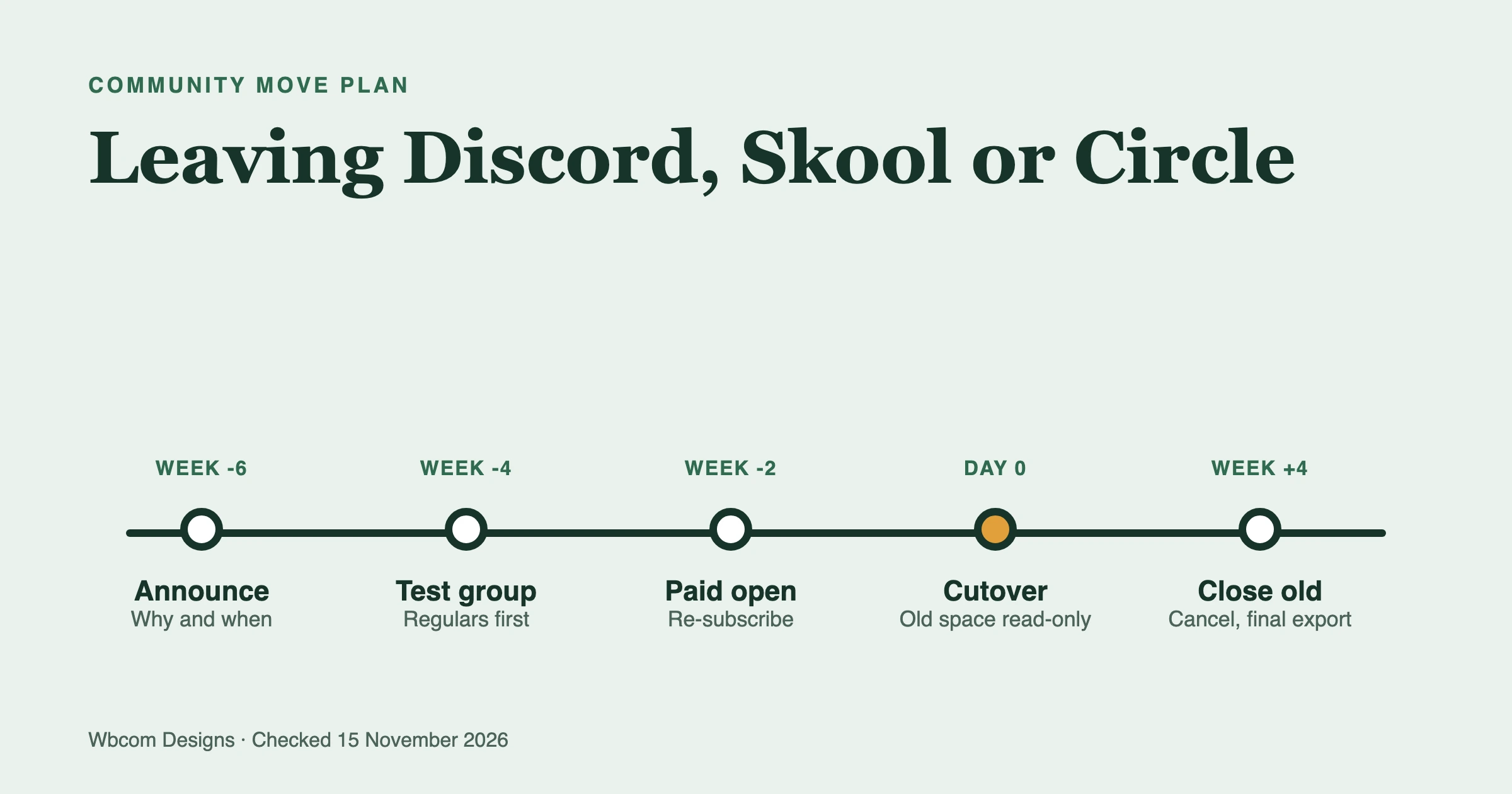
You can move a paid community off Discord, Skool or Circle, but it is a planned project and not an export button. Your member list will move on all three. Your post history mostly will not. Your members’ payment cards usually cannot move at all, so plan for each paying member to re-subscribe on the new platform, with a short overlap so nobody is billed twice or loses access. This guide covers what each platform lets you export, what you lose, how to move billing, and a timeline you can copy.
Checked on 15 November 2026. Prices, export steps and fees change, so each fact below names its source.
Should you leave at all?
Leave if the platform’s limits now cost you more than a move would, and stay if the pain is a passing mood. People ask this when they feel they rent their audience, and that feeling is reasonable: on a hosted platform you do not control the pricing, the feature list or the data format. It still does not make a move automatically wise.
Run this test before you plan anything.
- Can you name the specific thing you cannot do today? “I want to own it” is a reason. “I cannot send the weekly digest I need” or “I cannot show members one login across my courses and community” is a better one.
- Do members come for the platform or for you? If people join because of your voice and the people inside, a move is survivable. If the draw is the platform’s own network or app, expect more loss.
- Is your billing tied to the platform? If the platform charges your members on its own account, moving means asking every paying member to sign up again. That is the biggest single cost of leaving.
- Can you run something yourself, or pay someone who can? A platform you own means hosting, updates and backups. That work is yours or your agency’s.
If you answer “no” to most of these, stay and fix the specific problem. If you answer “yes” to the first and fourth, keep reading.
We have written separately about the wider comparison: WordPress vs SaaS community platforms, Discord alternatives for community owners and the true per-member cost of Mighty Networks, Circle, Skool and WordPress. If you already know you want a Discord-style setup on WordPress, our step-by-step build guide covers the build. This post is about the move itself.
What can you export from Discord, Skool and Circle?
Member lists are exportable from Skool and Circle. Discord has no member-list export for server owners that we could confirm. Message history is the weakest spot on all three. Here is what we found on 15 November 2026.
| Platform | Member list | Posts and discussions | Billing records | Notes |
|---|---|---|---|---|
| Skool | CSV from Members, then Export, with emails in paid groups | No built-in export we could find | Payouts only, through Skool | Third-party scrapers exist and need your login cookies |
| Circle | CSV from Audience, More, Export CSV, emailed to the admin | Not in the member export | Subscriptions and transactions export, plus your own Stripe account | Many profile fields included |
| Discord | No owner export of members that we could confirm | Third-party exporter tools, using a bot | Depends on how you charge | Your own data package covers your account, not the server’s history |
Skool
A Skool community post dated June 2024 says you can export members’ email addresses in paid groups: go to Members, then Export, and the CSV includes email addresses. The same post limits that to paid groups. A HighLevel migration guide describes the same route (a CSV with names, emails and custom fields) and tells you to copy posts and course content by hand. We found no official Skool export for posts, comments or course videos.
Two warnings from third-party tools. Several scraper listings say many email fields come back blank for members who joined through Skool’s Discovery network, and one estimates around a third of members. That is a claim from a vendor listing, so treat the number loosely and test your own export before you count on it.
Circle
Circle documents the export in its help center. Go to Audience, open the audience page, pick a tab, click More below the filters, and choose Export CSV. The All tab with no filters gives everyone. The file is emailed to your admin account rather than downloaded at once. Per Circle’s help page, the file can include name, email, join date, active status, tags, profile fields, engagement figures and an activity score.
Billing data is separate. Circle’s help center describes exporting subscriptions and transactions as CSV files from the Payments pages, and also lets you export from the Stripe account connected to your community, because paywall customers live there. That matters in the billing section below.
Discord
Discord’s own data package is for your account. As we read the search summaries of Discord’s help article, it covers your messages, your connections and your settings, and it is emailed to you. We could not open the article directly on 15 November because Discord’s support site refused our automated request, so check the exact contents in your own account settings before relying on it.
For a whole server’s history, the practical route is a third-party exporter. The open-source DiscordChatExporter exports channels to HTML, TXT, CSV and JSON. Its README recommends using a bot, and warns that using a user token to automate your account is against Discord’s terms and may get you banned. Use a bot with the permissions you set, and run it on a server you own.
One more point. Exporting message text is not the same as moving a community. Text in a file does not become threads, replies and notifications on the new platform. Most communities keep the archive as a read-only reference and start the new space fresh.
What do you lose when you move?
You lose history, habit and some reach. Here is what typically does not come with you, and what you can do about it.
| What | Does it move? | What to do |
|---|---|---|
| Member list and emails | Yes, as CSV on Skool and Circle | Export early and check blank emails |
| Posts and comments | Rarely | Export key threads as a read-only archive |
| Course videos and lessons | Not through a member export | Download from your own source files and re-upload |
| Member profiles and avatars | Partly, as profile fields | Ask members to refresh profiles on day one |
| Points, badges and levels | No, platform-specific | Start a new scheme, or grant a starting badge to veterans |
| Notifications and app installs | No | Members install a new app or home-screen shortcut |
| Platform discovery traffic | No | Replace it with your own search and email |
| Paying subscriptions | Usually no | Plan a re-subscribe step (see below) |
The discovery point deserves a plain sentence. Hosted networks send you some new members through their own directories. A site you own will not, so your growth then rests on your own search traffic, email list and social posts. For a community that mostly grows by referral and email, that is fine. For one that grows by directory listing, it is a real cost.
How do you move paid members without double billing?
Where the member’s card is stored decides everything. There are three situations, and you can find yours in a few minutes.
Case 1: Skool, where Skool is the merchant
Skool’s payments FAQ says Skool is the merchant of record and that all payment processing happens on Skool’s merchant account. It also says you cannot use your existing Stripe account for payouts: Skool creates a Stripe Express account only to send you your payouts. In plain terms, your members’ cards are not in a Stripe account you control. They cannot be exported or copied to a new platform by you.
What that means for the move:
- Every paying member has to subscribe again on the new platform and enter their card there.
- Skool’s FAQ also says existing members are grandfathered on the price they currently pay, so you can offer the same price on the new platform as a reason to move.
- Cancel the Skool side only after the member has paid on the new side.
Case 2: Circle, where the Stripe account is yours
Circle’s help center says paywall customers and payments also live in the Stripe account connected to your community, and you can export customers, subscriptions and payments from it. Stripe’s documentation describes migrating customers and their stored payment methods between accounts or processors through its data migrations team, with two rules worth knowing: Stripe only helps when a request includes both customer records and their payment data, and subscriptions are not carried over automatically. You export the plans and recreate them in the new setup, using Stripe’s Billing migration tooling.
This is the one case where members may not need to enter a card again. It still takes planning, and the new platform’s payment tool has to work with the cards you move. Ask both Stripe and your new platform’s team how it works in your setup before you promise members anything.
Case 3: Discord, where billing sits outside the platform
Some Discord communities charge through Discord’s own server subscriptions. Many others charge through a separate tool such as a membership site, a link in a bot, or a payment page, and use Discord only as the room. We could not confirm Discord’s current fee terms from a Discord page, so we give no percentage here. Check your Creator Portal for the real terms.
If you charge through your own tool, the card is already outside Discord, and you may only need to point the same subscribers at the new site. If you charge through Discord, treat it like Skool: members re-subscribe.
A safe order of operations
- Pick a cutover date at least four weeks out and write it down.
- Open the new platform to paying members first. Let them join and pay while the old one still runs.
- Offer something small for moving early. A grandfathered price, a founders badge or an extra month costs little and helps.
- Pause new sign-ups on the old platform a week before cutover, so the two lists do not drift apart.
- Cancel old subscriptions member by member only after you see the new payment succeed. Never cancel in bulk the day before.
- Keep a refund rule for anyone billed twice. Decide it in advance and tell people.
- Export billing records from the old platform for your own accounts before you close it.
- Keep read-only access to the old space for 30 days if the platform allows it.
Check your own terms and privacy obligations before you email a list you exported from a platform. A move notice to existing paying members is normally a service message, but the rules depend on where you and your members live, so ask a professional if you are unsure.
What should the member communication timeline look like?
Give people more notice than feels necessary. A move that surprises people reads as a shutdown, and a move that is announced early reads as an upgrade. Here is a schedule you can adapt.
| When | What you send | What you do |
|---|---|---|
| 6 weeks before | A short note: why you are moving, the date, what stays the same | Build the new site on a staging copy |
| 4 weeks before | The new link, a preview and the move-early offer | Invite a small test group of regulars |
| 3 weeks before | A walk-through video or post: how to join and pay | Fix whatever the test group finds |
| 2 weeks before | Open the new space to all paying members | Seed it with pinned guides and a welcome thread |
| 1 week before | Pause new sign-ups on the old platform | Post a reminder in the old space daily |
| Cutover day | Announce the old space is read-only | Move the active conversations across |
| 1 week after | A check-in: what is missing, what is confusing | Reply to every member who writes in |
| 4 weeks after | Final notice that the old space closes | Cancel the old plan, export final records |
How do you keep people active through the switch?
People stay when the new room already has life in it. Three habits help.
- Run both for a short overlap, but make one the home. Two equal homes split attention and both feel empty. Say clearly that the new site is the home from cutover day.
- Move the structure, not the archive. Recreate the channels or spaces people actually use. Drop the dead ones. A server with forty channels and six active ones should arrive as six.
- Seed the first week yourself. A welcome thread, a pinned “start here” post and a few questions you have written in advance mean the first visit does not land in silence.
Match your roles too. List your Discord roles, Skool levels or Circle access groups on one sheet and map each to a role or plan on the new platform. Do it before any member arrives. Fixing access for a hundred people one by one later is the most common source of angry emails.
What does a platform you own cost?
It costs hosting, a plugin or software licence, your payment processor’s fees, and someone’s time. Hosted platforms hide those in the subscription. Here is the hosted side, as listed on Skool’s pricing page and Circle’s pricing page on 15 November 2026.
| Platform | Plans on the pricing page | Transaction fee |
|---|---|---|
| Skool | Hobby $9 per month, Pro $99 per month | 10% on Hobby, 2.9% on Pro (the payments FAQ adds 30 cents per transaction) |
| Circle | Professional $89, Business $199, Scale $419 per month, annual billing | 2%, 1% and 1% by plan |
Circle lists unlimited members on every plan, with limits on admins, spaces and storage by plan. Skool lists unlimited members on both plans. Fees quoted here are the vendors’ published figures, and taxes are extra.
On the owned side we cannot give you one number, because it depends on your host and your payment processor. What we can say is which costs exist: hosting for a WordPress site, a licence for the community software if you use a paid tier, the processor’s per-payment fee, and the time to run updates and backups. Our per-member cost comparison works through the math at 500, 2,000 and 10,000 paid members.
Is BuddyNext the right place to move to?
It is one option, and we make it, so weigh our view accordingly. BuddyNext is a self-hosted community plugin for WordPress from our team at Wbcom Designs. Members and data stay on your own database. It has Spaces (open, private or secret), sub-spaces, profiles, a member directory, private messages, notifications, moderation tools and gamification. Memberships and paywalls are on the Pro side, and the Pro add-on that gates a Space behind a paid plan takes payments through your own Stripe account. The core plugin is free on unlimited sites. Pro is $149, $249 or $399 a year for 1, 5 or unlimited sites, or $399, $599 or $999 once for a lifetime licence, and every tier has the same features (BuddyNext pricing, checked 15 November 2026).
That Stripe point is the reason a platform like this changes the billing story. Once cards live in your own Stripe account, your next move later is far easier than this one.
Where BuddyNext falls short for this kind of move
We would rather you hear these from us.
- No Discord history import. Our own build guide states that Discord message history cannot be imported.
- No live voice or video channels. Voice messages are recorded clips inside a direct message. If your community lives in live voice rooms, keep a Discord room for that.
- No bot API or webhook system for community integrations, as our guide states.
- No anonymous join links. Members register, are invited or use social login.
- No native mobile app yet. BuddyNext’s site says an installable web app ships now and native iOS and Android apps are on the roadmap.
- Monetization needs Pro, and some items, such as meetings and booking, are listed as coming soon.
- It is newly launched. The reviews cited on its site refer to Wbcom Designs and our other plugins, not to BuddyNext itself.
- Migration is a project. The site says moving an existing community is planned as a real project rather than a one-click switch.
If you also sell courses, Learnomy is our course plugin and can sit beside the community. If you only run a community, you do not need it.
If a live voice community is your core, or you need bot integrations, a hosted platform or a hybrid setup may suit you better, and we would say so on a call. Our X Communities migration playbook shows how we have approached a time-boxed move before, and the same planning habits apply here.
Common mistakes people report
These come up repeatedly in vendor documentation, migration guides and tool listings. We paraphrase them, check them on 15 November 2026 and link the source.
- Assuming Skool emails are all in the export. The June 2024 Skool community post limits email export to paid groups, and several scraper listings report blank emails for some members. Run the export early and count the blanks.
- Using a user token to export Discord. The DiscordChatExporter README says automating a user account is against Discord’s terms and may get you banned. Use a bot.
- Expecting card details to move from Skool. Skool’s payments FAQ says Skool is the merchant of record and that you cannot use your existing Stripe account. Plan for re-subscription.
- Expecting subscriptions to follow a Stripe card migration. Stripe’s data migration guidance says subscriptions need remapping, and its team only helps when customer records and payment data are requested together.
- Forgetting that exports arrive by email. Circle’s help page says the member CSV is emailed to the admin account. Ask for it a day early, and make sure the right mailbox is monitored.
- Copying content by hand at the last minute. The HighLevel migration guide for Skool leaves posts and course content as manual steps. Start the copy weeks before cutover.
What should you do first?
Do these five things this week, whichever platform you leave.
- Export your member list now and count blank emails.
- Work out where your members’ cards are stored, using the three cases above.
- Write down which three or four things you cannot live without, such as live voice, courses or a native app, and test them on the new platform before you commit.
- Pick a cutover date at least four weeks out and draft the first announcement.
- Build a small test group of regular members and let them try the new space.
If you want help with any of it, our team can plan or run the move for you, and you can start from buddynext.com. It costs money, and a small free community with a few hundred members can often do this alone with the checklist above.
FAQ
Can I export my Discord server’s messages?
Not with a built-in owner export that we could confirm. Discord’s data package is for your own account data. For server channels, owners use third-party exporters such as the open-source DiscordChatExporter, which exports to HTML, TXT, CSV and JSON and recommends a bot over a user token. Message text will not become threads on the new platform.
Can I export members from Skool?
Yes, for paid groups. A Skool community post from June 2024 says to go to Members and choose Export, and the CSV includes email addresses. Check your file for blanks, because some third-party tools report missing emails for members who came through Skool’s Discovery network.
How do I export members from Circle?
Go to Audience, pick the All tab, click More below the filters and choose Export CSV. Circle emails the file to your admin account. Subscriptions and transactions export separately from the Payments pages.
Can I move my members’ payment cards from Skool?
No, not by yourself. Skool’s payments FAQ says Skool is the merchant of record and processes all payments on its own merchant account, and that you cannot use your existing Stripe account. Members need to subscribe again on the new platform.
Can I move members’ cards from Circle to a new platform?
Possibly, because Circle’s help center says paywall customers and payments are in your connected Stripe account. Stripe has a data migration process for moving customers and stored payment data, but it does not carry subscriptions over automatically, and the new platform has to support the move. Ask both sides before you promise members anything.
How long should the move take?
We plan six to eight weeks from first announcement to closing the old space: build and test in the first two, open to paying members in the middle, and keep the old space read-only for a month at the end. Smaller communities can compress this, but we would not go under four weeks.
Will I lose members if I move?
Some, yes. We cannot give you a trustworthy percentage, because it depends on how much of your draw is you versus the platform. Early notice, a smooth payment step and a seeded new space keep the loss small.
Do I need to tell members before I email an exported list?
Tell them early, and check your own terms and privacy duties first. The rules depend on where you and your members live. If you are unsure, ask a professional.
Related reading