
20 min read
Discord Alternatives for WordPress Community Owners in 2026


Discord is where a lot of communities started. It was fast, free, and people were already there. But if you are a course creator, coach, or agency running a paid community in 2026, Discord is starting to cost you more than it saves. Not in dollars, but in control. You do not own your member data. Your content cannot be indexed. You have no way to gate access cleanly without a bot setup that breaks regularly. And when Discord changes its terms, your community feels it before you do.
This guide covers 11 platforms that give you a real alternative, split into two camps: platforms you can own and host yourself on WordPress, and SaaS platforms that are cleaner and more purpose-built than Discord for professional communities. We also cover when Discord is still the right call, and a decision tree to help you pick quickly.
The short answer: for WordPress community owners, the strongest Discord alternative in 2026 is BuddyNext, the free Community OS for WordPress. You get feed, member spaces, profiles, moderation, and messaging on a site you own, your content gets indexed by Google, and BuddyNext Pro (from $149/year) adds Stripe membership tiers when you are ready to charge. You can try a free BuddyNext sandbox in your browser right now.
Updated August 2026: this guide now covers BuddyNext.
Table of Contents
- Why Creators Are Leaving Discord in 2026
- The Two Camps: Own It vs. Rent It (Better)
- Self-Hosted Platforms: Own Your Community
- SaaS Alternatives: Rent It, But Better Than Discord
- Platform Comparison
- When Discord Is Still the Right Call
- Decision Tree: Which Platform Fits Your Use Case
- What Ownership Actually Gets You
- What to Expect During a Platform Migration
- Getting Started with a WordPress Community
- Frequently Asked Questions
- The Bottom Line
Why Creators Are Leaving Discord in 2026
Discord was built for gaming. It solved a specific problem: real-time voice and text for groups playing together. The features that made it excellent for that use case are exactly the features that create friction for professional communities.
No Searchable, Indexed Content
Everything your community creates on Discord disappears into a scrolling channel. Search is limited. Google cannot index it. A detailed answer one of your members wrote six months ago is effectively gone unless someone bookmarks it manually. For course creators building a knowledge base, that is a significant loss.
Content Moderation at Scale
Discord’s moderation tools were built for servers, not communities. Age verification has become a genuine liability for creators whose content is adult-adjacent or regulated. The platform’s response to NSFW content has been inconsistent, and server owners regularly deal with ban waves that catch legitimate communities as collateral damage.
Member Data Stays with Discord
You cannot export your member list from Discord in any meaningful format. Email addresses, purchase history, engagement data, none of it belongs to you. If Discord changes its pricing model, shuts down a feature, or bans your server, you lose your audience along with it. This is platform lock-in at its most acute.
Paid Gating Is Clunky
Gating paid community access on Discord requires a third-party bot (usually MemberLink, Whop, or a manual role assignment workflow), an external payment processor, and ongoing maintenance. When any piece breaks, members lose access, and you spend time in support instead of creating content.
No SEO Benefit
Every thread, resource, and answer your community produces is locked inside Discord. It helps your current members but builds nothing for search traffic. A forum or community on WordPress is an SEO asset. Discord is not.
The Two Camps: Own It vs. Rent It (Better)
The alternatives split cleanly into two categories. Self-hosted platforms give you full ownership of data, content, and infrastructure. SaaS alternatives are still rented, but they are purpose-built for professional communities and solve most of Discord’s structural problems. Both are legitimate choices. The right one depends on your technical appetite and growth stage.
Self-Hosted Platforms: Own Your Community
1. WordPress + BuddyNext (The Free Community OS)
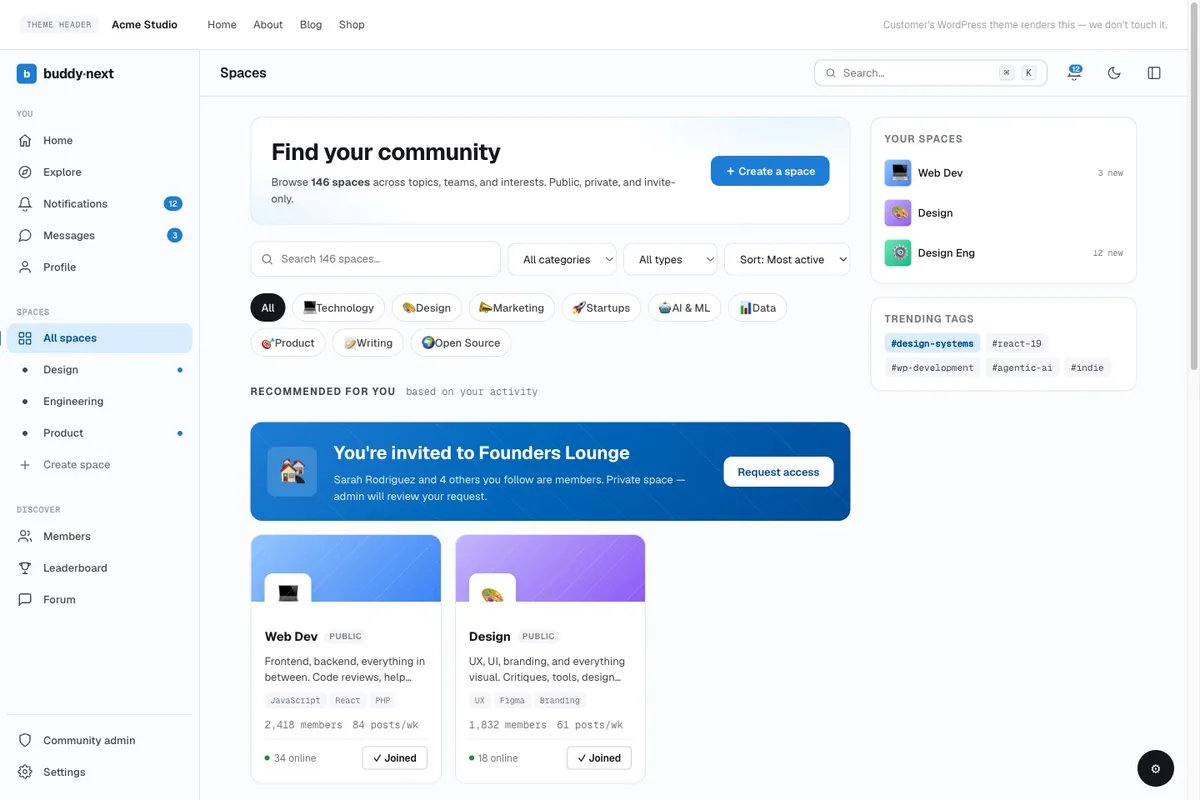
BuddyNext is a free, standalone community engine from Wbcom Designs, built as a Community OS for WordPress. It covers what a Discord server actually does for a professional community, but on infrastructure you own: an activity feed with reactions and threaded comments, member Spaces (the channels equivalent, with open, private, and secret types), member profiles and directory, private messaging, notifications, and a full moderation suite with reporting, strikes, and shadow-bans built in.
For someone leaving Discord, the mapping is direct. Channels become Spaces. DMs stay DMs. Roles become member types and space roles. The difference is that every discussion your members produce is indexed by Google, your member list is exportable data in your own database, and access gating does not depend on a bot staying online.
- Free core with feed, Spaces, profiles, messaging, moderation, and 2FA/social login
- BuddyNext Pro (from $149/year) adds native Stripe membership tiers, so paid access works without MemberLink, Whop, or bot glue
- Real-time features and push notifications in Pro; installable PWA in free
- Grows through the same team’s apps: Jetonomy for forums, Learnomy for courses, MediaVerse for media, WB Gamification for points and badges (free)
- Content indexed by Google; every thread compounds into SEO
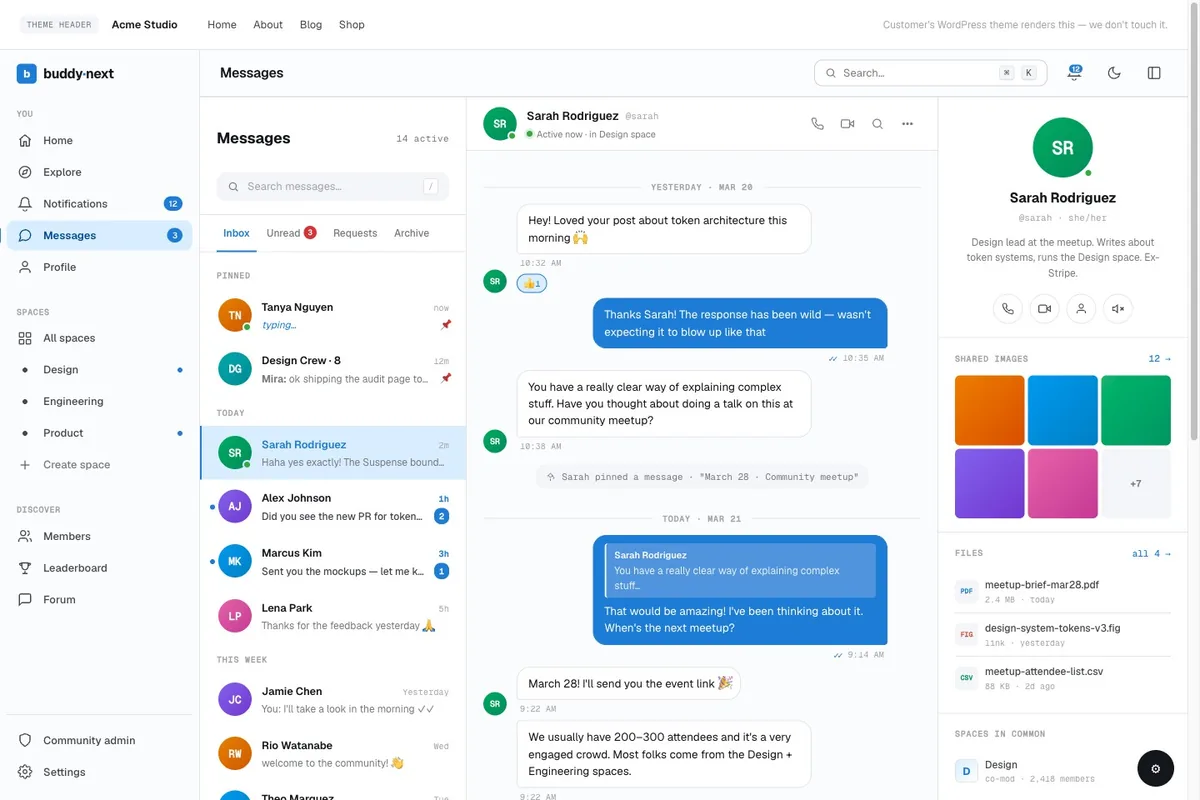
The BuddyNext vs Discord comparison covers the trade-offs point by point if you want the full breakdown before committing.
2. WordPress + BuddyPress + BuddyX Pro Theme
BuddyPress turns a WordPress site into a full social network: member profiles, activity streams, private messaging, groups, and notifications. Paired with the BuddyX Pro theme, you get a polished, mobile-responsive interface that does not require custom development to look professional out of the box.
BuddyX Pro is designed specifically for community sites. It ships with group layouts, member directory templates, and a visual customizer that handles the styling without touching code. Combined with BuddyPress, it is the fastest path to a self-hosted community that actually looks like a product rather than a default WordPress install.
- Full data ownership: member emails, profiles, content, all on your server
- Integrates with WooCommerce for paid membership gating
- Content is indexed by Google, building SEO over time
- Scales with plugins: forums via bbPress, events via The Events Calendar, LMS via LearnDash
- No per-member pricing at the platform level
The trade-off: you are responsible for hosting, security, and performance. A badly configured WordPress site is worse than a SaaS alternative. Work with a developer who knows BuddyPress if you need a clean setup fast.
3. WordPress + Jetonomy
Jetonomy is a forum and community plugin built for WordPress. Where BuddyPress leans toward social networking (activity streams, friend connections, group feeds), Jetonomy is structured around organized discussion: topic-based threads, voting, solved answers, and a knowledge-base format that surfaces valuable content over time.
For communities where Q&A, peer support, and organized knowledge sharing are the core activity, Jetonomy is a better fit than BuddyPress. It is fully standalone, and when BuddyNext is active the two integrate automatically, sharing design tokens with zero configuration. It also ships one-click importers from bbPress, wpForo, and Asgaros with URL preservation.
- Threaded discussions with full Gutenberg block support in replies
- Upvoting and accepted answers for peer support communities
- Member reputation and contribution tracking
- Paid access gating via WooCommerce or MemberPress integration
- All content indexed by Google
Jetonomy is particularly effective for SaaS product communities and developer support forums where searchability matters more than social interaction. If you have ever wished your Discord support channel had a knowledge base, Jetonomy is the WordPress-native answer.
4. WordPress + Reign Theme
Reign is a BuddyPress theme with a broader feature set than BuddyX, covering marketplace layouts, vendor directories, and multi-group structures. If your community has a commerce layer, Reign handles the hybrid community-marketplace use case that BuddyX was not designed for.
Use Reign when your community combines peer networking with product listings, vendor profiles, or job boards. The theme ships with pre-built layouts for all of these and integrates with WooCommerce out of the box.
Reign Theme
5. Discourse
Discourse is the most mature open-source forum platform available. It runs on its own stack (Ruby on Rails, PostgreSQL, Redis), which means it is not WordPress, but it is fully self-hostable and has a large, active development community.
The interface is modern, the threading is excellent, and the moderation tools are substantially better than Discord’s. Discourse has built-in topic tagging, badges, trust levels, and a well-documented API. The official hosted version starts at roughly $100/month for 100,000 page views.
- Best-in-class threading and topic organization
- Strong moderation toolkit
- Google indexes all public content
- Good email digest and notification system
- Paid membership via Patreon/Stripe integration in plugins
Discourse requires either managed hosting or a Linux server with meaningful DevOps knowledge to maintain. It is not a WordPress plugin. If you are already on WordPress, BuddyPress + Jetonomy is a more integrated path.
6. Flarum
Flarum is a lightweight PHP forum that prioritizes performance and a clean interface over feature completeness. It runs on a standard PHP + MySQL stack, making hosting straightforward. The extension ecosystem covers most common community features: subscriptions, private messaging, user groups, and moderation.
Flarum is a good choice if you want a fast, focused forum without the complexity of Discourse’s infrastructure requirements. It does not have the same maturity as Discourse, but for smaller communities (under 10,000 members), it performs well and requires minimal server resources.
7. Mattermost (Self-Hosted)
Mattermost is an open-source Slack alternative with real-time channels, threading, and file sharing. It is the closest self-hosted equivalent to Discord’s channel structure. Mattermost runs on Linux and supports integrations with most developer tooling.
This is the right choice if real-time chat is genuinely the core of your community, you need full data sovereignty, and you have the infrastructure to maintain it. For course creators and coaches, it is probably overkill. For developer communities, internal team hubs, or communities where async chat is the primary activity, it is the strongest self-hosted option.
SaaS Alternatives: Rent It, But Better Than Discord
8. Circle
Circle is purpose-built for paid communities. It has spaces (think channels), events, courses, and a member directory in one interface. Pricing scales with member count, starting around $89/month for up to 100 active members at the time of writing (verify current pricing at circle.so before budgeting).
Circle’s main advantage over Discord is that everything is organized around community engagement: rich posts, comments, course progress, and member profiles. The interface makes sense to people who are not gamers, which matters for professional and educational communities.
- Built-in payment processing for memberships
- Course hosting included on higher plans
- Good mobile app
- Zapier integration for automation
- Member data export available
You still do not own the infrastructure, and pricing scales in ways that can become expensive at growth. But the product is focused and well-executed for the creator use case.
9. Mighty Networks
Mighty Networks was one of the first platforms to combine community, courses, and paid events in a single interface. It has improved significantly since its early versions and now has a reasonable mobile app, cohort-based course structures, and better moderation tools.
It is a better choice than Discord for educators who want everything in one place and do not want to manage a WordPress stack. The platform handles member payments, course delivery, and community interaction without third-party integrations.
10. Skool
Skool takes a stripped-down approach: community feed, courses, and a leaderboard-style member engagement system. It is deliberately simple. The gamification layer (points for posting, commenting, completing lessons) is more native to the product than it is on other platforms, and it drives meaningful engagement for many communities.
Skool’s affiliate model means members can refer others, and the community discovery feature exposes your community to other Skool users. If organic growth inside the platform matters to you, Skool has an advantage over Circle in that regard. Pricing is per-community, not per-member, which is predictable.
11. Geneva
Geneva is a community platform that blends Discord’s channel structure with a cleaner interface designed for non-gaming communities. It has chat channels, forum-style threads, and events. It is free to host communities on, with monetization options available.
Geneva fills a specific gap: if your community genuinely needs real-time channels and async threads in the same product, and you do not want to maintain Mattermost, Geneva is the most Discord-like platform that was built for professional communities. It does not have the course hosting or full member management of Circle or Skool, but the interface is significantly more accessible for non-technical members.
Platform Comparison
| Platform | Data Ownership | Real-Time Chat | Paid Gating | SEO of Content | Mobile App | Cost Model |
|---|---|---|---|---|---|---|
| WordPress + BuddyNext | Full | DMs; real-time with Pro | Built-in (Pro, Stripe) | Yes (indexed) | PWA; app with Pro | Free core / Pro from $149/yr |
| WordPress + BuddyPress + BuddyX | Full | Plugin required | Via WooCommerce | Yes (indexed) | Via theme | Hosting + plugins |
| WordPress + Jetonomy | Full | Plugin required | Via WooCommerce | Yes (indexed) | Responsive | Hosting + plugin |
| WordPress + Reign | Full | Plugin required | Via WooCommerce | Yes (indexed) | Responsive | Hosting + theme |
| Discourse | Full (self-hosted) | No (async) | Via plugins | Yes (indexed) | Native app | Hosting or $100/mo+ |
| Flarum | Full (self-hosted) | No (async) | Via extension | Yes (indexed) | Responsive | Hosting cost only |
| Mattermost | Full (self-hosted) | Yes (native) | No native gate | No (private) | Native app | Hosting cost only |
| Circle | Partial (export available) | DMs only | Built-in | No | Native app | From ~$89/mo |
| Mighty Networks | Partial | Limited | Built-in | No | Native app | Per plan |
| Skool | Partial | No | Built-in | No | Native app | Per community |
| Geneva | Partial | Yes | Limited | No | Native app | Free + revenue share |
When Discord Is Still the Right Call
Discord is not broken. It is just not designed for everything people use it for.
Discord works well when real-time voice and text channels are the entire product. Gaming communities, live watch parties, developer open-source projects where contributors want instant back-and-forth, these are environments where Discord’s architecture is a genuine fit. The onboarding is zero friction for most users. It is free at scale. The voice channels are good.
- Free gaming or hobby communities with no paid tier
- Open-source developer communities where the server is a collaboration channel, not a product
- Communities where the audience is already on Discord and migration has high switching cost
- Short-lived event-driven communities (conference after-parties, launch groups) where permanence is not needed
The problem arises when Discord is used as the default for things it was never designed for: paid communities, educational cohorts, customer support, or long-lived knowledge bases. The platform can be made to work for these use cases but it requires ongoing maintenance that other platforms handle natively.
Decision Tree: Which Platform Fits Your Use Case
Use this to narrow down your choice based on what your community actually needs.
| Your Situation | Best Fit | Reason |
|---|---|---|
| Leaving Discord, want a free platform with full data ownership | WordPress + BuddyNext | Free Community OS: feed, Spaces, messaging, moderation; Pro adds Stripe membership tiers when you monetise |
| Course creator with paid cohorts, want full data ownership | WordPress + BuddyX Pro + BuddyPress | Integrates with LearnDash; WooCommerce handles enrollment; all data on your server |
| SaaS product community, need searchable Q&A and peer support | WordPress + Jetonomy | Structured threads, voting, accepted answers; indexes in Google; WooCommerce or MemberPress for access control |
| Brand community with commerce layer (vendor directory, marketplace) | WordPress + Reign Theme | BuddyPress + WooCommerce marketplace layouts; handles community and commerce in one install |
| Developer community, open-source, need moderation tools | Discourse (self-hosted) | Best threading in class; strong trust-level and moderation system; public content indexed |
| Coach or creator, want everything in one place, no dev work | Circle or Skool | Built-in payment, courses, and community; clean interface for non-technical members |
| Community where real-time chat is central but Discord interface too gaming-coded | Geneva or Mattermost | Geneva for consumer communities; Mattermost for technical teams needing data sovereignty |
| Free gaming, hobby, or open-source community | Discord (stay) | Zero friction onboarding, strong voice, free at scale, users already there |
What Ownership Actually Gets You
The case for self-hosting comes down to three things: data, SEO, and longevity.
Data ownership means you can reach your members when a platform changes. Every email address, every member profile, every piece of content your community produces is an asset you control. When you run on Discord, that same asset belongs to Discord. Platform changes to policies, pricing, or features affect you without any input from you.
SEO value accumulates on self-hosted platforms. Every question answered in your Jetonomy forum, every group discussion in your BuddyPress community, every resource your members share is content Google can index. Over time, that compounds. A community that has been active for three years on WordPress is also three years of indexed content. A Discord server of the same age has contributed nothing to your search visibility.
Longevity means your community does not depend on a platform company’s roadmap. Discord has changed significantly since 2020. Monetization features have been added, removed, and repriced. Server boosts have become a significant revenue stream for Discord, which means the features you rely on are subject to pricing pressure. Owning your stack means you set the roadmap.
For context on how the same ownership argument plays out across the broader tech stack, the Wbcom Designs post on building versus renting your full stack covers the economics in more detail.
If you are running a community alongside an educational offering, the patterns covered in why Facebook Groups fail educational communities apply directly here. Discord and Facebook Groups share the same structural limitations: no indexable content, no clean access control, and member data you cannot export.
For teams managing larger WordPress community sites, the silent failure audit for WordPress community sites is worth running before or after a platform migration to verify nothing quietly broke during the transition.
What to Expect During a Platform Migration
Moving an active community is not a weekend project, but it is also not the months-long ordeal people fear. Most migrations to WordPress follow a predictable pattern once the technical setup is in place.
The first two weeks are setup: WordPress install, theme and plugin configuration, payment integration, and a seed round of content that gives new members something to engage with before the official launch. This is also when you build out the membership tiers and test the access gating end-to-end.
Weeks three and four are the soft launch phase: you open the new platform to your most engaged members first, ideally the people who generate the most value in your Discord. Their early activity seeds the platform and signals to other members that the move is real. This cohort also surfaces any friction points in the UX before a full migration.
The final phase is the cutover: you announce the move to everyone, set a date when Discord access is reduced or removed, and redirect the community energy to the new platform. Members who are truly invested will follow. Members who drop off at this point were likely low-engagement regardless of which platform you were on.
- Export member email addresses from your payment processor (Stripe, PayPal) before you start, not after
- Archive valuable Discord threads as seed posts on the new platform, with credit to the original authors
- Keep Discord read-only for 30 days after the cutover so members can reference old conversations
- Set up email notifications on the new platform early so members stay engaged without actively visiting every day
The transition is also an opportunity to restructure. Discord channels accumulate noise over time. A migration gives you a clean slate to design the community architecture intentionally, organizing content around what actually gets used rather than what was created first.
Getting Started with a WordPress Community
The fastest path from Discord to a self-hosted community that looks polished and runs reliably:
- Start with a WordPress install on a host that can handle community traffic (Cloudways, WP Engine, or a dedicated VPS)
- Install BuddyNext (free) for the social layer, and add Jetonomy if your community is structured around Q&A and forums; the BuddyX Pro theme pairs with both
- Connect WooCommerce or MemberPress for paid access control
- Export what you can from Discord: a message export gives you content to seed the new platform, and member emails from Stripe or your payment processor are more valuable than anything Discord will give you
- Run both in parallel during the transition: announce the new platform to your Discord members, migrate the content over three to four weeks, then wind down Discord access
If the setup work is outside your capacity or you want a custom community build with specific integrations, the WordPress community development work Wbcom Designs does covers the full stack: BuddyPress customization, LearnDash integration, membership gating, and ongoing maintenance. You can hire a WordPress developer who specializes in this kind of build rather than learning it yourself.
For communities with specific design requirements around the Reign theme, the Reign theme details and documentation cover what the theme handles out of the box and what needs custom development.
While building a custom social platform can sometimes get expensive with separate add-ons, you can get a complete ecosystem out-of-the-box using a curated premium BuddyPress community plugin bundle, making self-hosting far cheaper than SaaS platforms long-term.
Frequently Asked Questions
1. What is the best Discord alternative for WordPress community owners?
BuddyNext is the strongest option in 2026: a free, standalone Community OS for WordPress with activity feed, member Spaces, profiles, private messaging, and built-in moderation. Your content is indexed by Google and your member data lives in your own database. BuddyNext Pro (from $149/year) adds native Stripe membership tiers for paid communities.
2. Can I migrate my Discord community to WordPress?
Yes. Export member emails from your payment processor (Stripe or PayPal), archive valuable Discord threads as seed content, launch WordPress with BuddyNext, run both platforms in parallel for three to four weeks, then wind down Discord access. Keep Discord read-only for 30 days so members can reference old conversations.
3. How do I charge for community access without Discord bots?
BuddyNext Pro includes Stripe membership tiers natively: monthly, yearly, or one-time plans, gated Spaces, trials, and a self-service customer portal. No MemberLink, Whop, or role-assignment bots required. On the BuddyPress path, WooCommerce or MemberPress handles the same job.
4. Can I try BuddyNext before switching?
Yes. A free sandbox at app.instawp.io spins up a complete demo community in your browser in about a minute, with the feed, Spaces, profiles, and moderation pre-configured. Nothing to install.
5. When should I stay on Discord?
Stay if you run a free gaming or hobby community, an open-source project where contributors want instant chat, or a short-lived event community. Discord’s real-time voice remains excellent. The case for leaving is strongest for paid communities, courses, and support communities that need searchable, owned content.
The Bottom Line
Discord is a fine tool for what it was built to do. The problem is that it became the default for paid professional communities because nothing better was free and obvious at the time. That is no longer true.
If you are running a paid community, a course cohort, or a professional network, you have better options in 2026. The right choice depends on whether you want full data ownership (WordPress path) or a managed product that is purpose-built for your use case (Circle, Skool, or Geneva).
What you should not be doing is running a paid community on infrastructure that keeps your member data, locks your content away from search engines, and requires a patchwork of bots to handle access control. That is renting your audience from a gaming platform, and it is a fragile foundation for anything you plan to build long-term.
Owning your community infrastructure is not about distrust of platforms. It is about not betting your member relationships on someone else’s roadmap.
If you are ready to move your community to WordPress or want a custom build that fits your specific setup, the Wbcom Designs team builds community sites as a core service. The work ranges from a clean BuddyX Pro install with Jetonomy to fully custom community platforms with advanced membership tiers, learning paths, and monetization layers.
Related reading