
18 min read
Three Server Flaws in Four Weeks: Who Patches Which Layer of Your WordPress Site

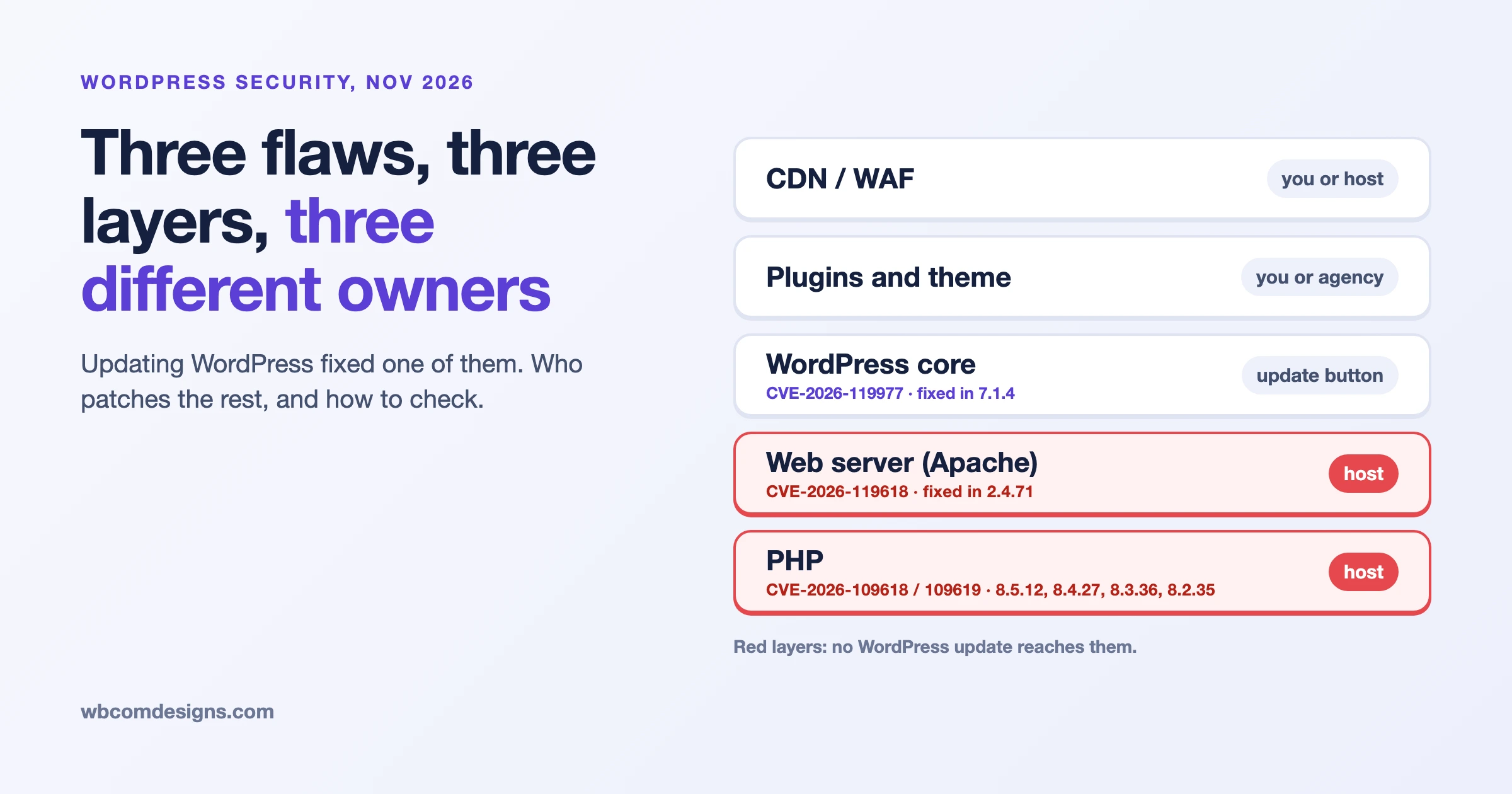
Between 21 October and 11 November 2026, three separate critical flaws were disclosed in the software your WordPress site runs on, and updating WordPress fixed only one of them. The first disclosure was a pair of PHP flaws (CVE-2026-109618 and CVE-2026-109619), the second a WordPress core flaw fixed in 7.1.4 (CVE-2026-119977), and the third a flaw in Apache’s HTTP/2 module (CVE-2026-119618). Each lives in a different layer, each layer has a different owner, and a care plan or a security plugin does not automatically cover all of them. This guide gives you a layer-by-layer table of who patches what, how to check your own version at each layer, and a plugin audit for the layer you control most.
Checked on 15 November 2026. Every date, version and number below comes from the advisory or vendor page we link next to it, which we read on 15 November.
What happened in the three weeks from 21 October to 11 November?
Three disclosures landed close together, and the pattern matters more than any single one. Two were in software that sits below WordPress, which means no WordPress update can touch them.
| Date | Layer | What was disclosed | Fixed in |
|---|---|---|---|
| 21 Oct 2026 | PHP | Two flaws that allow unauthenticated remote code execution, CVE-2026-109618 and CVE-2026-109619, each scored 9.2 (CVSS 4.0) | PHP 8.5.12, 8.4.27, 8.3.36, 8.2.35 |
| 28 Oct 2026 | WordPress core | A race condition in the core update process that can lead to remote code execution during the upgrade window, CVE-2026-119977, one of 22 issues fixed | WordPress 7.1.4, with backports to older branches |
| 11 Nov 2026 | Web server | A mod_http2 flaw in Apache HTTP Server that can lead to remote code execution, CVE-2026-119618, rated critical by Apache | Apache HTTP Server 2.4.71 |
We count the span as roughly three weeks between the first and third disclosure, and about four weeks if you start from the WordPress 7.1.3 release that preceded 7.1.4. Whichever way you count it, a site that only ran the WordPress update button during that time was patched against one of three.
For the earlier picture this year, see our post on the 2026 WordPress vulnerability wave and why maintenance is the product. This post is narrower. It is about the layers underneath the plugins.
Does updating WordPress fix a PHP vulnerability?
No. WordPress core, plugin and theme updates do not replace the PHP installation on your server. PHP is a separate program that your host (or your server administrator) installs and updates. Sucuri’s advisory of 21 October says it directly: updating your CMS, plugins, themes or application code does not patch these vulnerabilities, and you need a patched PHP build running on the server. WPBeginner made the same point the same day.
This is the single most common misunderstanding we see when a security headline breaks. The WordPress dashboard shows a green “up to date” tick for core and plugins, and the owner reasonably assumes the site is current. The dashboard is only reporting on the layers WordPress itself manages.
Which layer does each flaw live in, and who patches it?
The honest answer depends on how your site is hosted. The table below shows the usual split. On managed WordPress hosting the host owns the server layers. On a VPS you run yourself, you or your server administrator own all of them. An agency or care plan sits across the top: it can check, chase and verify, but it cannot patch a layer that only your host controls.
| Layer | Example from the last three weeks | Who normally patches it | How to check your version | What a WordPress firewall plugin can do |
|---|---|---|---|---|
| PHP | CVE-2026-109618 and CVE-2026-109619, fixed 21 Oct | Managed host: the host. Shared hosting: you pick the version in the control panel, the host supplies the build. VPS: you | Tools, Site Health, Info, Server. Confirm the patched build with your host | Nothing for the flaw itself. Updating PHP is the only complete fix, per PHP’s own advisory |
| Web server (Apache, nginx, LiteSpeed) | CVE-2026-119618 in Apache mod_http2, fixed 11 Nov | Host, or you on a VPS. Vendor packages may carry different version numbers | Ask the host, or on your own server check the package and whether h2 is enabled | Nothing. A PHP-level firewall runs after Apache has handled the connection |
| WordPress core | CVE-2026-119977, fixed in 7.1.4 on 28 Oct | You, an auto-update setting, your agency, or your host if it manages core | Dashboard, Updates. Or wp core version | Limited for the upgrade-window flaw (see below) |
| Plugins | The day-to-day source of most WordPress vulnerabilities | You, auto-updates, or your agency | wp plugin list or Plugins screen | Often useful, this is the layer these tools are built for |
| Theme and custom code | Child themes and one-off integrations do not show on the update screen | Whoever built it | Theme screen, plus a code review for custom work | Partial |
| CDN, WAF and edge | Cloudflare and others added rules for the PHP flaws | You or your host | Provider dashboard | Not applicable. A CDN rule is a stopgap, not a patch |
Our own maintenance page draws the same line between a host and a maintenance plan: the host keeps the server running, while a maintenance plan tests updates, watches the site and fixes what breaks. Nobody should read that as “the server patching is somebody else’s problem and nobody checks”. Somebody has to check. We come back to that in the care plan section.
How serious were the two PHP flaws?
Serious enough that the US cybersecurity agency CISA added both to its Known Exploited Vulnerabilities catalog on 26 October, with a federal remediation due date of 29 October. Both are rated 9.2 on the CVSS 4.0 scale in the CVE records, which describe the flaws as reachable over the network without privileges.
The technical story, from PHP’s own advisories on GitHub (the first and the second), is about memory handling:
- CVE-2026-109618 concerns an out-of-memory condition. PHP exits the request abruptly while some request memory is only partly set up, and the cleanup that follows can read or branch on that invalid memory. The advisory lists several ways an attacker can push a request into that state, including multipart uploads that stay inside the apparent size limits.
- CVE-2026-109619 concerns stale state. A worker keeps a pointer into memory that belonged to a finished request, and a later request handled by the same worker can use it before PHP resets it.
PHP considers the risk highest for Apache with mod_php, where a request can trigger the problem before any application code runs. PHP-FPM, php-cgi, FrankenPHP and LiteSpeed are also listed as potentially exposed, so “we use FPM” is not a reason to wait.
Were attacks real? Sucuri wrote on 21 October that exploitation attempts were being observed, and quoted Hadrian saying it was seeing exploitation at scale, mostly through PHP’s session upload-progress path. Patchstack’s live alert said its telemetry showed probing and that it had no hard evidence of breaches at that point. Attempts are not the same as successful compromises. The fact that CISA listed both flaws as exploited a few days later settles the question of whether to hurry.
What if your PHP is 8.1 or older?
PHP 8.1 and older no longer get regular point releases from the PHP project. Sucuri reports that PHP published emergency source backports for 7.4, 8.0 and 8.1 because of the severity, and that Linux distributions and long-term-support vendors may ship patched packages. Patchstack’s alert lists vendor status as of 22 October, for example Ubuntu’s own PHP 8.1 package on 22.04 and CloudLinux’s ea-php packages for cPanel.
The catch is that a patched older build keeps its old version number. A site running “PHP 8.1.2” can be fixed or unfixed depending on the package. Both Sucuri and Patchstack warn against judging by the displayed version alone. Ask your host to confirm in writing that the package addresses both CVE numbers. If you are on 8.1 or older, this is also a good moment to plan the move to a supported branch, which our open-source maintenance calendar tracks with dates.
What was the WordPress 7.1.4 flaw, and does a firewall block it?
WordPress 7.1.4 was released on 28 October 2026 with fixes for 22 vulnerabilities across 17 advisories, according to Patchstack’s write-up. Most need a logged-in account, usually Contributor. One does not: a race condition in the core update process that can end in remote code execution.
Patchstack’s explanation of the mechanism, in plain terms: when WordPress installs or updates something, it unpacks the package into wp-content/upgrade/. Before 7.1.4, the unpacking folder name could be predictable, and the cleanup step removed the index.php file that stops the folder from being listed. For the few seconds an update takes, a full copy of WordPress sat at a guessable, browsable path, and that copy includes an installer script. Version 7.1.4 adds 16 random characters to the folder name, recreates index.php, and stops deleting it.
Two readings of the risk exist, and both are on the record. Patchstack scored the flaw with high attack complexity because an attacker has to hit the right path during a window of seconds, and said it would not call it practical to exploit. CISA, on the other hand, added CVE-2026-119977 to its Known Exploited Vulnerabilities catalog on 3 November. We would not wait for the argument to resolve. The fix is the same free update either way.
The firewall question has a specific answer. Patchstack says a PHP firewall cannot block this one, because the extracted copy loads WordPress from its own files and the official zip contains no mu-plugins directory, so the site’s firewall never runs for that request. Its suggested control sits at the web server: deny access to wp-content/upgrade/ and check that the directory is not listable. That is a change a host or server administrator makes, not something a plugin does.
Which versions got the fix? WordPress’s own release notes list 7.1.4, and backports for 7.0.8, 6.9.11 and 6.8.12 among others. WordPress also reminds readers that only the most recent version is actively supported. If your site is stuck on an old branch because of a plugin or theme, that is a risk to schedule, not a comfortable place to sit.
What is the Apache HTTP/2 flaw, and is your site exposed?
CVE-2026-119618 is a flaw in mod_http2, the module Apache uses to speak HTTP/2. Apache lists versions 2.4.55 through 2.4.70 as affected, plus standalone mod_h2 releases 2.0.8 through 2.0.42, and fixed it in 2.4.71 on 11 November 2026. The CVE record describes a concurrency problem in a function called assign_headers() that can lead to remote code execution. Apache rates it critical.
Not every Apache server is exposed. Wordfence’s public service announcement makes these points clearly:
- Apache’s default protocol is HTTP/1.1. HTTP/2 has to be turned on in the server configuration, so a server that does not offer h2 or h2c through the module is not exposed to this flaw.
- Vendors backport fixes, so the Apache version number alone may not tell you whether a vendor-supplied build is patched.
- Your public site may serve HTTP/2 from a CDN or load balancer while the Apache server behind it only receives HTTP/1.1. The exposure question applies to the Apache origin itself.
- The Wordfence plugin cannot help, because its firewall runs at the PHP application layer, after Apache has handled the connection.
On exploitation, Wordfence’s reading of the public material is cautious: a researcher posted a test setup that reports memory corruption and Apache child-process crashes on 2.4.70, but the posted test does not demonstrate command execution, and Wiz reported no known exploitation in the wild on 11 November. The CISA catalog file we downloaded on 15 November, last released on 13 November, did not list this CVE. That can change, and it is the kind of thing to re-check rather than assume.
How do you check your version at each layer?
Start with what you can see yourself. The commands below are standard WordPress and Apache tooling. Run them on a server you administer, and read them as a first look, not a full audit.
# WordPress core version
wp core version

# Plugins with an update waiting
wp plugin list --update=available --fields=name,status,version,update_version

# Apache version and whether the HTTP/2 module is loaded (Debian/Ubuntu naming)
apache2ctl -v
apache2ctl -M | grep -i http2

# Where HTTP/2 is switched on in the Apache config (path varies by distro)
grep -Rn "Protocols" /etc/apache2/

# Does the public edge speak HTTP/2? (This tests the CDN or front door, not necessarily Apache)
curl -sI --http2 https://example.com | head -n 1
For PHP, use the WordPress dashboard: Tools, Site Health, Info tab, Server section. Be careful with php -v in a terminal. Sucuri notes that the command-line version can differ from the version the web server uses, so verify the PHP version serving the live website. After any PHP update, the PHP workers need a restart or reload, otherwise they keep running the old code in memory. PHP’s advisory says to restart every worker.
On managed or shared hosting you often cannot run any of this. Send your host one message and keep the reply:
Which PHP build and Apache build is my site running? Does the web server accept h2 or h2c? Have CVE-2026-109618, CVE-2026-109619 and CVE-2026-119618 been fixed in the installed packages, and were the services restarted afterwards?
A host that answers that in one email is a host that is paying attention. A host that cannot answer is giving you information too.
Does hosting-level protection like Kinsta’s Patchstack cover this?
It covers part of it. Kinsta announced on 9 October 2026 that its Vulnerability Protection, powered by Patchstack, is enabled on all new WordPress environments and rolling out to existing sites from 14 October at no extra cost. It works as a virtual patch: requests that try to exploit a known flaw in WordPress core, plugins or themes are blocked until you can update. It installs as a must-use plugin you cannot switch off.
Kinsta itself says the service is not an alternative to keeping up with updates. And as the previous sections show, a virtual patch that runs inside WordPress cannot reach a flaw in PHP’s request handling or in Apache’s HTTP/2 module, and Patchstack says a PHP firewall cannot block the core upgrade-window flaw. A host that protects the plugin layer well can still be behind on the server layers, and the reverse is possible too.
Ask any host two separate questions: what protects my plugins between disclosure and update, and how quickly do you patch PHP and the web server after a critical advisory?
Does having 30 plugins mean you should leave WordPress?
No. Thirty plugins is not the problem. Plugins nobody owns are the problem. A site can run thirty well-maintained plugins safely, and a site with six can be exposed through one abandoned one.
Picture a business that arrives at this question, and note that this is an illustration, not a client story. The site has about thirty plugins installed over several years. One of them was last updated a long time ago and its developer has gone quiet. A security headline lands, someone asks whether the site is affected, and nobody can answer in under a day because nobody knows what the thirty plugins do, which ones are active, or who added them. Leadership asks whether it is time to leave WordPress.
The answer is almost always to fix the inventory, not the platform. The platform risk is real, but moving to another system with thirty unowned components just moves the problem.
What does abandoned-plugin risk look like in practice?
The clearest recent example is the Essential Plugin case from April 2026. TNW’s report, dated 15 April 2026, says an attacker bought a portfolio of more than 30 plugins on the Flippa marketplace, added a backdoor in a release dated 8 August 2025 whose changelog only said it checked compatibility with WordPress 6.8.2, left it dormant for eight months, then activated it on 5 and 6 April 2026 to serve hidden spam to Googlebot. WordPress.org closed 31 of the plugins on 7 April 2026. A site owner looking at the update screen in that period saw nothing wrong, because the plugin was “up to date”.
The lesson is not “avoid plugins”. It is that a version number and a green tick do not tell you who owns the code now.
The plugin sprawl audit, in seven steps
Do this once, write it down, and repeat it quarterly. It takes an afternoon for a site with thirty plugins.
- List everything. Run
wp plugin list --fields=name,status,version,updateor export the Plugins screen. Include must-use plugins and anything in the mu-plugins folder. - Name an owner for each. One person or one team per plugin. If you cannot name an owner, that plugin goes on the removal list until someone claims it.
- Write one line for each plugin’s job. “Adds the checkout button for X.” If you cannot write the line, you probably do not need it.
- Check the update history. Look at the plugin’s page on WordPress.org, or the vendor’s changelog for premium ones. Note the last release date and the “tested up to” version.
- Check for ownership changes. Has the developer name, the support site or the plugin author changed recently? A sudden change is not proof of anything, but the Essential Plugin case is why it is worth a look.
- Find overlaps. Two plugins doing the same job, or a plugin doing something WordPress core now does, are removal candidates.
- Delete what you remove. Deactivating leaves the code on the server. Delete the plugin files, and check the database for leftovers if it stored data.
| Finding | Decision | Why |
|---|---|---|
| Active, has an owner, updated in the last year | Keep | Normal state |
| Active, has an owner, not updated for a long time, no alternative | Keep for now, set a review date, plan a replacement | Risk is rising, but removing it may break a business function |
| Active, no owner, nobody can say what it does | Test removal on a staging copy, then delete | Unowned code is the exposure |
| Inactive but installed | Delete | The files still sit on the server |
| Recently changed hands | Review the changelog and diff before the next update | The Essential Plugin pattern |
| Closed or removed from WordPress.org | Replace as a priority | No more updates will come |
For the licence side of this, where the vendor of a paid plugin changes terms or price, we wrote a separate licence-risk checklist for site owners.
Common mistakes people report during security headlines
These are patterns that the advisories from Sucuri, Patchstack and Wordfence warn about. We did not find forum threads we could verify and date for this list, so each item is tied to the advisory that raises it, not to individual posts.
- Assuming a WordPress update patched PHP. Sucuri (21 October) and WPBeginner (21 October) both say it does not.
- Trusting
php -v. The command-line PHP can differ from the PHP the web server uses (Sucuri). - Updating PHP and not restarting the workers. PHP’s advisory says to restart every worker so they pick up the patched build.
- Judging an older PHP or Apache build by its version number. Vendors backport fixes without changing the branch (Sucuri, Patchstack, Wordfence).
- Relying on a PHP-level firewall for a server-level flaw. Wordfence (Apache) and Patchstack (core upgrade window) both say a firewall that runs inside PHP cannot cover these.
- Treating a cleaned site as safe after the patch. WPBeginner’s checklist adds that updating stops new attacks but does not remove an attacker who is already in. Look for admin users you do not recognise and files that changed unexpectedly. Patchstack’s 21 October alert also carried a separate warning that an attacker holding valid UpdraftCentral dashboard keys was installing backdoors on connected sites, and advised deleting those keys.
What should a care plan cover when the flaw is not in WordPress?
A care plan cannot patch a server it does not control, and it should say so up front. What it can and should do is own the checking: know which PHP and web server build each site runs, ask the host the right question the day an advisory lands, record the answer, chase if it does not come, and confirm after the fix that the site still works.
The six-point test we use is in our guide on what a WordPress care plan should include and what to ask before you pay. For this topic, three questions from it matter most:
- When a critical flaw is announced in PHP or the web server, who contacts the host, and by when?
- Who confirms the PHP and web server versions, and where is that written down?
- Is there a plan for upgrading PHP before it runs out of support?
Here is what we run, stated plainly. Our WordPress maintenance plans test core, plugin and theme updates on a staging copy before they go live, take off-site backups that are test-restored monthly, scan the active plugin list for known vulnerabilities every 24 hours, and send a written report every Friday. Hosting is not included, your host stays your host, and the page lists hosting, new features and premium licences as outside the plan. We do not patch Apache on a host we do not run. The honest limit of any agency is the same: on a host-managed server the host owns the server layers, and the agency’s job is to verify and escalate.
Where a plan like ours adds value is the part owners rarely do themselves: the inventory, the written host confirmations, the staging test that proves the PHP upgrade did not break checkout, and the report you can forward. If you already have a developer who does all of that, you do not need us for it. For the wider argument on what clients still pay an agency for, see support, off-site backups and tested restores.
A short response plan for the next headline
When the next critical advisory arrives, the order of work is the same whether it is PHP, a web server or core. Identify the layer from the advisory. Look up who patches that layer for your site in the table above. Confirm your current version, or ask the owner of that layer. Read the vendor’s temporary mitigation if no patch exists yet, and note its limits: for the Apache flaw Wordfence suggests switching HTTP/2 off at the origin, while PHP’s own advisory says updating is the only complete fix. Patch, restart the services, verify the live version, test login, checkout, forms and uploads, check for signs of a break-in, and write down what you did and when.
Frequently asked questions
Which PHP versions fix CVE-2026-109618 and CVE-2026-109619?
PHP 8.5.12, 8.4.27, 8.3.36 and 8.2.35, released 21 October 2026, per PHP’s advisories. Older branches rely on vendor backports or PHP’s emergency source backports for 7.4, 8.0 and 8.1.
Is WordPress 7.1.4 a required update?
WordPress’s release notes call it a security release and recommend updating immediately. Backports exist for older branches, so you can stay on your branch and still be patched.
Does a CDN protect me?
A CDN can add rules and may terminate HTTP/2 itself so that Apache only sees HTTP/1.1, as Wordfence notes. Sucuri describes Cloudflare’s WAF rules as a stopgap that only helps if your server accepts traffic exclusively from Cloudflare. Neither is a patch.
Should I leave WordPress because of these flaws?
These flaws were in PHP and Apache, which also run many non-WordPress sites. Patchstack lists Drupal, Magento, Joomla and Laravel as exposed to the PHP flaws if they run a vulnerable PHP version. Leaving WordPress would not have changed your exposure to two of the three.
What we could not verify
A few things in circulation we could not confirm at the source, and therefore left out: figures for attack counts that appear only on secondary blogs, claims about the share of all sites affected, and any confirmed compromise of a WordPress site through the Apache flaw. Wordfence says none of its sources establishes one as of its writing. We also did not find a Kinsta announcement dated 12 November, so we use the dates on Kinsta’s own changelog page.
If you want us to check your site’s layers and write down the answers, start with our maintenance page and ask for an engineer.
Related reading