
14 min read
7 WordPress Event Themes for Event and Conference Websites


Last updated: 11 November 2026
Quick answer
Our pick is Eventonomy, made by our team at Wbcom Designs: an events plugin with RSVPs and calendar views for free and paid tickets in Pro, which says it works with any theme, so you keep the design you already have. Reign, also ours, suits an event site that is part of a community. If you want a conference template instead, for a single conference with a schedule and speaker pages, Exhibz ($69), Grand Conference ($69) and EvnTalk ($49) are the most direct ThemeForest picks. For several events with listings, importers and WooCommerce tickets, look at Event Champ ($79). For a theme with its own ticketing and QR check-in, look at EM4U ($69).
An event website has a short list of jobs: tell people what the event is, show the schedule and speakers, take registrations or ticket sales, and send reminders. A theme controls how it looks, and some themes also bundle the event features. This guide compares seven themes for conference and event sites, then explains the other route, a plugin that adds events to the theme you already have. Prices, sales and dates come from the ThemeForest pages and vendor pages, read on 11 November 2026.
Disclosure: Reign and Eventonomy are made by our team at Wbcom Designs, the company that publishes this site. They lead this guide because they are our products, so weigh that. We checked the others by the same criteria and say where ours are not the right fit. We did not install or test any theme.
What changed in this version
- Eventum, Eventerra and EventBuilder are gone. Their ThemeForest pages now return an HTTP 410 “Gone” error, so the themes appear to have been removed from sale. We took them out.
- We added Event Champ, Grand Conference, EM4U and Evently, which appear on the current ThemeForest best-seller list for event themes.
- We moved the free Event theme by Theme Freesia to a caution: its last update was in June 2025.
- Older claims that Reign supports specific event plugins were removed, because the current Reign page does not mention them.
How we chose these themes
- Built for events or conferences, with schedule, speaker or ticket features.
- Currently on sale with a page we could open.
- Updated in the last year, and preferably the last six months.
Comparison table
| Theme | Price | Sales and rating | Updated | Tickets |
|---|---|---|---|---|
| Eventonomy (Wbcom, plugin, our pick) | Pro $99 a year for 1 site; free core | Sold by Wbcom | See vendor page | Free RSVPs; paid tickets in Pro (Stripe, PayPal, WooCommerce) |
| Reign (Wbcom, our pick for communities) | From $99 a year | Sold by Wbcom | 7 Oct 2026 (v8.0.8) | Built-in Events feature per its page |
| Exhibz | $69 | 5,303 sales, 4.28 from 108 reviews | 23 Sep 2026 (v3.0.14) | Free Eventin plugin with WooCommerce |
| Event Champ | $79 | 5,261 sales, 4.63 from 265 reviews | 29 Oct 2026 | WooCommerce, offline, Eventbrite and others |
| Grand Conference | $69 | 4,480 sales, 4.59 from 116 reviews | 27 Jul 2026 | WooCommerce cart or custom URL |
| EM4U | $69 | 1,441 sales, 4.52 from 29 reviews | 3 Nov 2026 (v1.9.3) | Own ticketing with QR codes |
| EvnTalk | $49 | 1,589 sales, 4.63 from 38 reviews | 20 Jul 2026 (v1.8.1) | Not stated on the page |
| Evently | $69 | 1,491 sales, 4.00 from 30 reviews | 21 Oct 2026 (v2.3) | Not stated; WooCommerce compatible |
ThemeForest prices are the Regular Licence for one end product, in US dollars. Each includes six months of support, and extending to 12 months costs between $13.88 and $25.13 depending on the item. The Extended Licence, for products where end users are charged, costs far more.
Theme or plugin: where should the event features live?
A theme with bundled event features is quick to launch, but your events are tied to that theme. If you change theme in two years, listings and tickets may not move with you. A plugin keeps the events separate from the design, so you can change the look without losing events, and it can sit on a theme you already own. The price of that freedom is one more product to set up and update.
Ask four questions before you pick. Do you need a one-off site for a single event, or a long-lived site with many events? Will you sell tickets, or only take free RSVPs? Does your current theme already look right? And who will keep it updated after launch?
What to check in any event theme
- Schedule layouts. Multi-day and multi-track events need schedules that stay readable on a phone.
- Speaker and sponsor pages. Check the layouts and whether sponsors can be grouped by level.
- Tickets. Find out whether tickets are built in, need a bundled plugin or need WooCommerce.
- Bundled plugins. Page builders and sliders add weight and may need separate renewals.
- Update date. A theme that has not been updated in a year is a risk on a site that takes payments.
- Demo import. A one-click import is fast, but some listings warn it replaces existing content, so use it on a new site.
- Mobile and speed. Open the demo on a phone before you buy.
Our pick: Eventonomy, the plugin route (made by our team)
We put it first because it keeps events separate from the design. If you already have a theme, or would rather not tie events to a theme, Eventonomy is an events plugin for calendars, RSVPs and tickets. It is not a theme, and it will not give you a conference homepage design. What its pages say:
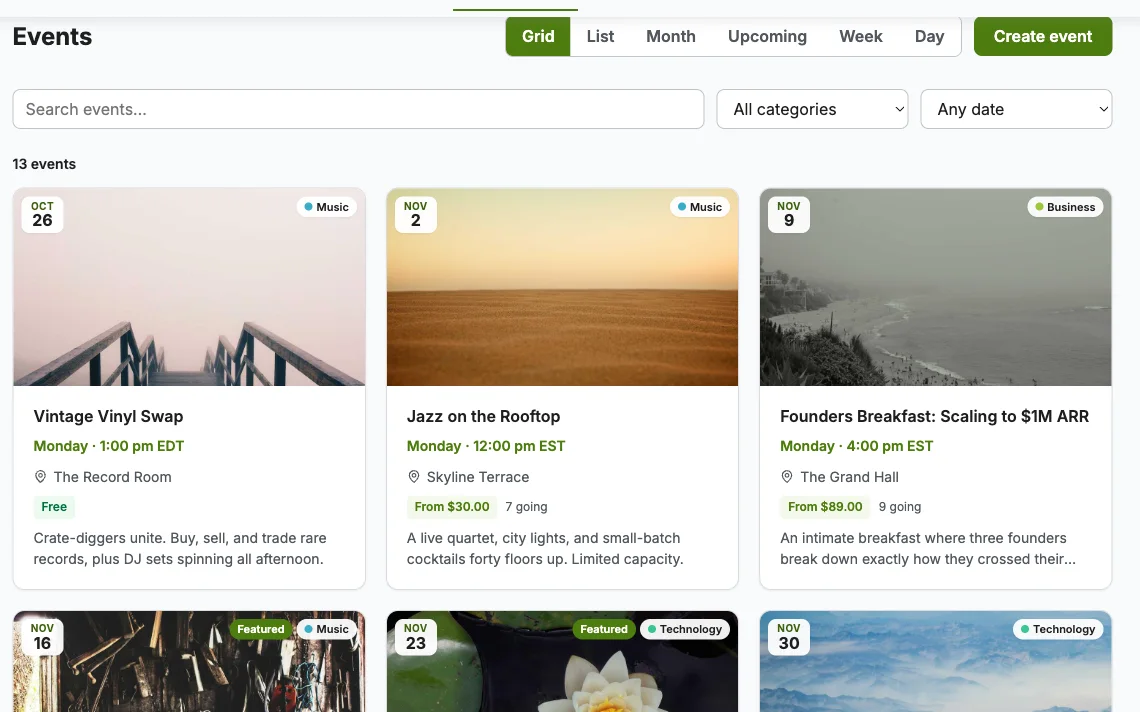
- Free: unlimited events and RSVPs with waitlists, guest RSVPs and magic links, Grid, List, Month and Upcoming calendar views, daily, weekly and monthly recurring events, an ICS feed, a venue and organizer catalog, a Manage Events dashboard, CSV exports and branded emails.
- Pro: paid tickets through Stripe, PayPal or WooCommerce with tax, booking fees and coupons, Week and Day calendar grids, a QR door check-in, organizer analytics and reports, SMS through Twilio, custom reminder timing and email templates, maps and geocoding, and conversion tracking.
- Theme fit: the page says it works with any theme and that its blocks inherit theme styles, without template overrides.
- Requirements: WordPress 6.5 or newer and PHP 8.1 or newer, per the page.
- Fees: Eventonomy takes no cut of ticket sales. Your payment gateway charges its usual fees.
- Price: Pro is $99 a year for 1 site, $199 for 5 sites and $249 for unlimited sites, or $249, $499 and $629 lifetime. Every tier has all Pro features, annual licences renew at 30% off, and if a licence expires the site keeps working but updates and support stop. Refunds follow the Wbcom refund policy.
The main page and the free versus Pro page disagree on one point: the main page lists custom RSVP questions in the free plugin, while the comparison page lists them under Pro. Check which version you get before you rely on it.
Best for: a site that runs events over time, wants RSVPs for free and may add paid tickets later, on any theme.
Not the best fit if: you need a ready-made conference homepage, speaker grid and multi-track timetable. A theme such as Exhibz or Grand Conference is closer. You can also pair a theme like those with a plugin, but check that the two work together.
The best WordPress event themes in 2026
1. Reign (our pick for communities, made by our team)
Reign is not a conference-template theme like the six above. It is our community theme for BuddyPress and BuddyBoss sites, version 8.0.8, updated 7 October 2026. Its page lists a built-in Events feature with RSVP, calendar view, ticketing and per-event chat, and WooCommerce among the plugins it fully supports. The older version of this guide said Reign supports specific event plugins by name. The current page does not mention them, so check with us before you rely on one.

Reign Only is $99 a year for one site ($249 lifetime), $149 a year for five sites and $249 a year for up to 20 sites. The Reign Bundle, with every Reign add-on, is $179, $279 and $399 a year for the same tiers. Annual licences renew at 30% off, and there is a 30-day money-back guarantee.
Best for: an events site that is part of a member community, where people have profiles and groups around the events.
Not the best fit if: you want a one-off conference landing page with a countdown and a speaker grid. The six themes above are closer to that job.
2. Exhibz
Exhibz by trippleS is the best seller on the list: $69, 5,303 sales, 4.28 stars from 108 reviews, version 3.0.14, updated 23 September 2026. It lists one-click demo install, Elementor and Gutenberg support, multi-day and multi-track scheduling, a countdown timer, 15 or more home variations, 8 header layouts, Zoom integration, RTL support and WooCommerce compatibility. It has single-event, multi-event and one-page variations. The page says ticket sales work through the free Eventin plugin with WooCommerce.
Best for: a conference or multi-day event, with a free ticketing route through Eventin.
Watch for: its rating is the lowest of the top three, so read recent reviews first.
3. Event Champ
Event Champ by GloriaThemes costs $79, with 5,261 sales and 4.63 stars from 265 reviews, updated 29 October 2026 and compatible with WordPress up to 7.1.x. It supports WPBakery and Gutenberg, with one-page and multipage layouts, event and venue listings, speaker, sponsor and organizer management, a calendar and schedule tools and filtered search. It includes WooCommerce integration for ticket sales, offline sales and reservations, and external ticketing through Eventbrite, Meetup and Facebook. Importers cover Facebook, Eventbrite, Meetup, Google Calendar, iCal and XML. It also lists membership and front-end publishing. Support is six months, with a 12 month extension for $25.13.
Best for: an events portal with many events, venues and organizers, and sites that import events from other services.
Watch for: the page lists Tickera support but does not say whether a ticketing plugin is bundled.
4. Grand Conference
Grand Conference by ThemeGoods is $69, with 4,480 sales and 4.59 stars from 116 reviews, updated 27 July 2026 and compatible with WordPress up to 7.0.x. It lists more than 30 predesigned pages, sessions filtered by topic and grouped by day, three schedule layouts, a speaker grid with two to five columns, venue maps, WooCommerce and Mailchimp support, Elementor and WPML compatibility. Booking forms can add a product to a WooCommerce cart or send visitors to a custom URL.
Best for: a single conference that needs many ready-made pages and a clear schedule.
Watch for: its compatibility note stops at WordPress 7.0.x, so check it against your version.
5. EM4U
EM4U by ovatheme is $69, with 1,441 sales and 4.52 stars from 29 reviews, version 1.9.3, released 3 November 2026. It lists event, venue, speaker and sponsor management, an event calendar, ticket management with inventory tracking, free and paid tickets, PDF ticket certificates, payments through PayPal, Stripe, offline and WooCommerce, QR and barcode support, attendee CSV export, custom checkout fields, reCAPTCHA and 12 or more home variations with a free WPBakery. It also lets organizers add private access details for virtual events, and lets tickets be resent or re-downloaded.
Best for: organizers who want ticketing and QR check-in inside the theme, without a separate ticket plugin.
Watch for: a smaller user base than the top two, so check support threads.
6. EvnTalk
EvnTalk by RadiusTheme is the cheapest at $49, with 1,589 sales and 4.63 stars from 38 reviews, version 1.8.1, released 20 July 2026. It lists 12 homepage layouts, 4 inner header styles, 3 speaker layouts, 8 event schedule layouts, WPML support, a one-click demo importer and a child theme. Elementor is included, and the listing says LayerSlider is bundled. The page does not describe ticket sales.
Best for: a low-cost conference site with strong schedule layouts and no ticket sales on the site itself.
Watch for: you will need a ticketing plugin of your own if you sell tickets.
7. Evently
Evently by Mikado-Themes costs $69, with 1,491 sales and a 4.00 rating from 30 reviews, version 2.3, released 21 October 2026. It lists nine homepage examples, team, speaker and schedule layouts, and bundled premium plugins: Slider Revolution, WPBakery Page Builder and the Timetable Responsive Schedule plugin. It is compatible with WooCommerce, WPML and Contact Form 7. The page does not mention ticket sales or event booking.
Best for: a meetup or conference site where the schedule matters more than ticket sales.
Watch for: the lowest rating here, and bundled plugins that add weight.
Other event plugins worth knowing
These figures come from WordPress.org on 11 November 2026.
- The Events Calendar: version 6.18.3.1, updated 5 November 2026, 600,000+ active installs, 84 out of 100 from 2,464 reviews.
- Events Manager: version 7.4.13, updated 5 November 2026, 60,000+ installs, 84 out of 100 from 551 reviews.
- Tickera: version 3.6.0.9, updated 23 October 2026, 2,000+ installs, 90 out of 100 from 292 reviews.
For a wider comparison, read our guide to the top WordPress event plugins, the roundup of event registration plugins and the piece on running online conferences on WordPress.
A caution on the free Event theme
Event by Theme Freesia is a free theme on WordPress.org: version 1.2.5, 1,000+ active installs and a rating of 90 out of 100. Its last update was on 3 June 2025 and it lists a minimum of WordPress 6.7, so it is more than a year old. We no longer include it in the main list. If you want a free start, test it on staging against your WordPress version first.
What an event site costs beyond the theme
The theme price is the small part. Plan for these items before you compare a $49 theme with a $79 theme.
- Support extension. ThemeForest includes six months of support. Extending to 12 months costs $13.88 to $25.13 on the listings we read. If your event is a year out, you may need it.
- Ticketing. Some themes bundle it, some use a free plugin, and some need a paid one. A payment gateway also takes a fee on each sale.
- Bundled page builders and sliders. Several themes include premium plugins. Check whether they renew separately after the first year.
- Hosting. Ticket launch day can bring a rush of visitors. Choose hosting that handles a spike, or use caching on the public pages.
- Email delivery. Confirmation and reminder emails must arrive. Use a proper email service so they do not land in spam.
- Your time. Replacing demo content takes longer than most people expect. Block out a few days.
Pages that help an event sell tickets
A good theme gives you the layout. The words and structure decide whether people register. These pages and details tend to matter most.
- A clear first screen. Name, date, place and one button. If a visitor cannot tell what, when and where in five seconds, they leave.
- A schedule people can scan. Group by day, then by track. Show times in the visitor’s timezone if the event is online or hybrid.
- Speaker pages with a reason to attend. A short line on what each speaker will cover is more useful than a long biography.
- Simple ticket choices. Two or three options with a clear difference. Explain refunds and transfers in plain words.
- Proof. Photos or quotes from a past edition, and a list of sponsors.
- Venue and travel details. A map, transport notes and nearby hotels for in-person events.
- Contact and FAQ. Answer the questions you get by email, such as accessibility, food and parking.
After the event
An event site can keep working after the day itself. Keep the page up with photos, slides and recordings, so it ranks for next year’s search. Move the registrations list to your email tool, with permission, so you can announce the next edition. If you run events often, a plugin-based setup, where the events are separate from the theme, makes it easier to keep a calendar of past and future events on one site. A theme-bundled setup suits a one-off event that you will archive.
Which should you choose?
- Events on a theme you already have (our pick): Eventonomy.
- Events inside a member community: Reign.
- One conference, strong schedule, low cost: EvnTalk or Grand Conference.
- One conference with free tickets through a plugin: Exhibz.
- Many events, importers and WooCommerce tickets: Event Champ.
- Ticketing and QR check-in in the theme: EM4U.
Launch checklist for an event site
- Write the page list first: home, schedule, speakers, tickets, venue, sponsors, contact.
- Import the demo on a new site, not a live one.
- Replace every demo text and photo, and check for leftover names.
- Set up tickets or RSVPs, and run a full test with a real payment if you sell tickets.
- Check emails: confirmation, reminder and cancellation.
- Test on a phone, since most visitors will check the schedule there.
- Add the event details in a format search engines understand, and check the page shows correctly when shared.
- Plan updates: who will renew licences and update the theme?
Frequently asked questions
What is the best WordPress theme for an event or conference website?
It depends on the format. Our pick is Eventonomy, made by our team, if you want events on a theme you already have. For a template, Exhibz, Grand Conference and EvnTalk suit a single conference. Event Champ suits many events. EM4U suits sites that want ticketing in the theme.
Do I need a plugin as well as an event theme?
Often yes. Some themes include ticketing, such as EM4U, and others rely on WooCommerce or a ticket plugin. Check each listing.
Is there a free WordPress event theme?
Event by Theme Freesia is free but was last updated in June 2025. A free plugin such as Eventonomy, The Events Calendar or Events Manager can add events to a theme you already have.
How do I sell tickets on a WordPress event site?
Use a theme with built-in ticketing, a ticket plugin such as Tickera, or WooCommerce. Eventonomy Pro sells tickets through Stripe, PayPal or WooCommerce.
Does Eventonomy work with any theme?
Its page says it works with any theme, and that its blocks inherit theme styles. Test your own theme before launch.
Why were Eventum, Eventerra and EventBuilder removed?
Their ThemeForest pages return an HTTP 410 “Gone” error, so they appear to be off sale.
Are ThemeForest prices in US dollars?
Yes. Prices shown are the Regular Licence, and each includes six months of support.
What we could not confirm
- We did not install or test any theme or plugin. Facts come from ThemeForest, WordPress.org and vendor pages.
- Some ThemeForest pages do not list a theme version number, so we do not state one for them.
- EvnTalk and Evently do not describe ticket sales on their pages.
- We could not confirm that any listed theme works with Eventonomy. The plugin says it works with any theme.
- Prices, sales counts and ratings change daily. Check the listing on the day you buy.
Related reading