
9 min read
10 Awesome WordPress Maintenance Mode Plugins


Is your site being rebuilt, migrated or patched? Then visitors should see a clear holding page instead of a half-working site. A maintenance mode or coming soon plugin does exactly that: it shows a branded message to the public while logged-in users with access still see the real site.
Below are 10 plugins that are live on WordPress.org as of November 2026, with what each one is good at, where it falls short and who should pick it.
Quick answer: The best WordPress maintenance mode plugins in 2026 are SeedProd (most polished), LightStart (formerly WP Maintenance Mode, free and flexible), Under Construction (fast setup, many templates), Maintenance by WebFactory (simple, sends 503) and CMP by NiteoThemes (free premium-style designs). For a bare on/off switch, use Slim Maintenance Mode or Maintenance Switch.
Last updated: 6 November 2026

Why You Need a WordPress Maintenance Mode Plugin
Sites need updates, and updates break things. A theme switch, a WooCommerce upgrade or a database migration can leave pages half-rendered for a few minutes or a few days. You do not want customers, or Google, to see that.
A maintenance page solves it. It usually carries a short message such as “We’re working on the site and will be back shortly”, often with a countdown timer. Many of these plugins also collect email addresses while the site is offline, so the downtime turns into a launch list.
Maintenance mode and SEO: why the 503 status matters
The status code your page returns matters more than its design. Google’s documentation on HTTP and network errors says 5xx responses make its crawlers slow down, and that URLs which keep returning a server error are eventually dropped from the index.
So a short outage with a 503 is safe. A maintenance page that sits live for weeks is not. If your plugin can send a 503 (Maintenance, Slim Maintenance Mode and Elementor’s maintenance mode all do), use it for real maintenance, and switch to a coming soon page only for sites that are not launched yet.
Maintenance Mode Plugins Compared
| Plugin | Active installs (WordPress.org) | Free tier | Best for |
|---|---|---|---|
| SeedProd | 600,000+ | Yes, Pro upsell | Polished pages and a full builder |
| LightStart | 400,000+ | Yes | Role and URL exclusions, subscribers |
| Under Construction | 600,000+ | Yes, Pro upsell | Setup in under a minute |
| CMP by NiteoThemes | 200,000+ | Yes, Pro upsell | Designed layouts without a builder |
| Elementor Maintenance Mode | Part of Elementor | Yes | Sites already built with Elementor |
| Smart Maintenance Mode | 1,000+ | Yes | IP range access |
| Fancy Coming Soon & Maintenance Mode | 200+ | Yes | Live customizer, Mailchimp |
| Slim Maintenance Mode | 10,000+ | Yes | One-click, no settings |
| Maintenance by WebFactory | 1+ million | Yes, Pro upsell | Simple page with a 503 |
| Maintenance Switch | 800+ | Yes | Toggle from the admin bar |
Install counts are the public figures on each plugin’s WordPress.org page, read on 6 November 2026. They are rounded by WordPress.org, so treat them as order of magnitude only.
1. Website Builder by SeedProd (Coming Soon Page & Maintenance Mode)
SeedProd started in 2011 as a coming soon plugin and still ships that mode, now inside a larger drag and drop website builder. The listing currently shows 600,000+ active installs and a 4.9 star average from roughly 4,700 ratings, and the plugin was updated on 4 November 2026.
The free version builds a basic coming soon or maintenance page through a friendly interface, and you can add your own tracking scripts. Heavier features such as the theme builder are in the paid tiers. For a deeper walkthrough, see our guide to adding a coming soon page and maintenance mode.
Key Features
- Works with any WordPress theme
- Responsive, customizable page designs
- Supports multisite and BuddyPress
- Free version covers the basics; the builder is a paid upgrade
Best for: site owners who want a nicely designed page fast. Skip it if you only need a plain on/off switch, because the builder is more than you need.
Also Read: Is It Possible To Get A Bird’s-Eye View Over Your Business’s Security?
2. LightStart (formerly WP Maintenance Mode)

LightStart is the plugin many people still know as WP Maintenance Mode. It is built by Themeisle, has 400,000+ active installs, and was updated at the end of October 2026. It handles colors, fonts, backgrounds, countdown timers and templates for maintenance, coming soon and landing pages. It also includes social icons, a contact form, SEO options and subscriber export.
Key Features
- Customize all colors, texts and backgrounds
- Exclude certain URLs from maintenance mode
- Exclude certain user roles from maintenance mode
- Let search engine robots bypass maintenance mode
- Works on multisite, with separate settings per site
Best for: sites that need fine control over who sees what. Because it now doubles as a landing page builder, the settings screen has plenty of options.
3. Under Construction
Under Construction puts your site in maintenance or coming soon mode in seconds. The listing advertises 500+ templates, uses Bunny Fonts for GDPR compatibility, and has 600,000+ active installs with a recent September 2026 update.
You choose a background image, edit the title and body, and add social links. A paid version adds a drag and drop builder, advanced access control and autoresponder integrations.
Key Features
- Choose which user roles see the maintenance page
- Quick setup with background images
- Set an automatic end date for maintenance mode
- Social media icons
Best for: owners who want something presentable in under a minute.
4. CMP - Coming Soon & Maintenance Plugin by NiteoThemes
CMP is a free plugin from NiteoThemes that aims for premium-looking pages. It has 200,000+ active installs, a 4.7 star average, and was updated in October 2026. The free version offers predefined themes, a custom logo, background graphics including YouTube videos or Unsplash images, a subscribe form and social icons.
Key Features
- One-click switch between maintenance, coming soon and landing page modes
- Predefined themes with custom backgrounds
- Subscribe form and social icons
Best for: owners who want a designed layout without learning a page builder.
5. Maintenance Switch
Maintenance Switch takes a different approach. It adds a button to the admin bar that toggles WordPress’s own built-in maintenance mode, so the page also appears during core, plugin and theme updates. You can set which user roles may flip the switch and supply your own HTML for the maintenance page.
It has a small user base (800+ installs) but is updated regularly and has a 5 star rating from 12 reviews at the time of writing.
Key Features
- One-click toggle from the admin bar
- Custom maintenance page through a simple HTML file
- Role control over who can switch maintenance on
Best for: developers and agencies who want a lightweight toggle and no page designer.
6. Elementor Maintenance Mode
Elementor includes its own maintenance mode. You design the page as an Elementor template, set it to Canvas layout so visitors cannot click through to other pages, and pick the template in Elementor’s tools. Choosing Maintenance (rather than Coming Soon) tells search engines the site is temporarily down with a 503.
Key Features
- Drag and drop design with your existing Elementor widgets
- 503 signal to search engines in maintenance mode
- Reuse templates from the Elementor library
Best for: sites already built in Elementor. If you do not use Elementor, a dedicated plugin is lighter.
7. Smart Maintenance Mode
Smart Maintenance Mode lets you define IP ranges that see the real site while everyone else sees the holding page. You can add custom HTML, images, messages and a countdown, and allow certain user roles through.
Key Features
- IP range and user role access
- Custom HTML, images and messages
- Countdown to launch
Check before you rely on it: the last release (1.5.3) was in April 2025 and it has only 1,000+ installs, so confirm it works on your WordPress version first.
8. Fancy Coming Soon & Maintenance Mode
Fancy Coming Soon & Maintenance Mode offers a live customizer, visitor email collection, Mailchimp integration and social buttons, and works with any theme. It is a small plugin (200+ installs) with a July 2026 update, so test it on a staging copy before using it on a client site.
Key Features
- Live customizer
- Mailchimp integration
- Social media buttons
9. Slim Maintenance Mode
Slim Maintenance Mode is the minimalist pick. Activate it, only administrators see the site, deactivate it when you are done. It shows an alert in the backend while active and sends a 503 response. It has support for Cachify, LiteSpeed Cache, Super Cache, WP Rocket, WP Fastest Cache and W3 Total Cache, 10,000+ installs and a 5 star rating from 63 reviews.
Key Features
- Works with any WordPress theme
- No settings to configure
- 503 status for search engines and users
- Cache plugin support
Best for: quick fixes where design does not matter.
10. Maintenance by WebFactory (WP Maintenance)
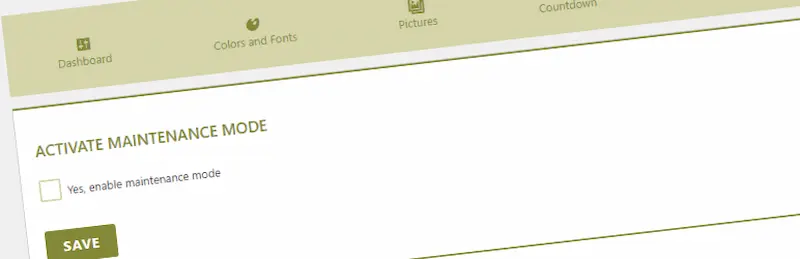
Maintenance is the most installed plugin on this list, with more than a million active installs and an update in early November 2026. It closes the site for visitors, sends a 503 response, and lets you edit the page with a live preview: background, logo, colors and text. It uses Bunny Fonts for GDPR compliance, and a PRO plugin adds ready-made themes.
Key Features
- Live preview customization
- Custom HTML support
- Countdown timer option
- 503 response for SEO-friendly downtime
Best for: owners who want a simple, trusted page with correct search engine signals.
Also Read: The 3 Most Bulletproof WordPress Hosts That Never Go Down
How to Choose
Match the plugin to the job. Short fix on a live site: Slim Maintenance Mode or Maintenance Switch. Planned relaunch with a branded page and email capture: SeedProd, LightStart or CMP. Site already in Elementor: use its built-in mode.
Whatever you pick, test while logged out in a private window, and confirm your cache plugin is not serving the old page to visitors. Check, too, that the plugin lets your payment gateway callbacks and API webhooks through if you run a shop.
If maintenance is a regular chore rather than a one-off, our WordPress website maintenance service handles updates and backups so you rarely need the page. See also 7 ways WordPress maintenance services benefit your business.

Frequently asked questions
What is the best WordPress maintenance mode plugin?
For most sites, SeedProd or LightStart. SeedProd gives the most polished pages, and LightStart gives more control over roles, URLs and subscribers at no cost. If you only need an on/off switch, Slim Maintenance Mode is faster to set up.
Does maintenance mode hurt SEO?
Not if it is short and returns a 503 status. Google slows crawling when it sees 5xx responses and eventually drops URLs that keep failing, so do not leave a maintenance page live for weeks.
What is the difference between maintenance mode and coming soon mode?
Maintenance mode is for a live site that is briefly offline, and should send a 503. Coming soon mode is for a site that has not launched yet, and often shows a signup form and countdown.
Can I use WordPress maintenance mode without a plugin?
WordPress shows its own basic maintenance message during core updates by creating a temporary .maintenance file in the install folder. For a custom page you control, use a plugin.
Are free maintenance mode plugins safe?
Choose ones that are still listed and updated on WordPress.org. 8Degree Coming Soon Page (closed July 2023) and IgniteUp (closed March 2022) were both shut down on WordPress.org for security issues and cannot be downloaded, so avoid any roundup that still recommends them.
Help Others With Your Insights
Have you used any of these maintenance mode plugins? Tell us which one worked for you, or which one we missed, in the comments below.
Interesting Read:
Related reading