
7 min read
WP Review Pro Review: Features, Pricing, Alternatives

WP Review Pro is MyThemeShop’s premium review plugin for WordPress. It adds star, point, percentage, circle, and thumbs ratings to posts, outputs review schema for rich results in Google, and lets readers submit their own ratings through comments. It still sells for $67 for a single site as of August 2026, but there is one fact you should know before buying: the free WP Review plugin has been closed on WordPress.org, so the free-to-pro upgrade path no longer exists. Here is our honest look at what the Pro version does, what it costs, and which maintained alternatives deserve a look.

What WP Review Pro Does
WP Review Pro turns any post or page into a structured review. You pick a rating system, add your criteria (say, design, features, value for money), and the plugin renders a styled review box wherever you want it: top of the post, bottom, or via shortcode. It ships with 16 pre-made review box templates, so the design work is mostly done for you.
The schema output is the real selling point. WP Review Pro supports 19 rich snippet types, from products and books to recipes and software, so your star ratings can appear directly in Google search results. Review stars in the results page draw the eye and raise click-through rates, which is why review plugins remain popular with affiliate and niche site owners. The plugin also imports reviews from Google, Yelp, and Facebook, useful for local business sites that want social proof on the page.
Key Features
- No coding required: Install, pick a template, set your criteria, done. Everything is handled in the settings panel and post meta box.
- Rich snippets: 19 schema types so your review ratings can show as stars in search results.
- Five rating systems: Stars, points, percentage, circle, and thumbs, switchable per review or set globally.
- User reviews via comments: Readers can rate your content when they leave a comment, and their scores can display alongside yours.
- Review imports: Pull existing reviews in from Google, Yelp, and Facebook.
- 16 templates: Pre-designed review box layouts with unlimited colour options to match your theme.
- Comparison tables: Put two or more products side by side inside a post.
- Flexible placement: Position the review box automatically or drop it anywhere with a shortcode.
- Star ratings on thumbnails: Show the score on post thumbnails in archive and grid layouts.
- Theme compatibility: Works with standard WordPress themes; we tested it under both classic and page-builder themes without layout breakage.
- WooCommerce support: Review boxes work on product pages alongside WooCommerce’s own ratings.
- Developer friendly: Filters and hooks for customising output, plus 10 widgets for recent, top-rated, and category-based reviews.
- Multisite ready: Compatible with WordPress multisite and multi-author setups.
Also Read: BuddyPress User Profile Reviews Plugin
Setting Up Your First Review
Setup takes about ten minutes. Here is the short version of the workflow we follow when installing it for clients:
- Install and activate. Upload the plugin zip from your MyThemeShop account, activate it, and enter your licence key so updates arrive.
- Set global defaults. Under WP Review in the dashboard, choose your default rating system and review box template. Setting a global default means you configure each post less.
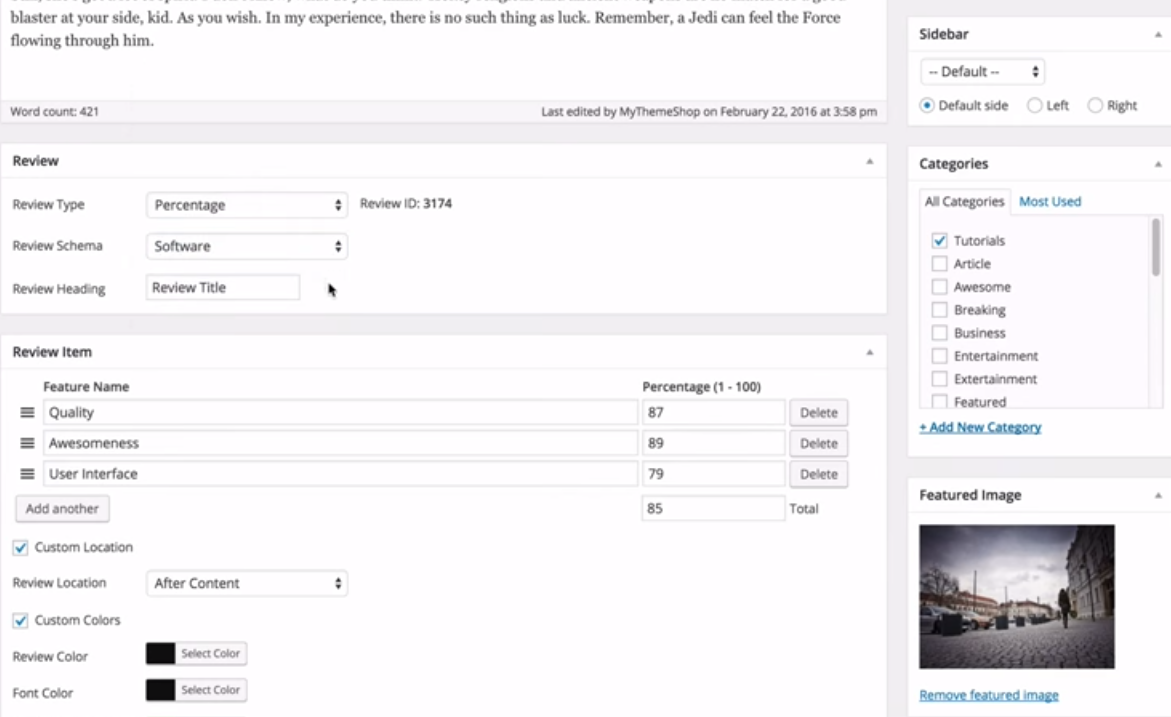
- Write the review post. Below the editor you will find the WP Review meta box. Switch “Review” on, pick the schema type that matches what you are reviewing (product, software, book, and so on), and fill in the item name.
- Add your criteria. Add each feature you are scoring, design, ease of use, value, and give it a rating. The plugin calculates the overall score.
- Choose placement. Let the box append automatically after the content, or place it manually with the shortcode where it reads best.
- Validate the schema. Run the published URL through Google’s Rich Results Test before you move on. Catching a missing field now beats wondering why stars never appeared.
A Note on Review Rich Results in 2026
Review stars in search results are not the free traffic firehose they were when this plugin launched. Google has tightened the rules over several updates: self-serving review markup is ignored, stars show only for eligible content types, and even valid markup is displayed at Google’s discretion. Sites relying on review snippets have watched them appear and disappear between algorithm updates.
That does not make review schema pointless. It remains a legitimate way to describe editorial reviews of third-party products, and when Google does show the stars, click-through rates benefit. Just treat rich results as a bonus on top of a genuinely useful review, not the reason the review exists. Write for the reader first; the markup is packaging.
Pricing
WP Review Pro costs $67 per year for a single site (listed down from $77 at the time of writing), with a multi-site membership plan at $199. Both come with a 30-day money-back guarantee. The current version is 3.4.11.
The bigger question is value. MyThemeShop’s attention has visibly shifted to Rank Math over the years, and the free WP Review plugin being closed on WordPress.org means you can no longer trial the product or fall back to a free tier. The Pro plugin still works and still sells, but the ecosystem around it is quieter than it was. If you already run WP Review Pro and it works, there is no urgent reason to leave. If you are choosing a review plugin today, weigh the alternatives below first.
WP Review Pro Alternatives Compared
All three alternatives here are free, listed on WordPress.org, and were updated within weeks of this article’s last check (August 2026):
| Plugin | Best for | Price | Active installs | Status (Aug 2026) |
|---|---|---|---|---|
| WP Review Pro | Author reviews with rich schema variety | $67/year | n/a (premium) | Sold; free version closed on WordPress.org |
| Site Reviews | Collecting visitor-submitted reviews | Free, paid add-ons | 60,000+ | Updated August 2026 |
| kk Star Ratings | Simple star ratings on posts | Free | 70,000+ | Updated August 2026 |
| Customer Reviews for WooCommerce | Store review collection and reminders | Free, Pro available | 80,000+ | Updated August 2026 |
Site Reviews is the strongest all-round pick if your reviews come from visitors rather than from you. It handles submission forms, moderation, star summaries, and schema, and its add-on system covers filtering and review images. kk Star Ratings is the minimalist option: star ratings on posts with schema output and almost nothing to configure. Customer Reviews for WooCommerce is the one to pick for a store, since it adds automated review-request emails, photo reviews, and Q&A on product pages.
None of these replicates WP Review Pro’s author-review box with multiple criteria quite as directly. For editorial reviews written by you, with per-criterion scores, WP Review Pro still does the specific job well. That niche is genuinely its strength.
One more practical tip from our own testing: whichever plugin you choose, avoid running two review-schema plugins at once. Duplicate or conflicting markup on the same URL is a common cause of rich results disappearing, and it is easy to do accidentally when an SEO plugin such as Yoast or Rank Math also adds schema. Pick one source of review markup per page and disable the rest, then re-run the Rich Results Test to confirm a single clean Review object remains.
Frequently asked questions
Is WP Review Pro still maintained?
It is still sold on MyThemeShop’s site at version 3.4.11, and support is included with a licence. Development is slow compared with its heyday, and the free WordPress.org version has been closed, so test on a staging site with your current WordPress version before renewing or buying.
Will review stars still show in Google search results?
Google shows review rich results only for supported content types (products, recipes, books, and similar) and only for genuine reviews. Self-serving reviews of your own business no longer qualify for stars. WP Review Pro outputs valid schema; whether Google displays it is Google’s call.
Can readers add their own ratings?
Yes. WP Review Pro ties ratings to comments, so visitors rate through the comment form and you can show the visitor average alongside your own score. If visitor reviews are your main use case, Site Reviews handles that workflow with more moderation control.
Does WP Review Pro work with WooCommerce?
Yes, review boxes can appear on product pages and the plugin plays along with WooCommerce’s built-in ratings. For collecting customer reviews at scale, though, Customer Reviews for WooCommerce is purpose-built for it.

Should You Buy WP Review Pro?
Buy it if you write editorial reviews yourself and want multi-criteria review boxes with broad schema support out of the box. At $67 a year it earns its keep on an affiliate or review site where rich results matter. Skip it if your reviews come from visitors or customers: Site Reviews and Customer Reviews for WooCommerce cover those cases free, and both are updated far more often. And if you run a community site, member and group reviews are a different problem entirely; our BuddyPress Member Reviews and BuddyPress Group Reviews plugins handle exactly that.
Interesting Reads:
Related reading