
9 min read
Is WordPress Good for Small Businesses?


Yes, WordPress is a good fit for most small businesses, and the reason is not the one usually given. It is not “free” (a real site costs money to run) and it is not “easy” (a site builder is easier on day one). It is that WordPress is the only mainstream option where you own the whole thing: the files, the database, the customer list, the content, and the freedom to move hosts or hire a different developer without starting over. For a business that expects to exist in five years, that matters more than the first week’s setup experience.
Below we set out who should and should not pick WordPress, what it really costs compared with Wix, Squarespace and Shopify, what to install, and the mistakes that turn a good WordPress site into an expensive one. We build on WordPress for a living, so read this as an informed opinion rather than a neutral survey; we have tried to be honest about where the alternatives win.
What WordPress is, in one paragraph

WordPress is open-source software you install on web hosting you rent. As of August 2026, W3Techs counts it on 40.7% of all websites and 58.9% of sites that use any CMS; Shopify is next at 5.3% of the web, then Wix at 4.2% and Squarespace at 2.4% (W3Techs CMS usage survey). The software itself is free under the GPL. You pay for hosting, a domain and optionally premium themes, plugins and help. WordPress.com is a separate hosted product from Automattic that runs the same software with restrictions on the cheaper plans; in this article “WordPress” means the self-hosted version from WordPress.org unless stated.
The case for WordPress
You own the site and the data
A WordPress site is a folder of files and a MySQL database. Back them up and you can restore the entire business presence on any host in the world. Customer records, orders, form submissions and content all export in standard formats. If your developer disappears, another one picks up where they left off. None of that is true on a closed platform, where an export usually means your blog posts and not much else.
It grows without a migration
The brochure site you launch this year becomes a store (WooCommerce), a booking system, a members’ area, a course, or a directory by adding plugins to the same install. Businesses that start on a site builder routinely hit a wall at the “we now need X” stage and rebuild; we do several of those migrations a year and they are never cheap.
Search engines already understand it
Clean URLs, fast themes, Yoast or Rank Math for metadata and schema, and full control over hosting speed. Site builders have closed the gap on the basics, but when you need a specific structured-data setup, a custom sitemap rule or server-side caching, WordPress lets you do it.
The labour market is deep
Because WordPress is so common, there is a WordPress freelancer in every city and agencies at every price point. You are not locked into one vendor’s partner directory. The same applies to hosting: hundreds of companies compete for WordPress customers, and switching takes an afternoon.
The case against, honestly
- You are responsible for maintenance. Core, theme and plugin updates, backups and security are your job or your host’s. A site builder handles all of that invisibly. If nobody in the business will spend an hour a month on it, either pay for managed hosting that does it, pay for a maintenance plan, or consider a builder.
- Day-one setup is slower. Choosing a host, a theme and a few plugins takes a weekend. Squarespace takes an evening.
- Plugin sprawl is a real risk. Forty plugins from forty authors is how sites get slow and get hacked. Discipline is required.
- Quality varies. The WordPress.org directory has 60,000 plugins and no gatekeeper beyond a security review. You have to read ratings, last-updated dates and support threads before installing.
Our rule: a one-person business with no plans beyond a contact page and a gallery is fine on a builder. A business that will ever sell online, take bookings, run a mailing list, publish regularly or hire help should start on WordPress so it never has to move.
What it actually costs
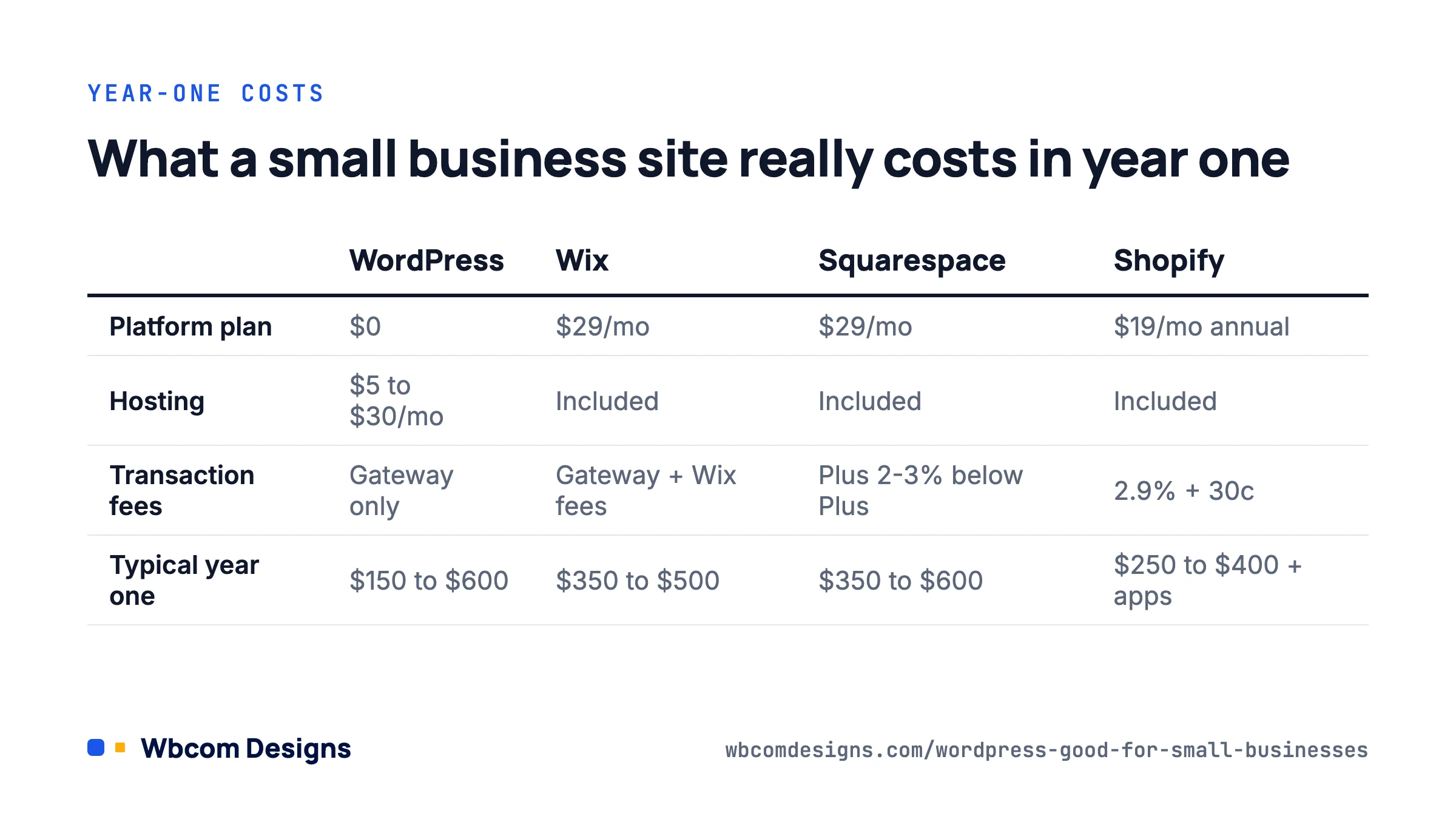
The “WordPress is free” line misleads people. Here is a realistic comparison for a small business site with a blog and a basic store, using published 2026 list prices on annual billing. Builder prices move often, so treat these as the shape of the comparison rather than a quote.
| Cost line | Self-hosted WordPress | Wix | Squarespace | Shopify |
|---|---|---|---|---|
| Platform / plan | $0 | Core $29/mo (Business $39/mo for a store) | Core $29/mo (Plus $49/mo for full commerce) | Basic $19/mo annual, $27/mo monthly |
| Hosting | $5 to $30/mo shared or managed; $20 to $60/mo for a store | Included | Included | Included |
| Domain | $10 to $20/yr | Free first year, then renewal | Free first year, then renewal | $15/yr approx |
| Theme | $0 to $70/yr | Included | Included | $0 to $350 one-off |
| Ecommerce transaction fees | Gateway only (Stripe 2.9% + 30c typical) | Gateway, plus Wix fees on some plans | Gateway, plus 2% to 3% Squarespace fee below Plus | 2.9% + 30c with Shopify Payments; extra fee for third-party gateways |
| Typical year one | $150 to $600 | $350 to $500 | $350 to $600 | $250 to $400 plus apps |
The totals are closer than most articles admit. The difference shows up in year three, when the WordPress site has added bookings, a members’ area and a second language for the cost of a couple of plugins, and the builder site has moved to a higher tier or hit a limit. The other difference is that every dollar on the WordPress side is optional and replaceable; the builder subscription is neither.
Where a builder is cheaper is developer time. If you would otherwise pay someone $60 an hour to handle updates, a $29 plan that includes them is good value. Factor that in.
A sensible small-business WordPress stack
You do not need much. This is what we set up for a typical local business and it has not changed a great deal in years.
- Hosting: a managed WordPress host or a reputable shared host with one-click staging and daily backups. Skip anything advertising “unlimited” everything for $2 a month.
- Theme: a block theme (Twenty Twenty-Five or the current default is fine) or a lightweight multipurpose theme. Avoid themes bundled with a dozen “required” plugins.
- SEO: Yoast SEO or Rank Math, free tier.
- Forms: WPForms Lite, Gravity Forms or Fluent Forms.
- Security: Wordfence or Solid Security free, plus two-factor authentication for every admin account.
- Backups: the host’s daily backup plus an off-site copy with UpdraftPlus or similar. See our backup plugin comparison for options.
- Caching: whatever the host provides, or WP Super Cache / LiteSpeed Cache depending on the server.
- Store, if needed: WooCommerce, with WooPayments or Stripe. Add extensions only when a specific need appears.
That is eight items, most of them free. Total plugin count should stay under fifteen for a site like this. If a proposal from a developer lists thirty plugins, ask why.
When the business sells services rather than products
Consultants, trades and agencies sell time and outcomes, not SKUs, and stock WooCommerce assumes you are shipping boxes. You can bolt on a booking plugin, or use a service-oriented layer such as Woo Sell Services, which adds requirements gathering, delivery and a conversation thread to each order. Either way, it is still the same WordPress install, which is the point.
The mistakes that make WordPress expensive

When a small-business owner tells us WordPress was a bad experience, it is nearly always one of these.
| Mistake | What it causes | Fix |
|---|---|---|
| Cheapest possible hosting | Slow pages, hacked neighbours, no backups when you need one | Pay $10 to $25/mo for a host with staging and backups |
| Heavy page-builder theme from a marketplace | Five-second load times, lock-in to the builder’s shortcodes | Use the block editor and a light theme |
| Nobody owns updates | Two years of missed updates, then a breach or a breaking upgrade | Assign it to a person or a maintenance plan; turn on auto-updates for minor releases |
| Developer holds the hosting and domain accounts | Business cannot access its own site when the relationship ends | Accounts in the business’s name; developer gets a user, not ownership |
| Admin username “admin”, shared password | Brute-force takeover | Unique usernames, password manager, two-factor on every admin |
| Installing a plugin for every small thing | Conflicts, slowdowns, update fatigue | Audit quarterly; delete (not just deactivate) what is unused |
If you suspect a site has already been compromised, our note on the signs a WordPress site has been hacked covers what to look for before you call anyone.
Three small-business scenarios
A dental practice
Needs: services pages, team bios, an appointment request form, reviews, local SEO. WordPress with a block theme, a form plugin and Yoast’s local SEO settings covers it. Cost after year one is hosting and a domain. A builder would do this fine too; WordPress wins when they add patient resources, a second location or online payments for deposits.
A bakery that starts taking online orders
Starts as a brochure site; eighteen months later wants pre-orders for weekend pickup. WooCommerce plus a local pickup shipping method and a delivery-date plugin. No migration, the existing content and rankings stay, and the card fees go to Stripe rather than a platform.
A consultant building an audience
Blog, newsletter signup, a paid course later. WordPress handles the publishing and SEO side better than any builder, the mailing list connects to any provider, and when the course arrives, LearnDash or Tutor LMS installs onto the same site. If a community forms around it, BuddyPress or BuddyNext sits alongside. That whole arc, from blog to community, is the path many of our customers have taken on one install.
FAQ
Is WordPress.com or WordPress.org better for a small business?
WordPress.com’s higher plans remove most restrictions and include hosting and maintenance, which suits owners who want zero admin. Self-hosted WordPress.org is cheaper, fully flexible and portable. If you want plugins and full control, self-host; if you want it managed and are happy to pay for the Business plan or above, WordPress.com is reasonable.
Do I need a developer?
Not to launch. A block theme and a handful of plugins are within reach of anyone comfortable with a laptop. You will want a developer for custom functionality, a store with complex rules, or a redesign. Budget for a few hours a year of help even on a simple site.
Is WordPress secure enough for a business?
Core is maintained by a dedicated security team and patched quickly. Almost every WordPress breach comes from outdated plugins, weak passwords or bad hosting, all of which are within your control. Keep it updated, use two-factor authentication, and choose a host that isolates accounts.
How long does a WordPress site take to build?
A five-page business site with a form: a weekend for a motivated owner, one to two weeks for an agency including content and design. A store: two to six weeks depending on product count and payment setup.
What we’d do
Pick a good host, use the block editor, install fewer than fifteen plugins, put the hosting and domain in the business’s name, and assign updates to a person. Do that and WordPress is the lowest-risk platform a small business can choose, because whatever the business becomes, the site can become it too. If the site has outgrown what you can manage in-house, our WordPress services team handles the build and the upkeep.
Related reading