
7 min read
Top 10 WooCommerce Express Checkout Plugins for Faster Sales

If you’re running a WooCommerce store, then optimising the checkout process should be at the top of your to-do list. Slow, clunky, or confusing checkouts lead to abandoned carts. That’s where WooCommerce Express Checkout Plugins come in. These tools streamline the buying process, helping customers complete their purchases quickly and effortlessly.
Whether you’re running a niche store or a large catalogue site, a fast checkout process can directly improve your bottom line. These plugins are particularly effective for mobile-first users who demand speed and simplicity.

What Are WooCommerce Express Checkout Plugins?
WooCommerce Express Checkout Plugins are tools designed to reduce the number of steps required for a customer to complete a purchase. Instead of navigating multiple pages, customers can buy products directly from the product or cart page using streamlined interfaces such as side carts, popups, or sticky buttons.
These plugins are especially helpful for mobile users and impulse buyers. By removing unnecessary form fields and optimising the payment flow, express checkout plugins help you speed up conversions and reduce cart abandonment.
How to Use WooCommerce Express Checkout Plugins
Implementing an express checkout plugin on your WooCommerce store is simpler than you might think. Here’s a quick step-by-step guide:
- Choose the Right Plugin: Start by selecting a plugin that fits your store’s needs from the list below.
- Install and Activate: Go to your WordPress dashboard, navigate to Plugins > Add New, and upload or search for the plugin.
- Configure Settings: Once activated, configure the plugin settings based on your checkout flow preferences.
- Test the Checkout: Place a test order to ensure the checkout process works smoothly and looks great across devices.
- Go Live: Once satisfied, publish your changes and monitor conversion rates for improvements.
Remember, always back up your site before installing new plugins to avoid conflicts or data loss.
List of WooCommerce Express Checkout Plugins
Here’s a curated list of the most powerful WooCommerce Express Checkout Plugins that can enhance your store’s checkout experience:
- Checkout Add-Ons for WooCommerce
- YITH WooCommerce Checkout Manager
- Direct Checkout for WooCommerce
- CartFlows
- PeachPay for WooCommerce
- Express Checkout for Stripe by Payment Plugins
- WooCommerce Express Checkout Plugin by WP Swings
- Iconic WooCommerce Fast Cart
- Buy Now Button for WooCommerce
- One-Click Checkout for WooCommerce
1. Checkout Add-Ons for WooCommerce

This plugin by SkyVerge is ideal for stores that want to upsell or cross-sell during checkout. It adds custom fields and options to the WooCommerce checkout page, allowing businesses to offer gift wrapping, special messages, tips, and more. The flexibility it provides is unmatched when it comes to enhancing user experience while speeding up the checkout process.
Because it lets customers input necessary add-ons without navigating away from checkout, it helps minimise friction and boosts average order value.
Key Features:
- Add custom fields (text, dropdowns, checkboxes, etc.)
- Offer paid or free add-ons directly during checkout
- Supports conditional logic and field prioritisation
Pricing: Starts at $79/year with a 30-day money-back guarantee.
2. YITH WooCommerce Checkout Manager
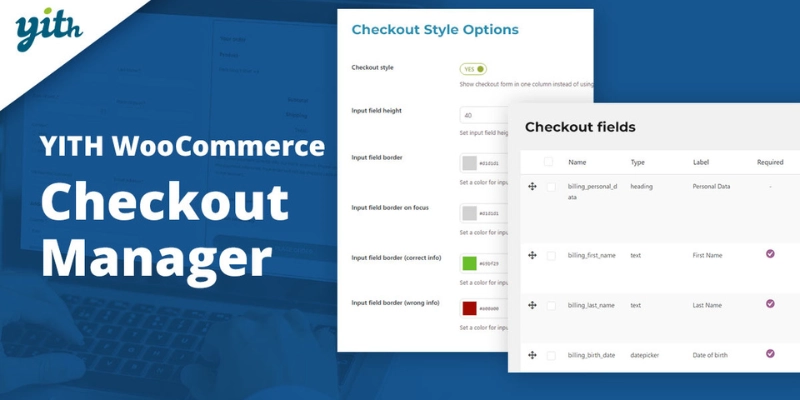
YITH WooCommerce Checkout Manager helps you gain full control over your checkout form layout. This plugin simplifies the checkout process by allowing store owners to add, remove, or rearrange fields with a drag-and-drop interface. Whether you want to reduce friction or capture essential data, it gets the job done efficiently.
By streamlining checkout forms and customising them to user intent, it creates a faster, cleaner buying experience, making it a solid WooCommerce Express Checkout Plugin option.
Key Features:
- Drag-and-drop checkout field editor
- Custom field support (text, date, textarea, select, etc.)
- Conditional logic for better field management
Pricing: Premium version starts at €69.99/year.
3. Direct Checkout for WooCommerce
Direct Checkout is perfect for store owners looking to skip unnecessary steps in the buying process. This plugin allows customers to be redirected straight to the checkout page, eliminating the cart page entirely. That means fewer clicks and faster conversions.
It also supports the addition of a “Buy Now” button on product pages, which encourages quick purchases and helps reduce cart abandonment rates.
Key Features:
- Skip the cart page and redirect to checkout
- AJAX add-to-cart functionality
- Customisable “Buy Now” button
Pricing: Free version available; Premium starts at $15/year.
4. CartFlows
CartFlows is an advanced funnel builder that optimises your WooCommerce checkout process using pre-designed templates and one-click upsell features. It replaces the default WooCommerce checkout with a more conversion-optimised flow.
Perfect for digital products, subscriptions, and course creators, CartFlows gives you powerful tools to create high-converting checkout experiences tailored to your business goals.
Key Features:
- Drag-and-drop funnel builder
- One-click upsells, order bumps, and thank you pages
- Split testing and analytics integration
Pricing: Free version available; Pro starts at $99/year.
Also Read: WooCommerce vs Easy Digital Downloads: Comparing WordPress E-commerce Plugins
5. PeachPay for WooCommerce
PeachPay is a powerful one-click checkout solution that’s especially focused on simplicity and speed. Once a customer uses PeachPay, their information is stored for all future checkouts, making repeat purchases effortless.
It supports various payment gateways like Stripe and PayPal, and its elegant pop-up interface ensures customers don’t need to leave the page to finalise their orders.
Key Features:
- One-click checkout for returning customers
- Popup-based checkout design
- Multi-currency and multilingual support
Pricing: Free plugin with no hidden charges.
6. Express Checkout for Stripe by Payment Plugins
This plugin integrates Stripe’s express checkout functionality directly into your WooCommerce store. It includes support for Apple Pay, Google Pay, and other local payment methods, all accessible from product and cart pages.
It’s particularly beneficial for mobile shoppers who want a smooth, modern checkout experience without jumping through hoops.
Key Features:
- Supports Apple Pay, Google Pay, and Link
- Embeds express buttons on product/cart pages
- No redirect to external pages
Pricing: Free plugin.
7. WooCommerce Express Checkout Plugin by WP Swings
This plugin adds express checkout buttons directly to product pages, enabling faster purchases. Designed with conversion optimisation in mind, it works smoothly with PayPal and other major payment gateways.
Its quick loading speed and seamless UI make it a favourite among small and mid-sized WooCommerce store owners.
Key Features:
- Single-click checkout for digital and physical goods
- PayPal integration with in-context checkout
- Compatible with major WooCommerce themes
Pricing: Free version available; Premium starts at $49/year.
8. Iconic WooCommerce Fast Cart
Iconic’s Fast Cart plugin transforms the checkout process into an elegant pop-up experience, letting customers review and finalise their order without ever leaving the product page. It eliminates traditional cart and checkout pages.
The plugin also supports upsells and works great for users who value a seamless shopping journey. It’s highly customisable and beautifully responsive.
Key Features:
- Pop-up cart and checkout in one view
- AJAX product quantity adjustments
- Integrated upsells and cross-sells
Pricing: Starts at $129/year.
9. Buy Now Button for WooCommerce
The Buy Now Button plugin adds a simple but powerful feature to your WooCommerce store, allowing customers to skip the cart and head straight to checkout. It’s especially useful for digital goods or stores selling high-demand products with quick purchase intent.
This plugin reduces friction and improves the user journey by allowing one-click purchasing directly from product pages, increasing overall conversion rates.
Key Features:
- Skip the cart and go to checkout instantly
- Customisable button text and location
- Supports variable products and external/affiliate products
Pricing: Free version available on WordPress.org. Premium version starts at $39/year.
Also Read: Affiliates Manager vs ReferralCandy vs YITH WooCommerce Affiliates: Best Affiliate Marketing Plugins
10. One-Click Checkout for WooCommerce
As the name suggests, One-Click Checkout for WooCommerce is a powerful tool that enables returning customers to purchase instantly using saved details. This Amazon-style express checkout dramatically reduces the time between browsing and buying.
It’s highly optimised for mobile devices and includes smart logic to auto-fill billing and shipping data for repeat customers, making the process incredibly smooth.
Key Features:
- One-click ordering for returning customers
- Auto-fills saved customer information
- Improves conversions on mobile
Pricing: Starts at $49/year with priority support and updates.

Need a WooCommerce Developer to Optimize Your Checkout?
Installing an express checkout plugin is a good first step, but a checkout flow that truly converts requires testing, custom integration, and ongoing optimization. Our team builds WooCommerce stores with checkout experiences designed for maximum conversion. See our WooCommerce development service.
Speed Up Checkout, Maximise Conversions
Investing in the right WooCommerce Express Checkout Plugin can make a noticeable difference in your store’s performance. Whether you’re aiming to reduce cart abandonment, improve mobile usability, or simply create a smoother customer experience, these plugins are game-changers. Each tool brings unique strengths, so choose the one that aligns best with your store’s specific needs.
With faster checkouts, you’re not just speeding up transactions, you’re building a more user-friendly, conversion-focused shopping experience that customers will appreciate and return to.
Interesting Reads
Top WooCommerce Development & Infrastructure Integrations
10 Best WooCommerce Multiple Sales Channels Plugins to Grow Your Reach
Related reading