
14 min read
StellarWP Alternatives: Simple, Honest Guide to Your Options

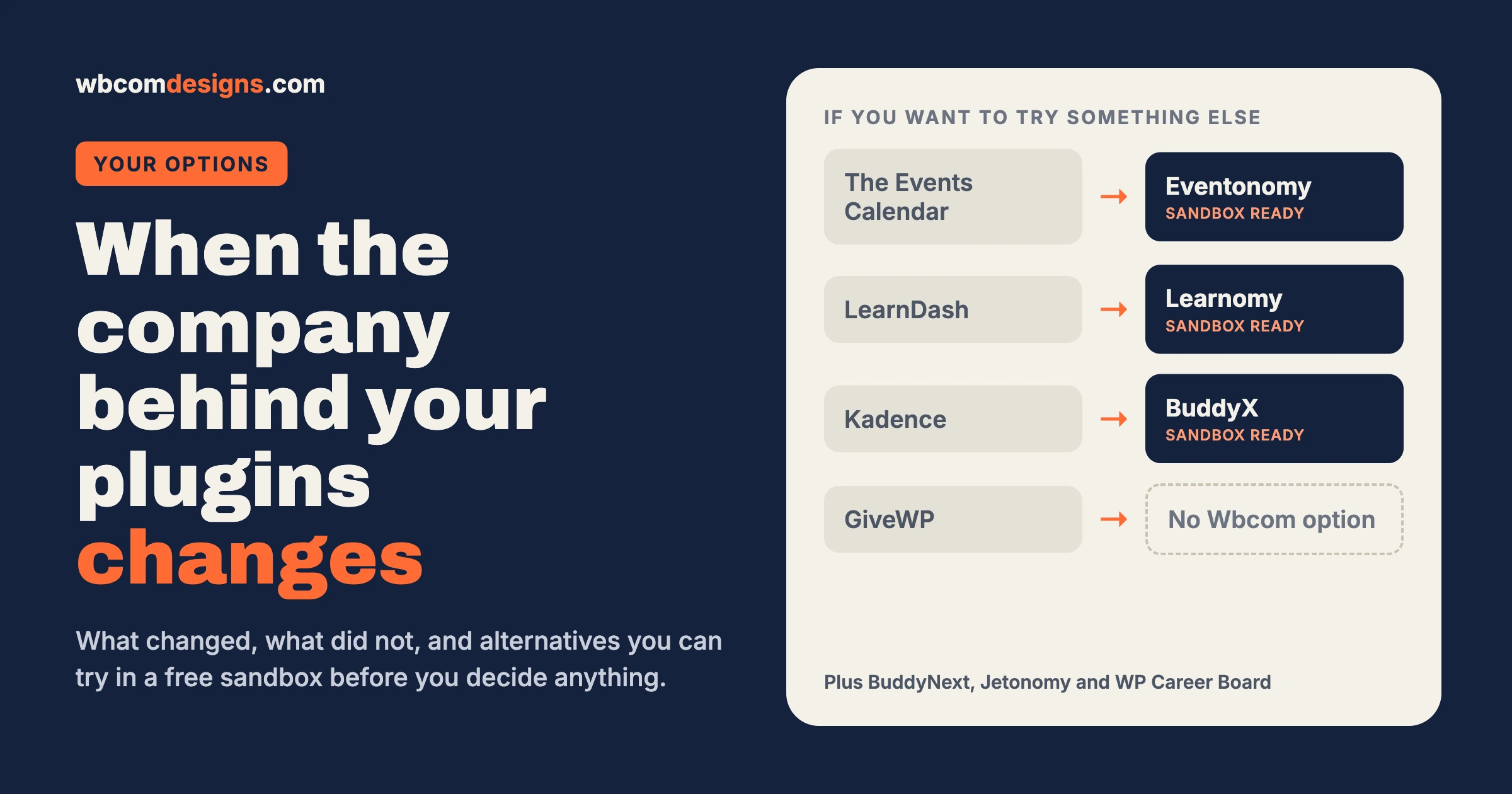
If you are searching for StellarWP alternatives, you probably run a site on Kadence, LearnDash, The Events Calendar or GiveWP, and you may have noticed that the company behind them looks different now. The old StellarWP name is gone. The product websites send you to Liquid Web. Your account lives in a new customer portal. If you are not technical, that can feel like a lot of change at once, and a fair question follows: should I be worried, and do I need to do anything?
This guide gives a calm answer. We explain what changed in plain words, what did not change, and how to decide whether to stay or move. Then, for people who want options, we list the best StellarWP alternatives you can try in a free sandbox before committing to anything.
A note before we start. Wbcom Designs makes several of the alternatives listed below. We are not a neutral party, so we say so here and again where it matters. We have also tried to tell you when staying put is the better choice, and where we have nothing to offer at all.
What changed, in plain words
In spring 2026, Liquid Web, the hosting and software company that owned the StellarWP family, brought its WordPress software together. The StellarWP brand was retired. Four products were kept as the core of the range: Kadence, LearnDash, The Events Calendar and GiveWP (also called Give). Smaller brands in the family, such as SolidWP, IconicWP and MemberDash, were folded into those four. Many owners now look for StellarWP alternatives for that reason. This is the same picture reported by several WordPress news sites, including WP Content and MemberPress. The second of those is written by a company that competes with LearnDash, so read it with that in mind.
On the practical side, the old product websites now redirect to pages on liquidweb.com, and customers manage their licences and invoices in one combined Liquid Web software portal instead of a separate account for each product.
What did not change
This part matters most, and it is easy to miss when headlines are loud.
- The four products continue. Liquid Web has said Kadence, LearnDash, The Events Calendar and GiveWP remain active products. LearnDash is not discontinued.
- Your site keeps working. A plugin that is installed and running does not stop because the company behind it was reorganised.
- Your content is still yours. Your courses, events, pages and donations sit in your own WordPress database, not on Liquid Web’s servers.
So nothing here is an emergency. If your site works today and you are happy, there is no deadline forcing you to act this week.
Should you move? An honest decision guide
Moving a live website always has a cost. It takes time, it can break things, and it asks your visitors to relearn something. So move for a reason, not out of panic.
Stay where you are if…
- Your site works and your customers are happy.
- Support has been responsive when you needed it.
- Your licence is active and you can log in to the new portal.
- You do not have a spare week to plan and test a migration.
Start looking at options if…
- You can no longer log in, find your invoices or reach support.
- A feature you rely on has been removed or put behind a higher plan.
- You are unsure what you are paying for now, or what the renewal will cost.
- You want a plugin from a smaller team that talks to you directly.
Five things to do this week, whichever way you go
- Check your licence and renewal date. Log in to the new portal and write down what you own and when it renews.
- Make sure you can still download updates and invoices. If something is missing, ask support in writing and keep the reply.
- Take a full backup of your site and store it somewhere you control.
- Find your export path. Know how you would get your courses, events or donors out of your current plugin if you ever needed to.
- Ask what support and update commitments apply to your licence. A clear written answer is worth having before your next renewal.
If any of that feels like too much, that is a normal reason to ask a developer for help. Our WordPress maintenance plans cover checks like these.
StellarWP alternatives you can try before you decide
If you want options, here is the list. For each one we say what it is, how it compares, and what moving involves. Every product has a free sandbox, a throwaway demo site you can click around in without installing anything or paying anything. The sandbox is a demo, so treat it as a place to look around rather than a copy of your own site.
| If you use… | A Wbcom option | Moving from your current plugin | Try it |
|---|---|---|---|
| The Events Calendar | Eventonomy | Built-in importer for The Events Calendar | Eventonomy sandbox |
| LearnDash | Learnomy | Built-in importer for LearnDash courses, lessons and quizzes | Learnomy sandbox |
| Kadence (the theme) | BuddyX or BuddyX Pro | No automatic importer. Rebuild on the new theme. | BuddyX sandbox, BuddyX Pro sandbox |
| GiveWP | None | We do not make a donation plugin | See our comparison below |
The Events Calendar: try Eventonomy
Eventonomy is our events plugin. It handles event listings, calendars, venues, organizers, registration and tickets. Recent releases added a waitlist for paid events, link-only private events, event reporting and organizer payouts in the Pro version.
Moving over. Eventonomy includes a one-click importer for The Events Calendar, as well as EventON, Events Manager, WP Event Manager and Sugar Calendar. It shows a preview before it changes anything, runs large imports in the background, adds redirects from your old event addresses, and can be undone. Your old plugin’s data is read, not changed, so you can keep it installed while you check the result. The importer is included in the free plugin.
What it does not bring over. Orders, payments, sold tickets and check-in records stay behind, because that history belongs to the old system. Plan for that if you have an event with tickets already on sale.
Want to see it first? Open the Eventonomy sandbox, then read our guide to Eventonomy and our wider roundup of events calendar alternatives for WordPress.
LearnDash: try Learnomy
Again, let us be clear: LearnDash continues, and for many sites it is the right tool. If your courses run well and your students are happy, you do not need to move. If you want to look at another option, Learnomy is our learning plugin. It covers courses, lessons, quizzes, certificates, memberships and student progress, and its course pages can be designed in Elementor.
Moving over. Learnomy has an import wizard that reads LearnDash (and also Tutor LMS and LifterLMS) on the same site. It brings across courses, lessons and topics, quizzes and questions. An optional step carries over who was enrolled and how far each learner got. It runs in the background, shows a preview first, and never changes the old plugin.
What it does not bring over. Certificates, quiz scores and anything to do with payments are left out on purpose. If your students have earned certificates, keep copies before you switch. Try it on a staging copy of your site first.
Try the Learnomy sandbox. Then read the step-by-step migration guide and our broader list of LearnDash alternatives, which includes options that are not ours.
Kadence: try BuddyX, with an honest caveat
Kadence is a theme and a set of page-building blocks, and it is used for every kind of site. BuddyX is a different animal. It is a free, fast theme designed for community, membership and learning sites. BuddyX Pro adds more layouts and options.
We want to be straight about this: BuddyX is not a general replacement for Kadence and Kadence Blocks. If you use Kadence for a brochure site, a blog or a shop with heavy custom block layouts, BuddyX is not the obvious swap. There is also no automatic importer from Kadence to BuddyX, so a move means rebuilding your pages on the new theme.
BuddyX makes sense if your site is, or is becoming, a community, a members area or a learning site. It has built-in support for LearnDash, The Events Calendar and common community plugins, so you can use it with the tools you already have. Look around in the BuddyX sandbox or the BuddyX Pro sandbox.
If you want a different general-purpose theme, there are many good ones, and we are happy to help you choose.
GiveWP: we have no equivalent
Wbcom does not make a donation or fundraising plugin, so there is nothing of ours to offer here. If you are weighing your options for online donations, our comparison of GiveWP and Charitable is a fair place to start. Whatever you pick, keep a regular export of your donor and donation records, because that data is the hardest to rebuild.
The wider set of tools that work together
Some people reading this do not just want a swap for one plugin. They are rethinking how their site fits together. Wbcom makes a small family of products designed to work with each other, so you can add one piece at a time:
- BuddyNext for a community with member profiles, spaces and a feed. Try the sandbox.
- Jetonomy for forums and question-and-answer boards. Try the sandbox.
- WP Career Board for a job board. Try the sandbox.
- Learnomy for courses and Eventonomy for events, as above.
One team builds them, there is one support desk, and they are made to share notifications. You can try every piece before you buy anything.
How to read plugin news without losing sleep
Stories about plugin companies spread fast, and they tend to sound worse than they are. A reorganisation is not the same as a shutdown. A new portal is not the same as a lost licence. And a rumour on a forum is not the same as a notice from the company. A few habits help you keep a clear head.
- Separate the company from the code. The plugin on your site is a set of files. It keeps working until something else on the site, such as a WordPress update or a new PHP version, stops it from working.
- Look for the official notice. Check what the vendor itself has published about your product, and check what your own licence says.
- Wait for facts before paying for a change. A rushed migration costs real money. A week of waiting usually costs nothing.
- Treat every vendor the same way. The questions below apply to Liquid Web, to us and to anyone else who sells you software.
Seven questions to ask any plugin vendor
You can use these on a vendor you already have, or on one you are thinking of choosing. If the answers are vague, that tells you something.
- What happens to my licence if the company is sold or reorganised? You want a clear answer about whether your plan, price and support carry over.
- How do I get my data out? Ask for the export steps. Good answers name specific tools or files, not a promise.
- How long are updates promised? Security fixes matter most. Ask how long each version line is supported.
- Who answers support, and how fast? A named team and a typical reply time beat a ticket form that disappears into a queue.
- How will you tell me about big changes? Email, a changelog and a public notice are all good signs.
- Can I try it without paying? A sandbox or a free version lets you test before you commit.
- What does it cost over three years? Include renewals, add-ons and any extra plan you would need.
A short check for each type of site
The right next step depends on what your site does. Here is a plain version for each of the four tools.
If you run events
Write down every event that already has tickets sold, and when it takes place. Do not move those mid-sale. Wait until the event is over, or move only your future events. Then try the importer on a staging copy and compare the number of events before and after.
If you run courses
List your active students, the courses they are on, and any certificates they have earned. Export what you can. Move during a quiet week, not the week a new class starts, and keep the old plugin installed for a while after the switch.
If your theme is the question
Take screenshots of your main pages on a phone and a desktop. A theme change affects every page, so you need a record of how things looked before. Rebuild the home page first, since it gets the most visitors, and check forms, menus and checkout early.
If you take donations
Export your donor list and donation history on a schedule, whichever plugin you use. Check that your receipts and yearly summaries can still be produced. A move here carries the highest risk, so ask for help before you change anything.
What a careful decision looks like
Suppose you run a small training business with ten courses and a yearly conference. You use LearnDash and The Events Calendar, and the site works. Nothing forces your hand, so you spend an hour checking your licences and backups, and you try the sandboxes for fun. You decide to stay for now, set a calendar reminder before your renewal date, and keep a note of what a move would involve.
Six months later, if your renewal price jumps or support goes quiet, you already know your options and your export path. A move is then a planned project, not a rush. That is the whole idea: spend a little time now so that you are never forced to decide in a hurry.
One more point on timing. Vendors often change prices and plans at renewal, so your renewal date is the natural moment to review your options. If you set a reminder for thirty days before each licence renews, you will always have time to test an alternative, ask questions and compare the real cost, without feeling pushed.
The real lesson: choose a vendor you can leave
There is an obvious irony in a plugin company telling you to think carefully about plugin companies, and we will say it plainly. The lesson from this story is not “never rely on one vendor”. Every plugin company, including us, can change owners, change prices or change direction.
The better lesson is to choose a vendor, and a setup, with these four qualities:
| Look for | Why it matters |
|---|---|
| Clear notice of changes | You hear about a change before it hits your site, not after. |
| Data you can export | Your content is in your database, in formats you can take elsewhere. |
| A way to try before you buy | A sandbox or demo lets you judge the real product, not the sales page. |
| A human you can reach | When something breaks, you speak to a person who knows the product. |
Hold us to the same standard. If we ever fall short of it, we want to hear about it.
How a move usually goes, step by step
If you decide to move, a careful migration looks like this. None of it needs to be rushed.
- Back up your whole site, files and database.
- Make a staging copy, a private duplicate of your site where mistakes cost nothing.
- Install the new plugin on staging and run the importer. Read the preview report.
- Check the result like a visitor would: open the courses, events or pages, test a signup, send a test email.
- Fix the gaps the importer told you about, such as certificates or ticket history.
- Switch the live site in a quiet period, keeping the old plugin installed for a few weeks as a safety net.
- Keep your old licence until you are sure. Do not cancel before the new setup has been used for real.
The whole thing is much less stressful with someone who has done it before. That is what we do for a living.
Questions people ask
Is LearnDash being discontinued?
No. Liquid Web has said LearnDash is one of four core products that continue. The company structure changed, not the existence of the plugin.
Will my site stop working?
No. Installed plugins keep running. What may change over time is support, pricing, plans and how you manage your licence.
Do I have to move away from Kadence, The Events Calendar or GiveWP?
No. If they work well for you, you can stay. Move if you have a clear reason, and not because of a headline.
Can I move without losing my content?
Often yes, but it depends on what you are moving. Courses, lessons and events can usually be imported. Orders, payments, certificates and ticket history often cannot, so plan how to keep those records before you switch.
Are the sandboxes the same as my site?
No. A sandbox is a demo site with sample content. It shows you the product, not your data. For your own data, test the importer on a staging copy.
Is there an alternative to GiveWP from Wbcom?
No. We do not make one. See the comparison linked above for other options.
How long does a move take?
A small site with a handful of courses or events can be moved and checked in a few days. A larger site with years of history, many students or many ticketed events takes longer, mostly because of testing. Plan for a quiet period rather than a deadline.
Will my search rankings suffer?
They can, if old addresses stop working. That is why a good importer adds redirects from old links to new ones, and why you should check the main pages in a search engine after the switch.
Do I need a developer?
Not always. Many owners run an importer themselves on a staging copy. If your site earns money or holds member data, having someone experienced check the plan is cheap insurance.
Want a second pair of eyes?
You do not have to decide this alone. If you would like an honest opinion, we can look at your site and tell you whether to stay, move or wait. If you do want to move, we can plan it, run it on staging, and look after the site afterwards.
Start with the sandboxes if you like to look for yourself, or tell us about your project and we will take it from there. The first conversation is free, and it is fine if the answer is “your current setup is fine, keep it”.
Related reading