
10 min read
What’s the Most Popular Platform for an Online Community?

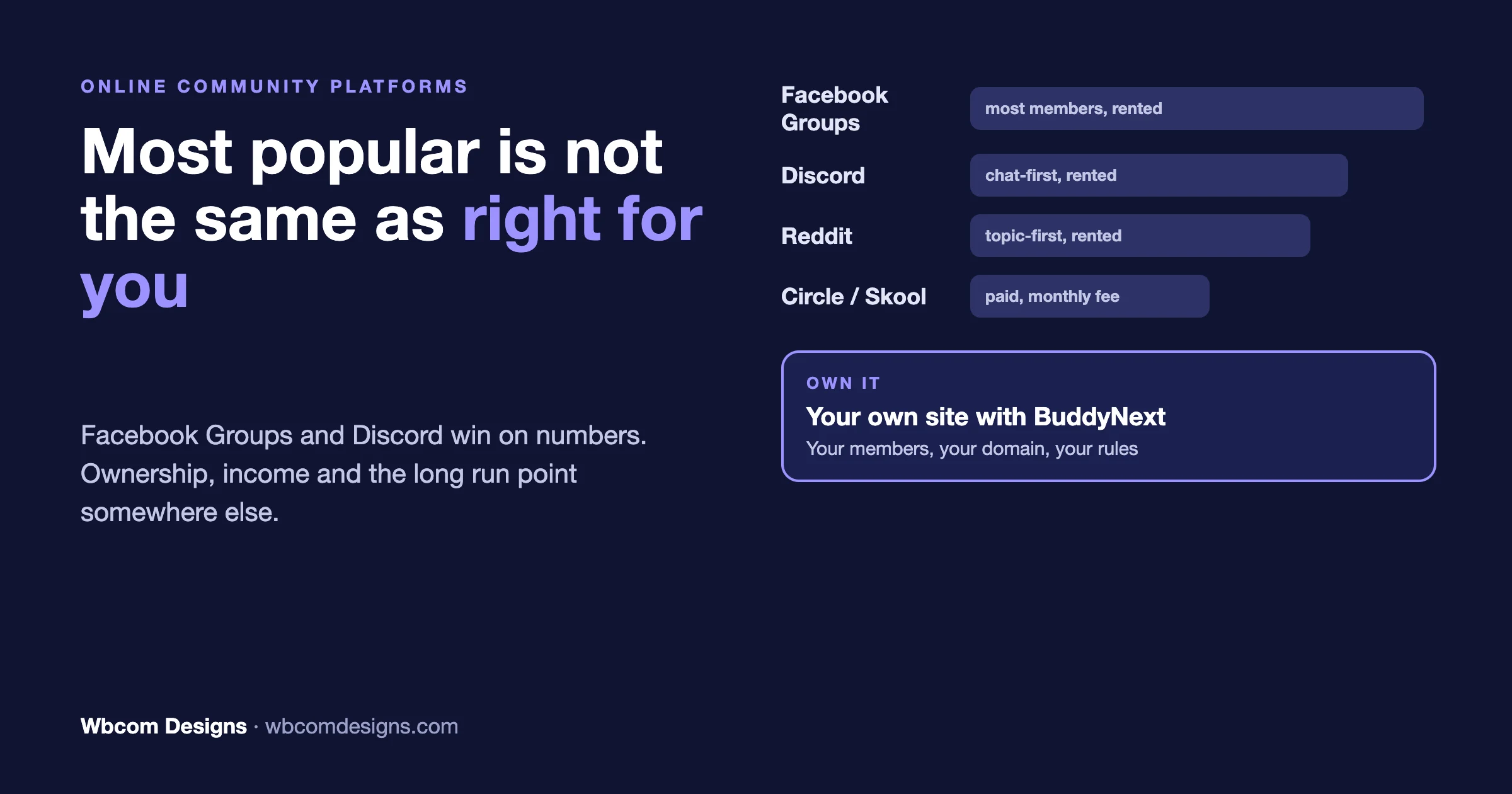
The most popular platform for an online community, by raw numbers, is Facebook Groups, with Discord close behind. Reddit itself is arguably bigger than both, if you count a subreddit as a community rather than a platform. But “most popular” and “right for you” are two different questions, and almost every thread asking this on Reddit ends up arguing about the gap between them instead of actually answering it.
Here’s the honest version, broken down by what you’re actually trying to do.
| Platform | Best for | What it costs you | Who owns the members |
|---|---|---|---|
| Facebook Groups | Local, hobby and parent groups reaching people who will not install anything new | Free | Meta. You cannot export member emails |
| Discord | Gaming, creator fandoms, real-time chat and voice | Free, optional paid boosts | Discord |
| Anonymous, topic-first discussion at scale | Free | Reddit and its moderators | |
| Slack | Professional and work-adjacent groups | Free tier with history limits, paid per member above that | Slack |
| Circle, Skool, Mighty Networks | Paid creator communities with courses and events | Monthly subscription for as long as the community runs, plus transaction fees on some plans | You own the content, but it lives on their servers and pricing |
| Your own WordPress site (BuddyNext) | Brand, customer, course and membership communities you plan to run for years | Free software, or a yearly or one-time Pro licence, plus hosting | You. Your database, your domain, your member list |
So What’s Actually Most Popular?
By sheer user count, nobody beats the free, general-purpose platforms people already have open. Facebook Groups is still the default for local businesses, parent groups, and hobby communities, anything that needs to reach people who aren’t going to download a new app. Discord is the default for gaming, creator fandoms, and any community that lives on real-time chat and voice. Reddit is the default for anonymous, topic-first discussion at massive scale, with zero setup cost to join. Slack covers professional and work-adjacent communities that feel more like a workplace than a hangout.
None of these were built as a “community platform” in the product sense. They’re general social infrastructure that communities happened to colonize because it was free and everyone was already there. That’s exactly why they dominate the raw numbers and almost never win a “what should I use” conversation among people actually building something.
Why “Most Popular” Isn’t the Same as “Best for You”
Ask that question with more context and the answer changes immediately. A creator monetizing a paid community and a teenager running a Minecraft server are not looking for the same thing, even though both technically run an “online community.”
Popularity answers “where are the most people already gathered.” It doesn’t answer “who owns this,” “can I charge for access,” “what happens if the platform changes its rules,” or “what does this look like in five years.” Those four questions matter more to anyone actually building a real community than the user count ever does.
What Do Most Businesses and Creators Actually Choose?
Once money, branding, or long-term ownership enters the picture, the field narrows fast. Circle and Mighty Networks dominate the creator-community space, both built specifically for memberships, courses, and discussion in one branded space. Skool has taken a big chunk of that market too, mostly on price and simplicity. Kajabi and Thinkific show up constantly for anyone running a course-first community rather than a discussion-first one. Membership plugins on WordPress are the other common route, which we compare in BuddyNext vs MemberPress.
All of them are SaaS. All of them bill monthly, forever, for as long as the community exists. That’s the trade nobody mentions in the pitch: you get a polished product on day one, and a rent payment with no end date.
What If You Don’t Want to Pay a Monthly Platform Fee Forever?
This is the question that doesn’t get asked enough, and it’s the one that actually matters most for anyone planning to run a community for years rather than months. A SaaS community platform bills every month for as long as the community exists, and several add a percentage of what you sell on top. Over three or five years that adds up to real money, which we work through plan by plan in what Mighty Networks, Circle and Skool really cost compared with WordPress. And the day you stop paying, your members, your history and your brand all live on someone else’s server.
The alternative is self-hosting: running the community on your own WordPress site instead of renting space from a platform. You install the software once, you own the database, and nobody can change your pricing or shut down your account.
Where BuddyNext Fits In
BuddyNext is the software most people reach for when they decide to go that route. You install it on your own WordPress site to build and run your own community platform: an activity feed with posts, polls and reactions, Spaces (open, private or secret groups), member profiles and a directory, direct messages, notifications, moderation, gamification and an installable app, all in the free version, on your own domain, with no monthly platform tax and no outside company able to touch it. Add Jetonomy when you want forums and Q&A with accepted answers. And and it doesn’t slow down as your membership grows.
It isn’t the most popular platform in raw user terms, and it was never going to be; Facebook Groups has a decade and a billion existing accounts on it. It’s the answer to a narrower, more important question: once you’ve decided you want to own your community instead of renting it, what do you actually install? For a full side-by-side against BuddyNext’s direct competitors, see BuddyNext vs BuddyBoss and the full 8 Best Community Platforms In 2026 comparison.
Pick by the kind of community you are building
The quickest way through the choice is to start from the community, not the software.
- A local group, a club or a parents’ network that needs zero friction. Facebook Groups. Everyone already has an account, and nobody has to learn anything new. Accept that you do not own the member list.
- A gaming group or a creator fandom that lives in chat and voice. Discord. Real-time conversation is what it does best.
- Open, anonymous discussion of a topic. A subreddit. Huge reach, almost no control.
- A paid community you want running this week with no technical work. A hosted platform such as Circle, Skool or Mighty Networks. You trade a monthly fee and some control for speed.
- A brand or customer community, a course community, an association, or anything you expect to run for years. Your own site. This is where ownership, search visibility and connecting the community to the rest of your business matter most.
Many communities move through these in order: a Facebook Group to test the idea, a hosted platform once people will pay, and their own site once the community is a real part of the business. Starting on your own site skips the two moves in the middle.
What you give up when the community lives on someone else’s platform
The cost of renting rarely shows up on day one. It shows up the day you want to change something.
- The member list. On Facebook and Discord you cannot export members’ email addresses, so you cannot reach your own community anywhere else.
- The history. Years of discussions, answers and introductions rarely export in a form you can bring somewhere new.
- Search traffic. Posts inside closed groups do not bring new people to you through Google. Public discussion on your own domain does, and every helpful answer keeps working for you.
- The rules. Pricing, features, algorithms and policies change on the platform’s schedule, not yours.
- The connection to your business. Your shop, courses, events and email list sit somewhere else, and members are different accounts in each place.
Can you earn money from the community?
Popularity and income rarely sit on the same platform. Where your community lives decides how you can charge for it and how much of each payment you keep.
- Free social platforms. Facebook Groups and Discord both offer some paid features for group owners, but they decide which countries, which formats and which share they take. The community is built to grow their platform first.
- Hosted community platforms. Charging for access is the core product, which is why creators choose them. The trade is the monthly fee, and on several plans a percentage of every sale on top of the payment processor’s fee.
- Your own site. You set the prices and keep the money apart from the payment processor’s fee. With BuddyNext Pro you can sell paid membership plans for Spaces and features, and the same site can sell courses, event tickets or products, so one member account covers everything they buy from you.
If income is part of the plan, decide that before you choose. Moving a paying community later is much harder than moving a free one, because every member has to sign up and pay again.
Moderation and safety: who decides
Every growing community eventually has to deal with spam, arguments and the occasional bad actor. The tools you have, and whose rules apply, depend on the platform.
- On Facebook, Discord and Reddit you moderate inside the platform’s own rules. Their policies can remove posts or whole groups, sometimes by automation, and appeals go through them, not you.
- On hosted community platforms you get admin tools designed for paid communities, within the limits of what the vendor builds.
- On your own site you write the rules. BuddyNext includes reporting, a moderation queue, member warnings and strikes with reasons, and blocking, and you decide who can post where. The responsibility is yours too, so plan who moderates before the community grows.
How to start a community on your own site
If you decide to own it, the setup is smaller than most people expect.
- Get WordPress hosting and a domain. A managed WordPress host keeps updates, backups and caching simple.
- Install BuddyNext. The free version gives you the feed, Spaces, profiles, messaging and moderation. Pro adds paid memberships, AI tools, broadcasts, analytics and real-time features from $149 a year, or a one-time lifetime licence, and every Pro feature keeps working even if the licence lapses (pricing).
- Create two or three Spaces, not twenty. A welcome Space, one for your main topic and one for announcements is plenty to start. Empty rooms make a community feel dead.
- Add what your members need, when they need it. Forums and Q&A with Jetonomy, courses with Learnomy, events and RSVPs with Eventonomy. They share the same member accounts.
- Invite your first fifty people personally. The first members set the tone for everyone after them. A personal invitation works better than an announcement.
If you would rather have it built and looked after for you, that is the work our team does: planning the community, setting it up on your own site and keeping it running.
Frequently Asked Questions
What’s the single most popular platform for an online community?
By raw numbers, Facebook Groups, with Discord close behind for anything chat-first. Neither was built specifically as a community platform; both just happen to be where everyone already is.
Is Discord or Facebook Groups better for a business community?
Facebook Groups reaches a broader, more mainstream audience with zero friction to join. Discord fits better for a younger, more active, chat-heavy audience. Neither gives you ownership of the member data or the ability to fully brand the experience.
What’s the cheapest way to run a community long-term?
Self-hosting on your own WordPress site. A SaaS platform’s monthly fee never stops; with BuddyNext you can run on the free version, or pay $149 a year or $399 once for Pro, plus hosting. Over a few years that is usually a fraction of a hosted platform’s fees.
Can I move my community off Discord or Facebook Groups later?
Not cleanly. Neither platform is built to export your member relationships, history, or activity in a usable way. That’s the real cost of starting on rented platforms: by the time you want to leave, leaving is expensive.
Is a WordPress community as easy to use as Facebook Groups?
For members, it can feel very similar: a feed, groups, profiles, messages and notifications, and BuddyNext installs as an app on phones. The difference is that people create one account on your site, which is a small step, in exchange for you owning the community.
Do I need a developer to run my own community?
Not to start. BuddyNext installs like any WordPress plugin and runs from its own settings screens. A developer becomes useful when you want custom design, integrations with other systems, or someone to handle updates and moderation tools for you.
Related reading