
16 min read
GTA 6 Is Here: How to Build a Home for Your Crew (Beyond Discord)


The wait is over, and every GTA crew is logging in. Grand Theft Auto VI went live at midnight local time, region by region, which put players in New Zealand at the front of the line and everyone else watching the clock. It is out on PlayStation 5 and Xbox Series X|S, according to Al Jazeera’s launch explainer. PC is not one of the launch platforms.
The numbers around it are loud. Review roundups have it opening at 99 on Metacritic, tied for the highest score the site has recorded, and Forbes reports over $1.5 billion in estimated pre-sales.
This post is not a review. If you run a crew, a clan or a gaming group of any size, launch week is when your people are most excited and least organised. Twenty new faces show up in the group chat. Someone asks when the first session is. Someone else posts a clip that scrolls out of view in an hour. The question we want to answer is a practical one: where does your GTA crew actually live, and is a chat server enough?
Our view, after building community software for a long time: keep voice where your crew likes it, and give the crew a home base you own. Here is what that looks like and how to set it up this week.
What this guide covers
- The launch in short, and the one detail that matters for crews
- Where GTA crews and gaming clans live today, and what keeps getting lost
- What Discord still does best (and why we would keep it)
- Six things a crew needs that a chat feed does not hold
- Building a gaming community website, screen by screen
- A seven-day setup plan for launch week
- Staying on the right side of the publisher
- FAQ
The launch in short, and the one detail that matters for crews
Three facts are worth knowing before you plan anything.
It is a single-player game at launch. Sony’s own PlayStation page for the game answers the multiplayer question directly: “Grand Theft Auto VI is a single-player experience.” Rockstar has not announced the name, the features or a date for an online mode. There are plenty of leaks and rumours about one. We are not going to repeat them, because none of them are confirmed.
It is big. Al Jazeera reports the main story at about 50 hours, full completion at up to 200, and a download that needs up to 212GB of free space. Your crew will be playing alone, on their own schedules, for weeks.
The crew is already forming. That is the part people miss. Crews do not wait for an online mode to exist. They form in group chats, comment threads and old servers during the single-player months, while everyone compares routes, swaps clips and argues about the map.
So the window in front of you is unusual. Nobody is grinding missions together yet. Your members have time and energy, and they want somewhere to put it. That makes launch week the best time to set up a home base, before the online rush, when moving everyone becomes much harder.
Where GTA crews and gaming clans live today
Most crews we see run on a patchwork that grew one tool at a time.
- A chat server for voice and banter, usually Discord.
- The in-game crew. In GTA Online, crews are set up through Rockstar’s Social Club, which gives you a tag, an emblem and a member list inside the game, but very little room for anything else.
- A group chat on a phone app for the core members.
- A subreddit or a social account for recruiting and showing off.
- A shared spreadsheet somebody made two years ago with the roster and ranks.
Each piece works. Together they leak. The roster in the spreadsheet does not match the member list in the server. The session times live in a pinned message that three people have edited. The best clip of the year is somewhere in a channel called #general, 40,000 messages up.
And none of it belongs to the crew. It belongs to whichever platform hosts it, under that platform’s rules.
What keeps getting lost
Ask any crew leader what they lose most often and you hear the same short list:
- Answers. “What’s the rule on friendly fire?” gets asked every week and answered every week.
- Dates. Session times posted in chat get buried under memes within the hour.
- Clips. The good stuff scrolls away, and nobody can find it for the end-of-year montage.
- People. Who joined when, who has which role, who has gone quiet. It lives in someone’s head.
That is not a Discord problem. It is a chat problem. Chat is built for now, and a crew also needs a memory.
What Discord still does best
Let’s be fair, because your members will be. For gamers, Discord is very good at the thing it was built for.
- Voice. Drop into a channel, talk while you play, leave. Nothing on a website matches that for low-friction party voice.
- Instant chat. Fast, familiar, and on everyone’s phone already.
- Screen sharing and streaming to friends during a session.
- Everyone already has an account. That alone is a big reason servers fill up quickly.
We would not tell a crew to give any of that up. The point of a home base is not to replace your voice channel. It is to put the roster, the calendar, the rules, the clips and the history somewhere searchable, organised and yours. Your crew still hops into voice where they like.
That said, a lot of gaming groups did start looking around in 2026. Discord confirmed in October 2025 that about 70,000 users had government ID images exposed through a third-party customer service provider, and in February 2026 it delayed its global age verification rollout to the second half of the year after user pushback. Discord says 90% of users will not need to verify. Even so, plenty of crews took it as a nudge to stop keeping everything in one rented room. We cover the full comparison in a separate post on choosing a Discord alternative for gaming communities.
Six things a crew needs that a chat feed does not hold
1. A real roster
Names, roles, platforms, time zones, gamer tags, join dates. A member directory you can search and filter beats a pinned message every time.
2. A calendar people can RSVP to
Heist nights, race meets, photo sessions, crew meetings. A date with a “going” button and a list of who is coming does more than a ping to @everyone.
3. Rules and answers that stay put
The crew code, the recruitment rules, the “how we split payouts” thread. These should be written once, searchable, and easy to link to.
4. A place for clips and screenshots
Albums per member, per event or per season, with privacy settings so the private stuff stays inside the crew.
5. Recognition
Crews run on reputation. Points for showing up, badges for milestones, a leaderboard for the weekly challenge. Small things, big effect on who keeps turning up.
6. Ownership
If the crew grows into a brand, with a name people know, a recruiting page and maybe a sponsor one day, the members and the history should be on a site the crew controls. Not on a platform that can change its rules overnight.
Building a gaming community website, screen by screen
Here is the setup we would use for a crew site. It runs on WordPress with a small family of plugins from Wbcom Designs, each doing one job: BuddyNext for the community, WPMediaVerse for clips and screenshots, Jetonomy for forums and Q&A, Eventonomy for sessions and meetups, and WB Gamification for points and badges.
A quick honesty note on the screenshots below. We have not built a gaming demo yet. These are real screens from our general community demo, so you will see photo walks and design critiques instead of car meets and heist crews. The captions say what each screen does and how a crew would use it.
If you want to see every one of these screens in motion first, the full walkthrough video is here. It runs about ten minutes.
The crew feed and spaces
BuddyNext gives the site a social feed, member profiles, a member directory, private one-to-one messages and moderation tools. Members post updates, photos and polls, and choose who sees each post.
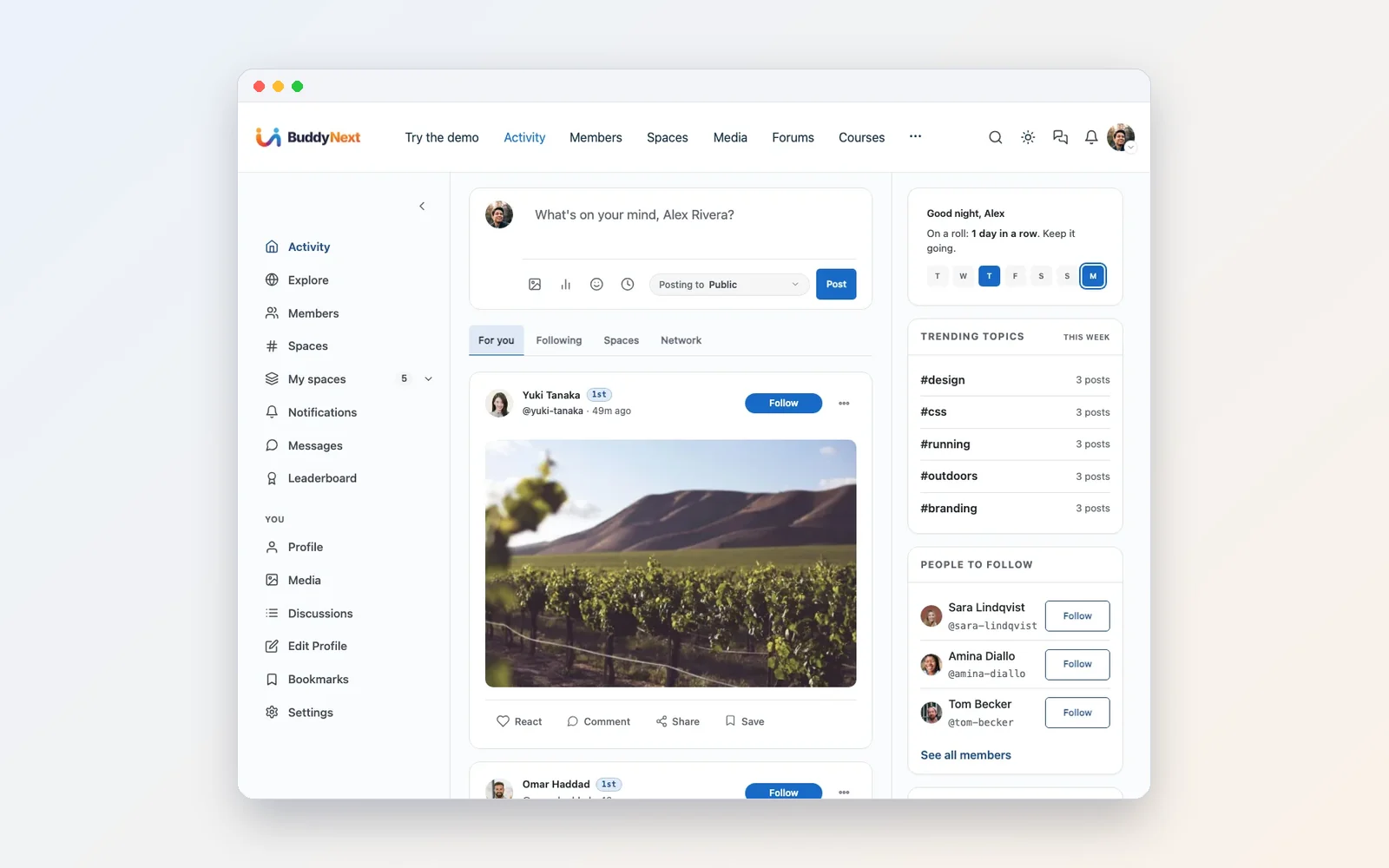
Spaces are where structure comes in. A space is a room with its own feed, members and roles. Some are open to anyone, private ones ask people to request to join and you approve each request, and secret ones are invite only.
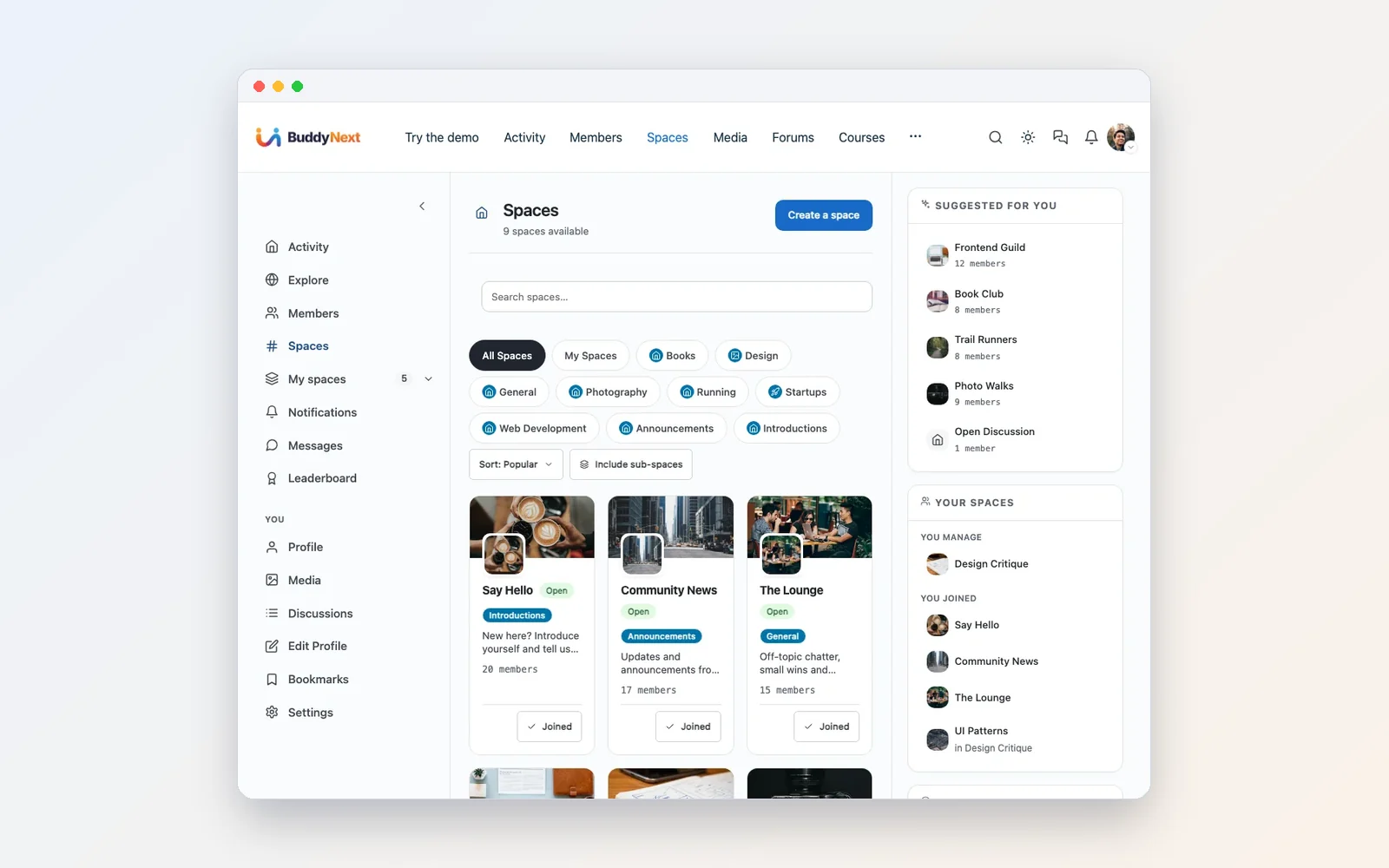
That three-tier pattern solves one of the oldest crew headaches. Recruits can hang out and get a feel for the group in the open space. Full members get the private room. Leadership talks in a room nobody else can see. And the request-to-join step means you decide who gets in, not a bot.
The roster: member directory and messages
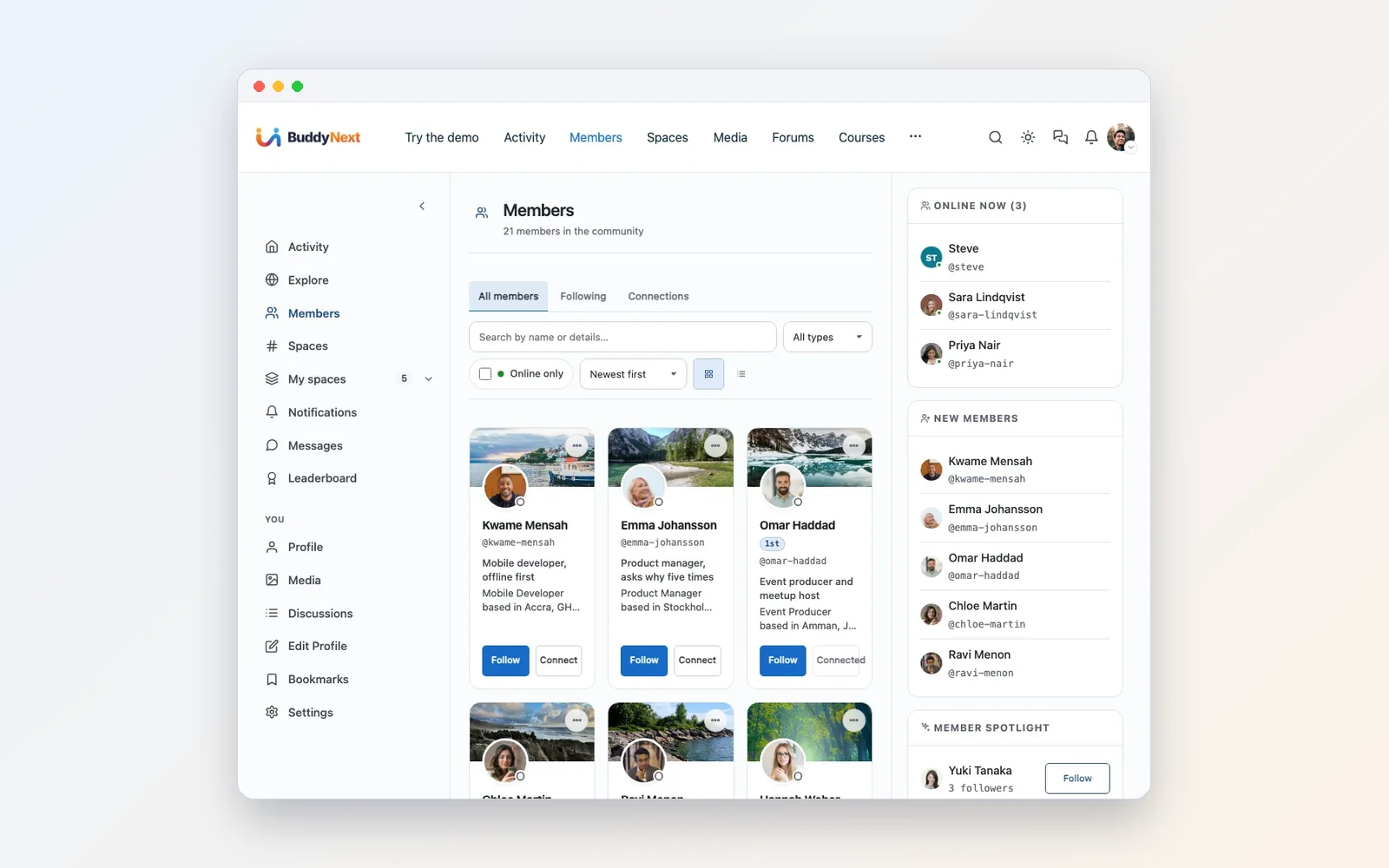
The directory can be searched and filtered, and sorted by recent, active or alphabetical. The owner can add custom profile fields. For a crew, add fields for platform, gamer tag, time zone and main role, and the directory becomes the roster spreadsheet, except it updates itself.
On the owner side there is an Export CSV button on the member list. That matters more than it looks. Your roster is a file you can take with you.

Messages are one to one, with photos shared inside the thread, and members can mute, block or report someone without waiting on you. On this stack, messaging runs on WPMediaVerse, and you switch it on or off in one place.
Clips and screenshots: WPMediaVerse
Gamers want to show their work. WPMediaVerse adds a proper gallery for photos and videos. Members upload from the front end, add a title, a description and tags, and pick who can see each item.
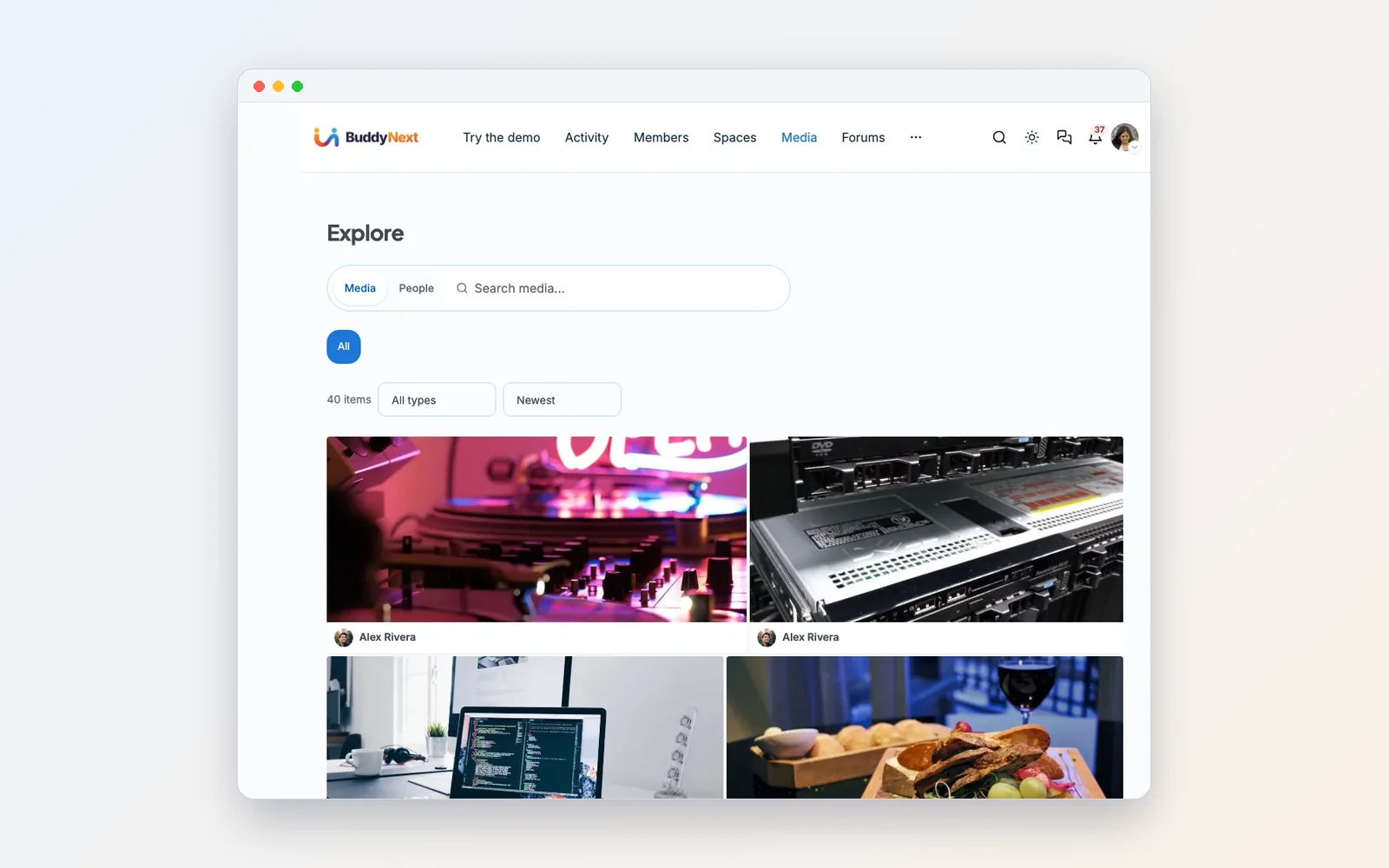

As the owner you set the allowed file types, the maximum upload size and how much storage each member gets, so one enthusiastic member cannot fill your hosting with raw footage. Reported uploads go to a moderation queue.
One practical tip for launch week: keep the gallery to captures your members made themselves. Ripped trailers and official artwork belong to the publisher, so leave those out.
Rules, guides and answers: Jetonomy
This is where a crew site pulls ahead of chat. Jetonomy adds forums, Q&A with accepted answers, idea boards and voting, and helpful members earn reputation.
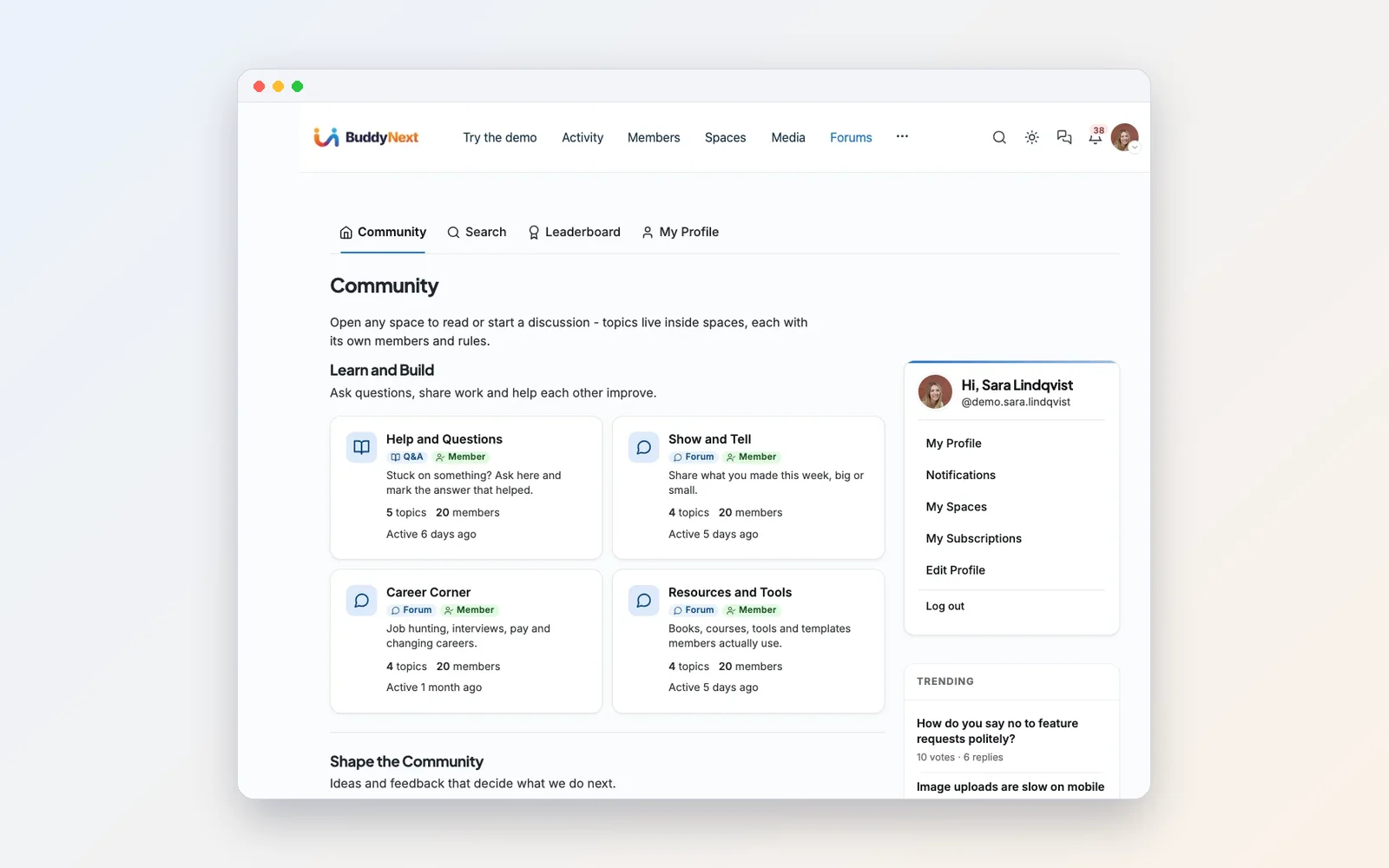
Think about the questions your crew will ask over the next month. Which order should we do things in? Where is a good spot for a car meet photo? What are the recruitment rules? In chat, each answer lasts a day. In a Q&A space, the best answer gets voted to the top and stays there, searchable, for the next person who asks.
Spaces can be public, private or hidden, with open, approval or invite join policies. So your public guides can help recruit, while your internal strategy stays inside.
Sessions and meetups: Eventonomy
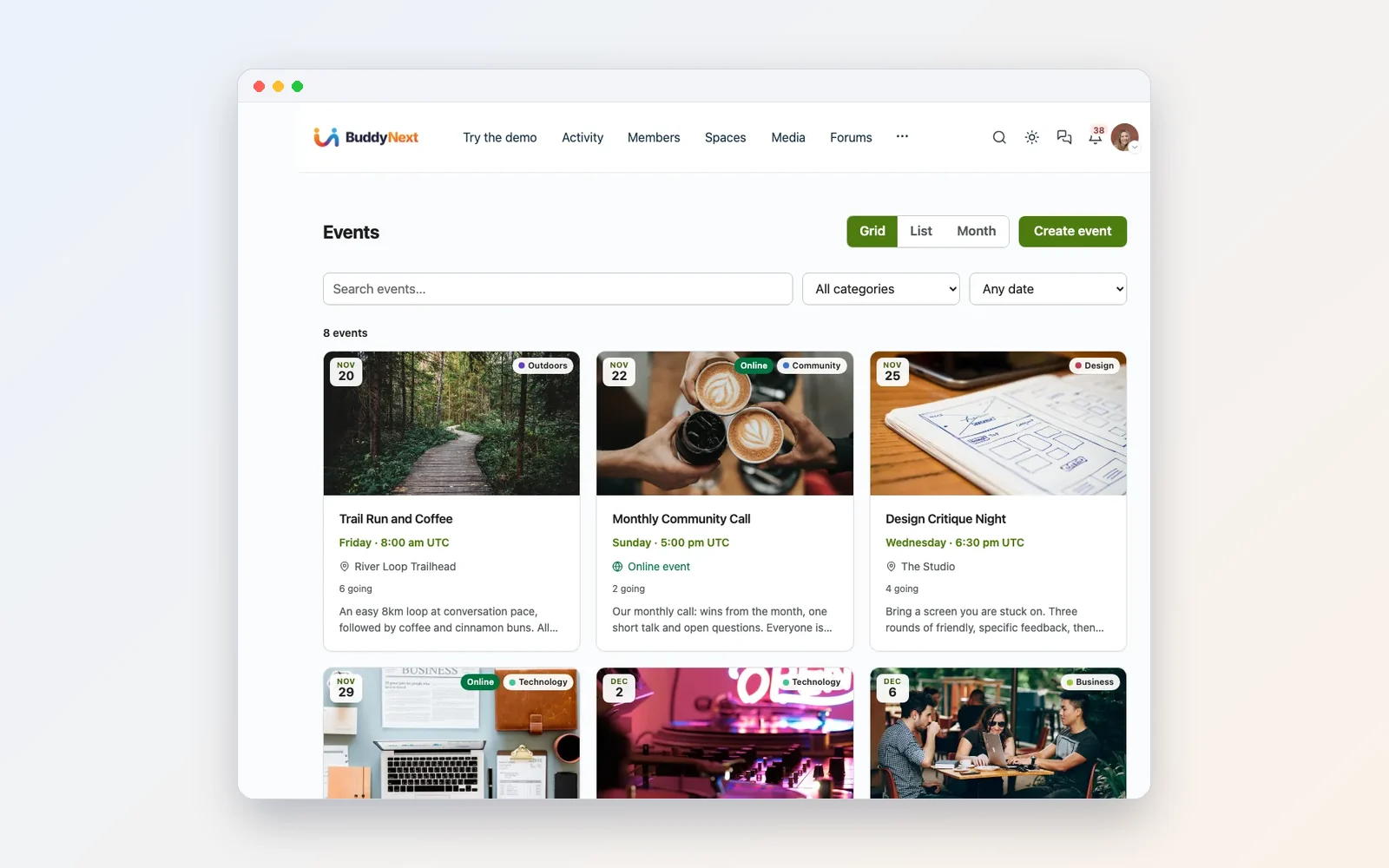

Members answer going, maybe or no in one click. You can cap the numbers, and a waitlist catches the overflow, which suits sessions with a fixed lobby size. Weekly or monthly series are built in, so a regular Friday race night is created once.
You can also let trusted members host their own events and set how many each person can create. That is how a crew grows without the leader running every night. A member who loves photo mode runs the monthly photo meet. Another runs the rookie night. You stay in control of who can host.
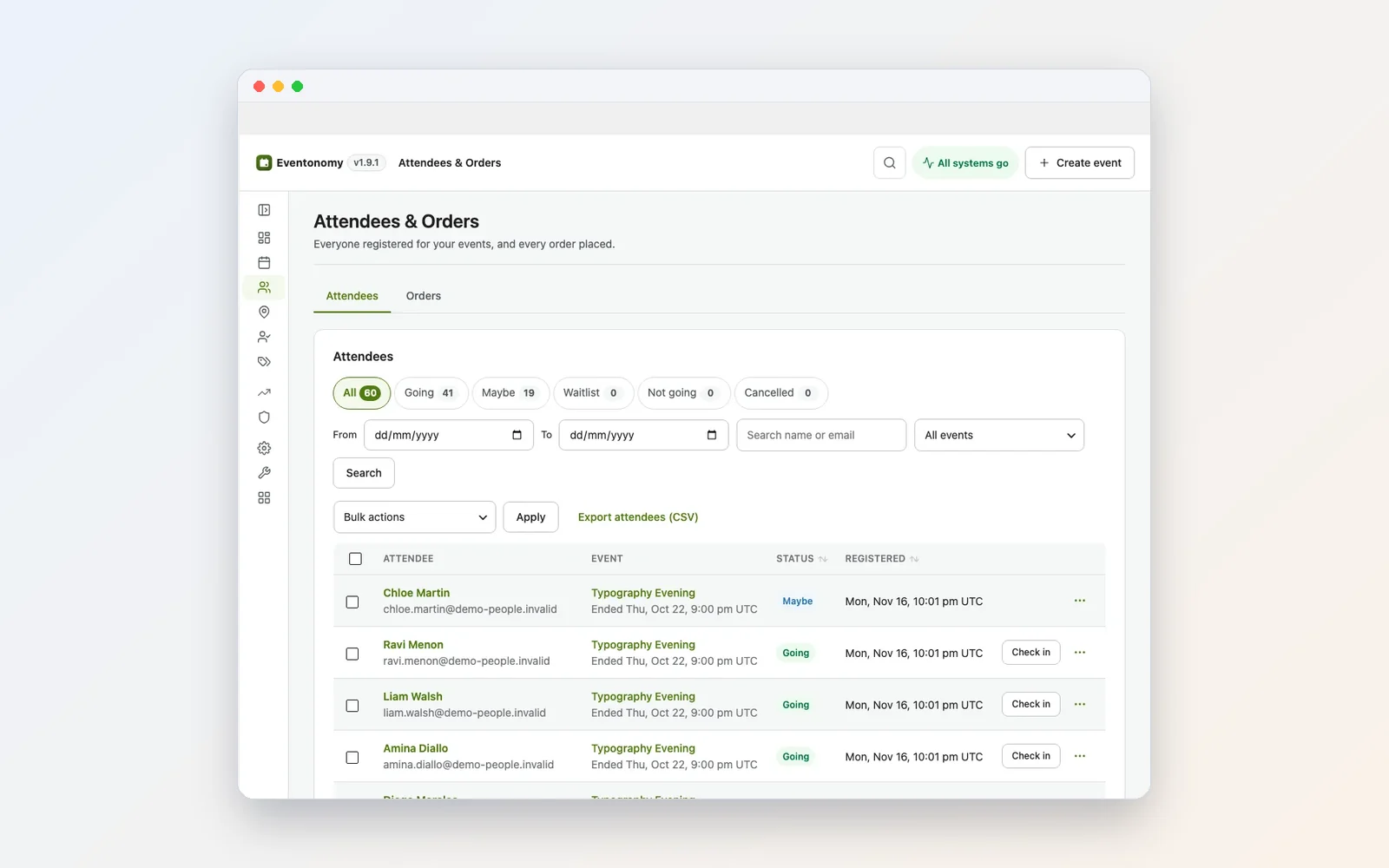
One tip: write the time zone in every event title or description. Crews spread across countries, and “8pm” means nothing without it.
Reputation and rewards: WB Gamification

Members earn points for posting, answering and joining events, and because everything sits on one site, it all counts toward one total. You set what each action is worth and add daily or weekly caps, so nobody farms points by spamming.

Badges award automatically, and you can hand out special ones yourself. A “Day One” badge for everyone who joins in launch week costs you nothing and people remember it. So does an “Event Host” badge for members who run sessions.
On phones, where your crew actually is

The whole site adapts to small screens, and BuddyNext has an optional bottom tab bar for phones. For a gaming group, that is the main way people will use it.
A seven-day setup plan for launch week
You do not need everything on day one. Here is a pace that works for a crew leader with a day job.
- Day 1: Get the site up. WordPress on hosting you choose, then BuddyNext. Apply the recommended settings and type in your crew name. If you want to see a full working setup first, the Wbcom Demo Installer builds a demo with sample members you can click through, then removes the samples when you are ready.
- Day 2: Open three spaces, not ten. Recruits (open), Members (private, request to join) and Officers (secret). Add more when people ask.
- Day 3: Write the crew code. Add Jetonomy and post your rules, recruitment process and FAQ before anyone arrives. Pin them.
- Day 4: Put the first session on the calendar. Add Eventonomy and create one event with a date, a cap and a clear time zone. A date gives people a reason to join now.
- Day 5: Open the clip wall. Add WPMediaVerse, set upload limits, and post three of your own clips so the gallery is not empty.
- Day 6: Turn on rewards. Add WB Gamification, set a few point values, and create the Day One badge.
- Day 7: Invite your core members first. Then post the link in your existing server. Do not move everyone at once. Let the site prove itself.
If you want a theme built for community sites, look at Reign. The plugins also work with the theme you already have.
Where voice fits
Keep your voice server. Put its invite link in a pinned post in the Members space, and add it to each event description so people know where to jump in when the session starts. The site holds the plan, the roster and the record. Voice handles the moment.
Over time you may find the server gets quieter outside session nights, because everything worth keeping now has a proper home. That is fine. That is the point.
Staying on the right side of the publisher
Take-Two and Rockstar protect their brands seriously. A crew site is a fan community, and it should look and act like one.
- Use your own name and logo. Build your brand around the crew, not the game. Do not use the publisher’s logos, key art or trailer footage as your branding.
- Share your own captures. Members’ own clips and screenshots are the heart of the gallery. Official artwork and ripped trailers stay out.
- Do not sell anything built on the game itself. Do not charge for access to modded servers, paid roleplay servers or in-game items. Read the publisher’s current policies before you try to make money from anything connected to the game.
- Make it clear you are unofficial. A line in your footer saying the site is a fan community, not affiliated with the publisher, is a good habit.
The good news: none of what makes a crew site useful depends on the publisher’s assets. The roster, the calendar, the rules, the rewards and your own clips are all yours.
Why build this now and not later
The single-player months are the calm before the online rush. Once an online mode exists, the crew will be busy playing, recruiting will spike, and moving everyone to a new home gets harder every week.
Set it up now and the site is already the place people check. The first session is on the calendar. The crew code is written. The Day One badges are handed out. When online arrives, you are not scrambling. You are recruiting.
And whatever happens to any chat platform next year, your roster, your history and your best clips stay on a site you own.
If you want the long version of the setup, with every settings screen, our guide on how to build an online community you own on WordPress walks through each plugin in detail. If your group already lives on Discord and you are weighing a full move, read what to expect when leaving Discord, Skool or Circle. And if you want your site to feel closer to a chat server, see how to build a Discord-style community platform on WordPress.
FAQ
Does GTA 6 have online multiplayer at launch?
No. The official PlayStation page describes Grand Theft Auto VI as a single-player experience, and Rockstar has not announced details of an online mode. Anything you read about online timing right now is a leak or a rumour.
Is GTA 6 on PC?
Not at launch. It released on PlayStation 5 and Xbox Series X|S.
How do I make a GTA crew?
In GTA Online, crews are created through Rockstar’s Social Club, which gives you an in-game tag, emblem and member list. Many crews pair that with a chat server for voice and a website for everything else: the roster, the calendar, rules and clips.
Why does a gaming crew need a website if we have Discord?
Discord is great for voice and instant chat. A website is better for the things that need to last: a searchable roster, events with RSVPs, rules and guides that do not scroll away, a clip gallery, and member data the crew controls. Most crews use both.
How do I make a gaming website for my clan?
Start with WordPress on hosting you choose, add BuddyNext for the community and member directory, then add Jetonomy for forums, Eventonomy for sessions, WPMediaVerse for clips and WB Gamification for points and badges as your group needs them.
Can members host their own sessions?
Yes, if you allow it. In Eventonomy you choose which members can create events, whether their events publish straight away or wait for review, and how many each member can create.
Can we keep some spaces private?
Yes. BuddyNext spaces can be open, private with request-to-join, or secret and invite only. Jetonomy discussion spaces can be public, private or hidden.
Can I host a GTA 6 server or roleplay server on this site?
No. This is a community website for your crew, not game server hosting. We also recommend against charging for access to anything built on the game itself, and suggest reading the publisher’s policies before monetising anything connected to it.
Give your crew a home base
The game is out. Your crew is forming right now, in a dozen places at once. Pick one place that is yours.
Start with BuddyNext, add Eventonomy for your first session, and grow from there. Keep voice where your crew likes it. Keep everything else where it can’t scroll away.
Related reading
- Discord Alternative Gaming Communities
- Build Online Community You Own Wordpress
- Discord Alternatives Wordpress Community Owners
- Buddynext 1 0 4 What it Takes to Ship a Community Platform People Actually Join
- Creating a Community With Buddyx The Ultimate Alternative to Discord
- Discord Style Community Platform Wordpress