
16 min read
Best Business Intelligence Tools for Small and Mid-Size Teams in 2026

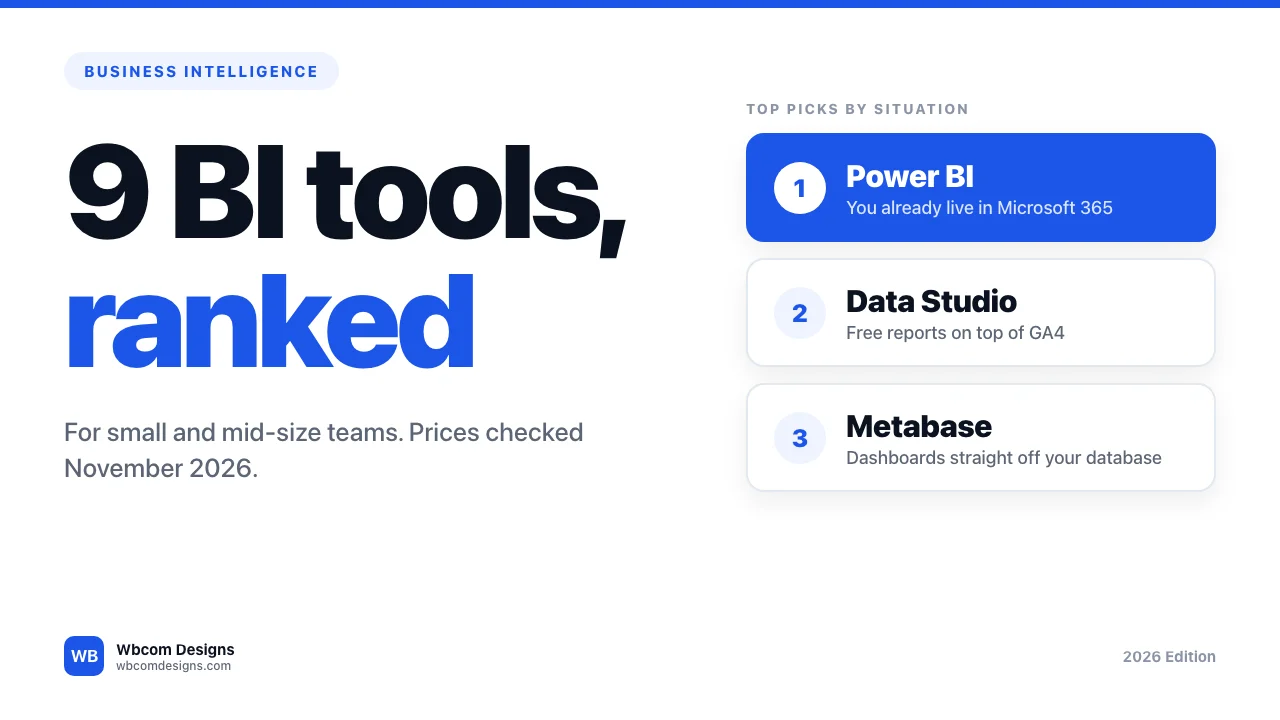
The best business intelligence tool for most small and mid-size teams is Power BI if you already pay for Microsoft 365, Data Studio (Google’s tool, formerly called Looker Studio) if you only need free reports on Google Analytics and ad data, and Metabase if you want dashboards straight off your own database. The other six tools below win in narrower cases. We checked prices and features on each vendor’s own pages in November 2026.
One note on method. We did not run hands-on tests of these tools. The ranking comes from vendor pricing pages, product docs and the limits each plan states in writing. Where a vendor’s page hid a price, blocked our access or contradicted itself, we say so instead of picking a number.
In this post
- What business intelligence is, and what it is not
- Why small teams are buying BI now
- How we picked
- The tools compared at a glance
- 1. Power BI
- 2. Data Studio (formerly Looker Studio)
- 3. Metabase
- 4. Zoho Analytics
- 5. Databox
- 6. Tableau
- 7. ThoughtSpot
- 8. Qlik Cloud
- 9. Apache Superset
- Pick by situation
- Mistakes that waste the licence
- Frequently asked questions
What Business Intelligence Is, and What It Is Not
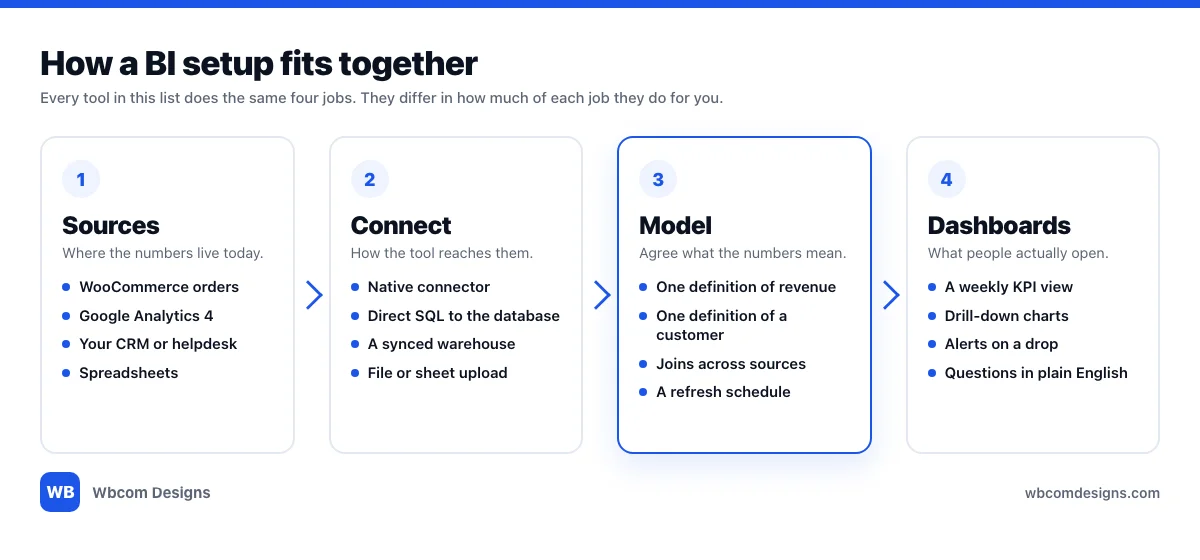
Business intelligence (BI) means pulling numbers out of the systems where they are created, such as your store, your CRM, your ad accounts and your website analytics, and putting them in one place where several people see the same figures. The output is a dashboard that updates itself.
That is different from a report, which is a fixed snapshot someone built last Tuesday. It is also different from analytics, which is open-ended digging by a person who knows the data. BI sits between the two. One person sets up the definitions, and everyone else reads the result.
Take a WooCommerce store. Orders live in WordPress. Traffic lives in Google Analytics 4. Ad spend lives in two ad platforms. Support tickets live in a helpdesk. None of those tools can tell you what a new customer cost you. A BI tool joins them. Every product in this list does that job, and they differ in how much of the joining they do for you.
Why Small Teams Are Buying BI Now
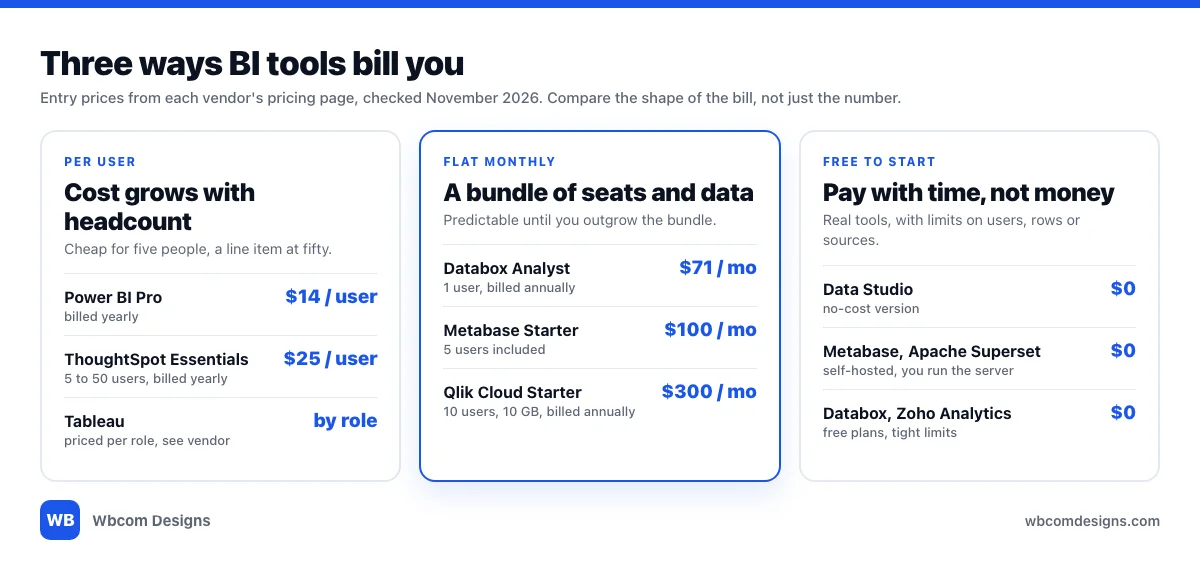
BI used to be a six-figure project with a consultant attached. The price of entry has collapsed. Power BI Pro is listed at $14 per user per month on Microsoft’s pricing page, Data Studio has a no-cost version, and Metabase’s open-source edition costs nothing to download.
The market keeps growing anyway. Meticulous Research projects that the global BI market will reach $56.9 billion by 2032, a 7.2% compound annual growth rate from 2025 to 2032, and expects cloud-based BI to lead deployment in 2025. That forecast was published in October 2024. Research firms disagree on the exact size because they draw the category boundary in different places, so read the number as a direction, not a measurement.
For a small team the practical point is simpler. The licences got cheap. The expensive part now is the time spent agreeing what “revenue” and “customer” mean.
How We Picked
Five criteria, in the order they tend to hurt a small team:
- Entry price and the shape of the bill. Per user, flat monthly or free. The shape matters more than the number.
- Time to a first useful dashboard. Can a non-engineer connect a source and have a chart by the end of an afternoon?
- Connectors for the data small teams actually have. GA4, a SQL database, WooCommerce, spreadsheets.
- Plain-English questions. Whether someone can type a question and get a chart, and on which plan.
- Limits that bite. Users, rows, data size, refresh frequency.
Prices below are entry prices in US dollars from each vendor’s page. The next graphic shows how the three billing shapes differ.
The Tools Compared at a Glance
Verified November 2026 against each vendor’s pages. A cell that says “see vendor” means the page hid the figure or blocked our access.
| Tool | Best for | AI or plain-English questions | Starting price | Free option | Verified |
|---|---|---|---|---|---|
| Power BI | Microsoft 365 teams | Copilot listed; plan coverage unclear | $14 per user per month, billed yearly | Free account to build, not share | Nov 2026 |
| Data Studio | Free GA4 and ads reporting | Gemini, on Pro | Free; Pro is per licence, see vendor | Yes | Nov 2026 |
| Metabase | Dashboards from your own database | AI questions on your chosen model, all plans | $100 per month, 5 users included | Open source | Nov 2026 |
| Zoho Analytics | Zoho users and WooCommerce stores | Ask Zia, with monthly credits on paid plans | See vendor | 2 users, 10K rows | Nov 2026 |
| Databox | Marketing KPI dashboards | AI analyst on every plan | $71 per month, billed annually | 1 user, 3 sources | Nov 2026 |
| Tableau | Deep visual analysis by analysts | See vendor | Per role, see vendor | See vendor | Nov 2026, partial |
| ThoughtSpot | Asking questions in plain English | Natural-language search and Spotter agents | $25 per user per month, billed annually | Trial only | Nov 2026 |
| Qlik Cloud | Mid-size teams with more data | Answers Agents on every plan | From $300 per month, 10 users | None listed | Nov 2026 |
| Apache Superset | Teams with an engineer and a server | None documented | Free software, you pay for hosting | Yes, open source | Nov 2026 |
1. Power BI: Best for Teams on Microsoft 365
Best for. Teams that already live in Excel, Teams and SharePoint, where Microsoft is already on the invoice.
Key features. You can build interactive reports with a free Power BI account, but sharing them needs a Pro or Premium licence. Pro is bundled into Microsoft 365 E5 and Office 365 E5, which makes it close to free if you are on those plans. Premium Per User adds larger models and more frequent refreshes. Microsoft’s pricing page lists Copilot as a feature but does not make clear which plans include it, so check before you count on it.
Limits. The free account stops at building. Embedded analytics and Fabric capacity are priced by usage or quote, not by seat, and are a different buying decision from the per-user plans.
Pricing. Pro is $14.00 per user per month, paid yearly. Premium Per User is $24.00 per user per month, paid yearly. Microsoft notes that prices can differ by country and currency.
Verdict. The default when Microsoft already runs your office. Outside that world it has no special edge over the cheaper options below.
2. Data Studio (Formerly Looker Studio): Best Free Option for Marketing Reports
Best for. Reports on Google Analytics 4, ad accounts and spreadsheets, for people who do not want to host anything.
Key features. Google’s documentation now says “Looker Studio is now called Data Studio,” so articles written a year ago and your own colleagues may still use the old name. The no-cost version connects to GA4 and to MySQL. For GA4 you need at least Read and Analyze permission on the property. Data Studio Pro adds team workspaces, up to 200 delivery schedules per report, delivery to Google Chat, and Gemini features that let people ask questions about their data and build calculated fields from plain-English prompts.
Limits. The GA4 connector does not support segments or comparisons, and reports are subject to GA4 Data API quotas. The MySQL connector reads one table or one custom query per data source, caps each query at 150K rows and cuts off the rest, and cannot reach localhost, so the database needs a public host. Joins across sources take extra work.
Pricing. The no-cost version is free. Pro is billed monthly per licence, with a 30-day trial. Google’s documentation does not state the amount, so see Google’s pricing page.
Verdict. Start here if your questions are mostly “how is the site doing.” Move on when you need to join several sources or pull more than 150K rows from a database.
3. Metabase: Best for Dashboards Straight From Your Database
Best for. Teams with a SQL database, including a WordPress MySQL database, who want everyone reading the same numbers.
Key features. Metabase lists official connectors for MySQL, MariaDB, PostgreSQL and BigQuery, and 29 data sources in total (18 official, 11 community). People can click through the data or write SQL. AI questions on the model of your choice are listed on every plan, including open source. If you use Metabase’s own AI service instead, it costs $3.75 per million tokens, with the first million included.
Limits. GA4 is not a direct source. Metabase’s FAQ says to sync it into a database or warehouse first. Google Sheets sync only on Cloud plans with Storage. Self-hosting means you run, patch and back up the server. On WordPress, connect with a read-only database user, and expect to write some SQL, because WooCommerce order data sits in WordPress tables rather than a tidy reporting schema.
Pricing. Open source is free with unlimited users. Starter is $100 per month with 5 users included and $6 for each extra user. Pro is $575 per month with 10 users included and $12 for each extra user. Both paid plans have a 14-day trial, and yearly billing takes about 10% off. Enterprise starts at $20,000 a year.
Verdict. The best value for a team that has a database and one person who can write SQL. Skip it if your data lives only in SaaS tools with no warehouse behind them.
4. Zoho Analytics: Best for Zoho Users and WooCommerce Stores
Best for. Businesses already on Zoho, and WooCommerce store owners who want sales dashboards without writing SQL.
Key features. Zoho’s “Advanced Analytics for WooCommerce” connector comes with 75+ pre-built reports and dashboards, and Zoho says it is included for paid Zoho Analytics users who also run WooCommerce (or Zoho CRM Plus or Zoho One). The first import can take anywhere from a few minutes to a couple of hours. Ask Zia, the AI assistant, runs on monthly credits on paid plans: 10K a month on Basic and 20K on Standard.
Limits. The free plan allows 2 users, 10K rows and 5 workspaces. Paid plans scale by rows and seats: Basic has 2 users and 0.5M rows, Standard 5 users and 1M rows, Premium 15 users and 5M rows, Enterprise 50 users and 50M rows. Extra users and rows are add-ons.
Pricing. When we loaded Zoho’s pricing page it showed no amounts, so we cannot quote a plan price. A Zoho help page uses $60 a month for Standard and $145 for Premium in its billing examples, and Zoho’s own pages disagree on the yearly discount, 20% in one place and 10% in another. Check the live page before you budget.
Verdict. The quickest route from WooCommerce orders to a working dashboard. Less appealing if you do not otherwise use Zoho.
5. Databox: Best for Marketing KPI Dashboards
Best for. Marketing teams and agencies that want one screen of KPIs from ads, analytics and ecommerce.
Key features. The free plan is a real one: $0, no time limit, 1 user, 3 data sources, 1 dashboard and daily sync. Databox’s AI analyst, called Genie, is listed on every plan. The WooCommerce integration connects through WooCommerce’s REST API, so you generate a consumer key and secret in your store and paste them into Databox. It pulls the same revenue and order figures you see in WooCommerce Analytics.
Limits. Data sources are capped per plan, from 3 on free up to 30 on Team Scale, and some WooCommerce metrics are missing because the WooCommerce API does not expose them. This is a scorecard tool, not a place to model messy data.
Pricing. Analyst is $71 per month billed annually, with 1 user and 5 sources. Databox’s own pages disagree on the higher plans: Team Core is $199 on the pricing page and $249 in the FAQ, and Team Scale is $319 against $399. Prices are in USD, billing is monthly or annual, and there is a 14-day trial.
Verdict. A good fit when the output is a weekly KPI view for a manager or a client. Look elsewhere if you need to join tables.
6. Tableau: Best for Deep Visual Analysis
Best for. Teams with analysts who will build the views for everyone else.
Key features. Tableau prices by role, with Creator, Explorer and Viewer licences, each billed per user per month. Creators build, Explorers work with published data and Viewers read.
Limits. Tableau’s pricing page returned an access error to our automated fetch, so we could not read it directly and could not confirm its AI features either. Excerpts of the page that appear in search results show Standard edition at $75 for Creator, $42 for Explorer and $15 for Viewer per user per month, billed annually, and they also say a deployment needs at least one Creator licence. Treat those numbers as unconfirmed until you load the page yourself.
Pricing. Per role. See the vendor.
Verdict. It is the tool analysts ask for by name, and the role-based bill suits a team where two people build and many people read. For a team of five who all want to build, it gets expensive quickly.
7. ThoughtSpot: Best for Asking Questions in Plain English
Best for. Teams where most people will never learn a chart builder and just want to type a question.
Key features. ThoughtSpot’s Pro plan lists AI-powered dashboards, automated insights, natural-language search and Spotter AI agents. ThoughtSpot says it does not meter or charge for LLM tokens.
Limits. The Essentials card lists dashboards and insights but not Spotter or natural-language search, so the plain-English part may sit on Pro. On the per-user model, Spotter agents are capped at 25 queries per month per user. There is no separate free plan, only a “Try for free” trial.
Pricing. Essentials is $25 per user per month billed annually, for 5 to 50 users and up to 25M rows. Pro is $50 per user per month billed annually, for up to 1,000 users and 250M rows. A usage-based option is listed at $0.10 per credit. Enterprise is custom.
Verdict. Worth a trial if “ask a question, get a chart” is the whole point. Confirm which plan includes the search feature before you sign.
8. Qlik Cloud: Best for Mid-Size Teams With More Data
Best for. Mid-size teams that expect data volume to grow and want governed analytics with AI built in.
Key features. Qlik prices by capacity rather than by seat. Starter has a fixed 10 GB of data and Standard has 25 GB, with no cost for additional users. Premium adds predictive analytics powered by automated machine learning. Qlik lists Answers Agents on every plan.
Limits. Starter’s 10 GB is fixed and Qlik does not sell more capacity on that plan, so you upgrade when you hit it. The page does not state a user limit for Premium. Charges apply only if you go over your plan’s capacity.
Pricing. Starter is from $300 per month for 10 users, billed annually. Standard is from $825 per month for 25 GB. Premium is from $2,750 per month for 50 GB. Enterprise is by quote and starts at 250 GB.
Verdict. Reasonable once you have more than a handful of sources and several departments reading them. Too much for a five-person team that only needs GA4 and sales figures.
9. Apache Superset: Best Free Option if You Have an Engineer
Best for. Teams with a developer or sysadmin who can run a server.
Key features. Superset is open source under the Apache-2.0 licence. It has a no-code chart builder, a web-based SQL editor, a lightweight semantic layer, a caching layer, security roles and a REST API. It can query any SQL data engine that has a Python DB-API driver and a SQLAlchemy dialect, and it ships with a Docker Compose quickstart, an official Docker image and a Helm chart.
Limits. The project’s README does not mention AI or natural-language querying. You host it, secure it, upgrade it and answer the pager when it falls over.
Pricing. The software is free. Hosting and engineering time are not.
Verdict. A free licence is not a free tool. Choose it when a developer already wants to run it, or when per-seat pricing would be a problem at your headcount.
Pick by Situation
Find the sentence that sounds like your team, then start with that tool’s free tier or trial before paying for anything.
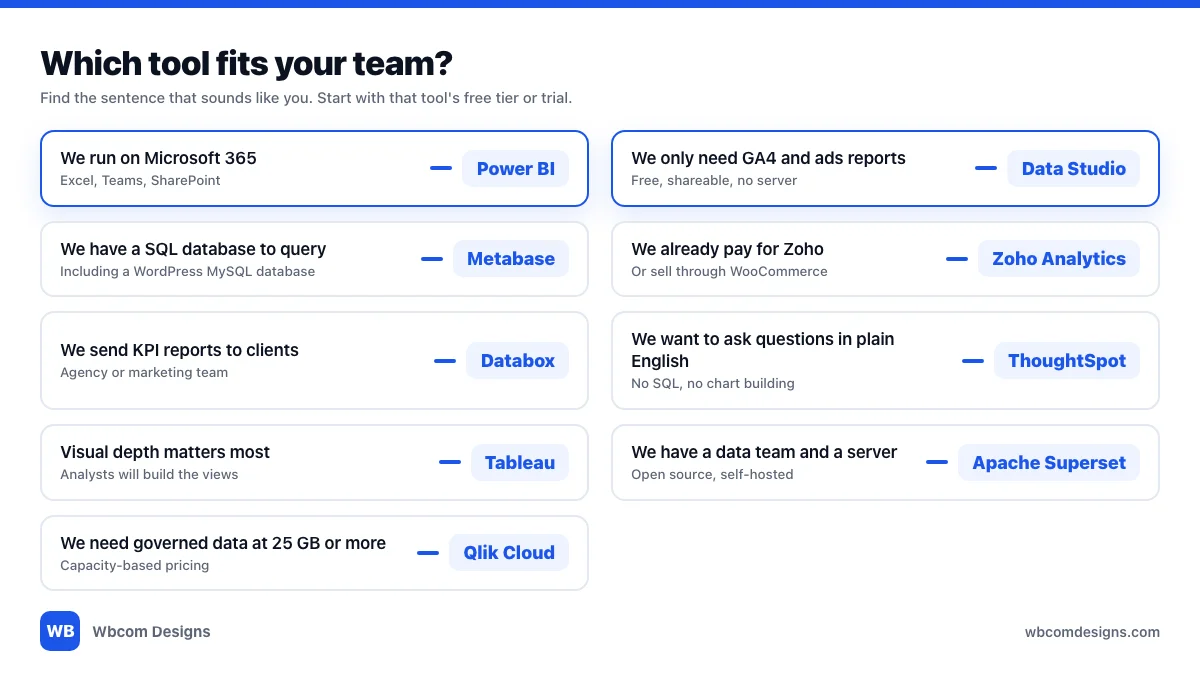
Two rules cut through most of the list. If nobody on your team writes SQL, pick a tool with native connectors for your sources: Data Studio, Zoho Analytics, Databox or Power BI. If you have a database and one person who does write SQL, Metabase or Superset give you the most for the least money.
If your numbers mostly describe a sales pipeline, a CRM’s own reporting may be enough for the first year. We compare those in our guide to the best CRM tools and the best WordPress CRM plugins.
Mistakes That Waste the Licence
Buying before you define five numbers. Write down revenue, new customers, cost per customer, churn and one more that matters to you, with the exact formula for each. The tool applies definitions. It cannot invent them.
Building forty dashboards. Build one. If people open it every Monday, build a second.
Ignoring the shape of the bill. A per-user tool looks cheap for the five people who build charts and gets pricey the day you invite the whole company.
Connecting a live database with an admin login. Create a read-only database user for BI and give it only the tables it needs. This matters most on a WordPress site, where the same database holds user accounts.
Trusting an AI answer without checking the definition. A plain-English question still runs on someone’s formula. Ask to see the query or the field behind the number.
Missing the row cap. Zoho’s free plan stops at 10K rows. Data Studio’s MySQL connector cuts off at 150K rows per query. Check the cap against your largest table before you build on it.
If the numbers you care about come from lead flow, our five-stage AI lead generation system lists the four metrics worth tracking at each stage.
Frequently Asked Questions
What is the best business intelligence tool for a small business?
For most small businesses, Power BI if you already use Microsoft 365, Data Studio if you mainly report on Google Analytics and ads, and Metabase if you have a database and someone who can write SQL. All three have a free way to start.
Is there a free business intelligence tool?
Yes. Data Studio has a no-cost version, Metabase and Apache Superset are open source, and Zoho Analytics and Databox both have free plans with tight limits on users, rows or data sources. Open-source tools are free to license but cost you hosting and maintenance.
What is the difference between business intelligence and analytics?
BI gives a group the same recurring view of the numbers, usually as dashboards. Analytics is open-ended investigation by someone who knows the data, often to answer a one-off question. Small teams use BI for the weekly picture and analytics when the picture looks wrong.
Can I connect a BI tool to WordPress or WooCommerce?
Yes, three ways. Zoho Analytics has a WooCommerce connector with 75+ pre-built reports. Databox connects through the WooCommerce REST API with a consumer key and secret. Metabase and Data Studio can read the WordPress MySQL database directly, which needs a database host the tool can reach and, for safety, a read-only user. Check your host’s policy on remote database connections first.
Do I need a data warehouse?
Not to start. A BI tool can read straight from your source systems or a single database. A warehouse starts to pay off when you join many sources, hit row limits or need history that your source systems do not keep.
Is Looker Studio the same as Data Studio?
Yes. Google’s documentation says “Looker Studio is now called Data Studio.” Many articles and some Google pages still use the old name, and the paid tier is now Data Studio Pro.
How much does BI cost for a team of ten?
Using the entry prices above, before tax: Power BI Pro is 10 x $14, or $140 a month, billed yearly. ThoughtSpot Essentials is 10 x $25, or $250 a month. Metabase Starter is $100 plus 5 extra users at $6, or $130 a month. Qlik Cloud Starter is $300 a month for 10 users. We left out Zoho Analytics and Tableau because we could not confirm their prices.
Do AI features make BI easier?
They make asking easier. Several tools now let you type a question and get a chart. They do not remove the need to define your metrics, and the AI features sit on different plans in different tools, so check the plan before you rely on one.
Pick the cheapest tool that connects to the data you already have, build one dashboard, and see whether anyone opens it. That tells you more than any feature list.
Want your WordPress or WooCommerce data in a place a BI tool can read? Wbcom Designs builds and supports WordPress sites for businesses that need the plumbing done properly.
Interesting Reads:
Related reading