
17 min read
Twenty Years of Corporate Training Content, One Upload Away


A lot of the compliance training and corporate onboarding content in the world isn’t sitting in a modern course builder. It’s sitting in SCORM packages, zip files built years ago in Articulate Storyline, Adobe Captivate, or an LMS that’s since been retired, each one carrying its own interactive slides, quizzes, and completion logic baked in. That content works. It was expensive to build. And for a huge number of organizations moving to a new LMS, the honest question isn’t “should we rebuild all of this,” it’s “does the new platform actually play what we already have.”
This is the specific problem Learnomy’s SCORM support is built to solve, and it’s worth being precise about what that actually means, because “SCORM support” is a phrase that gets used loosely across the LMS market, sometimes meaning full playback and grade tracking, sometimes meaning barely-functional file storage with no real integration into the rest of the platform.
The stakes for getting this wrong are higher than they might look at first. A compliance training library isn’t just content, it’s often a legal or contractual obligation. Organizations track who completed mandatory safety or harassment training, by when, with what score, because a regulator, an insurer, or a court might eventually ask for that record. An LMS migration that quietly loses or misreports that completion data isn’t a minor bug; it’s a compliance gap with real consequences. That’s the actual weight behind a feature that, on the surface, looks like nothing more than a file-upload field.
Table of Contents
- The student experience: a sandboxed player, not a foreign object
- What SCORM actually is, and why it’s still relevant
- How Learnomy actually integrates it, according to its own code
- Where the completion data actually goes
- The Pro Tools hub: where SCORM reporting actually lives
- Security, quietly, because a SCORM zip is untrusted input
- What a careless SCORM implementation looks like, by comparison
- Part of a bigger standards story
- What actually gets replaced, and what doesn’t
- Three real situations this solves
- Common questions before you rely on this
- What to check before betting a migration on this
- How this connects to the rest of a real migration
- A checklist for evaluating SCORM claims on any LMS, not just this one
The student experience: a sandboxed player, not a foreign object
From a learner’s side, a well-integrated SCORM lesson should feel like just another lesson in the course, not a jarring handoff to a different system. Learnomy’s own description of the runtime, “learners play the package in a sandboxed runtime”, is the technical detail behind that experience. A sandboxed runtime means the SCORM package’s HTML, JavaScript, and media run in an isolated context within the lesson page, communicating with Learnomy only through the standardized SCORM API contract (the CMI data model referenced earlier), rather than having free rein over the surrounding page. That isolation is both a security boundary, the SCORM content can’t reach outside its sandbox to interfere with the rest of the site, and a consistency guarantee, since the package only ever talks to Learnomy through the one well-defined interface every SCORM-compliant LMS is supposed to support.
For the student, the practical result is that a SCORM lesson sits in the curriculum sidebar exactly like a video or text lesson, gets marked complete through the same visual progress indicators, and counts toward the same course-completion percentage, the packaging format underneath is invisible to them. That invisibility is the actual goal. A student shouldn’t need to know or care that a specific lesson happens to be a SCORM package rather than a native video; they should just experience one consistent course.
What SCORM actually is, and why it’s still relevant
SCORM, Sharable Content Object Reference Model, is an old but still heavily used e-learning packaging standard. A SCORM package is a self-contained zip file: HTML, JavaScript, media assets, and a runtime API contract that lets the package talk to whatever LMS is hosting it, reporting back completion status and quiz scores through a standardized interface. It was built specifically so training content wouldn’t be locked to one vendor’s platform, build it once, and any SCORM-compliant LMS can host it.
That portability is exactly why so much corporate and institutional training still exists as SCORM packages today. A compliance course built five years ago for one LMS should, in principle, work on a completely different one, without anyone touching the original content. Whether that promise actually holds depends entirely on how carefully the new platform implements the runtime side of that contract, and that’s where a lot of “SCORM support” claims quietly fall short.
How Learnomy actually integrates it, according to its own code
Learnomy’s SCORM module isn’t a bolted-on file uploader. Its own internal description states the design directly: SCORM is implemented as a lesson content-type, meaning uploading a SCORM package is one specific answer to the same question every other lesson answers (“what kind of content is this lesson”), sitting right alongside video, text, PDF, and the other content types covered in the course builder article elsewhere in this series. That’s a meaningfully different architecture than treating SCORM as a separate, bolted-on subsystem with its own disconnected reporting. A SCORM lesson lives in the same curriculum structure, the same sections, the same course, as every other lesson type.
The module is also explicitly described as authorable from three different places: the wp-admin lesson editor for admins, the Pro front-end builder for instructors working without backend access, and the REST API for anyone integrating programmatically. Whichever door an instructor happens to use to build a course, uploading a SCORM package works the same way through all three.
Where the completion data actually goes
The detail that separates real SCORM support from a file-hosting gimmick is what happens after a student finishes the package. Learnomy’s own code comment on this is specific: learners play the package “in a sandboxed runtime and CMI completion/score flow through the existing Progress pipeline.”
Unpack what that sentence is actually promising. “CMI” refers to the SCORM runtime’s standard data model, the interface a SCORM package uses to report back what a learner did: did they complete it, what score did they get, how far did they get before closing the window. The claim here is that this data doesn’t stay trapped inside the SCORM player as a separate, disconnected number, it flows into the same Progress pipeline that every other lesson type in Learnomy uses to determine completion.
That matters enormously for anything built on top of completion data elsewhere in this series. A course that mixes a few SCORM-packaged compliance modules with ordinary video lessons and quizzes still produces one unified completion percentage, one unified entry on the analytics dashboard, one unified trigger for a certificate. Without that integration, a SCORM lesson would be an island, technically playable, but invisible to the completion tracking, the analytics dashboard, and the certificate system that make the rest of the platform useful. “SCORM completion flows into the one progress pipeline” is the specific architectural claim that keeps a SCORM-heavy course from becoming a second, disconnected LMS living awkwardly inside the first one.
The Pro Tools hub: where SCORM reporting actually lives
Learnomy surfaces its less-frequently-used Pro features through a dedicated hub rather than cluttering the main sidebar with every possible menu item. Here’s that real screen, with SCORM Tracking listed alongside the other advanced features covered elsewhere in this series:
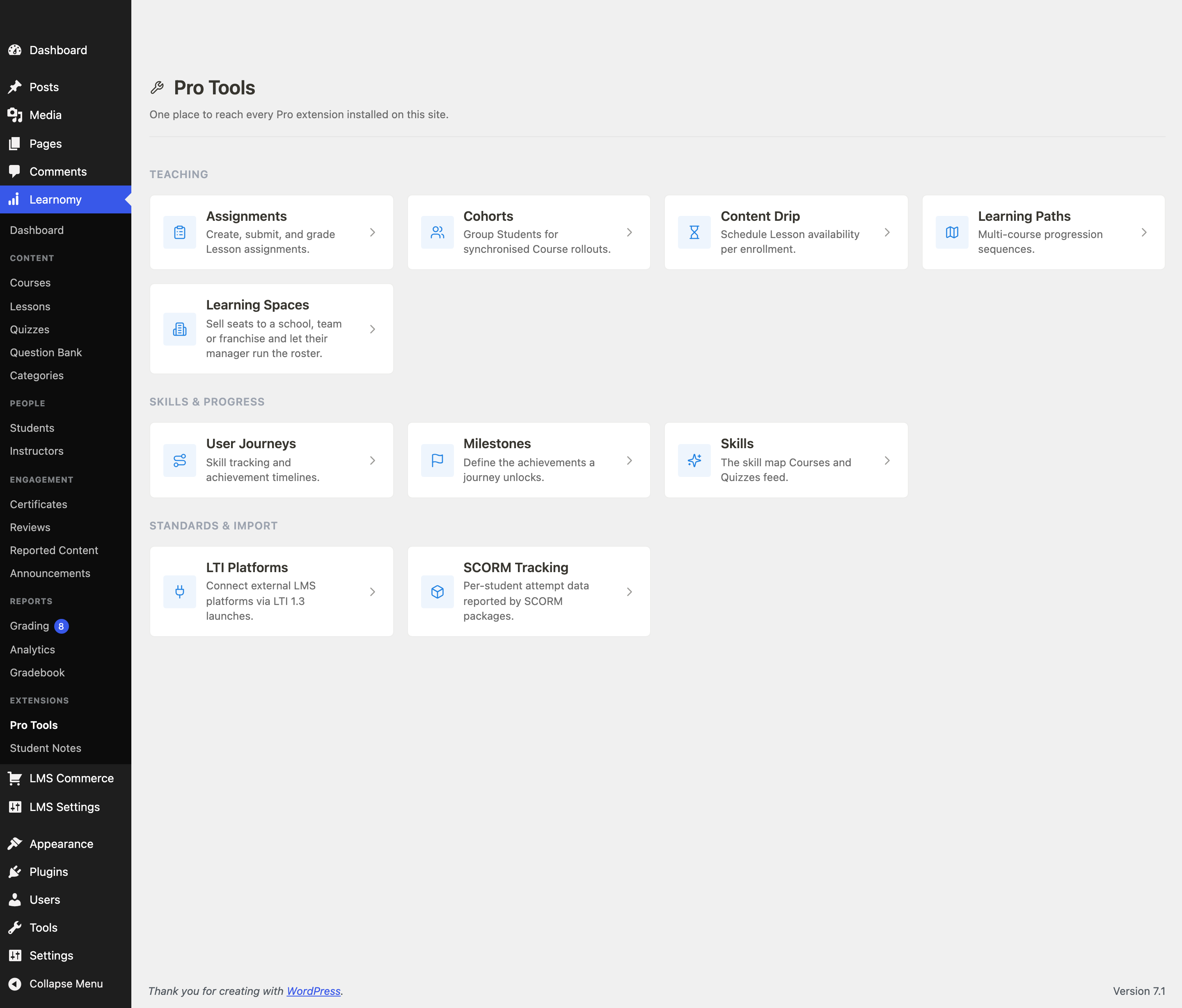
The description on the SCORM Tracking card is direct about its purpose: “Per-student attempt data reported by SCORM packages.” That’s the reporting side of the same pipeline described above, a dedicated screen where an admin can see exactly what each student’s SCORM attempt actually reported back, rather than having to trust that a green checkmark on a progress bar means what it claims to mean.
Notice this card sits in a “Standards & Import” grouping alongside LTI Platforms, which is a meaningful categorization choice. SCORM isn’t framed here as a course-building feature, it’s framed as an interoperability feature, a way of accepting content built to an external standard rather than a way of authoring new content inside Learnomy’s own tools. That’s the honest framing: SCORM is for content you already have, not content you’re building fresh.
Security, quietly, because a SCORM zip is untrusted input
It’s worth naming a risk that a casual SCORM implementation could get badly wrong: a SCORM package is, fundamentally, a zip file full of arbitrary HTML and JavaScript that a user uploads to your server. Handled carelessly, that’s a direct path to stored cross-site scripting, path traversal, or a zip-bomb denial-of-service attack, a maliciously crafted “training module” that either attacks the browser of whoever views it or attacks the server processing the upload.
The build notes behind this feature explicitly call out this exact threat model as a planned phase of the work: “package importer (security: zip/traversal/zip-bomb, non-exec storage).” That’s not generic security boilerplate, it names the three specific attack classes a SCORM importer has to defend against (path traversal during extraction, zip bombs that expand to consume disk or memory, and files stored in a way that could be executed rather than just served as static assets) as deliberate, named engineering tasks, not an afterthought discovered after a vulnerability report. For a feature whose entire job is accepting a zip file from potentially any instructor on a multi-instructor marketplace, that’s exactly the risk category worth confirming was actually taken seriously, and here, it’s named in the plugin’s own internal planning documentation before the feature shipped, not patched in reactively after the fact.
What a careless SCORM implementation looks like, by comparison
“Supports SCORM” is one of those feature-list phrases that hides an enormous range of actual quality, and it’s worth naming the failure modes directly so you know what to check for.
A careless implementation treats SCORM as a file attachment, not a lesson type, the package plays in an iframe somewhere, but its completion status never actually reaches the platform’s own progress tracking, so a student’s course completion percentage simply ignores whatever they did inside the SCORM content. That’s a common enough failure pattern that it’s worth testing directly rather than assuming: complete a SCORM lesson as a test student, and check whether the course’s overall completion percentage actually moved.
A careless implementation also often skips real per-attempt reporting, meaning an admin can see that a package exists but can’t see individual student scores or attempt history without exporting raw data and parsing it by hand. And a careless implementation is the one that skips the security hardening named explicitly in Learnomy’s own build notes, treating an uploaded zip as safe to extract and serve without validating it isn’t a path-traversal or zip-bomb attack, which is a real, documented category of vulnerability in SCORM importers across the LMS industry generally, not a hypothetical concern specific to any one product.
The difference between that pattern and what’s actually built here is architectural, not cosmetic: SCORM as a genuine lesson content-type, with completion flowing through the same Progress pipeline every other lesson uses, with a dedicated per-student reporting screen, and with the specific attack classes named and addressed as planned engineering work rather than discovered after the fact.
Part of a bigger standards story
SCORM doesn’t sit alone in Learnomy’s module catalog, it’s grouped under a “Standards & interop” category alongside three siblings worth knowing about even if they’re not the focus of this article: H5P, for attaching existing H5P interactive content (H5P’s own widely-used format for interactive video, presentations, and quizzes) as a lesson, with completion flowing into the same one progress pipeline; QTI, for importing IMS QTI 2.x / 3.0 assessments, a different, assessment-specific standard used heavily by testing organizations and some school systems, as native questions played through Learnomy’s own quiz engine rather than a separate player; and xAPI, for emitting xAPI statements to an external Learning Record Store as students enroll, complete lessons, and answer quizzes, which is the standard corporate L&D teams use when they need learning activity data flowing into a separate analytics or compliance system beyond the LMS itself.
The reason this grouping matters: it signals that SCORM isn’t a one-off integration bolted on because a customer asked for it once. It’s one piece of a deliberate strategy to be a genuine interoperability layer for a market, corporate training, compliance, education, that has decades of content and reporting built around specific open standards, not just around whatever any one LMS vendor happens to support. A platform that takes SCORM seriously as one of several standards, rather than as an isolated checkbox feature, is more likely to have gotten the actual integration right, because the same underlying design principle (external content or data flows into the same core pipeline as native content) has to hold across all four.
What actually gets replaced, and what doesn’t
It’s worth being clear-eyed about the scope of what SCORM support solves versus what it doesn’t. It solves the migration problem for existing packaged content, a compliance course built years ago in a different authoring tool plays here, and its completion data counts the same way any other lesson’s does. It does not turn Learnomy into a SCORM authoring tool; you’re not building new interactive slides inside Learnomy’s own editor, you’re importing content that was authored elsewhere, in dedicated tools built for exactly that purpose.
That’s the correct scope, not a missing feature. SCORM authoring tools like Articulate Storyline or Adobe Captivate are specialized products built around interactive slide design, branching scenarios, and rich media assembly, replicating that inside an LMS’s own admin would be an enormous undertaking for a capability most course creators building fresh content on Learnomy will never need, since the curriculum builder and quiz system covered elsewhere in this series already cover new content creation well. SCORM’s job here is narrower and more valuable: don’t force a rebuild of content that already works.
Three real situations this solves
The corporate L&D team migrating off a legacy LMS. This is the single clearest use case: a compliance library, sexual harassment training, safety certifications, onboarding modules, built up over years in whatever authoring tool the previous platform favored. Rebuilding all of that from scratch to move to a new LMS isn’t a realistic option for most L&D teams; the SCORM import path means the migration is about hosting the existing packages correctly, not recreating years of instructional design work.
The certification body accepting content from external training companies. An organization that certifies completion of third-party training, an industry association, a franchise network, a professional licensing body, often receives SCORM packages directly from the organizations that built the training, with no ability to edit the source content at all. Playing those packages correctly and folding their completion data into the same reporting used for everything else on the platform is the entire requirement.
The academy that occasionally licenses ready-made courseware. Some course creators supplement their own original content with licensed, pre-built modules on topics outside their personal expertise, a licensed cybersecurity awareness module, a licensed anatomy course, whatever comes as a SCORM package from the licensor. For this creator, SCORM support means their catalog isn’t limited to only what they personally authored.
Common questions before you rely on this
Does SCORM 1.2 and SCORM 2004 both work, or just one version? The module’s own description names support for both: “Upload SCORM 1.2 / 2004 packages as a lesson type.” These are the two major SCORM specification versions in circulation, and packages built years apart on different authoring tools are likely to use either one, so supporting both matters for actually accepting the range of legacy content that exists in the wild.
What happens to a student’s progress if they close the SCORM player partway through? Based on the CMI-to-Progress-pipeline integration described in the module’s own design notes, partial progress is exactly the kind of state SCORM’s CMI data model is built to report, score and completion status are read from the package’s own runtime reporting, not inferred separately by Learnomy, so a package that correctly tracks partial progress internally should report that same partial state through to Learnomy’s pipeline.
Can I mix SCORM lessons with ordinary Learnomy lessons in the same course? Yes, because SCORM is implemented as a lesson content-type rather than a separate content system, a course can freely combine SCORM lessons with video, text, quiz, and any other lesson type in the same curriculum structure, all contributing to the same overall course completion percentage.
Is there a size limit on SCORM package uploads? This isn’t detailed in what’s publicly described about the module, and given the explicit zip-bomb defense named in its own security planning, a size or extraction limit is a reasonable thing to expect exists, worth confirming directly against your specific package sizes if you’re planning to import particularly large, media-heavy courseware.
Do I need the SCORM module enabled for lessons that don’t use SCORM? No, like every module in Learnomy’s toggle system, SCORM is opt-in and adds no overhead or admin-menu clutter when it’s off. A site with no legacy SCORM content to migrate never needs to enable it.
What to check before betting a migration on this
If you’re the person actually responsible for moving a SCORM library onto a new platform, verify these specifics directly with your own real packages before committing:
- Test with your actual packages, not a generic sample. SCORM implementations vary in how strictly they follow the specification, and some legacy authoring tools produced packages with quirks. The only real test is uploading the specific packages you need to migrate and confirming completion and score report correctly.
- Confirm the completion percentage on a mixed course looks right. Build one test course combining a SCORM lesson with an ordinary lesson, complete both as a test student, and check that the course-level completion percentage and the analytics dashboard reflect both correctly, not just the native Learnomy lesson.
- Check the SCORM Tracking screen for the specific attempt data you need. If your organization needs the underlying score and attempt history for reporting purposes, an audit trail for compliance training, for instance, confirm the per-student data available there covers what your specific reporting requirement needs before relying on it.
- Ask directly about upload limits for your largest packages. A media-heavy SCORM course can be a large zip file; confirm your server’s upload limits and the module’s own handling comfortably cover your biggest packages before you’re mid-migration and discover a ceiling.
The honest value of SCORM support isn’t that it’s exciting, it’s one of the least visually interesting features in this whole series, a file upload field and a sandboxed player. Its value is specifically that it means years of already-built, already-paid-for training content doesn’t become throwaway work the moment an organization decides to move platforms. That’s a real, unglamorous, and expensive problem for exactly the organizations that have the most SCORM content sitting around, and it’s solved correctly here by folding the completion data into the same reporting pipeline as everything else, rather than treating imported content as a second-class citizen nobody bothered to fully wire up.
How this connects to the rest of a real migration
It’s worth placing SCORM support alongside the LMS-to-LMS migration wizard covered earlier in this series, because they solve adjacent but genuinely different problems, and conflating them leads to a wrong expectation. The migration wizard moves course structure, lessons, and quizzes out of LearnDash, Tutor LMS, or LifterLMS specifically, plugins with their own database schemas that the migration tool knows how to read directly. SCORM support solves a different migration path entirely: content that was never tied to any particular LMS’s database in the first place, packaged instead as a portable, standards-based zip file that could have come from any authoring tool, any previous LMS, or a third-party training vendor who never used any WordPress LMS at all.
An organization migrating a real, mixed catalog often needs both at once: the migration wizard for the native course content built inside their old LMS, and SCORM import for the licensed or externally-built compliance modules that were always packaged content rather than platform-native content, regardless of which LMS hosted them before. Knowing which path a specific piece of content needs, was it built as native course content in the old platform, or was it always a SCORM package sitting inside that platform, is the first, most practical planning question for anyone actually running one of these migrations.
A checklist for evaluating SCORM claims on any LMS, not just this one
Since “SCORM support” varies so widely across the market, here’s the specific, checkable version of everything covered above, useful even if you’re evaluating a platform other than the one in this article:
- Ask whether SCORM completion affects the platform’s own course-completion percentage, or whether it’s tracked in a separate, disconnected view. If a vendor can’t answer this clearly, assume it’s disconnected.
- Ask whether per-student attempt and score data is visible in a dedicated admin screen, not just exportable as raw log data you’d have to parse yourself.
- Ask directly what security measures exist around the zip upload and extraction process. A vendor that can name specific defenses (path traversal, zip bombs, non-executable storage) has clearly thought about this; a vendor that answers vaguely probably hasn’t.
- Ask which SCORM versions are actually supported, 1.2 and 2004 are the two that matter for real-world legacy content, and a platform supporting only one may not accept a meaningful share of what you’re trying to migrate.
- Test with your own real packages before committing, not a vendor-provided sample built specifically to demonstrate their own best-case scenario.
None of these questions require trusting a claim on faith, every one of them has a concrete, demonstrable answer a vendor should be able to show you directly, the same way this article showed the real Pro Tools hub card, the real module description text, and the real security-planning language behind Learnomy’s own implementation, rather than asking you to take “SCORM support” at face value.
If you’re running that evaluation for a workplace training program, our comparison of the best LMS platforms for corporate employee training applies these questions, alongside the compliance and reporting ones, across the platforms most teams shortlist.
Related reading