
17 min read
rtMedia Review 2026: Is It the Best Media Plugin for WordPress & BuddyPress?


Media sharing is at the core of thriving online communities. From photo uploads and video sharing to private albums, visual and audio content are what keep users engaged. For WordPress site owners using BuddyPress or BuddyBoss, a reliable media plugin is crucial to building an interactive, social-driven platform. That’s where this rtMedia Review comes in.
Developed by rtCamp, rtMedia is trusted by thousands of community-based websites worldwide. It goes far beyond WordPress’ basic media library by adding frontend uploads, media privacy controls, albums, likes, and comments, all fully integrated into BuddyPress profiles and groups. The result is a website that functions much like a social networking platform.
In this rtMedia Review, we’ll take a closer look at its features, pricing, advantages, and limitations, along with comparisons to alternatives. By the end, you’ll know if rtMedia is the best choice for your WordPress or BuddyPress-powered site in 2026.

What is rtMedia?
rtMedia is a powerful WordPress media management plugin developed by rtCamp. It is built specifically to extend the capabilities of WordPress, BuddyPress, and BuddyBoss websites by enabling users to upload, share, and interact with media directly from the frontend. Unlike the default WordPress media library, which is designed mainly for admins, rtMedia brings media functionality into the hands of community members.
With rtMedia, users can upload photos, videos, and audio files, create albums, and interact with others’ content through likes and comments. It integrates seamlessly with BuddyPress profiles, activity streams, and groups, creating an experience similar to popular social networking platforms.
The plugin comes in two versions: a free core plugin available on WordPress.org and a Pro version with premium add-ons like video encoding, watermarking, media moderation, and photo tagging. This makes rtMedia a flexible solution for small communities as well as large membership sites.
Why Choose rtMedia?

For WordPress site owners running BuddyPress or BuddyBoss, one of the biggest challenges is managing user-generated media. By default, WordPress doesn’t provide social-style media features such as profile uploads, albums, or activity stream integration. That’s where rtMedia fills the gap.
One of the main reasons to choose rtMedia is its ability to transform a community site into an interactive, media-rich platform. Members can upload photos, videos, and audio files directly from the frontend, making the experience more like a social network. Features such as likes, comments, and privacy settings encourage engagement and help communities thrive.
Another benefit is scalability. The free version is perfect for small sites that only need basic uploads, while premium add-ons unlock advanced tools like media moderation, video encoding, photo tagging, and watermarking. This flexibility makes it equally suitable for small communities, schools, and large membership-based platforms.
In short, rtMedia offers seamless BuddyPress integration, strong customization options, and community-focused features, all designed to boost user interaction and keep members engaged.
How to Get Started with rtMedia (Step-by-Step Guide)
Setting up rtMedia is simple, whether you’re using it on a standard WordPress site or integrating it with BuddyPress or BuddyBoss. The plugin is designed to work seamlessly with community-driven platforms, so you can have media uploads running in just a few minutes. Here’s how to get started:
1. Install and Activate rtMedia
- From your WordPress dashboard, go to Plugins → Add New.
- Search for rtMedia in the repository.
- Install and activate the plugin.
- For Pro users, download the premium plugin from rtMedia’s official site and upload it manually.
2. Configure General Settings
- After activation, go to rtMedia → Settings.
- Set basic options like media upload sizes, allowed file types (images, videos, audio), and privacy preferences.
- Choose whether uploads should appear in BuddyPress activity streams and user profiles.
3. Enable Media in BuddyPress/BuddyBoss
- If you’re running BuddyPress or BuddyBoss, navigate to the Integration tab.
- Enable media uploads in profiles, groups, and activity streams.
- This allows users to post media just like they would on social platforms.
4. Manage Media Privacy and Moderation
- Configure privacy levels (public, friends, private).
- Enable admin moderation tools to approve or remove inappropriate media.
- Optional: Install add-ons like rtMedia Moderation for advanced control.
5. Enhance Features with Premium Add-ons
- Add-ons like Video Encoding, Photo Tagging, Album Creation, and Watermarking extend functionality.
- Install only what you need to keep your site lightweight.
6. Test and Launch
- Create a test account and upload media files to confirm everything works.
- Check responsiveness across devices and browsers.
- Announce the feature to your community so members can start sharing media.
Key Features of rtMedia
rtMedia stands out as one of the most feature-rich media plugins for WordPress, BuddyPress, and BuddyBoss. It transforms community websites into social-media-like platforms where users can upload, share, and engage with media directly from the frontend. Below are the key features that make rtMedia a go-to plugin in 2026.
1. Frontend Media Uploads
Unlike WordPress’ default media library, rtMedia enables users to upload images, audio, and video files directly from the frontend. This is especially useful for community and membership sites where members interact with each other’s content. Uploads can be made in:
- User profiles
- BuddyPress/BuddyBoss groups
- Activity streams
2. Albums and Galleries
rtMedia allows users to create and manage albums and galleries within their profiles. This makes it easy for communities to organize photos and videos, similar to how social media platforms function. Admins can control album creation permissions to ensure the site remains structured.
3. Privacy and Moderation Controls
Community-driven sites need strong moderation tools. rtMedia provides:
- Privacy levels (Public, Friends, or Private).
- Admin moderation to approve, reject, or delete media.
- Optional Moderation add-on for advanced reporting and admin review.
These controls ensure your community remains safe and user-friendly.
4. Social Features (Likes and Comments)
rtMedia integrates seamlessly with BuddyPress activity streams, allowing members to like, comment, and interact with uploaded media. This social interaction encourages higher engagement and makes communities feel more alive.
5. Responsive Design and Lightbox Support
All media uploaded through rtMedia is mobile-friendly and responsive, ensuring a smooth user experience across devices. The built-in lightbox feature lets users view photos and videos in a pop-up without leaving the page.
6. Premium Add-ons for Advanced Functionality
While the free version is powerful, rtMedia also offers premium add-ons to extend functionality:
- Photo Tagging - Tag friends in uploaded images.
- Watermarking - Protect photos with automatic watermarks.
- Audio/Video Encoding - Ensure video/audio files are optimized for web playback.
- Media Moderation - Let users report inappropriate content.
- Album Creation and Customization - More control over media organization.
These add-ons make rtMedia scalable for large communities and e-learning sites.
7. Deep BuddyPress and BuddyBoss Integration
rtMedia was built with BuddyPress and BuddyBoss in mind. It integrates seamlessly into:
- User profiles (media tabs).
- Groups (shared albums and media galleries).
- Activity streams (upload and engage in real time).
This makes it the perfect plugin for community platforms, social networks, and membership-based websites.
8. WooCommerce and bbPress Support
rtMedia works well with WooCommerce and bbPress, allowing users to attach media to forum posts, product reviews, or support discussions. This makes it useful beyond social communities. eCommerce stores and forums can benefit too.
9. Developer-Friendly Customization
For developers, rtMedia provides hooks, filters, and APIs to customize how media behaves on the site. This flexibility makes it easy to integrate rtMedia with custom workflows or third-party tools.
10. Free Core Plugin
One of rtMedia’s biggest advantages is its free core plugin available on WordPress.org. While advanced users may need premium add-ons, many small websites can achieve social-style media functionality without spending anything.
rtMedia Pricing (2026 Update)
One of the standout advantages of rtMedia is that it offers a free core plugin with enough functionality to get most community websites started. From basic photo, audio, and video uploads to BuddyPress/BuddyBoss integration, the free version is suitable for small communities, blogs, and membership sites that don’t require advanced tools.
For websites that need additional functionality, rtMedia offers a range of premium add-ons and bundled plans. This flexible pricing structure ensures you only pay for what you need, making it cost-effective compared to some competitors.
1. Free Version
- Available on WordPress.org.
- Includes media uploads, albums, privacy settings, and BuddyPress/BuddyBoss integration.
- Ideal for small sites or communities testing out media features.
2. Premium Add-ons
Each add-on is sold separately or included in a bundle. Popular options include:
- Photo Tagging
- Watermarking
- Media Moderation
- Video/Audio Encoding
- Album Creation and Customization
Prices for individual add-ons typically range between $29-$99 per year, depending on functionality.
3. rtMedia Pro Bundle
Instead of buying add-ons individually, rtMedia also offers bundled plans that include multiple premium features at a discounted price. Plans usually scale based on the number of sites and features required:
- rtMedia Starter - Great for small websites needing basic premium features.
- rtMedia Pro - Includes a wide range of add-ons for mid-sized communities.
- rtMedia Unlimited - Covers all features for unlimited sites, best for agencies and large platforms.
Pricing for bundles generally starts around $149/year and can go up to $499/year for unlimited usage.
Value for Money
Compared to alternatives like MediaPress or NextGEN Gallery, rtMedia provides solid value for BuddyPress-specific use cases. MediaPress is free but limited in features, and NextGEN is photo-focused without community interaction. rtMedia sits in the middle ground, though the cost of multiple add-ons can add up for growing communities.
In short, rtMedia’s flexible pricing works best for established BuddyPress communities that need specific premium add-ons rather than a wholesale platform upgrade.
Pros and Cons of rtMedia
Like any plugin, rtMedia comes with both strengths and limitations. Evaluating these will help you decide whether it’s the right media solution for your WordPress or BuddyPress-powered community in 2026.
Pros of rtMedia
- Free Core Plugin: rtMedia offers a free version on WordPress.org that provides solid functionality, including photo, video, and audio uploads with BuddyPress/BuddyBoss integration.
- Seamless BuddyPress and BuddyBoss Integration: Designed specifically for community platforms, rtMedia fits naturally into profiles, groups, and activity streams, creating a social-media-like experience.
- Frontend Media Uploads: Members can upload photos, videos, and audio directly from the frontend, making it user-friendly and engaging for non-technical users.
- Scalable with Add-ons: Premium add-ons such as Photo Tagging, Video Encoding, Watermarking, and Media Moderation allow site owners to scale features as their community grows.
- Social Engagement Tools: Built-in likes, comments, and activity stream integration encourage interaction and keep communities active.
- Responsive and Mobile-Friendly: All media displays beautifully across devices, with lightbox support for a better viewing experience.
- Developer-Friendly: Offers hooks, filters, and APIs for customization, making it easy for developers to extend functionality.
Cons of rtMedia
- Add-ons Can Be Expensive: While the core plugin is free, many advanced features require premium add-ons. Costs can add up quickly for sites that need multiple features.
- Requires BuddyPress or BuddyBoss for Full Potential: While rtMedia works on standalone WordPress sites, its true power is unlocked with BuddyPress or BuddyBoss. Without them, some features may feel limited.
- Performance with Large Media Libraries: Sites handling a high volume of large media files (like videos) may need strong hosting and CDN support to avoid slowdowns.
- Learning Curve for Beginners: Although frontend features are easy for users, site admins may find the settings panel overwhelming due to the number of configuration options.
- Slow Development Pace: rtMedia’s update cadence has slowed noticeably in recent years. The plugin has not kept pace with WordPress block editor standards or modern architecture patterns, and significant new features have been rare since the mid-2020s.
- No AI Moderation: Content moderation is entirely manual. Admins must review flagged media themselves, or purchase the Moderation add-on for user reporting. There is no automated content analysis, which is an increasingly visible gap as communities scale and AI moderation becomes standard in newer platforms.
rtMedia vs Other Media Plugins
When choosing a media plugin for WordPress, it’s important to compare rtMedia with alternatives like MediaPress, NextGEN Gallery, and WP User Frontend. Each has its strengths, but rtMedia stands out for community-driven sites powered by BuddyPress or BuddyBoss.
rtMedia vs MediaPress
MediaPress is a free BuddyPress media plugin that allows basic photo, video, and audio uploads. While it covers essentials, its features are limited compared to rtMedia. For example, rtMedia includes privacy controls, likes, comments, albums, and premium add-ons like video encoding and watermarking. MediaPress is lightweight and suitable for very small communities, but rtMedia is more scalable for larger or growing platforms.
rtMedia vs NextGEN Gallery
NextGEN Gallery is one of the most popular WordPress plugins for photo galleries. It’s powerful for photographers, artists, and portfolios, offering advanced gallery layouts, image management, and eCommerce options. However, it is not designed for social interaction. rtMedia, on the other hand, is built for community engagement, allowing likes, comments, and integration with BuddyPress activity streams. If you’re running a community site, rtMedia is the clearer choice; for professional photography portfolios, NextGEN wins.
rtMedia vs WP User Frontend
WP User Frontend enables users to post content, including media, directly from the frontend. While it offers strong form-building and content submission features, it doesn’t specialize in community-style media interaction. rtMedia focuses on creating a social-media-like experience, with member albums, group uploads, and interaction tools. WP User Frontend is best for content-driven sites, while rtMedia is better for social communities and membership networks.
Which Plugin Should You Choose?
- Choose WPMediaVerse if you want the most modern, feature-complete media platform, works standalone or with BuddyPress, includes reactions, follows, DMs, AI moderation, explore feed, and 80+ REST endpoints in the free version.
- Choose rtMedia if you’re already using it on an established BuddyPress community and migration isn’t a priority right now.
- Choose MediaPress if you want a free, lightweight option with only basic uploads.
- Choose NextGEN Gallery if you’re a photographer or creative professional managing large image portfolios.
- Choose WP User Frontend if your site focuses on frontend content submission rather than community interaction.
For new community sites in 2026, WPMediaVerse is the stronger choice, it offers more features in its free version than rtMedia’s paid tier, with modern architecture built for scale.
Who Should Use rtMedia in 2026?
Not every WordPress website needs a feature-rich media plugin like rtMedia. It’s designed specifically for sites that want to offer members a way to upload, share, and interact with media content. If you’re wondering whether rtMedia is right for your site, here’s who will benefit most.
1. Community and Social Networking Sites
If your website runs on BuddyPress or BuddyBoss, rtMedia is a practical match. It allows members to upload photos, videos, and audio files, interact with them through likes and comments, and create albums, essentially turning your site into a media-sharing community.
2. Membership and E-learning Platforms
For schools, online courses, or membership sites, rtMedia enables students and members to share projects, upload resources, or post media in group discussions. Add-ons like moderation and privacy controls make it easy to maintain a safe learning environment.
3. Nonprofits and Community Groups
Nonprofits, clubs, and associations that run private communities can use rtMedia for event photo sharing, volunteer galleries, and group interactions. The free version may be sufficient for smaller communities, while Pro features add more control.
4. Agencies and Developers
Agencies building custom BuddyPress or BuddyBoss sites can use rtMedia as a flexible, developer-friendly solution. With hooks, filters, and APIs, it’s easy to customize workflows and tailor media functionality for clients.
Who May Not Need rtMedia
If your website is not community-focused and you only need simple image galleries, a plugin like NextGEN Gallery may be a better fit. Similarly, if you don’t use BuddyPress or BuddyBoss, some of rtMedia’s best features may go unused. And if you’re starting a new community site from scratch, a more modern platform is worth considering before committing to rtMedia’s architecture.

A modern alternative: WPMediaVerse
If you’re evaluating options for a new community or thinking about where rtMedia’s limitations are starting to show, WPMediaVerse is worth a serious look. It’s a free WordPress plugin built from the ground up as a complete photo and video community platform, one that works standalone without requiring BuddyPress, though it integrates with BuddyPress and BuddyBoss if you use them.
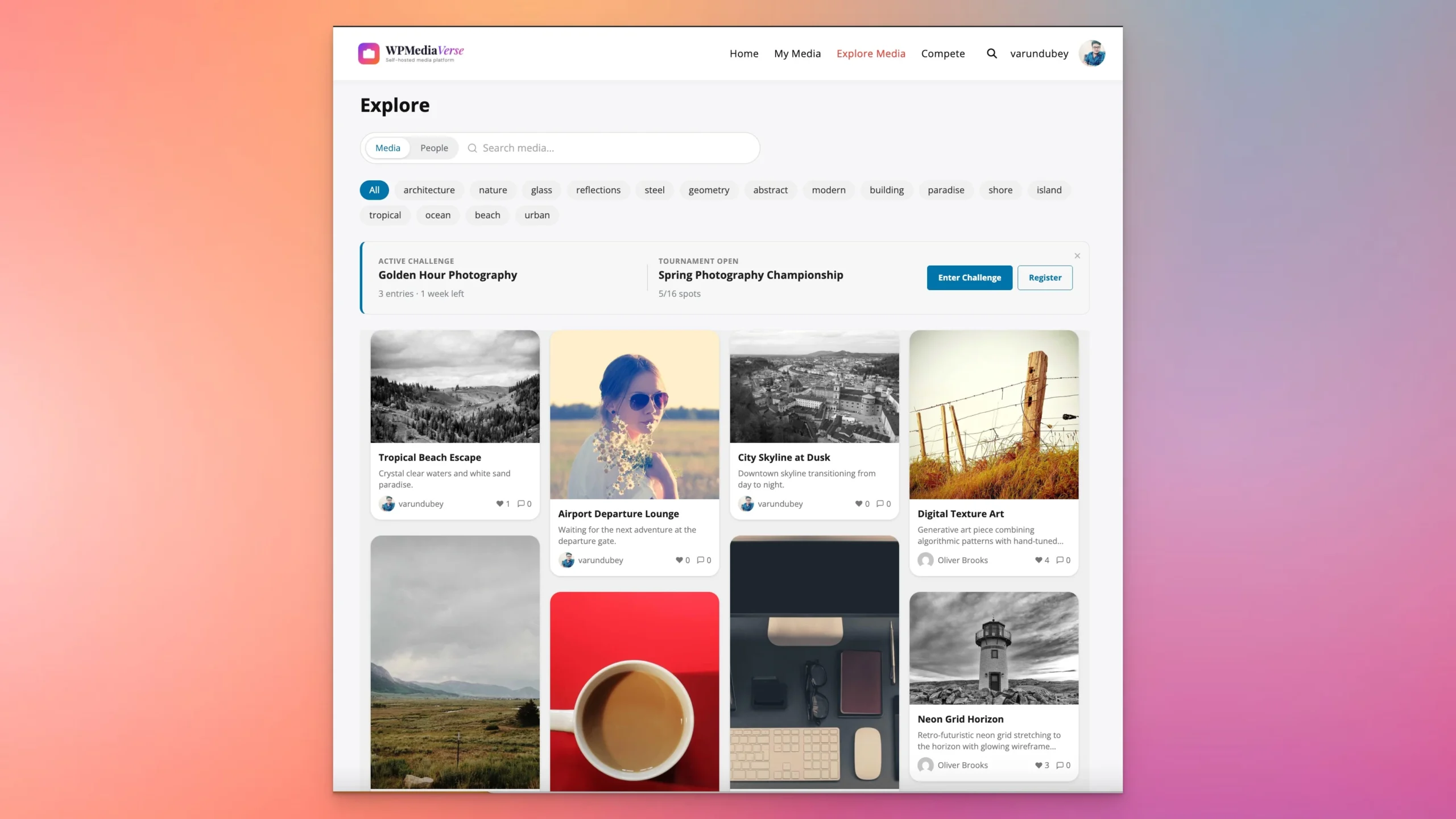
Where WPMediaVerse improves on rtMedia:
- Albums and reactions: Members create albums, organize media, and react with six emoji reactions rather than a basic like button. The social layer feels closer to what users expect from modern platforms.
- AI safety moderation: OpenAI Vision content analysis flags unsafe uploads automatically. This is included free, with budget controls. rtMedia’s moderation is manual admin review only, even in the paid add-on.
- Six privacy levels: Public, members only, friends, group, private, and custom. rtMedia offers three. This matters for communities where members need granular control over who sees their content.
- One-click rtMedia migration: WPMediaVerse Pro includes a dedicated migration tool that imports your existing rtMedia content directly into WPMediaVerse, with dry-run preview, batch processing, and resume on interruption. Switching doesn’t mean starting over.
- No BuddyPress dependency: The full social layer, follows, direct messages, activity feed, and the Explore discovery page, works on any WordPress site without BuddyPress installed.
- Modern architecture: Custom database tables with proper indexes (not wp_postmeta), WordPress Interactivity API blocks, and 80+ REST API endpoints. It’s built for headless setups and mobile apps, not just classic WordPress.
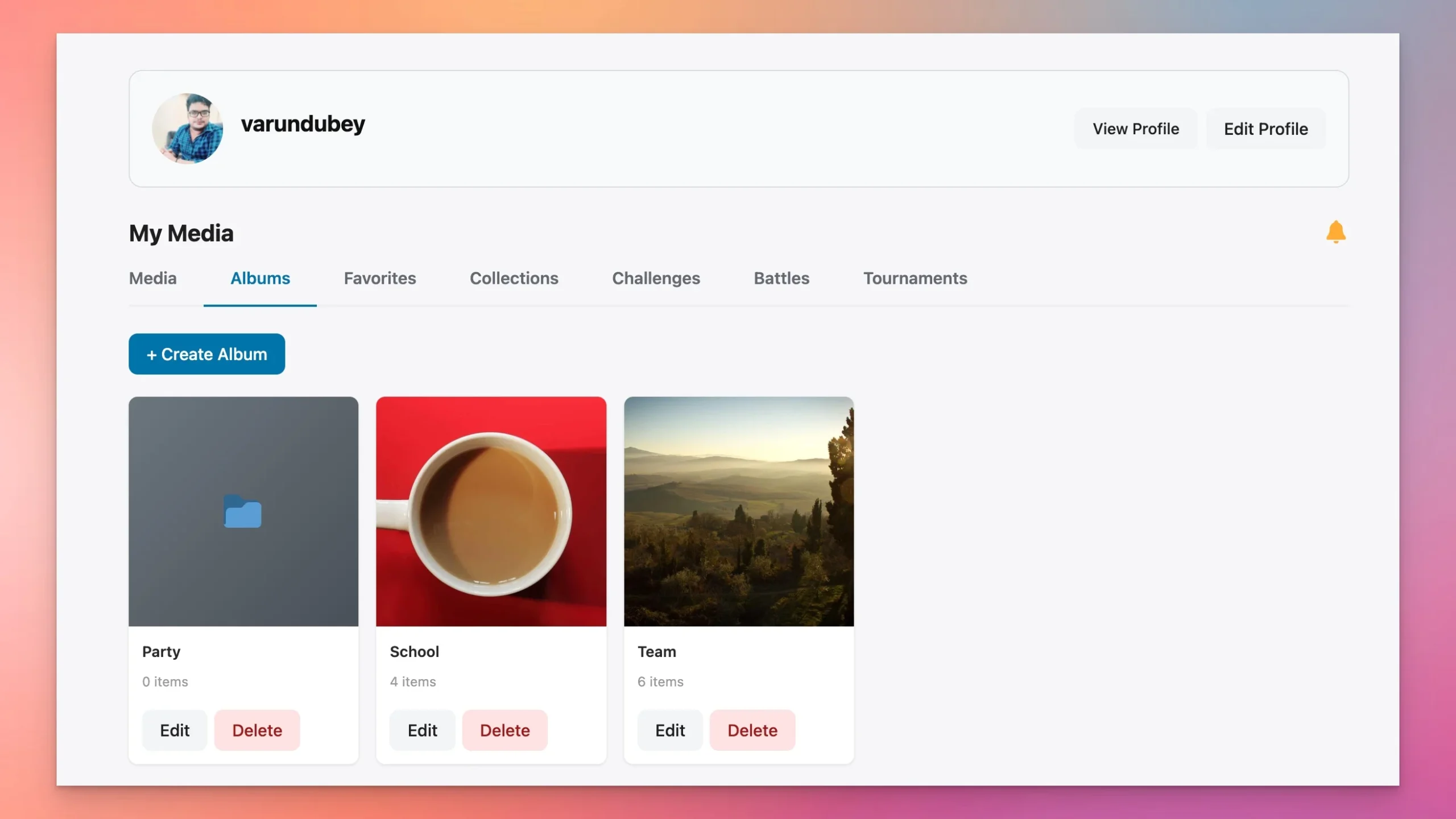
The free version covers albums, reactions, six privacy levels, AI moderation, the full social layer, and 13 Gutenberg blocks. WPMediaVerse Pro ($69-199/year) adds cloud storage via S3 and BunnyCDN, HLS video streaming, auto-captions via Whisper, photo contests and tournaments, and the rtMedia migration tool.
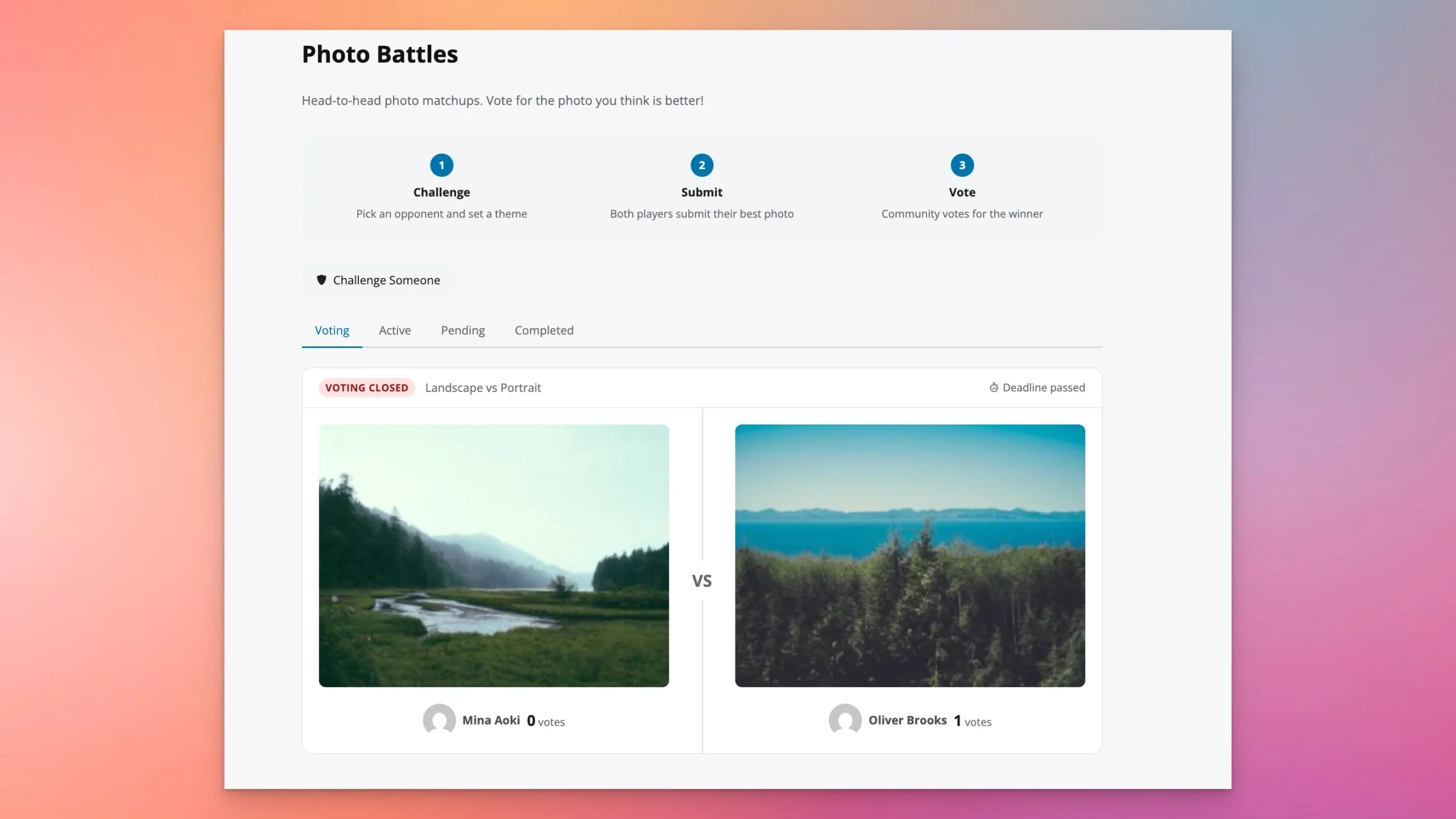
Download WPMediaVerse free or try it in a live sandbox before committing. If you’re already running rtMedia, the Pro migration tool makes the move straightforward.
Should You Use rtMedia for Your WordPress Community?
If you’re already running a BuddyPress or BuddyBoss community on rtMedia, it remains a workable solution. Members can upload photos, videos, and audio files, organize them into albums, and interact through likes and comments. For an established site where rebuilding isn’t an option right now, the plugin continues to do its job.
That said, this rtMedia Review is honest about where the plugin stands in 2026: development has slowed, there is no AI moderation, privacy controls are limited to three levels, and the plugin doesn’t support the block editor or standalone WordPress installs well. For smaller communities that are happy with the current feature set and BuddyPress integration, that may be fine.
For anyone building a new community site, or anyone who has run into rtMedia’s ceiling and wants a path forward, WPMediaVerse is the stronger choice. It offers more in its free version than rtMedia delivers at a paid tier, and its one-click migration tool means you’re not locked in forever. For membership sites, online schools, nonprofits, and communities where media sharing is central to the experience, the difference in capability is significant enough to warrant the switch.
In short, rtMedia is a stable, proven plugin for BuddyPress communities that built on it years ago. For new builds in 2026, the better starting point is WPMediaVerse.
Frequently Asked Questions (FAQs)
1. Is rtMedia free to use?
Yes, rtMedia offers a free core plugin available on WordPress.org. It includes essential features like media uploads, albums, privacy options, and BuddyPress/BuddyBoss integration. For advanced features, you can upgrade with premium add-ons or bundles.
2. Does rtMedia work without BuddyPress or BuddyBoss?
Yes, rtMedia can be used on a standard WordPress site. However, its best features, such as profile and group media sharing, are designed for BuddyPress and BuddyBoss. Without these platforms, its functionality is more limited.
3. Can I upload videos and audio with rtMedia?
Absolutely. rtMedia supports images, audio, and video uploads. For larger files or advanced playback compatibility, you can use the premium Audio/Video Encoding add-on.
4. Does rtMedia support WooCommerce or bbPress?
Yes, rtMedia integrates with WooCommerce and bbPress, allowing users to attach media to forum discussions, product reviews, and more. This makes it versatile for eCommerce stores and community forums.
5. What premium add-ons are available for rtMedia?
rtMedia offers a wide range of add-ons, including Photo Tagging, Watermarking, Media Moderation, Album Customization, and Video Encoding. These add-ons expand functionality for communities that need more control and engagement features.
6. Is rtMedia beginner-friendly?
Yes, rtMedia is easy to set up with its default options. Site admins may need some time to explore advanced settings, but community members will find uploading and interacting with media straightforward.
Interesting Reads:
WPForms Review 2026: Is It the Best WordPress Form Builder for Beginners?
Best BuddyPress Media Plugin for Community Website
Gravity Forms Review 2026: Is It Still the Best WordPress Form Builder?
Introducing WPMediaVerse: A Complete Media Platform for WordPress
Related reading