
6 min read
9 Retina-Ready WordPress Themes for Sharp Images on Any Screen


A WordPress theme with a better visual experience is the safer starting point for a new site. You can’t afford to lose prospective customers because your site is not ready for high-resolution graphics or retina-ready displays. When your site looks sharp on an iPhone, a MacBook or a 4K monitor, it leaves a good impression of your business.
Quick answer: A retina-ready theme serves sharper images to high-density screens by using responsive srcset images. Since WordPress 4.4 core adds these automatically, so most current themes qualify. Nine to consider are BuddyX, Reign, WoodMart, Tour Package, Real Church, Astra, Kadence, GeneratePress and Twenty Twenty-Five.
Last updated: 7 November 2026
Here is a Go-Getter’s Guide that helps you create a Retina-Ready WordPress Website. It explains what the term “retina ready” means.
WordPress Theme Customization Service

What Makes a WordPress Theme Retina Ready
A retina or high-DPI screen packs more physical pixels into the same space. A 300 by 200 pixel image shown on a 2x screen needs a 600 by 400 file to look sharp. According to web.dev’s responsive images course, density descriptors such as 1x and 2x give the browser alternate versions of an image for high-density displays, and images with lower pixel densities can look fuzzy on them.
WordPress handles much of this for you. The WordPress responsive images documentation says that since WordPress 4.4, native responsive images are supported through srcset and sizes attributes, so the browser can pick the best file for the device. WordPress creates several sizes on upload, and the max_srcset_image_width filter caps the largest image added to srcset at 2048 pixels by default.
In practice, a theme is retina ready when it uses core image functions, ships a logo and icons that stay sharp at 2x (SVG or a double-size file) and does not hard-code small image sizes. Always check the demo on a high-density screen before you buy.
Retina-Ready WordPress Themes
1. BuddyX Theme

BuddyX is a multipurpose, multi-level and retina-ready WordPress Theme to build an online social community website. Its responsive and user-friendly layouts are suitable for all devices. It requires no coding skills to work with this plugin. The design is optimized for mobile devices so looks great on tablets and phones too.
BuddyX theme makes your website look more beautiful and functional. It is equipped with clean code and easy-to-customize. It provides full WooCommerce support that integrates online store functionalities on your BuddyPress social network and allows you to sell your products online.
2. Reign Theme- Retina Ready WordPress Themes

Reign is another amazing multipurpose WordPress theme with superb features. It is fully compatible with WooCommerce. You can build your site easily with the help of Drag-n-Drop visual builder. With advanced Typography settings and colour options, you can customize the look and feel of your WordPress site.
With the help of the Reign theme, you can build your own community to engage your users and attract new users towards your site. It is fully Gutenberg ready which is useful to edit content. Build your amazing website using the Reign WordPress theme.
3. WoodMart
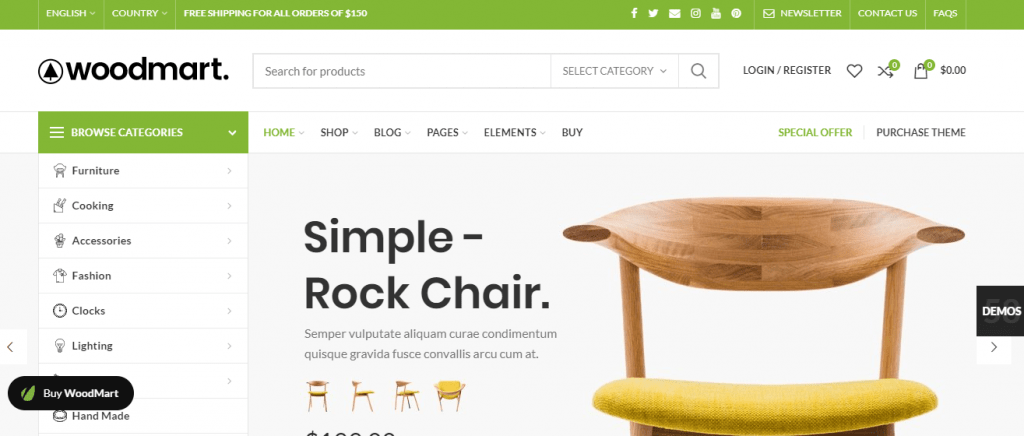
WoodMart is a premium WooCommerce WordPress theme for building online stores. The vendor site lists 100+ prebuilt websites and 400+ ready-made templates, and support for Elementor, the Gutenberg block editor and WPBakery. It sells for a one-time $69 (US dollars, convert to your local currency), and it offers image optimization controls with WebP support.
Key features include AJAX search, color and size filters, and a drag-and-drop header builder with unlimited header layouts. The vendor page does not mention retina displays by name, so test the demos on a high-density screen. Plugins named by the theme include Revolution Slider, WPBakery, WooCommerce, W3 Total Cache, Contact Form 7, WPML, bbPress, MailChimp and WooCommerce Germanized.
4. Tour Package

Tour Package is a WordPress travel theme for travel companies, built by GoodLayers. It is listed on ThemeForest at $79 with 6.4K sales as of 7 November 2026. It offers a package filtering system and a package post type to feature all packages. Its booking form needs Contact Form 7 on your site.
It is described as SEO-optimized with localization support, a layer slider and a drag-and-drop module, plus an admin panel for changing appearance. Features come from the vendor description, so check the live listing.
5. Real Church
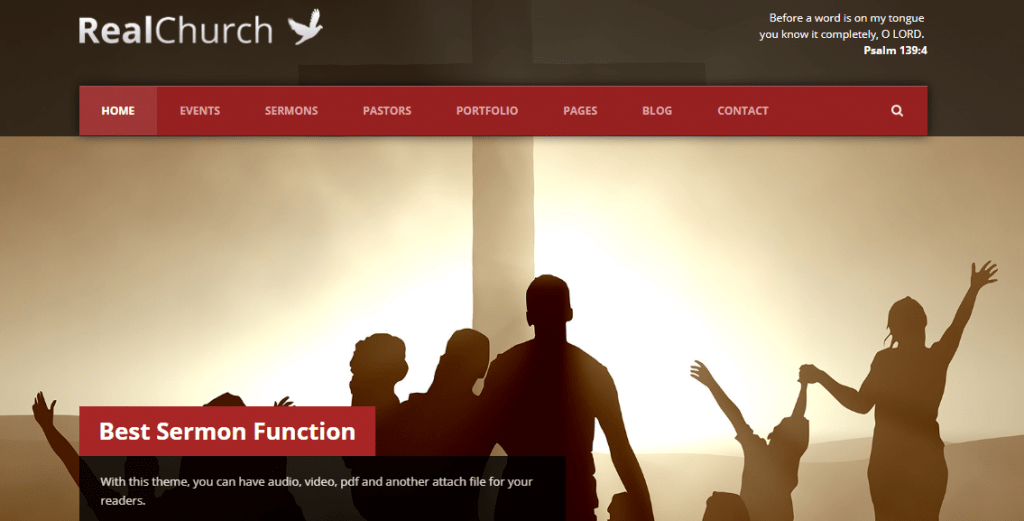
Real Church is a responsive WordPress theme for church websites from GoodLayers. Its ThemeForest listing is titled “Real Church - Responsive Retina Ready WordPress”, priced at $79 with 2.7K sales and last updated on 13 October 2026. It includes Sermon, Event and Pastor post types. Sermons support video, audio, attachments and PDFs, and events take start and end times plus Google Maps. A drag-and-drop builder is included.
6. Astra
Astra is a free theme on WordPress.org. The directory lists version 4.14.2, 1,000,000+ active installations and a last update on 29 October 2026. It is free with optional paid upgrades. Because it uses WordPress core image functions, your uploads get the standard srcset treatment described above.
7. Kadence
Kadence is a free theme with 500,000+ active installations, version 1.6.0 and an update dated 6 November 2026 on WordPress.org. The directory says it is free with additional paid commercial upgrades or support. Its page does not mention retina by name, so rely on core responsive images and test your own logo at 2x.
8. GeneratePress
GeneratePress is a lightweight free theme with 500,000+ active installations. The WordPress.org directory shows version 3.6.1, last updated 1 December 2025, and a requirement of WordPress 6.5 or higher. It is a good base when you want fast pages and full control of image sizes.
9. Twenty Twenty-Five
Twenty Twenty-Five is the default block theme from the WordPress team. Directory data shows version 1.5, 1,000,000+ active installations, an update on 20 May 2026 and a requirement of WordPress 6.7. As a block theme it relies on core image handling, which makes it a clean reference for how responsive images should behave.
How to Test a Theme on High-DPI Screens
Open the demo on a phone or a laptop with a high-density display and zoom in on the logo and hero image. Then view the page source and look for a srcset attribute on content images. If images carry only a single small file, the theme may be overriding core behavior. Upload images at about twice their display width, and keep the logo as an SVG where possible. For more on layouts that adapt to every device, see our list of fully responsive WordPress themes and our WordPress themes guide.
Retina-Ready Themes Compared
| Theme | Best for | Cost (USD) | Where to get it |
|---|---|---|---|
| BuddyX | Community sites | See vendor | Wbcom Designs |
| Reign | Community sites | See vendor | Wbcom Designs |
| WoodMart | WooCommerce stores | $69 one time | ThemeForest and vendor |
| Tour Package | Travel companies | $79 | ThemeForest |
| Real Church | Churches | $79 | ThemeForest |
| Astra | General use | Free, paid upgrades | WordPress.org |
| Kadence | General use | Free, paid upgrades | WordPress.org |
| GeneratePress | Speed-focused sites | Free, paid upgrades | WordPress.org |
| Twenty Twenty-Five | Block theme baseline | Free | WordPress.org |
Prices are in US dollars as shown on 7 November 2026. Convert to your local currency and check taxes at checkout.
Frequently asked questions
What does retina ready mean for a WordPress theme?
It means images look sharp on high-density screens. The theme should serve larger files to those screens, usually through srcset, and keep logos and icons crisp at 2x.
Does WordPress support retina images by default?
Yes. Since WordPress 4.4, core adds srcset and sizes attributes to content images so the browser can choose the best file for the device.
What size should I upload images for retina screens?
Upload at about twice the width they display. WordPress creates smaller sizes for you, and by default it caps the largest image added to srcset at 2048 pixels.
Do I need a paid theme for retina support?
No. Free themes such as Astra, Kadence, GeneratePress and Twenty Twenty-Five rely on the same core image handling. Paid themes add demos, builders and support.
How can I check if my site serves retina images?
View the page source and look for srcset on your images, or open the browser developer tools on a high-density screen and check which file loads.
Which theme suits an online store?
WoodMart is built for WooCommerce, with 100+ prebuilt websites listed on its vendor site. Check each theme demo on a high-density screen before you buy.
 Browse these themes carefully and pick what fits your niche and requirements.
Related reading