
15 min read
MemberPress Review 2026: Is It Still the Best WordPress Membership Plugin?


Subscription-based businesses and membership platforms are experiencing significant growth, and tools like MemberPress are at the forefront of this expansion. From online courses and coaching programs to private communities and digital product libraries, an increasing number of entrepreneurs and businesses are turning to membership websites as a sustainable revenue model. According to a recent MemberPress Review report, the global e-learning and subscription economy is projected to surpass $300 billion by 2026, proving that this model is here to stay.
For WordPress users, choosing the right membership plugin is crucial to building a secure, flexible, and profitable platform. That’s where MemberPress comes in. Often referred to as one of the most powerful solutions for WordPress, it enables you to create and manage membership levels, restrict content, sell online courses, and accept recurring payments, all from a single plugin.
In this MemberPress Review 2026, we’ll take a closer look at its features, pricing, pros and cons, and alternatives to determine whether it truly deserves the title of the best WordPress membership plugin. By the end, you’ll have a clear idea if MemberPress is the right fit for your online business or community project.

What is MemberPress?
MemberPress is a premium WordPress plugin designed to help you create and manage membership websites with ease. Launched in 2013, it has grown into one of the most trusted tools for entrepreneurs, educators, and businesses looking to monetize digital content, online courses, or communities.
At its core, MemberPress allows you to set up membership levels, restrict access to content, and control who sees what based on their subscription plan. You can protect pages, posts, categories, or even specific files, making it ideal for sites that want to run a paywall system.
Beyond content restriction, MemberPress offers powerful tools for recurring payments, subscription management, coupon codes, and reporting. Its built-in course builder, MemberPress Courses, also lets you design and sell online learning programs without the need for a separate LMS.
In short, MemberPress is an all-in-one membership solution for WordPress users who want flexibility, scalability, and monetization built right into their website.
Why Choose MemberPress?
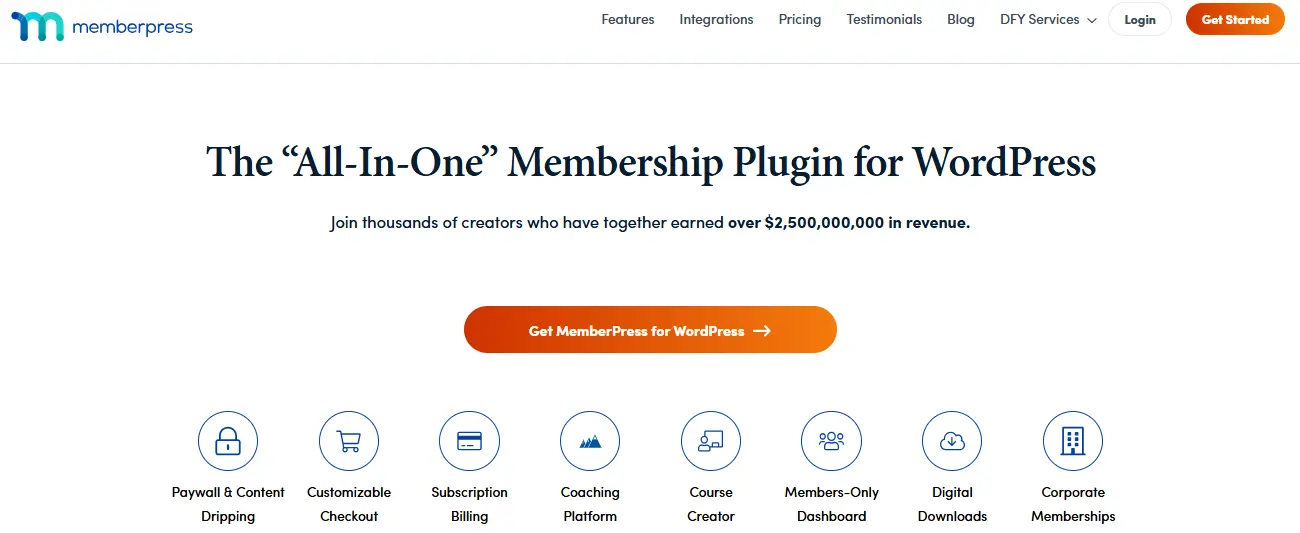
When it comes to building a membership site on WordPress, MemberPress is often the go-to plugin because it combines ease of use with powerful functionality. Unlike piecing together multiple plugins, MemberPress gives you everything you need in one place, making it especially appealing for non-technical users and busy entrepreneurs.
One of its strongest selling points is its content restriction system. With just a few clicks, you can control access to pages, posts, categories, and files based on membership levels. This makes it easy to create paywalls, drip content over time, or deliver exclusive content to premium subscribers.
Another advantage is its monetization features. MemberPress integrates seamlessly with major payment gateways like Stripe, PayPal, and Authorize.Net to handle recurring payments, subscriptions, and coupons. Plus, it supports multiple pricing tiers, so you can offer flexible plans to suit different audiences.
On top of that, the plugin includes a built-in course builder and integrates with popular email marketing tools, helping you create a full membership ecosystem without third-party complications.
If you’re looking for a reliable, scalable, and user-friendly solution, MemberPress makes a strong case as the best WordPress membership plugin.
How to Get Started with MemberPress (Step-by-Step Guide)
Setting up a membership site with MemberPress is straightforward, even if you’re new to WordPress. The plugin provides an intuitive setup process and powerful tools to get your site running quickly. Here’s a step-by-step guide:
Step 1: Install WordPress and Choose a Theme
Start by setting up your WordPress site with reliable hosting. While MemberPress works with almost any theme, choosing a membership-optimized theme like Reign or other community-focused themes will give you a professional look and smooth integration.
Step 2: Install and Activate MemberPress
- Go to your WordPress dashboard and navigate to Plugins, then Add New.
- Upload the MemberPress plugin file since it’s a premium plugin.
- Activate it with your license key. This unlocks all the membership features you’ll need.
Step 3: Configure Basic Settings
Use the setup wizard to adjust important settings such as:
- Payment gateways include Stripe, PayPal, and Authorize.Net.
- Currency and tax options.
- Email notifications for members and admins.
Step 4: Create Membership Levels
Define the different plans or tiers you want to offer. For example:
- Free plan with limited access.
- Premium plan with full content access.
- VIP plan with extra perks like downloads or coaching sessions.
Step 5: Protect Content with Rules
MemberPress uses rules to control access. You can restrict:
- Specific pages or posts.
- Entire categories or tags.
- Files and downloads. This allows you to build paywalls or drip content over time.
Step 6: Add Courses or Digital Products
If you’re offering online learning, use MemberPress Courses to create structured lessons and modules. You can also sell eBooks, templates, or other digital products directly through your membership site.
Step 7: Launch and Customize
Once everything is set up, customize your site’s design with your theme and page builder like Elementor, Gutenberg, or Divi. Test the full process as a user by signing up, accessing content, and making payments. Finally, publish your site and start promoting it to your target audience.
Key Features of MemberPress
MemberPress is widely regarded as one of the most powerful WordPress membership plugins, thanks to its robust feature set. From content restriction to course creation, it offers all the tools you need to build, manage, and monetize a membership site. Let’s explore the key features in detail.
1. Unlimited Membership Levels
MemberPress lets you create unlimited membership tiers, each with its own pricing, access rules, and benefits. You can offer free, recurring, or one-time payment plans, making it flexible for different business models.
2. Advanced Content Restriction
At the heart of MemberPress is its powerful content protection system. You can restrict:
- Individual posts or pages.
- Entire categories or tags.
- Custom post types and files. Rules allow you to set who can access specific content, ensuring your premium material stays behind a paywall.
3. Drip Content and Expiration
With drip content, you can release lessons or resources gradually instead of all at once. You can also set expiration dates on content, making it available only for a certain time. This boosts engagement and encourages longer memberships.
4. Built-in Course Builder (MemberPress Courses)
MemberPress includes a drag-and-drop course builder, eliminating the need for a separate LMS plugin. You can create structured courses with modules and lessons, track student progress, and offer quizzes, all from within MemberPress.
5. Payment Gateway Integrations
The plugin integrates with major payment gateways, including:
- Stripe
- PayPal
- Authorize.Net. These gateways allow you to accept credit cards, recurring subscriptions, and one-time payments securely.
6. Coupons and Discount Management
You can create coupon codes to offer discounts, free trials, or promotional pricing. This is especially useful for marketing campaigns and attracting new members.
7. Reporting and Analytics
MemberPress provides detailed reports on revenue, subscriptions, and member activity. You can see which plans are performing best and track your site’s growth over time.
8. Email Marketing Integrations
The plugin integrates with popular email marketing services such as:
- Mailchimp
- ConvertKit
- ActiveCampaign
- AWeber. This allows you to build automated email funnels, nurture members, and improve retention.
9. WooCommerce Compatibility
MemberPress works seamlessly with WooCommerce, enabling you to sell physical or digital products alongside memberships. This is ideal if you want to combine e-commerce and subscription models.
10. Affiliate Program Support
Through its Affiliate Royale integration, MemberPress allows you to create and manage an affiliate program. Members or influencers can promote your site and earn commissions, expanding your reach.
11. Community and Forum Integrations
MemberPress integrates with BuddyPress, BuddyBoss, and bbPress, letting you build thriving communities, discussion forums, and social networking features around your membership site.
MemberPress Pricing

Unlike some WordPress plugins that offer a free version, MemberPress is premium-only plugin. While this may feel like a drawback at first, its pricing includes robust features, ongoing updates, and reliable customer support, making it a worthwhile investment for serious membership site owners.
As of 2026, MemberPress offers three pricing tiers:
- Basic - $179 per year
Includes unlimited members, one membership site, content restriction rules, and integrations with Stripe and PayPal. - Plus - $299 per year
Adds support for up to two membership sites, Authorize.Net payments, advanced marketing integrations, and additional features like corporate accounts. - Pro - $399 per year
Supports up to five membership sites, includes all integrations, priority support, and advanced tools for scaling.
Each plan comes with a 14-day money-back guarantee, so you can test the plugin risk-free.
While MemberPress is priced higher than some competitors, its all-in-one functionality covering courses, subscriptions, content restriction, coupons, and reporting means you don’t need multiple plugins. For businesses that plan to grow and scale, it often ends up being more cost-effective than cheaper alternatives.
Pros and Cons of MemberPress
Like any plugin, MemberPress comes with strengths and limitations. Understanding its pros and cons will help you decide if it’s the right WordPress membership plugin for your project.
Pros of MemberPress
- All-in-One Solution: MemberPress combines membership management, content restriction, payment processing, and course creation in one plugin. This reduces the need for multiple plugins and integrations.
- Powerful Content Restriction: Its rules-based system allows you to protect posts, pages, categories, tags, and files. You can also set drip content schedules and expiration dates for more engaging user experiences.
- Built-in Course Builder: With MemberPress Courses, you don’t need an external LMS. You can create structured lessons, quizzes, and progress tracking directly within the plugin.
- Easy Monetization: Supports recurring payments, multiple membership tiers, coupons, and one-time payments. WooCommerce integration also enables product sales alongside subscriptions.
- Strong Integrations: Works seamlessly with payment gateways like Stripe, PayPal, and Authorize.Net, email marketing tools such as Mailchimp, ConvertKit, and ActiveCampaign, and community plugins including BuddyPress and BuddyBoss.
- Scalable and Developer Friendly: Clean code and extensive hooks make it flexible for developers, while non-technical users benefit from its user-friendly interface.
Cons of MemberPress
- No Free Version: Unlike some competitors, MemberPress doesn’t offer a free tier. This can be a barrier for beginners testing the waters.
- Higher Pricing: Starting at $179 per year, it’s more expensive than plugins like Paid Memberships Pro or Restrict Content Pro. For small projects, the cost may feel steep.
- Design Limitations: While it integrates with most themes, customization options for membership pages are somewhat limited without additional CSS or page builders.
- Learning Curve: Although setup is straightforward, mastering advanced features like rules, drip content, and integrations can take time, especially for non-technical users.
- Limited Native Community Features: It doesn’t include built-in forums or social networking. For community-based sites, you’ll need to integrate BuddyPress, BuddyBoss, or bbPress.
MemberPress vs Alternatives
MemberPress is a leading option for building membership sites on WordPress, but it isn’t the only solution available. Depending on your goals, budget, and technical comfort level, other plugins or SaaS platforms may be worth considering.
Restrict Content Pro
Restrict Content Pro offers solid content restriction features and recurring billing. However, it lacks a built-in course builder, which MemberPress includes along with drip content and advanced automation. Restrict Content Pro works best for straightforward membership sites, while MemberPress shines as an all-in-one solution.
Paid Memberships Pro
Paid Memberships Pro is attractive because it offers a free version, making it budget-friendly for small projects. Advanced functionality often requires multiple add-ons. MemberPress provides more features out of the box and a smoother interface, making it ideal for users who want a complete package.
LearnDash with WooCommerce
LearnDash is a full Learning Management System and is excellent for course-focused platforms. It doesn’t handle memberships natively, so pairing it with WooCommerce adds extra complexity. For sites that need both courses and memberships, MemberPress is the more streamlined option.
SaaS Platforms (Kajabi, Teachable)
Hosted solutions like Kajabi and Teachable provide built-in marketing and community features but come with higher monthly costs and less control over customization. MemberPress gives you full ownership of your site and data. While SaaS tools are great for quick launches, they often cost $100 to $200 per month, whereas MemberPress is billed annually and can be more cost-effective long term.
Who Should Use MemberPress?
MemberPress is designed for flexibility, which makes it suitable for a wide range of online businesses and creators. Whether you’re an educator, entrepreneur, or community builder, its features can adapt to your goals.
Educators and Course Creators
Teachers, coaches, and online instructors can use MemberPress to build structured learning platforms. With the built-in course builder, lessons and quizzes can be delivered professionally without needing a separate LMS.
Entrepreneurs and Digital Product Sellers
For business owners selling eBooks, templates, or premium resources, MemberPress provides an easy way to restrict downloads to paying members. Subscription tiers and coupons also create opportunities for upselling.
Communities and Membership Sites
Community builders who want to create exclusive spaces benefit from MemberPress’s content restriction and its integration with tools like BuddyPress and BuddyBoss. This makes it simple to pair memberships with forums, groups, and social features.
Agencies and Developers
Agencies building client websites will find MemberPress both powerful and developer-friendly. Clean code, reliable support, and integrations with payment gateways and marketing tools make it easy to deliver custom membership solutions.
Tips to Grow a Membership Site with MemberPress
Launching a membership site is only the beginning. The real challenge lies in growing and retaining your community. With MemberPress, you have the tools to scale effectively. Here are some proven strategies to help your membership business thrive.
1. Offer Multiple Pricing Tiers
Not every member is willing to pay the same amount. Create different plans, such as free, basic, and premiu,m so people can join at their comfort level. Over time, many free or basic users upgrade to higher tiers for additional benefits.
2. Use Drip Content to Keep Members Engaged
Releasing content gradually rather than all at once keeps members coming back. Drip courses, lessons, or resources on a schedule to maintain long-term interest and improve retention.
3. Provide Free Trials or Coupons
Lower the barrier to entry by offering limited-time trials or discount coupons. This encourages more sign-ups and gives prospects a chance to experience your platform before committing.
4. Integrate with Email Marketing
Use MemberPress integrations with Mailchimp, ConvertKit, or ActiveCampaign to send automated emails. Share new content, remind members about expiring subscriptions, and re-engage inactive users with special offers.
5. Build a Community Around Your Membership
Pair MemberPress with BuddyPress or BuddyBoss to add discussion forums, groups, or private communities. Strong social interaction increases loyalty and helps members feel connected.
6. Highlight Success Stories
Feature case studies, testimonials, or member achievements to build trust and show potential members the value of joining.

Why MemberPress Remains a Trusted Choice
After diving deep into features, pricing, pros and cons, and comparisons, this MemberPress Review highlights why the plugin continues to be a leading option for building membership websites. Its combination of content restriction, integrated course builder, and recurring payment management makes it more than just a plugin. It’s a complete platform for online businesses.
Although it doesn’t offer a free version and comes at a higher price point than some alternatives, the value lies in its all-in-one functionality. Entrepreneurs, educators, and community managers who want to save time and reduce complexity will appreciate how MemberPress eliminates the need for juggling multiple plugins.
Ultimately, this MemberPress Review confirms that it remains one of the most reliable solutions for anyone seeking the best WordPress membership plugin. Whether your goal is selling online courses, running a paid community, or monetizing digital content, MemberPress provides the scalability and stability needed to grow with confidence.
Frequently Asked Questions (FAQs)
1. Is MemberPress free to use?
No. MemberPress is a premium plugin and does not have a free version. However, it comes with a 14-day money-back guarantee, so you can test risk-free.
2. How much does MemberPress cost?
MemberPress offers three pricing plans: Basic at $179 per year, Plus at $299 per year, and Pro at $399 per year. Each tier includes different features, integrations, and site licenses.
3. Can I sell online courses with MemberPress?
Yes. MemberPress includes a built-in course builder that allows you to create structured lessons, quizzes, and progress tracking without needing a separate LMS plugin.
4. Does MemberPress support recurring payments?
Absolutely. MemberPress integrates with payment gateways like Stripe, PayPal, and Authorize.Net, making it easy to manage subscriptions, renewals, and recurring payments.
5. What types of content can I restrict with MemberPress?
You can restrict pages, posts, categories, tags, custom post types, and files. This allows you to protect premium content and deliver exclusive resources to paying members.
6. Does MemberPress integrate with email marketing tools?
Yes. MemberPress works with major email services like Mailchimp, ConvertKit, ActiveCampaign, and AWeber, allowing you to build automated campaigns and nurture your members.
7. Is MemberPress good for community sites?
Yes, especially when combined with BuddyPress, BuddyBoss, or bbPress. These integrations allow you to add forums, groups, and social networking features to your membership site.
Interesting Reads:
WP Job Manager Review 2026: Is It Still the Best WordPress Job Board Plugin?
How to Create a Membership Community in WordPress?
LearnDash Review 2026: Is It the Best LMS Plugin for WordPress?
Related reading