
12 min read
Memberium Alternatives: WordPress Membership Plugins Compared in 2026

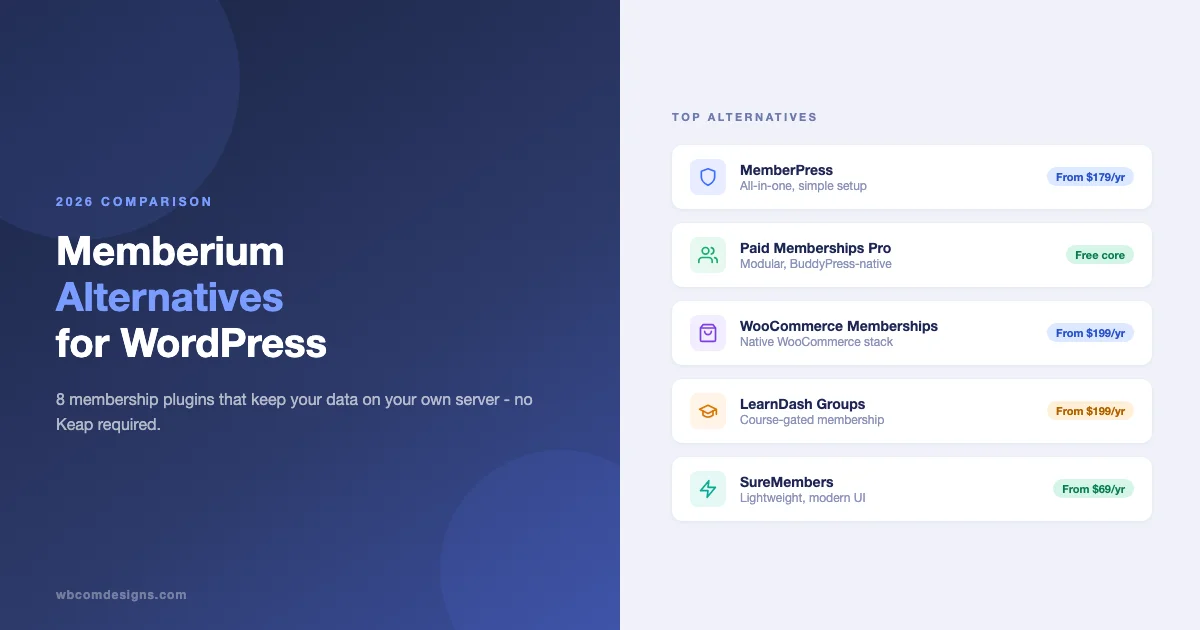
Memberium works well when your business runs entirely inside Keap (formerly Infusionsoft). You tag contacts in Keap, and Memberium reads those tags to unlock WordPress content. The integration is tight, the conditional logic is flexible, and for Keap-native businesses it is genuinely hard to replace. The problem is that “Keap-native” describes a shrinking slice of the market. Most membership site owners today run WooCommerce, Stripe, or a standalone LMS - and for them, paying Memberium’s $49-$99/month on top of a Keap subscription that starts at $79/month is a significant overhead for a feature they could get closer to their existing stack.
This guide covers the strongest WordPress membership alternatives to Memberium, who each one is actually built for, and a decision tree at the end to point you toward the right choice without wading through marketing copy.
What Memberium Does Well (And Where It Gets Expensive)
Memberium’s core value proposition is Keap tag-based access control. You can protect any WordPress page, post, or custom post type based on whether a contact has a specific Keap tag. Because Keap handles billing and contact management, Memberium does not need its own payment processing or email system - it just reads tags. This makes it very clean for Keap users who want to avoid a second CRM.
Where it gets painful: Memberium requires an active Keap subscription (Basic starts at $79/month, Pro at $169/month) plus Memberium itself ($49-$99/month). For a small membership site clearing $2,000-$5,000/month in recurring revenue, that is $128-$268/month in platform costs before hosting, themes, or content production. That is 5-13% of revenue going to platform overhead before you do any work.
The other issue is data ownership. Your contacts, tags, and automation sequences live in Keap’s cloud. Migrating away means exporting contacts, rebuilding automations in a new system, and remapping access rules in a new plugin - all at the same time. Businesses that have grown past their Keap dependency often find the exit more expensive than staying, which is a lock-in dynamic worth understanding before you start.
8 WordPress Membership Alternatives Worth Considering
1. MemberPress
MemberPress is the closest direct substitute for Memberium in terms of market positioning - it is built specifically for membership sites and includes everything in one plugin: payment processing (Stripe, PayPal, Authorize.net), access rules, member management, and a basic course builder called MemberPress Courses. Setup is straightforward for most use cases, and the UI is polished enough that non-technical site owners can manage rules without developer help.
Pricing: $179.50/year (Basic), $299.50/year (Plus), $399.50/year (Pro). These are 2026 prices from memberpress.com.
- Pros: All-in-one, no separate CRM needed, strong Stripe integration, good documentation, large support community.
- Cons: Course builder is basic compared to LearnDash. Rule logic is less flexible than Memberium’s tag system. Email marketing relies on third-party integrations (Mailchimp, ConvertKit, ActiveCampaign). Annual pricing only - no monthly option.
- Best for: Site owners who want a single plugin to handle everything and do not need advanced course delivery.
2. Restrict Content Pro
Restrict Content Pro (RCP) is a lean, developer-friendly membership plugin owned by Sandhills Development (the Easy Digital Downloads team). It handles subscription tiers, Stripe/PayPal payments, and content restriction, but it does not try to be an all-in-one platform. The codebase is clean and hook-rich, which makes it easier to extend or customize than heavier alternatives.
Pricing: $99/year (Personal, 1 site), $149/year (Plus, 5 sites), $249/year (Professional, unlimited).
- Pros: Lightweight, well-coded, straightforward pricing, works well with EDD for digital downloads alongside memberships, solid developer documentation.
- Cons: Fewer built-in features than MemberPress - you will need additional plugins for drip content, a course builder, or a community layer. Less actively developed than some alternatives since the Sandhills team’s primary focus is EDD.
- Best for: Developers or technically confident site owners who want a clean foundation to build on, particularly if they are already running EDD.
3. Paid Memberships Pro
Paid Memberships Pro (PMPro) has the most generous free tier of any membership plugin. The core plugin is free on WordPress.org and handles payment processing, member management, and content restriction without a paid license. The paid plans add specific add-ons (around 75+ available) for things like BuddyPress integration, drip content, email confirmation, and Mailchimp sync.
Pricing: Free (core), $247/year (Plus), $397/year (Builder), $697/year (Unlimited). Individual add-ons can be purchased separately.
For site owners who want to set up a membership community using BuddyPress and Paid Memberships Pro, this combination is particularly cost-effective because the core PMPro plugin handles payments while BuddyX or a compatible theme handles the community layer without a separate subscription fee.
- Pros: Free core, modular add-on system lets you pay only for what you use, excellent BuddyPress integration, strong open-source community, detailed documentation.
- Cons: Add-on costs can accumulate. The UI is less polished than MemberPress. Setting up a complete stack requires more decisions than a bundled alternative.
- Best for: Community-oriented membership sites, especially those combining memberships with BuddyPress social layers or running on tight budgets.
4. WooCommerce Memberships
WooCommerce Memberships (by SkyVerge/WooCommerce) integrates membership access control directly into the WooCommerce order and subscription flow. When someone buys a product or subscribes, their membership is activated. Access rules work across products, posts, pages, and custom post types. It pairs with WooCommerce Subscriptions ($279/year) for recurring billing.
Pricing: $199/year (WooCommerce Memberships), $279/year (WooCommerce Subscriptions) if you need recurring billing.
If your store already runs WooCommerce, this is the path of least resistance. You can set up a WooCommerce membership community using BuddyPress and BuddyX without migrating to a new payment platform or CRM.
- Pros: Native WooCommerce integration, works with your existing product catalog and payment gateway, leverages WooCommerce’s extensive ecosystem of extensions.
- Cons: Requires WooCommerce (adds weight if you are membership-only with no product catalog). WooCommerce Subscriptions adds significant annual cost. Less standalone than MemberPress.
- Best for: Businesses already selling products or services through WooCommerce who want to add a membership layer without switching platforms.
5. LearnDash with Groups (for Course-Gated Membership)
LearnDash is primarily an LMS, not a membership plugin - but its Groups system effectively creates tiered membership access for course-based businesses. You create groups, assign courses to each group, and sell group enrollment (directly or through WooCommerce). Members of a group get access to the courses assigned to that group. For course-heavy membership sites, this eliminates the need for a separate membership plugin entirely.
Pricing: $199/year (1 site), $399/year (10 sites), $799/year (unlimited).
For businesses building education-led memberships, the best LearnDash membership plugin combinations can extend this further with drip scheduling, prerequisite logic, and community add-ons that go well beyond what a standalone membership plugin offers.
- Pros: Industry-leading course delivery, Groups system handles tiered access cleanly, strong WooCommerce integration, good developer ecosystem, partners well with BuddyPress for social learning.
- Cons: Overkill if you do not need course delivery. Non-course content restriction is less granular than a dedicated membership plugin. You will need WooCommerce or a payment gateway add-on for billing.
- Best for: Education businesses where the core value is course delivery and membership is the access model, not the product.
6. WC Sell Services / WP Sell Services
WC Sell Services and WP Sell Services approach the problem differently. Rather than protecting static content, they create a service marketplace model where members purchase specific service packages and the seller delivers within a structured workflow. For agencies and freelancers who want to monetize expertise through retainers or project-based packages, this is a better fit than a traditional content-gating plugin.
The WooCommerce version integrates directly into the WooCommerce product catalog. The standalone WP Sell Services version works without WooCommerce, which is useful for lightweight service sites that do not need a full store.
- Pros: Structured service delivery workflow, built-in messaging between buyer and seller, order management, works with existing WooCommerce setup, competitive pricing.
- Cons: Not a traditional content-restriction membership plugin - does not protect posts or pages by membership tier. Designed for service transaction workflows, not subscription-based content access.
- Best for: Agencies, coaches, or consultants selling packaged services who want a structured delivery process inside WordPress rather than migrating to a standalone service platform.
7. SureMembers
SureMembers is the newer entrant in this category, released by the Brainstorm Force team (the people behind Astra and CartFlows). It is built to be leaner and faster than legacy membership plugins, with a simplified UI that covers the core use cases: access rules, drip content, multiple payment gateways, and membership tiers. Because it comes from the Astra ecosystem, it integrates cleanly with Spectra blocks and CartFlows checkout flows.
Pricing: $69/year (1 site), $149/year (unlimited sites) as part of SureDash or standalone. Pricing as listed on suremembers.com in 2026.
- Pros: Modern UI, fast, integrates well with Astra and CartFlows, affordable, active development from a well-resourced team.
- Cons: Smaller ecosystem and add-on library than MemberPress or PMPro. Community integrations (BuddyPress, bbPress) are limited compared to established alternatives. Less proven at scale than older options.
- Best for: New membership sites built on the Astra ecosystem who want a modern, lightweight alternative to established plugins.
8. WishList Member
WishList Member is one of the oldest membership plugins in the WordPress ecosystem (active since 2008) and still holds a significant installed base. It supports multiple membership levels, sequential content unlocking, and integrations with most major email marketing platforms including ActiveCampaign, Drip, GetResponse, and Infusionsoft/Keap - which makes it the closest direct substitute for Memberium among Keap users who want to reduce platform dependency without completely abandoning the integration.
Pricing: $149/year (basic annual plan), $249/year (full access), or a one-time payment option. Check wishlistmember.com for current pricing.
- Pros: Mature, battle-tested codebase, strong Keap/Infusionsoft integration for those transitioning gradually, good email marketing ecosystem, lifetime license option.
- Cons: UI feels dated compared to newer alternatives. Development pace is slower. Less active community than MemberPress.
- Best for: Keap users who want to migrate off Memberium gradually while keeping the Keap integration functional during the transition period.
Comparison Table: Pricing, Integrations, and Owner-of-Data Factor
| Plugin | Starting Price/Year | Native CRM Required | Billing Included | BuddyPress Support | Data Ownership |
|---|---|---|---|---|---|
| Memberium | $49/mo + Keap $79/mo | Yes (Keap) | Via Keap | No | Keap (cloud) |
| MemberPress | $179.50/yr | No | Yes (Stripe/PayPal) | Add-on | WordPress (yours) |
| Restrict Content Pro | $99/yr | No | Yes (Stripe/PayPal) | Add-on | WordPress (yours) |
| Paid Memberships Pro | Free / $247/yr | No | Yes | Strong (native) | WordPress (yours) |
| WooCommerce Memberships | $199/yr | No | Via WooCommerce | Via BuddyX/BuddyPress | WordPress (yours) |
| LearnDash Groups | $199/yr | No | Via WooCommerce | Strong (native) | WordPress (yours) |
| WC Sell Services | Competitive | No | Via WooCommerce | Compatible | WordPress (yours) |
| SureMembers | $69/yr | No | Yes | Limited | WordPress (yours) |
| WishList Member | $149/yr | No (optional Keap) | Yes | Add-on | WordPress (yours) |
The data ownership column is the one that matters most for long-term sustainability. Every WordPress-native alternative keeps your member data in your own database under your own hosting account. You can export it, migrate it, or back it up without negotiating with a SaaS vendor. That is a structural advantage that compounds over time, especially as your membership list grows.
Decision Tree: Matching Your Stack to the Right Plugin
The right choice depends almost entirely on what you are already running, not on which plugin has the most features. Here is the fastest path to the right answer:
If you are already on WooCommerce
Go with WooCommerce Memberships. Your payment gateway, product catalog, tax handling, and fulfillment workflows are already there. Adding a membership layer on top of WooCommerce is a much smaller migration than switching to a standalone membership platform. If you need recurring billing, add WooCommerce Subscriptions. If you want a community layer for members, BuddyPress with BuddyX Pro integrates cleanly with WooCommerce membership data.
If you are coming from Infusionsoft or Keap
Consider WishList Member as a bridge. It maintains the Keap integration while giving you a WordPress-native membership layer, which lets you migrate the billing and access control first while keeping your CRM workflows intact. Once your membership revenue is stable on the WordPress side, you can evaluate whether the Keap subscription is still earning its cost. MemberPress is the clean-break option if you are ready to move CRM functionality to a lighter tool like ConvertKit or ActiveCampaign.
If your primary product is courses
LearnDash with Groups handles membership through the course access model without needing a separate membership plugin. If you also need a community layer - forums, member profiles, activity feeds, messaging - combining LearnDash with BuddyPress gives you a self-hosted stack that matches what you would pay $100-$300/month for on platforms like Circle or Mighty Networks. For site owners exploring how to generate ongoing income from a learning community, understanding how online communities actually make money helps frame which membership model to build around.
If you are building a community-first membership
Paid Memberships Pro with BuddyPress gives you the most modular foundation. PMPro handles billing and access control. BuddyPress (with BuddyX Pro theme) handles social profiles, groups, activity feeds, and messaging. You can add paid memberships to a BuddyPress community without a custom build - the PMPro BuddyPress add-on handles member profile synchronization and group access gating out of the box.
If you want the simplest possible setup
MemberPress. It makes the most decisions for you, has the best documentation for non-technical users, and the annual pricing is predictable. You will pay more than some alternatives and you will lose some flexibility, but the setup time is genuinely shorter. For a review of how different membership plugins compare at the feature level, this MemberPress vs Paid Memberships Pro comparison goes deeper on the tradeoffs between the two most popular standalone options.
What Changes When You Move Off Memberium
If you are actively planning a migration, the components that need replacing are: billing (move to Stripe direct, WooCommerce, or your new plugin’s built-in processing), access control rules (rebuild as membership tiers rather than CRM tags), email automations (move sequences to ConvertKit, ActiveCampaign, or Mailchimp), and member records (export from Keap, import to WordPress as custom user meta or your new plugin’s member table).
The actual content - your protected posts, pages, and courses - stays in WordPress. You are not migrating content, only the access layer that sits in front of it. That makes migrations less risky than they feel initially. The hardest part is usually the email automations, not the membership logic itself.
For businesses that want to convert membership revenue into a reliable monthly income model, the mechanics of turning a WordPress membership site into a monthly revenue machine go beyond plugin choice into pricing structure, churn reduction, and upsell architecture - all of which are plugin-agnostic.
A Note on Complexity vs. Capability
One thing that does not show up in comparison tables is implementation complexity. Memberium’s tag-based logic is conceptually simple for Keap users because it mirrors a mental model they already have. WordPress membership plugins use a different model (membership levels + access rules + subscription status) that requires a brief reorientation but is not harder once you understand it.
If you are evaluating these plugins for a site you are building for a client, the question is not just which plugin is most capable - it is which plugin the client can manage without developer support. MemberPress wins on ease of use. PMPro wins on cost. WooCommerce Memberships wins on ecosystem fit for existing WooCommerce sites. Knowing which constraint matters most for your specific situation is the decision, not the plugin comparison itself.
For a broader view of membership plugin options across the WordPress ecosystem, the full comparison of the best WordPress membership plugins covers additional options and goes deeper on configuration for specific use cases.
Need a Custom Membership Build?
Off-the-shelf plugins handle most membership use cases, but they start to show limits when you need custom access logic, non-standard billing models, deep CRM integrations, or a community layer built to match your brand rather than a theme template. If your requirements outgrow what a plugin can do without heavy customization, we build custom WordPress membership sites - from architecture planning through to launch and ongoing maintenance.
Related reading