
14 min read
Hire a WooCommerce Developer or Move to Shopify? A 2026 Cost and Scope Guide

Hire a WooCommerce developer when your store needs behaviour the platform does not ship, such as a custom checkout, trade pricing, unusual integrations, or content and commerce under one roof. Move to Shopify when nobody on your side wants to look after a server and your store is a standard catalogue with a standard checkout. On running cost the two are closer than most comparisons admit, and the deciding factors are usually scope and who maintains the store, not the monthly plan price. This guide gives you a three-year cost model built on Shopify’s published pricing, the questions that separate an agency from a plugin installer, red flags in proposals, and what a migration really moves in either direction.
Checked on 15 November 2026. Shopify prices and fees come from Shopify’s own pricing page as it displayed on that date. Everything we could not verify is listed at the end.
Should you hire a WooCommerce developer or move to Shopify?
It depends on four things: how unusual your store is, who will look after it, how much you pay in fees as sales grow, and how much you want to own. The table gives the usual lean. It is a starting point, not a verdict.
| Your situation | Usual lean | Why |
|---|---|---|
| Standard catalogue, standard checkout, no one to maintain a site | Shopify | Hosting, updates and uptime sit with the platform |
| You need custom checkout rules, B2B pricing, quotes or unusual shipping logic | WooCommerce with a developer | You can change the code, and you are not limited to what the platform exposes |
| Content and search are your main way to get customers | WooCommerce | The store sits inside a full publishing system |
| You sell through third-party payment providers and revenue is growing | Run the numbers on both | Shopify charges a percentage on top of the processor when you use a provider other than its own |
| You already have a WordPress site, a developer or an agency you trust | WooCommerce | The marginal cost of adding a store is lower |
| You need full checkout customisation on Shopify | Check the plan | Shopify’s pricing page shows full checkout customisation only on the Plus plan |
Our earlier post on when to migrate and when to stay covers the stay-or-leave signals for stores already running. This guide is about the next step: the money, the hiring, and the move itself.
When does Shopify genuinely win?
We build on WooCommerce, so you should weigh this section knowing which side we sell. Even so, there are clear cases where Shopify is the better call, and we would tell a client so.
- You have no technical help and do not want any. Shopify’s plans include hosting, a custom domain and an SSL certificate. WooCommerce is free software, but hosting, updates, backups and security fall to you or someone you pay.
- Your store is plain. A catalogue with variants, standard shipping, standard tax and one payment method needs little engineering. The extra freedom of WooCommerce earns nothing if you never use it.
- You can use Shopify’s own payments. Shopify’s help centre notes that choosing Shopify Payments avoids the extra third-party transaction fees. It is available only in certain countries, so check yours.
- You want one company to call. When something breaks on a hosted platform, there is one vendor. On WooCommerce, the host, a plugin author and your developer may each point at the others.
- You sell across channels and in person. Shopify’s plans list selling on social, marketplaces and in AI chats, plus point of sale, as built-in parts of the platform.
- Speed to launch matters more than long-term control. A guided setup with a template can go live quickly.
If most of that describes you, move to Shopify, or start there, and spend the savings on products and marketing.
When is hiring a WooCommerce developer the better call?
The honest case for WooCommerce is control and ownership, with the price of that control being engineering care. It tends to win in these situations:
- The store has rules the platform’s defaults do not express: wholesale tiers, customer-specific catalogues, quote requests, approval steps, unusual delivery or deposit logic.
- Your content, search traffic and store need to live together without a bridge between two systems. Our post on six routes for your WordPress site goes into that choice.
- You want your customer and order data in a database you control.
- You have a WordPress site already and a team or agency who knows it.
- Your catalogue or traffic is large enough that fees and plan tiers matter, and you can budget for proper hosting and care.
WooCommerce also fails in recognisable ways: twenty plugins doing what one integration should, a slow checkout built on a page builder, and nobody responsible for updates. Hiring a developer is not a guarantee against that. Hiring the wrong one is how most of those stores get that way. The sections below are about telling the difference before you sign.
What does each path cost over three years?
The honest answer is a formula, plus a published price list on the Shopify side. Shopify prints its plan prices and its third-party payment fee on its pricing page. WooCommerce has no single price list, because you buy hosting, extensions, build work and care from different places. We did not find a neutral, current source for those costs, so we show the structure and ask you to fill it from quotes.
Shopify’s published plan prices on 15 November 2026. US-dollar prices, before tax, from shopify.com/pricing. Shopify shows local-currency prices in some countries, so check the page for yours.
| Plan | Per month, billed yearly | Per month, billed monthly | Fee on third-party payment providers | Three years of plan fees (yearly billing) |
|---|---|---|---|---|
| Basic | $29 | $39 | 2% | $1,044 |
| Grow | $89 | $105 | 1% | $3,204 |
| Advanced | $359 | $399 | 0.6% | $12,924 |
| Plus | from $2,300 | from $2,300 | 0.2% | from $82,800 |
The three-year column is simple multiplication of Shopify’s yearly-billed price by 36. Apps are separate: Shopify’s help centre lists subscription, app and third-party charges as separate lines on your bill, so your real total includes every paid app you install.
The WooCommerce side is a list of line items. The software is free to download from WordPress.org. Everything else is something you buy.
| Cost line | Shopify | WooCommerce | Where your number comes from |
|---|---|---|---|
| Platform or hosting | Plan fee, hosting included | Hosting, billed to you | Hosting quotes, sized to your traffic |
| Extensions and apps | Paid apps, monthly | Paid extensions, usually yearly licences | The exact list you need, priced at the vendor |
| Payment processing | Processor fee, plus a platform fee if you use a third-party provider (table above) | Processor fee only. WooPayments charges no setup or monthly fee and is pay as you go, available in 38 countries | Your processor’s current rates, on both sides |
| Build and design | Theme plus setup or a partner | Theme plus developer hours | Written, fixed or capped quotes |
| Maintenance | Handled by the platform | Care plan or in-house time | A priced care plan, see what one should include |
| Custom work as you grow | Partner or app developer hours | Developer hours | Your own roadmap |
A worked example, with every assumption marked
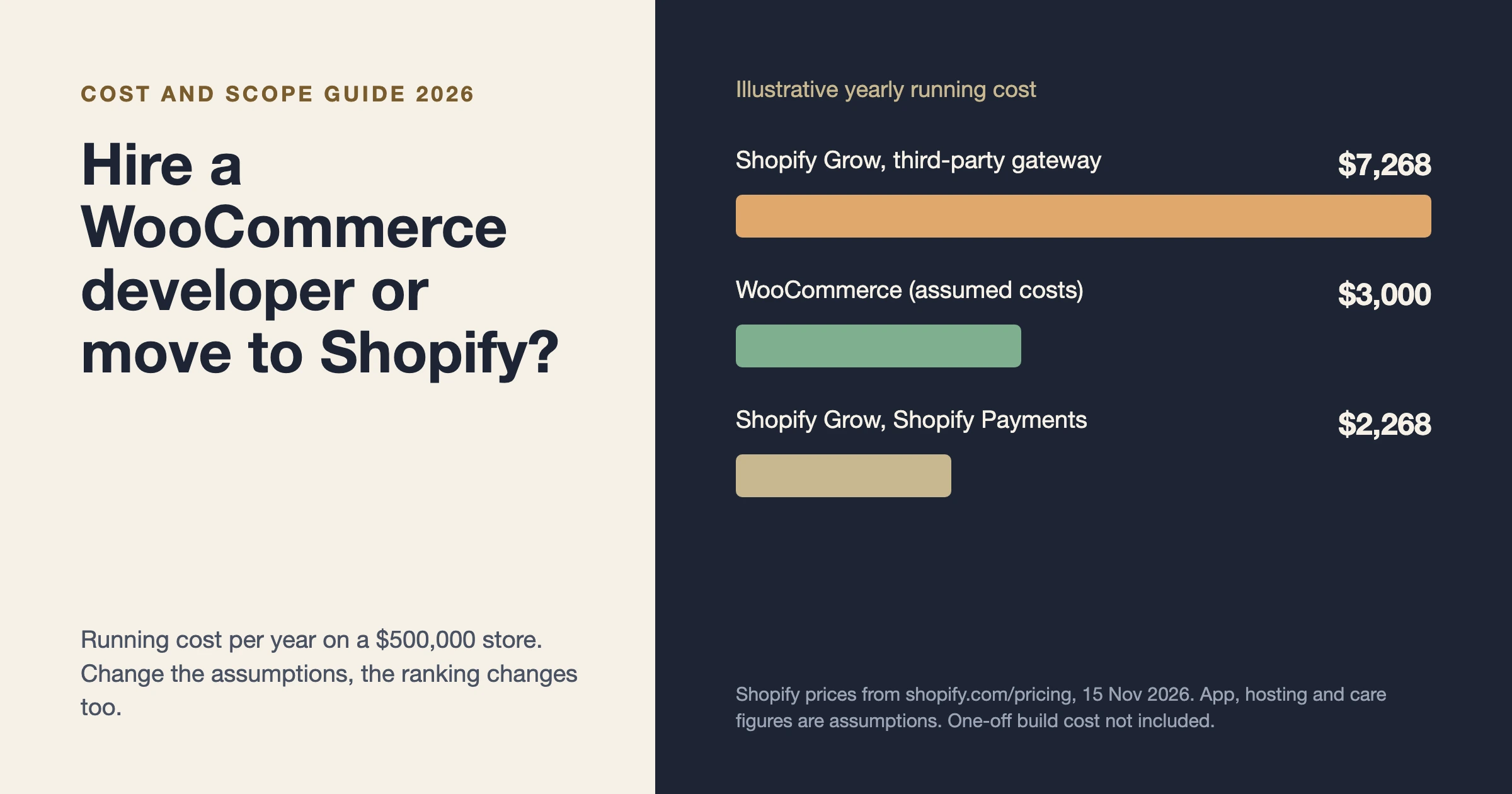
The numbers below are assumptions chosen to show how the comparison works, not quotes and not market rates. Replace each with your own. Suppose a store sells $500,000 a year, runs on Shopify’s Grow plan billed yearly, and installs paid apps costing $1,200 a year (assumed). Suppose a WooCommerce version of the same store costs $3,000 a year to run, made up of hosting, extensions and a care plan (assumed).
| Per year | Shopify, third-party payment provider | Shopify, Shopify Payments | WooCommerce (assumed) |
|---|---|---|---|
| Plan (Grow, yearly billing) | $1,068 | $1,068 | none |
| Apps or extensions | $1,200 (assumed) | $1,200 (assumed) | included in the $3,000 |
| Platform fee on third-party provider, 1% of $500,000 | $5,000 | $0 | $0 |
| Hosting, care and extensions | included above | included above | $3,000 (assumed) |
| Running total per year | $7,268 | $2,268 | $3,000 |
Three lessons fall out of that, and they hold whatever your real numbers are:
- Where Shopify Payments is available and you use it, a plain store can be cheaper to run on Shopify than on WooCommerce.
- When you use a third-party payment provider on a lower Shopify plan, the percentage fee can tip the running cost toward WooCommerce as revenue climbs.
- The running cost is half the picture. WooCommerce also has a one-off build cost that Shopify’s template route may not, and that gap, spread over three years, is what usually decides the result.
We would rather you leave this section with a spreadsheet than with a slogan. Anyone who tells you one platform is always cheaper is not looking at your numbers.
What is the difference between a freelancer, an agency and a plugin installer?
People search for “freelance WordPress developer”, “WooCommerce development agency” and “custom WooCommerce development” as if they were three versions of one thing. They are three different ways of buying work, with different strengths.
| Option | Good when | Watch for |
|---|---|---|
| Freelance developer | A clear, bounded task, a lower overhead budget, one person who knows your store | Single point of failure. Holidays, illness and other clients all affect you. Ask who covers when they are away |
| Agency | Larger scope, several skills (design, payments, performance), continuity when people leave | Account managers between you and the engineer, and juniors doing the work a senior sold |
| Plugin installer | Never a deliberate choice. It describes a supplier who assembles off-the-shelf extensions and cannot change code when they fall short | A stack of extensions where one custom integration would be cleaner, with nobody able to maintain the glue |
We have a longer buyer’s guide on how to hire a WordPress developer without getting burned. For stores that need more than configuration, see our post on custom ecommerce development.
Which scope questions separate an agency from a plugin installer?
Ask these in writing and read the answers for specifics. A good supplier answers with your store’s details. A weak one answers with their process.
- What exactly will you build custom, and what will you buy as an extension? You want a reasoned split, with the reason for each extension.
- What happens to my extension licences? Whose name are they in, and who renews them?
- How do you test checkout and payments before launch? Look for test orders, failed-payment cases and webhook checks, not “we click through it”.
- Where does the work happen before it reaches the live store? A staging copy is the minimum.
- Who owns the code and the accounts at the end? Code in a repository you can access, hosting and payment accounts in your name.
- How will you keep the store fast with my catalogue size? Ask what they will measure, not whether they care about speed.
- What does maintenance look like after launch, and what does it cost? A launch with no plan for updates is a future incident.
- What is out of scope? Every honest proposal has a list.
- Who will do the work, and can I meet them?
- What would make you advise me to use Shopify instead? A supplier who has an answer to that is giving you a straight comparison.
What are the red flags in a WooCommerce proposal?
- No list of what is excluded. Open scope means open invoices.
- A price with no breakdown. You cannot compare two quotes you cannot read.
- Every requirement is “a plugin”. Sometimes right, often a sign nobody will write code when the plugin falls short.
- Hosting and licences bought in the supplier’s name. That makes leaving them harder than it should be.
- No staging, no test orders, no rollback plan.
- A promise of a ranking or a conversion number. Nobody can promise those.
- No questions about your business. A proposal that arrives before anyone asked what you sell and to whom has been copied from another client.
- Pressure to decide this week.
What does a migration really move, in either direction?
The platforms’ own documentation is the best guide. We read both on 15 November 2026.
| Item | Shopify to WooCommerce (per the Shopify Data Migrator documentation) | WooCommerce to Shopify (per Shopify’s migration guide) |
|---|---|---|
| Products and variants | Imported, including variable products with images, title, stock and SKU | CSV import or a migration app. Variants that fail to import may need adding by hand |
| Customers | Imported, but passwords are not, because Shopify’s APIs do not provide them. Customers use password reset | CSV, migration apps or the Customer API. The guide does not mention passwords, so ask your supplier whether customers keep theirs or must set new ones |
| Orders | Imported, with filters by date and status | Historical orders only, through a migration app or an API. Import products first, then customers, then orders |
| Pages, blog posts, reviews, coupons | Imported | Pages and blogs via apps or APIs. Shopify lists gift cards and store credits as migratable through apps and the GiftCard API |
| URLs and redirects | The tool stores 301 redirects from /products, /pages, /blogs and /collections paths to the new permalinks. Cart and checkout paths are not redirected one to one | You set up URL redirects in Shopify, and the guide warns old page links likely will not load without them. A CSV import of redirects is available |
| Live cutover | Optional one-way live sync of products, inventory, orders and customers during cutover | Test orders, then domain switch |
| Subscriptions | Not named in the documentation we read. Ask your supplier how recurring billing moves | Not named in the guide we read. Ask the same |
The pattern is the same both ways. Catalogue data moves easily. Passwords need a plan. Redirects decide whether your search traffic survives. Subscriptions, saved payment methods and anything custom need a specific plan from whoever does the work, and you should ask for it by name. Our website migration service page describes how we approach it. For a related move from another platform, see leaving Magento and what each destination costs to keep running.
Common mistakes people report when choosing or moving
These are documented gotchas from the platforms’ own help pages, which we read on 15 November 2026. We link each one at its source in the sections above.
- Forgetting redirects. Shopify’s guide says old page links likely will not load after a domain move unless redirects are set up first. The Shopify Data Migrator stores redirects for products, pages, blogs and collections, but not for cart and checkout.
- Expecting customers to keep their passwords. Moving to WooCommerce does not carry them: the migrator’s documentation says Shopify’s APIs do not provide password data, so customers use password reset. Ask what happens in the other direction before you promise anything to customers.
- Importing in the wrong order. Shopify’s guide says to import products first, then customers, then historical orders, so orders connect to both.
- Emailing the whole team by accident. Shopify’s guide notes that staff set to receive order notifications get a new-order email for each imported order, so switch those off before importing historical orders.
- Choosing a plan and finding the checkout locked. Shopify’s pricing page lists checkout customisation as limited on Basic, Grow and Advanced, and full on Plus.
- Counting only the platform fee. Shopify bills apps separately, and charges a percentage on third-party payment providers. Both belong in the three-year number.
Where does Wbcom Designs fit?
We offer WooCommerce development, as one option among those above. Our page describes custom checkout, payments, subscriptions, B2B pricing, speed work, and moves from Shopify to WooCommerce, with fixed-price quotes within 48 hours of a free call. Our care plans cover WooCommerce stores from the Professional plan up, with staged updates and a test order walked through checkout.
The honest cons. We are a WooCommerce and WordPress team, so we have a stake in the answer, and we are not a Shopify agency. If your store is plain and you have nobody to maintain it, we will say Shopify is likely the better fit. Our work is quoted per project, so a small store with standard needs may be better served by a single freelancer or by Shopify itself. And we do not publish a rate card on this page, because a number without your scope would mislead you.
If you want a second opinion on your own numbers, the contact page is the place to start.
Frequently asked questions
How much does it cost to hire a WooCommerce developer?
It varies with scope, and we could not find a neutral current source for market rates, so we do not quote one. Get at least three written quotes with the same scope document, each broken into build, extensions, hosting and maintenance, and compare line by line.
Is Shopify cheaper than WooCommerce?
Sometimes. In our worked example, a plain store using Shopify Payments was cheaper to run on Shopify, and a store using a third-party payment provider was closer to a tie. Replace the assumptions with your own and recalculate.
Do I need a developer to run WooCommerce?
Not for a standard store, but you do need someone responsible for updates, backups and security. That can be a care plan, an in-house person or a developer on retainer. It cannot be nobody.
Can I move from Shopify to WooCommerce and keep my search rankings?
The Shopify Data Migrator documentation says it stores 301 redirects for products, pages, blogs and collections. Cart and checkout paths are not redirected one to one. Check the redirects against your top landing pages after launch.
What does Shopify Plus add?
According to Shopify’s pricing page, Plus adds full checkout customisation, unlimited staff accounts and B2B catalogues, a 0.2% fee on third-party payment providers and priority support. It starts at $2,300 a month on the page we read.
What we could not verify
We did not find a neutral source for current WooCommerce hosting, extension or developer rates, so those are left to your quotes. The worked example’s revenue, app, hosting and care figures are our assumptions for illustration. Card processing rates for Shopify Payments and WooPayments vary by country and were not compared. How subscriptions and saved payment methods move between platforms was not covered in the documentation we read.
Related reading