
9 min read
6 Best Seismic LMS Alternatives Compared for 2026


Almost nobody leaves Seismic because the LMS stopped working. They leave because the reason teams pick Seismic in the first place, wanting a platform that bends to how they actually deliver learning, is exactly what most Seismic replacements also fail to do: they impose their own model just as firmly.
Updated on June 30, 2026
This guide compares the best Seismic LMS alternatives, focusing on where each platform fits and what kind of team should seriously consider it.
What Seismic gets right
Seismic is built for sales-enablement-adjacent training at scale, with content management and delivery tightly integrated into a broader enablement platform. For organizations that already run their sales content through Seismic, keeping training in the same system avoids a second tool to manage.
If Seismic’s enablement integration is genuinely load-bearing for your sales organization, staying is a defensible decision.
Why businesses look for a Seismic LMS alternative
- High cost relative to training needs. Seismic is priced for its full enablement platform, not just the learning module.
- Limited control over learning experience and customization. The platform imposes its own structure on course delivery.
- Desire for better usability and faster deployment. Some teams want to launch training faster than Seismic’s setup allows.
- Need for stronger integrations with an existing website or membership system. Seismic is standalone, not woven into a broader site.
- Interest in blending LMS delivery with community, coaching, or member education. Learning is often more effective when it is not isolated from peer interaction.
Does Seismic’s model actually fit how you deliver learning?
Four questions decide whether staying makes sense:
- Is your training tightly coupled to Seismic’s sales-enablement content? If yes, unbundling loses real integration value.
- Do you need the LMS to live inside a broader branded site or community? Seismic is standalone by design, which works against this.
- Is cost proportionate to how much of the platform you actually use? Training-only usage inside a full enablement contract is expensive per feature used.
- Would a platform that bends to your workflow, rather than the reverse, actually change how training gets used? If control is the real complaint, most enterprise alternatives will disappoint you the same way Seismic did.
Score the options below on flexibility and total cost separately. They usually point in different directions, and knowing which matters more decides the shortlist.
What to compare in an LMS alternative
- ownership and flexibility: do you want full control or a managed platform?
- course delivery experience: how usable is the system for both admins and learners?
- customization: can the platform adapt to your business model?
- integration potential: will it connect well with your site, marketing stack, payments, or CRM?
- community and engagement support: does it help beyond course hosting alone?
- cost over time: licensing, user growth, and development overhead all matter.
6 alternatives to Seismic
1. Learnomy
Fixes: control, template lock-in, per-user cost. Does not fix: sales-enablement content integration, if that is genuinely what you need alongside training.
As this guide notes, the reason teams leave Seismic is rarely price alone. It is usually wanting a platform that bends to how they actually deliver learning rather than the reverse. Learnomy sits at the opposite end: free, self-hosted, no per-user cost, and because it runs on WordPress, the surrounding experience is yours to shape rather than configured within someone else’s templates.

Courses, quizzes, assignments, certificates, and a weighted gradebook are all included, with a front-end course builder and built-in memberships and monetization.
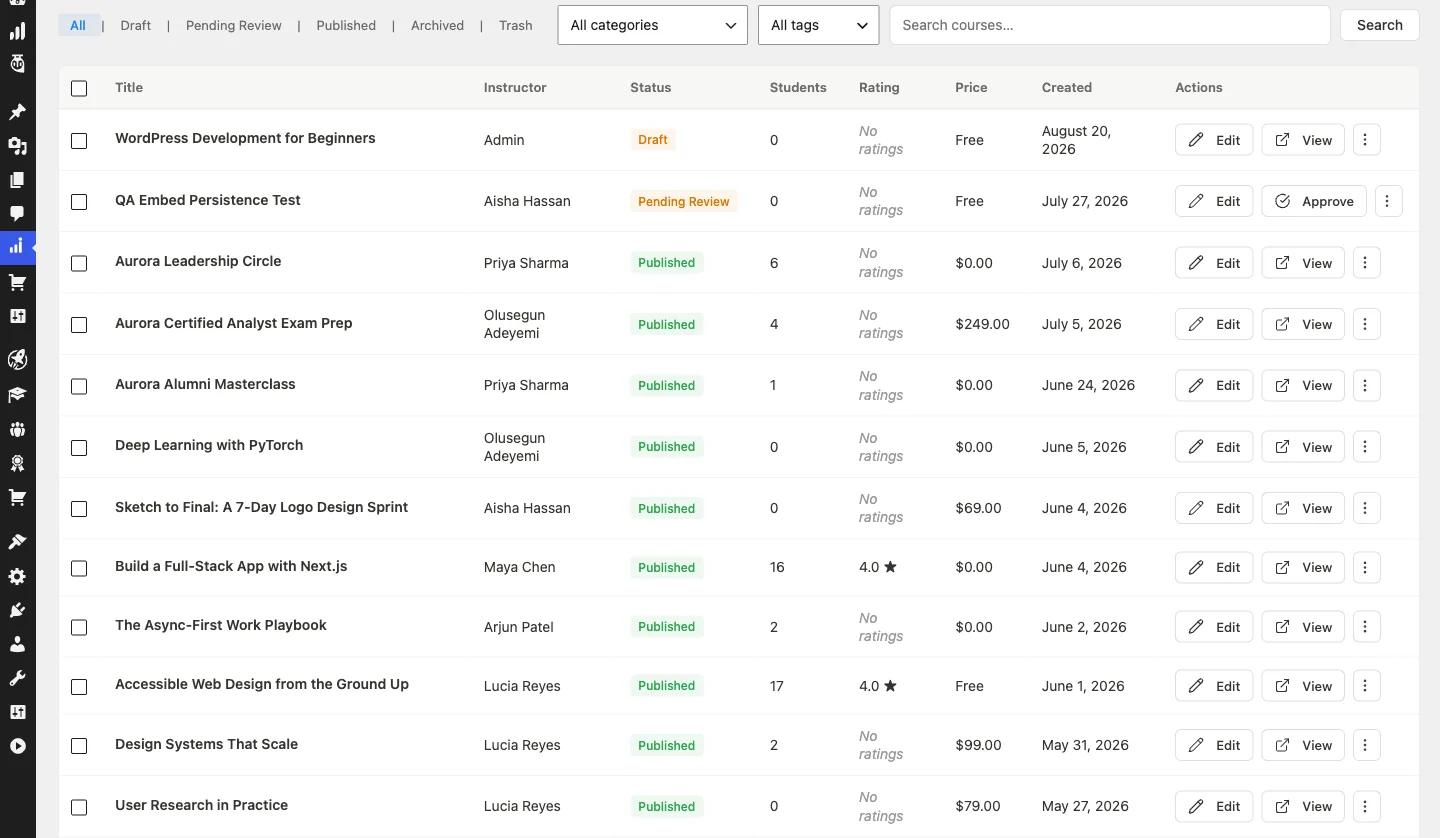
Weakness: no vendor SLA, no procurement-friendly contract, and no dedicated implementation team. For a regulated organisation those are decisive, and no free plugin substitutes for them. It also does not replicate Seismic’s sales-content management side.
2. LearnDash
Fixes: ownership, WordPress integration. Does not fix: cost, licence plus add-ons can add up at scale.
LearnDash is still one of the strongest alternatives when an organization wants control. Because it runs on WordPress, it is especially relevant for businesses that want the LMS to live inside a broader website, membership system, or community platform.
- Best for: organizations wanting a WordPress-based LMS with strong ownership and customization.
- Main downside: works best when the team is willing to manage or support a WordPress-based stack.
3. TalentLMS
Fixes: setup friction, deployment speed. Does not fix: deep customization or per-user cost at scale.
TalentLMS is attractive because it lowers setup friction, a stronger fit for teams that want a hosted platform and value speed and broad usability over deep customization.
- Best for: teams wanting a ready-to-use cloud LMS without heavy technical setup.
- Main downside: less flexible than ownership-focused options like LearnDash or Moodle.
4. Docebo
Fixes: enterprise scale, AI-oriented personalization. Does not fix: pricing transparency, it is quote-only.
Docebo is more compelling for larger organizations that want enterprise-grade scale, stronger automation, and more advanced learner management.
- Best for: enterprises needing a more advanced and scalable hosted LMS.
- Main downside: smaller teams may find it heavier and more expensive than necessary.
5. Moodle
Fixes: cost, open-source control. Does not fix: setup and maintenance effort, which lands on you.
Moodle remains important because it gives organizations a high level of control through an open-source model, a better choice for teams that value flexibility and technical ownership.
- Best for: technically capable teams wanting open-source control.
- Main downside: usually requires more technical effort than hosted LMS products.
6. iSpring Learn
Fixes: fast rollout, familiar authoring workflows. Does not fix: deep ownership or standalone flexibility.
iSpring Learn is useful when the priority is getting training content live quickly, especially for internal learning and corporate training.
- Best for: organizations wanting fast rollout and familiar course-authoring workflows.
- Main downside: less control than more customizable LMS options.
Side by side
| Alternative | Pricing model | Free tier | WordPress-native | Community-ready | Switch worth it if |
|---|---|---|---|---|---|
| Seismic (incumbent) | Enablement contract | No | No | No | Training is tightly coupled to sales-enablement content |
| Learnomy | Free | Yes, complete | Yes | Yes, via companion apps | Control and cost are the real complaints |
| LearnDash | Licence plus add-ons | No | Yes | Via BuddyPress/BuddyNext | You want a recognised WordPress vendor |
| TalentLMS | Per active user | Yes, limited | No | No | You want fast hosted setup |
| Docebo | Quoted | No | No | Partial, social learning | Training complexity is genuinely enterprise-scale |
| Moodle | Free core plus hosting | Yes | No | Via forums/plugins | You have technical staff and want full control |
| iSpring Learn | Authoring+delivery bundle | No | No | No | You need fast rollout with familiar authoring |
Before you migrate, do this instead
Separate the training complaint from the enablement complaint. If sales-content management is working fine and only training feels rigid, a lighter-weight LMS alongside Seismic might solve it without a full switch.
Price what you would actually keep from Seismic. If content management stays but training moves, confirm the reduced Seismic contract actually saves meaningfully versus the full bundle.
Switching effort, realistically
Course content, one to three days. Structure and materials generally export in usable form, though formatting often needs cleanup.
Completion history, does not transfer. Plan a cutover date and start fresh tracking on the new platform.
Communication, ongoing. Give learners advance notice and new login instructions.
Which Seismic LMS alternative fits different needs best?
- For an all-in-one WordPress LMS: Learnomy is an excellent choice for organizations that want course creation, memberships, learner management, and monetization in one platform.
- For control and ownership: LearnDash and Moodle remain strong choices for organizations that want complete control over their learning environment.
- For quick hosted deployment: TalentLMS and iSpring Learn are easier to deploy and require less technical management.
- For enterprise-scale learning: Docebo is a strong option for large organizations with advanced training requirements.
- For WordPress-based education businesses: Learnomy and LearnDash are ideal for organizations looking to build a scalable learning platform on WordPress.
How LMS alternatives connect to social learning, member education, and communities
Choosing an LMS is not only about course delivery. Many organizations now need student engagement, peer discussion, member interaction, and branded learning spaces that go beyond static lessons.
For WordPress-based education businesses, an LMS often works best when paired with community features, membership logic, and a broader learner experience. These related guides support that model:
- LifterLMS Review in 2026: Is It the Right LMS Plugin for WordPress?
- LearnDash vs LearnPress vs Tutor LMS
- Disciple Platform Review in 2026: Is It Worth It for Your Community?
- Gating Your Community by Membership Level with Jetonomy
That combination creates a stronger learning system: LMS for structured content, community for discussion and accountability, and WordPress ownership for long-term flexibility.
Two organizations, two different answers
The 80-person sales team using Seismic for both content and training
Sales collateral, playbooks, and onboarding training all run through Seismic’s integrated workflow, and reps pull content and complete training in the same interface.
They should stay, or negotiate scope. The integration between content and training is the actual value, and unbundling loses more than it saves.
The 40-person team using Seismic only for onboarding modules
Sales content lives elsewhere. Seismic’s LMS module is used for a handful of onboarding courses and nothing more.
They should move. They are paying enablement-platform pricing for a training-only use case, and Learnomy or LearnDash cover that completely at a fraction of the cost.
Decide in one line
- Control and cost are the real complaints. Learnomy.
- You want a recognised WordPress vendor. LearnDash.
- You want fast hosted setup. TalentLMS.
- Training complexity is genuinely enterprise-scale. Docebo.
- You have technical staff and want full control. Moodle.
- You need fast rollout with familiar authoring workflows. iSpring Learn.
- Training is tightly coupled to sales-enablement content. Stay on Seismic.
Final Thoughts
The best Seismic LMS alternative depends on your organization’s training goals, technical requirements, and preferred learning experience. If you want full ownership and flexibility, an all-in-one WordPress solution like Learnomy offers a scalable foundation, while hosted LMS platforms remain suitable for organizations prioritizing rapid deployment.
Frequently Asked Questions About Seismic LMS Alternatives
Why do businesses switch from Seismic LMS?
Common reasons include cost, flexibility limits, usability concerns, and the need for stronger ownership or broader learning-experience control.
What is the best Seismic LMS alternative for WordPress users?
Learnomy is an excellent option for organizations that want an all-in-one WordPress LMS with built-in course creation, learner management, memberships, certificates, and monetization. LearnDash is another strong choice for businesses that require an established LMS ecosystem and extensive integrations.
What is the best hosted Seismic LMS alternative?
TalentLMS and iSpring Learn are often practical hosted options for teams that want faster setup and less technical overhead.
What is the best open-source Seismic LMS alternative?
Moodle remains one of the most relevant open-source LMS alternatives because of its flexibility and large ecosystem.
Why does community matter in LMS decisions?
Because many learners benefit from discussion, peer support, accountability, and a stronger sense of participation than a standalone course system provides.
Should I stay on Seismic if I use it for sales content too?
If sales collateral and training genuinely run through the same integrated workflow, unbundling usually loses more value than it saves. The clearer case for switching is when Seismic’s LMS module is used for training alone.
LearnDash vs LearnPress vs Tutor LMS
Disciple Platform Review in 2026: Is It Worth It for Your Community?
Related reading