
16 min read
Make Every Enrollment Trigger Something Else

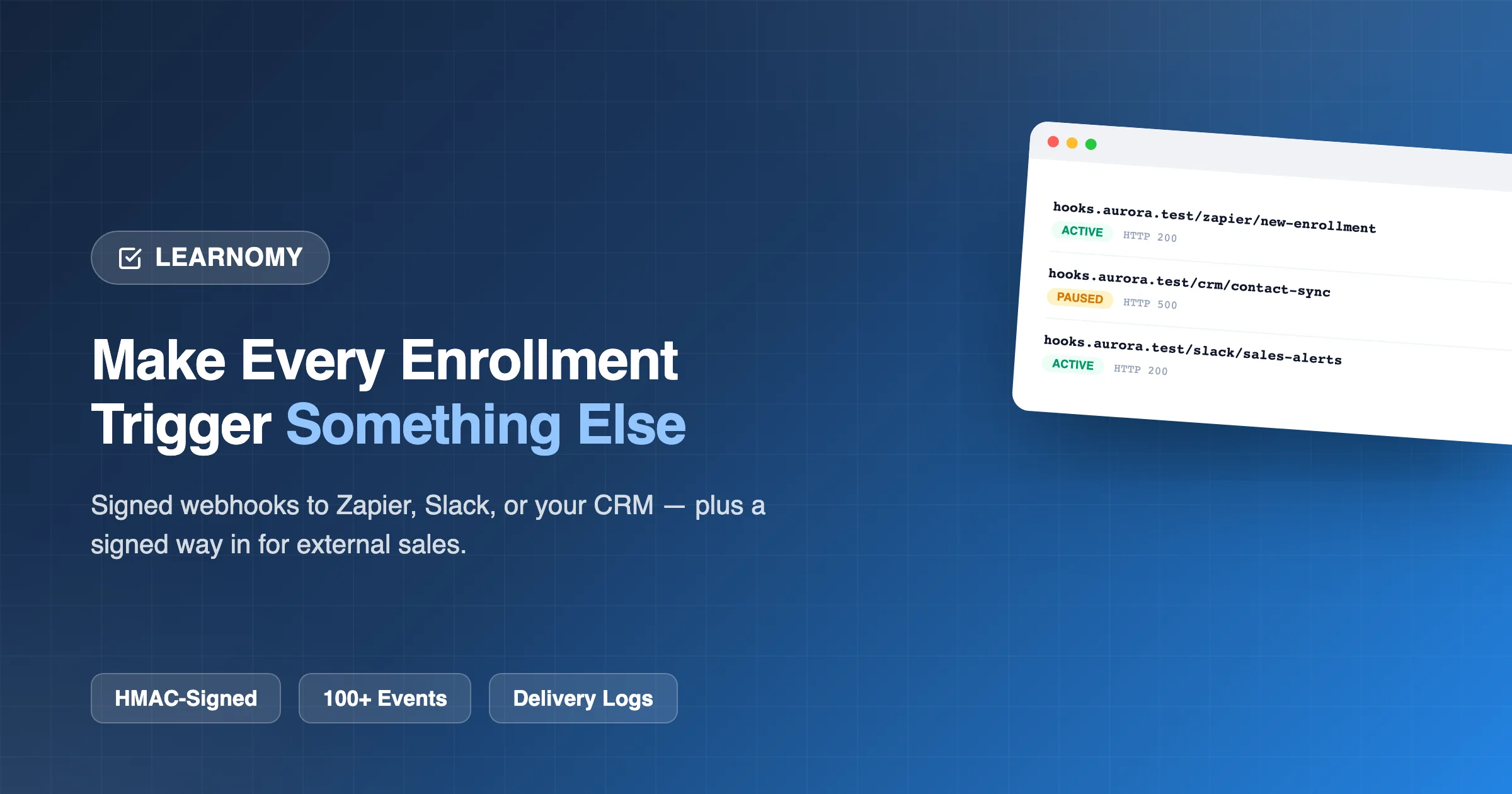
A course platform that only lives inside itself is a dead end for anyone running a real business around it. The moment a student enrolls, you probably want that fact to show up somewhere else too, a CRM contact record, a Slack channel your sales team watches, an email automation sequence, a spreadsheet your accountant reconciles against. Building each of those connections as a one-off, hand-coded integration is exactly the kind of technical debt that piles up fast and breaks silently the first time an API changes. Webhooks are the standard, general-purpose answer to this problem, and it’s worth looking at exactly how thorough a real implementation actually is.
The alternative to a real webhook system is usually one of two things, and both are worse. Either a course business manually checks the platform’s own admin screens periodically to catch up on what happened, which doesn’t scale past a handful of transactions a day and guarantees a delay between something happening and anyone downstream knowing about it, or a developer gets hired to build a bespoke integration against whatever API the platform exposes, a real cost in money and ongoing maintenance for something a well-built webhook system would make a five-minute, no-code setup instead. The gap between those two worlds is exactly what a comprehensive, well-secured webhook catalog closes.
Table of Contents
- The scale of what’s actually wired up
- Security: HMAC signing, stated in plain language
- The incoming door: selling a course somewhere else entirely
- Real webhooks, already running, with real failure states
- Why “Paused,” not “silently retrying forever” or “silently dead,” is the correct behavior
- Choosing events deliberately, not “select all”
- How this connects to the rest of the platform
- What a careless webhook system looks like, for comparison
- Zapier and Make: the actual on-ramp for non-developers
- Three real situations this solves
- Common questions before you wire up your first integration
- What to verify before you depend on this for real business operations
- The over-subscription trap, and why granularity alone doesn’t prevent it
- Building a genuine operational habit around this
The scale of what’s actually wired up
Here’s the real Outgoing Webhooks screen from a working Learnomy install, and the sheer breadth of what’s on it is the first thing worth noticing:

That’s not a short list of the two or three most obvious events, it’s a genuinely comprehensive catalog, organized by category: Enrollment (Created, Completed, Cancelled, Expired, Purchase Failed, Restarted, Retaken, Access Restored, Progress Reset), Course (Published, Created, Rejected, Updated, Deleted, Approved, Pending Review, Duplicated), Quiz (Submitted, Started, Graded, Failed, Attempts Granted, Passed, Created, Updated, Deleted), Payment, Membership, Withdrawal, Certificate (Issued, Revoked, Expired, Verified), Review, Instructor (Application Approved, Application Submitted, Rejected, Suspended, Resumed, Courses Reassigned), Lesson, Refund, Purchase, Subscription (a full lifecycle: Renewed, Expired, Created, Resumed, Past Due, Deleted, Approved, Declined, Cancelled, Paused, Auto Expired, Plan Changed, Extended, Plan Change Completed, Plan Change Failed, Pending, Trial Ended), User, Space, Space Group, Cohort, Learning Path, Milestone, Assignment, Membership Plan, Commission, Coupon, Payout, Stripe, Gift, AI, Report, and LTI.
Every category name on that list maps directly to a feature covered elsewhere in this series, Commission and Payout tie to the instructor payments articles, Certificate ties to the certificate article, LTI ties to the institutional-integration article, Learning Path and Milestone tie to the career-track article, AI ties to the authoring article. That comprehensiveness isn’t accidental, it reflects webhooks being treated as a cross-cutting capability wired into every subsystem as it was built, rather than a separate integration layer bolted on afterward covering only a handful of the most commonly requested events.
Security: HMAC signing, stated in plain language
The subtitle on this screen states the security model directly: “Push Learnomy events to Zapier, your CRM, or any HTTPS endpoint. Each delivery is signed with the webhook secret.” That’s HMAC signing, every webhook payload gets cryptographically signed using a secret key only your server and Learnomy’s server know, and your endpoint can verify that signature before trusting the payload actually came from Learnomy and wasn’t forged by someone who discovered your endpoint URL.
The real Secret Key field, DLY5HsJHTllKKgWxSPB64esFSoWQhe47 in this case, comes with a direct warning: “Signs every payload (HMAC-SHA256). Copy it now. For security it is not shown again after the webhook is saved.” That last sentence is a meaningful security practice, not an arbitrary inconvenience, a secret that can be re-displayed after creation is a secret that’s likely stored in a recoverable, and therefore more exposed, way. A secret shown once and never again means the system almost certainly stores it hashed rather than in plain, reversible form, the same security discipline you’d want from a password field, applied correctly here to a webhook signing secret.
The incoming door: selling a course somewhere else entirely
Most of the screen covers outgoing events, things happening in Learnomy that other systems should know about. But there’s a second, distinct capability at the top of the page that solves the opposite problem: “Incoming enrollment (external / closed Courses), Sell a Course on another platform (your own checkout, Gumroad, a CRM) and grant access here. Connect your store to these details, or send a test to confirm it works end to end.”
This is a genuinely different and valuable capability from outgoing webhooks. It’s the technical mechanism behind the “closed” and “invite only” pricing models covered in the pricing article elsewhere in this series, a course sold entirely outside Learnomy’s own checkout, through Gumroad, a custom cart, or any other system, that still needs to grant real Learnomy course access the moment a sale happens elsewhere. The description spells out the payload directly: “Your store POSTs a signed JSON body { ‘useremail’: ‘…’, ‘courseid’: 123 } here to grant access. Add ‘action’: ‘revoke’ to pull access on a refund.” That single endpoint, with that one additional field, handles both directions of the relationship, granting access on a sale, and revoking it on a refund, through the same simple contract.
Real webhooks, already running, with real failure states
The bottom of the screen shows the actual registered webhooks on this install, and it’s worth reading exactly what each one reveals:
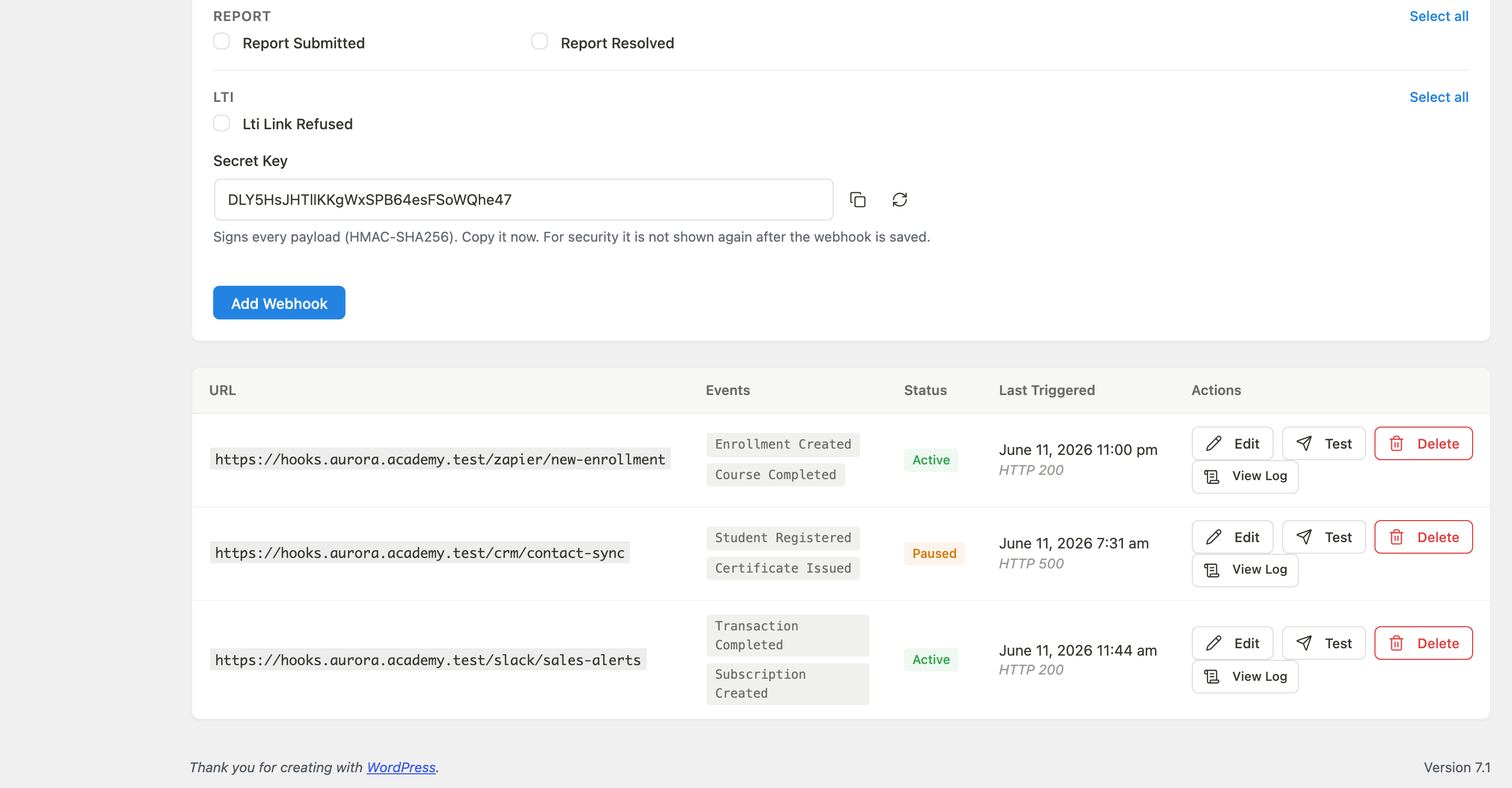
Three real, distinct integrations: hooks.aurora.academy.test/zapier/new-enrollment, listening for Enrollment Created and Course Completed, currently Active, last triggered June 11, 2026 at 11:00pm with an HTTP 200 response, a clean, successful delivery. hooks.aurora.academy.test/crm/contact-sync, listening for Student Registered and Certificate Issued, currently Paused, with its last attempt returning HTTP 500, a server error on the receiving end. hooks.aurora.academy.test/slack/sales-alerts, listening for Transaction Completed and Subscription Created, Active, last triggered successfully with HTTP 200.
That middle row is the important one. A webhook that failed with a 500 error didn’t just vanish or get silently retried forever, it’s marked Paused, visibly distinct from the two healthy Active webhooks, with the specific HTTP status code that caused the pause displayed directly on the row. Every row also carries a View Log action alongside Edit, Test, and Delete, meaning the specific failure isn’t just a status badge, there’s an actual delivery log an admin can open to see exactly what happened and why.
Why “Paused,” not “silently retrying forever” or “silently dead,” is the correct behavior
This is worth dwelling on, because it’s a genuinely easy thing for a webhook system to get wrong in either direction. A system that silently retries a failing webhook forever, with no visible signal, means a broken CRM integration could sit failing for months with nobody noticing, exactly the kind of quiet failure that erodes trust in automation generally, since nobody ever explicitly turned it off, it just stopped working and nobody knew. A system that silently gives up after a fixed number of retries, with equally no visible signal, produces the identical outcome from the admin’s perspective: an integration that’s dead, and nobody knows.
Pausing the webhook and marking it visibly, with the specific error code and a Test button sitting right there to retry manually once the underlying issue is fixed, is the correct middle ground: stop wasting delivery attempts against an endpoint that’s clearly broken, but make that fact impossible to miss on the admin’s own dashboard rather than burying it in a server log nobody’s watching. An admin scanning this screen sees, at a glance, that the CRM integration needs attention, not because they went looking for a problem, but because the status column itself is the signal.
Choosing events deliberately, not “select all”
The event-selection interface, dozens of individually named checkboxes, organized by category, each with its own Select all link scoped to just that category, is a deliberate design against the lazy alternative of one giant “select all events” toggle. That granularity matters practically: a Slack sales-alerts channel almost certainly wants Transaction Completed and Subscription Created, and almost certainly does not want Lesson Comment Posted flooding the same channel with noise unrelated to sales. A CRM sync integration wants Student Registered and Certificate Issued, not every quiz attempt across the whole catalog.
Building the event catalog this granularly, rather than a single generic “something happened” webhook that dumps every event to every subscriber and expects the receiving system to filter, puts the filtering responsibility in the right place: configured once, deliberately, at the point where the integration is set up, rather than requiring every downstream system to implement its own filtering logic for events it never wanted delivered in the first place.
How this connects to the rest of the platform
Nearly every article in this series has a webhook category sitting behind it, and it’s worth naming a few of those connections directly, because they show webhooks acting as the connective tissue between features that would otherwise be isolated. The multi-instructor commission system has Commission Overpaid and Commission Calculated events, a site owner could route those directly to an accounting system rather than reconciling commission math by hand. The Stripe Connect payouts system has its own Payout Reversed, Payout Reversal Failed, and Payout Transfer Created events, meaning the specific refund-debt edge case covered in that article could itself trigger a webhook, alerting an admin the moment that exact scenario occurs rather than requiring them to notice it on the payouts screen. The LTI integration has its own Lti Link Refused event, covered directly in the LTI article, giving an institutional partner’s IT team an automated heads-up the moment a launch fails rather than waiting for a support ticket.
This is the practical value of a webhook system this comprehensive: it turns every other feature in the platform into something that can proactively notify the rest of your business stack, rather than requiring you to log into Learnomy’s own admin repeatedly to check whether something happened.
What a careless webhook system looks like, for comparison
Given how many features in this series have a careless-versus-careful contrast worth naming, webhooks deserve the same treatment, because the phrase “webhook support” covers a similarly wide quality range. A careless implementation fires an unsigned payload, any URL that happens to know your endpoint could forge a fake “enrollment created” event, and your receiving system would have no way to distinguish it from a real one. A careless implementation offers a single, coarse “all events” subscription rather than granular per-event selection, forcing every integration to filter out irrelevant noise on the receiving end. And a careless implementation either retries a failing endpoint forever with no visible signal, or silently gives up after a fixed number of attempts, both of which produce the same practical outcome: a broken integration nobody notices until a downstream process quietly stops working and someone eventually asks why.
Every one of those failure modes is specifically avoided in what’s shown above: HMAC-SHA256 signing stated explicitly in the interface copy, dozens of individually selectable events organized by category, and a visible Paused status with a specific error code the moment a delivery genuinely fails. None of this is exotic engineering, HMAC signing and per-event granularity are well-understood, standard practices in any serious webhook implementation across the software industry. The point isn’t that any single piece here is technically remarkable; it’s that all of the standard best practices are actually present together, rather than a subset being skipped to ship faster.
Webhook depth is also one of the clearest tells of a platform’s overall developer story, which is why it sits alongside API routes and documentation as a core criterion in our roundup of the best LMS platforms with REST API and developer features.
Zapier and Make: the actual on-ramp for non-developers
It’s worth being direct about who realistically uses a feature like this, because “webhooks” as a word sounds like a purely technical, developer-only capability, and that framing undersells its real audience. The screen’s own subtitle names Zapier specifically, “Push Learnomy events to Zapier, your CRM, or any HTTPS endpoint”, and that matters because Zapier (and similar no-code automation tools like Make) exist specifically to let someone with zero coding ability point a webhook at a visual workflow builder and connect it to hundreds of other tools without writing a single line of code.
That’s the realistic path for most course creators who want the CRM-sync or Slack-alert scenarios described above: not hiring a developer to write custom integration code against a webhook payload, but pointing Learnomy’s webhook at a Zapier “catch hook” trigger and building the rest of the automation, “when this webhook fires, create a contact in HubSpot, then send a Slack message”, entirely through Zapier’s own visual interface. The technical HMAC-signing details covered above matter for security, but the day-to-day experience of actually using this feature, for the overwhelming majority of course creators who’ll ever touch it, is a no-code automation platform’s own dashboard, not a code editor.
Three real situations this solves
The academy running sales through Slack-alerted urgency. A team that wants real-time visibility into revenue, a Slack channel pinging every time a transaction completes or a subscription starts, gets that with a single webhook pointed at a Slack incoming-webhook URL, exactly as shown in the real “sales-alerts” row above, with zero custom code required on Learnomy’s side.
The business selling the same course through multiple storefronts. A course creator selling through their own Learnomy checkout, and also through Gumroad, a WooCommerce storefront, or a separate landing page checkout, uses the incoming-enrollment endpoint to keep both channels granting the same real Learnomy access, with refunds from either channel correctly revoking access through the same signed contract.
The team that needs CRM contact records created automatically. Rather than manually exporting a student list periodically, a Student Registered webhook pointed at a CRM’s contact-creation endpoint keeps that system current automatically, the moment each registration happens, exactly what the real (if currently paused) “contact-sync” row in the screenshot was built to do.
Common questions before you wire up your first integration
What happens to events fired while a webhook is paused? Based on the design shown, pause on failure, with a manual Test action to resume, a paused webhook most likely doesn’t queue and retroactively deliver missed events once reactivated; it simply stops attempting new deliveries until the underlying issue is fixed and someone re-enables it. Confirm this directly if your integration depends on not losing events during a downtime window.
Can I verify a webhook payload’s signature without writing custom code? The HMAC-SHA256 signing scheme described here is a standard, well-documented approach that most webhook-receiving platforms (Zapier, Make, and most CRMs) already know how to verify natively, you’re not being asked to implement a proprietary signing scheme from scratch.
Is there a limit to how many webhooks I can register? Nothing in the screen examined suggests an artificial cap, and the Webhooks Pro module (covered in the modules catalog elsewhere in this series) is specifically described as “unlimited webhooks with automatic retry and delivery logs”, meaning the free tier’s more basic outgoing-webhook capability is likely more limited, with this Pro version removing that ceiling.
How do I debug a webhook that’s marked Active but doesn’t seem to be delivering? The View Log action next to every webhook row is exactly the tool for this, it should show the actual delivery attempts, their timestamps, and their response codes, giving you the specific evidence needed to diagnose an issue rather than guessing.
Can the incoming-enrollment endpoint grant access to a membership plan, not just a single course? The documented payload example specifically references course_id, suggesting single-course granting is the primary documented use case, if you need to grant membership-level access through this same external-sale mechanism, confirm directly whether that’s supported or whether it requires a different integration path.
What to verify before you depend on this for real business operations
- Send a real test event to each webhook before trusting it in production, using the built-in Test action, and confirm the receiving system actually processes it correctly, not just that Learnomy reports a successful delivery.
- Actually verify the HMAC signature on the receiving end, rather than trusting that a request hitting your endpoint URL is genuinely from Learnomy, the whole point of the signing mechanism is defeated if the receiving system never checks it.
- Select events deliberately per integration, resisting the temptation to select every available checkbox “just in case”, a Slack channel flooded with irrelevant events becomes a channel people mute, which defeats the purpose of real-time alerting.
- Check the status column periodically, not just when something feels wrong. A Paused webhook sitting unnoticed for weeks is exactly the failure mode this visible status design is meant to prevent, but only if someone’s actually looking at the screen periodically rather than assuming silence means everything is fine.
The over-subscription trap, and why granularity alone doesn’t prevent it
Granular, per-event selection solves the “too coarse” problem, but it introduces a subtler failure mode worth naming: it’s entirely possible to select every event that sounds vaguely relevant to an integration, ending up with a webhook that fires far more often than the receiving system, or the humans watching it, can actually make good use of. A Slack sales-alerts channel that gets pinged for every single quiz submission across the whole catalog, in addition to the transaction events it actually cares about, becomes exactly the kind of noisy channel people mute within a week, which quietly defeats the entire purpose of having a real-time alert in the first place.
The discipline this requires isn’t technical, it’s editorial: before checking a box, ask whether a human or a downstream system genuinely needs to react to that specific event, not just whether it’s theoretically interesting. The real “sales-alerts” webhook in the screenshot above is a good model of this restraint, two events selected (Transaction Completed, Subscription Created), both directly tied to the channel’s actual purpose, not a dozen tangentially related ones swept in because they were available. Revisit your own webhook’s event selection periodically as your integration’s actual usage patterns become clear, trimming events that turned out to generate noise rather than value, the same way you’d unsubscribe from an email list that stopped being useful.
Building a genuine operational habit around this
The specific value of everything covered above only materializes if someone actually treats the Outgoing Webhooks screen as a piece of live infrastructure to monitor, not a one-time setup task to complete and forget. A reasonable habit: check the status column on this screen on the same cadence you check the Grading queue or the Analytics dashboard covered elsewhere in this series, weekly, at minimum, for a catalog running several active integrations, more often if a specific integration is business-critical. A Paused webhook caught within a day of failing is a two-minute fix. The same Paused webhook discovered three months later, after a CRM has been silently missing every new student registration in the meantime, is a much larger cleanup problem, and one that’s entirely avoidable simply by looking at a screen that’s already telling you, plainly, that something needs attention.
The real test of any webhook system is whether it survives contact with a genuinely broken downstream endpoint, because every integration eventually has one, whether from a CRM’s own outage, an expired API key, or a Zapier automation someone forgot to renew. What’s shown here handles that correctly: a visible pause, a specific error code, a delivery log, and a one-click way to test again once it’s fixed. That’s the unglamorous engineering that makes “make every enrollment trigger something else” a promise you can actually build a business process around, rather than an integration you have to personally babysit to make sure it hasn’t quietly stopped working.
Related reading