
11 min read
How to Build a Fiverr-Style Freelance Service Marketplace on WordPress


You can build a Fiverr-style freelance service marketplace on WordPress using one plugin: WP Sell Services. It covers the exact mechanics Fiverr popularised, tiered service packages, seller profiles with aggregate ratings, requirement forms, and category-based discovery, without Fiverr’s standard 20% commission on every order.
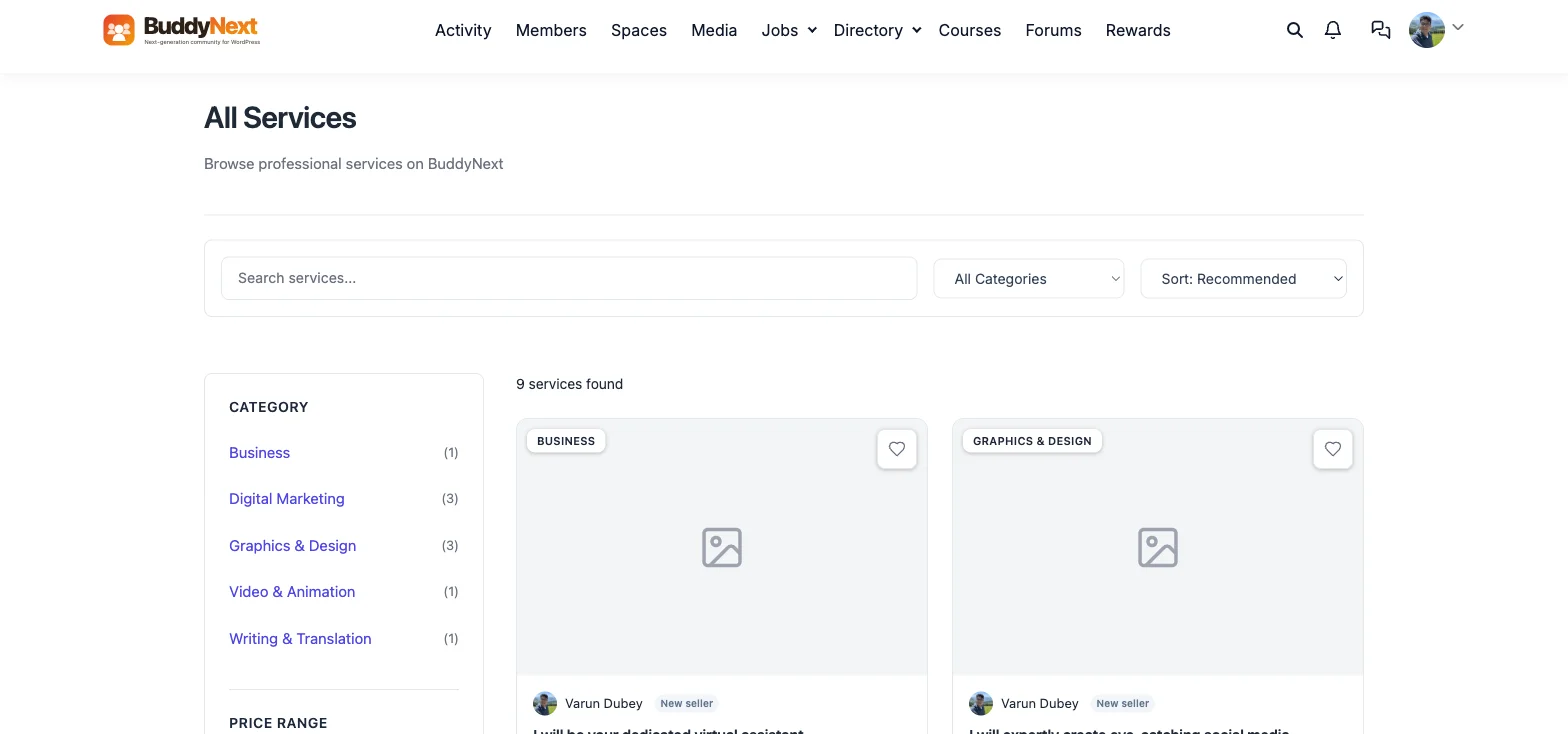
This guide covers what makes a service marketplace actually function as a marketplace rather than a glorified portfolio page: tiered pricing packages, the requirements form that gates an order until the buyer answers the seller’s questions, seller trust signals (rating, order count, member-since date), and category-based browsing. Every screenshot below is from a live install with 9 real services, real tiered pricing, and a seller with 701 aggregate reviews, not a mockup.
Key Takeaways
- WP Sell Services runs the full Fiverr mechanic natively: multi-tier pricing packages per service, a pre-order requirements form, delivery-time and revision limits, and seller ratings, all in one plugin.
- Every service supports up to three pricing tiers (the same Basic/Standard/Premium pattern Fiverr uses), each with its own price, delivery time, revision count, and feature checklist.
- A requirements form collects the buyer’s answers to seller-defined questions before an order can be placed, the mechanic that prevents a seller from starting work without the information they need.
- Seller trust is built from aggregate rating, order count, and member-since date shown directly on every listing, not just a single unverified profile blurb.
- No commission is taken from the marketplace owner’s pocket, unlike Fiverr’s standard 20% cut on every completed order. Free to install, with three commerce backends to choose from (native, WooCommerce, or Easy Digital Downloads) depending on what the rest of the site already runs on.
What Is a Freelance Service Marketplace, and Why Would You Clone It?
Fiverr’s actual innovation wasn’t freelancing, freelance marketplaces existed long before it, it was packaging a service as a fixed-price, fixed-scope product instead of an open-ended hourly negotiation. “I will design a logo for $50, delivered in 3 days” is a product listing, not a job posting, and that framing is what makes a service marketplace browsable the way a product catalogue is, rather than requiring a buyer to post a job and wait for proposals.
Building your own version makes sense for an agency that wants to package its own team’s services as fixed-price offerings, a niche professional community (developers, designers, consultants in one specific industry) that wants a marketplace scoped to their own audience, or a platform that wants to avoid handing 20% of every transaction to Fiverr. It’s also the right call when a business already has WooCommerce or Easy Digital Downloads running and wants services sold through the same checkout as physical or digital products.
Where Self-Built Service Marketplaces Usually Fall Short
Three failure patterns show up repeatedly in DIY WordPress marketplace builds. First, flat, single-price listings, no tiered packages, which forces every buyer into the same scope and price regardless of what they actually need, the opposite of Fiverr’s Basic/Standard/Premium model that captures buyers across a wider budget range from one listing. Second, no requirements gate, an order gets placed with no structured way for the seller to collect the information they need before starting work, leading to back-and-forth messaging that should have happened before checkout. Third, no visible seller trust signals, a listing with no rating, no order count, and no seller history looks identical whether it’s from a first-time seller or someone who’s delivered hundreds of orders.
WP Sell Services avoids all three by shipping tiered packages, a requirements form, and seller rating/order-count/member-since data as core features of every listing, not optional add-ons.
Why Self-Host Instead of Using Fiverr or Upwork
Fiverr charges sellers a flat 20% commission on every completed order, regardless of order size, and separately charges buyers a service fee on top of the listed price. Upwork’s freelancer fee scales down with a client relationship’s lifetime value but still takes a meaningful cut, and both platforms own the buyer relationship, a seller who gets suspended loses their entire order history and reviews instantly, with limited recourse.
A self-hosted marketplace keeps the full transaction value (minus standard payment processor fees, not a platform commission), gives the marketplace owner full control over which categories and sellers are allowed, and doesn’t risk a seller’s reputation being erased by a platform-level policy decision. The tradeoff, consistent across this series, is that Fiverr and Upwork bring a large existing buyer pool. Self-hosting is the right call for an agency, a niche professional community, or a platform that already has, or can build, its own audience of buyers and sellers.
What You Need
- WordPress, any standard install, self-hosted or on a host that allows plugin installs.
- WP Sell Services, a free WordPress service marketplace plugin: tiered pricing, requirements forms, seller ratings, and category-based discovery, running on its own native commerce layer. This is the entire marketplace engine.
- A theme that renders the service grid and listing pages cleanly. BuddyX Pro is what’s used in the screenshots on this page.
The core plugin is free and runs its own native checkout with no WooCommerce or EDD dependency required. WP Sell Services Pro adds advanced monetisation and seller tools, covered in the monetisation section below. If the rest of the site already runs on WooCommerce or Easy Digital Downloads, dedicated WooCommerce and EDD versions plug services directly into that existing checkout instead.
Step 1: Install WP Sell Services and Understand the Service Data Model
From your WordPress dashboard, go to Plugins → Add New, search for WP Sell Services, install and activate. The plugin registers its own Service post type, each service listing carries a title (Fiverr’s “I will …” framing works well here since it states the exact deliverable), a category, a description, and up to three pricing tiers.
Once active, a front-end Services archive is available automatically, with category filtering, a price-range filter, and sort controls, no separate page-building required to get a working marketplace grid.
Step 2: Configure Tiered Pricing Packages
Each service supports up to three pricing tiers, in the example above, 5 Hours ($50), 10 Hours, and 20 Hours of virtual assistant time, each tier carrying its own price, delivery time (7 Days in this case), revision limit, and a checklist of what’s included. This is the single most important structural decision in a service marketplace: a flat single price forces every buyer into the same scope, while tiered packages let a $50 buyer and a $500 buyer both find the right fit on the same listing.

Step 3: Set Up the Requirements Form
Every service can define its own Requirements questions, shown in the example above as “What tasks do you need help with?”, “What tools do you currently use?”, and “Preferred communication method?” A buyer answers these before an order is placed, giving the seller everything they need to start work immediately rather than opening with a round of clarifying messages after payment has already happened. This single feature is a large part of why Fiverr feels more efficient than an open job-board model, the information exchange that would otherwise happen over several messages is captured upfront, structured, and attached to the order.
Step 4: Build Seller Trust Signals
Every listing shows an About the Seller section with the seller’s photo, an aggregate rating across all of their services (4.9 from 701 reviews in the example above, distinct from the 98 reviews on this specific service), a “Contact Me” button, and a member-since date. A Frequently Asked Questions accordion on the listing itself pre-answers the questions a buyer would otherwise need to message about, reducing pre-sale friction the same way a well-written product page does in any e-commerce context.
Self-Hosted vs. Hosted Service Marketplaces
| Platform | Tiered Packages | Commission Taken | Seller Owns Their Reputation | Cost Model |
|---|---|---|---|---|
| Fiverr | Yes, three tiers | 20% flat seller commission + buyer service fee | No, tied to the Fiverr account | Free to list; commission on every sale |
| Upwork | No, hourly or fixed-bid proposals | Sliding scale, up to 10% at high lifetime billing | No, tied to the Upwork account | Free to list; commission on every sale |
| Freelancer.com | Limited, project-bid model | 10% or $5 minimum per project | No, tied to the platform account | Free to list; commission on every sale |
| WP Sell Services | Yes, up to three tiers per service | None, payment-processor fees only | Yes, the marketplace owner’s own data | Free core; Pro tier optional |
The gap worth noticing: Upwork and Freelancer.com are proposal-based, not product-based, a buyer has to post a job and wait, rather than browsing fixed-price listings the way Fiverr and WP Sell Services both work. Among the fixed-price options, only WP Sell Services keeps 100% of the transaction with the marketplace owner instead of a third-party platform.
Monetising a Service Marketplace
The free core plugin supports a fully functional marketplace with tiered pricing, requirements forms, and seller profiles. WP Sell Services Pro adds advanced seller tools and monetisation options for a marketplace that’s outgrown a single-seller or small-team setup, useful once the marketplace opens up to outside sellers and needs commission handling, payout management, or more granular seller permissions.
Frequently Asked Questions
No. WP Sell Services runs its own native commerce layer with no WooCommerce or EDD dependency required. If the rest of the site already runs on one of those platforms, dedicated WooCommerce and EDD versions of the plugin plug services directly into that existing checkout instead.
Up to three tiers per service, the same Basic/Standard/Premium structure Fiverr popularised. Each tier carries its own price, delivery time, revision limit, and list of included features, so one listing can serve buyers with different budgets and scope needs.
Each service can define its own Requirements questions, which the buyer must answer before the order is placed. This captures the information exchange that would otherwise happen through back-and-forth messaging after checkout, structured and attached to the order from the start.
Every listing shows a member-since date alongside the rating and order count, so a new marketplace with early sellers can still show transparent, honest signals (a recent join date, a low but real order count) rather than hiding the absence of a track record. Trust builds visibly as sellers complete their first orders.
The core plugin takes no commission, transactions run through standard payment processor fees only. Commission handling for a multi-seller marketplace with outside sellers is a Pro-tier capability for marketplace owners who want to charge sellers a cut, the same model Fiverr runs, but configured and kept by the marketplace owner rather than paid to a third party.
Related
This is the seventh build in a series on cloning well-known platforms with self-hosted WordPress plugins. See also how to build a LinkedIn-style professional network, how to build a Meetup-style events platform, how to build a Udemy-style course marketplace, how to build a Reddit-style community forum, how to build an Instagram-style photo sharing platform, how to build a Yelp-style business directory, how to build a Medium-style publishing platform, and how to add a Duolingo-style points and streaks system. Protecting paid video content? See how to build a Netflix-style protected video platform on WordPress. And for a quick community pulse-check, see how to add Twitter/X-style polls to WordPress.
Get Started
Get WP Sell Services to start your marketplace, or see WP Sell Services Pro for advanced seller tools. If you want the exact look shown in this guide, BuddyX Pro is the theme used throughout.
Related reading
- Twitter x Style Polls Surveys Wordpress
- Netflix Style Protected Video Platform Wordpress
- Duolingo Style Points Streaks Leaderboard Wordpress
- Medium Style Multi Author Publishing Platform Wordpress
- Yelp Style Business Directory Review Platform Wordpress
- Instagram Style Photo Sharing Platform Wordpress