
18 min read
The First WordPress Forum Plugin Built for the AI Era


There has never been a worse time to run a community on a plugin that can’t tell a spam bot from a real member, and can’t be seen by anything except a browser.
That sentence sounds dramatic until you sit with it for a minute. Two things changed about the web very recently, and almost nothing built before 2023 was designed with either of them in mind.
First: spam stopped being a person with a script and a keyword list. It’s now a language model that can write a plausible-sounding reply in your community’s own tone, at a volume no moderation queue was ever built to absorb.
Second, and much less talked about: the web is starting to have two kinds of visitors, people, and AI agents acting on their behalf. WordPress itself just shipped the Abilities API (6.9+), a standard way for a site to expose what it can do so an agent can discover and call those actions directly. A forum that has no story here is, for a growing slice of the internet, functionally invisible.
Every forum plugin most WordPress sites are still running, bbPress, wpForo, Asgaros, was architected years before either force existed. This isn’t a knock on their age for its own sake. It’s that the specific decisions made a decade ago are exactly what block both of the things a forum plugin now needs to do.
Jetonomy was not built in that decade. This is what “built for the AI era” actually means, feature by feature, with real screenshots from a live install, not a slide deck.
Why the incumbents genuinely can’t just bolt this on
bbPress hasn’t seen meaningful architectural development in years. Like most plugins in this category, it stores everything in WordPress’s default, one-size-fits-all storage, the same tables WordPress uses for ordinary blog posts and their extra bits of data, never built with a fast-moving forum in mind. Its admin screens still rely on jQuery, an older style of website code from before WordPress had a modern, official way for outside tools to connect to a site (that’s what “the WordPress REST API” means, a standard door other apps can use to read or write data) and before WordPress introduced its current, lighter-weight way of making pages feel instantly responsive without loading a ton of extra code.
Retrofitting an AI-moderation layer or an agent-readable interface onto that isn’t a feature update. It’s a rewrite. Every AI-assisted decision a forum needs to make, is this account trustworthy, is this content safe, does this thread need a summary, needs the system to already understand things like a member’s trust standing, which space they belong to, and their voting history. A plugin built on generic, blog-post-shaped storage was never designed to track any of that cleanly.
As of today, none of the legacy forum plugins have documented AI moderation, support for WordPress’s new “Abilities API” (explained below), or the ability to plug in your choice of AI provider. That’s not a permanent law of the universe, it’s just where things stand right now, in a genuinely open field.
What “modern architecture” looks like when you can see it
Jetonomy runs on 22 database tables built specifically for community data, one shaped for posts, one for replies, one for votes, and so on, instead of cramming everything into WordPress’s generic, one-size-fits-all storage the way older plugins do. The front end is built with WordPress’s current, lightweight approach to interactive pages, so there’s no jQuery and no heavy extra JavaScript framework loaded in the background. And it automatically reads your active theme’s design settings, so it doesn’t look like a plugin someone bolted onto your site.

Underneath, it’s built for a community that actually succeeds and grows. In plain terms: loading a list of topics stays fast no matter how many thousands of posts pile up, because it uses a smarter loading method instead of the slow “count everything” approach most plugins fall back on. Numbers you see everywhere, reply counts, vote totals, are calculated once and saved, not recalculated every single time a page loads. Search works instantly because it uses a proper search index (the same basic idea a search engine uses), not a slow scan through every post. And if your hosting has speed-boosting tools like Redis or Memcached installed, Jetonomy finds and uses them automatically. A community scaling past 100,000 posts doesn’t hit the wall that forces most WordPress forums into a rebuild from scratch.
Four ways to run a community, not one
Every Space picks a format:
- Forum, classic threaded discussion, for support and general chat.
- Q&A, questions get answers, answers get voted on, the best one is marked accepted and floats to the top.
- Ideas, members submit and vote on ideas, and watch them move across a public roadmap.
- Social Feed, a lighter, scrollable format without full threading.
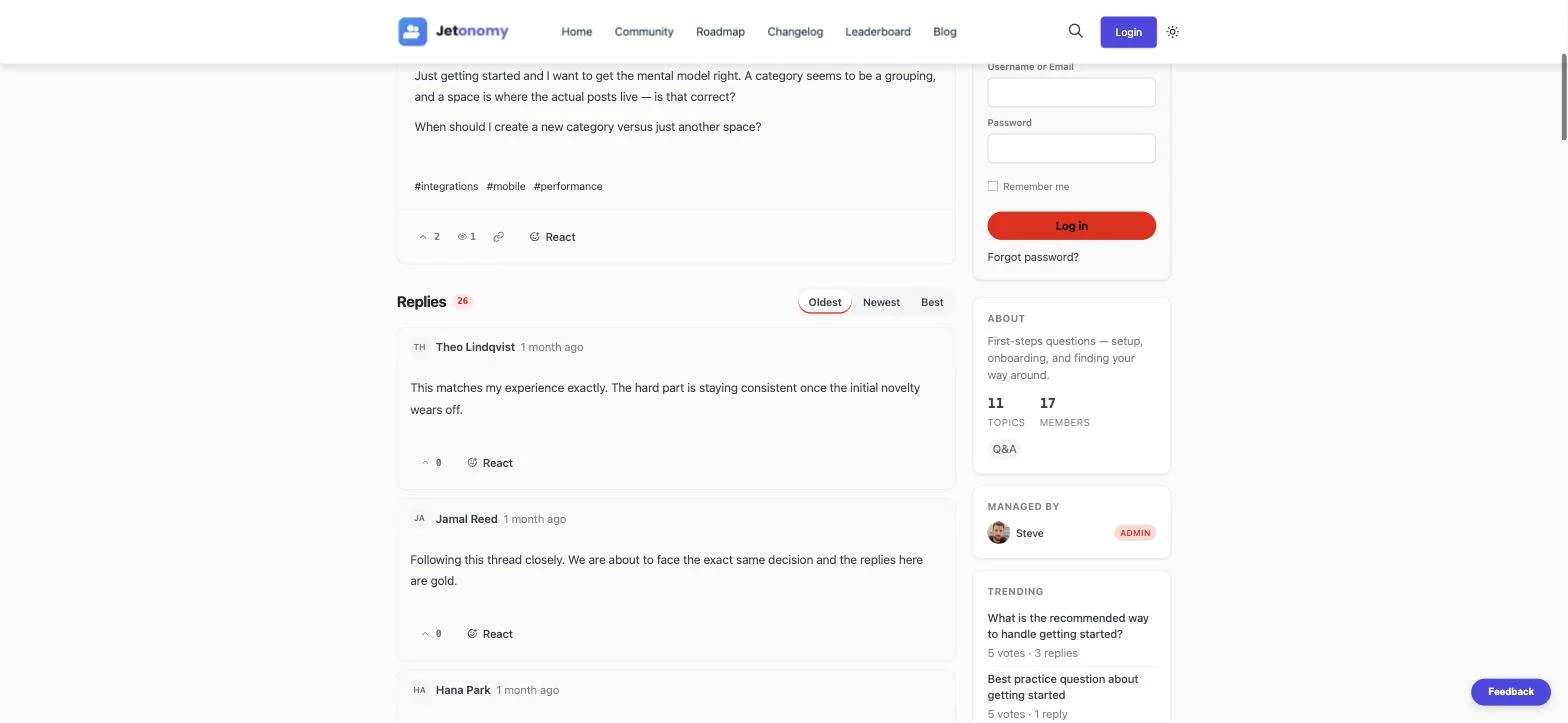
Here’s a real Q&A post, resolved, with the reply thread underneath it, not a mockup:

And here’s an Ideas board with a live public roadmap, Planned, In Progress, Shipped, Declined:

A voting-and-accepted-answers system surfaces correct content, not just popular content, the difference between “most-upvoted answer” and “the answer that actually solved it” matters enormously when someone finds the thread six months later through search. A visible roadmap turns a feature-request inbox into a kept promise instead of a black hole.
Reputation, and why it’s the plugin’s real anti-spam engine
Members earn reputation points for posting, replying, being voted on, and having an answer accepted. Every point value is configurable. That reputation feeds a public leaderboard:

This isn’t cosmetic gamification. It’s the exact number that drives the system that actually defends the community, Trust Levels.
Trust Levels: fighting AI-scale spam with an actual system, not a filter
This is the section that matters most for the AI-era argument, so it deserves the real settings screen, not a summary.

Three layers stack on every action a member takes:
- WordPress capabilities, which abilities each WP role holds, editable per-capability.
- Space roles, every Space has its own owner and moderators, independent of site-wide roles.
- Trust levels (0 - 5), a standing members earn, not a role anyone assigns.
Brand-new accounts start at Level 0, capped by rate limits an owner sets directly (3 posts, 10 replies, 5 votes a day by default, no image uploads). Members climb to Levels 1 - 3 automatically once they cross thresholds that combine posts made, days active, reputation earned, and crucially, replies received from other members, so nobody climbs by only ever talking to themselves. Levels 4 and 5 are never automatic; an owner hands them out by hand to the people they trust most.
Here’s why this matters more in 2026 than it did in 2015: a moderation queue sized for human-generated spam volume simply does not survive AI-generated spam volume. Trust Levels mean the moderation workload doesn’t grow in a straight line with community size, because the system is already limiting what an unproven account can attempt, before a human, or an AI moderator, ever has to look at it.
It is explicitly not a spam filter and doesn’t replace one. It’s the layer that decides how much damage an unproven account can do while nobody has vouched for it yet.
Below the trust system sits the role capability mapping, the fine-grained control over what each WordPress role can actually do inside the community:

Moderation: defense in depth, not a single point of failure
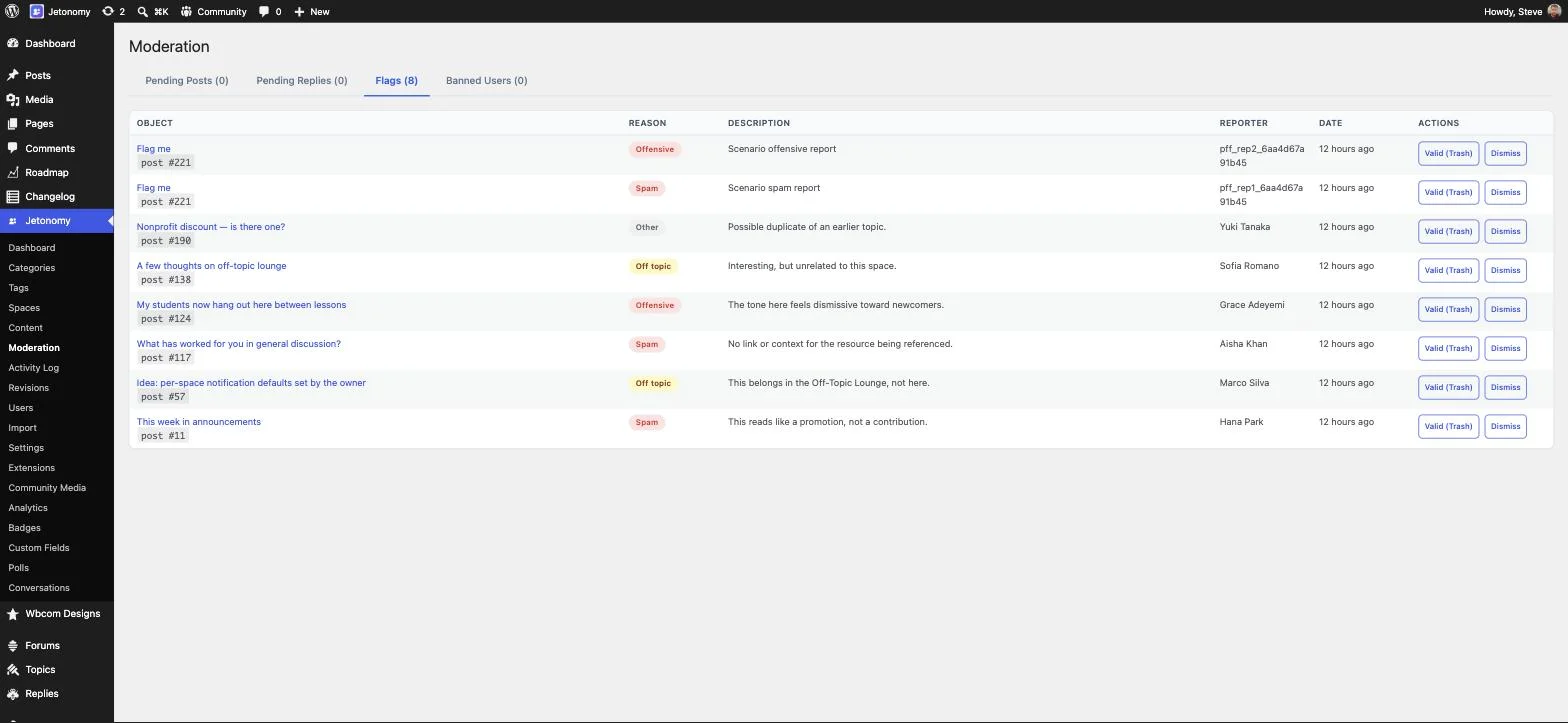
Flagging, Akismet (the same spam-detection service used across millions of WordPress sites), a rules engine you can configure (block certain words, limit how many links a post can contain, catch other spam patterns), and ban enforcement that also tracks the device’s network address (so a banned user can’t just create a fresh account from the same connection), all of this sits alongside Trust Levels. Here’s a real moderation queue with eight pending flags, each carrying its reason and reporter:
And CAPTCHA sits as one more layer for post and reply forms, with trusted members (Level 2+) automatically exempt so your best contributors are never slowed down by a check meant for strangers:

No single layer here is asked to be perfect. Akismet catches known spam signatures; Trust Levels limit what unproven accounts can even attempt; the rules engine catches patterns specific to your own community; CAPTCHA stops the crudest automation before it ever reaches a form; and the flag queue is the human backstop for everything the automated layers miss.
The centerpiece: AI that moderates with you, not just an “AI-powered” label
This is the part that actually earns the headline. Jetonomy ships a full AI Integration layer, pluggable, and genuinely optional, not something that runs by default without you choosing it.

Once enabled, you choose exactly whose AI you trust with your community’s content:

That third option is worth sitting with for a second: Ollama, a way to run an AI model on your own server instead of sending anything to an outside company. No sign-up key needed, nothing leaving your infrastructure. It’s the direct answer to the obvious objection anyone running a sensitive or privacy-conscious community will raise, “so now my members’ posts go to OpenAI?”, and it’s a detail most WordPress plugins in this category simply don’t offer at all.
Once a provider is connected, four real capabilities turn on:
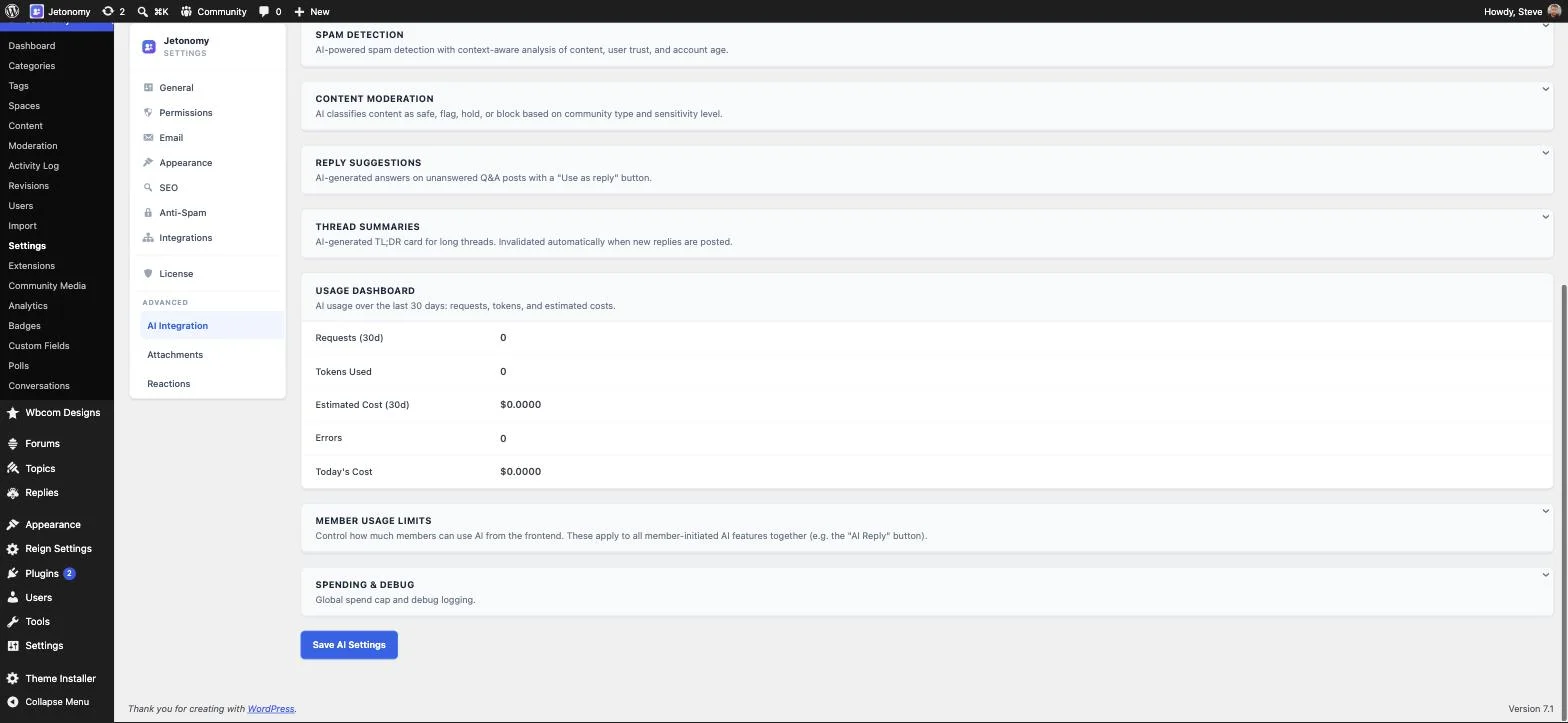
- Spam Detection, AI-powered, context-aware analysis of content, user trust, and account age, not just a keyword match.
- Content Moderation, classifies content as safe, flag, hold, or block, based on the community’s type and the sensitivity level an owner sets.
- Reply Suggestions, AI-generated draft answers on unanswered Q&A posts, with a one-click “Use as reply” button a human still approves.
- Thread Summaries, a short, AI-written summary at the top of long threads so newcomers don’t have to read fifty replies to catch up. It regenerates automatically the moment a new reply lands, so it’s never out of date.
Notice what’s also on that screen: a usage dashboard tracking requests, tokens, and estimated cost over the last 30 days, plus member usage limits and a global spend cap. AI moderation that can silently run up an unbounded bill is not a feature anyone should ship without a meter attached, Jetonomy ships with one built in.
And when the connected provider becomes unreachable, content keeps publishing rather than the whole site locking up, the gap in AI-assisted coverage is surfaced to the owner, not hidden.
Walking through what actually happens to a spam post
It’s easier to trust a system once you can see the whole path a piece of content takes, so here’s the sequence, end to end, on a fresh account with none of the trust an established member has already earned.
- A brand-new account signs up and immediately tries to post. It’s Level 0 by default, so it’s already capped: 3 posts, 10 replies, 5 votes a day, no image uploads, numbers an owner can tighten or loosen from the Permissions screen shown above.
- If AI Integration is switched on, the post gets checked for spam by an AI model that looks at more than just the words in it, it also considers the account’s trust standing and how new it is. A simple keyword filter has no way to know either of those things; an AI model that can actually reason about the account’s history can.
- The Content Moderation capability classifies the result as safe, flag, hold, or block, based on the community type and the sensitivity level the owner configured. A support forum and a teenager-facing hobby community shouldn’t use the same threshold, and this is why that threshold is a setting, not a constant.
- Akismet runs independently, as its own pass, catching the spam signatures it’s specifically good at regardless of what the AI layer decided.
- If a member spots something that got through both automated layers anyway, they flag it, landing it in the queue you saw a screenshot of earlier, with the flag reason and reporter attached, waiting for a moderator.
- If the account keeps it up, a moderator can silence it (blocks posting, keeps read access) or ban it outright (blocks login entirely), with the IP address on record so a same-network return under a new account is at least visible.
Six layers, and not one of them is asked to catch everything on its own. That’s the actual design principle behind “AI era” here, not “an AI runs the forum,” but “the forum was built assuming both attackers and defenders now have AI available, and it doesn’t rely on any single layer being perfect.”
Private conversations, reactions, and polls
Not every interaction belongs in a public thread. Private messaging supports one-on-one and group conversations between members with real-time unread counts, at a dedicated /community/messages/ URL, useful the moment a moderator needs to talk to a member about a flagged post without airing it publicly, or two collaborators need to coordinate off the main feed.
Reactions add one-click, Slack-style emoji pills to any post or reply, a zero-friction way for a member to signal agreement or appreciation without adding reply-noise to a thread, distinct from the inline emoji picker used while composing. And polls can be embedded directly inside a post or a Space, with multiple question types, turning “let’s ask the community” from a forum post with a manual tally into a first-class object with live results.
Ready for the agentic web, not just the AI-spam problem
The AI-integration screen above solves one half of the “AI era” problem, the threat side. The other half is about opportunity. WordPress recently introduced something called the Abilities API (added in WordPress 6.9). Think of it as a menu a website can publish listing exactly what it’s capable of doing, creating a post, approving a member, moderating a flag, written in a format an AI assistant can read and act on directly, instead of a human having to click through the admin screens by hand. Jetonomy already publishes its own menu against this new standard.
On top of that, Jetonomy exposes more than 86 separate connection points that other software can use to read or write its data (developers call this a REST API), a full set of commands developers can run from a terminal to automate tasks, and 232 spots in the code where developers can plug in custom behavior. In practical terms: every action a person can take by clicking around the interface can also be done automatically by other software, a script, or an AI tool.
This matters because the Abilities API is genuinely new, months old, not years, and almost nothing in this plugin category supports it. It means a Jetonomy-powered community isn’t invisible to the growing part of the web that runs through AI assistants and automated tools instead of only a person sitting in front of a browser.
Everything else that ships alongside it
The AI-era story is the headline, but Jetonomy is a complete forum platform underneath it. A quick, honest rundown of what else is in there, because none of it should get lost under the AI conversation:
Content & editor
A rich text editor with color-coded code blocks (readable code snippets in over 50 programming languages, not a wall of plain text), drag-and-drop and clipboard-paste image upload, @mentions with autocomplete, auto-embed for YouTube/X/Vimeo links (paste a link, it turns into a proper preview), quote-to-reply, and threaded replies up to 3 levels deep.
Navigation & search
Search that returns results instantly even on a large community, because it’s built on a proper search index instead of scanning every post one by one each time someone searches. There’s also a tag system with per-space filters, and keyboard shortcuts for people who’d rather not touch the mouse (j/k to move between items, l to upvote, r to reply, / to search), the kind of power-user detail that matters to the members who set the tone of any community.
Notifications
An in-app bell with unread count, immediate email notifications, per-user preferences, daily/weekly digests, reply-by-email (no login required), and browser-level web push.
Memberships & access control
Spaces can be locked to paying members or people enrolled in a specific course, by connecting to whichever membership or course tool you already use, WooCommerce, Restrict Content Pro, or one of several online-course platforms (LearnDash, Tutor LMS, LifterLMS, Sensei LMS, MasterStudy LMS). New courses can even auto-create their own discussion Space, with the course’s author automatically made its admin.
Custom fields, badges, analytics
Point-and-click tools let you add your own extra fields to posts and member profiles, no coding needed. You can also design custom badges and set rules for who earns them automatically. And a built-in analytics dashboard tracks growth, your most active members, and engagement over time, with a one-click export to a spreadsheet file if you want to dig deeper or report the numbers elsewhere.
SEO
Every page tells search engines exactly what it is: a clean, canonical web address for each page (so Google doesn’t see duplicate versions of the same discussion), preview cards for when a thread gets shared on social media, and a special behind-the-scenes tag that identifies a page as a forum discussion, the same kind of tag that lets Google show star ratings or recipe times, but for Q&A threads instead. Your posts are automatically included in your sitemap, and page titles are fully customizable. This matters because forum content is some of the highest-intent search traffic that exists, someone typing your exact error message into Google, and it’s also the content type most forum software has traditionally handled worst.
Branding
Colors, fonts, and spacing are pulled automatically from whatever theme you’re already using, so there’s nothing to configure. If your theme doesn’t give Jetonomy anything usable to inherit, you can set the colors by hand instead. There’s also a logo setting, layout controls, a box for custom CSS if you want to go further, and, for agencies building this for a client, an option to replace Jetonomy’s own branding entirely with the client’s own.
Import tools
One-click importers for bbPress, wpForo, and Asgaros, batched with a progress bar and resume support, with 301 redirects from old bbPress URLs so a migration doesn’t cost you years of search rankings.
Accessibility
Every page has been checked against the official web accessibility standard (WCAG, the guidelines screen-reader software and other assistive tools rely on), built with properly structured markup rather than generic styled boxes, and fully usable with just a keyboard. Not an edge case, a baseline requirement for any community that wants to include every member, including those using a screen reader or unable to use a mouse.
Where each piece fits, a quick map
| If you’re running… | The features that matter most |
|---|---|
| A product support forum | Q&A + accepted answers, the moderation queue, auto-moderation rules, forum schema for search |
| A SaaS feedback / roadmap program | Ideas type + status board, notifications on status change, the leaderboard for power users |
| A course or membership community | Membership adapters, auto-created course Spaces, private conversations |
| A large, aging forum migrating over | bbPress/wpForo/Asgaros importers with redirects, Trust Levels to keep moderation sane post-migration |
| A privacy-sensitive or internal community | Self-hosted Ollama, invite-only Spaces, ban/silence with IP tracking |
| A high-growth community | The performance architecture, Trust Levels (moderation that doesn’t scale linearly), the analytics dashboard |
Frequently asked questions
Is Jetonomy an “AI plugin,” or a forum plugin with AI features?
A forum plugin with AI features you choose to switch on. The AI Integration extension is off by default. Turning it on, picking a provider, and setting a sensitivity level are all deliberate steps an owner takes, nothing about running a Jetonomy community requires AI at all.
Does my community’s content get sent to OpenAI or Anthropic if I use AI features?
Only if you pick those providers. The self-hosted Ollama option runs on your own server with no API key and nothing leaving your infrastructure. The choice of provider, and therefore where content goes, is entirely yours, including a fallback chain if your first choice becomes unreachable.
What happens if the AI provider goes down?
Content keeps publishing normally, Jetonomy is built so an AI outage never locks up your site, and the site owner is shown a clear warning that AI checks were skipped, instead of the gap being hidden.
Can AI moderation run up an unexpected bill?
There’s a live 30-day usage dashboard (requests, tokens, estimated cost), per-member usage limits, and a global spend cap, all in the same settings screen, the kind of meter that should exist on any feature that calls a paid API on your behalf.
Does bbPress or wpForo have anything like Trust Levels?
No. On both, you either trust somebody with a role or you don’t, a manual, one-person-at-a-time decision. Jetonomy promotes members automatically based on what they’ve actually done, and the thresholds for every level are numbers you can see and edit yourself.
What is the Abilities API, and why does it matter for a forum?
It’s a WordPress standard (6.9+) for a site to declare the actions it supports so an AI agent can discover and call them directly, the way a REST API lets an app do it today. It’s genuinely new, months old, not years, and almost nothing in the forum-plugin category has adopted it yet. Jetonomy has.
Can I migrate from bbPress without losing my SEO rankings?
The bbPress importer includes 301 redirects from the old URLs as part of the migration, specifically so existing search rankings and inbound links survive the switch. Imports run batched with a progress bar and resume support, so a large forum doesn’t need to migrate in one uninterrupted sitting.
The honest version of this pitch
None of this is “AI-powered” in the sense of running automatically the moment you install the plugin, every AI capability here is an optional layer you configure, with your own choice of provider, your own spend cap, and a visible off switch. Competitors aren’t being described as having zero moderation; most run Akismet-style filtering just fine. The actual, specific gap, as of today, is a graduated trust system that scales with community size, a pluggable AI-provider layer with a genuine self-hosted option, and Abilities API presence for the agentic web. That’s a precise claim, not a marketing one, and it’s the reason “modern” is the right word here, not just “new.”
Try it
Every screenshot in this post came from a real, running Jetonomy install, nothing here is a mockup. If your community is still running on a plugin that predates both AI-generated spam and the AI-agent web, it might be worth seeing what one built for right now actually looks like.
Get Jetonomy to start a community on your own site, or read the full documentation for the setup wizard, the importer, and every setting covered above. If your community needs the extensions shown in this post, AI Integration, Private Messaging, Reactions, Polls, Analytics, and more, Jetonomy Pro adds them to an existing Jetonomy install.
Related reading