
8 min read
6 Best TalentLMS Alternatives Compared for 2026


Pricing checked August 2026. Most enterprise LMS vendors quote rather than publish, and published tiers change often, so treat these as indicative and confirm directly before budgeting.
Almost nobody leaves TalentLMS because it stopped working. They leave because the per-active-user model, which felt reasonable for a defined internal team, starts charging for every customer, partner, and contractor the moment training goes wider than employees.
TalentLMS is genuinely easy to set up and use. The friction is almost always the seat count, not the software.
Six alternatives below, with an honest account of when per-user pricing still works and when it does not.
What TalentLMS gets right
TalentLMS is running the same afternoon you sign up, and support actually answers when something breaks. Gamification, reporting, and integrations with Zoom and Salesforce are solid without much configuration. For a defined, stable internal headcount, the per-user pricing is genuinely predictable.
If your trained audience is fixed and internal, staying is a reasonable, low-effort decision. Self-hosting trades that ease for control and cost, and that trade is not free.
Why people actually leave
Training audiences that grow past employees. The dominant reason. Customers, partners, contractors, or a free trial tier are all billable seats the moment they touch the platform.
Customization ceiling. As branding and workflow needs get more specific, TalentLMS’s hosted model becomes more limiting than a WordPress-based option.
Cost scaling faster than value. Reporting and automation depth are gated to higher tiers, so growing past the entry plan often means a bigger jump in price than in capability.
Is your training audience actually fixed?
Four questions decide whether per-user pricing still fits:
- Is everyone being trained an employee, or does the list include customers and partners? External audiences are the fastest way to blow past a per-user budget.
- Is the headcount stable, or growing? A growing team means a growing bill on a per-user model, even if nothing else about the training program changes.
- Do you need the LMS to sell courses, not just deliver internal training? That is a different job than TalentLMS is built for.
- Would speed-to-launch matter more than cost if you had to choose? If yes, TalentLMS’s ease of use may still be worth the per-seat premium.
A growing or external audience is the clearest signal to unbundle from per-user pricing entirely. A small, stable internal team that values speed over savings is the case for staying.
How the seat bill actually grows
Signing. Pricing is quoted against your current internal headcount, and it looks reasonable next to the setup speed.
First expansion. Someone decides contractors or partners should get the same onboarding as employees. Each one is now a billable seat.
Customer training. Product onboarding gets added for customers, since the platform is already live. Seat count climbs again, now tied to customer growth rather than headcount.
Renewal. The plan tier that made sense at the original headcount no longer covers actual usage, and the jump to the next tier is steep.
List of 6 Best TalentLMS Alternatives
1. Learnomy
Fixes: per-seat cost, training audiences beyond employees. Does not fix: setup speed or vendor support, both trade off against self-hosting.
TalentLMS is reasonable for a defined internal headcount and becomes expensive the moment you want to train customers, partners, contractors, or a free tier of prospects, every one of those is a billable seat. Learnomy has no seat count at all.
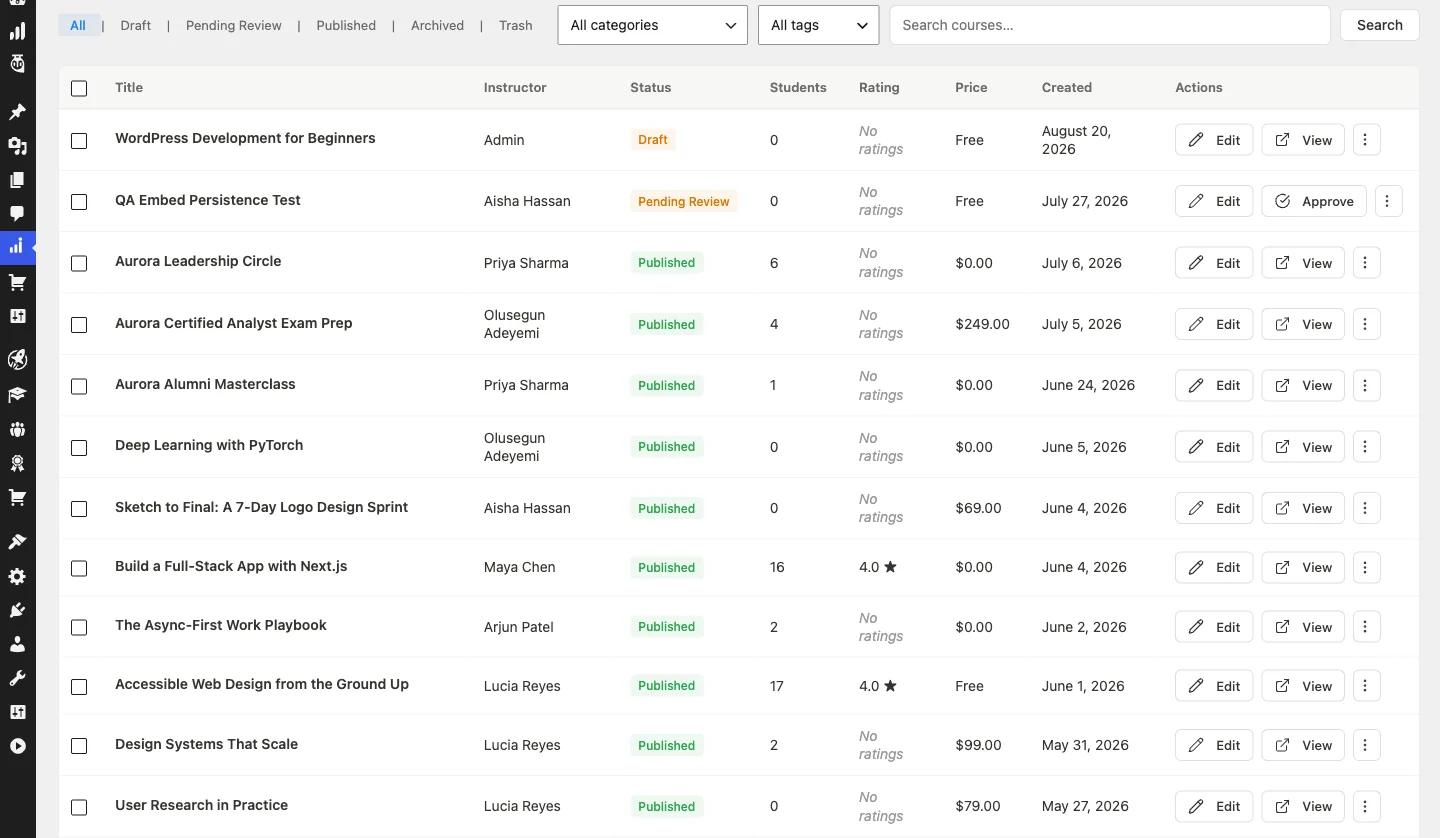
Learnomy is free and self-hosted, so extending training beyond employees costs nothing extra in licensing, and courses, quizzes, certificates, and SCORM import are included rather than tiered.
Weakness: where TalentLMS keeps its advantage is speed and support, it is running the same afternoon you sign up, and someone answers when it breaks. Self-hosting trades that for control and cost.
2. LearnDash
Fixes: per-seat cost, complete ownership. Does not fix: setup speed, you manage your own WordPress install.
LearnDash gives granular control over courses, lessons, topics, quizzes, and certificates, with drip-feed content and monetization through Stripe or WooCommerce. Pricing starts at $259/year for a single site, flat rather than per-seat, more affordable long-term than monthly per-user fees at any real scale.
3. Thinkific
Fixes: ease of use for course creators, no technical setup. Does not fix: corporate-training features like compliance tracking that TalentLMS supports natively.
Thinkific offers a drag-and-drop builder, marketing tools, student analytics, and integrations with Mailchimp and Zoom. A limited free plan exists; full functionality starts at $49/month. Customization is more limited than a WordPress-based option.
4. Teachable
Fixes: selling courses, not just delivering internal training. Does not fix: team management or compliance tooling.
Teachable is built around ecommerce: bundles, coupons, affiliate programs, and conversion-optimized sales pages, with tax and payment handling included. Pricing starts at $39/month, with transaction fees on lower tiers. Customization runs within pre-designed templates.
5. Moodle
Fixes: cost, if you have technical staff. Does not fix: setup and maintenance effort, which lands entirely on you.
Moodle offers total configuration freedom for course paths, grading, and plugins, entirely free to download, though it needs a developer or IT team for installation, hosting, and security.
6. Kajabi
Fixes: running a whole digital business, not just training. Does not fix: cost, it is the most expensive option here.
Kajabi bundles course hosting with email marketing automation, a CRM, funnel design, and landing pages. Pricing starts at $149/month, steep compared to TalentLMS, but it replaces several separate tools.
Side by side
| Alternative | Pricing model | Free tier | WordPress-native | Built for selling courses | Switch worth it if |
|---|---|---|---|---|---|
| TalentLMS (incumbent) | Per active user | Yes, limited | No | No | Audience is small, internal, and stable |
| Learnomy | Free | Yes, complete | Yes | Yes | Training extends past employees |
| LearnDash | Flat licence plus add-ons | No | Yes | Yes, via WooCommerce | You want WordPress-native ownership |
| Thinkific | Monthly, hosted | Yes, limited | No | Yes | You want zero-code course creation |
| Teachable | Monthly plus fees | No | No | Yes, ecommerce-first | Selling courses is the primary goal |
| Moodle | Free core plus hosting | Yes | No | No | You have technical staff and want full control |
| Kajabi | Monthly, all-in-one | No | No | Yes, plus marketing suite | You want one tool for courses, email, and sales |
Before you migrate, do this instead
Separate internal and external training. If only the external audience is driving seat growth, moving just that group to a free platform can cut most of the cost without a full migration.
Check the actual tier jump. Sometimes the current plan already covers more headroom than you are using; confirm before assuming you need to upgrade or switch.
Price the self-hosting overhead honestly. Moving to a self-hosted platform is not free, hosting and occasional maintenance have real cost, just usually far below per-seat licensing at scale.
Switching effort, realistically
Course content, half a day to two days. Course structure and files generally export in usable form.
Completion records, does not transfer. Historical completions stay with TalentLMS. Plan a cutover date and start fresh tracking.
Communication, ongoing. Give learners advance notice and new login instructions before the cutover.
Two teams, two different answers
The 15-person startup training employees only
Headcount is stable, training is entirely internal, and the team values not having to think about hosting.
They should stay. The per-user cost at this size is small and predictable, and TalentLMS’s speed and support are worth more than the marginal saving from switching.
The SaaS company onboarding 3,000 customers a year
Every new customer account is a training seat, and the bill now tracks customer growth rather than internal headcount.
They should move. Per-user pricing was never designed for a customer-facing audience that scales with the business, and a flat-cost platform removes that scaling problem entirely.
Decide in one line
- Training extends past employees. Learnomy.
- You want WordPress-native ownership. LearnDash.
- You want zero-code course creation. Thinkific.
- Selling courses is the primary goal. Teachable.
- You have technical staff and want full control. Moodle.
- You want one tool for courses, email, and sales. Kajabi.
- Your audience is small, internal, and stable. Stay on TalentLMS.
Frequently Asked Questions About TalentLMS Alternatives
Why does TalentLMS get expensive as training programs grow?
TalentLMS bills per active user. Once training extends past a fixed internal headcount, to customers, partners, contractors, or a free trial tier, every added person becomes a billable seat.
Is there a TalentLMS alternative with no per-user fee?
Learnomy has no seat count. It is free and self-hosted, with courses, quizzes, certificates, and SCORM import included rather than gated behind a per-user tier.
What do you give up by switching from TalentLMS to a self-hosted LMS?
Mainly speed and vendor support. TalentLMS is live the same day you sign up and has a support team on call; a self-hosted platform like Learnomy trades that convenience for full control and zero licensing cost.
What is the best all-in-one alternative to TalentLMS for course sellers?
Kajabi bundles course hosting with marketing and sales tools, at a higher monthly price than TalentLMS. Learnomy covers course sales and memberships natively without a separate marketing suite.
Should a small team with stable headcount switch away from TalentLMS?
Usually not. If the trained audience is small, internal, and not growing, TalentLMS’s per-user cost stays predictable and the setup speed and support are worth the premium.
Does completion history transfer when switching LMS platforms?
Generally no. Plan a cutover date, export what you can, and start fresh tracking on the new platform rather than expecting full historical data to migrate.
Interesting Reads
5 Top Canvas LMS Alternatives for 2026 you Should Try
Related reading