
16 min read
Launching a New Website in 2026? 12 Things to Check Before You Go Live

Most people launch a website the way they move into a new flat. The furniture goes in first. The smoke alarm gets installed “later”.
The furniture is the design and the shiny hero section. The smoke alarm is everything a visitor never asks about until something goes wrong: the privacy policy, the cookie banner, the refund terms, the alt text on your images, the contact address in your footer. Skip those and the site still looks finished. It just is not safe to open.
The numbers in 2026 make the point better than any lecture. European regulators have issued about €7.1 billion in GDPR fines since 2018, with €1.2 billion of that in 2025 alone. In the US, 5,114 digital accessibility lawsuits were filed in 2025, and 70% of them targeted online stores. And in September 2025 the French regulator CNIL fined Google €325 million and Shein €150 million for one thing: placing cookies before people agreed to them.
Small sites get caught too. Accessibility lawsuits and tracking-pixel claims are often filed in batches against businesses that simply never checked.
This checklist covers the 12 things to sort out before your new website goes live, with the latest rules and data behind each one. At the end you will find a complete prompt and the exact terminal commands to build a site with AI (vibe coding) that gets these right from the first commit.
A quick note: this is practical guidance, not legal advice. Laws differ by country and by business type, so have a lawyer review your final legal pages, especially if you sell to customers in several regions.
The 12-point checklist at a glance
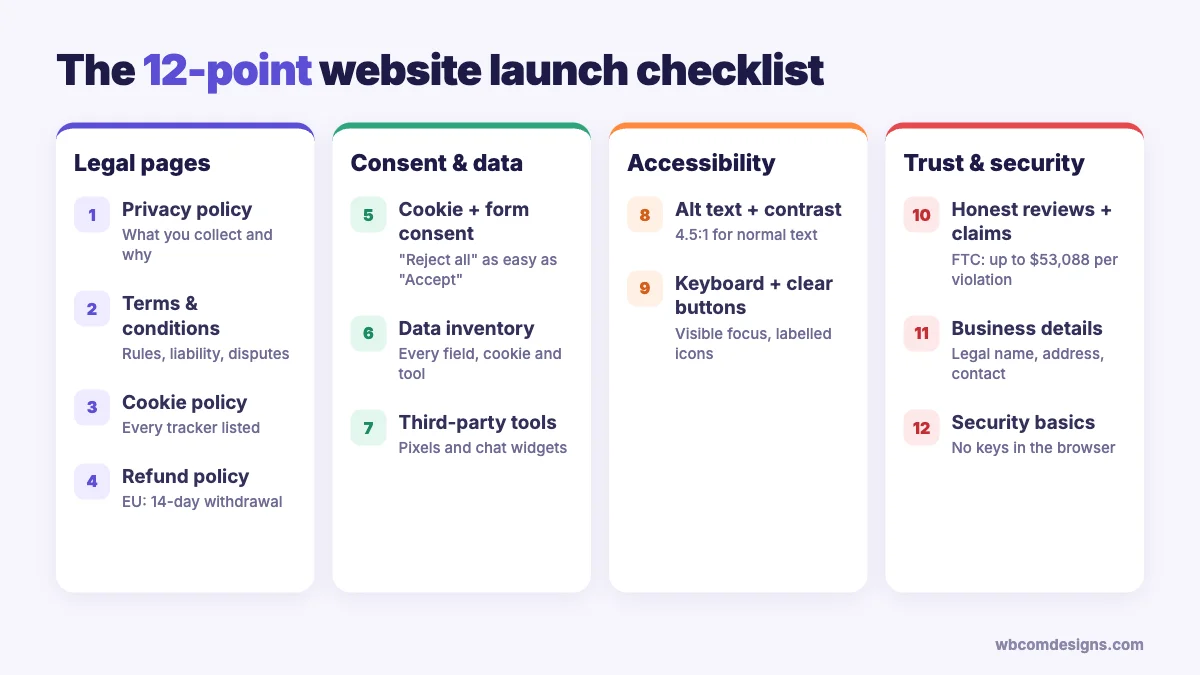
| What to check | Why it matters |
|---|---|
| 1. Privacy policy | Required almost everywhere you collect personal data, even an email address |
| 2. Terms and conditions | Limits your liability and sets the rules for using your site |
| 3. Cookie policy | Explains every cookie and tracker you set |
| 4. Refund policy | Required by payment processors and by consumer law in many regions |
| 5. Cookie and form consent | Trackers and marketing emails need permission first |
| 6. A list of the data you collect | You cannot write an honest privacy policy without it |
| 7. Third-party tools | Pixels and chat widgets are the source of thousands of lawsuits |
| 8. Alt text and colour contrast | The two most common accessibility failures on the web |
| 9. Keyboard access and clear buttons | Many visitors never touch a mouse |
| 10. Honest reviews and claims | Fake reviews now carry fines per violation |
| 11. Business details | Many countries require your legal name and address on the site |
| 12. Security basics | AI-built sites often ship with exposed keys and open databases |
Legal pages every new website needs
1. Privacy policy
If your site has a contact form, a newsletter signup, analytics or even server logs, you are collecting personal data. That alone is enough to need a privacy policy in most of the world.
The rules keep spreading. In the US, about 20 states now have comprehensive privacy laws in force, with Indiana, Kentucky and Rhode Island joining on 1 January 2026, according to the MultiState tracker. California’s CalOPPA has required a visible privacy policy for any site that collects data from Californians since 2004, whatever your size. India notified its DPDP Rules on 14 November 2025, and the full set of obligations applies from 13 May 2027.
A good privacy policy answers five plain questions: what you collect, why you collect it, who you share it with, how long you keep it, and how someone can ask you to delete it. Write it in plain language. A policy nobody can understand does not protect you, and regulators have started saying so.
Common mistake: copying another company’s privacy policy. It will describe their tools and their data flows, not yours, which makes it inaccurate on day one.
2. Terms and conditions
No general law forces you to publish terms and conditions. You want them anyway, because they are the only place where you set the rules: who owns the content, what users may not do, how disputes are handled, and how far your liability goes.
Some platforms make them mandatory in practice. Apple requires every App Store app to have an end-user licence agreement, and falls back to its own standard one if you do not provide it. If you run a membership site or a community where users post content, clear terms are what let you remove abusive posts or close accounts without arguments.
3. Cookie policy
Your cookie policy lists every cookie and tracker on the site, with what each one does and how long it lasts. It sits next to your privacy policy and should be updated every time you add a new tool.
The UK has relaxed one part of this. Under the Data (Use and Access) Act 2025, some low-risk cookies such as basic analytics no longer need prior consent in the UK, as long as you explain them and offer an opt-out, according to the ICO. That change applies to UK law only. EU visitors still need to say yes before any non-essential cookie is set.
4. Refund policy
If you sell anything, publish a refund policy before the first sale. Stripe’s terms require merchants to disclose a fair refund policy, and Google Merchant Center limits the visibility of product listings that do not show a return policy.
Consumer law sets the floor. In the EU, shoppers get a 14-day right to withdraw from most online purchases without giving a reason. Digital downloads are the exception, but only if the buyer agreed to immediate access and confirmed they understand they lose the right to cancel. Put that checkbox in your checkout.
Subscriptions need extra care. The FTC’s “click to cancel” rule was struck down by a US appeals court in July 2025, and the FTC restarted the rulemaking in 2026, as Gibson Dunn reports. The older ROSCA law still applies, so cancelling must stay simple. If signing up takes one click, cancelling should not take a phone call.
Consent and data
5. Cookie and form consent
A cookie banner that only has an “Accept” button is not consent. European regulators expect a “Reject all” button on the first screen, as easy to find and click as “Accept all”. The CNIL has issued formal notices to sites that hid the reject option behind a settings menu.
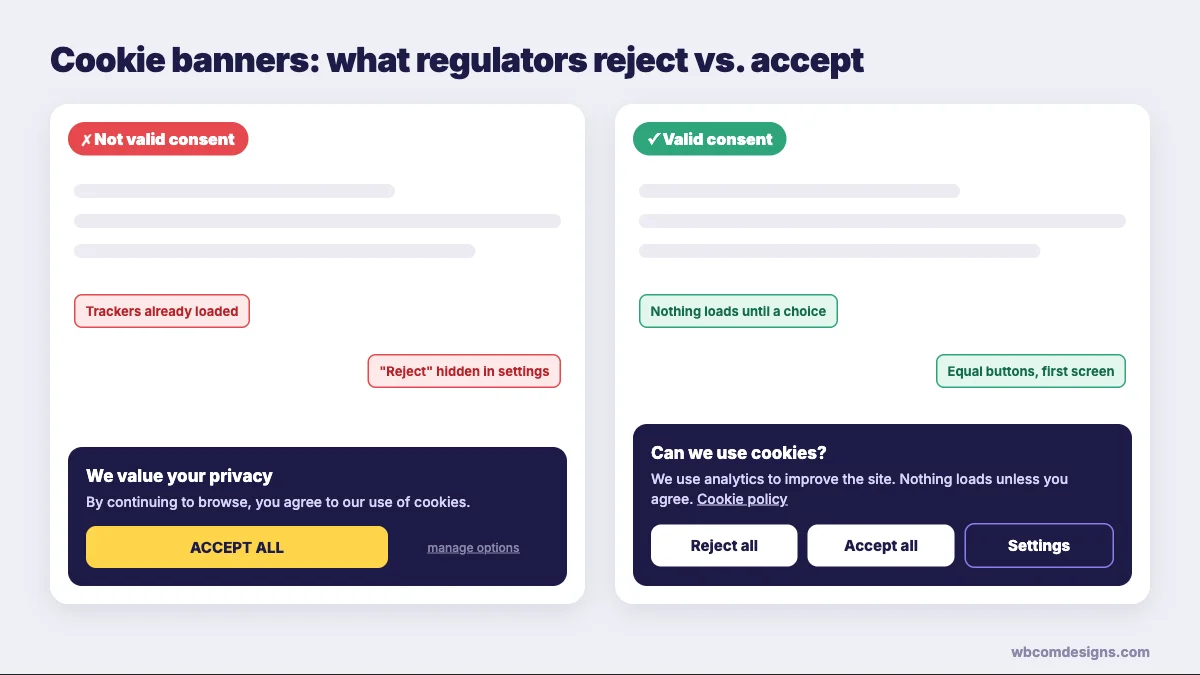
Timing matters as much as design. Analytics and ad pixels must not load until the visitor agrees. The same goes for embedded videos that set cookies. If you use Google Analytics or Google Ads with visitors from the EU or UK, you also need Google Consent Mode v2, which has been required since March 2024.
The US is moving the same way from a different direction. Twelve states now require businesses to honour universal opt-out signals such as Global Privacy Control, a browser setting that tells every site “do not sell or share my data”, according to Clym.
Forms need consent too. A newsletter checkbox must start unticked, say exactly what people will receive, and link to your privacy policy. In the US, each email that breaks the CAN-SPAM Act can cost up to $53,088. Every marketing email needs a working unsubscribe link and your physical address.
6. Know exactly what user data you collect
Before you write a word of your privacy policy, make a data inventory. It is a simple table: every form field, cookie and tool, the data it collects, where that data goes, and how long you keep it.
Most site owners are surprised by the result. A basic WordPress or AI-built site often sends data to 10 or more services: hosting logs, analytics, a font CDN, a video embed, a chat widget, an email platform and a payment provider. Each one belongs in your policy.
Collect less where you can. A contact form rarely needs a phone number, and a newsletter never needs a date of birth. Every field you remove is one less thing to protect and explain.
7. Third-party tools, pixels and chat widgets
This is where the lawsuits are in 2026. In California, lawyers have filed more than 4,300 claims under the state’s wiretapping law since 2022, arguing that tracking pixels, session-replay tools and chat widgets “listen in” on visitors, according to Barnes & Thornburg. Courts have let several of these cases go ahead, including one against Adidas in late 2025.
Healthcare sites have paid the most. MarinHealth agreed to a $3 million settlement in 2025 over the Meta Pixel on its website, one of many similar cases.
Before launch, open your site, open the browser’s developer tools and watch the Network tab. Every request that goes to a domain you do not own is a third party. Ask whether you need it, whether it waits for consent, and whether it is in your privacy policy.
Accessibility
The WebAIM Million 2025 study tested the home pages of one million popular websites. It found detectable accessibility failures on 94.8% of them, with an average of 51 errors per page. Almost all of those errors fall into six types, and most of them take minutes to fix.
The legal pressure is real. The European Accessibility Act has applied since 28 June 2025 to businesses selling online to EU consumers, with an exemption for service businesses with fewer than 10 staff and under €2 million turnover. In the US there is no size exemption for accessibility lawsuits.
8. Alt text and colour contrast
Low-contrast text was the most common failure in the WebAIM study, found on 79.1% of home pages. Missing alt text came next, on 55.5%.
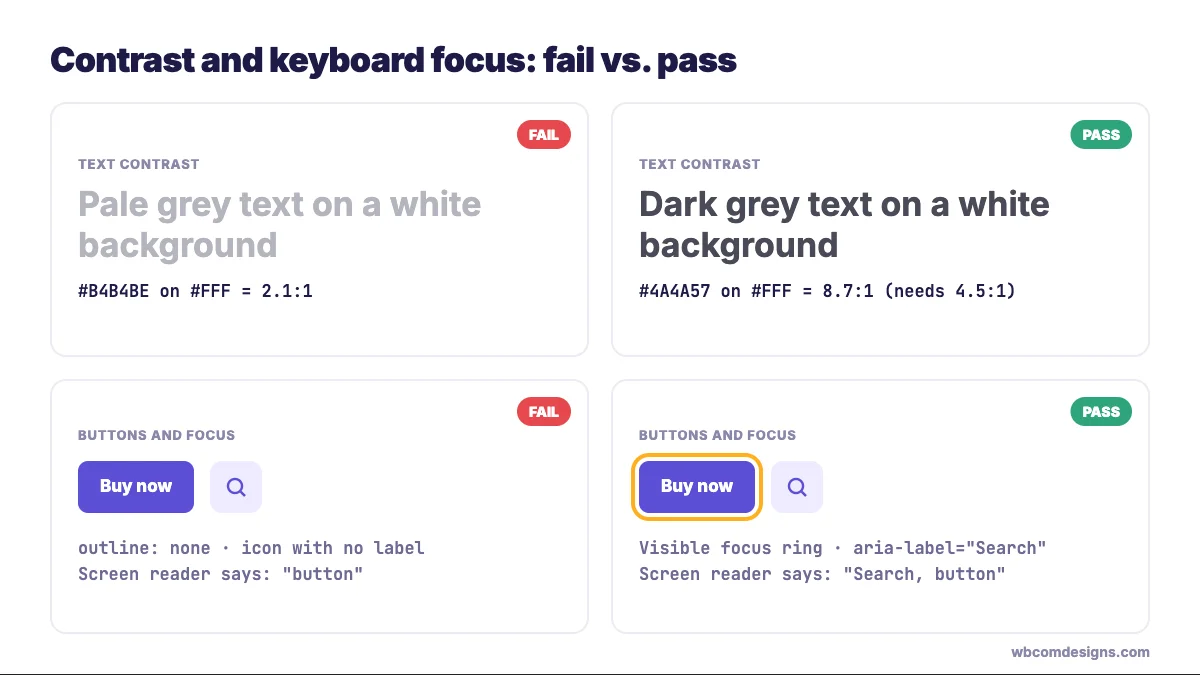
The fix for contrast is a number. Under WCAG 2.2, normal text needs a contrast ratio of at least 4.5:1 against its background, and large text or interface elements like icons and input borders need at least 3:1. Pale grey text on white almost always fails. Check your brand colours once with a contrast checker and you are done.
Alt text describes an image for people using screen readers, and for search engines. Write what the image shows and why it is there: “Team of four reviewing a website design on a laptop” works, while “image1.jpg” does not. Decorative images should have an empty alt attribute so screen readers skip them.
9. Keyboard access and clear buttons
Try this test before launch. Put your mouse away and press Tab to move through your site. You should always see where you are, and you should be able to fill in every form and complete a purchase with only the keyboard.
Two WCAG rules cover this. The focus indicator must be visible (rule 2.4.7), and it must not be hidden behind sticky headers or cookie banners (rule 2.4.11, new in WCAG 2.2). Removing the focus outline with CSS to make buttons “look cleaner” is one of the most common ways sites fail.
Clear buttons matter for everyone. The WebAIM study found empty links on 45.4% of home pages and empty buttons on 29.6%: icon-only buttons with no label, so a screen reader just says “button”. Give every icon button an accessible label, and write link text that makes sense on its own. “Download the pricing PDF” beats “Click here” every time.
Trust and transparency
10. No fake reviews or unsupported claims
New sites have no reviews, so the temptation is to invent a few. Do not.
Since 21 October 2024, the FTC rule on consumer reviews and testimonials has banned fake and AI-generated reviews, bought reviews and fake social proof, with civil penalties of up to $53,088 per violation. The UK banned fake reviews under the DMCC Act from 6 April 2025, and the CMA can now fine up to 10% of global turnover. EU law has required sites to explain how they check that reviews come from real customers since 2022.
The same goes for claims. “Write 10x faster”, “trusted by millions” and “the #1 AI tool” all need evidence you can produce on request. The FTC’s Operation AI Comply has brought more than a dozen cases against companies that overstated what their AI could do, including a service that called itself “the world’s first robot lawyer”. If you cannot prove a claim, rewrite it as something you can.
Stock-photo “customers” with five-star quotes fall into the same trap. Launch with no testimonials and add real ones as they arrive. An honest empty section beats a fake full one.
11. Business details
Visitors want to know who is behind a site before they pay it. In many countries the law agrees.
The EU E-Commerce Directive requires online businesses to show who they are and how to reach them, including a geographic address. Germany’s version, the Impressum, also asks for your company register number and VAT ID, with fines of up to €50,000. UK companies must show their registered name and number on the website, along with the registered office address. In India, the Consumer Protection (E-Commerce) Rules 2020 require online sellers to list a grievance officer who acknowledges complaints within 48 hours.
A footer with your legal business name, a real address, an email that someone reads, and links to all your policies covers most of this in one place.
12. Security basics, especially for AI-built sites
Use HTTPS everywhere, keep plugins and dependencies updated, and never put secret keys in code that runs in the browser. For a WordPress site, the bigger risk usually arrives after launch, when updates stop. We covered that in the 2026 WordPress vulnerability wave.
Sites built with AI tools need a closer look, which brings us to vibe coding.
Building your site with vibe coding? The complete prompt and commands
“Vibe coding” was Collins Dictionary’s word of the year for 2025, and it is easy to see why. A quarter of the startups in Y Combinator’s Winter 2025 batch had codebases that were about 95% AI-generated, according to TechCrunch.
The catch is that AI writes what you ask for, not what you forgot to ask for. Veracode’s 2025 GenAI Code Security Report tested more than 100 language models and found they chose the insecure option in 45% of coding tasks. In one widely reported flaw, CVE-2025-48757, more than 170 apps built with Lovable exposed their databases because row level security was never switched on.
So ask for compliance up front. Here is the full workflow we use.
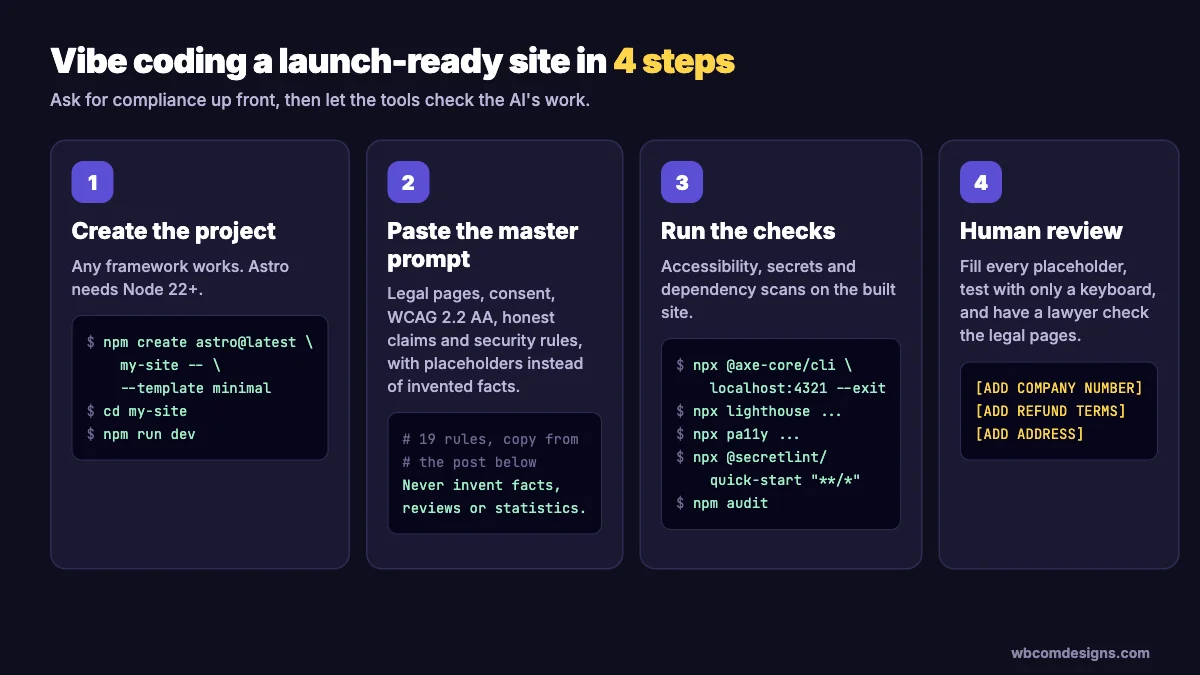
Step 1: Create the project
Any modern framework works. We use Astro here because it produces fast static pages by default. You need Node.js 22 or newer.
npm create astro@latest my-site -- --template minimal
cd my-site
npm install
npm run dev
Open the folder in your AI coding tool: Claude Code, Cursor, Windsurf, or a builder like Lovable or Bolt.
Step 2: Paste this master prompt
Fill in the parts in square brackets first. The prompt tells the AI to leave placeholders instead of inventing facts, which is the most important line in it.
Build a website for [BUSINESS NAME], a [WHAT YOU DO] business
based in [COUNTRY], selling to customers in [REGIONS, e.g. EU, US, UK, India].
Pages: Home, About, [YOUR PAGES], Contact.

Follow every rule below. Where you need a fact you do not have
(company number, address, prices, results, reviews), insert a
clearly marked placeholder like [ADD COMPANY NUMBER].
Never invent facts, reviews, statistics or customer names.

LEGAL PAGES
1. Create Privacy Policy, Terms and Conditions, Cookie Policy and
   Refund Policy pages, written in plain English. Base them on the
   data inventory in step 6, not on generic templates.
2. Link all four from the footer of every page.

CONSENT
3. Add a cookie banner with "Accept all", "Reject all" and
   "Settings" buttons of equal size and prominence on the first layer.
4. Load no analytics, pixels, embeds or other non-essential scripts
   until the visitor accepts. Store the choice and let users change
   it from a "Cookie settings" link in the footer.
5. Detect the Global Privacy Control signal (navigator.globalPrivacyControl)
   and treat it as an opt-out of sale and sharing.
6. Every form: unticked consent checkbox for marketing, a link to
   the Privacy Policy, and only the fields we truly need.

DATA
7. Create DATA-INVENTORY.md listing every form field, cookie and
   third-party service, the data each one collects, where it goes
   and how long it is kept. Keep it updated as you build.

ACCESSIBILITY (WCAG 2.2 AA)
8. Text contrast at least 4.5:1, large text and UI elements 3:1.
9. Descriptive alt text on meaningful images, alt="" on decorative ones.
10. Every input has a visible label. Every icon button has an aria-label.
11. Full keyboard navigation, a visible focus outline that is never
    removed or hidden behind sticky elements, and a "Skip to content" link.
12. Use semantic HTML: header, nav, main, footer, and one h1 per page.

TRUST
13. No testimonials, review stars, user counts or performance claims
    unless I provide them. Leave an empty placeholder section instead.
14. Footer shows legal business name, address, contact email and
    [REGISTRATION NUMBER / VAT ID / GRIEVANCE OFFICER as required].
15. If anything is sold: show the full price including taxes, the
    refund terms and a cancellation path as simple as the signup.

SECURITY
16. No secrets, API keys or tokens in client-side code. Use
    environment variables and add .env to .gitignore.
17. If a database is used, enable row level security on every table
    and deny access by default.
18. Validate and escape all user input on the server.
19. Set security headers: Content-Security-Policy,
    Strict-Transport-Security, X-Content-Type-Options, Referrer-Policy.

When you finish, run the checks in step 3 and fix every issue they
report. Then give me a list of every placeholder I still need to fill.
Step 3: Run the launch checks
Build the site and start a local preview, then run these in a second terminal window. Every command below was tested on a fresh Astro project in October 2026.
# Build and preview the production site
npm run build
npx astro preview

# Accessibility: automated WCAG checks with axe
npx @axe-core/cli http://localhost:4321 --exit

# Accessibility, SEO and best-practice scores with Lighthouse
npx lighthouse http://localhost:4321 --only-categories=accessibility,best-practices,seo --view

# A second accessibility scanner, to catch what the first one misses
npx pa11y http://localhost:4321

# Leaked API keys and secrets in your code
npx @secretlint/quick-start "**/*"

# Known vulnerabilities in your dependencies
npm audit
Do not assume a template is clean. When we ran these checks on Astro’s own blank starter page, axe flagged 2 accessibility issues and Lighthouse scored accessibility at 94 out of 100. When we planted a fake Stripe key in a file, the secrets scan caught it immediately.
Automated tools find roughly a third to a half of accessibility problems. They cannot tell whether your alt text makes sense or your forms are confusing. Finish with the keyboard test from point 9 and a read-through of every legal page.
For the functional side of launch testing, such as forms, page speed and broken links, our earlier website launch checklist walks through the technical tests.
Step 4: Have a human review the legal pages
AI can draft a privacy policy that matches your data inventory. It cannot know your refund promises or the laws of every country you sell into. Fill in each placeholder yourself, then get a lawyer or a reputable policy generator to review the final text.
If your AI-built site is already live and misbehaving, our guide to fixing an AI-built WordPress site covers what to check and when to bring in help. And if you would rather not build it yourself, here is how to hire a WordPress developer without getting burned.
Frequently asked questions
Do I need a privacy policy if my site does not sell anything?
Almost certainly. A contact form, a newsletter, analytics or server logs all collect personal data. Laws such as GDPR and CalOPPA care about collecting data, not about selling products.
Can I copy another website’s privacy policy?
No. It is usually protected by copyright, and it describes someone else’s data practices. A policy that does not match what your site actually does can itself be treated as deceptive.
Is an AI-generated privacy policy good enough?
It is a fair first draft if you give the AI an accurate data inventory. It is not good enough on its own. Check every statement against what your site really does and have it reviewed before launch.
Does a small business website need to be accessible?
In practice, yes. The European Accessibility Act exempts only very small service businesses, and US accessibility lawsuits are filed against companies of every size. Accessible sites also reach more customers and tend to rank better.
Do I need a cookie banner if I only use Google Analytics?
For visitors from the EU, yes, because analytics cookies need consent there. The UK has relaxed this for some basic analytics since 2026. In most US states a banner is not required, but you must disclose tracking and honour opt-out signals where the law says so.
What should I check first if I only have one hour before launch?
Run the axe and Lighthouse commands above, fix contrast and missing alt text, confirm your cookie banner blocks trackers until consent, and make sure your footer links to a privacy policy and shows how to contact you.
A website is finished when the people who use it, and the people who regulate it, can trust it. Ship the smoke alarm with the furniture.
Related reading