
10 min read
How to Boost Leads and Sales with Quizzes and Surveys


A well-built quiz converts visitors into leads at a rate most lead magnets never reach. Interact’s 2026 report, based on more than 80 million quiz leads, puts the average start-to-lead rate at 40.1%, against the 2% to 5% you typically see from a PDF download form. The difference is not magic. A quiz asks people to tell you about themselves, then gives them something specific in return, and that exchange is what makes people willing to hand over an email address.
This guide covers how to plan a quiz or survey that actually produces leads and sales, which WordPress tools to use, how to wire the results into your email platform, and the mistakes we’ve watched sink otherwise good campaigns.
Why quizzes outperform static lead magnets

A checklist or ebook asks for an email before the reader knows whether the content is any good. A quiz flips the order. The visitor invests two minutes answering questions, becomes curious about their result, and only then meets the opt-in form. By that point they have a sunk cost and a specific reason to continue.
The numbers back this up. Interact’s data shows 65% of people who start a quiz finish it, and 40.1% of starters become leads. Coaching and course businesses do best at 44.9% start-to-lead, service providers hit 42.2%, and e-commerce stores average 37.6%. Those figures have barely moved since 2013, which tells you the format works independent of trends.
There’s a second benefit people underrate. Every answer is a data point you can use for segmentation. A “what kind of community should you build” quiz tells you whether the lead cares about courses, memberships or a social network before you send a single email. That is worth more than the lead itself in most funnels.
Quizzes versus surveys: pick the right tool for the job
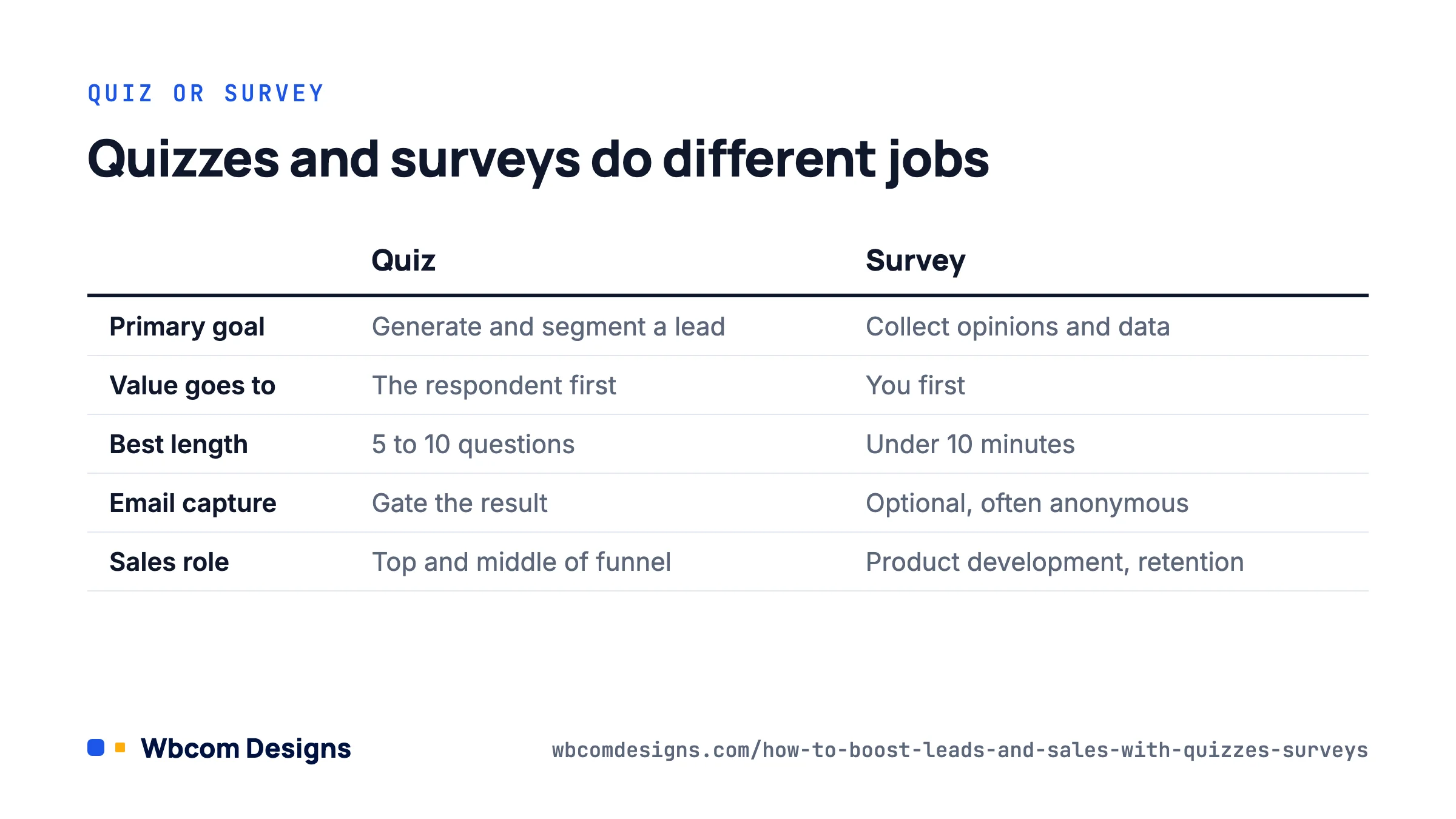
People use the two words interchangeably but they do different jobs, and mixing them up is the most common planning error we see.
| Quiz | Survey | |
|---|---|---|
| Primary goal | Generate a lead and segment it | Collect opinions and data |
| Who gets value first | The respondent (a personalised result) | You (research insight) |
| Best length | 5 to 10 questions | Depends, but under 10 minutes |
| Email capture | Gate the result behind the opt-in | Optional, often anonymous |
| Typical placement | Landing page, blog CTA, paid ad destination | Post-purchase, member dashboard, email |
| Sales role | Top and middle of funnel | Product development, retention, testimonials |
A quiz is a lead generation asset. A survey is a listening tool. You can attach an email field to a survey, but if the main purpose is to capture leads, design it as a quiz with a result page. If the purpose is to learn why customers churn or what feature to build next, keep it anonymous and short so you get honest answers.
Five quiz formats that produce leads
Almost every high-converting quiz falls into one of these patterns. Pick the one that matches what you sell.
1. Personality or type quiz
“Which kind of course creator are you?” Outcomes are categories, not scores. This is the friendliest format for cold traffic because there are no wrong answers. Each outcome maps neatly to an email segment and a product recommendation.
2. Assessment or scorecard
“How ready is your WooCommerce store for Black Friday?” Points accumulate and the result is a band (Beginner, Intermediate, Advanced). This works well for services and consultants because a low score creates a reason to book a call.
3. Product recommender
“Find the right BuddyPress theme for your community.” Answers filter to a specific product or bundle. This converts directly to sales rather than to an email list, so put the buy button on the result page and skip the opt-in if the cart is the goal.
4. Knowledge test
“Test your WordPress security knowledge.” The result is a score out of ten. These get shared a lot but convert to leads at lower rates unless the result page offers a specific fix for the questions people missed.
5. Diagnostic
“Why isn’t your membership site growing?” Questions narrow down to one of three or four likely causes, each with a recommended next step. This is the most effective format for higher-ticket services because the result reads as advice rather than marketing.
How to build one that converts: a seven-step plan
- Start from the outcome. Write the three to five result pages first. Each result needs a name, a two-paragraph description the reader will recognise themselves in, and one call to action. If you cannot think of a distinct next step for a result, merge it with another.
- Work backwards to the questions. Write 6 to 8 questions where each answer option points towards one result. Interact’s data shows conversion depends on relevance rather than length, but anything past ten questions starts to hurt completion.
- Write a title under 15 words. Lead with the question the audience is already asking themselves. “What’s holding your community back?” beats “Community Growth Assessment Quiz”.
- Place the opt-in after the last question, before the result. Show a teaser (“Your result is ready, where should we send your full breakdown?”) and keep the form to name and email. Always offer a skip link. Forced opt-ins drop completion and attract fake addresses.
- Tag by result. Push the outcome into your email platform as a tag or custom field. FluentCRM, Mailchimp, ConvertKit (now Kit) and ActiveCampaign all accept this from the major quiz plugins.
- Write one short automation per result. Three to five emails that expand on the result and lead to a single offer. Do not send the same sequence to everyone; that throws away the segmentation you worked to collect.
- Promote it like a product. Put it in the blog sidebar, add an inline CTA on the five posts with the most traffic, pin it in your community, and use it as the destination for paid social. A quiz on a page nobody visits is decoration.
WordPress tools we’d actually use
You do not need a SaaS subscription to run quizzes on WordPress. These are the options we reach for depending on the site.
Quiz and Survey Master (QSM)
The free version on WordPress.org gives you unlimited quizzes, more than 15 question types, timers, and score-range result pages. Paid bundles start around $129 to $149 per year and add Mailchimp, leaderboards, reporting and a ChatGPT-based question generator. Good default for marketing quizzes on a standard WordPress site.
WB Polls

Our own WB Polls plugin handles three things in one install: BuddyPress activity polls, standalone polls, and multi-page surveys with analytics and CSV export. Guest voting can require an email, which turns a public poll into a lead capture tool. Licences run from $49 a year. If you already run a BuddyPress or BuddyBoss community, polls in the activity stream get far more responses than a separate survey page because members are already there.
LearnDash quizzes
If you sell courses, LearnDash’s built-in quiz builder is more capable than most people realise. A free “placement test” course with a single quiz, open to anyone who registers, doubles as a lead magnet and a pre-sale for the paid course. Pair it with our Dashboard for LearnDash if you want instructors to see quiz results on the front end.
Form builders
Fluent Forms, Gravity Forms and WPForms all have conditional logic and calculation fields that can produce a scorecard quiz. They lack proper result pages out of the box, so you end up building redirects by hand. Fine if you already own one; not worth buying for quizzes alone.
Hosted tools
Interact and Typeform both embed in WordPress and have the best-looking quiz UI. You pay monthly, the data lives off-site, and you rely on their integrations to get leads into your CRM. We’d choose these for a short paid campaign and a WordPress plugin for anything permanent.
We compared more of these in our roundup of WordPress quiz plugins if you want feature-by-feature detail.
Turning survey answers into sales
Surveys rarely create leads directly. They create sales by telling you what to say. Three survey types earn their keep on most sites.
The post-purchase survey. One question, sent 24 hours after checkout: “What nearly stopped you buying?” The answers are your objection list. Put the top three on the pricing page as FAQs and watch the conversion rate move.
The cancellation survey. For memberships and subscriptions, a required single-choice question on cancel (“Too expensive”, “Not using it”, “Missing a feature”, “Other”) tells you whether churn is a pricing, onboarding or product problem. Each answer deserves a different win-back email.
The community pulse survey. In a BuddyPress or BuddyNext community, a quarterly three-question poll on what members want next does double duty. It gives you a roadmap and it signals that you listen, which keeps renewals up.
Keep surveys short, say how long they take, and share the results back with respondents. Response rates roughly double when people know their answers go somewhere.
A worked example: the course creator diagnostic
Here is a real structure we used for a client selling a WordPress membership course. Quiz title: “Why isn’t your membership site growing?” Seven questions, four results.
- Traffic problem: fewer than 1,000 visits a month. Result page recommends the SEO module and links to a free traffic checklist. Email sequence: four emails on content and search.
- Conversion problem: traffic fine, sign-ups under 1%. Result page points at the pricing and landing page lessons. Sequence includes a teardown offer.
- Retention problem: sign-ups fine, churn above 8% monthly. Result page recommends the onboarding and community lessons. Sequence leads with a case study.
- Offer problem: contradictory answers about audience and price. Result page suggests a strategy call. Sequence is short and books the call.
Over three months the quiz converted 38% of starters to leads, in line with Interact’s benchmark, and the segmented sequences sold at roughly twice the rate of the generic newsletter. The quiz itself took two days to build in QSM and a further day to connect to FluentCRM.
Mistakes that quietly kill results
- Generic results. If all four outcomes recommend the same product, the reader notices. Each result needs its own advice.
- Gating before value. Asking for an email on question one is a form with extra steps. Ask at the end.
- No skip option. Required opt-ins lower completion and fill your list with throwaway addresses.
- Ignoring mobile. Most quiz traffic from social is on phones. Test the whole flow on a small screen, including the result page and the email form.
- Slow pages. Quiz plugins load scripts on every page unless you tell them not to. Restrict assets to the quiz page or your Core Web Vitals take a hit site-wide.
- Forgetting consent. Add a clear consent checkbox where GDPR applies and store the consent timestamp. Most plugins, including WB Polls, have a field for this.
- Never updating. Review the answer distribution every quarter. If 80% of people land on one result, split it into two.
FAQ
How many questions should a lead generation quiz have?
Six to eight is the sweet spot. Fewer than five feels trivial and gives you poor segmentation; more than ten lowers completion. Interact’s data suggests relevance matters more than count, so a ten-question quiz on a topic people care about will still outperform a five-question quiz on a dull one.
Should I require an email to see the result?
Show the opt-in but let people skip. You’ll capture slightly fewer addresses but the ones you get are real, and your completion rate stays high enough that the quiz gets shared.
Can I run quizzes inside a BuddyPress community?
Yes. WB Polls posts polls and surveys directly into the activity stream, and LearnDash quizzes can be attached to free courses that members access from their profile. Both keep the data inside WordPress.
Do quizzes help with SEO?
Indirectly. A quiz page rarely ranks on its own, but quizzes get linked and shared more than most content, and the time-on-page signals are strong. Put the quiz on a page with supporting copy rather than a bare embed.
What should I track?
Starts, completions, opt-ins, and revenue by result segment. The first three tell you whether the quiz works; the fourth tells you whether the segments are worth keeping.
Where to start
Pick one quiz format, write the result pages first, and build it with whatever plugin you already have before buying anything. Put it on your highest-traffic blog post for two weeks and measure starts to opt-ins. If you land anywhere near 30%, you’ve found a lead source worth investing in. If you are running a community or course site and want this wired into your membership flow properly, our team builds these integrations regularly and can save you the trial and error.
Related reading