
10 min read
Google Nano Banana Explained: Models, Pricing and Uses

Nano Banana is Google’s name for the image generation and editing models built into Gemini. It started as Gemini 2.5 Flash Image in August 2025 and, as of August 2026, the family has grown to three current models: Nano Banana 2 (gemini-3.1-flash-image), Nano Banana 2 Lite (gemini-3.1-flash-lite-image) and Nano Banana Pro (gemini-3-pro-image). The original model is deprecated and Google recommends moving to Nano Banana 2 Lite.
What made the first release stand out still defines the family: you describe edits in plain language, and the model keeps the same face, pet or product looking like itself across repeated edits. Developed by Google DeepMind, it is available free in the Gemini app, with the Pro model reserved for Google AI Pro and Ultra subscribers, and through the Gemini API, Google AI Studio and Vertex AI for developers.
This guide covers what Nano Banana does, how the current models differ, what each costs, and where it fits for site owners and marketers who need consistent visuals without a design team.

What is Google’s Nano Banana?
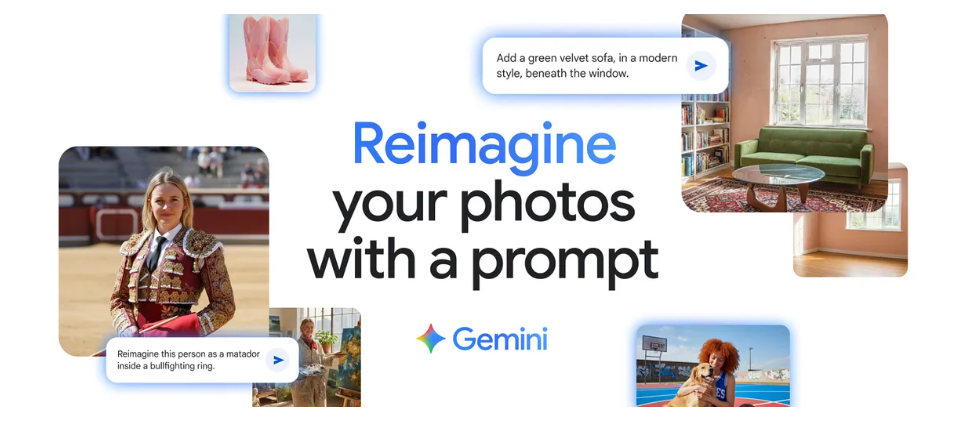
At its core, Nano Banana is a generative AI image editor. The nickname came from an anonymous entry on the LMArena leaderboard in mid-2025 that kept beating named models; when Google revealed it was theirs, the codename stuck and is now the official product name. It differs from traditional editors in two ways:
- Natural language editing: Instead of relying on manual adjustments, sliders, or advanced software knowledge, you describe the changes you want in plain English or another supported language.
- Identity preservation: The subject’s likeness, whether a human face, a pet, or a product, stays consistent across multiple rounds of editing.
That combination makes the tool usable for beginners and dependable enough for professionals. From fixing family photos to producing ad variants, Nano Banana closes the gap between personal creativity and commercial production.
The name now covers a family rather than a single model. Here is how they line up in August 2026, based on Google’s image generation documentation:
| Model | API ID | Released | Max resolution | Best for |
|---|---|---|---|---|
| Nano Banana (original) | gemini-2.5-flash-image | August 2025 | 1K | Deprecated; migrate to 2 Lite |
| Nano Banana Pro | gemini-3-pro-image | Preview Nov 2025, GA May 2026 | 4K | Complex scenes, text in images, brand consistency |
| Nano Banana 2 | gemini-3.1-flash-image | Preview Feb 2026, GA May 2026 | 4K | Everyday generation and editing, up to 14 reference images |
| Nano Banana 2 Lite | gemini-3.1-flash-lite-image | June 2026 | 1K | High-volume, lowest cost |
Key Features and Capabilities of Nano Banana
1. Identity Consistency
Most AI photo editors struggle with subject consistency. A person’s face drifts slightly when you change the background or clothing. Nano Banana was the first mainstream model to get this right. It locks the core identity of subjects so facial features, hairstyles, and even pets stay true-to-life across edits.
This is the feature that matters most for marketers. A brand mascot or a product shot keeps its intended look across a whole campaign, and Nano Banana 2 extends the idea with up to 14 reference images so you can hold several characters, a style and a product consistent in one scene.
2. Multi-Turn Editing
Nano Banana supports step-by-step editing, known as multi-turn editing. Instead of one-off modifications, you build edits in stages. For example:
- Start with a portrait.
- Add a new outfit.
- Change the background to a scenic beach.
- Introduce additional elements, such as props or lighting adjustments.
Each change builds on the last while preserving the subject’s likeness. This mirrors how professional designers work, refining an image in stages, but makes it available to everyday users.
3. Photo Blending
With Nano Banana, you can merge multiple photos into a single coherent image. For instance:
- Blend a landscape shot with a portrait.
- Turn textures from one photo (like butterfly wings) into a dress pattern.
- Combine family photos into a stylized group shot.
This blurs the line between photography and digital art and lets users produce visuals that used to need advanced design software.
4. Design Mixing
Nano Banana also introduces design mixing. It lets you borrow styles, textures, or patterns from one image and apply them to another. A wallpaper pattern could become part of a fashion design, or textures from nature could become graphic elements.
This is useful for fashion designers, graphic artists, and advertisers who need rapid concept creation without hours of manual editing. Nano Banana Pro adds reliable text rendering, so the same workflow now handles posters, infographics and product labels that earlier models mangled.
5. Animated Video Generation
Nano Banana’s capabilities go beyond static images. By feeding edited photos into Gemini’s video model, Veo, you can generate short animated clips. Nano Banana 2 also works in the other direction: it accepts a video as input and generates still images from it, which is handy for pulling a clean thumbnail or key frame out of footage.
Think of turning a series of edited vacation photos into a short motion piece, or producing an animated ad directly from product shots, all driven by prompts.
6. Transparency Through Watermarking
AI-generated media raises valid concerns about authenticity. Google builds two levels of watermarking into Nano Banana output:
- A visible watermark in the Gemini app for clear labeling.
- An invisible SynthID watermark on every image from every model, including API output.
You can upload any image to Gemini and ask whether it was made with Google AI; the check runs against SynthID. That gives audiences a way to know when content has been AI-generated.
Availability and Pricing
Nano Banana is available globally on Android, iOS, and the web within the Gemini app. Free users get the standard Nano Banana 2 model from the Tools menu, and Google AI Pro, Plus and Ultra subscribers can regenerate any image with Nano Banana Pro. Free usage has daily limits that Google adjusts without notice, so heavy users end up on a paid plan.
For developers and enterprises, the models are accessible via:
- Gemini API
- Google AI Studio
- Vertex AI
API pricing in August 2026, per Google’s Gemini API pricing page:
| Model | Output price | Input price (per 1M tokens) |
|---|---|---|
| Nano Banana 2 Lite | $0.0336 per 1K image | $0.25 |
| Nano Banana (original, deprecated) | $0.039 per image | $0.30 |
| Nano Banana 2 | $0.045 (512px), $0.067 (1K), $0.101 (2K), $0.151 (4K) | $0.50 |
| Nano Banana Pro | $0.134 (1K or 2K), $0.24 (4K) | $2.00 |
Batch mode halves every figure above if you can wait for asynchronous results. None of the image models has a free API tier. For a rough sense of scale, a store generating 1,000 product lifestyle images a month at 1K on Nano Banana 2 pays about $67; the same job on 2 Lite is about $34.
Reception and Market Potential
Industry Reaction
Nano Banana’s launch drew praise from creators, marketers, and enterprises. Its ability to keep subjects consistent set it apart from rivals, and within days of the August 2025 release it topped the LMArena image-editing leaderboard. That lead has been contested since, but Google has kept shipping: Nano Banana Pro in November 2025, Nano Banana 2 in February 2026, and 2 Lite in June 2026.
Creator Community Buzz
Content creators took to the prompt-driven workflow because it produces usable edits without technical skill. The “3D figurine” trend that flooded social feeds in September 2025 was almost entirely Nano Banana output, and it pushed the Gemini app to the top of the app store charts that month.
Enterprise and Marketing Adoption
Marketers care about identity preservation and blending because they make consistent campaign imagery cheap. Brands can hold a look across dozens of variants, test new designs quickly, and generate audience-specific creative, with SynthID giving them a defensible disclosure story.
Comparing Nano Banana to Competitors
Midjourney, OpenAI’s GPT Image models, and Stable Diffusion all generate striking images. Where they have historically struggled is consistency and reliability in a production workflow. Nano Banana’s focus is:
- Identity fidelity across edits.
- Multi-turn iterative editing in a chat interface.
- SynthID watermarking for trust.
- Integration into the Gemini ecosystem, so it sits next to Google’s text, video and search tools.
Our view after a year of using all of them: Midjourney still wins on pure aesthetics for illustration, GPT Image is the most comfortable for people who already live in ChatGPT, and open models remain the choice when you need to run locally or fine-tune. For editing real photos of real people and products, Nano Banana is the one we reach for first, and at the Lite and standard tiers it is among the cheapest hosted options per image.
Real-World Applications of Nano Banana
1. Personal Creativity
- Edit vacation photos with fun backdrops.
- Create stylized portraits for social media.
- Generate custom birthday cards or invitations.
2. Marketing and Advertising
- Produce ad visuals with consistent brand identity.
- Blend product photos with lifestyle imagery for campaigns.
- Generate promotional animations directly from product images.
3. Education and Training
- Teachers can create custom visuals for lessons.
- Training materials can be adapted for different audiences in minutes.
- Students can explore creative projects without advanced software.
4. Entertainment and Media
- Content creators can design thumbnails, posters, and animations.
- Filmmakers can prototype concept art and visual scenes.
- Social influencers can produce distinctive visuals to stand out online.
5. WordPress Sites and Online Communities
- Featured images and OG cards that match a consistent house style across every post.
- Product variants for WooCommerce listings (same item, different colourways or settings) without a reshoot.
- Member-facing graphics for community announcements, event banners and course thumbnails.
If you run a community or membership site, our guide to the best AI plugins for WordPress covers tools that bring this kind of generation into the editor, and this piece on AI plugins and member privacy explains what to check before you feed member photos into any third-party model.
Ethical Considerations and Transparency
AI-generated media raises real questions about misuse and misinformation. Google’s approach has three parts:
- SynthID watermarking on every output, with a public verification path in the Gemini app.
- Prompt and output filters that block edits of identifiable public figures in misleading contexts and refuse some categories outright.
- C2PA content credentials on images generated in Google’s consumer products, so other platforms can read the provenance data.
None of this stops a determined bad actor, and watermarks can be degraded. It does mean that a platform or publisher has a practical way to check provenance, which is more than most competitors offered in 2025. If you publish AI-edited images of real people, disclose it; the EU AI Act’s transparency obligations for generated content apply from August 2026.
The Future of Creative AI with Nano Banana
The launch of Nano Banana signalled Google’s shift toward making AI image work a default feature of its products rather than a separate app. A year on, that is what happened: the models sit inside Gemini, Google Search’s AI Mode, Slides, Vids and the Ads tools, and developers get the same models through one API.
What to expect next:
- Shorter gaps between model generations; Google shipped four Nano Banana models in ten months.
- Deeper Workspace integration, so a Docs or Slides user never leaves the document to make an image.
- More pressure on pricing at the low end, where 2 Lite already undercuts the original model.

Frequently asked questions
Is Nano Banana free?
In the Gemini app, yes, with daily limits. Nano Banana 2 is available to free accounts; Nano Banana Pro needs a Google AI Pro, Plus or Ultra subscription. API use is paid from the first image.
Which Nano Banana model should I use?
Nano Banana 2 for most editing and generation. Nano Banana Pro when you need readable text inside the image, 4K output, or a complex scene with several consistent characters. Nano Banana 2 Lite for bulk jobs where cost matters more than detail.
Does Nano Banana watermark images?
Every output carries an invisible SynthID watermark, and images made in the Gemini app also get a small visible mark. The API output has SynthID only.
Can I use Nano Banana images commercially?
Google’s terms allow commercial use of generated output. You are responsible for the content, so avoid trademarked characters and do not generate images of real people without permission.
Is the original Nano Banana model still available?
The gemini-2.5-flash-image model is deprecated. Google’s documentation tells developers to move to Nano Banana 2 Lite, which costs less and produces better results.
Big Potential in a Small Tool
The original Nano Banana launch marked a turning point in AI photo editing, and the family that followed confirmed it. Identity preservation, multi-turn editing, photo blending, design mixing, and video-to-image support now come standard across three models at three price points.
Where to start: open the Gemini app, pick the image tool, and edit a real photo rather than generating from scratch. That is where Nano Banana beats everything else. If you are building it into a site or a workflow, prototype on Nano Banana 2 in AI Studio, then drop to 2 Lite once you know the prompts work and the volume is real.
Interesting Reads
How to Create a Shopify-Style Multi-Step Checkout in WooCommerce
Google I/O 2025 Unveils the Future of AI with Gemini and Beyond
Google Tag Manager vs Google Analytics: Features, Benefits, and Key Differences
Related reading